
University WiFi: कैंपस-व्यापी वायरलेस नेटवर्क कैसे बनाएं
यह व्यापक गाइड वरिष्ठ IT पेशेवरों को एक मजबूत कैंपस-व्यापी वायरलेस नेटवर्क को डिजाइन, तैनात और प्रबंधित करने के लिए व्यावहारिक रणनीतियाँ प्रदान करती है। इसमें श्रेणीबद्ध नेटवर्क आर्किटेक्चर, सुरक्षा मानक (IEEE 802.1X, WPA3, GDPR), और उच्च शिक्षा वातावरण में ROI बढ़ाने के लिए एनालिटिक्स का लाभ उठाने के तरीके शामिल हैं। चाहे आप पुराने इंफ्रास्ट्रक्चर को अपग्रेड कर रहे हों या बिल्कुल नए सिरे से निर्माण कर रहे हों, यह गाइड साइट सर्वेक्षण से लेकर निरंतर अनुकूलन तक हर निर्णय बिंदु को दर्शाती है।
इस गाइड को सुनें
पॉडकास्ट ट्रांसक्रिप्ट देखें
हमारी मुख्य श्रृंखला का हिस्सा: Guest WiFi Guide →
कार्यकारी सारांश (Executive Summary)
उच्च शिक्षण संस्थानों के लिए, एक विश्वसनीय परिसर-व्यापी वायरलेस नेटवर्क अब केवल एक सुविधा नहीं है; यह बिजली और पानी के समान ही एक महत्वपूर्ण बुनियादी ढांचा है। आधुनिक विश्वविद्यालयों को अत्यधिक भीड़भाड़ वाले वातावरण, विस्तृत भौतिक क्षेत्रों में निर्बाध रोमिंग और छात्रों, कर्मचारियों, शोधकर्ताओं और आगंतुकों सहित विविध उपयोगकर्ता समूहों के लिए सुरक्षित पहुंच का समर्थन करना चाहिए। यह मार्गदर्शिका IT प्रबंधकों, नेटवर्क आर्किटेक्ट्स और CTOs को उच्च-प्रदर्शन वाले विश्वविद्यालय WiFi नेटवर्क को तैनात और प्रबंधित करने के लिए एक विश्वसनीय खाका प्रदान करती है। एक मजबूत, स्तरीय आर्किटेक्चर, 802.1X और WPA3 Enterprise सहित कड़े सुरक्षा प्रोटोकॉल और रणनीतिक एनालिटिक्स एकीकरण पर ध्यान केंद्रित करके, संस्थान इष्टतम कनेक्टिविटी सुनिश्चित करने और मापने योग्य ROI साबित करने के साथ-साथ जोखिम को कम कर सकते हैं। हम प्रारंभिक साइट सर्वेक्षणों से लेकर Purple के Guest WiFi और WiFi Analytics जैसे प्लेटफॉर्मों का उपयोग करके निरंतर अनुकूलन तक की तैनाती के व्यावहारिक चरणों का पता लगाते हैं।
तकनीकी गहन विश्लेषण (Technical Deep Dive)
नेटवर्क आर्किटेक्चर और टोपोलॉजी
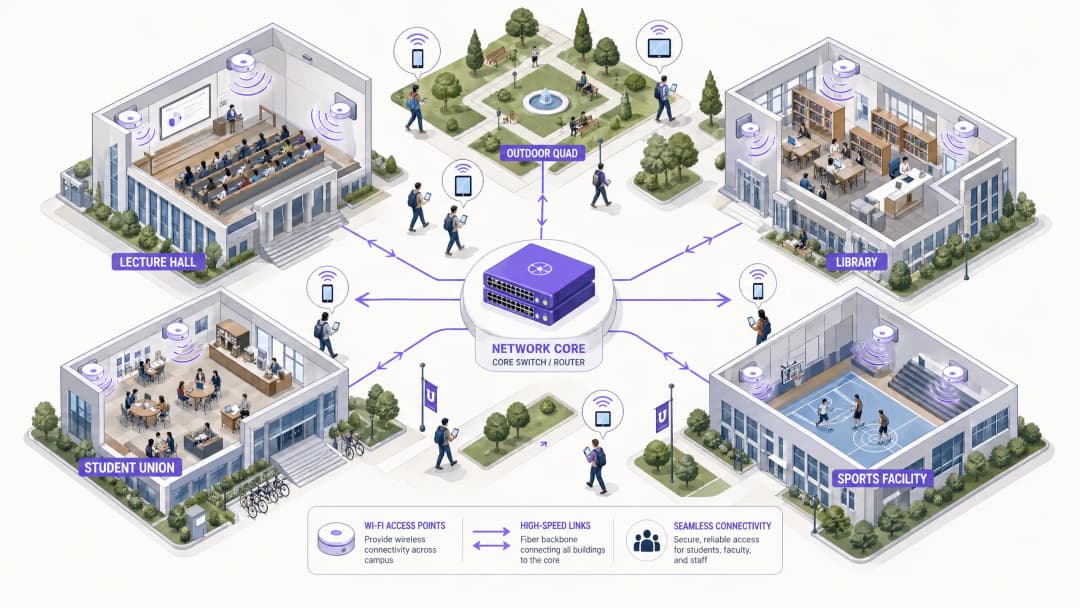
एक परिसर-व्यापी वायरलेस नेटवर्क के निर्माण के लिए एक स्केलेबल, स्तरीय आर्किटेक्चर की आवश्यकता होती है। मानक अभ्यास में तीन अलग-अलग स्तर शामिल हैं: कोर, एग्रीगेशन और एक्सेस।
 कोर लेयर नेटवर्क की हाई-स्पीड रीढ़ की हड्डी बनाती है। यह विभिन्न परिसर क्षेत्रों और व्यापक इंटरनेट के बीच ट्रैफ़िक को रूट करने के लिए जिम्मेदार है। यहाँ उच्च उपलब्धता और रिडंडेंसी सर्वोपरि हैं - कोर राउटर और फ़ायरवॉल को बिना विलंबता (लेटेंसी) पैदा किए अत्यधिक थ्रूपुट को संभालना चाहिए। डुअल-होम्ड अपलिंक्स और रिडंडेंट पावर सप्लाई यहाँ मानक अभ्यास हैं।
एग्रीगेशन लेयर मध्यस्थ के रूप में कार्य करती है, एक्सेस लेयर स्विच से ट्रैफ़िक एकत्र करती है और नेटवर्क नीतियों को लागू करती है। वायरलेस LAN कंट्रोलर (WLCs) आमतौर पर यहाँ स्थित होते हैं, जो एक्सेस पॉइंट (AP) बेड़े का प्रबंधन करते हैं, RF प्रबंधन को संभालते हैं और उपयोगकर्ताओं के भवनों के बीच आवागमन करने पर निर्बाध रोमिंग सुनिश्चित करते हैं। यह लेयर क्वालिटी ऑफ़ सर्विस (QoS) नीतियों के अनुप्रयोग का भी प्रबंधन करती है।
एक्सेस लेयर नेटवर्क का किनारा (एज) है, जहाँ क्लाइंट डिवाइस कनेक्ट होते हैं। इसमें व्याख्यान कक्षों, पुस्तकालयों, छात्र आवासों और बाहरी परिसरों में तैनात PoE (पॉवर ओवर इथरनेट) स्विच और भौतिक APs शामिल हैं। उच्च घनत्व वाले APs जो Wi-Fi 6 (802.11ax) या Wi-Fi 6E का समर्थन करते हैं, वे उच्च एक साथ डिवाइस संख्या वाले क्षेत्रों के लिए महत्वपूर्ण हैं।
कोर लेयर नेटवर्क की हाई-स्पीड रीढ़ की हड्डी बनाती है। यह विभिन्न परिसर क्षेत्रों और व्यापक इंटरनेट के बीच ट्रैफ़िक को रूट करने के लिए जिम्मेदार है। यहाँ उच्च उपलब्धता और रिडंडेंसी सर्वोपरि हैं - कोर राउटर और फ़ायरवॉल को बिना विलंबता (लेटेंसी) पैदा किए अत्यधिक थ्रूपुट को संभालना चाहिए। डुअल-होम्ड अपलिंक्स और रिडंडेंट पावर सप्लाई यहाँ मानक अभ्यास हैं।
एग्रीगेशन लेयर मध्यस्थ के रूप में कार्य करती है, एक्सेस लेयर स्विच से ट्रैफ़िक एकत्र करती है और नेटवर्क नीतियों को लागू करती है। वायरलेस LAN कंट्रोलर (WLCs) आमतौर पर यहाँ स्थित होते हैं, जो एक्सेस पॉइंट (AP) बेड़े का प्रबंधन करते हैं, RF प्रबंधन को संभालते हैं और उपयोगकर्ताओं के भवनों के बीच आवागमन करने पर निर्बाध रोमिंग सुनिश्चित करते हैं। यह लेयर क्वालिटी ऑफ़ सर्विस (QoS) नीतियों के अनुप्रयोग का भी प्रबंधन करती है।
एक्सेस लेयर नेटवर्क का किनारा (एज) है, जहाँ क्लाइंट डिवाइस कनेक्ट होते हैं। इसमें व्याख्यान कक्षों, पुस्तकालयों, छात्र आवासों और बाहरी परिसरों में तैनात PoE (पॉवर ओवर इथरनेट) स्विच और भौतिक APs शामिल हैं। उच्च घनत्व वाले APs जो Wi-Fi 6 (802.11ax) या Wi-Fi 6E का समर्थन करते हैं, वे उच्च एक साथ डिवाइस संख्या वाले क्षेत्रों के लिए महत्वपूर्ण हैं।
सुरक्षा मानक और प्रमाणीकरण
विश्वविद्यालय के नेटवर्क को सुरक्षित करने के लिए एक जटिल मल्टी-टेनेंट वातावरण में मजबूत सुरक्षा और उपयोगकर्ता पहुंच के बीच संतुलन बनाना आवश्यक है।
कर्मचारियों और छात्रों के कनेक्शन को सुरक्षित करने के लिए WPA3 Enterprise और IEEE 802.1X का उपयोग अनिवार्य है। 802.1X पोर्ट-आधारित नेटवर्क एक्सेस कंट्रोल (NAC) प्रदान करता है, जिससे यह सुनिश्चित होता है कि केवल प्रमाणित उपयोगकर्ता और डिवाइस ही नेटवर्क तक पहुंच सकें। यह विश्वविद्यालय के Active Directory या LDAP डायरेक्टरी से जुड़े केंद्रीय RADIUS सर्वर (जैसे FreeRADIUS या Microsoft NPS) के साथ एकीकृत होता है। इसका अर्थ यह है कि छात्रों के क्रेडेंशियल उनके विश्वविद्यालय लॉगिन से मेल खाते हैं, जिससे सर्विस डेस्क का काम काफी कम हो जाता है।
अतिथि पहुंच (Guest Access) और Captive Portals आगंतुकों, सम्मेलन में भाग लेने वालों और संभावित छात्रों को सेवाएं प्रदान करते हैं। एक सुरक्षित Captive Portal GDPR अनुपालन सुनिश्चित करता है और साथ ही एक नियंत्रित ऑनबोर्डिंग अनुभव प्रदान करता है। Purple जैसे समाधानों के साथ एकीकरण करने से मूल्यवान फर्स्ट-पार्टी डेटा कैप्चर करने के साथ-साथ सहज अतिथि पहुंच मिलती है जिसका उपयोग मार्केटिंग और ऑपरेशंस के लिए किया जा सकता है। अपने नेटवर्क की नींव को सुरक्षित रखने के बारे में अधिक जानने के लिए, Protecting Your Network with Strong DNS and Security देखें।
VLAN सेगमेंटेशन ट्रैफ़िक के प्रकारों को अलग करने के लिए अत्यंत महत्वपूर्ण है। छात्रों का ट्रैफ़िक, कर्मचारियों के संसाधन, IoT डिवाइस (स्मार्ट बिल्डिंग सेंसर, HVAC कंट्रोलर) और अतिथि पहुंच अलग-अलग VLAN पर होने चाहिए। यह संभावित सुरक्षा खतरों को सीमित करता है, ब्रॉडकास्ट स्टॉर्म को रोकता है और उपयोगकर्ता श्रेणी के आधार पर बैंडविड्थ प्रबंधन की अनुमति देता है।
अपने विशिष्ट सेटअप को लेकर कोई सवाल हैं?
हमारी टीम 80,000 से अधिक वेन्यू में वेन्यू ऑपरेटरों, IT मैनेजरों और नेटवर्क इंजीनियरों के साथ काम करती है। 20 मिनट का कॉल बुक करें और हम आपको दिखाएंगे कि आपके जैसे अन्य लोगों ने इसे कैसे हल किया।
कार्यान्वयन गाइड (Implementation Guide)
चरण 1: साइट सर्वे और RF प्लानिंग
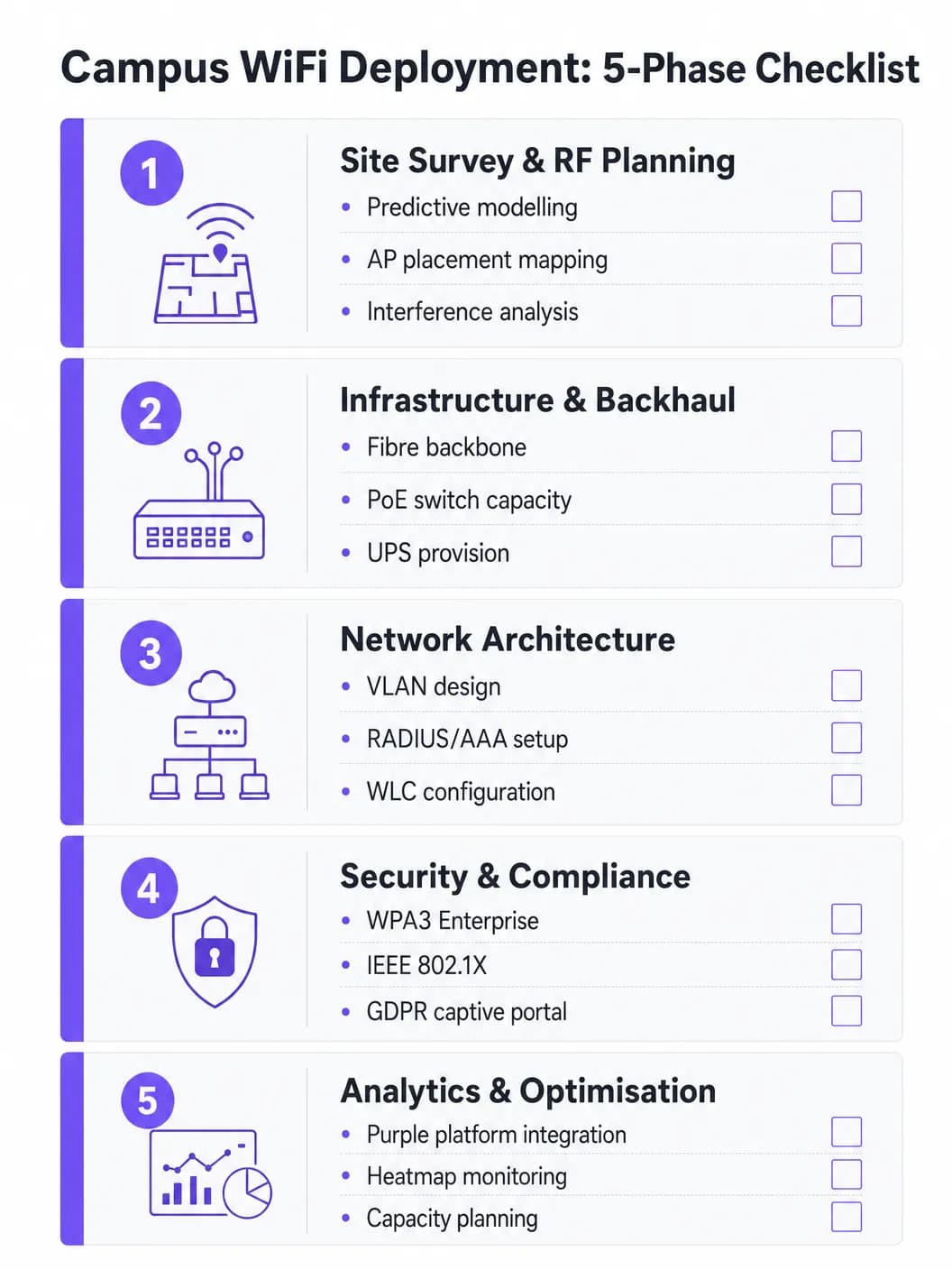
AP प्लेसमेंट का अनुमान कभी न लगाएं। एक व्यापक प्रेडिक्टिव और एक्टिव साइट सर्वे इस परियोजना का सबसे महत्वपूर्ण निवेश है। भौतिक वातावरण का नक्शा तैयार करने के लिए Ekahau या AirMagnet जैसे टूल का उपयोग किया जाना चाहिए, जिसमें निर्माण सामग्री (कंक्रीट, कांच, धातु), हस्तक्षेप के स्रोत (पुराने ब्लूटूथ, माइक्रोवेव, पड़ोसी नेटवर्क) और प्रति क्षेत्र अपेक्षित उपयोगकर्ता घनत्व को ध्यान में रखा जाना चाहिए। इसका उद्देश्य को-चैनल हस्तक्षेप के बिना पर्याप्त कवरेज और क्षमता सुनिश्चित करना है। शुरुआती AP परिनियोजन के बाद एक्टिव सर्वे के साथ प्रेडिक्टिव मॉडल का सत्यापन किया जाना चाहिए।
चरण 2: इन्फ्रास्ट्रक्चर और बैकहॉल अपग्रेड
नए AP को तैनात करने से पहले, बुनियादी वायर्ड इन्फ्रास्ट्रक्चर का मूल्यांकन किया जाना चाहिए और जहां आवश्यक हो वहां अपग्रेड किया जाना चाहिए। यह सुनिश्चित करें कि आधुनिक Wi-Fi 6/6E APs के लिए आवश्यक मल्टी-गीगाबिट ईथरनेट (mGig) का समर्थन करने के लिए CAT6A केबल बिछाई गई है। सत्यापित करें कि एज स्विच नए AP मॉडल के लिए पर्याप्त PoE+ या PoE++ पावर बजट प्रदान करते हैं। कोर नेटवर्क में पर्याप्त बैंडविड्थ होनी चाहिए - बेहतर प्रदर्शन के लिए एक समर्पित बिजनेस इंटरनेट कनेक्शन पर विचार करें। बैकहॉल विकल्पों के संदर्भ में अधिक जानने के लिए, What is a Leased Line? Dedicated Business Internet पढ़ें।
चरण 3: नेटवर्क कॉन्फ़िगरेशन
डिज़ाइन किए गए आर्किटेक्चर के अनुसार WLCs और APs को कॉन्फ़िगर करें। थोक डाउनलोड और स्ट्रीमिंग पर महत्वपूर्ण ट्रैफ़िक (VoIP, वीडियो कॉन्फ्रेंसिंग, अनुसंधान डेटा ट्रांसफर) को प्राथमिकता देने के लिए QoS नीतियों को लागू करें। सुनिश्चित करें कि निर्बाध रोमिंग प्रोटोकॉल (फास्ट BSS ट्रांज़िशन के लिए 802.11r, नेबर रिपोर्ट्स के लिए 802.11k, और BSS ट्रांज़िशन मैनेजमेंट के लिए 802.11v) सही ढंग से कॉन्फ़िगर किए गए हैं ताकि डिवाइस बिना कनेक्शन टूटे APs के बीच ट्रांज़िशन कर सकें।
चरण 4: सुरक्षा और अनुपालन सुदृढ़ीकरण
कर्मचारियों और छात्रों के SSIDs पर WPA3 Enterprise को डिप्लॉय करें। डिवाइस प्रबंधन क्षमताओं के आधार पर EAP-TLS या PEAP-MSCHAPv2 का उपयोग करके IEEE 802.1X को कॉन्फ़िगर करें। अतिथि SSID के लिए GDPR-अनुकूल Captive Portal लागू करें। सुनिश्चित करें कि सभी प्रबंधन इंटरफेस मजबूत पासवर्ड और प्रमाणपत्र-आधारित प्रमाणीकरण के साथ सुरक्षित हैं। साइन-ऑफ से पहले पेनेट्रेशन परीक्षण आयोजित करें।
चरण 5: विश्लेषणात्मक एकीकरण और निरंतर अनुकूलन
AP स्वास्थ्य, क्लाइंट डेंसिटी, रोमिंग पैटर्न और बैंडविड्थ उपयोग में दृश्यता प्राप्त करने के लिए नेटवर्क को एक एनालिटिक्स प्लेटफ़ॉर्म के साथ एकीकृत करें। Purple का WiFi Analytics प्लेटफ़ॉर्म परिचालन डैशबोर्ड प्रदान करता है जो IT टीमों और स्थल संचालन दोनों को लाभ पहुँचाता है। यह एक बार का काम नहीं है - जैसे-जैसे इमारतों का नवीनीकरण होता है और डिवाइस के प्रकार विकसित होते हैं, RF वातावरण बदलता रहता है।
सर्वोत्तम प्रथाएं
केवल कवरेज के लिए नहीं, बल्कि क्षमता के लिए डिज़ाइन करें। उच्च शिक्षा में, कवरेज आसान है; क्षमता कठिन है। एक लेक्चर थिएटर में हर जगह मजबूत सिग्नल हो सकता है, लेकिन अगर 300 छात्र एक साथ एक ही AP से जुड़ते हैं, तो नेटवर्क विफल हो जाएगा। हाई-डेंसिटी APs को डिप्लॉय करें और संगत क्लाइंट्स को कम भीड़भाड़ वाले 5 GHz या 6 GHz बैंड पर निर्देशित करने के लिए बैंड स्टीयरिंग जैसी सुविधाओं का लाभ उठाएं। स्टिकी क्लाइंट्स को नजदीकी AP पर रोम करने के लिए मजबूर करने हेतु लीगेसी डेटा दरों (1, 2, 5.5, और 11 Mbps) को अक्षम करें।
निरंतर निगरानी लागू करें। नेटवर्क कोई "सेट और भूल जाओ" वाला डिप्लॉयमेंट नहीं है। वास्तविक समय में AP स्वास्थ्य, क्लाइंट डेंसिटी और रोमिंग पैटर्न की निगरानी के लिए एनालिटिक्स प्लेटफ़ॉर्म का उपयोग करें। Purple के एनालिटिक्स इस बात की जानकारी प्रदान करते हैं कि स्थानों का उपयोग कैसे किया जाता है, जो भविष्य के बुनियादी ढांचे के निर्णयों और स्थान उपयोग रणनीतियों को सूचित करता है।
निर्बाध ऑनबोर्डिंग के लिए OpenRoaming का लाभ उठाएं। आने वाले शिक्षाविदों और भागीदार संस्थानों के छात्रों के लिए, OpenRoaming को लागू करने से मैन्युअल नेटवर्क लॉगिन की परेशानी दूर हो जाती है। Purple, Connect लाइसेंस के तहत OpenRoaming के लिए एक मुफ्त पहचान प्रदाता के रूप में कार्य करता है, जिससे भाग लेने वाले संस्थानों के उपयोगकर्ता स्वचालित रूप से और सुरक्षित रूप से कनेक्ट हो सकते हैं - जिससे विज़िटर अनुभव में व्यापक सुधार होता है।
व्यापक रूप से अलग करें। आंतरिक संसाधनों के समान VLAN पर अतिथि ट्रैफ़िक की अनुमति कभी न दें। प्रत्येक उपयोगकर्ता श्रेणी के लिए अलग SSIDs, VLANs और फ़ायरवॉल नियमों का उपयोग करें। पीक आवर्स के दौरान किसी एकल उपयोगकर्ता को अपलिंक को संतृप्त करने से रोकने के लिए अतिथि VLANs पर बैंडविड्थ सीमा लागू करें।
समस्या निवारण और जोखिम न्यूनीकरण
Co-Channel Interference (CCI) तब होता है जब एक ही चैनल पर मौजूद कई AP एक-दूसरे का पता लगा सकते हैं, जिससे उन्हें बारी-बारी से ट्रांसमिट करना पड़ता है और प्रदर्शन गंभीर रूप से प्रभावित होता है। घनी आबादी वाले क्षेत्रों में खराब WiFi प्रदर्शन का यह सबसे आम कारण है। इसके समाधान में उचित RF प्लानिंग, WLC पर Dynamic Channel Allocation (DCA) सुविधाओं का उपयोग करना और घने क्षेत्रों में AP ट्रांसमिट पावर को कम करना शामिल है।
Sticky Clients वे डिवाइस होते हैं जो नजदीकी AP पर रोम करने से मना कर देते हैं और दूर के AP से कमजोर कनेक्शन बनाए रखते हैं। यह पुराने स्मार्टफोन और लैपटॉप में विशेष रूप से आम है। इसके समाधान में न्यूनतम अनिवार्य डेटा दरों को समायोजित करना शामिल है - कम दरों को अक्षम करने से क्लाइंट ड्राइवर बेहतर कनेक्शन खोजने के लिए मजबूर होता है।
DHCP Exhaustion बाहरी प्लाजा और छात्र संघों जैसे उच्च-प्रवाह वाले क्षेत्रों में एक आश्चर्यजनक रूप से आम विफलता मोड है। जब DHCP पूल में IP पते समाप्त हो जाते हैं, तो मजबूत सिग्नल होने के बावजूद नए डिवाइस कनेक्ट नहीं हो पाते हैं। इसके समाधान में अतिथि और छात्र VLANs के लिए कम DHCP लीज समय (एक से दो घंटे) लागू करना और यह सुनिश्चित करना शामिल है कि DHCP रेंज पीक समवर्ती उपकरणों के लिए सही ढंग से आकार की हो।
Rogue Access Points एक बड़ा सुरक्षा जोखिम पैदा करते हैं। कर्मचारी या छात्र उपभोक्ता-ग्रेड राउटर प्लग इन करके असुरक्षित प्रवेश बिंदु बना देते हैं। इसके समाधान में WLC पर दुष्ट AP का पता लगाने की सुविधा को सक्षम करना और नियमित रूप से भौतिक ऑडिट करना शामिल है।
ROI और व्यावसायिक प्रभाव
एक मजबूत कैंपस WiFi नेटवर्क बुनियादी कनेक्टिविटी से परे मापने योग्य रिटर्न प्रदान करता है। Purple जैसे प्लेटफॉर्म को एकीकृत करके, विश्वविद्यालय परिणामों को मात्रात्मक रूप दे सकते हैं:
| मीट्रिक | मापन विधि | विशिष्ट परिणाम |
|---|---|---|
| छात्र संतुष्टि | NPS सर्वेक्षण, IT हेल्पडेस्क टिकट वॉल्यूम | WiFi से संबंधित शिकायतों में कमी |
| स्थान का उपयोग | हीटमैप, ड्वेल टाइम डेटा | अनुकूलित लाइब्रेरी और अध्ययन स्थान आवंटन |
| IT परिचालन दक्षता | हेल्पडेस्क टिकट वॉल्यूम, अपटाइम | कम मैन्युअल कॉन्फ़िगरेशन ओवरहेड |
| विज़िटर डेटा कैप्चर | Captive Portal पंजीकरण | फर्स्ट-पार्टी मार्केटिंग डेटाबेस की वृद्धि |
| नेटवर्क अपटाइम | SLA मॉनिटरिंग, घटना रिपोर्ट | बढ़ा हुआ SLA अनुपालन |
Purple प्लेटफॉर्म पर एनालिटिक्स और विज़िटर डेटा क्षमताएं राजस्व के अवसर भी प्रस्तुत करती हैं, विशेष रूप से तब जब कैंपस में बड़े पैमाने पर सार्वजनिक कार्यक्रमों की मेजबानी की जाती है जहां टियर एक्सेस मॉडल तैनात किए जा सकते हैं। समान ROI फ्रेमवर्क Retail, Hospitality, Healthcare, और Transport सेटिंग्स में Purple संचालन पर लागू होते हैं। बड़े आयोजन स्थलों पर WiFi तैनाती के व्यापक दृष्टिकोण के लिए, देखें Airport WiFi: How Operators Provide Connectivity Across Terminals और WiFi Aeroportuale: Come gli Operatori Forniscono Connettività tra i Terminal।
मुख्य परिभाषाएं
IEEE 802.1X
पोर्ट-आधारित नेटवर्क एक्सेस कंट्रोल (NAC) के लिए एक मानक जो LAN या WLAN से कनेक्ट होने वाले उपकरणों के लिए एक ऑथेंटिकेशन मैकेनिज्म प्रदान करता है। इसके लिए एक सप्लीकेंट (क्लाइंट डिवाइस), एक ऑथेंटिकेटर (AP या स्विच), और एक ऑथेंटिकेशन सर्वर (RADIUS) की आवश्यकता होती है।
छात्रों और कर्मचारियों को नेटवर्क पर अनुमति देने से पहले प्रमाणित करने के लिए उपयोग किया जाता है, क्रेडेंशियल सत्यापन के लिए एक RADIUS सर्वर और Active Directory के साथ एकीकृत होता है। साझा PSK पासवर्ड को समाप्त करता है और प्रति-उपयोगकर्ता नीति लागू करने में सक्षम बनाता है।
WLC (Wireless LAN Controller)
एक सेंट्रलाइज्ड हार्डवेयर या सॉफ्टवेयर अप्लायंस जो नियंत्रण के एक सिंगल पॉइंट से कई एक्सेस पॉइंट्स को मैनेज और कॉन्फ़िगर करता है। यह पूरे AP फ्लीट में RF मैनेजमेंट, रोमिंग, फ़र्मवेयर अपडेट और पॉलिसी लागू करने का काम संभालता है।
पूरे कैंपस में लगातार पॉलिसी लागू करने, डायनामिक चैनल असाइनमेंट और बिना किसी रुकावट के रोमिंग सुनिश्चित करने के लिए बड़े डिप्लॉयमेंट के लिए आवश्यक है। यह फिजिकल हार्डवेयर या क्लाउड-मैनेज्ड वर्चुअल इंस्टेंस हो सकता है।
Co-Channel Interference (CCI)
इंटर्फियरेंस जो तब होता है जब एक ही फ्रीक्वेंसी चैनल पर काम करने वाले दो या दो से अधिक AP एक-दूसरे की रेंज में होते हैं। ट्रांसमिट करने से पहले दोनों AP को चैनल खाली होने का इंतजार करना पड़ता है, जिससे थ्रूपुट गंभीर रूप से कम हो जाता है।
घने डिप्लॉयमेंट में खराब प्रदर्शन का प्राथमिक कारण। सावधानीपूर्वक चैनल प्लानिंग, WLC पर डायनामिक चैनल असाइनमेंट (DCA) और AP ट्रांसमिट पावर को कम करके इसे कम किया जा सकता है।
Band Steering
APs द्वारा उपयोग की जाने वाली एक तकनीक जो ड्यूल-बैंड सक्षम क्लाइंट उपकरणों को अधिक भीड़भाड़ वाले 2.4 GHz बैंड के बजाय 5 GHz या 6 GHz बैंड से कनेक्ट करने के लिए प्रोत्साहित करती है, जिसके लिए यह 2.4 GHz पर प्रोब रिस्पॉन्स को डिले या सप्रेस करती है।
हाई-डेंसिटी वाले क्षेत्रों में कैपेसिटी और थ्रूपुट को अधिकतम करने के लिए महत्वपूर्ण है। 5 GHz और 6 GHz बैंड अधिक नॉन-ओवरलैपिंग चैनल और उच्च थ्रूपुट प्रदान करते हैं, लेकिन इनकी रेंज कम होती है।
Captive Portal
एक वेब पेज जिस पर उपयोगकर्ताओं को पूर्ण नेटवर्क एक्सेस मिलने से पहले रीडायरेक्ट किया जाता है। आमतौर पर उपयोगकर्ता के MAC एड्रेस को फ़ायरवॉल के माध्यम से अनुमति दिए जाने से पहले सेवा की शर्तों को स्वीकार करने, ऑथेंटिकेशन या डेटा कैप्चर की आवश्यकता होती है।
गेस्ट एक्सेस मैनेजमेंट, GDPR-कंप्लायंट डेटा कलेक्शन, और ब्रांडेड ऑनबोर्डिंग अनुभवों के लिए उपयोग किया जाता है। Purple जैसे प्लेटफॉर्म एनालिटिक्स इंटीग्रेशन के साथ कस्टमाइज़ेबल Captive Portal समाधान प्रदान करते हैं।
VLAN (Virtual Local Area Network)
नेटवर्क उपकरणों का एक लॉजिकल ग्रुप जो इस तरह व्यवहार करते हैं जैसे कि वे एक ही फिजिकल नेटवर्क पर हों, भले ही उनकी वास्तविक फिजिकल लोकेशन कुछ भी हो। VLANs को लेयर 2 पर परिभाषित किया जाता है और इनका उपयोग ब्रॉडकास्ट डोमेन को विभाजित करने के लिए किया जाता है।
सुरक्षा और प्रदर्शन के लिए अलग-अलग उपयोगकर्ता श्रेणियों (छात्रों, कर्मचारियों, मेहमानों, IoT उपकरणों) को अलग करने के लिए उपयोग किया जाता है। गेस्ट ट्रैफ़िक को आंतरिक रिसोर्सेज तक पहुँचने से रोकता है और प्रति-VLAN बैंडविड्थ पॉलिसियों की अनुमति देता है।
PoE (Power over Ethernet)
एक तकनीक जो ट्विस्टेड-पेयर ईथरनेट केबलिंग पर डेटा के साथ इलेक्ट्रिकल पावर भी भेजती है, जिससे एक ही केबल से APs जैसे उपकरणों को डेटा कनेक्शन और इलेक्ट्रिकल पावर दोनों प्रदान किए जा सकते हैं।
APs को बिना किसी समर्पित पावर आउटलेट वाले स्थानों पर स्थापित करने की अनुमति देता है। IT टीमों को यह सत्यापित करना होगा कि एज स्विच के पास सभी कनेक्टेड APs को पावर देने के लिए पर्याप्त PoE बजट (कुल वॉट) है, विशेष रूप से बिजली की अधिक खपत करने वाले WiFi 6E मॉडलों के साथ जिन्हें PoE++ (802.3bt) की आवश्यकता होती है।
OpenRoaming
Hotspot 2.0 (Passpoint) मानक पर बना एक ग्लोबल WiFi रोमिंग फेडरेशन, जो उपयोगकर्ताओं को अपने मौजूदा पहचान क्रेडेंशियल्स का उपयोग करके, मैन्युअल लॉगिन के बिना भाग लेने वाले नेटवर्क से ऑटोमैटिक और सुरक्षित रूप से कनेक्ट होने की अनुमति देता है।
साझेदार संस्थानों के विजिटिंग शिक्षाविदों और छात्रों के अनुभव को बेहतर बनाता है। Purple Connect लाइसेंस के तहत OpenRoaming के लिए एक आइडेंटिटी प्रोवाइडर के रूप में कार्य कर सकता है, जिससे योग्य उपयोगकर्ताओं के लिए ऑटोमैटिक सुरक्षित कनेक्शन सक्षम होते हैं।
WPA3 Enterprise
एंटरप्राइज़ नेटवर्क के लिए WiFi प्रोटेक्टेड एक्सेस सुरक्षा प्रोटोकॉल की नवीनतम पीढ़ी। यह 192-बिट न्यूनतम-शक्ति वाले सुरक्षा प्रोटोकॉल का उपयोग करता है और प्रोटेक्टेड मैनेजमेंट फ्रेम्स (PMF) के उपयोग को अनिवार्य बनाता है, जिससे ऑफलाइन डिक्शनरी हमलों के खिलाफ अधिक सुरक्षा मिलती है।
सभी कर्मचारियों और छात्रों के SSIDs के लिए अनुशंसित सुरक्षा मानक। WPA2 Enterprise को रिप्लेस करता है और वायरलेस नेटवर्क पर प्रसारित संवेदनशील रिसर्च और व्यक्तिगत डेटा के लिए काफी मजबूत सुरक्षा प्रदान करता है।
RADIUS (Remote Authentication Dial-In User Service)
एक नेटवर्किंग प्रोटोकॉल जो नेटवर्क सेवा से जुड़ने और उसका उपयोग करने वाले उपयोगकर्ताओं के लिए सेंट्रलाइज्ड ऑथेंटिकेशन, ऑथराइजेशन और अकाउंटिंग (AAA) मैनेजमेंट प्रदान करता है।
कैंपस नेटवर्क पर 802.1X ऑथेंटिकेशन का मुख्य आधार। RADIUS सर्वर Active Directory के खिलाफ क्रेडेंशियल्स को वैलिडेट करता है और प्रत्येक ऑथेंटिकेटेड उपयोगकर्ता के लिए उचित VLAN असाइनमेंट और एक्सेस पॉलिसी लौटाता है।
हल किए गए उदाहरण
एक बड़ा विश्वविद्यालय अपने मुख्य व्याख्यान कक्ष (क्षमता 500) को WiFi 6 में अपग्रेड कर रहा है। पिछले परिनियोजन में ऊंची छत पर लगे 4 AP का उपयोग किया गया था, जिसके परिणामस्वरूप पीक समय के दौरान खराब प्रदर्शन और बार-बार डिस्कनेक्ट की समस्या होती थी। सही दृष्टिकोण क्या है?
IT टीम को कवरेज-केंद्रित डिज़ाइन से क्षमता-केंद्रित डिज़ाइन में स्थानांतरित होना चाहिए। सबसे पहले, विशेष रूप से व्याख्यान कक्ष के लिए एक नया साइट सर्वेक्षण करें, जिसमें अपेक्षित डिवाइस गणना का मॉडल तैयार किया जाए (प्रति छात्र 2+ डिवाइस के आधार पर 1,000+ डिवाइस मान लें)। छत पर लगे ओम्नी-डायरेक्शनल AP को सीट के नीचे वाले AP परिनियोजन या साइड की दीवारों पर लगे दिशात्मक (पैच) एंटीना एरे से बदलें, जिससे छोटे, केंद्रित माइक्रो-सेल बन सकें। AP की संख्या बढ़ाकर 8-12 WiFi 6 AP करें, जिनमें से प्रत्येक बैठने के एक निश्चित हिस्से को सेवा प्रदान करे। सह-चैनल हस्तक्षेप को कम करने के लिए वैकल्पिक AP पर 2.4 GHz रेडियो को अक्षम करें, मुख्य रूप से 5 GHz और 6 GHz बैंड पर भरोसा करें। सख्त बैंड स्टीयरिंग लागू करें और 12 Mbps से कम की लीगेसी डेटा दरों को अक्षम करें। अधिक गैर-ओवरलैपिंग चैनलों की अनुमति देने और हस्तक्षेप को कम करने के लिए 5 GHz बैंड में 20 MHz चैनल चौड़ाई (40 या 80 MHz के बजाय) का उपयोग करने के लिए WLC को कॉन्फ़िगर करें।
एक कैंपस नेटवर्क को बाहरी क्वाड क्षेत्र में रुक-रुक कर कनेक्टिविटी समस्याओं का सामना करना पड़ रहा है। उपयोगकर्ता दोपहर के भोजन की अवधि (12:00-13:30) के दौरान मजबूत सिग्नल लेकिन वेब पेज लोड करने में असमर्थता की रिपोर्ट करते हैं। नैदानिक दृष्टिकोण क्या है?
बिना कनेक्टिविटी वाला मजबूत सिग्नल एक लेयर 2/3 समस्या है, RF समस्या नहीं। नैदानिक क्रम इस प्रकार होना चाहिए: (1) आउटडोर VLAN के लिए DHCP स्कोप की जांच करें - स्कोप उपयोग के लिए DHCP सर्वर से क्वेरी करें। यदि यह 80% से ऊपर है, तो DHCP समाप्ति संभावित कारण है। लीज समय को घटाकर 1 घंटा करें और यदि संभव हो तो स्कोप का विस्तार करें। (2) यदि DHCP ठीक है, तो आउटडोर डिस्ट्रीब्यूशन स्विच की अपलिंक क्षमता की जांच करें। यदि AP एक संकुचित अपलिंक के माध्यम से जुड़े हैं, तो अड़चन वायर्ड है, वायरलेस नहीं। (3) स्पेक्ट्रम विश्लेषक का उपयोग करके बाहरी हस्तक्षेप के लिए RF वातावरण का विश्लेषण करें - नगरपालिका WiFi नेटवर्क या आस-पास के व्यवसाय शोर के स्तर को बढ़ा रहे हो सकते हैं। (4) पीक अवधि के दौरान सत्र समाप्ति के लिए फ़ायरवॉल और NAT तालिका की समीक्षा करें।
अभ्यास प्रश्न
Q1. एक यूनिवर्सिटी 8,000 दर्शकों की क्षमता वाले नवनिर्मित आउटडोर स्पोर्ट्स स्टेडियम में WiFi तैनात करने की योजना बना रही है। स्टेडियम में कोई छत नहीं है और इसका डिजाइन ओपन-बाउल है। सबसे महत्वपूर्ण RF विचार क्या है और AP प्लेसमेंट के लिए क्या दृष्टिकोण अपनाया जाना चाहिए?
संकेत: भौतिक सीमाओं की कमी, खुले वातावरण में सिग्नल प्रोपेगेशन और इवेंट्स के दौरान अत्यधिक डिवाइस डेंसिटी पर विचार करें।
मॉडल उत्तर देखें
सबसे महत्वपूर्ण विचार सिग्नल प्रोपेगेशन को नियंत्रित करना और ऐसे वातावरण में को-चैनल इंटरफेरेंस को कम करना है जहां कोई प्राकृतिक RF एटेन्युएशन नहीं है। इनडोर वातावरण के विपरीत, ओपन-बाउल का अर्थ है कि सिग्नल स्वतंत्र रूप से यात्रा करते हैं, जिससे APs पूरे स्पेस में एक-दूसरे के साथ इंटरफेयर करते हैं। सही दृष्टिकोण सीटिंग टियर्स के नीचे लगे डायरेक्शनल (सेक्टर) एंटेना का उपयोग करना है, जो अत्यधिक फोकस्ड माइक्रो-सेल्स बनाने के लिए नीचे सीटिंग रोज़ की ओर इशारा करते हैं। सेल के आकार को सीमित करने के लिए ट्रांसमिट पावर को सावधानीपूर्वक ट्यून किया जाना चाहिए। अत्यधिक डिवाइस डेंसिटी को संभालने के लिए OFDMA और BSS Colouring फीचर्स वाले WiFi 6 APs निर्दिष्ट किए जाने चाहिए। इवेंट स्टाफ, मीडिया और पब्लिक अटेंडीज़ के लिए अलग-अलग SSIDs और VLANs कॉन्फ़िगर किए जाने चाहिए।
Q2. एक नेटवर्क अपग्रेड के दौरान, IT टीम देखती है कि सुरक्षा अपग्रेड को WPA3 Enterprise में बदलने के बाद पुराने IoT डिवाइसेज (लेगेसी HVAC सेंसर और डोर एक्सेस कंट्रोलर) नए कैंपस WiFi नेटवर्क से कनेक्ट होने में विफल हो रहे हैं।
संकेत: लेगेसी एंबेडेड डिवाइसेज की सुरक्षा प्रोटोकॉल अनुकूलता और अन्य उपयोगकर्ता श्रेणियों के लिए सुरक्षा बनाए रखने की आवश्यकता पर विचार करें।
मॉडल उत्तर देखें
WPA3 Enterprise को लागू करने वाला नया नेटवर्क पुराने IoT डिवाइसेज के साथ असंगत है जो केवल WPA2 या पुराने प्रोटोकॉल का समर्थन करते हैं। इसका समाधान विशेष रूप से लेगेसी IoT डिवाइसेज के लिए एक समर्पित, आइसोलेटेड SSID और VLAN बनाना है, जिसमें एक मजबूत, रोटेटेड पासफ्रेज के साथ WPA2-PSK, या उन डिवाइसेज के लिए MAC Authentication Bypass (MAB) का उपयोग किया जाए जो किसी भी EAP मेथड का समर्थन नहीं कर सकते हैं। इस VLAN को कसकर फायरवॉल किया जाना चाहिए - IoT डिवाइसेज को केवल अपने विशिष्ट मैनेजमेंट सर्वर के साथ संवाद करने में सक्षम होना चाहिए, न कि व्यापक कैंपस नेटवर्क के साथ। मुख्य छात्र और स्टाफ SSIDs WPA3 Enterprise पर बने रहेंगे, जिससे प्राथमिक उपयोगकर्ता आबादी के लिए सुरक्षा बनी रहेगी।
Q3. यूनिवर्सिटी बड़े सार्वजनिक आयोजनों (ओपन डेज़, ग्रेजुएशन सेरेमनी, पब्लिक लेक्चर्स) के दौरान GDPR-compliant रहते हुए अपने गेस्ट WiFi नेटवर्क का मुद्रीकरण करना चाहती है। अनुशंसित आर्किटेक्चर क्या है?
संकेत: डेटा कैप्चर आवश्यकताओं, सहमति तंत्र और मुफ्त और प्रीमियम एक्सेस टियर्स के बीच अंतर पर विचार करें।
मॉडल उत्तर देखें
गेस्ट VLAN के साथ एकीकृत Purple जैसे Captive Portal समाधान को तैनात करें। एक टियर्ड एक्सेस मॉडल कॉन्फ़िगर करें: एक मुफ्त टियर जो ईमेल पते और स्पष्ट GDPR-compliant मार्केटिंग सहमति के बदले में बुनियादी इंटरनेट एक्सेस (बैंडविड्थ सीमा के साथ) प्रदान करता है, और एक वैकल्पिक प्रीमियम टियर जो शुल्क के लिए उच्च बैंडविड्थ प्रदान करता है (भुगतान गेटवे एकीकरण के माध्यम से संसाधित)। GDPR Article 7 आवश्यकताओं को पूरा करने के लिए Captive Portal को एक स्पष्ट गोपनीयता सूचना प्रदर्शित करनी चाहिए और सहमति टाइमस्टैम्प रिकॉर्ड करना चाहिए। कैप्चर किया गया फर्स्ट-पार्टी डेटा इवेंट के बाद की मार्केटिंग के लिए यूनिवर्सिटी के CRM में जाता है। सभी गेस्ट ट्रैफ़िक को फायरवॉल नियमों के माध्यम से आंतरिक यूनिवर्सिटी सिस्टम से अलग किया जाना चाहिए, और डेटा रिटेंशन पॉलिसियों को प्रलेखित और लागू किया जाना चाहिए।
Q4. IT टीम को शिकायतें मिलती हैं कि मुख्य लाइब्रेरी में काम के दिनों में 10:00 से 14:00 के बीच WiFi प्रदर्शन खराब रहता है, भले ही नेटवर्क मैनेजमेंट कंसोल में स्वस्थ AP स्थिति दिखा रहा हो। टीम को निदान के लिए क्या दृष्टिकोण अपनाना चाहिए?
संकेत: समय-आधारित पैटर्न और ऑफ-पीक और पीक ऑवर्स के बीच क्या बदलाव होते हैं, इस पर विचार करें।
मॉडल उत्तर देखें
समय-आधारित पैटर्न ही मुख्य डायग्नोस्टिक संकेत है - यह समस्या केवल पीक ऑक्यूपेंसी (अत्यधिक भीड़ वाले) घंटों के दौरान होती है, जो हार्डवेयर या कॉन्फ़िगरेशन दोष के बजाय क्षमता (कैपेसिटी) की समस्या का सुझाव देती है। डायग्नोस्टिक क्रम इस प्रकार होना चाहिए: (1) समस्या की अवधि के दौरान प्रति-AP क्लाइंट एसोसिएशन काउंट की जांच करें - यदि कोई भी AP एक साथ 30-40 से अधिक क्लाइंट्स को सेवा दे रहा है, तो वह ओवरलोड है। (2) लाइब्रेरी VLAN के लिए DHCP स्कोप उपयोग की समीक्षा करें। (3) लाइब्रेरी को सेवा देने वाले डिस्ट्रीब्यूशन स्विच पर अपलिंक उपयोग की जांच करें - वायर्ड बैकहॉल संतृप्त (सैट्युरेटेड) हो सकता है। (4) WLC के RF आंकड़ों का उपयोग करके APs पर चैनल उपयोग और पुनः प्रयास (रिट्राई) दरों की समीक्षा करें। संभावित समाधान या तो क्लाइंट लोड को वितरित करने के लिए अतिरिक्त APs को तैनात करना है, या प्रति-क्लाइंट थ्रूपुट में सुधार करने के लिए कड़े बैंड स्टीयरिंग और न्यूनतम डेटा दर नीतियों को लागू करना है।
इस श्रृंखला में आगे पढ़ें
Staff WiFi बनाम Guest WiFi: कॉर्पोरेट नेटवर्क सेगमेंटेशन के लिए सर्वोत्तम प्रथाएं
IT लीडर्स के लिए स्टाफ और गेस्ट WiFi नेटवर्क को विभाजित करने पर एक व्यापक तकनीकी गाइड। इसमें VLAN आर्किटेक्चर, 802.1X ऑथेंटिकेशन, फ़ायरवॉल नीतियां और सुरक्षित नेटवर्क डिज़ाइन का व्यावसायिक प्रभाव शामिल है।
होटल Guest WiFi Management: PMS, Portals, और ब्रांड मानकों को एकीकृत करना
यह तकनीकी मार्गदर्शिका विस्तार से बताती है कि VLAN segmentation, automated session management के लिए PMS integration, और GDPR-compliant डेटा कैप्चर के लिए captive portal अनुकूलन पर ध्यान केंद्रित करते हुए उद्यम-स्तर के होटल WiFi नेटवर्क का निर्माण कैसे किया जाए।
सुरक्षित गेस्ट WiFi कैसे सेटअप करें: एक सुरक्षित एंटरप्राइज कॉन्फ़िगरेशन गाइड
यह आधिकारिक गाइड IT लीडर्स और नेटवर्क आर्किटेक्ट्स को सुरक्षित एंटरप्राइज गेस्ट WiFi को तैनात करने का एक निश्चित खाका प्रदान करती है। इसमें अनुपालन करने वाले फर्स्ट-पार्टी डेटा को कैप्चर करते हुए आंतरिक प्रणालियों की सुरक्षा के लिए आवश्यक आर्किटेक्चर, WPA3 माइग्रेशन, VLAN सेगमेंटेशन और captive portal इंटीग्रेशन शामिल हैं।
अपने विशिष्ट सेटअप को लेकर कोई सवाल हैं?
हमारी टीम 80,000 से अधिक वेन्यू में वेन्यू ऑपरेटरों, IT मैनेजरों और नेटवर्क इंजीनियरों के साथ काम करती है। 20 मिनट का कॉल बुक करें और हम आपको दिखाएंगे कि आपके जैसे अन्य लोगों ने इसे कैसे हल किया।