
University WiFi: Come Costruire una Rete Wireless in Tutto il Campus
Questa guida completa fornisce ai professionisti IT senior strategie pratiche per la progettazione, l'implementazione e la gestione di una rete wireless solida in tutto il campus. Copre l'architettura di rete gerarchica, gli standard di sicurezza (IEEE 802.1X, WPA3, GDPR) e come sfruttare l'analisi per generare ROI negli ambienti dell'istruzione superiore. Che si tratti di aggiornare un'infrastruttura legacy o di progettarla da zero, questa guida traccia ogni punto decisionale, dal sopralluogo iniziale all'ottimizzazione continua.
Ascolta questa guida
Visualizza trascrizione del podcast
Parte della nostra serie principale: Guest WiFi Guide →
Sintesi Esecutiva
Per gli istituti di istruzione superiore, una rete wireless affidabile su scala di campus non è più un semplice servizio accessorio; è un'infrastruttura critica equivalente all'elettricità e all'acqua. Le università moderne devono supportare ambienti ad alta densità, roaming continuo su vaste aree fisiche e un accesso sicuro per diversi gruppi di utenti, tra cui studenti, personale, ricercatori e visitatori. Questa guida fornisce un modello autorevole per IT manager, architetti di rete e CTO per implementare e gestire reti WiFi universitarie ad alte prestazioni. Concentrandosi su un'architettura robusta e stratificata, protocolli di sicurezza rigorosi tra cui IEEE 802.1X e WPA3 Enterprise e un'integrazione strategica degli strumenti di analytics, gli istituti possono mitigare i rischi garantendo al contempo una connettività ottimale e dimostrando un ROI misurabile. Esploriamo le fasi pratiche di implementazione, dai sondaggi preliminari del sito fino all'ottimizzazione continua, utilizzando piattaforme come il Guest WiFi e il WiFi Analytics di Purple.
Approfondimento Tecnico
Architettura e Topologia di Rete
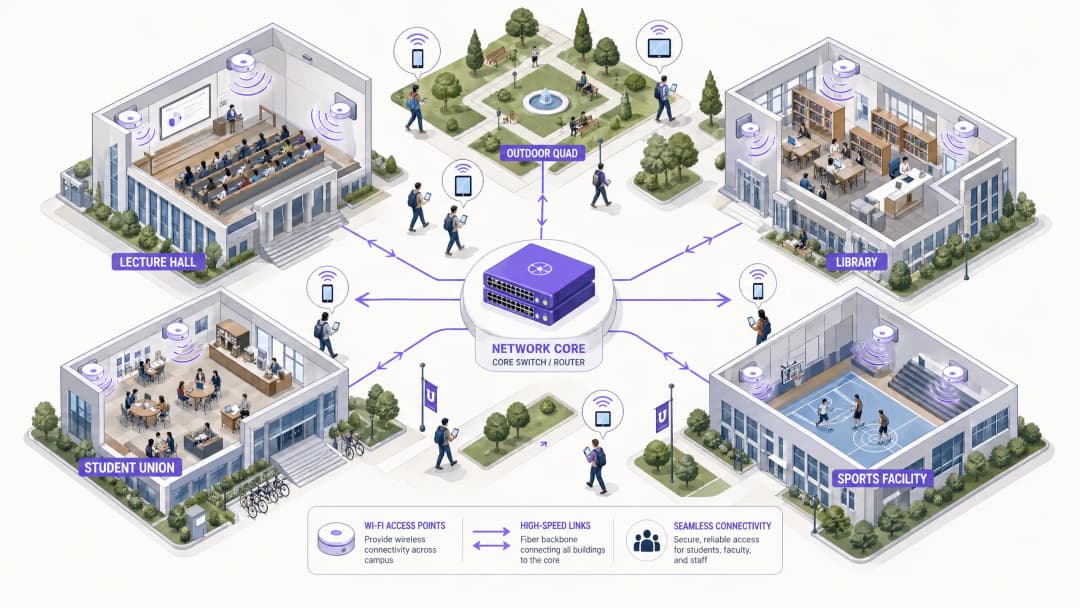
La creazione di una rete wireless su scala di campus richiede un'architettura scalabile e stratificata. La pratica standard prevede tre livelli distinti: Core, Aggregazione e Accesso.
 Il Livello Core costituisce la dorsale ad alta velocità della rete. È responsabile dell'instradamento del traffico tra le diverse zone del campus e verso internet. L'alta disponibilità e la ridondanza sono fondamentali in questo livello - i router core e i firewall devono gestire un throughput immenso senza introdurre latenza. Gli uplink dual-homed e gli alimentatori ridondanti rappresentano la pratica standard.
Il Livello di Aggregazione funge da intermediario, aggregando il traffico proveniente dagli switch del livello di Accesso e applicando le policy di rete. I Wireless LAN Controller (WLC) risiedono tipicamente qui, gestendo la flotta di access point (AP), la gestione RF e garantendo un roaming continuo quando gli utenti si spostano tra gli edifici. Questo livello gestisce anche l'applicazione delle policy di Quality of Service (QoS).
Il Livello di Accesso rappresenta il perimetro della rete, dove si connettono i dispositivi client. È composto da switch PoE (Power over Ethernet) e AP fisici distribuiti in aule magne, biblioteche, alloggi per studenti e piazze all'aperto. Gli AP ad alta densità che supportano il Wi-Fi 6 (802.11ax) o il Wi-Fi 6E sono fondamentali per le aree con un elevato numero di dispositivi simultanei.
Il Livello Core costituisce la dorsale ad alta velocità della rete. È responsabile dell'instradamento del traffico tra le diverse zone del campus e verso internet. L'alta disponibilità e la ridondanza sono fondamentali in questo livello - i router core e i firewall devono gestire un throughput immenso senza introdurre latenza. Gli uplink dual-homed e gli alimentatori ridondanti rappresentano la pratica standard.
Il Livello di Aggregazione funge da intermediario, aggregando il traffico proveniente dagli switch del livello di Accesso e applicando le policy di rete. I Wireless LAN Controller (WLC) risiedono tipicamente qui, gestendo la flotta di access point (AP), la gestione RF e garantendo un roaming continuo quando gli utenti si spostano tra gli edifici. Questo livello gestisce anche l'applicazione delle policy di Quality of Service (QoS).
Il Livello di Accesso rappresenta il perimetro della rete, dove si connettono i dispositivi client. È composto da switch PoE (Power over Ethernet) e AP fisici distribuiti in aule magne, biblioteche, alloggi per studenti e piazze all'aperto. Gli AP ad alta densità che supportano il Wi-Fi 6 (802.11ax) o il Wi-Fi 6E sono fondamentali per le aree con un elevato numero di dispositivi simultanei.
Standard di Sicurezza e Autenticazione
Garantire la sicurezza di una rete universitaria richiede di bilanciare una protezione robusta con l'accessibilità degli utenti in un ambiente multi-tenant complesso.
WPA3 Enterprise e IEEE 802.1X sono indispensabili per proteggere le connessioni di personale e studenti. Lo standard 802.1X fornisce un controllo degli accessi alla rete (NAC) basato sulle porte, garantendo che solo gli utenti e i dispositivi autenticati possano accedere alla rete. Si integra con i server RADIUS centrali (come FreeRADIUS o Microsoft NPS) collegati ad Active Directory o alle directory LDAP dell'università. Ciò significa che le credenziali degli studenti corrispondono al loro login universitario, riducendo drasticamente il carico di lavoro del service desk.
Guest Access e Captive Portals servono visitatori, partecipanti a conferenze e futuri studenti. Un Captive Portal sicuro garantisce la conformità al GDPR offrendo al contempo un'esperienza di onboarding controllata. L'integrazione con soluzioni come Purple consente un accesso ospite fluido, acquisendo al contempo preziosi dati di prima parte per il marketing e le operazioni. Per ulteriori informazioni sulla protezione delle fondamenta della rete, consultare Protecting Your Network with Strong DNS and Security.
La segmentazione VLAN è fondamentale per isolare i tipi di traffico. Il traffico degli studenti, le risorse del personale, i dispositivi IoT (sensori per edifici intelligenti, controller HVAC) e l'accesso degli ospiti devono risiedere su VLAN separate. Questo contiene potenziali violazioni della sicurezza, previene i broadcast storm e consente una gestione granulare della larghezza di banda in base alla classe di utente.
Guida all'implementazione
Fase 1: Site Survey e pianificazione RF
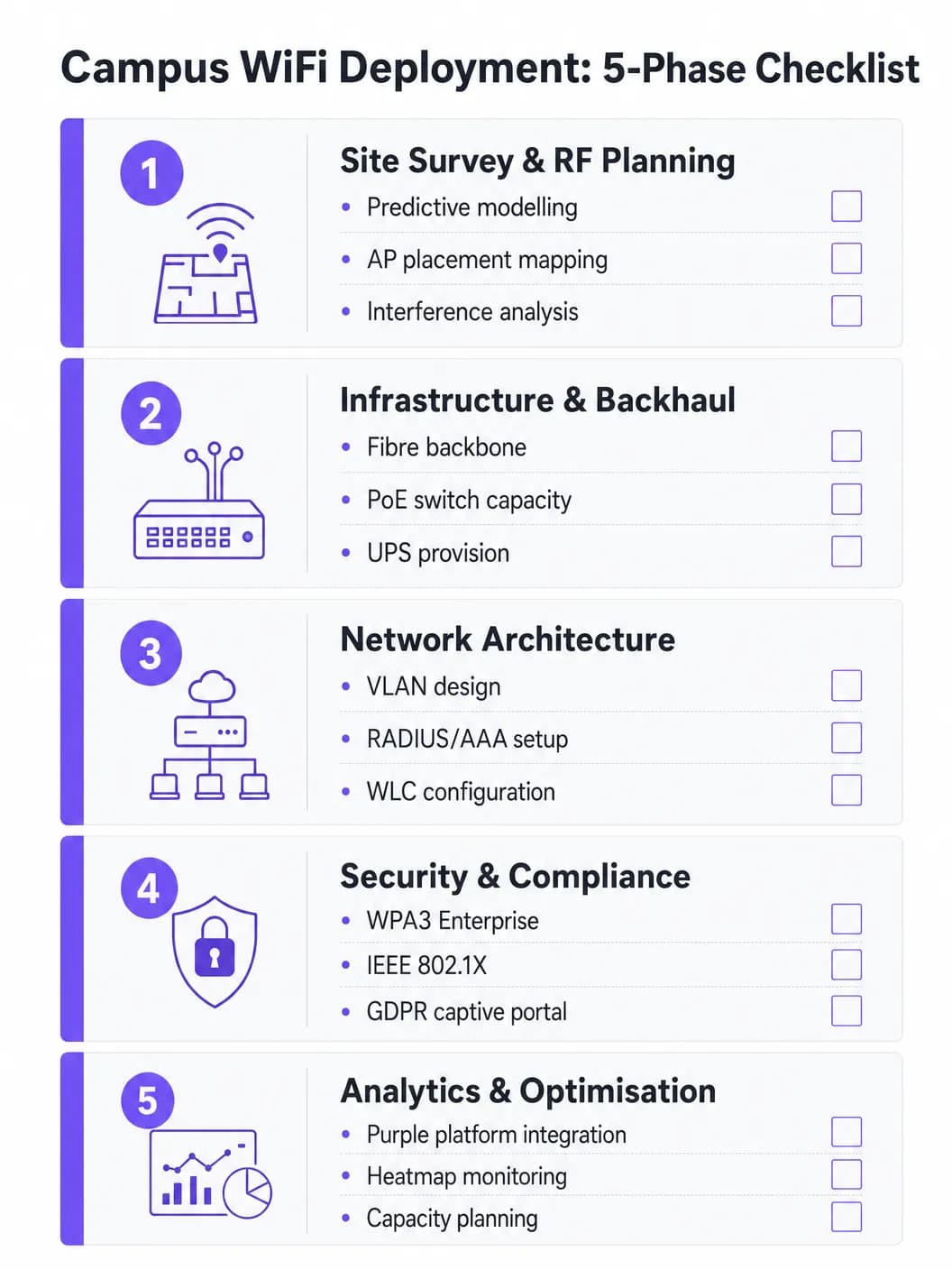
Non tirare mai a indovinare il posizionamento degli AP. Un site survey predittivo e attivo completo è l'investimento più importante del progetto. Strumenti come Ekahau o AirMagnet dovrebbero essere utilizzati per mappare l'ambiente fisico, tenendo conto dei materiali di costruzione (cemento, vetro, metallo), delle fonti di interferenza (Bluetooth legacy, microonde, reti vicine) e della densità di utenti prevista per zona. L'obiettivo è garantire una copertura e una capacità adeguate senza causare interferenze co-canale. I modelli predittivi devono essere convalidati con survey attivi dopo l'implementazione iniziale degli AP.
Fase 2: Aggiornamenti dell'infrastruttura e del backhaul
Prima di distribuire i nuovi AP, l'infrastruttura cablata sottostante deve essere valutata e aggiornata dove necessario. Assicurarsi che venga utilizzato il cablaggio CAT6A per supportare la tecnologia multi-gigabit Ethernet (mGig) richiesta dai moderni AP WiFi 6/6E. Verificare che gli switch di edge forniscano budget di alimentazione PoE+ o PoE++ adeguati per i nuovi modelli di AP. La rete centrale deve disporre di una larghezza di banda sufficiente - considerare una connessione internet aziendale dedicata per la resilienza. Per un contesto sulle opzioni di backhaul, leggere What is a Leased Line? Dedicated Business Internet.
Fase 3: Configurazione di rete
Configura i WLC e gli AP in base all'architettura progettata. Implementa policy di QoS per dare priorità al traffico critico (VoIP, videoconferenze, trasferimenti di dati di ricerca) rispetto ai download di grandi dimensioni e allo streaming. Assicurati che i protocolli di roaming continuo (802.11r per Fast BSS Transition, 802.11k per Neighbor Reports e 802.11v per BSS Transition Management) siano configurati correttamente in modo che i dispositivi passino da un AP all'altro senza interrompere la connessione.
Fase 4: Protezione della sicurezza e conformità
Distribuisci WPA3 Enterprise sugli SSID del personale e degli studenti. Configura lo standard IEEE 802.1X utilizzando EAP-TLS o PEAP-MSCHAPv2 a seconda delle capacità di gestione dei dispositivi. Implementa un Captive Portal conforme al GDPR per l'SSID degli ospiti. Assicurati che tutte le interfacce di gestione siano protette con password complesse e autenticazione basata su certificati. Conduci test di penetrazione prima dell'approvazione finale.### Fase 5: Integrazione analitica e ottimizzazione continua
Integra la rete con una piattaforma di analytics per ottenere visibilità sullo stato di salute degli AP, sulla densità dei client, sui pattern di roaming e sull'utilizzo della larghezza di banda. La piattaforma di WiFi Analytics di Purple fornisce dashboard operative a vantaggio sia dei team IT che della gestione della struttura. Questo non è un lavoro una tantum - l'ambiente RF cambia man mano che gli edifici vengono ristrutturati e i tipi di dispositivi si evolvono.
Hai domande sulla tua configurazione specifica?
Il nostro team collabora con gestori di sedi, responsabili IT e ingegneri di rete in 80.000 sedi. Prenota una chiamata di 20 minuti e ti mostreremo come altri professionisti come te hanno risolto il problema.
Best Practice
Progetta per la capacità, non solo per la copertura. Nell'istruzione superiore, la copertura è facile; la capacità è difficile. Un'aula magna può avere un segnale forte ovunque, ma se 300 studenti si connettono contemporaneamente a un singolo AP, la rete fallirà. Distribuisci AP ad alta densità e sfrutta funzionalità come il band steering per indirizzare i client compatibili verso le bande meno congestionate a 5 GHz o 6 GHz. Disabilita le velocità di trasmissione dei dati legacy (1, 2, 5.5 e 11 Mbps) per forzare i client lenti a spostarsi su un AP più vicino.
Implementa un monitoraggio continuo. Una rete non è un'installazione da impostare e dimenticare. Utilizza piattaforme di analytics per monitorare in tempo reale lo stato degli AP, la densità dei client e i pattern di roaming. Gli analytics di Purple forniscono informazioni su come vengono utilizzati gli spazi, guidando le future decisioni infrastrutturali e le strategie di utilizzo degli spazi.
Sfrutta OpenRoaming per un onboarding fluido. Per i docenti in visita e gli studenti delle istituzioni partner, l'implementazione di OpenRoaming rimuove l'attrito degli accessi manuali alla rete. Purple funge da identity provider gratuito per OpenRoaming con la licenza Purple Connect, consentendo agli utenti degli istituti partecipanti di connettersi in modo automatico e sicuro - migliorando notevolmente l'esperienza dei visitatori.
Segrega in modo completo. Non consentire mai il traffico degli ospiti sulla stessa VLAN delle risorse interne. Utilizza SSID, VLAN e regole firewall separate per ciascuna categoria di utenti. Applica limiti di larghezza di banda alle VLAN degli ospiti per evitare che un singolo utente saturi l'uplink durante le ore di punta.
Risoluzione dei problemi e mitigazione dei rischi
L'interferenza co-canale (CCI) si verifica quando più AP sullo stesso canale riescono a rilevarsi a vicenda, costringendoli a trasmettere a turno e riducendo drasticamente le prestazioni. Questa è la causa più comune di scarse prestazioni del WiFi nelle implementazioni ad alta densità. La mitigazione include una corretta pianificazione RF, l'utilizzo delle funzioni di Dynamic Channel Allocation (DCA) sul WLC e la riduzione della potenza di trasmissione degli AP nelle aree dense.
I client ostinati (Sticky Clients) sono dispositivi che rifiutano di effettuare il roaming verso un AP più vicino, mantenendo una connessione debole con uno lontano. Questo comportamento è particolarmente comune con gli smartphone e i laptop più vecchi. La mitigazione include la regolazione delle tariffe minime di trasmissione dati obbligatorie: disattivare le tariffe più basse costringe il driver del client a cercare una connessione migliore.
L'esaurimento del DHCP è una modalità di guasto sorprendentemente comune nelle aree ad alto flusso come le piazze all'aperto e i centri studenteschi. Quando il pool DHCP esaurisce gli indirizzi IP, i nuovi dispositivi non riescono a connettersi nonostante la presenza di un segnale forte. La mitigazione include l'implementazione di tempi di lease DHCP più brevi (da una a due ore) per le VLAN degli ospiti e degli studenti e la garanzia che l'intervallo DHCP sia dimensionato correttamente per il picco di dispositivi simultanei.
I Rogue Access Point rappresentano un grave rischio per la sicurezza. Il personale o gli studenti che collegano router di livello consumer creano punti di accesso non protetti. La mitigazione include l'abilitazione del rilevamento dei rogue AP sul WLC e l'esecuzione di verifiche fisiche periodiche.
ROI e impatto sul business
Una rete WiFi di campus robusta offre ritorni misurabili che vanno oltre la semplice connettività di base. Integrando piattaforme come Purple, le università possono quantificare i risultati:
| Metrica | Metodo di Misurazione | Risultato Tipico |
|---|---|---|
| Soddisfazione degli studenti | Sondaggi NPS, volume dei ticket dell'IT helpdesk | Riduzione dei reclami relativi al WiFi |
| Utilizzo dello spazio | Mappe termiche, dati sul tempo di permanenza | Ottimizzazione dell'allocazione degli spazi in biblioteca e per lo studio |
| Efficienza operativa IT | Volume dei ticket dell'helpdesk, tempo di attività | Riduzione dei costi di configurazione manuale |
| Acquisizione dati dei visitatori | Registrazioni tramite Captive Portal | Crescita del database di marketing di prima parte |
| Tempo di attività della rete | Monitoraggio degli SLA, report sugli incidenti | Maggiore conformità agli SLA |
Le funzionalità di analisi e di acquisizione dei dati dei visitatori sulla piattaforma Purple offrono anche opportunità di guadagno, in particolare quando si ospitano eventi pubblici su larga scala nel campus, dove è possibile implementare modelli di accesso a livelli. Framework di ROI simili si applicano alle operazioni Purple nei settori Retail, Hospitality, Healthcare e Transport. Per una prospettiva più ampia sulle implementazioni WiFi in grandi ambienti, consulta Airport WiFi: How Operators Provide Connectivity Across Terminals e WiFi Aeroportuale: Come gli Operatori Forniscono Connettività tra i Terminal.
Definizioni chiave
IEEE 802.1X
Uno standard per il Network Access Control (NAC) basato su porte che fornisce un meccanismo di autenticazione per i dispositivi che desiderano connettersi a una LAN o WLAN. Richiede un supplicant (dispositivo client), un autenticatore (l'AP o lo switch) e un server di autenticazione (RADIUS).
Utilizzato per autenticare studenti e personale prima che sia consentito loro l'accesso alla rete, integrandolo con un server RADIUS e Active Directory per la convalida delle credenziali. Elimina le password PSK condivise e consente l'applicazione di policy per singolo utente.
WLC (Wireless LAN Controller)
Un'appliance hardware o software centralizzata che gestisce e configura più Access Point da un unico punto di controllo. Gestisce la gestione RF, il roaming, gli aggiornamenti del firmware e l'applicazione delle policy su tutta la flotta di AP.
Essenziale per implementazioni su larga scala per garantire l'applicazione coerente delle policy, l'assegnazione dinamica dei canali e un roaming continuo all'interno del campus. Può essere un hardware fisico o un'istanza virtuale gestita in cloud.
Interferenza Co-Canale (CCI)
Interferenza che si verifica quando due o più AP che operano sullo stesso canale di frequenza si trovano nel raggio d'azione l'uno dell'altro. Entrambi gli AP devono attendere che il canale sia libero prima di trasmettere, riducendo drasticamente la velocità di trasmissione.
La causa principale di scarso rendimento nelle implementazioni dense. Mitigata da un'attenta pianificazione dei canali, dall'assegnazione dinamica dei canali (DCA) sul WLC e dalla riduzione della potenza di trasmissione degli AP.
Band Steering
Una tecnica utilizzata dagli AP per incoraggiare i dispositivi client dotati di funzionalità dual-band a connettersi alla banda a 5 GHz o 6 GHz piuttosto che alla banda a 2,4 GHz, più congestionata, ritardando o sopprimendo le risposte ai probe a 2,4 GHz.
Fondamentale per massimizzare la capacità e la velocità di trasmissione nelle aree ad alta densità. Le bande a 5 GHz e 6 GHz offrono più canali non sovrapposti e una maggiore velocità di trasmissione, ma una portata inferiore.
Captive Portal
Una pagina web a cui gli utenti vengono reindirizzati prima di ottenere il pieno accesso alla rete. Di solito richiede l'accettazione dei termini di servizio, l'autenticazione o l'acquisizione dei dati prima che l'indirizzo MAC dell'utente sia autorizzato a passare attraverso il firewall.
Utilizzato per la gestione dell'accesso degli ospiti, la raccolta dati conforme al GDPR e l'esperienza di onboarding personalizzata con il brand. Piattaforme come Purple offrono soluzioni di Captive Portal personalizzabili con integrazione di analytics.
VLAN (Virtual Local Area Network)
Un raggruppamento logico di dispositivi di rete che si comportano come se si trovassero sulla stessa rete fisica, indipendentemente dalla loro effettiva posizione fisica. Le VLAN sono definite al Layer 2 e sono utilizzate per segmentare i domini di broadcast.
Utilizzata per isolare diverse classi di utenti (studenti, personale, ospiti, dispositivi IoT) per motivi di sicurezza e prestazioni. Impedisce al traffico degli ospiti di raggiungere le risorse interne e consente policy di larghezza di banda per singola VLAN.
PoE (Power over Ethernet)
Una tecnologia che trasmette energia elettrica insieme ai dati su un cablaggio Ethernet a doppino intrecciato, consentendo a un singolo cavo di fornire sia la connessione dati che l'energia elettrica a dispositivi come gli AP.
Consente di installare gli AP in posizioni prive di prese di corrente dedicate. I team IT devono verificare che gli switch di rete abbiano un budget PoE sufficiente (watt totali) per alimentare tutti gli AP connessi, in particolare con i modelli WiFi 6E ad alto consumo energetico che richiedono PoE++ (802.3bt).
OpenRoaming
Una federazione globale di roaming WiFi basata sullo standard Hotspot 2.0 (Passpoint), che consente agli utenti di connettersi automaticamente e in sicurezza alle reti partecipanti senza login manuale, utilizzando le proprie credenziali di identità esistenti.
Migliora l'esperienza di accademici e studenti in visita da istituti partner. Purple può fungere da identity provider per OpenRoaming con la licenza Purple Connect, consentendo connessioni sicure automatiche per gli utenti idonei.
WPA3 Enterprise
L'ultima generazione del protocollo di sicurezza WiFi Protected Access per le reti aziendali. Utilizza protocolli di sicurezza con forza minima a 192 bit e impone l'uso di Protected Management Frames (PMF), fornendo una protezione più forte contro gli attacchi offline basati su dizionario.
Lo standard di sicurezza consigliato per tutti gli SSID del personale e degli studenti. Sostituisce il WPA2 Enterprise e offre una protezione significativamente più forte per le ricerche sensibili e i dati personali trasmessi sulla rete wireless.
RADIUS (Remote Authentication Dial-In User Service)
Un protocollo di rete che fornisce una gestione centralizzata di autenticazione, autorizzazione e contabilità (AAA) per gli utenti che si connettono e utilizzano un servizio di rete.
La spina dorsale dell'autenticazione 802.1X sulle reti dei campus. Il server RADIUS convalida le credenziali rispetto ad Active Directory e restituisce l'assegnazione della VLAN e i criteri di accesso appropriati per ciascun utente autenticato.
Esempi pratici
Una grande università sta aggiornando la sua aula magna principale (capacità 500 persone) al WiFi 6. L'installazione precedente utilizzava 4 AP montati sul soffitto alto, con conseguenti prestazioni scarse e frequenti disconnessioni durante i picchi di utilizzo. Qual è l'approccio corretto?
Il team IT deve passare da un design incentrato sulla copertura a uno incentrato sulla capacità. Innanzitutto, è necessario condurre un nuovo sopralluogo specifico per l'aula magna, modellando il numero di dispositivi previsto (ipotizzando oltre 1.000 dispositivi, considerando più di 2 dispositivi per studente). Sostituire gli AP omnidirezionali montati a soffitto con AP installati sotto le poltrone o con array di antenne direttive (patch) montati sulle pareti laterali, creando micro-celle più piccole e mirate. Aumentare il numero di AP a 8-12 AP WiFi 6, ciascuno a servizio di una sezione definita di posti a sedere. Disattivare le radio a 2,4 GHz sugli AP alternati per ridurre l'interferenza co-canale, affidandosi principalmente alle bande a 5 GHz e 6 GHz. Implementare un band steering rigoroso e disabilitare i data rate legacy inferiori a 12 Mbps. Configurare il WLC per utilizzare larghezze di canale a 20 MHz nella banda a 5 GHz (anziché 40 o 80 MHz) per consentire un maggior numero di canali non sovrapposti e ridurre l'interferenza.
Una rete di campus riscontra problemi di connettività intermittente nell'area del cortile esterno. Gli utenti segnalano un segnale forte ma l'impossibilità di caricare le pagine web durante la pausa pranzo (12:00-13:30). Qual è l'approccio diagnostico?
Un segnale forte senza connettività è un problema di Livello 2/3, non di radiofrequenza. La sequenza diagnostica dovrebbe essere: (1) Verificare lo scope DHCP per la VLAN esterna - interrogare il server DHCP per verificare l'utilizzo dello scope. Se è superiore all'80%, l'esaurimento del DHCP è la causa probabile. Ridurre i tempi di lease a 1 ora ed espandere lo scope se possibile. (2) Se il DHCP è funzionante, verificare la capacità di uplink dello switch di distribuzione esterno. Se gli AP sono collegati tramite un uplink congestionato, il collo di bottiglia è cablato, non wireless. (3) Analizzare l'ambiente RF alla ricerca di interferenze esterne utilizzando un analizzatore di spettro - le reti WiFi comunali o le attività commerciali vicine potrebbero causare un innalzamento del rumore di fondo. (4) Verificare il firewall e la tabella NAT per l'esaurimento delle sessioni durante i periodi di picco.
Domande di esercitazione
Q1. Un'università sta pianificando di distribuire il WiFi in uno stadio sportivo all'aperto di nuova costruzione con una capacità di 8.000 spettatori. Lo stadio non ha copertura e presenta un design a conca aperta. Qual è la considerazione RF più critica e come dovrebbe essere affrontato il posizionamento degli AP?
Suggerimento: Considera l'assenza di confini fisici, la propagazione del segnale in un ambiente aperto e l'estrema densità di dispositivi durante gli eventi.
Visualizza risposta modello
La considerazione più critica è il controllo della propagazione del segnale e la riduzione al minimo dell'interferenza co-canale in un ambiente privo di attenuazione RF naturale. A differenza degli ambienti interni, la conca aperta consente ai segnali di viaggiare liberamente, causando l'interferenza degli AP tra loro in tutto lo spazio. L'approccio corretto consiste nell'utilizzare antenne direzionali (a settore) montate sotto le gradinate, rivolte verso il basso verso le file di sedili per creare micro-celle altamente focalizzate. La potenza di trasmissione deve essere calibrata con attenzione per limitare le dimensioni della cella. Gli AP WiFi 6 con funzionalità OFDMA e BSS Colouring dovrebbero essere specificati per gestire l'estrema densità di dispositivi. SSID e VLAN separati devono essere configurati per il personale dell'evento, i media e il pubblico.
Q2. Durante un aggiornamento di rete, il team IT nota che i dispositivi IoT più vecchi (sensori HVAC legacy e controller per l'accesso alle porte) non riescono a connettersi alla nuova rete WiFi del campus dopo l'aggiornamento della sicurezza a WPA3 Enterprise.
Suggerimento: Considera la compatibilità dei protocolli di sicurezza dei dispositivi embedded legacy e la necessità di mantenere la sicurezza per altre classi di utenti.
Visualizza risposta modello
La nuova rete che impone WPA3 Enterprise è incompatibile con i dispositivi IoT più vecchi che supportano solo WPA2 o protocolli precedenti. La soluzione consiste nel creare un SSID e una VLAN dedicati e isolati specificamente per i dispositivi IoT legacy, utilizzando WPA2-PSK con una passphrase robusta e ruotata, oppure il MAC Authentication Bypass (MAB) per i dispositivi che non supportano alcun metodo EAP. Questa VLAN deve essere strettamente protetta da firewall - i dispositivi IoT devono poter comunicare solo con i loro server di gestione specifici, non con la rete più ampia del campus. Gli SSID principali per studenti e personale rimangono su WPA3 Enterprise, mantenendo la sicurezza per la popolazione di utenti principali.
Q3. L'università vuole monetizzare la sua rete WiFi per gli ospiti durante i grandi eventi pubblici (giornate porte aperte, cerimonie di laurea, conferenze pubbliche) pur rimanendo conforme al GDPR. Qual è l'architettura raccomandata?
Suggerimento: Considera i requisiti di acquisizione dei dati, i meccanismi di consenso e la differenza tra livelli di accesso gratuiti e premium.
Visualizza risposta modello
Implementare una soluzione Captive Portal come Purple integrata con la VLAN degli ospiti. Configurare un modello di accesso a livelli: un livello gratuito che offre un accesso a internet di base (con limiti di larghezza di banda) in cambio dell'indirizzo email e di un consenso esplicito al marketing conforme al GDPR, e un livello premium opzionale che offre una larghezza di banda superiore a pagamento (elaborato tramite l'integrazione con un gateway di pagamento). Il Captive Portal deve mostrare una chiara informativa sulla privacy e registrare i timestamp del consenso per soddisfare i requisiti dell'Articolo 7 del GDPR. I dati di prima parte acquisiti vengono inseriti nel CRM dell'università per il marketing post-evento. Tutto il traffico degli ospiti deve essere isolato dai sistemi interni dell'università tramite regole di firewall, e le policy di conservazione dei dati devono essere documentate e applicate.
Q4. Il team IT riceve segnalazioni secondo cui le prestazioni del WiFi nella biblioteca principale sono scarse tra le 10:00 e le 14:00 nei giorni feriali, nonostante la rete mostri uno stato degli AP ottimale nella console di gestione. In che modo il team dovrebbe affrontare la diagnosi?
Suggerimento: Considera i pattern basati sul tempo e cosa cambia tra le ore non di punta e quelle di punta.
Visualizza risposta modello
Il pattern basato sul tempo è l'indizio diagnostico chiave - il problema si verifica solo durante le ore di picco di occupazione, suggerendo un problema di capacità piuttosto che un guasto hardware o di configurazione. La sequenza diagnostica dovrebbe essere: (1) Verificare i conteggi delle associazioni client per AP durante la finestra temporale del problema - se un AP serve più di 30-40 client simultaneamente, è sovraccarico. (2) Verificare l'utilizzo del pool DHCP per la VLAN della biblioteca. (3) Controllare l'utilizzo dell'uplink sullo switch di distribuzione che serve la biblioteca - il backhaul cablato potrebbe essere saturo. (4) Analizzare l'utilizzo dei canali e i tassi di tentativi (retry rates) sugli AP utilizzando le statistiche RF del WLC. La probabile risoluzione consiste nel distribuire AP aggiuntivi per ripartire il carico dei client, oppure nell'implementare policy di band steering più severe e tariffe minime di trasmissione dati per migliorare il throughput per client.
Continua a leggere questa serie
Staff WiFi vs. Guest WiFi: Best Practices for Corporate Network Segmentation
Una guida tecnica completa per i leader IT sulla segmentazione delle reti WiFi per il personale e gli ospiti. Copre l'architettura VLAN, l'autenticazione 802.1X, le policy dei firewall e l'impatto aziendale di una progettazione di rete sicura.
Gestione del WiFi per gli ospiti degli hotel: integrazione di PMS, portali e standard di marca
Questa guida tecnica illustra in dettaglio come progettare reti WiFi per hotel di livello enterprise, concentrandosi sulla segmentazione VLAN, sull'integrazione del PMS per la gestione automatizzata delle sessioni e sull'ottimizzazione del Captive Portal per l'acquisizione dei dati conforme al GDPR.
Come configurare il WiFi ospiti: Guida alla configurazione aziendale sicura
Questa guida autorevole fornisce ai responsabili IT e ai network architect un piano d'azione definitivo per implementare un WiFi ospiti aziendale sicuro. Copre l'architettura essenziale, la migrazione a WPA3, la segmentazione VLAN e l'integrazione del Captive Portal per proteggere i sistemi interni e acquisire dati di prima parte conformi.
Hai domande sulla tua configurazione specifica?
Il nostro team collabora con gestori di sedi, responsabili IT e ingegneri di rete in 80.000 sedi. Prenota una chiamata di 20 minuti e ti mostreremo come altri professionisti come te hanno risolto il problema.