
Usm PPSK: comparing features and deployment models
This technical guide details the deployment architecture of USM PPSK (Unified Security Model Private Pre-Shared Key) for multi-tenant WiFi environments. It compares USM PPSK against standard shared PSK and 802.1X, providing IT leaders with concrete implementation strategies to secure resident networks while maintaining IoT compatibility.
Listen to this guide
View podcast transcript
Executive Summary
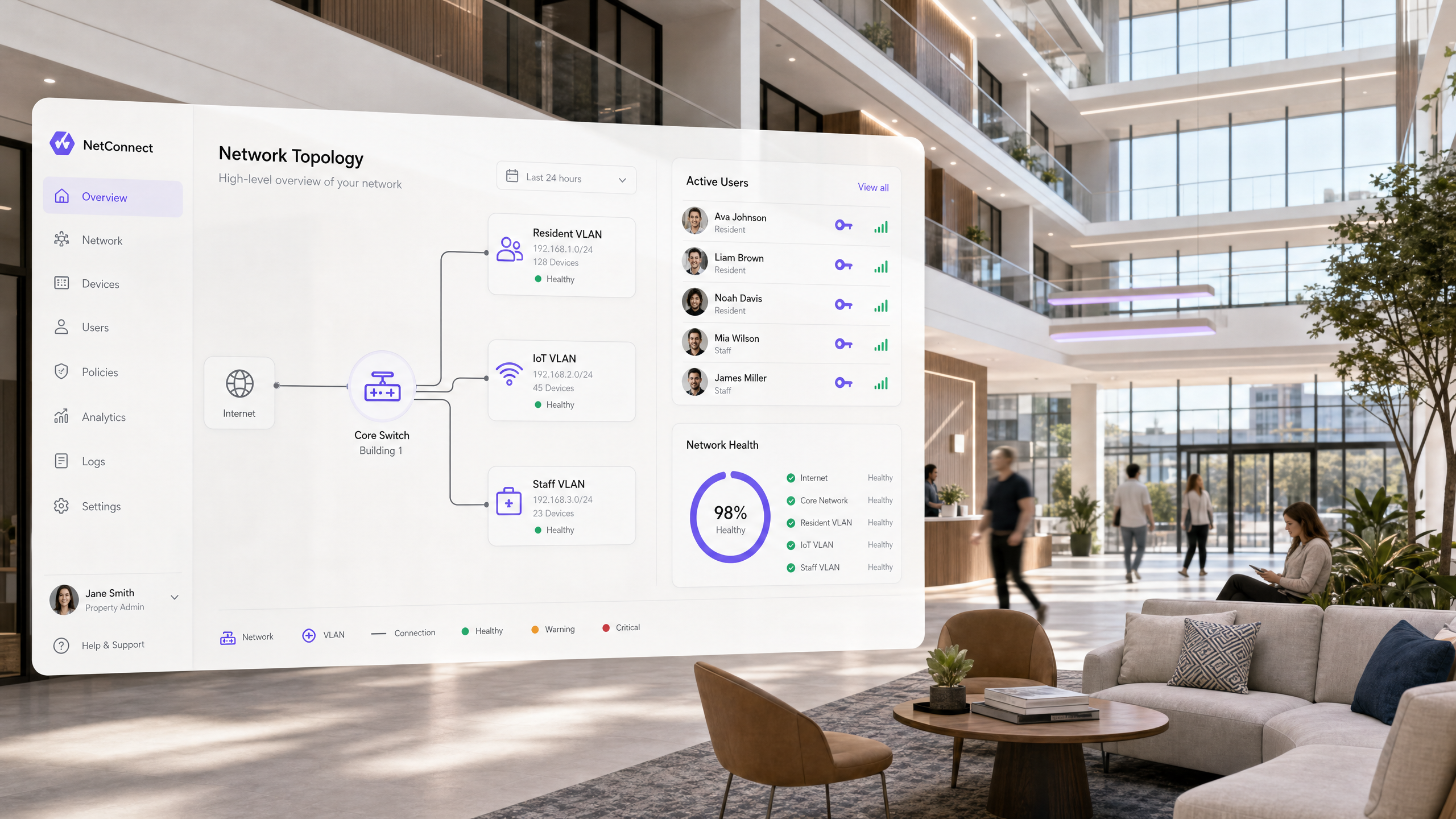
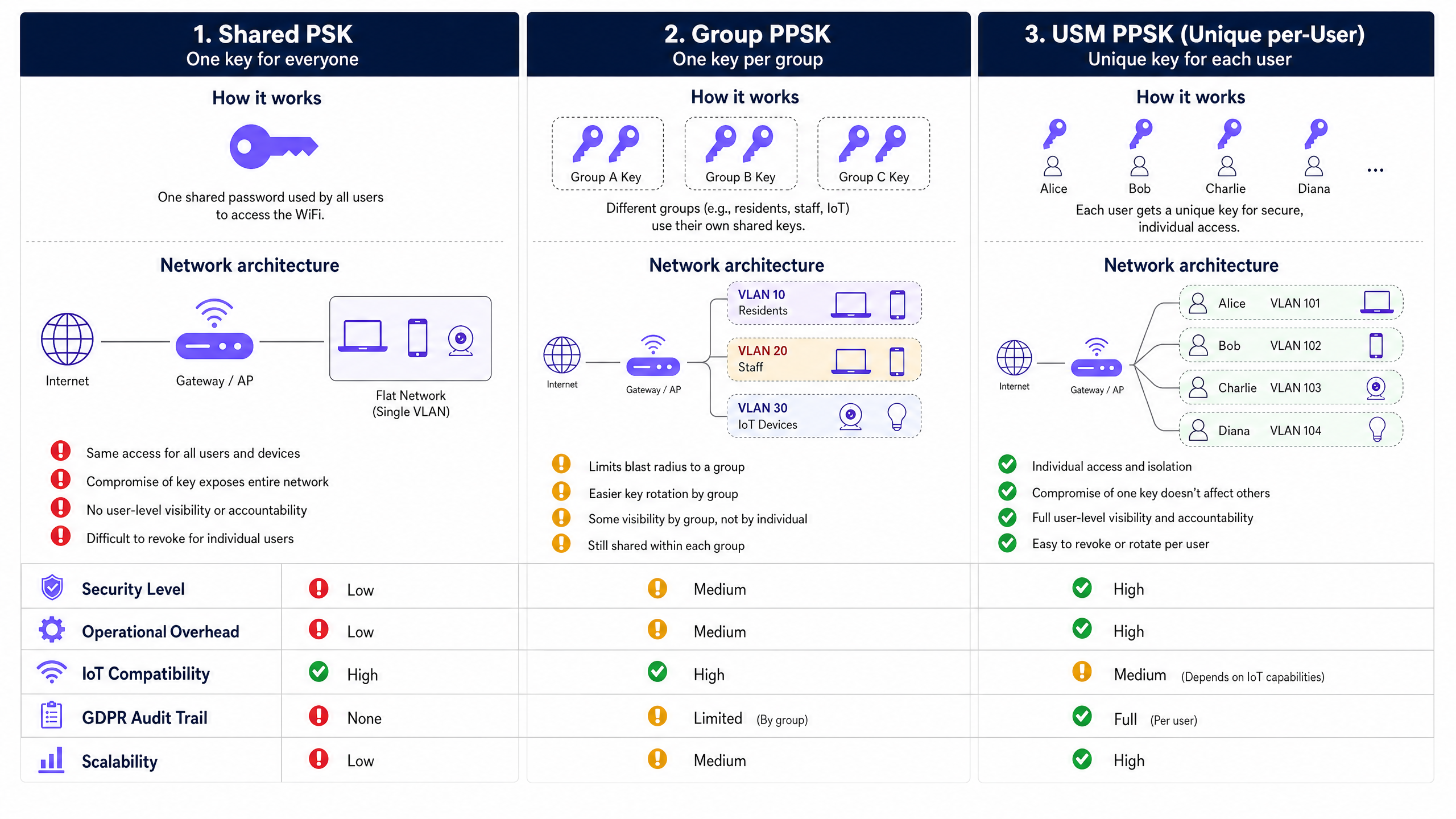
Deploying WiFi in multi-tenant environments requires balancing enterprise security with residential simplicity. A standard shared password creates an unacceptable security liability, while 802.1X enterprise authentication breaks compatibility with smart home devices. USM PPSK (Unified Security Model Private Pre-Shared Key) resolves this tension. It assigns a cryptographically unique WiFi key to each resident, dynamically steering their devices into isolated VLANs. This approach delivers a private, home-like network experience across shared physical infrastructure. For property developers and build-to-rent operators, USM PPSK automates credential lifecycles, contains the blast radius of compromised keys, and provides the audit trails necessary for GDPR compliance. Purple's platform integrates this capability directly with property management systems, eliminating manual IT overhead.
Listen to the companion podcast for this guide:
Technical Deep-Dive
The Authentication Architecture
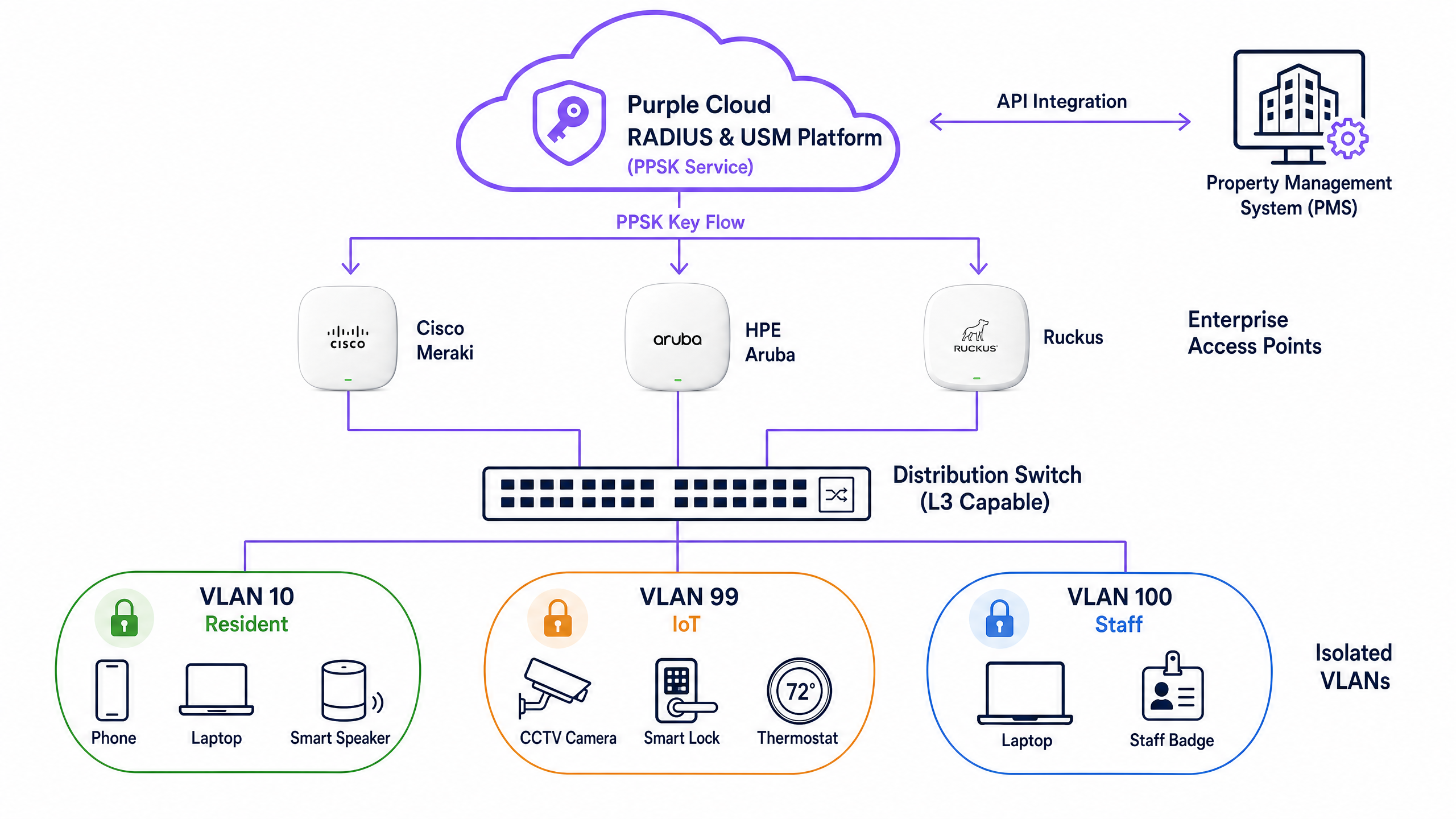
When a device connects to a USM PPSK network, the process operates at the WPA2-Personal layer, requiring no certificates or 802.1X supplicants. The wireless controller intercepts the association request and forwards the device MAC address to the cloud RADIUS server. The RADIUS server validates the identity and returns an Access-Accept response containing the specific pre-shared key assigned to that resident, alongside their designated VLAN tag.
The access point then validates the key presented by the device. If successful, the device is authenticated and placed directly into the resident's isolated network segment. This architecture allows a single SSID to support hundreds of private networks, eliminating the RF congestion caused by broadcasting multiple SSIDs.
Vendor Implementations
The underlying mechanism is identical across the industry, though vendors use different terminology. Cisco Meraki implements this as iPSK (Identity PSK). HPE Aruba calls it MPSK (Multi-PSK). Ruckus uses DPSK (Dynamic PSK). Juniper Mist refers to it as ePSK. All these platforms support the core requirement: mapping unique keys to specific VLANs via RADIUS attributes. Purple acts as the hardware-agnostic USM layer, orchestrating these keys across any compatible infrastructure.
Implementation Guide
Step 1: Define the Logical Architecture
Begin by mapping your network segments before configuring hardware. A standard build-to-rent deployment requires distinct VLANs for residents, IoT devices, staff, and guests. Assign a dedicated VLAN per apartment to ensure isolation. Use RFC 1918 private IP addressing with sufficient subnet sizes - a /24 subnet provides 254 usable addresses, which accommodates the 15 to 25 devices typical of modern households.
Step 2: Configure the Controller
Integrate your wireless controller with the Purple cloud RADIUS platform. Configure a single WPA2-Personal SSID across the building. Enable MAC-based authentication on this SSID, pointing to the Purple RADIUS servers. Ensure your distribution switches are configured with the necessary 802.1Q trunk ports to carry the resident VLANs back to the core routing infrastructure.
Step 3: Automate the Key Lifecycle
Connect the USM platform to your property management system via API. When a new tenancy agreement is signed, the API triggers the generation of a unique PPSK. The key is automatically emailed to the resident. When the tenancy ends, the API revokes the key instantly. This integration is the difference between a scalable service and an administrative burden.
Best Practices
Account for MAC Randomisation. Modern operating systems randomise MAC addresses by default. Implement a pre-registration workflow for devices, or use a captive portal onboarding process that instructs residents to disable private addressing for the building network.
Enforce Device Limits. Configure the controller to limit the number of concurrent devices per key - typically six to eight. This prevents a single compromised key from being used across the entire building.
Isolate High-Risk IoT. While residents want their smart speakers on their personal VLAN, building management systems (CCTV, HVAC controllers, smart locks) must sit on a dedicated IoT VLAN with strict egress filtering.
Troubleshooting & Risk Mitigation
Dropped Traffic on Valid Authentication
If a device authenticates successfully but fails to receive an IP address, the failure point is almost always trunk port configuration. Verify that the dynamically assigned VLAN is permitted on the switch ports connecting your access points to the distribution layer.
WPA3 Compatibility Issues
Deploying pure WPA3-SAE with PPSK can cause connection failures for older IoT devices. Configure the SSID in WPA2/WPA3 transition mode to support legacy hardware while providing enhanced encryption for modern devices. Note that some vendor implementations currently restrict PPSK to WPA2.
ROI & Business Impact
Deploying USM PPSK fundamentally changes the economics of multi-tenant WiFi. Operators moving from a shared PSK model typically report a 70% reduction in support tickets related to device onboarding and password rotation. Furthermore, the ability to provide secure, isolated networks allows operators to bundle premium WiFi into the rent, transforming an IT cost centre into a yield-generating amenity. The automated key lifecycle eliminates the IT labour previously required for move-in and move-out events.
Key Definitions
USM (Unified Security Model)
The management layer that handles key generation, distribution, and revocation across wireless infrastructure.
Provides the automation and audit trails necessary to operate PPSK at scale in enterprise environments.
PPSK (Private Pre-Shared Key)
An authentication method where individual users or devices are assigned unique passwords for a single SSID.
Replaces the insecure shared password model while maintaining compatibility with devices that lack 802.1X support.
VLAN Steering
The process of dynamically assigning a device to a specific network segment based on its authentication credentials.
Crucial for isolating resident traffic in multi-tenant buildings without broadcasting multiple SSIDs.
MAC Randomisation
A privacy feature in modern operating systems that generates a temporary MAC address for new network connections.
Can break PPSK implementations that rely on static MAC address lookups unless pre-registration workflows are used.
802.1X
The IEEE standard for port-based network access control, requiring a RADIUS server and client supplicant.
The standard for corporate networks, but generally unsuitable for residential WiFi due to lack of IoT device support.
mDNS (Multicast DNS)
A protocol used by smart devices to discover services on a local network without a DNS server.
Must be permitted within resident VLANs to allow casting and smart home pairing.
RADIUS
A networking protocol that provides centralised authentication, authorisation, and accounting.
The backend database that stores the unique keys and VLAN assignments in a USM PPSK architecture.
WPA3-SAE
The modern WiFi security standard that replaces pre-shared keys with Simultaneous Authentication of Equals.
Provides stronger encryption but requires transition mode configuration to support older IoT devices on PPSK networks.
Worked Examples
A 250-unit build-to-rent development currently uses a single shared password. The operator spends two weeks managing support tickets every time the password is rotated. They need to secure the network while supporting resident smart devices.
Deploy USM PPSK integrated with the property management system. Configure a single building-wide SSID. Assign a unique VLAN to each apartment. When a resident moves in, the API generates a unique key and emails it to them. All their devices connect using this key and land in their private VLAN. When they move out, the key is revoked automatically.
A 400-bed student accommodation block experiences severe network degradation during move-in week as 400 students attempt to connect multiple devices simultaneously.
Implement USM PPSK with keys generated prior to arrival. Send the unique keys to students via their pre-arrival welcome packs. Configure the network to map each key to a specific room VLAN. Ensure DHCP scopes are sized appropriately (e.g., /24 per floor or block) to handle the IP address requests.
Practice Questions
Q1. A build-to-rent operator wants to deploy WiFi across 300 apartments using Ubiquiti UniFi hardware. They plan to use the controller's local PPSK feature. What is the primary risk?
Hint: Consider the operational overhead of move-in and move-out events.
View model answer
Controller-local PPSK lacks the API integration necessary for automated key lifecycle management. Managing keys manually for 300 apartments will create significant IT overhead. They should use a RADIUS-backed USM platform integrated with their property management system.
Q2. After deploying USM PPSK, residents report that their smartphones connect successfully, but their smart TVs fail to obtain an IP address. What is the most likely cause?
Hint: Think about the network path between the access point and the DHCP server.
View model answer
The distribution switch ports connecting the access points are likely missing the required 802.1Q VLAN tags. The access point authenticates the TV and assigns it to the correct VLAN, but the switch drops the traffic because that VLAN is not permitted on the trunk port.
Q3. You are designing the network for a coworking space that requires strict audit trails for corporate laptops, but also needs to support wireless printers and casting devices. How should you architect the authentication?
Hint: Different device types require different authentication methods.
View model answer
Deploy a hybrid architecture. Use 802.1X for the corporate laptops to provide cryptographic identity verification. Use USM PPSK on a separate IoT VLAN for the printers and casting devices that do not support 802.1X supplicants.
Continue reading in this series
Uu PPSK pdf: comparing features and deployment models
This technical reference guide compares Private Pre-Shared Key (PPSK) WiFi architecture against traditional 802.1X and standard PSK deployments. It provides network architects and IT managers with vendor-neutral implementation strategies for multi-tenant residential, IoT, and BTR environments.
Uu PPSK pdf: comparing features and deployment models
This technical reference guide compares Private Pre-Shared Key (PPSK) WiFi architecture against traditional 802.1X and standard PSK deployments. It provides network architects and IT managers with vendor-neutral implementation strategies for multi-tenant residential, IoT, and BTR environments.
Uu PPSK 2023: comparing features and deployment models
This technical reference guide compares Unique per-User Private Pre-Shared Key (UU PPSK) WiFi architecture against traditional shared PSK and 802.1X deployments, with a specific focus on the 2023 landscape of vendor implementations and platform capabilities. It provides property developers, BTR operators, and MDU landlords with actionable deployment strategies, VLAN architecture guidance, and automated lifecycle management workflows. The guide covers three deployment models, real-world case studies, and the compliance implications of each authentication approach.