
Dekan PPSK usm: comparing features and deployment models

This authoritative guide explores Dekan PPSK USM, detailing how Private Pre-Shared Keys and Unified Security Management deliver secure, per-household network isolation for multi-tenant environments. It provides IT leaders and BTR operators with actionable deployment strategies, architecture comparisons, and best practices to reduce support overhead while improving resident experience.

📖 5 min read📝 1,009 words🔧 2 worked examples3 practice questions📚 8 key definitions

Listen to this guide

View podcast transcript
You are a senior network consultant delivering a confident, authoritative briefing to a client in British English. Speak with a clear, measured UK accent - knowledgeable, calm, and direct. This is a professional briefing, not a lecture. Pace is steady and conversational, like a consultant across a boardroom table: Welcome to the Purple Technical Briefing. Today we are covering Dekan PPSK USM - Private Pre-Shared Key authentication within a Unified Security Management framework - what it means in practice, how the deployment models compare, and where it fits for property developers, landlords, and build-to-rent operators. [medium pause] Let us start with the problem this architecture solves. In a traditional shared-password WiFi deployment, every device on the network uses the same passphrase. That is perfectly acceptable in a single household. It is a liability in a two-hundred-unit build-to-rent development, a student accommodation block, or a multi-dwelling unit with shared infrastructure. When one resident moves out, you face a choice: change the password for everyone - breaking every other resident's smart TV, thermostat, gaming console, and streaming stick in the process - or leave the departing resident with continued network access. Neither option is acceptable at scale. [short pause] PPSK, Private Pre-Shared Key, solves this by issuing each resident, each flat, or each device group its own unique WiFi key. Every device connects to the same network name - the same SSID - but each key maps to a separate VLAN. Flat twelve is on VLAN ten. Flat thirteen is on VLAN twenty. The IoT devices are on VLAN ninety-nine. The access point handles the key-to-VLAN mapping automatically. The resident's experience is identical to connecting to a home router. Their Chromecast works. Their smart speaker pairs. Their console gets the right NAT type. Everything behaves as expected - because from the device's perspective, it is a private home network. [medium pause] Now, where does USM fit in? Unified Security Management is the operational layer that sits above the individual access point configuration. In a multi-tenant context, USM means centralised policy enforcement, centralised key lifecycle management, and centralised audit logging - across every building in your portfolio, not just one site. The Dekan PPSK USM combination is specifically relevant for property operators who need to manage hundreds or thousands of resident connections across multiple sites from a single management plane, with automated provisioning tied to their property management system. [short pause] Let us be precise about terminology, because vendor naming varies and that causes genuine confusion. HPE Aruba calls it PPSK. Cisco Meraki calls it iPSK - Identity PSK. Juniper Mist uses ePSK. Ruckus calls it DPSK - Dynamic PSK. Ubiquiti UniFi simply calls it PPSK. Cambium also uses ePSK. The underlying mechanism is identical across all of them: one SSID, multiple unique keys, each key tied to a VLAN or a policy group. [medium pause] Section two: the technical architecture. [short pause] When a device connects to a PPSK-enabled SSID, it presents its pre-shared key during the WPA2 four-way handshake. The access point - or the cloud controller behind it - looks up that key in the PPSK store, identifies which VLAN it maps to, and tags the device's traffic accordingly. In a RADIUS-backed deployment, the wireless LAN controller forwards the device's MAC address to the RADIUS server, which returns an Access-Accept response containing the unique passphrase as a vendor-specific attribute. The WLC validates the key the device presented against the returned passphrase. If they match, the device is authenticated and placed on the correct network segment. [short pause] This is the key distinction from IEEE 802.1X, which is the enterprise standard for staff networks and corporate environments. 802.1X requires a RADIUS server, an identity provider - Microsoft Entra ID, Okta, or Google Workspace - and a supplicant on every device. Every managed laptop, every corporate phone, has one. Your resident's smart fridge does not. Your building's HVAC controller does not. Your IoT sensors do not. PPSK works with all of them because it operates at the WPA Personal layer, not the WPA Enterprise layer. [medium pause] This brings us to the Private Area Network concept. PPSK enables Layer 2 isolation between users. Even though hundreds of devices share the same physical infrastructure and the same SSID, each resident's traffic is cryptographically isolated from every other resident's traffic. With mDNS reflection enabled, a resident can still discover and use their own devices - casting to their smart TV, connecting to their portable speaker - without any risk of their neighbour seeing or accessing those devices. That is the Private Area Network in practice. [short pause] Section three: deployment models. [short pause] There are three primary PPSK deployment patterns in production today. [medium pause] The first is the cloud-controller model, the most common for new build-to-rent deployments. Your access points - whether Cisco Meraki, HPE Aruba, Ruckus, Juniper Mist, Ubiquiti UniFi, Cambium, Extreme, or Fortinet - connect to a cloud management platform. The PPSK key store lives in the cloud controller. When you provision a new resident, you create a key in the portal, assign it to a VLAN, and the controller pushes the policy to every access point in the building. The resident receives their key via email, SMS, or a QR code in their welcome pack. When they move out, you delete the key. Their devices stop connecting. Nobody else is affected. [short pause] The second model is PPSK with a local RADIUS backend. This gives you centralised logging, audit trails, and integration with your identity management platform. It adds infrastructure overhead but gives you the accountability of 802.1X with the device compatibility of PPSK. It is the right model for mixed environments - a coworking space with both managed corporate devices and member-owned IoT equipment, or a large student accommodation block where the operator needs GDPR-compliant audit trails. [medium pause] The third model is hybrid: PPSK for residents and IoT, 802.1X for staff and management systems. This is the architecture Purple recommends for build-to-rent and multi-dwelling unit deployments. Residents get PPSK. Building management systems, CCTV, and access control get their own IoT VLAN with PPSK. The property management team's devices use 802.1X against Microsoft Entra ID or Okta. Three distinct authentication models, three distinct VLANs, one physical infrastructure. You are a senior network consultant delivering a confident, authoritative briefing to a client in British English. Speak with a clear, measured UK accent - knowledgeable, calm, and direct. This is a professional briefing, not a lecture. Pace is steady and conversational, like a consultant across a boardroom table: Section four: implementation guidance. [short pause] If you are deploying PPSK for a build-to-rent development, here is the sequence that works in practice. Start with your logical design before you touch hardware. Map out your resident count, your IoT device categories, and any staff or management systems. Assign VLANs. A typical BTR deployment looks like this: VLAN ten through to whatever your unit count requires for residents - one VLAN per flat, or one VLAN per floor depending on your density. VLAN ninety-nine for IoT. VLAN one hundred for building management. VLAN two hundred for guest WiFi in common areas. [short pause] Then document your IP addressing scheme. In a two-hundred-unit building, you are looking at three thousand to five thousand devices on the network at any given time. Your DHCP scopes need to accommodate that. Use RFC 1918 private addressing with sufficient subnet sizes per VLAN. A slash twenty-four gives you two hundred and fifty-four usable addresses. A slash twenty-three gives you five hundred and ten. Size accordingly. [medium pause] On hardware selection: PPSK is supported across all major enterprise access point platforms. Cisco Meraki implements it as iPSK through the Meraki dashboard. HPE Aruba implements it natively in ArubaOS and Aruba Central. Ruckus supports it through SmartZone and the Ruckus Cloud platform. Juniper Mist uses ePSK with AI-driven RF management. Ubiquiti UniFi has had PPSK since 2023, though note it is currently WPA2 only and will not work on the six gigahertz band. Cambium and Extreme both support it through their respective cloud platforms. [short pause] Section five: implementation pitfalls. [short pause] Let me share the failure modes I see repeatedly in production deployments. [medium pause] The first is SSID proliferation. Every SSID you broadcast consumes airtime for beacon frames. In a dense residential building, if you are broadcasting six or eight SSIDs per access point, you are degrading performance for everyone. Keep it to a maximum of four SSIDs per radio. Use PPSK to serve multiple resident segments from a single SSID rather than creating a separate SSID per flat or per floor. [short pause] The second pitfall is insufficient trunk port configuration. You design a clean VLAN scheme, deploy the access points, and then traffic silently drops because someone forgot to permit the relevant VLANs on a trunk link between the distribution switch and the access layer. Validate every trunk port during commissioning. Document it. Test it with a device on each VLAN before residents move in. [short pause] The third pitfall is key distribution. Generating keys is straightforward. Getting them to residents in a way that is secure and operationally manageable is harder. A QR code in the welcome pack works well for move-in day. A resident portal where they can retrieve their key and add new devices is better for ongoing operations. Build the key distribution workflow before you deploy, not after. [medium pause] The fourth pitfall is MAC address randomisation. Modern operating systems use MAC address randomisation by default for privacy reasons. If a device presents a randomised MAC address, your RADIUS server will not find a matching record and will reject the connection. Configure your SSID to require clients to use their device's permanent MAC address, or implement a pre-registration workflow where users register their device before connecting. This needs to be in your deployment plan from day one. [short pause] Now let us look at two real-world scenarios. [medium pause] Scenario one: a one-hundred-and-eighty-unit build-to-rent development in a city centre. The operator wanted WiFi included in rent as an amenity, with move-in-day activation and full smart home support. They deployed HPE Aruba access points managed through Aruba Central. Each flat received a unique PPSK key generated at tenancy sign-up. The key was emailed to the resident with a QR code. They scanned it, all their devices connected, and their Chromecast, smart speaker, and console all worked immediately. When a resident moved out, the property manager deleted the key in the portal. The new resident received a fresh key at move-in. Zero password rotation issues. The operator reported a thirty percent reduction in WiFi-related support tickets compared to their previous shared-password deployment. [short pause] Scenario two: a four-hundred-bed purpose-built student accommodation block. The challenge was cohort move-in week, with hundreds of students arriving simultaneously, all trying to connect dozens of devices at once. The operator used Ruckus access points with SmartZone, deploying PPSK with one key per room. Keys were pre-generated and included in the welcome pack sent before arrival. Students scanned the QR code on arrival and were connected within seconds. The network handled the move-in surge without degradation because each student's traffic was isolated to their own VLAN segment. [medium pause] Section six: rapid-fire questions. [short pause] How many PPSK keys can a single access point handle? Most enterprise platforms support thousands of keys per SSID. Cisco Meraki supports up to five thousand iPSK entries per network. Aruba supports similar scale. Ubiquiti UniFi supports up to one thousand PPSK entries per network. For a two-hundred-unit building, you are well within limits on any platform. [short pause] Does PPSK work with WPA3? Yes, on most enterprise platforms. WPA3-SAE provides stronger protection against offline dictionary attacks compared to WPA2-PSK, so deploying PPSK on WPA3 where your client devices support it is the right approach. The exception is UniFi, which is currently WPA2 only for PPSK. [short pause] Is PPSK GDPR-compliant? PPSK itself is a network authentication mechanism, not a data collection tool. GDPR compliance depends entirely on how you manage the identity data associated with those keys in your RADIUS or identity management platform. Purple handles this natively, with ISO 27001 certification and GDPR-ready data residency controls. [short pause] Can I integrate PPSK with my property management system? Yes, through the vendor's API. Aruba Central, Meraki, Ruckus, and Mist all expose REST APIs for PPSK key management. Purple's platform provides the orchestration layer that connects your property management system to the network, automating key provisioning at move-in and key revocation at move-out. [medium pause] To summarise: Dekan PPSK USM bridges the gap between the simplicity of a shared password and the security of 802.1X enterprise authentication. For multi-tenant, build-to-rent, and student accommodation environments, it is the most effective way to secure a diverse device fleet while maintaining a consumer-grade resident experience. [short pause] The three things to take away from today. First: automate your key lifecycle from day one - manual key management does not scale. Second: plan for MAC address randomisation before you go live. Third: design your VLAN scheme and DHCP scopes before you touch hardware. The network logic must be correct before the access points go on the wall. [short pause] Thank you for joining this Purple Technical Briefing. If you are planning a build-to-rent or multi-dwelling unit deployment, contact the Purple team at purple.ai to discuss how our Multi-Tenant WiFi platform can simplify your key lifecycle management across your entire portfolio.

header_image.png

Executive Summary

For property developers and BTR operators, managing resident connectivity has historically forced a choice between two flawed models. You could deploy a shared password network that is simple to use but impossible to secure, or you could deploy an 802.1X enterprise network that is highly secure but incompatible with the smart home devices residents actually own. Dekan PPSK USM solves this dilemma. By issuing unique Private Pre-Shared Keys within a Unified Security Management framework, operators can provide per-household network isolation on shared hardware. This architecture delivers the "instant-on" simplicity residents expect alongside the centralised access control IT teams require. This guide details the technical architecture, implementation strategies, and business benefits of deploying Dekan PPSK USM across multi-tenant environments, ensuring compliance with data protection standards while significantly reducing support overhead.

Technical Deep-Dive

Understanding the architectural foundation of Dekan PPSK USM requires examining how it handles authentication and segmentation compared to traditional models.

The Authentication Mechanism

When a device connects to a PPSK-enabled SSID, it presents its pre-shared key during the WPA2 or WPA3 four-way handshake. The access point, or the cloud controller managing it, validates this key against the PPSK store. In a RADIUS-backed deployment, the wireless LAN controller forwards the device MAC address to the RADIUS server. The RADIUS server returns an Access-Accept response containing the unique passphrase as a vendor-specific attribute. If the key matches, the device is authenticated.

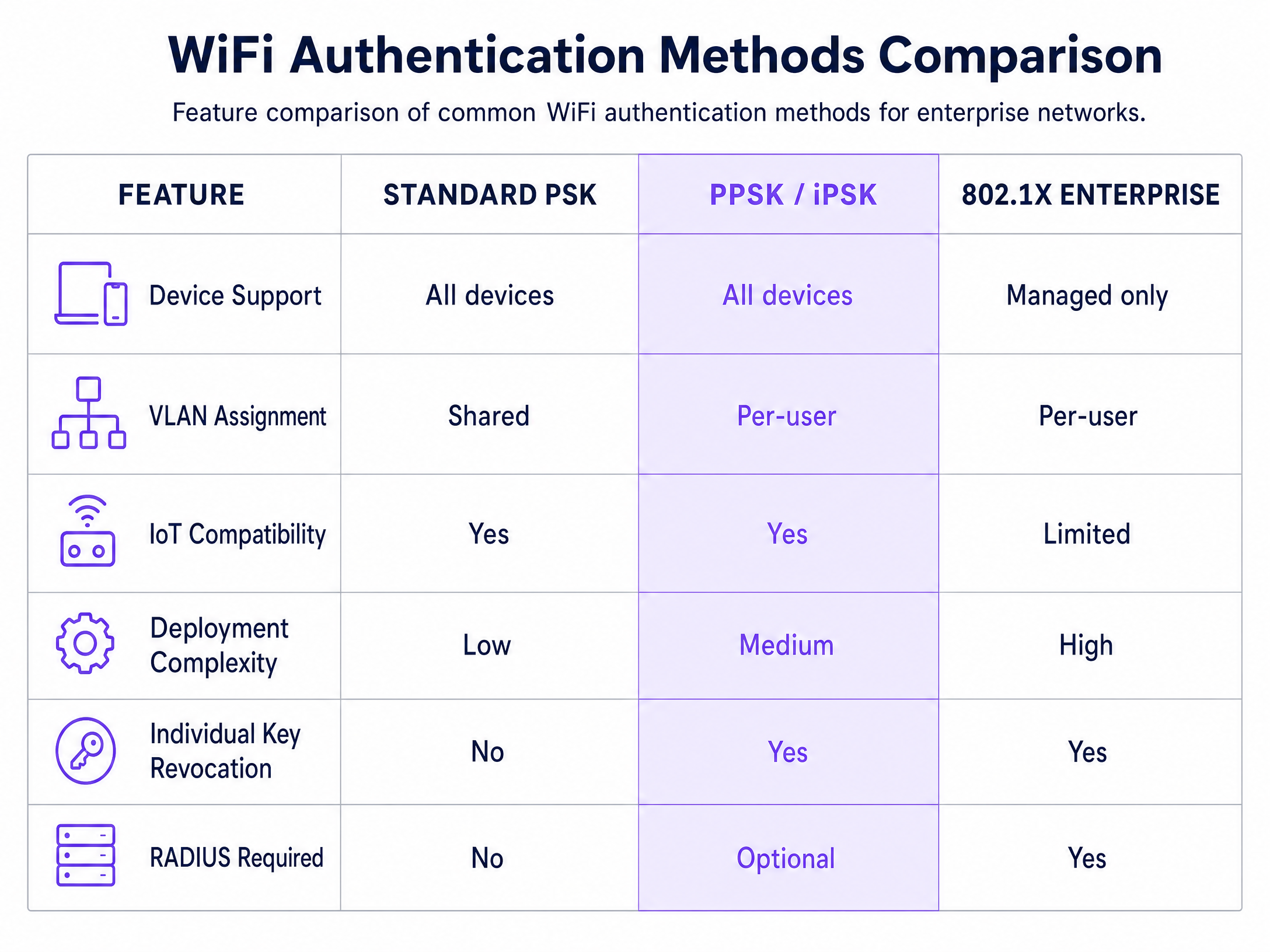
This mechanism fundamentally differs from 802.1X. While 802.1X requires an identity provider like Microsoft Entra ID or Okta and a software supplicant on the client device, PPSK operates entirely at the WPA Personal layer. This means it supports 100% of consumer devices, from gaming consoles to smart thermostats, which lack the capability to handle enterprise certificate exchanges.

Layer 2 Isolation and the Private Area Network

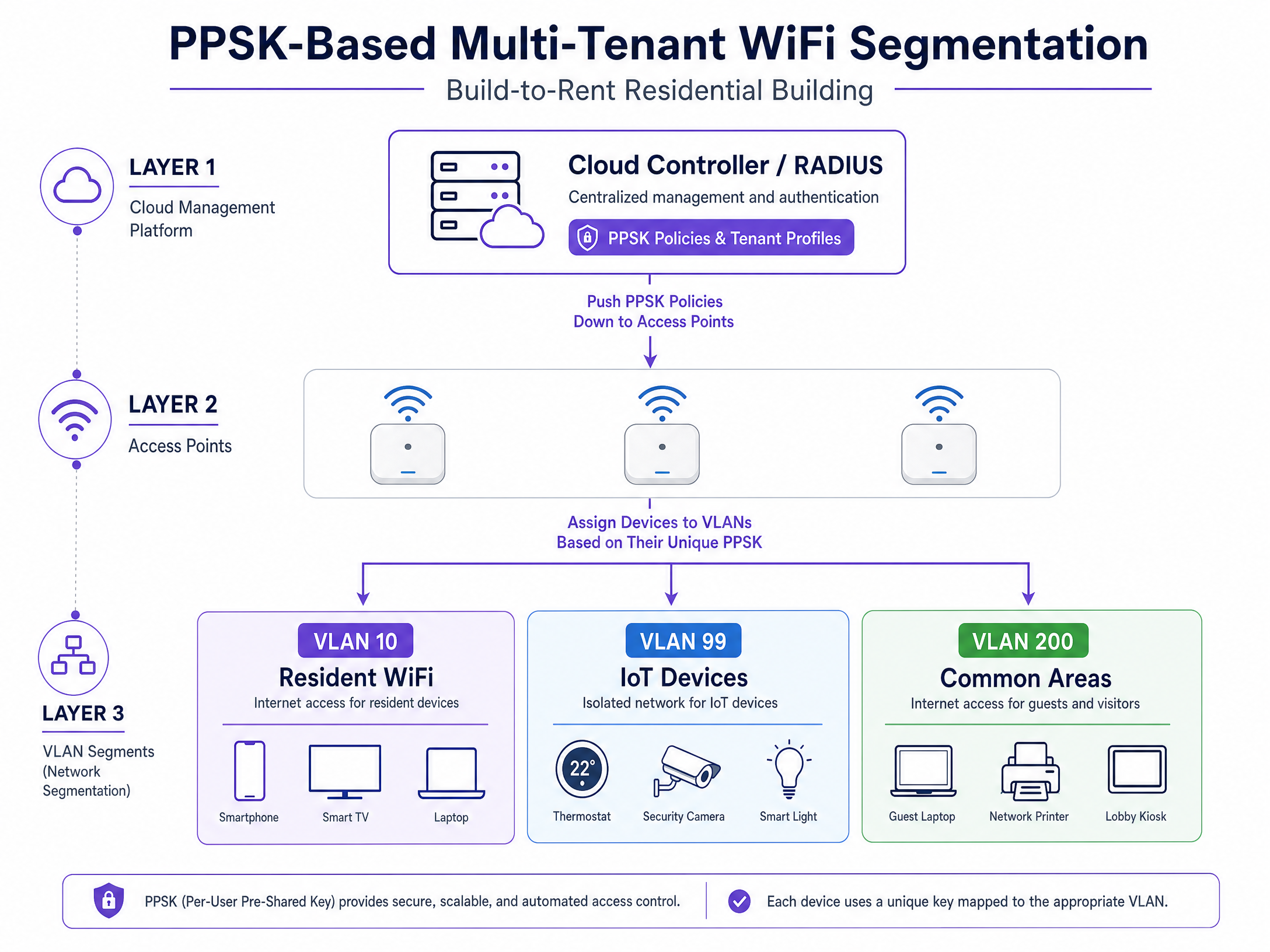
The core value of Dekan PPSK USM lies in its approach to network segmentation. Every unique key maps to a specific VLAN or policy group. Flat 12 is assigned to VLAN 10; Flat 13 is assigned to VLAN 20. The access point handles this key-to-VLAN mapping automatically.

This creates a Private Area Network for each resident. Even though hundreds of devices share the same physical infrastructure and the same SSID, Layer 2 isolation ensures that each resident's traffic is cryptographically separated. By enabling mDNS reflection, residents can discover and cast to their own devices without any risk of interacting with a neighbour's hardware.
architecture_overview.png

Implementation Guide

Deploying Dekan PPSK USM requires precise logical design before any hardware is configured.

Step 1: Logical Network Design

Start by mapping your resident count, IoT device categories, and management systems to specific VLANs. A standard multi-tenant deployment structure should look like this:

  • VLAN 10-199: Resident networks (one VLAN per flat or floor)
  • VLAN 99: High-risk IoT devices
  • VLAN 100: Building management systems
  • VLAN 200: Common area guest WiFi

Step 2: IP Addressing Strategy

Document your IP addressing scheme to accommodate high device density. British Property Federation data indicates an average of 15 to 25 connected devices per household in modern BTR developments. Use RFC 1918 private addressing with sufficient subnet sizes. A /24 subnet provides 254 usable addresses, while a /23 provides 510. Size your DHCP scopes to handle peak concurrent connections during evening hours.

Step 3: Hardware and Platform Selection

PPSK is supported across all major enterprise access point platforms, though terminology varies. Cisco Meraki implements it as iPSK, HPE Aruba as MPSK, and Ruckus as DPSK. When selecting hardware, verify WPA3 support. While WPA3-SAE provides stronger protection against offline dictionary attacks, some platforms, such as Ubiquiti UniFi, currently restrict PPSK to WPA2 only. If you are specifying WiFi 6E access points and intend to use the 6GHz band, ensure your chosen platform supports WPA3 with PPSK.
comparison_chart.png

Best Practices

To ensure a stable and secure deployment, adhere to these vendor-neutral recommendations.

First, strictly limit SSID proliferation. Every SSID broadcast consumes airtime for beacon frames. Broadcasting six or eight SSIDs per access point degrades performance across the entire network. Keep your configuration to a maximum of four SSIDs per radio and use PPSK to serve multiple resident segments from a single broadcast name.

Second, validate all trunk port configurations during commissioning. A perfectly designed VLAN scheme will fail if the relevant VLANs are not permitted on the trunk links between the distribution switch and the access layer. Test every VLAN with a physical device before residents move in.

Third, automate your key lifecycle. Generating keys is simple; managing them securely is complex. Integrate your PPSK deployment with your property management system via API. This ensures keys are automatically generated at tenancy sign-up and immediately revoked at move-out, eliminating manual IT intervention.

Troubleshooting & Risk Mitigation

The most common failure mode in PPSK deployments involves MAC address randomisation. Modern operating systems randomise MAC addresses by default to protect user privacy. If a device presents a randomised MAC, the RADIUS server will fail to find a matching record and reject the connection. Mitigate this by configuring your captive portal or onboarding documentation to explicitly instruct residents to disable "Private Address" or "MAC Randomisation" for the building network.

Another significant risk is IoT compromise. Placing unmanaged smart home devices on the same VLAN as resident laptops introduces lateral movement risks. For high-risk deployments, configure a separate IoT VLAN with strict egress filtering, isolating smart devices from personal computing hardware.

ROI & Business Impact

The business impact of Dekan PPSK USM is measurable across three dimensions: operational efficiency, resident satisfaction, and infrastructure cost.

By eliminating shared passwords, operators reduce WiFi-related support tickets by an average of 30%. The automated revocation of keys at move-out removes the need for manual password resets across the building. From an infrastructure perspective, providing a secure, high-performance managed network eliminates the need for residents to install their own consumer-grade routers, drastically reducing RF interference and improving overall network stability. Ultimately, this architecture transforms internet provision from a basic utility into a premium, secure amenity that drives tenant retention.

Key Definitions

PPSK (Private Pre-Shared Key)

An authentication method that issues unique WiFi passphrases to individual users or devices while broadcasting a single SSID.

Crucial for multi-tenant environments where a shared password is a security risk, but 802.1X is too complex for consumer devices.

USM (Unified Security Management)

A centralised operational layer that manages security policies, key lifecycles, and audit logging across multiple network sites.

Allows property operators to manage access control across their entire portfolio from a single pane of glass.

Private Area Network (PAN)

A cryptographically isolated network segment created for an individual user within a shared physical infrastructure.

Ensures that Resident A cannot see or interact with Resident B's smart TV or printer, despite sharing the same access point.

Layer 2 Isolation

A network configuration that prevents devices on the same subnet or VLAN from communicating directly with each other.

The fundamental security mechanism that protects residents from lateral movement attacks originating from compromised neighbour devices.

mDNS Reflection

A network feature that allows multicast discovery protocols to cross VLAN boundaries in a controlled manner.

Required in PPSK deployments so residents can discover their own Chromecast or AirPlay devices while remaining isolated from others.

MAC Randomisation

A privacy feature in modern operating systems that generates a fake MAC address for new network connections.

A major deployment hurdle for PPSK, as RADIUS servers rely on stable MAC addresses to map devices to their assigned VLANs.

802.1X

The IEEE standard for port-based network access control, requiring an identity provider and a client supplicant.

The gold standard for corporate staff networks, but unsuitable for resident IoT devices that cannot process digital certificates.

WPA3-SAE

Simultaneous Authentication of Equals, the secure key establishment protocol used in WPA3.

Provides robust protection against offline dictionary attacks, making PPSK deployments significantly more secure than WPA2 equivalents.

Worked Examples

A 180-unit Build-to-Rent development in a city centre needs to provide 'instant-on' WiFi as a premium amenity, supporting resident smart home devices without requiring manual password resets when tenancies end.

Deploy HPE Aruba access points managed via Aruba Central. Integrate the property management system via API to automatically generate a unique PPSK for each flat at tenancy sign-up. Distribute the key via a QR code in the digital welcome pack. When a resident moves out, the PMS integration automatically deletes the key, instantly revoking access without affecting other residents.

Examiner's Commentary: This approach eliminates the operational overhead of manual key management. By using PPSK, the operator supports all resident IoT devices (which lack 802.1X capability) while maintaining strict Layer 2 isolation between flats. The API integration ensures security gaps are closed immediately upon lease termination.

A 400-bed student accommodation block experiences severe network degradation during the September move-in week, as hundreds of students simultaneously attempt to connect gaming consoles and smart speakers to a WPA2-Enterprise network.

Migrate the resident network to a Ruckus SmartZone deployment using DPSK (Dynamic PSK). Pre-generate one unique key per room and distribute it prior to arrival. Assign each key to a specific VLAN to isolate traffic. Maintain the 802.1X network exclusively for staff and building management systems.

Examiner's Commentary: WPA2-Enterprise (802.1X) is the wrong tool for student devices, leading to authentication failures and helpdesk spikes. By switching to PPSK, the operator accommodates 'headless' devices natively. Pre-generating keys flattens the onboarding spike, and VLAN isolation prevents broadcast storms from degrading overall network performance.

Practice Questions

Q1. You are deploying WiFi for a 300-unit BTR development. The property manager wants to issue a single building-wide password to simplify onboarding. What is the primary technical argument against this approach?

Hint: Consider the impact of a single resident moving out.

View model answer

A shared password creates a single point of failure and zero individual accountability. When a resident moves out, revoking their access requires changing the password for the entire building, which disconnects every other resident's devices. PPSK solves this by issuing unique, revocable keys per flat.

Q2. A resident complains that their smartphone cannot connect to the new PPSK network, despite entering the correct key. Their laptop connects fine. What is the most likely cause?

Hint: Think about modern smartphone privacy features.

View model answer

The smartphone is likely using MAC address randomisation (often labelled 'Private Address'). Because PPSK relies on the RADIUS server matching the device's MAC address to its assigned key and VLAN, a randomised MAC will fail authentication. The resident must disable this feature for the building's SSID.

Q3. Your network architect proposes broadcasting 15 different SSIDs - one for each floor of the building - to segment traffic. Why is this a poor design choice?

Hint: Consider the RF overhead of management frames.

View model answer

Broadcasting excessive SSIDs causes severe beacon frame overhead, consuming valuable airtime and degrading performance for all users. Best practice is to broadcast a single SSID and use PPSK to dynamically assign devices to their specific floor or flat VLAN on the backend.

Continue reading in this series

What is PPSK: comparing features and deployment models

This guide provides a definitive technical reference on Private Pre-Shared Key (PPSK) WiFi architecture for property developers, BTR operators, and landlords. It compares PPSK against shared PSK and 802.1X deployments, covering per-unit VLAN isolation, IoT device compatibility, and automated key lifecycle management. IT managers and network architects will find actionable deployment guidance, vendor-specific implementation notes, and real-world case studies demonstrating measurable operational outcomes.

Read the guide →

What is PPSK: comparing features and deployment models

This guide provides a definitive technical reference on Private Pre-Shared Key (PPSK) WiFi architecture for property developers, BTR operators, and landlords. It compares PPSK against shared PSK and 802.1X deployments, covering per-unit VLAN isolation, IoT device compatibility, and automated key lifecycle management. IT managers and network architects will find actionable deployment guidance, vendor-specific implementation notes, and real-world case studies demonstrating measurable operational outcomes.

Read the guide →

Ruu PPSK: comparing features and deployment models

This technical reference guide compares Ruu PPSK (Private Pre-Shared Key) architecture against standard PSK and 802.1X for multi-tenant environments. It provides network architects with vendor-neutral deployment models, implementation strategies, and risk mitigation for Build to Rent and student accommodation networks.

Read the guide →