A ward manager catches you at the end of a shift. Three relatives on the same corridor can't hold a video call, a patient's tablet keeps bouncing back to the login page, and someone has written "the WiFi is rubbish" on the whiteboard. The access points are up, the portal is live, and nothing on the dashboard looks broken.
That gap between connected and usable is where most hospital guest WiFi projects stall. The radio plan was signed off before anyone counted how many people sit in outpatients at ten in the morning. The login method was chosen by whoever had the template open. And the safety advice visitors need, whether they can bank or join a video appointment, never made it off the risk register and onto the splash screen.
Those three decisions belong together. Signal, identity and published expectations are one design, not a network build with a disclaimer bolted on afterwards. Here is how I'd sequence it, from the radio survey to the pilot ward, along with the trade-offs worth raising with a clinical governance group before the first access point goes live.
The national baseline is already set. By the end of March 2019 the NHS WiFi Programme had introduced free NHS WiFi in 98% of NHS trusts and reached more than 8,000 centres of patient care, giving over 63 million visiting patients access to free connectivity. Visitor access is no longer a side project on a spare VLAN. It's part of the estate.
Plan capacity and radio targets before buying hardware
Three numbers decide whether hospital guest WiFi holds up on a busy ward: primary signal, latency and channel load. Portal branding comes later, because none of it matters if the association drops when the bay fills up.
NHS England recommends a primary RSSI of at least -65 dBm across NHS settings, and describes acceptable latency as roughly 20 to 250 ms, noting that neither figure is definitive and both should be validated against the applications in use (NHS England guidance on assessing WiFi performance metrics). Read that as a floor rather than a specification. A reading of -65 dBm at the bedside proves the link will associate. It says nothing about whether forty people in the same bay can each hold a video call at eight in the evening.
Survey the building you actually have
Walk every floor with a survey tool before the purchase order goes out. Note what kills signal: lead-lined imaging rooms, bed partitions that move during a ward round, concrete service cores, the basement corridor where relatives wait for a taxi. Survey the outdoor approaches too, because that's where people stand at discharge trying to call a lift.
Band choice is a capacity decision, not a preference. NHS England identifies 2.4 GHz as the band for public guest and legacy devices, which need range more than throughput, and 5 GHz for capacity wherever clients and access points support it. Locking out 2.4 GHz punishes older handsets; running everything on 2.4 GHz hands your airtime to whoever has the loudest radio.
Plan for the peak, not the average. A network measured at 10am on a Tuesday flatters every design. The reading that matters is the one taken at seven in the evening on a visiting night.
Then measure what visitors do to the network: concurrent clients per access point, channel utilisation, packet loss, DHCP and DNS response, and the rate at which authentication completes. Load-test with video and messaging rather than a ping, and repeat the exercise after every ward move or building change, because a new piece of equipment or a rearranged bay redraws the coverage map.
| Metric | Target | Notes |
|---|---|---|
| Primary signal (RSSI) | -65 dBm or stronger | NHS England target across patient-facing areas |
| Latency | About 20 to 250 ms | Validate against video calls and messaging |
| Band for public and legacy devices | 2.4 GHz | Wider range, lower capacity |
| Band for capacity | 5 GHz | Use where clients and access points support it |
| Concurrent clients at peak | Count per access point during a live visiting hour, then design above it | Your visitor numbers, not a vendor figure |
| Channel utilisation | Investigate any sustained high reading taken during visiting hours | Quiet-period readings hide contention |
| Packet loss | Set your own threshold during load testing | Retest at peak, not overnight |
Every figure in that table is something you re-measure, not something you sign off once. If you're building the test plan from scratch, a guide to RF survey and channel planning covers the survey mechanics in more depth.
Choose the right login method for each area
The trade-off that catches teams out isn't encryption or cost. It's how many visitors never finish the login at all.
A shared password on a laminated sign looks cheap until you watch a queue of relatives type it one-thumbed onto a cracked screen. It carries no per-user identity and no per-device encryption, so it belongs at a one-day event rather than on a ward where someone might stay connected for six hours.
Email registration through a captive portal is the model most trusts landed on. Queen Victoria Hospital NHS Foundation Trust put free WiFi into wards, outpatient waiting areas, its café and restaurant in November 2014, with users registering an email address in exchange for a password, and streaming and music downloads restricted to protect capacity for everyone else (NHS England's transformation blog on connecting patients to digital services). Identity, terms and bandwidth control in a single flow. The technology has moved on; the pattern hasn't.
| Method | Setup effort | Encryption | Visitor identity | Best fit |
|---|---|---|---|---|
| Open network with terms page | Low | None | None beyond acceptance | Waiting areas with minimal data needs |
| Shared password on signage | Low | Shared key only | None per user | Short events, not wards |
| Captive portal with email | Medium | Open unless WPA2/WPA3 is applied | Email captured with consent | General visitor access |
| Passpoint (Hotspot 2.0) | High | WPA2/3-Enterprise | Account or profile | Repeat visitors and staff-issued devices |
| Branded app or account | Medium | Sets the protection level of the network it rides on | Account | Visitors who return often |
Where the portal fails, and who catches it
Some devices can't complete a captive portal at all. Older Android handsets, locked-down work laptops and e-readers will sit on the splash page and never resolve it, and no amount of portal tuning fixes a browser that refuses to open. That's a staffing question as much as a technical one. Someone on the ward needs a route to register a device, and the failure message needs a ward phone number rather than a generic error code.
Passpoint earns its place where the same people come back. After a one-time profile install the device joins automatically with enterprise-grade protection, which suits repeat outpatients and staff-issued tablets. It needs access points and a provisioning path that support it, and it's no substitute for the phone that can't take a profile.
Whatever method you pick, publish the limits where visitors will read them. Nottinghamshire Healthcare tells visitors that NHS WiFi may not be available in all areas and is unsuitable for TV streaming or phone and video calls (Nottinghamshire Healthcare free WiFi page). That's the honest version, and it beats a splash page promising a cinema experience.
Any email or account capture needs a clear consent step under UK GDPR, and the data should be kept only for the purpose you stated at the point of collection. Large-text, screen-reader-friendly login pages matter more here than on any commercial network. Splash-page structure and consent flows are covered in more detail in this captive portal design guide.
How to separate guest traffic from clinical systems
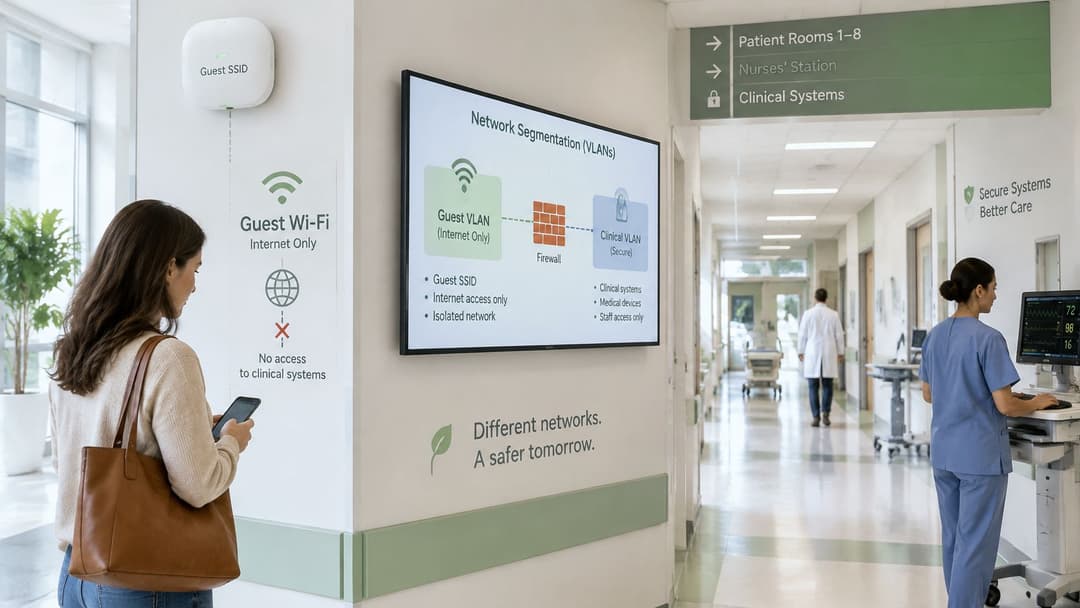
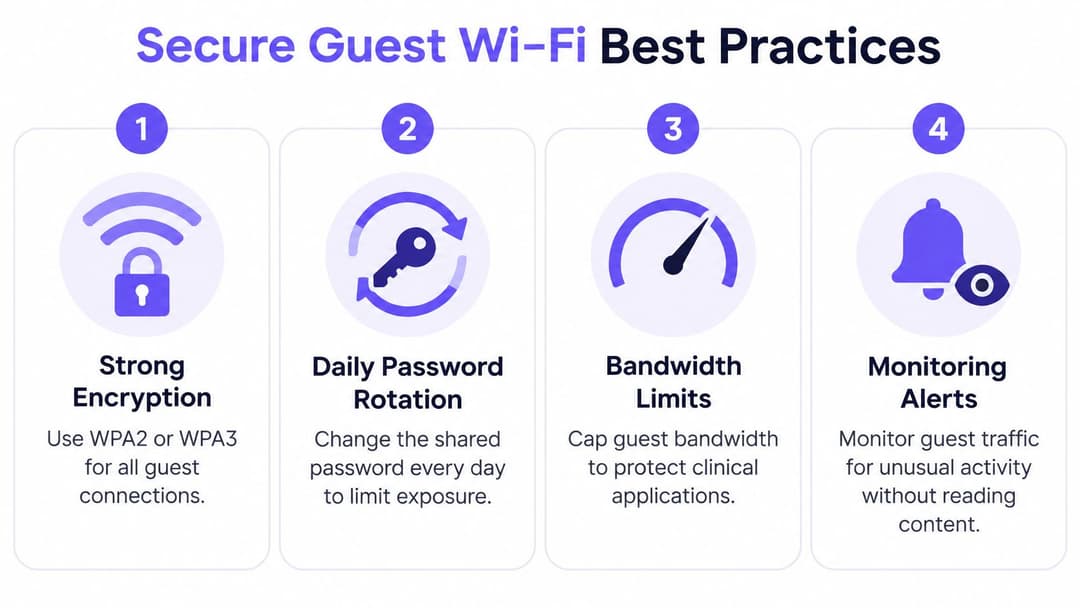
Treat guest access as an untrusted internet service that happens to live in your building. NHS England's setup guidance calls for documented local policies on content filtering, acceptable use, bring-your-own-device rules and capacity monitoring, plus an acceptable-use policy and blocking of illegal or inappropriate content. Network controls come first, because a policy document doesn't stop a compromised phone from sweeping a radiology subnet.
- Put guests on their own SSID, VLAN and firewall zone. A compromised visitor device should land in a dead end with no route anywhere interesting. The common slip is a guest VLAN shared with a meeting room or reception system because it was quicker to configure on the day.
- Deny lateral access to clinical, biomedical, management and printer subnets. No exceptions carved out for convenience. The usual crack in the wall is printer access granted so staff can print from personal phones, which opens a path to a print server sitting inside the management range.
- Permit only the outbound services guests need. That normally means web traffic plus DNS, with VPN and modern application requirements handled deliberately rather than assumed. A blanket allow-all outbound rule turns your guest VLAN into somebody else's attack platform.
- Filter, rate-limit, isolate and expire. DNS and content filtering, per-client rate limits, client isolation so visitors can't see each other, and a session expiry set to match your own governance policy rather than borrowed from another trust's settings. The guidance on setting up NHS WiFi asks for isolation to be proved with both authenticated and unauthenticated penetration tests, so build that proof into the design rather than retrofitting it after a complaint.
- Log authentication, DHCP, NAT and security events under a written retention and access policy you can produce when asked. Logging without a documented retention rule is a liability dressed up as evidence.
- Test the zone rules before the login page goes public. Any route from guest to clinical that answers is a same-day fix, not a backlog item.
Visitors make better decisions when someone tells them the truth. Some trust notices warn plainly that guest traffic can potentially be intercepted by another wireless user and carries no expectation of privacy. That is exactly the sentence a shared password lets you avoid writing, and exactly the sentence visitors need to read.
A shared key encrypts traffic but gives no per-user identity: everyone who knows the passphrase is indistinguishable from everyone else who does, which makes the warning above honest rather than alarmist. If the design assumes visitors will use HTTPS with patched devices and their own endpoint protection, say so in the terms they accept, and measure portal completion, support contacts, blocked-policy events and isolation-test results as the operational indicators that matter. For the wider architecture, this enterprise WiFi security guide walks through segmentation and access control patterns.
What visitors can safely do on guest WiFi
Here's the question patients and carers ask, and most hospital pages don't answer: can I bank, join a video appointment, or open work files on this network?
Free doesn't mean safe, and trust notices prove the point. Some describe NHS WiFi as a shared public network and advise caution with personal or sensitive information, while others describe access as nothing more than selecting the network and accepting terms (King's College Hospital WiFi and entertainment page). Those are two different messages about the same kind of service, and visitors get whichever one their trust happened to publish. Write yours at design time, alongside the SSID and the login method, rather than after launch.
The stakes run wider than convenience. Lack of reliable WiFi is one of the barriers that leaves some people less able to use digital health services at all. A guest network that works for browsing but not for an NHS app login leaves the people who most depend on it with nothing.
| Task | Guest WiFi verdict | Use instead |
|---|---|---|
| Ordinary browsing, news and maps over HTTPS | Reasonable | Guest WiFi |
| Messaging family over HTTPS | Reasonable, avoid sensitive detail | Guest WiFi |
| Online banking | Avoid | Mobile data |
| NHS app login with personal health data | Avoid | Mobile data |
| Video consultation | Avoid | Mobile data |
| Work systems and files | Avoid | Staff-supported access |
What changes the answer is encryption, and the network name tells visitors nothing about it. HTTPS protects page content, but on an open or shared-key network the connection metadata is still visible and interception is possible, which is why the trust notices vary so much in tone. A network built on per-device keys changes that picture. An open one doesn't, however reassuring the splash page looks. So the honest answer to "what can I safely do here" is fixed by a design decision made before the first visitor connects. If your architecture only supports safe HTTPS browsing, publish that answer plainly and point people at the alternatives in the same breath.
The rule worth printing on the login page: if the information would hurt you on a stranger's screen, don't send it over guest WiFi.
Give people somewhere to go instead. Mobile data covers banking, health app logins and video consultations. A personal VPN helps on some corporate systems and breaks others, so explain its limits rather than recommending it flatly. A staff member who can help on a ward computer, and a phone number for anyone without a suitable device, closes the gap for the visitors who can't self-serve at all.
Test, monitor and respond when guest WiFi fails
Before launch, run isolation tests from two starting points: an authenticated guest session and an unauthenticated one. From each, try to reach clinical, biomedical, management and printer subnets. Any successful reach is a same-day fix, because the failure mode you're testing for is a rule that was written but never applied.
After launch, five operational signals tell you whether the design is working. Support contacts matter most, and they usually surface a fault before the monitoring does, especially in the fortnight after a ward move or a building change. Pair each metric with a trigger so an alert carries an instruction rather than a graph.
| Metric | Why it matters | Review trigger |
|---|---|---|
| Portal completion rate | Shows whether visitors can actually get on | Sustained fall during visiting hours |
| Session duration | Confirms expiry settings work as designed | Sessions longer than policy allows |
| Blocked-policy events | Shows filtering is hitting real traffic | Sudden spike in one area |
| Isolation-test failures | Confirms guests cannot reach clinical subnets | Any failure, same day |
| Support contacts | Reveals hidden faults early | A rise after a ward or building change |
Decide the incident sequence before you need it
Write down who can revoke guest sessions, who can isolate the guest SSID, how an infected visitor device gets handled, and who records the event under the retention policy. Four names on one page beats a debate at seven in the evening. I'd practise the sequence once with the infection-control and estates teams, because a guest WiFi fault during visiting hours is also a patient-communication problem, and the relatives in the corridor need a message as much as the network team does.
Change control is where guest networks rot. A switch replacement, a new firewall rule set or a re-cabled ward can reopen a path that was closed at launch, and nobody notices until an isolation test is run again. Add guest isolation to the standard post-change checklist rather than relying on the annual review.
Monitoring earns its keep when a rising number of support calls is treated as an incident, not as background noise.
Watch the shape of the complaints too. A steady trickle about one corridor is a coverage problem. A burst about logins across a whole site is usually authentication or DNS. A cluster of complaints from one bay after new equipment arrived is neither, and the fix belongs with estates rather than with the wireless controller.
Run a pilot before full launch
One ward, one visiting week, and a written pass or fail for each decision made earlier. That's the gate I'd set before a building-wide rollout, because a pilot costs a fraction of a bad launch and produces evidence a steering group can act on.
Start with radio. Measure primary signal in a patient room, a waiting area and an outdoor approach during a real visiting hour, and confirm the -65 dBm target holds rather than assuming the survey was representative. Then take the login route end to end on three devices: a current smartphone, an older handset that may never complete a portal, and a laptop. Record how long each takes and where anyone gives up, because those abandonments are your fallback staffing case.
Isolation testing comes next, from authenticated and unauthenticated sessions, with zero failures accepted. Confirm the plain-language safe-use notice is visible on the login page before anyone authenticates, and that acceptable-use, bring-your-own-device and data-retention policies are signed off rather than drafted. Set the review triggers from your monitoring table and put a name against each one.
If staff and guest access overlap on the same estate, this is the point to shortlist vendors rather than after the hardware lands. Purple runs guest WiFi, staff 802.1X security and private area networks on a single cloud platform, with guest connection methods covering captive portal, Passpoint and an app, and staff authentication working with Entra ID, Google and Okta. Compare that against your existing controller and identity setup, then book the pilot on one ward before committing to anything larger.
A pilot that passes on signal, isolation, login completion and published expectations gives you something a business case rarely has: a week of real visitor traffic behind the decision. Widen to the next ward only when all four pass.
Purple gives hospitals a way to run guest access that visitors can complete, with a branded captive portal, Passpoint support and per-visitor consent built into the same platform that handles staff authentication, so signal, identity and published warnings are planned together rather than stitched on after launch. If you're scoping a ward pilot or replacing a shared password that has outlived its usefulness, visit Purple to see how the guest and staff networks fit on the access points you already own.