
Arti iPSK: a comprehensive guide for businesses
Arti iPSK provides enterprise-grade network security with the simplicity of a home WiFi password. This guide details how to implement automated Identity Pre-Shared Key architecture to deliver secure, per-user VLAN isolation across multi-tenant environments without breaking IoT device compatibility.
Listen to this guide
View podcast transcript
Executive Summary
Providing secure, high-performance WiFi in multi-tenant environments forces a compromise. You choose the simplicity of a shared password (WPA2-Personal) which offers zero security and zero isolation, or you choose the complexity of 802.1X Enterprise authentication, which provides excellent security but completely breaks headless devices like gaming consoles, smart TVs, and IoT sensors.
Arti iPSK (automated Identity Pre-Shared Key) eliminates this compromise. It assigns a unique WiFi password to every resident or user on a single shared SSID. When a device connects, the RADIUS server dynamically steers it into a dedicated VLAN, creating a Private Area Network (PAN) for that specific user. This architecture delivers the security and per-user control of an enterprise network while maintaining 100% device compatibility. This guide details the technical architecture, deployment strategies, and business case for property developers, BTR operators, and hospitality IT teams looking to deploy iPSK at scale.
Technical Deep-Dive: The iPSK Architecture
The core of an iPSK deployment relies on the integration between your Wireless LAN Controller (or Cloud Controller) and a RADIUS authentication server.
The Authentication Flow
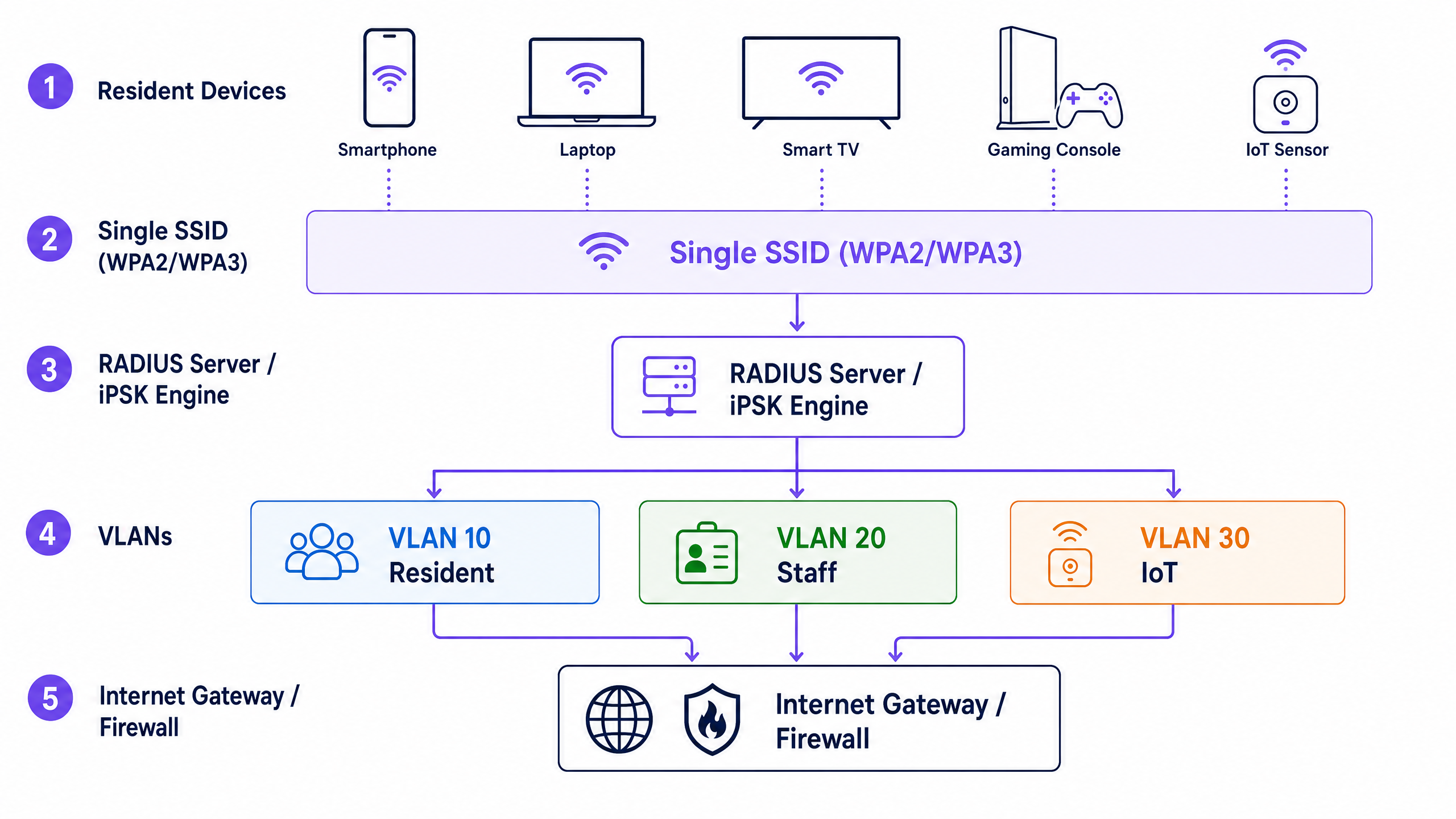
When a device attempts to connect to the shared SSID, it presents its unique Pre-Shared Key. The access point sends an authentication request, typically containing the device's MAC address, to the RADIUS server. The RADIUS server checks its database. If the key and MAC address match a valid profile, it sends an Access-Accept message back to the controller.
Importantly, this response includes specific network policies as vendor-specific attributes. The most critical of these is the VLAN assignment.
The Private Area Network (PAN) Advantage
In a multi-tenant environment like a 200-room hotel or a build-to-rent property, you might have thousands of devices on the same physical access points. With iPSK, the RADIUS server dynamically assigns each resident's devices to their own specific VLAN. This creates a virtual WiFi bubble around that user.
Inside the bubble, Layer 2 isolation is disabled. This means mDNS reflection works perfectly. A resident's iPhone can discover their own Chromecast or wireless printer, exactly as it would on a private home router.
Outside the bubble, Layer 2 isolation is strictly enforced. Resident A cannot see, cast to, or interact with Resident B's devices, even if they are connected to the exact same access point in the hallway. This solves the biggest headache in multi-tenant WiFi: device discovery. You maintain the strict security and isolation required for a public or shared venue, while delivering the seamless, interconnected experience users expect.
Compatibility Comparison
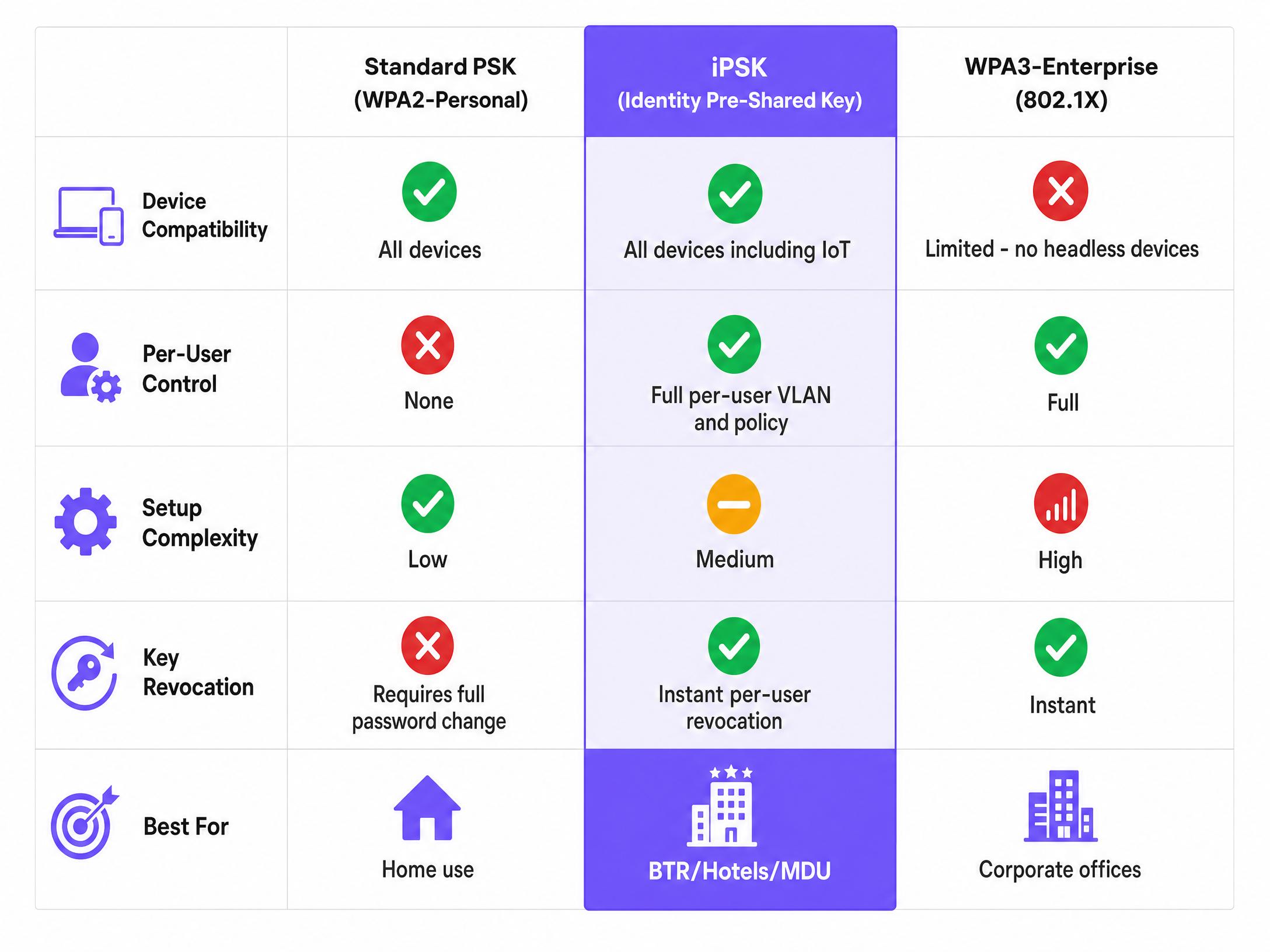
As the comparison shows, iPSK bridges the gap between consumer simplicity and enterprise control. Unlike WPA3-Enterprise, it natively supports headless IoT devices that cannot process 802.1X certificates.
Implementation Guide
Deploying iPSK successfully requires careful planning across your RF design, controller configuration, and identity integration.
1. RF Site Survey and Density Planning
Before specifying access points, execute a predictive radio frequency design. Tools like Ekahau model signal propagation through your building's specific materials. Plan for high device density: modern BTR units average 15 - 25 connected devices per household. Your network architecture needs to handle that density from day one.
2. Traffic Classification and VLAN Design
Document every device type and user population in your environment. Residents, staff, visitors, IoT devices, CCTV, and building management systems each require a dedicated VLAN, subnet, and firewall policy.
Implement a default-deny, explicit-permit firewall policy between VLANs. Your guest VLAN should have outbound internet access and nothing else. Ensure there is no route from the guest network to the resident or staff subnets.
3. Controller Configuration
Keep your SSID count low. Broadcast no more than three SSIDs per radio band: Resident (iPSK), Staff (802.1X), and Guest (Captive Portal or Passpoint). Every additional SSID consumes airtime for beacon frames, which meaningfully degrades throughput in dense deployments.
4. Automating the Lifecycle (The "Arti" in Arti iPSK)
Manually managing thousands of unique keys is impossible for IT teams. You must automate the lifecycle. Integrate your wireless controller with your Identity Provider (Microsoft Entra ID, Okta) and your Property Management System via REST API.
When a new resident is added to the system, generate a unique, cryptographically random 32-character key automatically. Distribute it via the Purple app or a secure welcome email. When the tenancy ends, revoke the key instantly via API. This ensures a Zero Trust approach to network access without administrative overhead.
Real-World Case Studies
Build-to-Rent (BTR) Deployment
A 300-unit BTR operator deployed Cisco Meraki access points with Purple's cloud overlay managing the iPSK lifecycle. When a resident signs their agreement, Purple generates a unique key. On move-in day, the resident connects their smartphone, smart TV, and gaming console using that single key. All devices land in their private VLAN. Their PlayStation achieves a clean NAT type for online gaming. When they move out, the key is revoked automatically via API integration with the property management system. The operator achieved an "Instant-On" experience, eliminating the need for residents to arrange their own broadband, which supported a £25 per month rent premium.
Hospitality Deployment
A 250-room hotel historically relied on captive portals, requiring guests to log in every 24 hours. This caused significant friction and prevented guests from using Apple TVs or Chromecasts. The hotel integrated their Property Management System with Purple. At check-in, the PMS triggers the generation of a unique iPSK key, printed on the keycard sleeve. Guests connect once, their devices stay connected throughout their stay, and the key expires automatically at checkout. Guest satisfaction scores for WiFi improved by 34% in the first quarter after deployment.
Best Practices
- Automate Provisioning: Never manage keys manually in a spreadsheet. Use API integration with your PMS or IdP to generate and revoke keys automatically.
- Enforce Device Limits: Configure a concurrent device limit per key (typically 4-6 devices for individuals, or 15-25 for a household) to prevent unauthorised credential sharing.
- Optimise DHCP Scopes: In high-density residential deployments, use 4-8 hour DHCP lease times rather than the default 24 hours to prevent IP address exhaustion.
- Generate Strong Keys: Keys must be cryptographically random and a minimum of 20 characters (ideally 32). Never use sequential patterns or allow users to choose their own keys.
- Use Supported Hardware: Ensure your access points and controllers support dynamic VLAN assignment via RADIUS. Purple deploys as a hardware-agnostic cloud overlay across Cisco Meraki, HPE Aruba, Ruckus, Juniper Mist, Ubiquiti UniFi, Cambium, Extreme, and Fortinet.
Troubleshooting & Risk Mitigation
Risk: IP Address Exhaustion In a multi-tenant building, devices frequently connect and disconnect. If DHCP leases are too long, you will run out of IP addresses in your subnet. Mitigation: Size subnets appropriately for the expected device density and reduce DHCP lease times to 4 hours.
Risk: Orphaned Credentials Keys that are generated but never revoked become a significant security liability over time. Mitigation: Build the revocation workflow before going live. Tie key expiration directly to the tenancy end date or checkout date in your management system.
Risk: RF Interference from Consumer Routers If the managed WiFi experience is poor, residents will plug in their own consumer routers, creating massive RF interference that degrades performance for everyone. Mitigation: Deliver a flawless Instant-On experience from day one. Use iPSK to ensure smart devices work perfectly, removing the incentive for residents to deploy rogue hardware.
ROI & Business Impact
Moving to iPSK transforms WiFi from a cost centre into a value driver.
For IT teams, it dramatically reduces support tickets. You eliminate the manual password rotations and the constant calls about gaming consoles failing to connect to 802.1X networks.
For venue operators, particularly in the Build-to-Rent sector, managed WiFi as an amenity consistently drives a rent premium and reduces void periods. British Property Federation sector research indicates managed WiFi supports a rent premium of £15-30 per unit per month and reduces void periods by 5-10 days. By delivering the high-performance, secure connectivity that modern tenants demand, you differentiate your property and increase Net Operating Income.
For further reading on related architectures, review our guides on Guest WiFi for common areas, or explore how this integrates with WiFi Analytics to understand space utilisation. In the Hospitality and Retail sectors, these insights drive significant operational efficiency. You can also read more about SSID strategy in our blog post Three SSIDs to rule them all: guest, Passpoint, and IoT WiFi .
Key Definitions
iPSK (Identity Pre-Shared Key)
A security mechanism that assigns a unique WiFi password to every individual user or device on a single SSID, providing per-user control without the complexity of 802.1X.
When IT teams need to secure multi-tenant environments but must support headless devices like gaming consoles.
RADIUS
Remote Authentication Dial-In User Service. A networking protocol that provides centralised Authentication, Authorization, and Accounting management.
The backend engine that checks an iPSK key and tells the wireless controller which VLAN to assign the user to.
VLAN Steering
The process of dynamically assigning a connecting device to a specific Virtual Local Area Network based on its authentication credentials.
Used to separate resident traffic from staff traffic on the same physical access points.
PAN (Private Area Network)
A logical network segment created by iPSK that isolates a single user's devices from all other users on the shared infrastructure.
Essential for delivering a private, home-like WiFi experience in a shared building.
mDNS Reflection
A network feature that allows multicast traffic (like Apple Bonjour or Chromecast discovery) to traverse network boundaries securely.
Required to allow residents to cast video from their phone to their smart TV.
Headless Device
A network-connected device without a traditional screen or keyboard interface, such as an IoT sensor, smart speaker, or thermostat.
These devices typically cannot process captive portals or 802.1X certificates, making iPSK the only viable enterprise security method for them.
Layer 2 Isolation
A security setting that prevents devices connected to the same access point from communicating directly with each other.
Must be enabled between residents for security, but disabled within a resident's PAN so their devices can interact.
BTR (Build-to-Rent)
Purpose-built residential properties designed specifically for renting rather than sale, typically owned and managed by a single institutional landlord.
The primary real estate sector driving the adoption of managed WiFi and iPSK architectures.
Worked Examples
A 400-bed student accommodation block currently uses a single shared WPA2-Personal password. Students complain that they cannot cast to their TVs because device isolation is enabled. IT complains that when a student is expelled, they cannot revoke access without changing the password for all 400 students. How should this be re-architected?
Deploy an iPSK architecture. Broadcast a single 'Resident WiFi' SSID. Integrate the wireless controller with the student accommodation management system via API. When a student enrols, generate a unique 32-character iPSK key. The RADIUS server will use this key to assign the student's devices to a unique VLAN (creating a Private Area Network). Disable Layer 2 isolation within the VLAN so casting works, but enforce isolation between VLANs. When a student leaves, revoke their specific key via API.
A property developer is planning the network for a new Build-to-Rent apartment complex. They need to support residents, building staff, IoT building management systems (HVAC, smart locks), and guest WiFi in the lobby. How should the SSIDs and VLANs be structured?
Broadcast exactly three SSIDs to minimise management overhead and RF congestion: 'Resident WiFi' (using iPSK), 'Staff WiFi' (using 802.1X), and 'Guest WiFi' (using a Captive Portal). Create four distinct VLANs: VLAN 10 (Residents), VLAN 20 (Staff), VLAN 30 (IoT), and VLAN 40 (Guests). Configure the firewall with a default-deny policy between VLANs. Connect the headless IoT devices to the 'Resident WiFi' SSID using dedicated iPSK keys that steer them specifically into VLAN 30.
Practice Questions
Q1. You are deploying WiFi in a senior living facility. Residents need to connect medical IoT devices, smart TVs, and tablets. The facility manager wants to use 802.1X Enterprise security for maximum protection. What is the architectural flaw in this plan?
Hint: Consider the capabilities of the devices the residents are bringing.
View model answer
The flaw is that 802.1X requires a digital certificate or complex username/password authentication. Headless devices like medical IoT sensors and smart TVs cannot process these credentials and will fail to connect. iPSK must be used instead to provide enterprise-grade per-user isolation while maintaining compatibility with these devices.
Q2. A BTR operator reports that their DHCP pool is exhausted by Wednesday every week, causing new residents to fail to connect. They are using a /23 subnet (510 usable IPs) for 200 residents. What configuration change is required?
Hint: Think about how long IP addresses are held after a device disconnects.
View model answer
The DHCP lease time is likely set to the default 24 hours (or longer). In a high-density environment where devices frequently leave and return, IP addresses are being held unnecessarily. Reduce the DHCP lease time to 4 - 8 hours to reclaim addresses more aggressively. Additionally, a /23 subnet may be too small for 200 residents if they average 3 devices each; expanding to a /22 may be necessary.
Q3. An IT manager wants to broadcast 6 different SSIDs to separate traffic: Residents, Staff, IoT, HVAC, Guests, and Management. Why is this a poor RF design, and how does iPSK solve it?
Hint: Consider the overhead of beacon frames on the wireless spectrum.
View model answer
Broadcasting 6 SSIDs creates excessive management overhead on the radio frequency spectrum. Every SSID broadcasts beacon frames constantly, consuming valuable airtime even when no clients are connected, which degrades overall network throughput. iPSK solves this by allowing you to broadcast a single SSID and use the unique keys to dynamically steer the devices into their respective VLANs (Residents, IoT, HVAC) on the backend.
Continue reading in this series
Uu PPSK 2023: comparing features and deployment models
This technical reference guide compares Unique per-User Private Pre-Shared Key (UU PPSK) WiFi architecture against traditional shared PSK and 802.1X deployments, with a specific focus on the 2023 landscape of vendor implementations and platform capabilities. It provides property developers, BTR operators, and MDU landlords with actionable deployment strategies, VLAN architecture guidance, and automated lifecycle management workflows. The guide covers three deployment models, real-world case studies, and the compliance implications of each authentication approach.
PPSK xaverius: comparing features and deployment models
This authoritative guide examines PPSK xaverius architecture for multi-tenant environments like Build to Rent and student accommodation. It compares deployment models, details implementation strategies, and explains how per-unit VLAN isolation delivers a home-like WiFi experience while maintaining enterprise security.
PPSK mun: comparing features and deployment models
This technical reference guide compares Private Pre-Shared Key (PPSK) architecture against traditional 802.1X and standard PSK deployments. It provides network architects and IT managers with vendor-neutral implementation strategies for multi-tenant residential, IoT, and BTR environments.