
Cisco iPSK: a comprehensive guide for businesses
This comprehensive guide explores Cisco iPSK (Identity Pre-Shared Key) architecture, implementation, and business benefits. It provides IT leaders in BTR, hospitality, and retail with actionable strategies for deploying secure, segmented, and automated WiFi networks without the complexity of 802.1X.
Listen to this guide
View podcast transcript
Executive Summary
Cisco Identity Pre-Shared Key (iPSK) solves the fundamental security compromise in enterprise WiFi: balancing the simplicity of a shared password with the security and segmentation of 802.1X. For IT managers and venue operations directors in Build-to-Rent (BTR), hospitality, and retail environments, iPSK provides a scalable method to isolate traffic, secure IoT devices, and automate network access without burdening the helpdesk.
By assigning a unique passcode to every individual user or device on a single SSID, iPSK enables granular network segmentation through VLAN override via RADIUS. This approach eliminates the risk of a single compromised password affecting the entire building, while supporting 100% of consumer devices - including gaming consoles, smart TVs, and legacy IoT sensors that lack 802.1X supplicants.
This guide details the technical architecture of Cisco iPSK, implementation strategies for Catalyst 9800 and Meraki environments, and the business impact of identity-based networking for multi-tenant operators.
Technical Deep-Dive: How Cisco iPSK Works
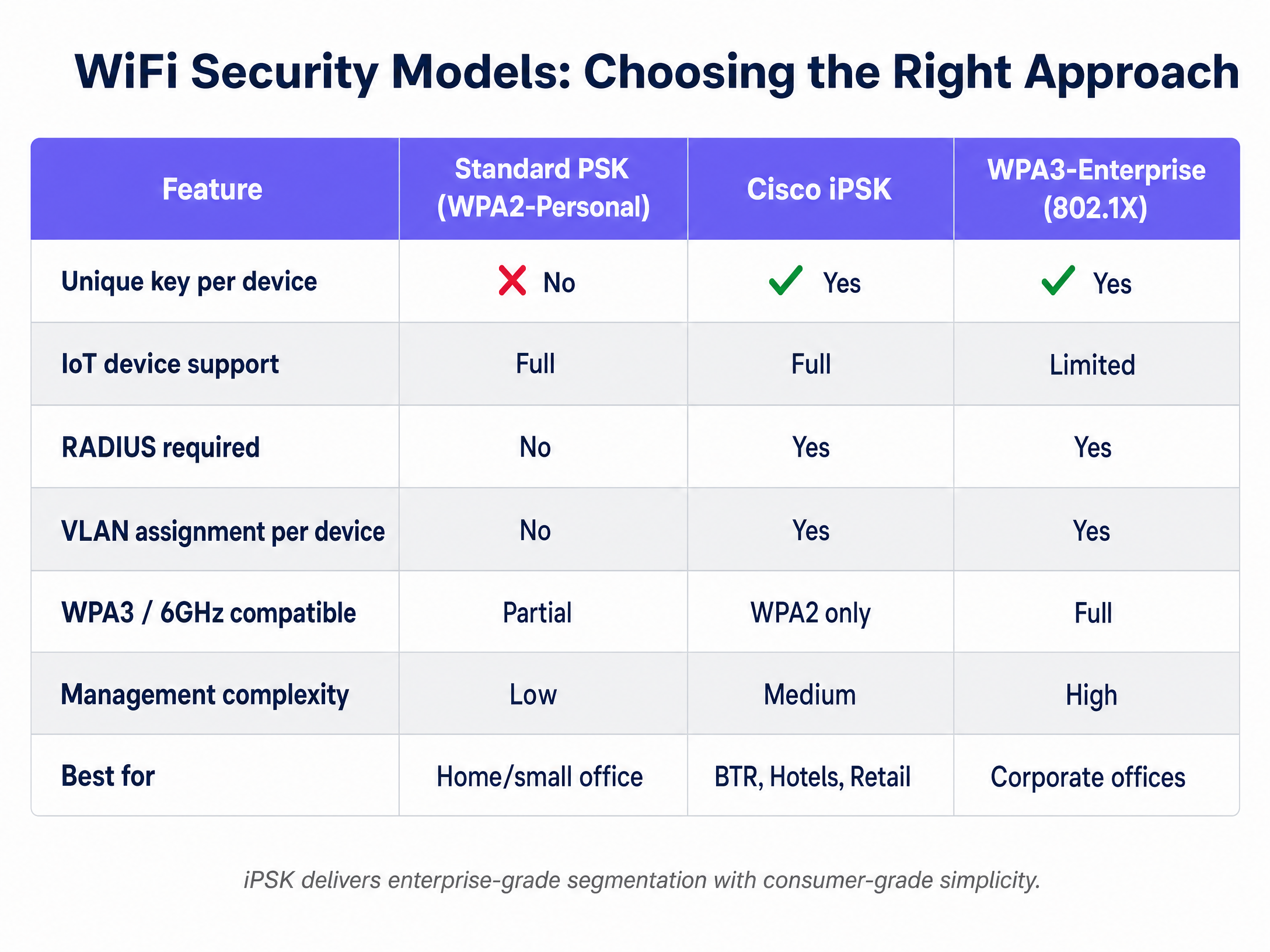
Traditional WPA2-Personal networks use a single, static password for all connected clients. If one resident shares the password, the entire building's security is compromised. Conversely, WPA2-Enterprise (802.1X) requires complex certificates or username/password credentials, which "headless" IoT devices cannot support.
Cisco iPSK bridges this gap by functioning as a standard WPA2-PSK network to the client device, while operating as an enterprise-grade authentication system on the backend.
The Authentication Architecture
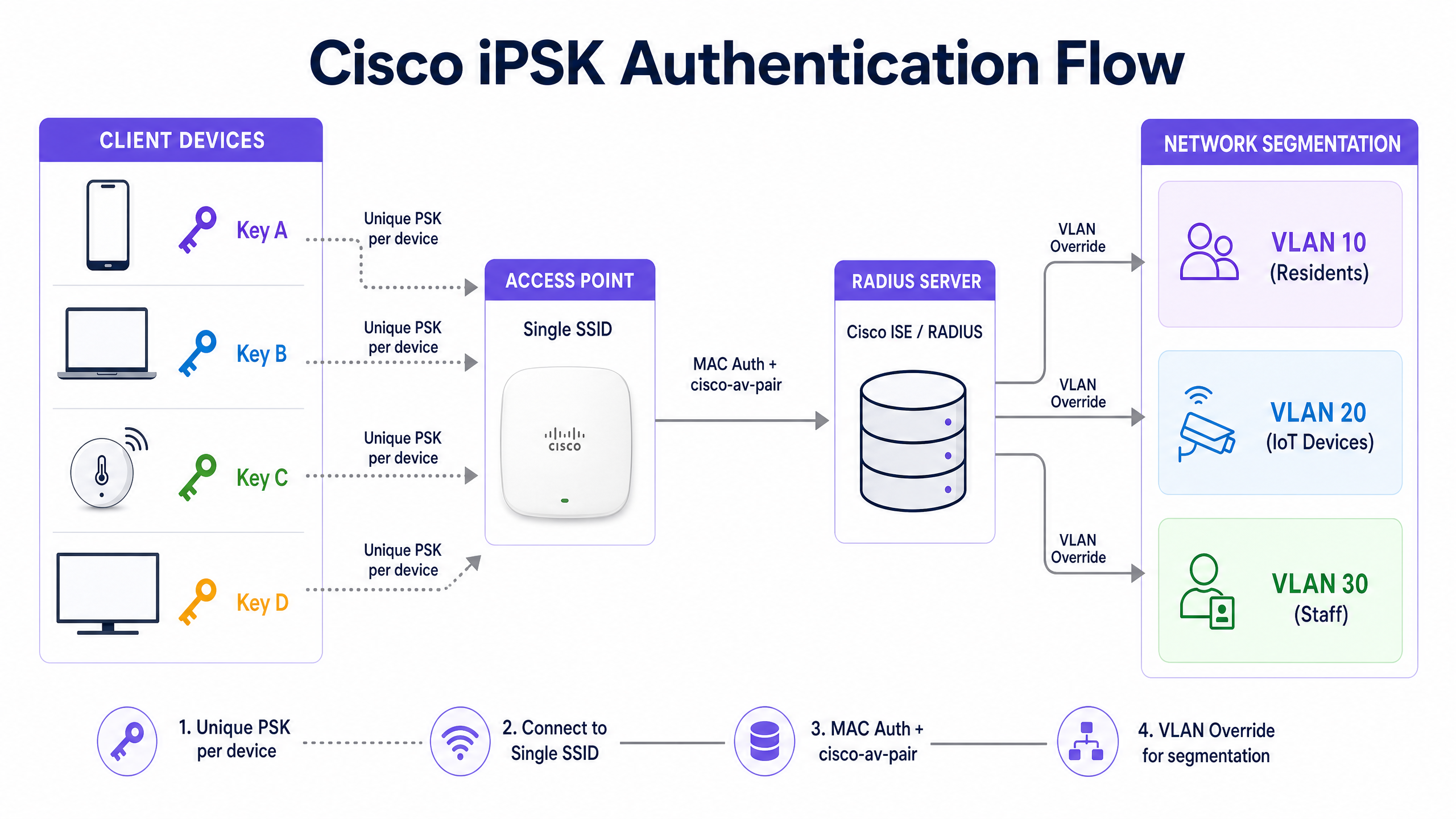
When a client device attempts to connect to an iPSK-enabled SSID, the authentication flow follows a specific sequence:
- Association Request: The client device sends an association request to the Cisco access point.
- MAC Authentication Bypass (MAB): The Cisco Wireless LAN Controller (WLC) intercepts the request and sends a RADIUS Access-Request to the authentication server (typically Cisco Identity Services Engine - ISE). The request uses the client's MAC address as both the username and password.
- Policy Evaluation: Cisco ISE evaluates its authorisation policy. It matches the MAC address to an endpoint identity group and retrieves the assigned pre-shared key for that specific device or user.
- RADIUS Response: ISE returns an Access-Accept response containing specific Cisco AV-pair attributes:
psk-mode=asciiandpsk=[the actual passphrase]. It may also return aTunnel-Private-Group-IDattribute to specify the VLAN. - 4-Way Handshake: The WLC receives the unique PSK from ISE and uses it to complete the standard WPA2 4-way EAPOL handshake with the client device.
Network Segmentation and VLAN Override
The primary technical advantage of iPSK is its ability to enforce network segmentation on a single SSID. Rather than broadcasting separate SSIDs for residents, staff, and IoT devices - which increases channel utilisation and management overhead - iPSK uses RADIUS to assign devices to specific VLANs dynamically.
When ISE returns the Access-Accept message, it includes the VLAN assignment. The WLC overrides the default VLAN of the SSID and places the client traffic onto the designated segment. This enables a Private Area Network (PAN) architecture, ensuring Layer 2 isolation. A resident's smartphone and smart TV sit on their own isolated VLAN, completely invisible to the resident in the adjacent apartment.
Implementation Guide: Catalyst 9800 and Meraki
Deploying iPSK requires coordination between the wireless controller and the RADIUS server. The implementation path differs slightly depending on whether you are using Cisco Catalyst or Cisco Meraki infrastructure.
Cisco Catalyst 9800 Configuration
The Catalyst 9800 series running IOS-XE supports robust iPSK deployments with Fast Secure Roaming. The core configuration requires enabling MAC filtering and AAA override.
- Configure the RADIUS Server: Define the Cisco ISE server and create an AAA authorisation method list pointing to the server group.
- Configure the WLAN: Under Layer 2 security, enable MAC filtering and set the Auth Key Management to PSK. You must enter a default pre-shared key in the WLC interface; however, this key acts merely as a placeholder and is never used by clients, as ISE overrides it.
- Enable AAA Override: In the Policy Profile associated with the WLAN, enable AAA Override to allow ISE to dictate the PSK and VLAN assignment.
- Configure ISE: In Cisco ISE, define the Network Device, add the client MAC addresses to Endpoint Identity Groups, and create Authorisation Profiles that return the
cisco-av-pairattributes containing the unique keys.
Cisco Meraki Configuration
Cisco Meraki simplifies the iPSK deployment process through its dashboard, offering two distinct operational modes: MAC-based and Easy PSK.
- MAC-Based iPSK: This is the traditional deployment model. You select "Identity PSK with RADIUS" in the Access Control settings. The Meraki AP sends the client MAC address to the RADIUS server, which returns the PSK. This method requires pre-registering every device MAC address in the RADIUS database.
- Easy PSK (MR 30.x and newer): To address the challenge of MAC address randomisation in modern smartphones, Meraki introduced Easy PSK. Instead of relying solely on MAC lookups, the AP passes the EAPOL parameters (including the ANonce and MIC) directly to the RADIUS server using Meraki vendor-specific attributes. The RADIUS server runs a rapid dictionary attack against its known iPSKs to find the match and returns the correct key. This eliminates the need to pre-register MAC addresses.
Best Practices for BTR and Hospitality
Implementing iPSK effectively requires more than technical configuration; it demands a structured approach to lifecycle management and user experience.
1. Automate Key Lifecycle Management
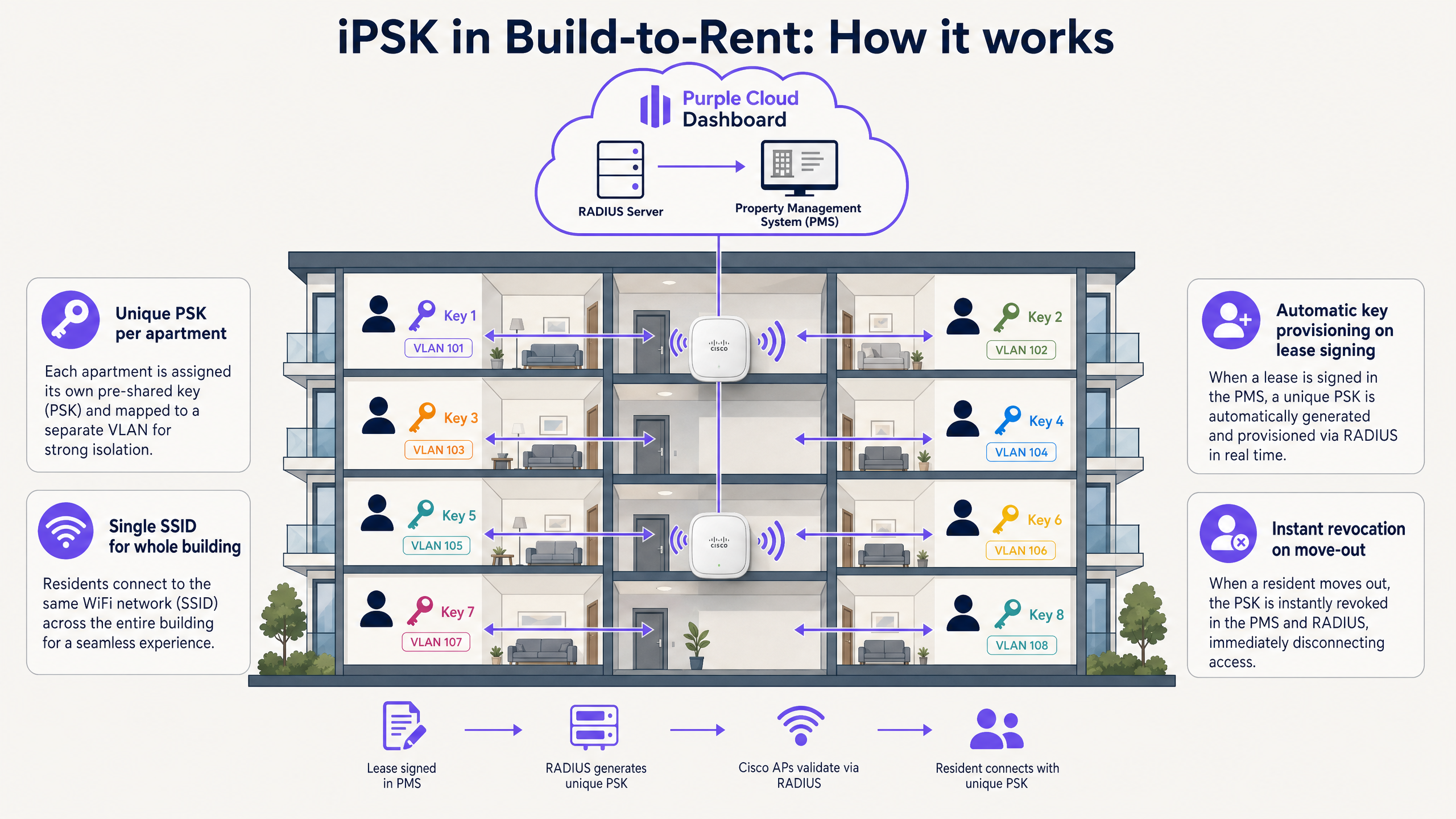
Manually managing thousands of unique keys in Cisco ISE is operationally unsustainable. You must integrate your identity provider (IdP) or Property Management System (PMS) with your network infrastructure.
For Retail and Hospitality environments, leverage platforms like Purple's Guest WiFi to automate this process. When a guest checks into a hotel or a resident signs a lease in a BTR property, the PMS triggers an API call that automatically generates the iPSK, provisions it in ISE, and emails it to the user. When the lease ends, the key is instantly revoked.
2. Design the VLAN Architecture Upfront
The value of iPSK lies in segmentation. Before configuring the wireless controllers, map out your VLAN strategy. Define separate segments for:
- Individual residents or hotel rooms (Private Area Networks)
- Building management systems (HVAC, access control)
- Staff and operational devices
- Public or transient Guest WiFi users
3. Address MAC Randomisation Proactively
Apple iOS 14 and Android 10 introduced per-network randomised MAC addresses. In a MAC-based iPSK deployment, this breaks authentication because the RADIUS server does not recognise the randomised MAC.
If using Meraki, deploy Easy PSK mode to bypass the MAC lookup requirement. If using Catalyst 9800, you must educate users to disable "Private WiFi Address" for the specific building SSID, or utilise an onboarding portal that registers the randomised MAC during the initial connection flow.
Troubleshooting & Risk Mitigation
When deploying iPSK, IT teams commonly encounter specific failure modes related to WPA3 compatibility and RADIUS communication.
The WPA3 and 6 GHz Challenge
The most significant constraint facing iPSK deployments today is the transition to WPA3 and the 6 GHz band (WiFi 6E and WiFi 7). WPA3 utilises Simultaneous Authentication of Equals (SAE), a more secure handshake protocol that currently does not support multiple pre-shared keys per SSID in the same manner as WPA2.
Because the 6 GHz band mandates WPA3, you cannot run traditional iPSK on a 6 GHz network. To mitigate this, implement a hybrid SSID strategy:
- Maintain WPA2 iPSK on the 2.4 GHz and 5 GHz bands to support legacy devices and IoT sensors.
- Deploy WPA3-Enterprise (802.1X) on the 6 GHz band for managed corporate endpoints and modern smartphones that support certificate-based authentication.
RADIUS Timeout Issues
In large deployments, particularly when using Meraki Easy PSK, the RADIUS server must process complex EAPOL attributes to find the matching key. If the RADIUS server takes too long, the EAPOL handshake times out on the access point.
Ensure your RADIUS infrastructure is adequately resourced. Position RADIUS servers geographically close to the wireless controllers to minimise latency, and monitor the Radius-Request to Access-Accept response times.
ROI & Business Impact
Transitioning to an iPSK architecture delivers measurable business impact for property developers and multi-tenant operators.
Reduced Support Overhead: By eliminating captive portals and 802.1X certificate errors, BTR operators typically see a 50 - 70% reduction in WiFi-related helpdesk tickets. Residents can connect their gaming consoles and smart TVs seamlessly, exactly as they would at home.
Hardware Consolidation: iPSK allows you to service an entire apartment building with a single, centrally managed SSID. This eliminates the need to install and manage individual consumer-grade routers in every flat, reducing capital expenditure and drastically cutting RF interference.
Enhanced Security Posture: By isolating resident traffic into Private Area Networks and segmenting vulnerable IoT devices, operators protect themselves from lateral movement attacks. If a resident's smart bulb is compromised, the threat is contained within their specific VLAN, safeguarding the broader building infrastructure and other residents.
For comprehensive guidance on multi-tenant deployments, review our Apartment WiFi solutions: a comprehensive guide for businesses .
Key Definitions
Identity Pre-Shared Key (iPSK)
A wireless security mechanism that assigns unique passcodes to individual users or devices on a single SSID, backed by a RADIUS server for authentication and policy enforcement.
When IT teams need to secure IoT devices or provide simple access for residents without using complex 802.1X certificates.
Private Area Network (PAN)
A micro-segmented network environment that isolates a specific user's devices from all other devices on the same physical infrastructure.
Essential in Build-to-Rent and student accommodation to ensure residents can cast to their smart TVs without neighbours intercepting the stream.
VLAN Override
The process where a RADIUS server instructs the wireless controller to ignore the SSID's default VLAN and instead place the authenticated client onto a dynamically assigned VLAN.
The core mechanism iPSK uses to segment traffic, allowing staff, guests, and IoT devices to share one SSID while remaining logically separated.
MAC Authentication Bypass (MAB)
An authentication method where the network access device sends the client's MAC address to the RADIUS server to verify identity and retrieve policy.
Used in traditional iPSK deployments to identify the device before returning the unique pre-shared key.
Simultaneous Authentication of Equals (SAE)
The secure key establishment protocol used in WPA3, designed to protect against brute-force dictionary attacks.
SAE's architecture currently limits the ability to use multiple unique keys on a single SSID, creating challenges for iPSK in WiFi 6E/7 deployments.
Cisco AV-Pair
Vendor-specific RADIUS attributes used to pass proprietary configuration data between Cisco ISE and Cisco network hardware.
In iPSK, the 'psk-mode=ascii' and 'psk=[key]' AV-pairs are the exact attributes that deliver the unique password to the wireless controller.
Easy PSK
A Cisco Meraki feature that passes EAPOL handshake parameters directly to the RADIUS server to validate the PSK, rather than relying on MAC address lookups.
The primary solution for deploying iPSK to modern smartphones that use randomised MAC addresses.
Headless Device
An internet-connected device lacking a traditional screen or keyboard interface, such as a smart thermostat, digital signage, or sensor.
These devices cannot navigate captive portals or support 802.1X, making iPSK the only secure way to onboard them to enterprise networks.
Worked Examples
A 350-unit Build-to-Rent (BTR) development needs to provide secure, private WiFi to all residents. They want to avoid installing individual routers in each flat to minimise RF interference, but residents must be able to connect gaming consoles and smart TVs securely without seeing their neighbours' devices.
Deploy a centralised Cisco wireless network using a single building-wide SSID configured for iPSK. Integrate the Property Management System (PMS) with Cisco ISE (or a platform like Purple). When a resident signs a lease, the system automatically generates a unique iPSK and assigns it to a dedicated VLAN for that specific flat. The resident receives the key via email and connects all devices to the single SSID. Cisco ISE uses the unique key to drop the resident's traffic onto their private VLAN.
A 180-room hotel wants to eliminate the friction of daily captive portal logins while ensuring guest devices are isolated from the hotel's smart TVs and room control systems.
Implement iPSK on the guest WiFi network. Generate a unique key for each booking and provide it to the guest at check-in. The guest connects their phone and laptop using this key, bypassing any captive portal. Configure the in-room smart TVs and environmental controls with their own static iPSKs, assigned to a separate IoT VLAN. Use the hotel's PMS integration to automatically revoke the guest's key at check-out.
Practice Questions
Q1. You are deploying a new WiFi network for a university dormitory. Students need to connect smartphones, laptops, and gaming consoles. You plan to use a single SSID. Which security model should you choose and why?
Hint: Consider the capabilities of gaming consoles and the risk of shared passwords in a student environment.
View model answer
Cisco iPSK is the correct choice. Standard WPA2-PSK is insecure for a dormitory, as password sharing is inevitable. WPA3-Enterprise (802.1X) is secure but will not support the students' gaming consoles or smart speakers. iPSK allows all devices to connect using a simple passcode while providing the backend segmentation needed to isolate each student's traffic.
Q2. During an iPSK deployment on Cisco Meraki, users with new iPhones report they cannot connect to the network, while users with older laptops connect fine. What is the likely cause and how do you resolve it?
Hint: Think about recent privacy features introduced in mobile operating systems regarding network identifiers.
View model answer
The likely cause is MAC address randomisation (Private WiFi Address) on the iPhones. If the network is using MAC-based iPSK, the RADIUS server will not recognise the randomised MAC and will reject the connection. To resolve this, switch the Meraki configuration to 'Easy PSK' mode, which validates the PSK using EAPOL parameters rather than relying on the MAC address.
Q3. A retail chain wants to upgrade to WiFi 6E access points to utilise the 6 GHz band. They currently use iPSK for their point-of-sale (POS) terminals and barcode scanners. What architectural challenge must they plan for?
Hint: Consider the mandatory security protocols required for operation in the 6 GHz spectrum.
View model answer
The 6 GHz band mandates the use of WPA3. Currently, the WPA3 SAE handshake does not natively support multiple pre-shared keys per SSID in the same way WPA2 does. The retail chain must either keep the POS devices on the 2.4/5 GHz bands using WPA2 iPSK, migrate the POS devices to WPA3-Enterprise (if supported), or verify if their specific vendor firmware supports proprietary WPA3-SAE iPSK workarounds before upgrading.
Continue reading in this series
Uu PPSK 2023: comparing features and deployment models
This technical reference guide compares Unique per-User Private Pre-Shared Key (UU PPSK) WiFi architecture against traditional shared PSK and 802.1X deployments, with a specific focus on the 2023 landscape of vendor implementations and platform capabilities. It provides property developers, BTR operators, and MDU landlords with actionable deployment strategies, VLAN architecture guidance, and automated lifecycle management workflows. The guide covers three deployment models, real-world case studies, and the compliance implications of each authentication approach.
Uu PPSK 2023: comparing features and deployment models
This technical reference guide compares Unique per-User Private Pre-Shared Key (UU PPSK) WiFi architecture against traditional shared PSK and 802.1X deployments, with a specific focus on the 2023 landscape of vendor implementations and platform capabilities. It provides property developers, BTR operators, and MDU landlords with actionable deployment strategies, VLAN architecture guidance, and automated lifecycle management workflows. The guide covers three deployment models, real-world case studies, and the compliance implications of each authentication approach.
PPSK xaverius: comparing features and deployment models
This authoritative guide examines PPSK xaverius architecture for multi-tenant environments like Build to Rent and student accommodation. It compares deployment models, details implementation strategies, and explains how per-unit VLAN isolation delivers a home-like WiFi experience while maintaining enterprise security.