
How to Scan for WiFi Interference and Find the Best Channel
This comprehensive technical guide provides enterprise IT leaders with actionable methodologies for identifying RF interference and selecting the optimal 5GHz channels. It covers spectrum analysis, DFS considerations, and practical deployment strategies to maximise throughput and reduce latency without requiring new hardware investments.
Listen to this guide
View podcast transcript
Executive Summary
For enterprise IT directors managing high-density venues, identifying the best channel for 5GHz deployments is a critical operational mandate. Poor channel selection drives latency spikes, roaming failures, and degraded throughput, directly impacting user experience and venue operations.
This technical reference guide outlines a structured methodology for identifying RF interference, executing spectrum analysis, and selecting optimal channels in the 5GHz band. By shifting from reactive troubleshooting to proactive RF management, IT teams can maximise throughput, mitigate co-channel contention, and support higher device densities without the capital expenditure of purchasing new access points.
Whether you are deploying Guest WiFi across a retail estate or securing back-of-house operational technology, understanding channel utilisation is the foundation of a robust wireless architecture.
Technical Deep-Dive: The 5GHz Spectrum and Interference Vectors
Understanding the 5GHz Landscape
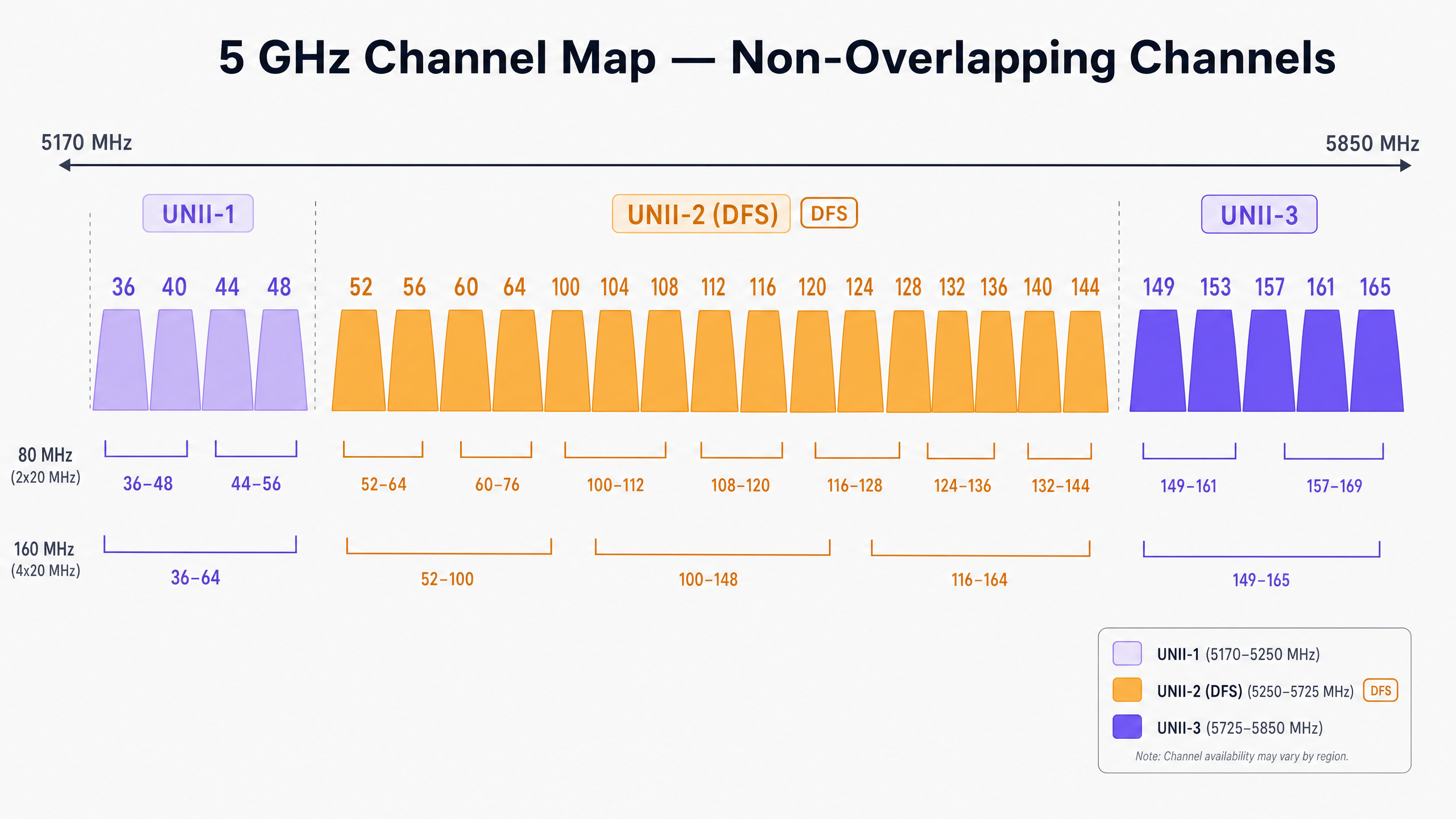
Unlike the constrained 2.4GHz band, which offers only three non-overlapping channels, the 5GHz spectrum provides up to 25 non-overlapping 20MHz channels (depending on regulatory domain). However, not all 5GHz channels are created equal. They are divided into specific Unlicensed National Information Infrastructure (UNII) bands, each with distinct operational rules.
UNII-1 and UNII-3: The Safe Harbours
Channels in the UNII-1 (36, 40, 44, 48) and UNII-3 (149, 153, 157, 161, 165) bands are generally free from radar interference constraints in most regions. For high-density deployments in Retail or Hospitality , these channels represent the lowest-risk starting point for your channel plan. Because UNII-3 operates at a slightly higher frequency, it experiences marginally higher attenuation through walls, which can actually be advantageous for limiting co-channel interference between adjacent rooms or floors.
UNII-2 and DFS (Dynamic Frequency Selection)
The UNII-2 bands (channels 52–144) share spectrum with incumbent military and weather radar systems. To use these channels, access points must support DFS. If an AP detects a radar pulse, it must immediately vacate the channel and cannot return for 30 minutes.
In environments near airports, ports, or weather stations, DFS events can cause sudden, unexplained client disconnections. If your venue experiences intermittent dropouts, reviewing controller logs for DFS events is a mandatory first step.
Types of Interference
Interference in enterprise wireless networks typically falls into two categories:
- Co-Channel Interference (CCI): This occurs when multiple APs (yours or a neighbour's) operate on the same channel. Because WiFi is a half-duplex medium governed by Carrier Sense Multiple Access with Collision Avoidance (CSMA/CA), all devices on the same channel must wait their turn to transmit. High CCI leads to increased airtime contention and elevated latency.
- Non-WiFi Interference: Devices emitting RF energy in the 5GHz band without adhering to 802.11 protocols. Common culprits include cordless phones, wireless AV transmitters, and proprietary IoT sensors. Unlike CCI, non-WiFi interference raises the noise floor, corrupting WiFi frames and triggering retransmissions.
Implementation Guide: Scanning and Channel Selection
To determine the best channel for 5GHz, you must move beyond default "Auto-RF" settings and implement a structured scanning methodology.
Step 1: Baseline the Environment
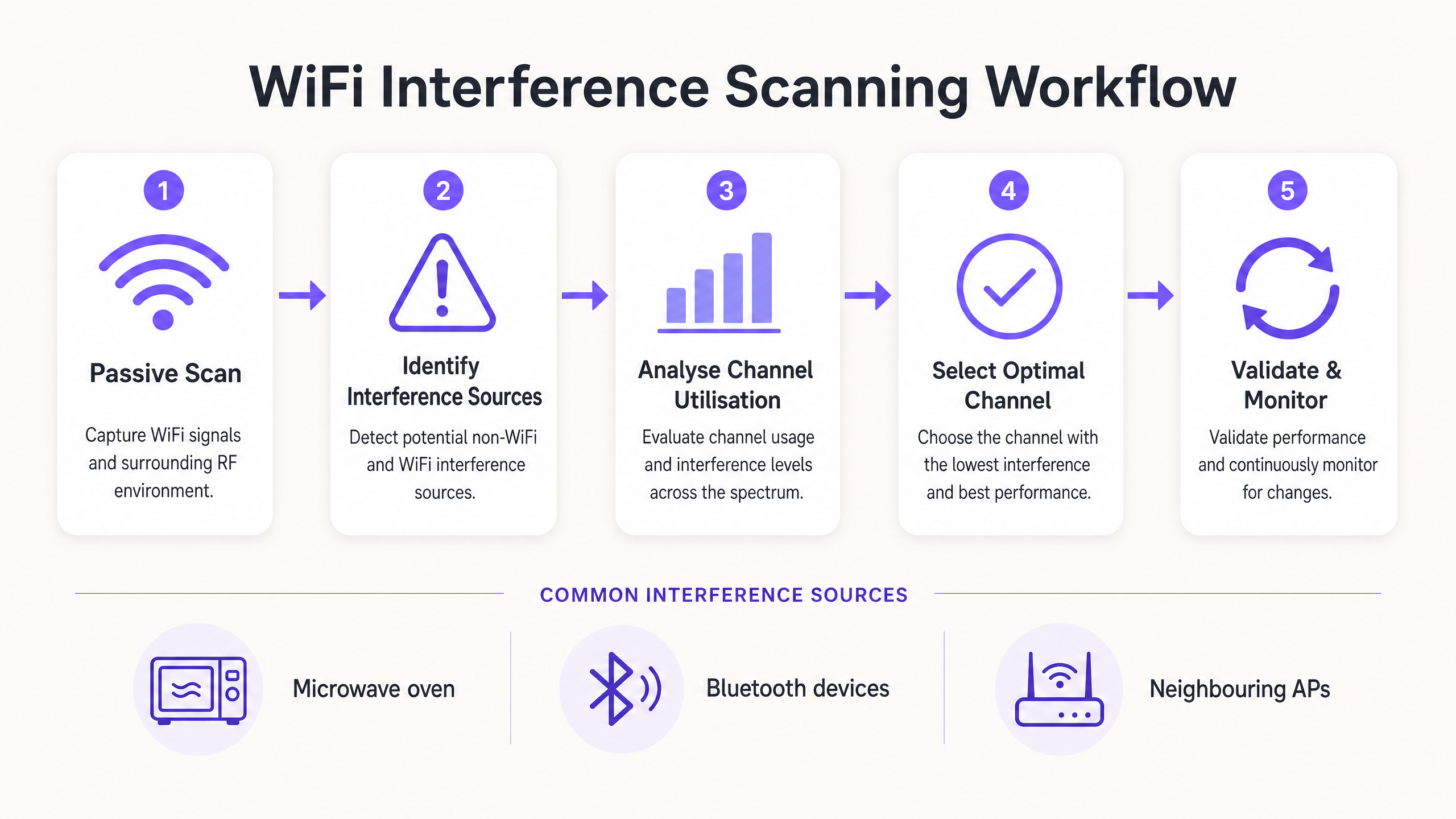
Before making changes, establish a baseline. Utilise your controller's built-in monitoring tools or integrate with a WiFi Analytics platform to capture:
- Average and peak channel utilisation percentages.
- Client association rates and roaming success metrics.
- Baseline throughput during peak operational hours.
> Crucial Rule: Never perform your initial RF scan in an empty venue. A scan at 2:00 AM on a Sunday will not reveal the interference generated by 5,000 attendees at a conference.
Step 2: Execute Spectrum Analysis
Relying solely on standard AP scanning only detects other 802.11 networks. To identify non-WiFi interference, you require hardware spectrum analysis.
- Tier 1 (Basic): Controller-based AP spectrum monitors. Many enterprise APs feature a dedicated scanning radio that can identify non-WiFi signatures.
- Tier 2 (Advanced): Dedicated hardware like the Ekahau Sidekick or MetaGeek Chanalyzer. These tools capture raw RF energy across the spectrum, allowing engineers to identify the specific signatures of Bluetooth devices, AV transmitters, or faulty hardware.
Step 3: Analyse Channel Utilisation
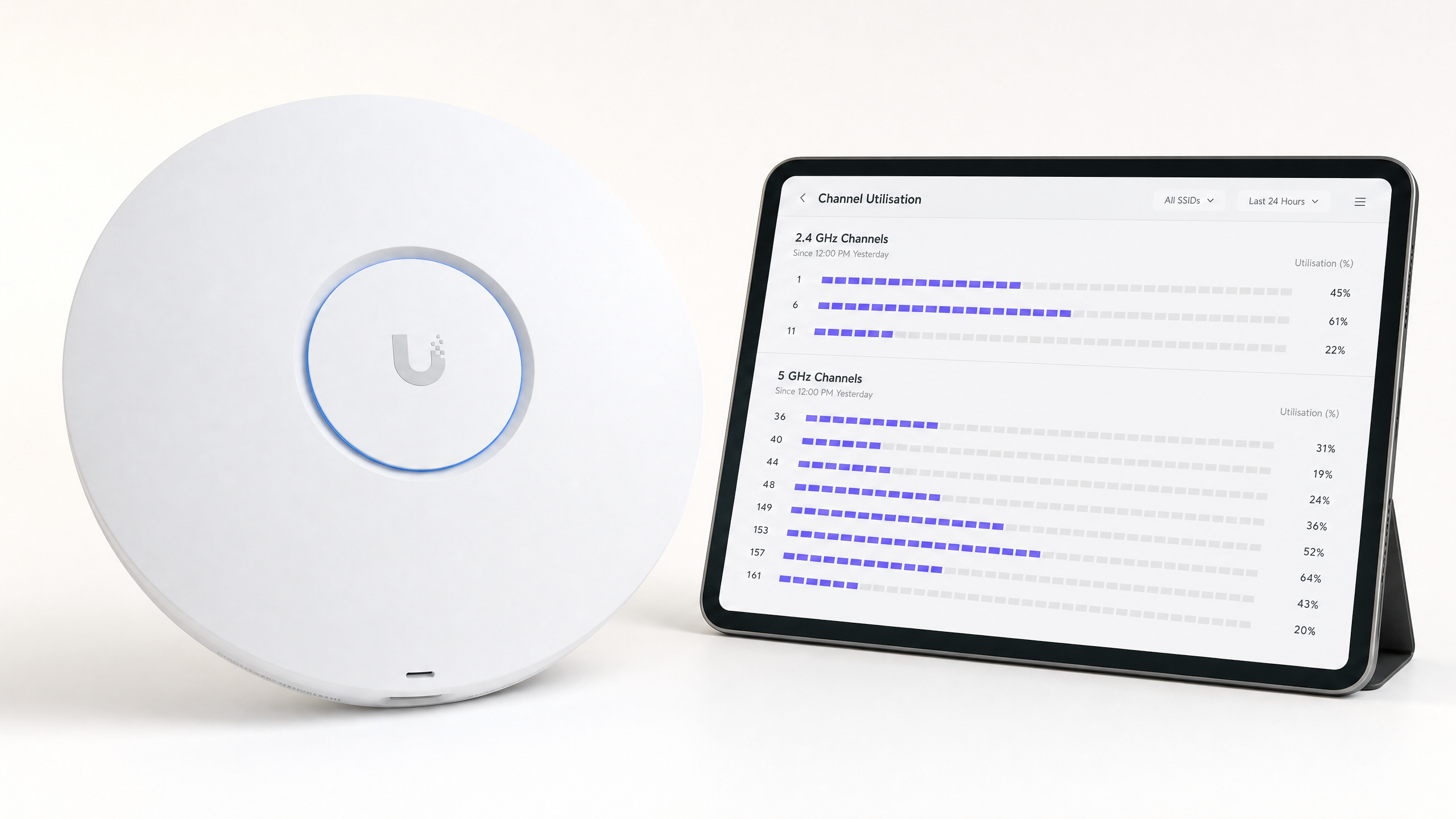
Channel utilisation is the most critical metric for performance. It represents the percentage of time the channel is busy (either transmitting data or blocked by interference).
- < 20%: Excellent. Plenty of capacity for high-throughput applications.
- 20% - 50%: Normal for active enterprise environments.
- > 70%: Critical threshold. At 70% utilisation, latency spikes exponentially, and client experience degrades rapidly.
If an AP reports >70% utilisation on its 5GHz channel, immediate remediation is required.
Step 4: Select the Optimal Channel
When selecting the best channel for 5GHz, follow this decision matrix:
- Identify channels with < 20% utilisation during peak hours.
- Prioritise UNII-1 and UNII-3 channels to avoid DFS-related disconnections, especially in critical zones like hospital emergency departments ( Healthcare ) or high-traffic transport hubs ( Transport ).
- If UNII-1/3 are saturated, selectively enable DFS channels (UNII-2), but monitor logs aggressively for radar detection events over the next 14 days.
- Standardise on 20MHz channel widths in ultra-high-density environments (like stadiums). Only use 40MHz or 80MHz bonded channels in low-density areas where peak individual throughput is required.
Best Practices & Troubleshooting
Disable Auto-Channel in High-Density Zones
While Radio Resource Management (RRM) and auto-channel algorithms are adequate for standard office environments, they frequently fail in complex venues. Uncontrolled channel changes during a live event can cause mass client disconnections. In stadiums or large conference centres, a static, meticulously planned channel design is mandatory.
Shrink the Cell Size
If all 5GHz channels show high utilisation, changing the channel won't solve the problem. Instead, you must reduce Co-Channel Interference by shrinking the RF footprint of your APs. Reduce the transmit (Tx) power of the APs and increase the minimum mandatory data rate (e.g., disable rates below 12 Mbps or 24 Mbps). This forces clients to roam sooner and prevents distant clients from consuming excessive airtime.
Related Reading
For further strategies on optimising infrastructure, read our guide on How to Improve WiFi Speed Without Buying New Access Points (or the German version: Wie man die WiFi-Geschwindigkeit verbessert, ohne neue Access Points zu kaufen ). For insights on modern access, see How a wi fi assistant Enables Passwordless Access in 2026 and our recent Offline Maps Mode launch . Also, read about our strategic direction in the Iain Fox Announcement .
ROI & Business Impact
Optimising 5GHz channel allocation delivers measurable business value without CapEx investment:
| Metric | Pre-Optimisation (Typical) | Post-Optimisation Target | Business Impact |
|---|---|---|---|
| Channel Utilisation | > 75% | < 40% | Eliminates latency spikes during peak hours. |
| Roaming Failures | 10-15% | < 2% | Seamless voice/video calls for roaming staff. |
| Support Tickets | High volume (Dropouts) | Minimal | Reduces IT operational expenditure (OpEx). |
| CapEx Avoidance | N/A | High | Delays the need for expensive hardware refreshes. |
By treating RF spectrum as a managed asset rather than an invisible utility, IT leaders can ensure their wireless infrastructure supports the growing demands of modern enterprise operations.
Key Definitions
Co-Channel Interference (CCI)
Interference caused when multiple access points operate on the exact same channel, forcing them to share airtime.
CCI is the primary cause of slow WiFi in dense deployments. IT teams must manage CCI by carefully planning channel reuse and managing AP transmit power.
Dynamic Frequency Selection (DFS)
A regulatory requirement for devices operating in the UNII-2 bands to detect radar systems and automatically vacate the channel.
While DFS channels offer valuable extra spectrum, radar detection events can cause sudden client disconnections, making them risky near airports or weather stations.
Channel Utilisation
The percentage of time a specific RF channel is busy transmitting or receiving data, or blocked by interference.
This is the most critical metric for WiFi health. High utilisation (>70%) directly correlates with poor user experience and high latency.
UNII Bands
Unlicensed National Information Infrastructure radio bands. The 5GHz spectrum is divided into UNII-1, UNII-2 (DFS), and UNII-3.
Understanding UNII band rules is essential for channel planning, as different bands have different transmit power limits and radar avoidance requirements.
CSMA/CA
Carrier Sense Multiple Access with Collision Avoidance. The protocol WiFi uses to ensure only one device transmits on a channel at a time.
Because WiFi is half-duplex and uses CSMA/CA, it is highly sensitive to interference. If the channel is noisy, devices will wait indefinitely to transmit.
Spectrum Analysis
The process of measuring raw RF energy across a frequency band, rather than just decoding WiFi frames.
Essential for finding non-WiFi interference sources like microwaves, Bluetooth devices, or faulty AV equipment that standard AP scans cannot see.
RSSI
Received Signal Strength Indicator. A measurement of how well a device can hear a signal from an access point.
While strong RSSI is necessary, it is not sufficient for good performance if channel utilisation is high or interference is present.
Bonded Channels
Combining multiple 20MHz channels into a wider channel (e.g., 40MHz, 80MHz) to increase maximum theoretical throughput.
Bonding channels reduces the total number of non-overlapping channels available, making it a poor choice for high-density enterprise deployments.
Worked Examples
A 400-room hotel in a dense urban centre is experiencing severe guest complaints regarding WiFi dropouts during the evening peak (7 PM - 10 PM). The controller shows APs are randomly changing channels, and channel utilisation on the 5GHz band frequently exceeds 85%.
- Disable the controller's Auto-RF/RRM feature to stop unpredictable channel changes during peak hours. 2. Perform a passive RF scan specifically between 7 PM and 10 PM to capture the true interference baseline. 3. Identify that neighbouring residential routers are saturating UNII-1 channels. 4. Manually reassign the hotel's corridor APs to DFS channels (UNII-2), as the venue is not near an airport. 5. Reduce AP transmit power by 3dBm to shrink cell sizes and reduce co-channel interference between adjacent rooms.
A retail distribution centre relies on handheld scanners for inventory management. The scanners frequently disconnect when moving between aisles, despite strong signal strength (-60 dBm). The APs are configured to use 80MHz channel widths on the 5GHz band.
- Reconfigure the entire 5GHz channel plan to use 20MHz channel widths instead of 80MHz. 2. Increase the minimum mandatory data rate to 24 Mbps to prune slow clients and clear airtime faster. 3. Audit the environment for non-WiFi interference using a spectrum analyser, as industrial environments often have legacy RF equipment.
Practice Questions
Q1. You are deploying WiFi in a hospital located 2 miles from a major international airport. The IT director wants to use all available 5GHz channels to maximise capacity. Do you recommend using UNII-2 (DFS) channels?
Hint: Consider the impact of weather and aviation radar systems on UNII-2 channels.
View model answer
No, it is highly discouraged. Proximity to a major airport means frequent radar detection events are highly likely. When an AP detects radar, it must immediately drop all clients and vacate the channel. In a hospital environment where critical medical telemetry may rely on WiFi, these sudden disconnections pose an unacceptable operational risk. Stick to UNII-1 and UNII-3 channels.
Q2. A stadium deployment is suffering from massive Co-Channel Interference (CCI) during matches. The APs are currently set to 80MHz channel widths on the 5GHz band to 'maximise speed'. What architectural change should you implement?
Hint: Think about the relationship between channel width and the number of available non-overlapping channels.
View model answer
Reduce the channel width from 80MHz to 20MHz across the entire deployment. Using 80MHz channels consumes four standard 20MHz channels per AP, drastically reducing the number of non-overlapping channels available. In a stadium, capacity (handling thousands of devices) is far more important than peak throughput for a single device. Reverting to 20MHz channels provides up to 25 non-overlapping channels, massively reducing CCI.
Q3. A retail store reports that their wireless point-of-sale (POS) terminals frequently drop offline, but only between 12:00 PM and 2:00 PM. Standard AP logs show strong signal strength. What is the next troubleshooting step?
Hint: What happens in a retail or office environment between noon and 2 PM?
View model answer
Perform a hardware spectrum analysis (using a tool like Ekahau Sidekick) during the 12:00 PM - 2:00 PM window. The specific timing strongly suggests non-WiFi interference, likely from a microwave oven in a staff breakroom. Standard AP scans only decode WiFi frames and will not 'see' the raw RF energy from a microwave, which operates in the 2.4GHz band and can completely corrupt WiFi transmissions.