
How to leverage SMS marketing example to increase return visits
This technical guide details how venue operators can use SMS marketing to drive measurable return visits by capturing verified first-party phone data through Guest WiFi. It covers compliance architecture, deployment workflows, and proven engagement sequences for hospitality, retail, and public-sector environments.
Listen to this guide
View podcast transcript
Executive Summary
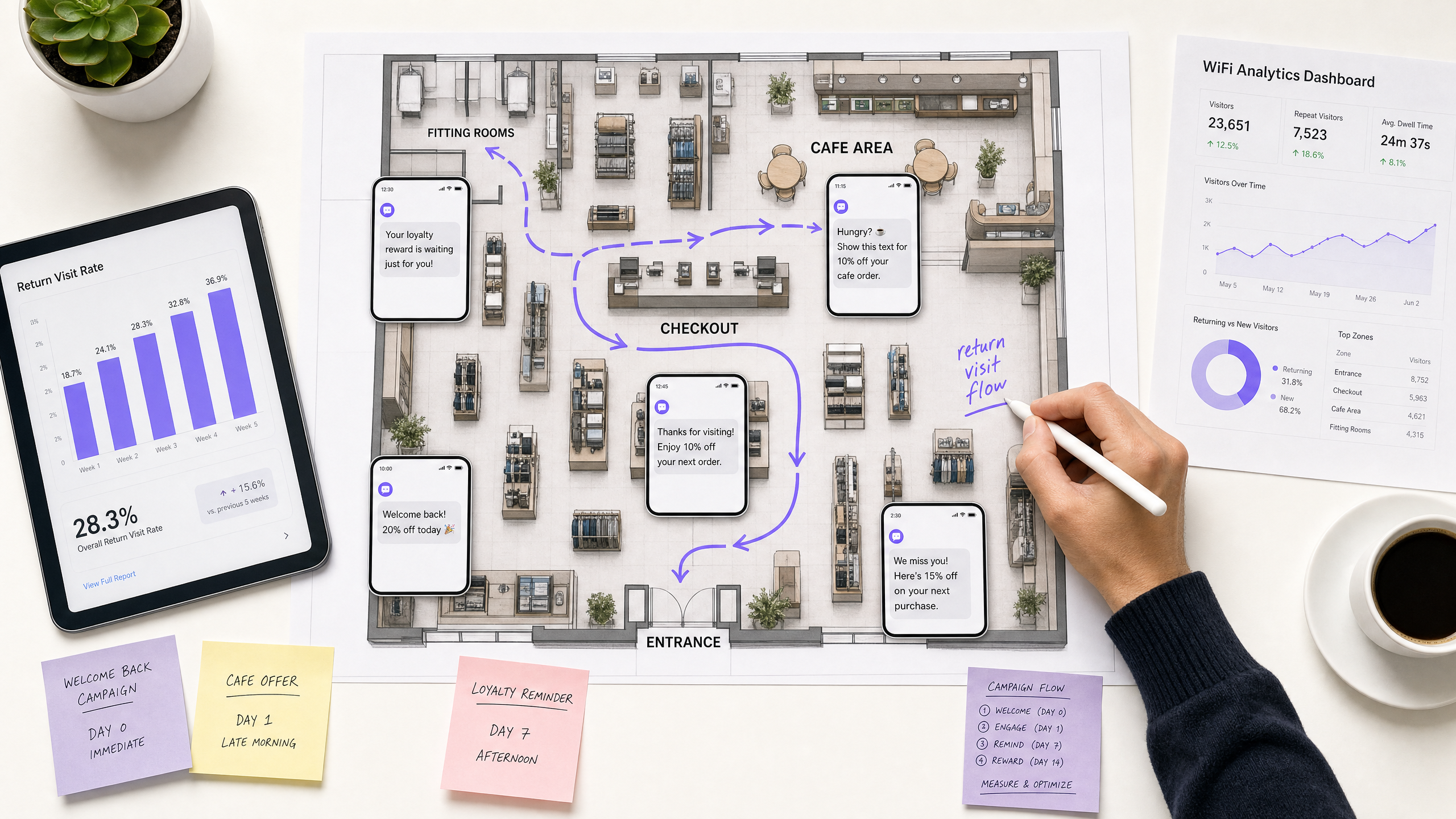
Venue operators face a persistent challenge: acquiring a guest is expensive, but retaining them is difficult when they leave the venue anonymously. SMS marketing solves this problem by delivering a 98% open rate and a 45% response rate. However, building a compliant, opted-in SMS list at scale requires a structural advantage. This guide explains how to use your existing Guest WiFi infrastructure as a data capture engine, converting anonymous footfall into verified phone numbers. By implementing the Purple Engage platform, IT and marketing teams can automate a four-stage SMS sequence that consistently increases return visits. This approach replaces manual list-building with an automated, GDPR-compliant architecture that integrates directly with Cisco Meraki, HPE Aruba, and Ruckus hardware.
Technical Deep-Dive
The Data Capture Architecture
The foundation of an effective SMS marketing example begins at the network edge. When a guest connects to the venue's SSID, the hardware controller redirects their traffic to a captive portal. This portal acts as the primary data capture interface. Instead of relying on manual sign-ups at a point of sale, the captive portal prompts the guest for their name, email, and phone number in exchange for internet access.
To ensure compliance with GDPR, CCPA, and PECR, the portal must present a distinct, unticked checkbox specifically for SMS marketing consent. This is a conscious-choice opt-in. The Purple platform records this consent with a cryptographic timestamp, the specific language presented to the user, and the MAC address of the device. This creates an auditable first-party data record.
Automation and Trigger Mechanisms
Once the data is captured, it flows into the Purple Engage CRM. The system uses RADIUS accounting data to track the guest's physical presence. When the guest's device disconnects from the network for a specified duration, the system registers a completed visit. This event acts as the trigger for the SMS automation workflow.
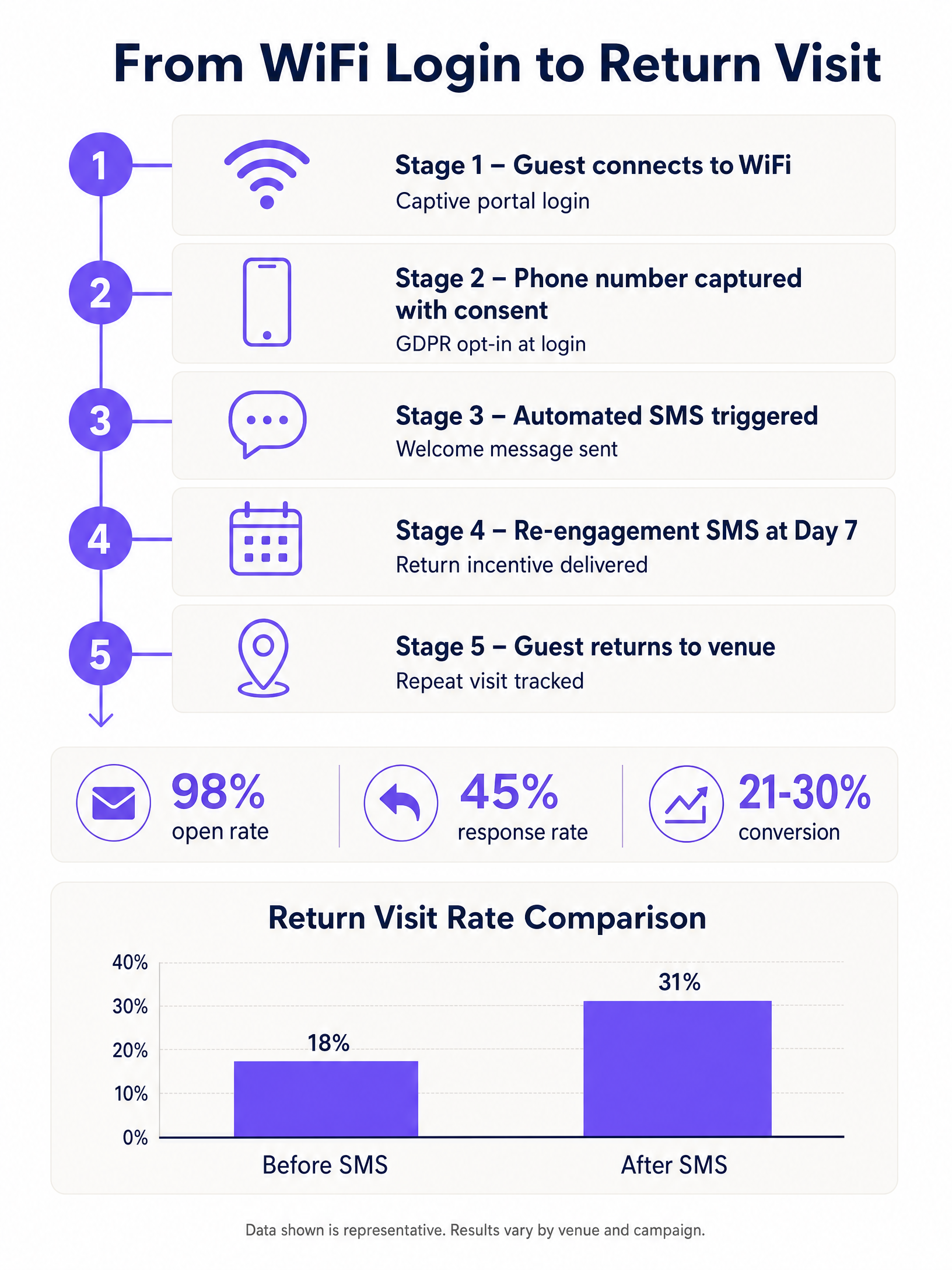
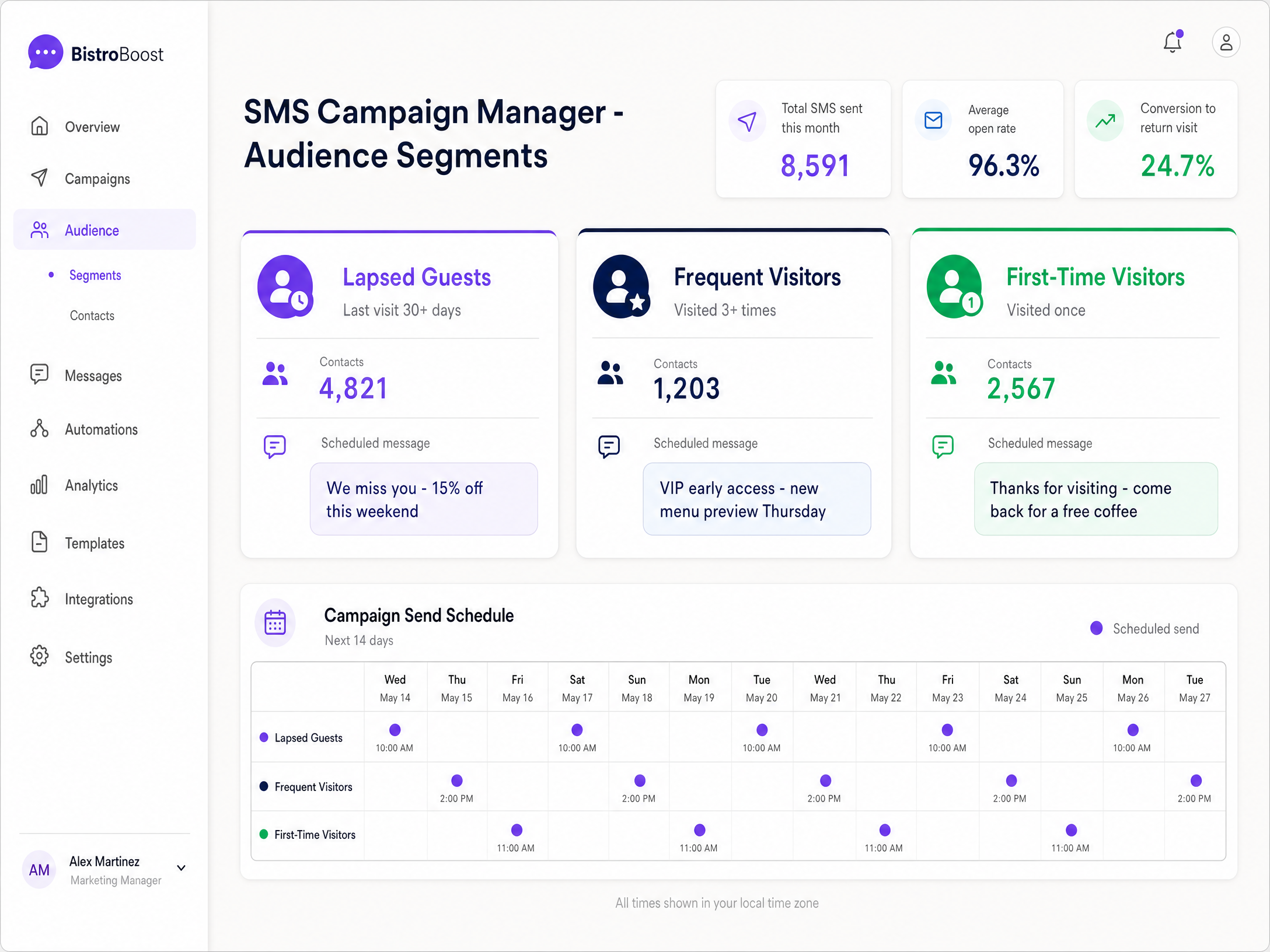
The automation engine evaluates the guest's profile against predefined segments. If the guest is a first-time visitor, they enter the welcome sequence. If they have visited multiple times, they enter a loyalty sequence. The system relies on precise timing delays to send messages at optimal intervals, such as one day, seven days, or 30 days after the initial visit.
Integration with Identity Providers
For enterprise deployments, the Guest WiFi platform integrates with identity providers like Microsoft Entra ID and Okta. This ensures that staff devices are automatically authenticated and excluded from guest marketing workflows, maintaining clean data and preventing internal spam.
Implementation Guide
Deploying an automated SMS return-visit campaign requires coordination between IT and marketing. Follow these steps to configure the system:
- Configure the Captive Portal: Access the Purple management console. Navigate to the splash page editor. Add the phone number field and set it as required or optional based on your data strategy. Add the SMS opt-in checkbox. Ensure the consent language clearly states the frequency and purpose of the messages.
- Define Audience Segments: Create dynamic segments in Purple Engage. Create a segment for 'First-Time Visitors' (visit count equals 1) and a segment for 'Lapsed Guests' (last visit greater than 30 days).
- Build the SMS Workflow: Navigate to the automation builder. Select the 'First-Time Visitors' segment as the trigger audience.
- Set a delay of 24 hours after the visit ends.
- Configure the first message: "Thanks for visiting us. Show this text for 10% off your next order."
- Add a conditional branch: If the guest returns within 7 days (detected via WiFi login), exit the workflow. If not, proceed to the next step.
- Set a delay of 7 days.
- Configure the second message: "We miss you! Your 10% discount expires in 48 hours."
- Test the Logic: Connect a test device to the Guest WiFi. Complete the login process and opt-in to SMS. Verify that the profile appears in the CRM with the correct consent flags. Disconnect the device and monitor the automation logs to confirm the trigger fires.
Best Practices
- Prioritise Relevance Over Frequency: Send no more than two promotional SMS messages per month. Over-messaging is the primary driver of opt-outs. Use the venue data to personalise the message based on the specific location visited.
- Clear Value Exchange: Guests will only provide their phone number if the perceived value is high. Offer a tangible benefit at the captive portal, such as "Sign up for SMS to receive a free coffee voucher immediately."
- Immediate Opt-Out Processing: Ensure your SMS gateway supports automatic suppression when a user replies 'STOP'. Continuing to message an opted-out user violates compliance standards and damages brand trust.
Troubleshooting & Risk Mitigation
- Low Opt-In Rates: If fewer than 20% of guests are providing their phone number, the value proposition is too weak or the portal design is cluttered. Simplify the login screen and make the incentive prominent.
- High Bounce Rates: Invalid phone numbers cause delivery failures. Implement input validation on the captive portal to ensure numbers follow the correct format (e.g., E.164 standard) before submission.
- Attribution Gaps: If you cannot measure the return visit rate, the campaign is flying blind. Ensure that the SMS platform and the WiFi analytics platform share a common identifier (the phone number) to close the loop. When a guest logs back into the WiFi, the system must attribute that visit to the preceding SMS campaign.
ROI & Business Impact
An effective SMS marketing example delivers measurable financial impact. Venue operators typically see a 31% increase in return visits from opted-in guests compared to anonymous traffic. By automating the data capture at the WiFi level, venues eliminate the cost of manual lead generation.
To calculate the ROI, track the cost per SMS sent against the average transaction value of a returning guest. For example, if an SMS campaign costs 50 pounds to send to 1,000 guests, and it drives 40 return visits with an average spend of 15 pounds, the campaign generates 600 pounds in revenue. This represents a significant return on a low-cost, high-engagement channel. Purple's analytics dashboard provides this attribution natively, allowing operators to prove the value of the network infrastructure to the wider business.
Key Definitions
Captive Portal
The web page that a user is required to view and interact with before access is granted to a public WiFi network.
This is the primary interface where venue operators capture guest data and secure SMS marketing consent.
First-Party Data
Information a company collects directly from its customers and owns entirely.
Capturing phone numbers via Guest WiFi provides high-quality first-party data, reducing reliance on expensive third-party advertising platforms.
Conscious-Choice Opt-In
An active, affirmative action taken by a user to consent to marketing communications, such as ticking an empty checkbox.
This is a strict requirement for GDPR and PECR compliance when building an SMS marketing list.
RADIUS Accounting
A networking protocol that tracks network usage, including session duration and data transfer.
Purple uses RADIUS data to determine exactly when a guest arrives and leaves, which triggers the automated SMS workflows.
E.164 Standard
The international standard format for phone numbers, ensuring global interoperability.
Captive portals must validate phone number inputs against this standard to prevent delivery failures and high bounce rates.
Attribution Loop
The process of connecting a marketing action (sending an SMS) to a business outcome (a return visit).
WiFi analytics closes the attribution loop by detecting the physical return of a device associated with an SMS campaign.
Omnichannel Engagement
A strategy that provides a seamless customer experience across multiple communication channels, such as email and SMS.
Combining SMS with existing email workflows produces a significant uplift in return visits compared to using a single channel.
Dynamic Segmentation
The automated grouping of users based on real-time behavioural data, such as visit frequency or dwell time.
Venue operators use dynamic segments to ensure SMS messages are highly relevant, sending different offers to first-time visitors versus loyal guests.
Worked Examples
A 200-room hotel needs to increase direct bookings from previous guests to reduce OTA commission fees. They currently capture email addresses at the WiFi portal but see low engagement. How should they implement an SMS strategy?
The IT team updates the captive portal to include a phone number field with a clear SMS opt-in for exclusive direct-booking rates. They configure Purple Engage to trigger an SMS 24 hours after checkout: "Thanks for staying with us. Book your next stay directly through this link for 15% off." A follow-up SMS is scheduled for 60 days later, timed with seasonal demand. The system tracks return visits by matching the phone number to future WiFi logins or direct booking data.
A retail chain with 40 locations wants to drive foot traffic during slow Tuesday afternoons. They have a database of 15,000 opted-in phone numbers captured via Guest WiFi.
The marketing team creates a segment in Purple Engage for guests who have visited any location in the last 90 days but never on a Tuesday. On Monday afternoon, they send a targeted SMS: "Beat the rush. Show this text tomorrow afternoon at any of our stores for a free pastry with your coffee." The campaign uses venue-level data to ensure the message is only sent to guests near an active location.
Practice Questions
Q1. A stadium operator wants to text fans a discount code for merchandise 30 minutes after the match ends. They plan to make the phone number field mandatory on the WiFi login page and include a pre-ticked box for marketing consent. What is the compliance risk here?
Hint: Consider the GDPR requirements for freely given and unambiguous consent.
View model answer
The primary risk is a breach of GDPR and PECR regulations. Consent must be a conscious, affirmative action, which means pre-ticked boxes are strictly prohibited. Furthermore, making the phone number mandatory for access while bundling it with marketing consent violates the principle that consent must be freely given. The correct approach is to make the marketing opt-in an unticked, optional checkbox, even if the phone number field itself is mandatory for network security purposes.
Q2. You have launched an SMS campaign offering 20% off to guests who have not visited in 60 days. The campaign shows a 99% delivery rate, but you cannot determine if it actually drove footfall. How do you fix the attribution?
Hint: Think about the data points captured at the initial WiFi login and how they relate to physical presence.
View model answer
To fix the attribution, you must correlate the SMS send data with the WiFi analytics data. Because the guest's phone number is tied to their device's MAC address in the Purple Engage CRM, the system can track when that specific MAC address reconnects to the venue's access points. By measuring the number of targeted MAC addresses that appear on the network in the days following the SMS broadcast, you can accurately calculate the return visit conversion rate.
Q3. A restaurant chain is experiencing a 12% opt-out rate on their SMS campaigns. They currently send a generic 'Come back soon' text to their entire database every Friday afternoon. What changes should they make to the automation workflow?
Hint: Consider the impact of relevance and segmentation on subscriber retention.
View model answer
The high opt-out rate is caused by a lack of relevance and over-messaging. The chain should implement dynamic segmentation based on visit history. Instead of a weekly blast, they should trigger messages based on individual behaviour - for example, sending a message 7 days after a specific guest's visit. They should also personalise the content, perhaps offering a free dessert to a first-time visitor, or a VIP table reservation to a frequent visitor. Moving from batch-and-blast to trigger-based, segmented messaging will reduce fatigue and lower the opt-out rate.