
How to leverage SMS marketing examples to increase return visits
This technical guide details how venue operators can use SMS marketing to drive measurable return visits by capturing verified first-party phone data via Guest WiFi. It covers the full implementation architecture from Captive Portal data capture through to automated campaign triggers, GDPR-compliant consent management, and closed-loop ROI attribution across retail, hospitality, and event environments.
Listen to this guide
View podcast transcript
Executive summary
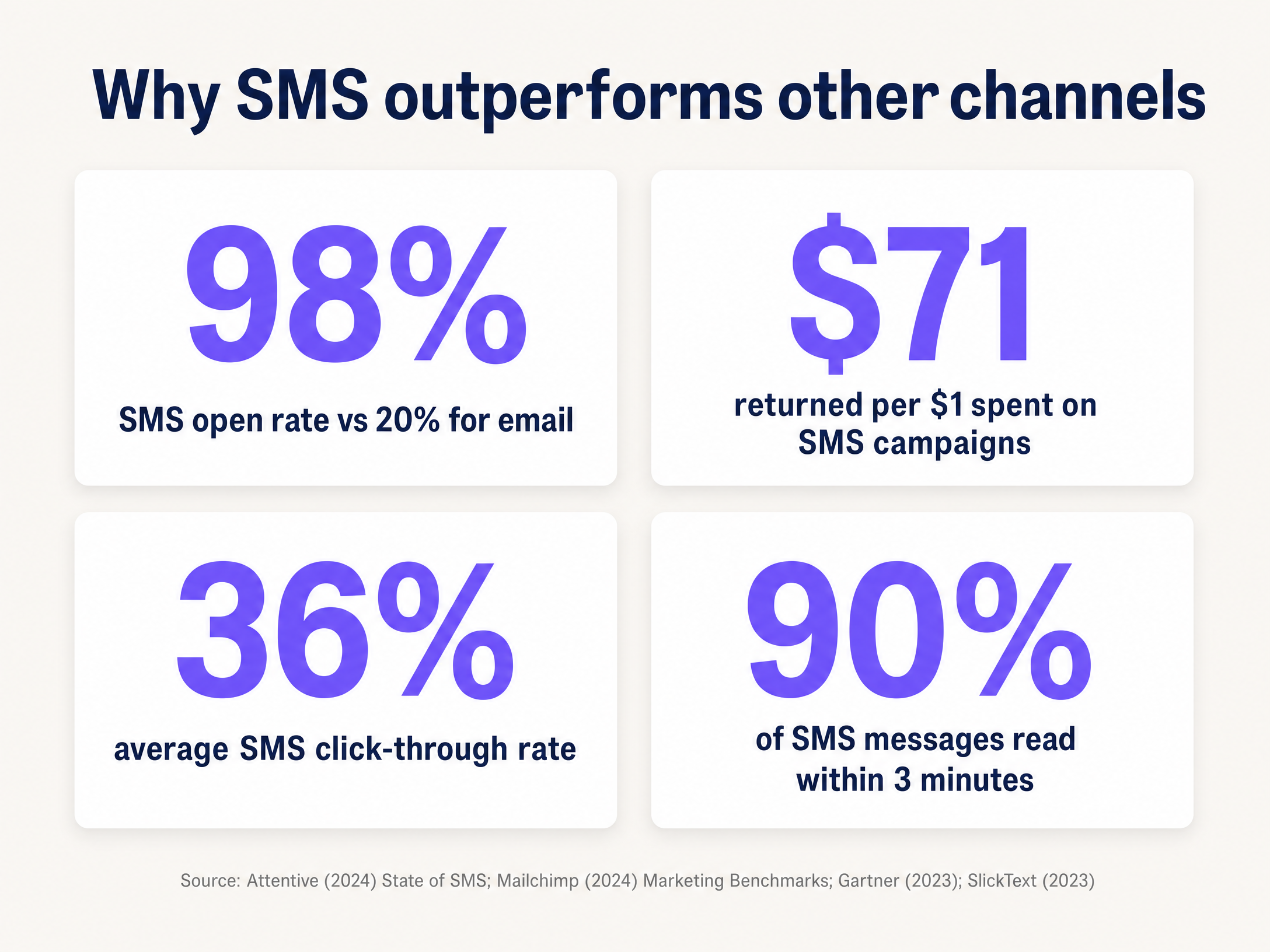
SMS marketing delivers a 98% open rate and returns up to $71 for every $1 spent, according to industry benchmarks (Sakari, 2025). For venue operators, the bottleneck is not the channel itself - it is capturing verified, consented phone numbers at scale. Guest WiFi solves this. By routing authentication through a captive portal on Cisco Meraki, HPE Aruba, Ruckus, or Juniper Mist hardware, Purple Engage captures verified phone numbers during the login flow, stores consent records with full audit trails, and automates SMS campaigns based on physical visit behaviour. This guide walks you through the architecture, the compliance requirements, and three proven sms marketing examples you can deploy this quarter.
Technical deep-dive
The data capture architecture
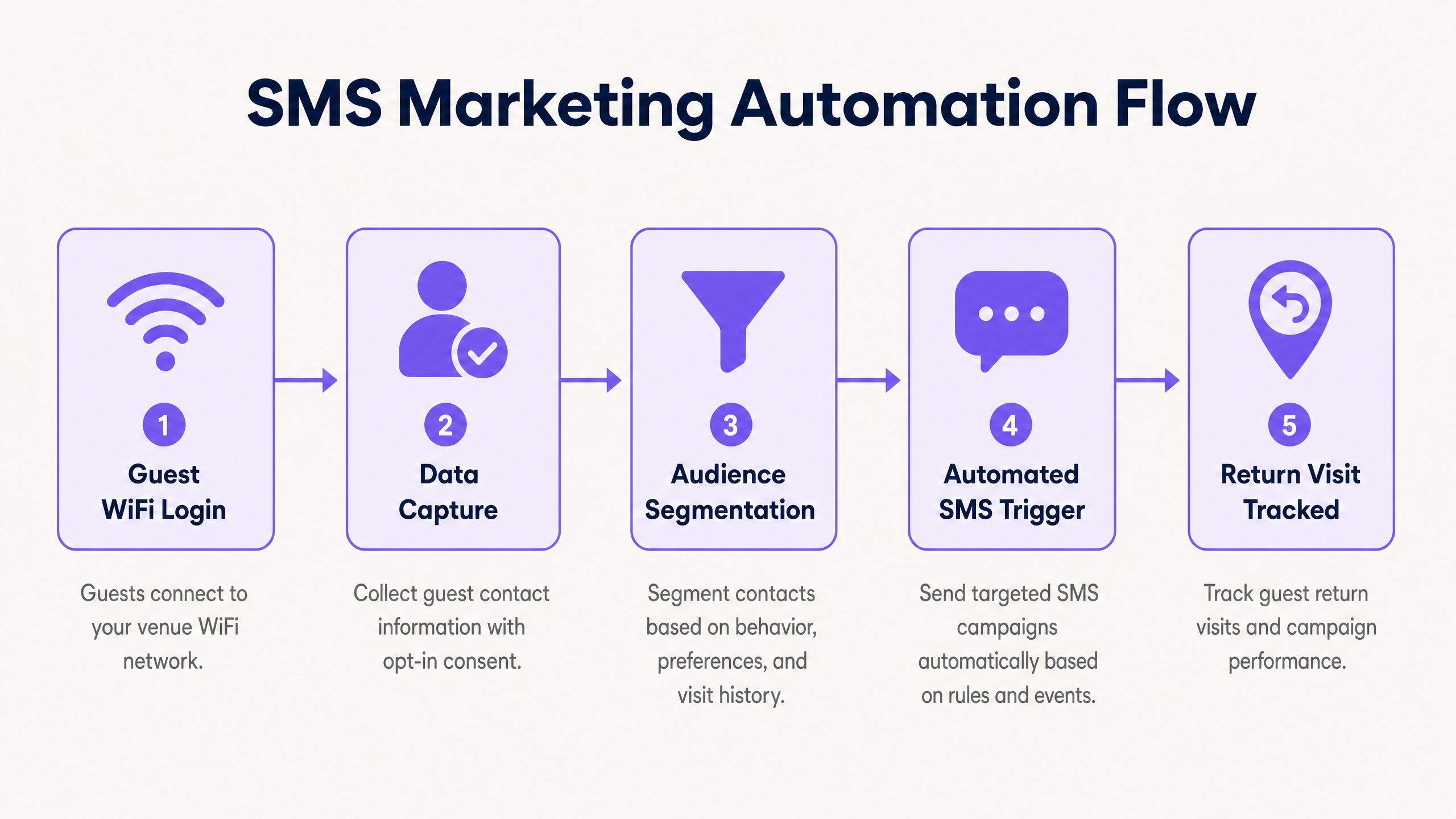
The foundation of any SMS marketing programme is a database of verified, consented phone numbers. Most venues rely on point-of-sale sign-ups or paper forms, which yield low conversion rates and poor data quality. Guest WiFi authentication solves both problems simultaneously.
When a visitor connects to your network, the access point redirects their HTTP traffic via RADIUS to the Purple cloud overlay. The captive portal - hosted on Purple's infrastructure with 99.999% uptime - presents a branded login screen. Instead of a simple email field, you present a phone number field with an OTP (One-Time Password) verification step. The system sends a six-digit code to the number provided; the visitor enters it to gain access. This single step guarantees that every number in your database is real, active, and reachable.
The integration works across Cisco Meraki, HPE Aruba, Ruckus, Juniper Mist, Ubiquiti UniFi, Cambium, Extreme, and Fortinet hardware. No rip-and-replace is required. Purple operates as a hardware-agnostic cloud overlay, sitting above your existing infrastructure.
Consent and compliance
GDPR (EU/UK), CCPA (California), and PECR (UK) all require explicit, conscious-choice opt-ins before you send marketing SMS messages. The captive portal must present a clearly worded consent checkbox, separate from the terms of service, that is not pre-ticked. The user must actively choose to opt in.
Purple Engage records the following for each consent event: timestamp, IP address, device MAC address, the exact consent language displayed, and the user's response. This audit trail is stored securely and is exportable for compliance reviews. When a user opts out by replying STOP to any message, the integration updates the central database within seconds, suppressing all future marketing messages to that number.
For venues operating across multiple jurisdictions, configure separate consent flows per region. The UK and EU require opt-in; the US requires a clear opt-out mechanism. Both are configurable within the Engage platform.
Segmentation and trigger logic
Raw phone number data is only the starting point. The WiFi Analytics platform tracks each device's visit history, dwell time, visit frequency, and last-seen timestamp. This behavioural data is the basis for audience segmentation.
Segments you can build immediately include: first-time visitors (connected once, never returned), lapsed visitors (no connection in 60 or 90 days), high-frequency visitors (connected five or more times in the last 30 days), and high-dwell visitors (average session over 60 minutes). Each segment maps to a different campaign type and message tone.
Triggers fire via webhook from the analytics platform to your SMS gateway. Purple Engage integrates natively with major SMS platforms. The webhook payload includes the phone number, the segment identifier, and the visit metadata, allowing the SMS platform to personalise the message dynamically.
Implementation guide
Step 1: Deploy the captive portal with phone verification
Navigate to the Purple Engage portal and configure a new splash page for your venue. Under authentication method, select Phone Number with OTP Verification. Set the OTP expiry to five minutes. Configure the consent checkbox with your legal team's approved language. Map the portal to your SSID via the RADIUS integration for your hardware vendor.
Test the flow on a personal device before going live. Verify that the OTP arrives within 10 seconds, that the consent record appears in the dashboard, and that the device is granted network access after successful verification.
Step 2: Define your audience segments
In the analytics dashboard, create the following baseline segments. First, a lapsed segment: visitors last seen more than 60 days ago. Second, a dwell-time segment: visitors with a session duration over 45 minutes. Third, a new visitor segment: devices with exactly one recorded visit. Save each segment with a clear name and document the criteria for your team.
Step 3: Build your first automated campaign
Start with the lapsed visitor reactivation campaign. This is the highest-ROI campaign type because it targets people who already know your venue. Configure the trigger: when a contact in the lapsed segment has not been seen for 90 days, send an SMS. Write the message: keep it under 160 characters, include the visitor's first name if available, state a clear offer, and include STOP to opt out. Schedule the send for 11:00 AM on a weekday.
Step 4: Configure attribution tracking
For each campaign, record the send date and the list of phone numbers that received the message. The analytics platform links each phone number to a device MAC address captured during the original WiFi login. Configure a 14-day attribution window. Any MAC address from the campaign cohort that reconnects to the network within 14 days of the send date counts as an attributed return visit. Export this data weekly to measure campaign performance.
Best practices
The following table summarises the key operational parameters for SMS marketing in venue environments.
| Parameter | Recommended value | Rationale |
|---|---|---|
| Message frequency | 2-4 per month | Reduces opt-out rate below 2% |
| Message length | Under 160 characters | Single SMS unit; lower cost |
| Send window | 10:00 AM - 8:00 PM local | Avoids complaints and regulatory risk |
| OTP expiry | 5 minutes | Balances security and user experience |
| Attribution window | 7-14 days | Captures considered return decisions |
| Opt-out processing | Under 60 seconds | GDPR and PECR requirement |
Personalisation is the single biggest lever for improving conversion rates. McKinsey research shows that companies excelling at personalisation generate 40% more revenue than average. At minimum, use the visitor's first name and reference their visit history. "Welcome back, James - it has been a while" outperforms "Dear Customer" on every metric.
For hospitality venues, the post-stay survey is the most valuable SMS campaign type. Send it two hours after the guest's device disconnects from the network. A simple 1-5 rating request achieves a 45% response rate. A low score triggers an immediate alert to the venue manager, allowing intervention before the guest posts a public review.
For retail venues, the in-venue dwell-time trigger drives the highest immediate conversion. A shopper who has been in your store for 45 minutes is actively browsing. A time-limited offer sent at that moment converts at a significantly higher rate than a post-visit message.
For transport hubs and airports, the reactivation campaign is most effective. Passengers travel on schedules, and a well-timed message ahead of a typical travel period can drive lounge bookings and ancillary revenue.
For more on structuring your Guest WiFi for multiple use cases, see Three SSIDs to rule them all: guest, Passpoint, and IoT WiFi and How to make a great first impression with your guest WiFi .
If you are also exploring SMS marketing in property and real estate contexts, see How to leverage real estate SMS marketing to increase return visits .
Troubleshooting and risk mitigation
High bounce rate: If SMS delivery fails on more than 5% of messages, your database contains unverified numbers. Enforce OTP verification at the point of WiFi login. This is a one-time fix that permanently improves database quality.
High opt-out rate: An opt-out rate above 2% indicates your messages are too frequent or lack value. Reduce cadence to twice a month and review message content. Every SMS must offer a tangible benefit: a discount, exclusive access, or time-sensitive information.
Zero attributed return visits: Your MAC address linkage is broken. Verify that the analytics platform is correctly recording the MAC-to-phone-number mapping during the OTP verification step. Check that the attribution window is configured and that the MAC address lookup is running against the correct network segment.
Consent audit failure: If your consent records are incomplete, review the captive portal configuration. Ensure that the consent checkbox is active, that the audit log is enabled in the Engage platform, and that records are being written to the database on each login event.
Integration latency: If webhook triggers are delayed by more than 60 seconds, check the API endpoint health and authentication token expiry. Implement a local queue to buffer events during temporary API outages.
ROI and business impact
SMS marketing costs between $0.02 and $0.04 per message. A campaign to 10,000 contacts costs $200 to $400. At a 10% conversion rate and an average transaction value of $50, a single campaign generates $50,000 in attributed revenue. That is a return of 125 to 250 times the campaign cost, well within the industry benchmark of $71 per $1 spent reported by Sakari (2025).
The more important metric for venue operators is return visit rate. Track the percentage of lapsed visitors who return within 14 days of receiving an SMS. A baseline of 8 - 12% is achievable in the first 90 days. With ongoing optimisation of segmentation and message content, venues running Purple Engage typically see this rate increase to 18 - 25% within six months.
Purple's 440 million logins recorded in 2024 across 80,000+ live venues provide a substantial benchmark dataset. Venues using the Engage plan with automated SMS campaigns consistently outperform those relying on email alone, driven by the fundamental difference in open rates: 98% for SMS versus 20% for email.
For a broader view of how Guest WiFi data feeds marketing automation, see Guest WiFi and the WiFi Analytics platform .
Key Definitions
First-party data
Information collected directly from your visitors, such as phone numbers captured via a Captive Portal login. You own it, it is accurate, and it does not depend on third-party data brokers.
The foundation of any compliant SMS marketing programme. Third-party data lists carry significant GDPR risk and typically have poor deliverability.
Captive Portal
A web page that a visitor must interact with before gaining internet access on a public network. It is the mechanism that enables data capture and consent collection at the point of WiFi authentication.
Every Guest WiFi deployment uses a Captive Portal. The question is whether yours is configured to capture phone numbers with OTP verification and explicit consent.
OTP (One-Time Password)
A temporary numeric code sent to a phone number to verify that the user owns the device. In the context of WiFi login, it confirms that the phone number entered is real and accessible.
Without OTP verification, users can enter any number to gain WiFi access. This renders the database unreliable for SMS marketing.
RADIUS
Remote Authentication Dial-In User Service. A networking protocol that provides centralised authentication, authorisation, and accounting management for users connecting to a network.
RADIUS is the protocol that allows hardware vendors (Cisco Meraki, HPE Aruba, Ruckus, Juniper Mist) to redirect unauthenticated users to the Purple Captive Portal.
MAC address
Media Access Control address. A unique identifier assigned to a network interface controller. It is used to track device presence on the network without storing personally identifiable information.
Linking a MAC address to a phone number during WiFi login enables return visit attribution. When the device reconnects, the system can identify it as belonging to a known contact.
Webhook
An HTTP callback that fires automatically when a specific event occurs in one system, delivering data to another system in real time.
Webhooks connect the WiFi analytics platform to the SMS gateway. When a trigger condition is met (e.g., dwell time exceeds 45 minutes), the webhook fires and the SMS is sent within seconds.
Dwell time
The duration a device remains connected or visible to the venue network during a single visit.
A key segmentation variable. High dwell time indicates an engaged visitor who is likely to respond to an in-venue offer. Low dwell time suggests a passing visitor who may not be a target for promotional messages.
RTLS (Real-Time Location Services)
A capability of enterprise WiFi infrastructure that uses signal triangulation to determine the approximate physical location of connected devices within a venue.
Required for geofence-based SMS triggers. Enables location-specific offers such as concession stand promotions in a stadium or department-level offers in a large retail store.
Conscious-choice opt-in
A consent mechanism where the user actively selects a checkbox or confirms their agreement, rather than being opted in by default. Pre-ticked boxes do not constitute valid consent under GDPR.
All SMS marketing campaigns built on Guest WiFi data must use conscious-choice opt-ins. This is both a legal requirement and a quality filter: users who actively opt in are more likely to engage with subsequent messages.
Worked Examples
A 300-capacity restaurant chain with 12 sites wants to increase weekday lunchtime footfall. They have 15,000 verified phone numbers collected via Guest WiFi over the past 18 months. How should they structure their first SMS campaign?
- In the WiFi Analytics dashboard, create a segment of contacts who have visited during weekday lunch hours (11:30 AM - 2:00 PM) at least twice in the past six months.
- Exclude contacts who have visited in the last seven days to avoid discounting existing frequent visitors.
- The resulting segment should be approximately 4,000 to 6,000 contacts.
- Configure an automated SMS campaign scheduled for 10:30 AM on Tuesdays and Thursdays.
- Message (under 160 characters): 'Hi [First Name], skip the queue today. Free soft drink with any main before 2 PM. Show this text. Reply STOP to opt out.'
- Track return visits by monitoring network authentications from the targeted cohort between 11:30 AM and 2:00 PM on campaign days within a seven-day attribution window.
- After two weeks, compare the return visit rate of the SMS cohort against a control group of similar contacts who did not receive the message.
A 45,000-seat stadium wants to use its Guest WiFi database to send location-based concession offers to attendees during live events. What architecture is required, and what are the key implementation risks?
- Audit the existing access point density. Location-based triggers require access points spaced no more than 15 metres apart to achieve the accuracy needed for geofence triggers. Most stadium deployments on Cisco Meraki or HPE Aruba already meet this requirement.
- Enable Real-Time Location Services (RTLS) on the network controller. This generates a continuous stream of device coordinates based on signal triangulation.
- In the analytics platform, configure geofences around each concession stand (typically a 10-metre radius).
- Build a webhook rule: when a MAC address enters a geofence, look up the associated phone number, check opt-in status, and fire the SMS API call within five seconds.
- Message: 'You are near Stand 7. Show this text for a free upgrade on any hot drink. Valid for 10 minutes. STOP to opt out.'
- Implement rate limiting: no more than one location-based SMS per attendee per event to prevent message fatigue.
- Separate emergency notification consent from marketing consent in the Captive Portal. Emergency messages (crowd control, safety alerts) must reach all connected devices regardless of marketing opt-in status.
Practice Questions
Q1. Your retail chain's marketing director wants to send a promotional SMS to every customer the moment they connect to the WiFi. What are the primary technical and compliance risks, and what is the correct implementation approach?
Hint: Consider the user experience during authentication, the legal basis for sending the message, and the timing of the trigger relative to the consent event.
View model answer
The primary compliance risk is that sending an SMS at the moment of login conflates the authentication process with marketing consent. Under GDPR, consent must be freely given and separate from a condition of service. If the visitor must accept marketing to get WiFi, the consent is not valid. The technical risk is that an immediate SMS interrupts the authentication flow: the visitor may need to switch apps to read the code, breaking the login sequence. The correct approach is to request explicit, separate marketing consent during the login flow, use OTP for authentication verification only, and delay the first promotional SMS by at least 15 minutes after the session begins. This respects the user experience and ensures the consent is legally valid.
Q2. You have sent an SMS campaign to 8,000 lapsed visitors. Your delivery rate is 97% but your attributed return visit rate is 0%. How do you diagnose and fix the attribution failure?
Hint: Think about the data linkage between the phone number in the SMS platform and the device identifier in the WiFi analytics platform.
View model answer
A 0% return visit rate despite high delivery almost always indicates a broken MAC-to-phone-number linkage. Diagnose by selecting five phone numbers from the campaign list and manually checking whether they have an associated MAC address in the WiFi analytics platform. If the mapping is missing, the OTP verification step is not writing the MAC address to the database. Fix by reviewing the captive portal configuration: ensure that when OTP verification succeeds, the system writes both the phone number and the device MAC address to the same contact record. Re-run the attribution query after the fix is deployed. Also verify that the attribution window is configured correctly and that the MAC address lookup is running against the correct network segment for each venue.
Q3. A conference centre wants to send different SMS messages to attendees at a technology conference versus attendees at a food and drink trade show, both running in the same venue on different days. How should the segmentation and campaign architecture be structured?
Hint: Consider how to tag contacts by event context at the point of data capture, and how to prevent messages intended for one event's attendees from reaching another event's attendees.
View model answer
The correct approach is event-level tagging at the point of WiFi login. Configure a separate SSID or a separate captive portal instance for each event, with a unique event identifier passed as metadata when the contact record is created. This tags each phone number with the event they attended. When building SMS campaigns, filter by event tag to ensure messages are relevant to the specific audience. To prevent cross-contamination, set a suppression rule: if a contact attended both events, they receive only the message relevant to their most recent attendance. This architecture also enables post-event attribution: you can measure which event's attendees had a higher return visit rate, informing future event programming decisions.
Q4. Your venue's SMS opt-out rate has risen from 1.2% to 4.8% over three months. What are the most likely causes and what actions should you take?
Hint: Opt-out rate is a signal about message relevance and frequency, not just message quality.
View model answer
An opt-out rate rising from 1.2% to 4.8% over three months indicates a systematic problem, not a one-off campaign failure. The most likely causes are: message frequency has increased beyond the audience's tolerance (check whether the number of campaigns per month has risen); message relevance has declined (check whether the segmentation has become less precise, sending offers to contacts who are unlikely to act on them); or a single poorly timed or poorly worded campaign has triggered a spike. Immediate actions: pause all campaigns for one week, review the campaign log for the past three months to identify any frequency or relevance changes, reduce cadence to a maximum of two campaigns per month, and rebuild the core segments with tighter behavioural criteria. Monitor the opt-out rate weekly for the next six weeks. If it does not return below 2%, conduct a short survey of opted-out contacts to understand their reasons.