
How to Set Up Guest WiFi: The Enterprise Network Segmentation Guide
This guide details the technical architecture, authentication standards, and deployment methodology required to build a secure, segmented enterprise WiFi network. You will learn how to implement the three-SSID model, deploy 802.1X for staff authentication, configure captive portals for GDPR-compliant guest access, and reduce your PCI DSS scope.
Video overview
Listen to this guide
View podcast transcript
📚 Part of our core series: Guest WiFi Guide →
Executive Summary
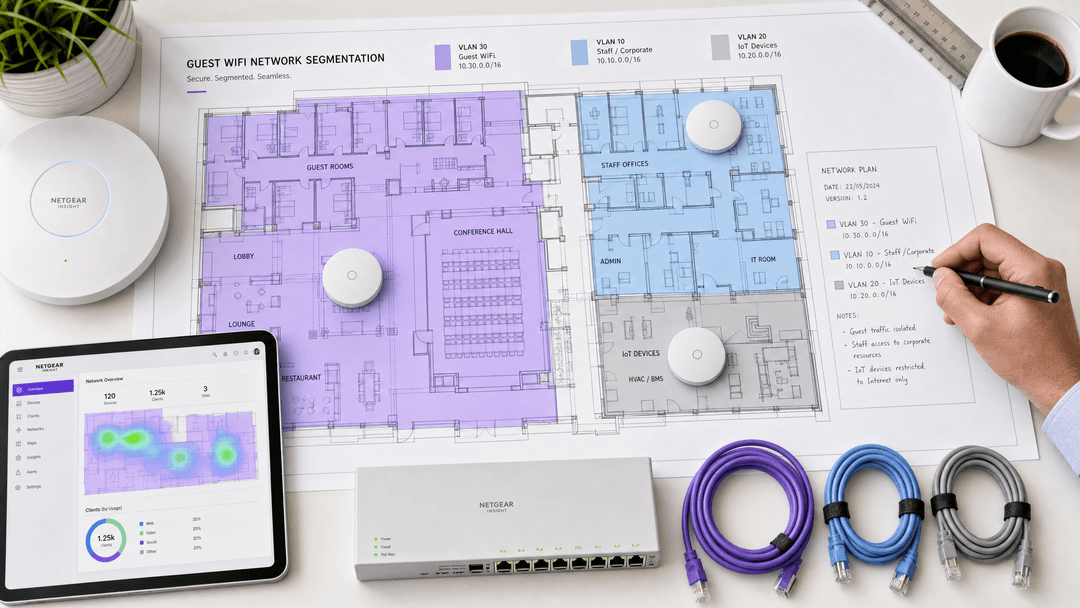
The primary failure mode in enterprise WiFi deployments is a flat network topology. When you place guests, staff, and IoT devices on the same broadcast domain, you introduce significant compliance and security risks. You also compromise the commercial utility of the network. A properly segmented network isolates traffic at the data link layer using Virtual Local Area Networks (VLANs), ensuring that a compromised IoT sensor cannot pivot to your property management system, and a malicious guest cannot scan your corporate servers.
This guide details the technical architecture, authentication standards, and deployment methodology required to build a secure, segmented enterprise WiFi network. You will learn how to implement the three-SSID model, deploy 802.1X for staff authentication, configure captive portals for GDPR-compliant guest access, and reduce your PCI-DSS scope through explicit network isolation. Purple operates across 80,000+ live venues and processes 440 million logins annually; the architecture described here is the exact model we deploy for global retail, hospitality, and transport brands.
Technical Deep-Dive: The Three-SSID Architecture
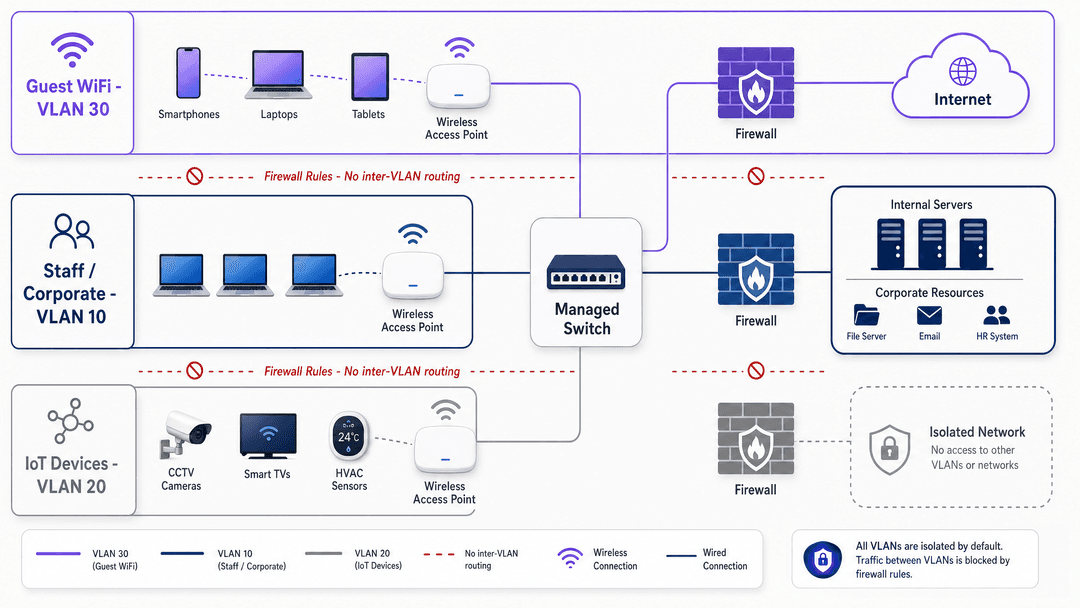
The foundational principle of enterprise WiFi segmentation is mapping distinct user groups to isolated network segments. The most effective approach is the three-SSID model, which balances security requirements with airtime efficiency. Every additional SSID broadcast by an access point consumes management frame overhead, reducing overall network capacity. Limiting your deployment to three SSIDs preserves performance while maintaining strict logical separation.
Guest WiFi (VLAN 30)
The guest segment requires internet access only. You must configure this VLAN with explicit firewall rules that drop all traffic destined for internal RFC 1918 IP address spaces (10.0.0.0/8, 172.16.0.0/12, 192.168.0.0/16).
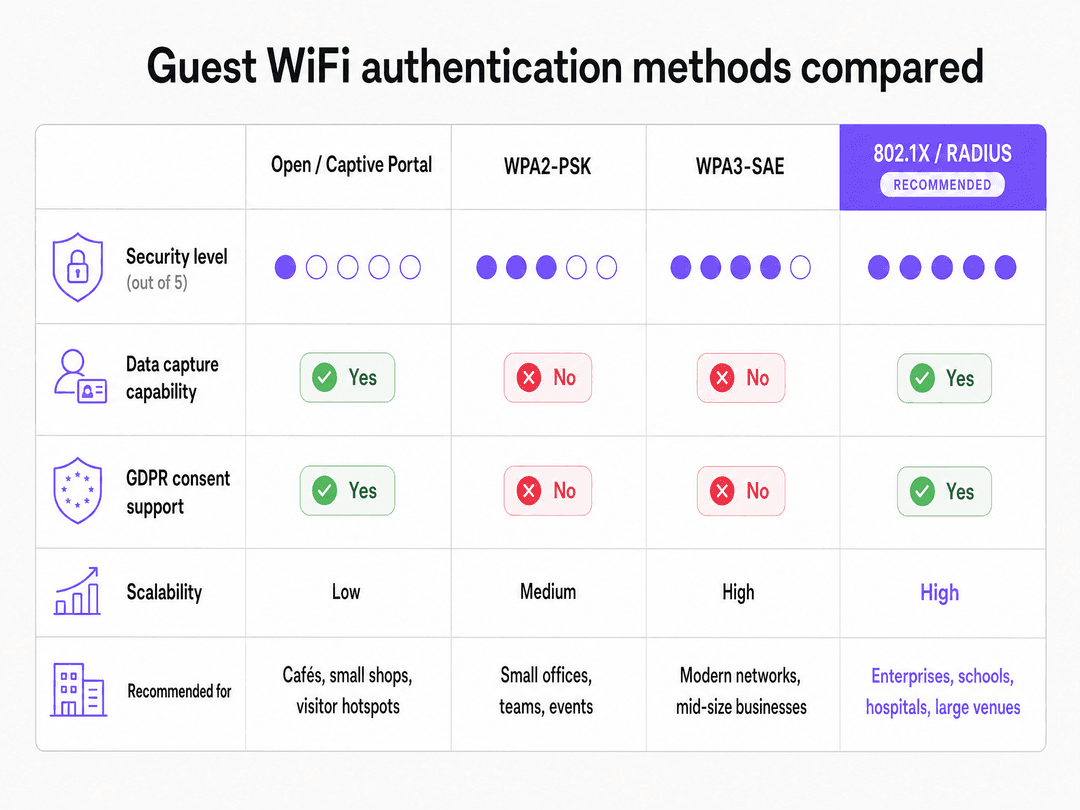
Guest authentication presents a specific challenge. You need to balance ease of access with security and data capture requirements. The recommended approach is an open network secured by a captive portal. When a user connects, the access point redirects their HTTP request to a branded splash page. The user authenticates via social login, email, or SMS. This mechanism allows you to capture explicit, granular consent for data processing under GDPR. Purple's Guest WiFi platform handles this identity capture and consent logging centrally, storing the exact consent text version agreed to by the user.
For transport hubs and large public venues, Passpoint (Hotspot 2.0) offers an alternative to the captive portal. Passpoint allows devices to authenticate automatically using credentials already stored on the device. Purple acts as an identity provider for OpenRoaming under our Connect plan, enabling seamless, secure connectivity without manual intervention.
Staff / Corporate (VLAN 10)
The staff segment requires access to internal corporate resources. You must secure this segment using WPA2-Enterprise or WPA3-Enterprise, authenticating against a RADIUS server via IEEE 802.1X.
When a staff device attempts to connect, the access point (authenticator) passes the credentials to the RADIUS server (authentication server). The RADIUS server verifies the credentials against your identity provider, such as Microsoft Entra ID or Okta. The recommended protocol is PEAP-MSCHAPv2, which wraps the authentication exchange in a secure TLS tunnel. This approach ensures that every staff member uses unique credentials, allowing you to revoke access for a single user instantly when they leave the organisation.
IoT Devices (VLAN 20)
The IoT segment isolates headless devices: CCTV cameras, smart TVs, HVAC sensors, and digital signage. These devices often lack the capability to authenticate via 802.1X or a captive portal. You must secure this segment using WPA2-PSK or WPA3-SAE with a strong, complex passphrase.
Crucially, you must apply strict egress firewall rules to the IoT VLAN. A smart TV only needs to communicate with its specific content delivery network; it does not need unrestricted internet access, and it certainly does not need access to your staff VLAN. By restricting outbound ports and destinations, you contain the blast radius if an IoT device is compromised.
Implementation Guide
Deploying this architecture requires coordinated configuration across your access points, managed switches, and firewalls. The exact steps vary by vendor, but the methodology remains consistent whether you deploy Cisco Meraki, HPE Aruba, Ruckus, Juniper Mist, or Ubiquiti UniFi.
Step 1: Define the VLAN Structure
Configure your core switch and firewall with the required VLANs. Assign each VLAN a dedicated subnet and DHCP scope.
- VLAN 10 (Staff): 10.10.0.0/16
- VLAN 20 (IoT): 10.20.0.0/16
- VLAN 30 (Guest): 10.30.0.0/16
Step 2: Configure Trunk Ports
Configure the switch ports connected to your access points as 802.1Q trunk ports. The trunk port must allow traffic for all three VLANs to pass between the access point and the switch.
Step 3: Build the SSIDs
In your wireless management dashboard, create the three SSIDs and map them to their respective VLANs.
- Map the "Corporate" SSID to VLAN 10. Configure 802.1X authentication and point the access points to your RADIUS server IP address.
- Map the "IoT" SSID to VLAN 20. Configure WPA2-PSK and set a strong passphrase. Hide the SSID broadcast to reduce clutter.
- Map the "Guest" SSID to VLAN 30. Configure an open network with a captive portal redirect URL pointing to your Purple splash page.
Step 4: Enforce Layer 3 Isolation
Configure your firewall or layer 3 switch to block inter-VLAN routing. Create explicit deny rules:
- Deny traffic from VLAN 30 to VLAN 10 and VLAN 20.
- Deny traffic from VLAN 20 to VLAN 10 and VLAN 30.
- Permit traffic from VLAN 10 to VLAN 20 only for specific administrative IP addresses if required.
Step 5: Enable Client Isolation
Enable client isolation (sometimes called layer 2 isolation or AP isolation) on the Guest WiFi SSID. This setting prevents devices connected to the same access point from communicating directly with each other, mitigating the risk of lateral attacks between guests.
Best Practices
Deploy Filtered DNS
You must deploy a filtered DNS resolver for your guest network. A filtered DNS service blocks queries to known malware command-and-control domains, phishing sites, and inappropriate content. This protects your guests and reduces the liability of your venue. Purple's Purple Shield add-on includes comprehensive DNS filtering integrated directly into the guest authentication flow. For more details on implementing this, review our guide on the Best DNS filtering: a comprehensive guide for businesses .
Implement Bandwidth Management
Guest WiFi traffic can easily saturate your WAN uplink, degrading performance for critical staff and operational systems. You must implement bandwidth limits. Apply a per-client limit (e.g., 5 Mbps down / 2 Mbps up) to ensure fair usage among guests. Apply a per-SSID limit (e.g., 50% of total WAN capacity) to guarantee bandwidth for your staff and IoT VLANs.
Centralise Configuration Management
For multi-site deployments in Retail or Hospitality , you cannot manually configure individual access points. You must use a cloud-managed platform to define your VLAN and SSID templates centrally. When you open a new site, you apply the template, and the access points inherit the correct configuration automatically. Purple acts as a cloud overlay across your entire estate, ensuring consistent captive portal branding and centralised data collection regardless of the underlying hardware vendor.
Troubleshooting & Risk Mitigation
DHCP Scope Exhaustion
A common failure mode in high-footfall venues like stadiums or large Transport hubs is DHCP scope exhaustion. If your guest VLAN uses a /24 subnet, you only have 253 usable IP addresses. When the 254th guest connects, they will fail to obtain an IP address. Mitigation: Size your guest DHCP scope appropriately. Use a /22 or /21 subnet for large venues. Reduce the DHCP lease time to 30 minutes or 1 hour so that IP addresses are returned to the pool quickly when guests leave the venue.
Internal Hostname Leakage
If you point the guest VLAN DHCP scope to your internal corporate DNS servers, guests can resolve internal hostnames, exposing your network topology. Mitigation: Always configure the guest DHCP scope to assign public DNS servers (like 8.8.8.8 or 1.1.1.1) or a dedicated filtered DNS service. Never use your internal Active Directory DNS servers for guest clients.
Captive Portal Interception
Modern operating systems use specific URLs (like captive.apple.com) to detect captive portals. If your firewall blocks these detection URLs, the captive portal will fail to load, and guests will see a "no internet connection" error. Mitigation: Ensure your "walled garden" or pre-authentication firewall rules explicitly permit traffic to the captive portal detection URLs used by Apple, Android, and Windows devices. Purple provides a documented list of required walled garden domains for all supported hardware vendors.
ROI & Business Impact
Proper network segmentation delivers measurable business value across three vectors:
1. PCI DSS Scope Reduction If your point-of-sale terminals share a network with your guest WiFi, your entire wireless infrastructure is in scope for PCI DSS compliance. By implementing strict VLAN segmentation and firewall rules, you isolate the payment environment. This reduces the number of systems subject to the annual PCI DSS assessment, significantly lowering your compliance costs and audit complexity.
2. First-Party Data Acquisition An open guest network provides connectivity but no commercial return. By routing guest traffic through a captive portal, you transform an IT cost centre into a marketing asset. Purple's WiFi Analytics platform captures verified demographics, contact details, and venue visitation frequency. For a retail chain, this first-party data directly feeds CRM systems, enabling targeted campaigns based on actual physical visits rather than just online browsing behaviour.
3. Operational Efficiency Deploying 802.1X for staff networks eliminates the operational overhead of managing shared PSKs. When an employee leaves, you disable their account in Microsoft Entra ID, and their WiFi access is revoked instantly across all sites. You eliminate the need to update a shared password on hundreds of devices, reducing IT helpdesk tickets and improving overall security posture.
Key Definitions
VLAN (Virtual Local Area Network)
A logical network segment created on physical switches and access points, defined under IEEE 802.1Q.
VLANs are the fundamental building blocks of network segmentation, allowing you to isolate guest, staff, and IoT traffic on the same physical hardware.
802.1X
An IEEE standard for port-based network access control that provides an authentication mechanism to devices wishing to attach to a LAN or WLAN.
This is the gold standard for staff WiFi authentication, replacing shared passwords with individual credentials verified against a directory like Microsoft Entra ID.
RADIUS
Remote Authentication Dial-In User Service; a networking protocol that provides centralised authentication, authorisation, and accounting management.
The RADIUS server acts as the middleman between your access points and your identity provider when staff authenticate via 802.1X.
Captive Portal
A web page that a user of a public-access network is obliged to view and interact with before access is granted.
The captive portal is where Purple captures user identity, secures GDPR consent, and displays venue branding before granting internet access.
Client Isolation
A wireless network security feature that prevents devices connected to the same access point from communicating directly with each other.
Essential for guest networks to prevent a malicious actor from scanning or attacking other guests' laptops or smartphones.
Passpoint (Hotspot 2.0)
A standard that enables mobile devices to automatically discover and connect to secure WiFi networks without requiring a captive portal interaction.
Used in transport hubs and large venues to provide seamless, secure connectivity using credentials already present on the user's device.
Walled Garden
A limited environment that controls the user's access to web content and services before they have fully authenticated.
You must configure the walled garden to allow access to OS captive portal detection URLs and the Purple authentication servers before the user logs in.
PCI DSS Scope
The systems, people, and processes that interact with or could impact the security of cardholder data.
Proper VLAN segmentation ensures your guest WiFi network remains out of scope for PCI DSS, drastically reducing compliance costs.
Worked Examples
A 200-room hotel needs to deploy WiFi across guest rooms, staff offices, and conference facilities. They have existing Cisco Meraki hardware but currently use a single flat network with a shared WPA2 password. How should they segment this network to ensure security and compliance?
The hotel must deploy a three-SSID architecture. First, configure VLAN 10 (Staff), VLAN 20 (IoT), and VLAN 30 (Guest) on the core switch and firewall. Second, configure the Meraki access points to broadcast three SSIDs. The Guest SSID maps to VLAN 30, uses an open network, and redirects to a Purple captive portal for authentication and GDPR consent. The Staff SSID maps to VLAN 10 and uses WPA2-Enterprise, authenticating via RADIUS against the hotel's Microsoft Entra ID tenant. The IoT SSID maps to VLAN 20 and uses WPA2-PSK with a hidden broadcast. Finally, configure layer 3 firewall rules on the Meraki security appliance to explicitly block all inter-VLAN routing.
A national retail chain with 50 stores needs to implement guest WiFi to capture shopper data for their CRM system. Their point-of-sale (POS) terminals currently run on the same network infrastructure. How do they deploy guest WiFi without bringing the entire network into scope for PCI DSS?
The retailer must implement strict logical segmentation using VLANs. The POS terminals must be placed on a dedicated, highly restricted VLAN (e.g., VLAN 40) that only permits outbound traffic to the payment processor. The guest WiFi must operate on a separate VLAN (e.g., VLAN 30). The core firewall must be configured with explicit deny rules that block all traffic between the guest VLAN and the POS VLAN. The guest VLAN must then be configured with a captive portal integrated with Purple to capture the shopper data and feed it via API into the CRM system.
Practice Questions
Q1. A stadium IT director plans to deploy a single WPA2-PSK network for both point-of-sale terminals and guest WiFi to simplify the deployment before a major event. What is the primary risk of this approach?
Hint: Consider the implications for compliance and the blast radius of a compromised device.
View model answer
This approach brings the entire stadium WiFi infrastructure into scope for PCI DSS compliance, massively increasing audit costs and liability. Furthermore, it allows guest devices to communicate directly with payment terminals, creating a severe security vulnerability. The director must deploy separate VLANs for POS and guest traffic, blocking inter-VLAN routing at the firewall.
Q2. Guests are connecting to the open WiFi network, but their devices display a 'No Internet Connection' error and the captive portal fails to load. Staff on the 802.1X network have no issues. What is the most likely configuration error?
Hint: Think about how modern devices detect captive portals before authentication is complete.
View model answer
The pre-authentication 'walled garden' firewall rules are misconfigured. The access point is blocking access to the specific URLs (e.g., captive.apple.com) that Apple, Android, and Windows devices use to detect the presence of a captive portal. The IT team must update the walled garden to permit these detection URLs and the Purple authentication domains.
Q3. A university has deployed a guest WiFi network using a /24 subnet for DHCP. During open days, users complain they cannot connect, even though signal strength is excellent. What is the issue and how should it be resolved?
Hint: Consider the mathematical limit of a /24 subnet and the behavior of temporary visitors.
View model answer
The network is experiencing DHCP scope exhaustion. A /24 subnet only provides 253 usable IP addresses, which is insufficient for a high-footfall event. The university must expand the DHCP scope to a /22 or /21 subnet to provide more IP addresses. They should also reduce the DHCP lease time to 30 or 60 minutes to ensure IP addresses are reclaimed quickly when visitors leave.
Continue reading in this series
The Enterprise Guide to Setting Up Guest WiFi: Security, Segmentation, and Speed
This enterprise technical guide provides actionable instruction for IT managers and network architects on deploying secure, segmented guest WiFi. It covers VLAN architecture, WPA3 encryption, 802.1X authentication, PCI DSS and GDPR compliance, and integrating Purple's hardware-agnostic captive portal layer.
How to Implement Time and Bandwidth Restrictions on Guest WiFi
An authoritative technical reference guide on implementing time and bandwidth restrictions on enterprise guest WiFi networks. This guide provides actionable architectural blueprints, vendor-neutral configurations, and real-world case studies to help IT leaders balance network performance, security compliance, and visitor experience.
The Ultimate Guide to Secure Guest WiFi Architecture
This guide provides IT managers, network architects, and CTOs at hotels, retail chains, stadiums, and public-sector organisations with a complete technical blueprint for deploying secure enterprise guest WiFi. It covers the three core architectural pillars — network segmentation, WPA3-OWE encryption, and identity-aware access control — alongside PCI DSS and GDPR compliance requirements, real-world case studies, and step-by-step deployment guidance.