
How to Implement Time and Bandwidth Restrictions on Guest WiFi
An authoritative technical reference guide on implementing time and bandwidth restrictions on enterprise guest WiFi networks. This guide provides actionable architectural blueprints, vendor-neutral configurations, and real-world case studies to help IT leaders balance network performance, security compliance, and visitor experience.
Video overview
Listen to this guide
View podcast transcript
Part of our core series: Guest WiFi Guide →
Guest WiFi Time & Bandwidth Policy Calculator
Size per-user rate limits, session expiration timers, and DHCP subnets based on venue type and WAN uplink. Generates production CLI configs and RADIUS attributes.
Executive Summary
For the modern enterprise, providing guest wireless access is no longer a luxury - it is an operational necessity. However, an unmanaged guest network represents a significant threat vector, capable of degrading corporate network performance, exposing sensitive data, and introducing regulatory liability. IT managers, network architects, and CTOs must move away from an open connectivity model towards a highly structured, policy-driven guest access layer.
This reference guide details the technical strategies for implementing precise time and bandwidth restrictions on guest wireless networks. By deploying logical network segmentation through Virtual Local Area Networks (VLANs), leveraging enterprise-grade Quality of Service (QoS) frameworks, and integrating a cloud-managed Policy Decision Point (PDP), organisations can protect business-critical operations while delivering a high-quality guest experience.
Through proactive bandwidth throttling, session duration limits, and time-based SSID scheduling, network administrators can reduce the risk of "bandwidth hogs" saturating the uplink, maintain compliance with standards such as PCI DSS v4.0 and GDPR, and open new avenues for customer engagement. Whether managing a 200-room hotel, a high-density stadium, or a multi-site retail estate, deploying structured guest network access policies is a cornerstone of modern network infrastructure design.
Technical Deep Dive
Implementing time and bandwidth restrictions on a guest wireless network requires a deep understanding of wireless protocols and network security architecture. To build a resilient guest network, administrators must operate across multiple layers of the OSI model, orchestrating access points, wireless controllers, firewalls, and authentication servers.
1. Bandwidth Management and Quality of Service (QoS)
Bandwidth restrictions are implemented to prevent a single client - or the guest network as a whole - from saturating the venue's WAN uplink. This is accomplished through two primary mechanisms: rate limiting (throttling traffic) and traffic prioritisation.
At the wireless layer, Quality of Service is governed by the IEEE 802.11e standard, which introduced WiFi Multimedia (WMM) [1]. WMM prioritises traffic into four access categories (ACs):
- Voice (AC_VO): Highest priority, lowest latency (e.g. VoIP).
- Video (AC_VI): High priority, low latency (e.g. streaming media).
- Best Effort (AC_BE): Medium priority, standard traffic (e.g. web browsing).
- Background (AC_BK): Lowest priority, high-throughput data (e.g. file downloads).
For guest networks, all traffic should be mapped to the Best Effort (AC_BE) or Background (AC_BK) categories. This ensures that critical corporate traffic - such as point-of-sale (POS) transactions or corporate VoIP calls - takes precedence over guest web browsing.
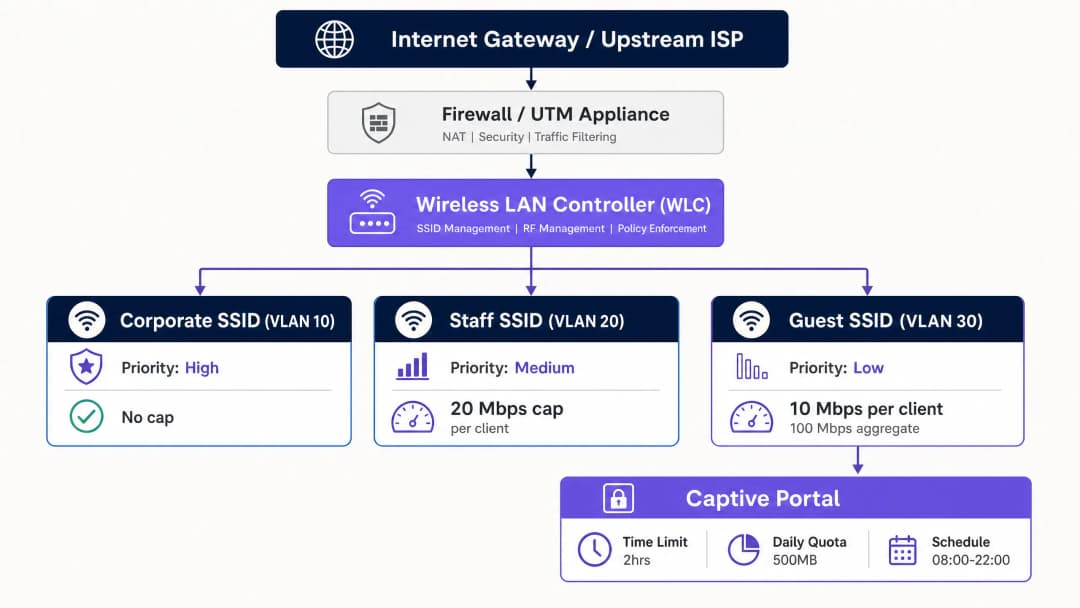
To enforce hard throughput limits, administrators deploy per-client rate limiting and per-SSID rate limiting. Per-client limits cap the maximum downstream and upstream speed of an individual device (e.g. 10 Mbps down / 2 Mbps up), while per-SSID limits cap the total bandwidth allocated to the entire guest network (e.g. 100 Mbps aggregate).
2. Time-Based Access and Session Management
Time-based restrictions manage network concurrency and prevent unauthorised long-term access. This involves two distinct concepts: session timeouts and SSID scheduling.
- Session timeouts: Enforced via RADIUS attributes returned during captive portal authentication. The RADIUS server sends the
Session-Timeoutattribute (RADIUS Attribute 27) to the access point (AP) or wireless LAN controller (WLC) [2]. This value, in seconds, dictates how long a client session remains active before re-authentication is required. - Idle timeouts: The
Idle-Timeoutattribute (RADIUS Attribute 28) terminates a session if no traffic is detected from the client within a specific window (e.g. 15 minutes). This is essential in high-density venues for reclaiming IP addresses from inactive devices. - RADIUS Change of Authorisation (CoA): Defined in RFC 5176, CoA allows the RADIUS server to dynamically push policy changes to the WLC or AP without disrupting the physical wireless link [3]. For example, if a guest consumes their daily data allowance, the RADIUS server can send a CoA message to dynamically throttle the client's bandwidth from 20 Mbps down to 1 Mbps.
3. Network Segmentation and Compliance
A fundamental rule of guest wireless architecture is complete isolation from corporate systems. This is achieved through VLAN segmentation. Guest traffic must live on a dedicated VLAN (e.g. VLAN 30), fully isolated from the corporate LAN (VLAN 10) and the voice/management networks (VLAN 20).
Inter-VLAN routing must be restricted at the firewall layer. A restrictive firewall policy should block all guest-to-corporate traffic. In addition, client isolation (also known as peer-to-peer blocking) must be enabled on the guest SSID. This prevents wireless clients on the same guest network from communicating with one another, reducing the risk of lateral malware propagation or man-in-the-middle (MITM) attacks.
Network segmentation is not merely best practice - it is a hard compliance requirement. Under PCI DSS v4.0 Requirement 1.3, organisations must implement network segmentation to isolate the cardholder data environment (CDE) from untrusted networks, including guest WiFi [4]. Failing to segment the guest network brings the entire guest infrastructure into PCI audit scope, dramatically increasing compliance cost and security risk.
Furthermore, organisations collecting personal data via a captive portal must comply with GDPR. This requires establishing a lawful basis for data collection, presenting a clear privacy notice, and enforcing strict data retention limits on session records.
Implementation Guide
Deploying time and bandwidth restrictions on an enterprise-grade network requires a systematic, vendor-agnostic process. The following is a recommended step-by-step implementation blueprint for senior network engineers.
Step 1: Logical Network Segmentation (VLAN & DHCP)
Before configuring any wireless settings, establish the logical network boundaries on your core switches and firewall.
- Create the guest VLAN: Configure a dedicated VLAN (e.g. VLAN 30) on the core switch and trunk it to all access points.
- Configure the DHCP scope: Set up a dedicated DHCP scope for the guest VLAN. Use short lease times (e.g. 2 to 4 hours) to prevent IP address exhaustion in high-churn environments.
- Enable DHCP snooping and ARP inspection: Enable DHCP snooping and dynamic ARP inspection (DAI) on the switches to prevent rogue DHCP servers and MAC spoofing attacks.
Step 2: Firewall Policy and Traffic Shaping
Configure the security gateway to police traffic on the guest VLAN.
- Block inter-VLAN routing: Create firewall rules that explicitly drop all traffic originating from the guest VLAN (VLAN 30) destined for any internal subnet (e.g. VLAN 10, VLAN 20).
- Apply traffic shaping: Create a shared traffic-shaping policy on the firewall that caps the aggregate throughput of the guest VLAN interface to protect the primary WAN link. For example, on a 1 Gbps fibre circuit, cap the guest VLAN at 150 Mbps.
Step 3: Wireless SSID Configuration
Configure the guest wireless network on your wireless LAN controller (WLC) or cloud management dashboard.
- Create the guest SSID: Broadcast a dedicated SSID (e.g. "Venue Guest WiFi").
- Enable client isolation: Switch on "Client Isolation" or "Peer-to-Peer Blocking" to prevent guest devices from communicating with each other.
- Enable WPA3 Opportunistic Wireless Encryption (OWE): To provide data confidentiality without a shared pre-shared key (PSK), configure WPA3-OWE. This encrypts each guest session's over-the-air traffic individually.
Step 4: RADIUS and Captive Portal Integration
Integrate your wireless infrastructure with a centralised Policy Decision Point (PDP), such as Guest WiFi, to manage authentication and policy enforcement.
- Configure the RADIUS server: Point your WLCs/APs at the cloud RADIUS server's IP address. Configure secure shared secrets.
- Map RADIUS attributes: Configure the RADIUS profile to return session restriction attributes on successful authentication:
Session-Timeout=7200(enforces a 2-hour session limit).Idle-Timeout=900(enforces a 15-minute idle timeout).
- Configure the captive portal redirect: Set up pre-authentication ACLs on the WLC/AP to permit DNS, DHCP, and traffic to the captive portal hostname, while redirecting all other HTTP/HTTPS traffic to the portal login page.
Step 5: SSID Scheduling and Time Ranges
To further secure the network and reduce the attack surface, configure SSID scheduling to disable guest access outside operating hours.
- Define the schedule: In the WLC or cloud dashboard, map the guest SSID to a time profile (e.g. Monday to Sunday, 08:00 to 22:00).
- Enforce hard shutdown: Ensure APs completely stop broadcasting the guest SSID outside these hours, rather than simply blocking association.
Got questions about your specific setup?
Our team works with venue operators, IT managers, and network engineers across 80,000 venues. Book a 20-minute call and we will show you how others like you solved it.
Best Practices
To ensure a balanced deployment that maintains high network performance without inconveniencing guests, network architects should follow these industry-standard best practices.
1. Dynamic Bandwidth Allocation and "Bursting"
Static bandwidth caps can sometimes give guests a poor experience during periods of low occupancy. Implementing a dynamic bandwidth allocation or bursting strategy is strongly recommended.
- Bursting (or boosting): Allows a guest device to temporarily exceed its bandwidth cap (e.g. boosting from 10 Mbps to 30 Mbps for the first 15 seconds of a download) to enable fast page loads or video buffering, before smoothly throttling it back to the baseline rate. This is natively supported by advanced controllers and platforms such as Tanaza [5].
- Dynamic shaping: Adjusts the aggregate bandwidth cap of the guest SSID based on overall WAN utilisation. If the corporate network is idle, the guest network can dynamically expand its ceiling, contracting instantly when corporate traffic spikes.
2. Right-Sizing Policies by Industry Vertical
Bandwidth and time restrictions should not be uniform across environments. They must be tailored to the specific dwell times and user expectations of each vertical.
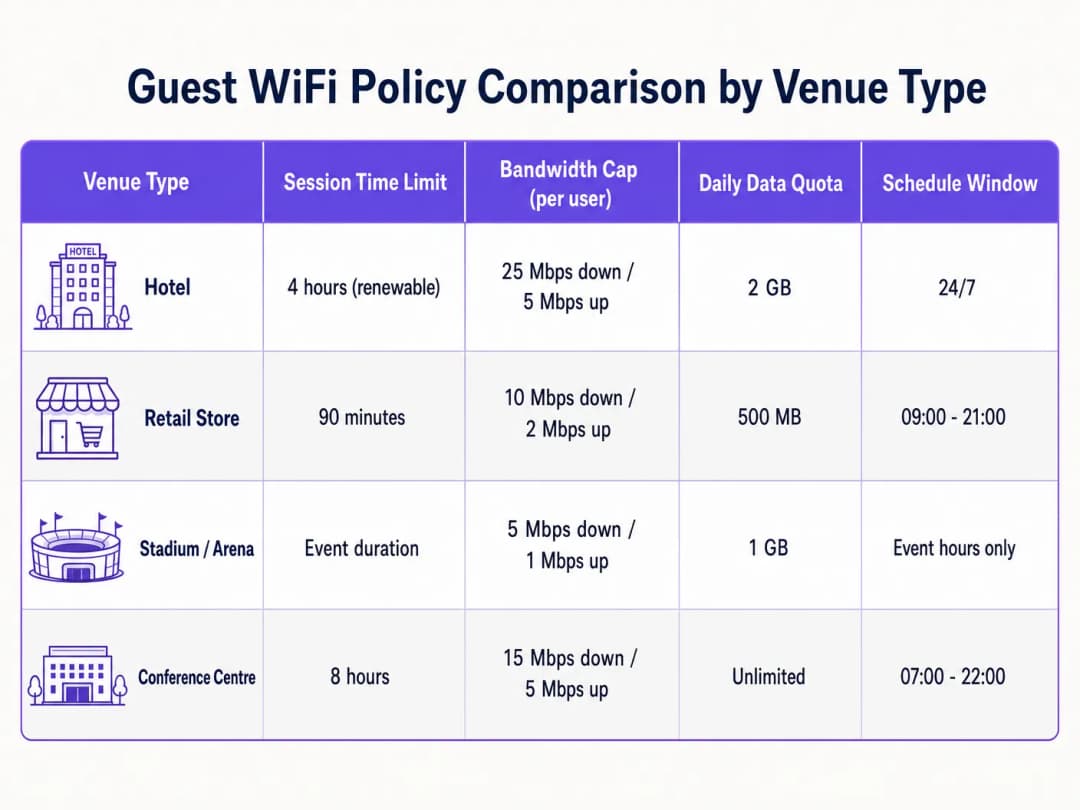
- Hospitality: Hotel guests expect high-throughput connectivity for streaming and remote work. Tailor policies to support at least 25 Mbps download per room, with longer session durations (e.g. 24 hours) to avoid the frustration of frequent re-authentication [6]. For deeper insight, see our Hotel WiFi Speed & Bandwidth Planning guide.
- Retail: Dwell times are shorter, typically 30 to 90 minutes. Implement a strict 90-minute session timeout to encourage turnover, and capture marketing data through WiFi Analytics during re-authentication [7].
- Stadiums and arenas: Ultra-high-density environments with tens of thousands of concurrent users. Bandwidth throttling must be highly conservative (e.g. 5 Mbps download) to prevent saturation of the entire backhaul, with session durations matched to the length of the event [8].
3. Leveraging Profile-Based Tiered Access
Avoid a "one-size-fits-all" guest network. Implement tiered access profiles to reward loyalty and monetise premium connectivity:
- Free tier: Standard speed (e.g. 5 Mbps download), 1-hour session limit, basic captive portal login.
- Premium tier: High speed (e.g. 50 Mbps download), 24-hour session limit, authenticated via loyalty credentials, room number, or direct payment. This is typically implemented using The 10 Best Network Access Control (NAC) Solutions in 2026 or integrated with How to Implement 802.1X Authentication with Cloud RADIUS.
Troubleshooting and Risk Mitigation
Operating a guest wireless network with active restrictions introduces specific failure modes that IT teams must proactively monitor and mitigate.
1. MAC Address Randomisation and Session Tracking
Modern mobile operating systems (iOS 14+, Android 10+) employ MAC address randomisation by default, rotating the device's hardware identifier to protect user privacy.
- Risk: If your guest network tracks session timeouts or data allowances by MAC address alone, a device that randomises its MAC will appear as a brand-new device, bypassing your time limits and throttling policies.
- Mitigation: Do not rely on MAC addresses for session state. Use an identity-based authentication model at the captive portal layer. Tie session state, time limits, and data allowances to the authenticated user identity in the RADIUS database (e.g. email address, verified phone number, or loyalty ID).
2. IP Address Exhaustion in High-Churn Venues
In high-footfall venues such as transport hubs or retail malls, long DHCP lease times can rapidly exhaust the available IP pool, leaving new guests unable to connect.
- Risk: If DHCP leases are set to a standard 24 hours but the average guest dwell time is 20 minutes, thousands of IP addresses will remain leased to devices that have already left, starving active users of IPs.
- Mitigation: Shorten DHCP lease times on the guest scope to 30 or 60 minutes. Implement a larger subnet mask (e.g. use a
/20or/19instead of a/24) to expand the available IP pool. If your wireless controller supports it, enable DHCP Release on Disconnect.
3. Captive Portal Redirect Failures (DNS and SSL)
The most common guest complaint is "the login page won't load". This is almost always caused by misconfigured DNS or SSL certificate issues.
- Risk: If a guest device cannot resolve DNS queries before authentication, the captive portal cannot load. Furthermore, if the captive portal redirect uses an untrusted or expired SSL certificate, modern browsers will block the redirect and display a security warning.
- Mitigation: Ensure the pre-authentication ACL (walled garden) explicitly permits DNS traffic to public resolvers (e.g.
1.1.1.1or8.8.8.8) or the local gateway DNS. Always use a valid, publicly trusted SSL/TLS certificate for your captive portal redirect hostname. Avoid self-signed certificates.
ROI and Business Impact
Implementing structured guest WiFi restrictions is not merely a technical exercise; it delivers measurable financial and operational returns to the business.
1. WAN Cost Control and Bandwidth Savings
An uncontrolled guest network forces the business to continually upgrade its WAN circuits to cope with peak demand. By implementing per-user rate limits and aggregate caps, organisations can significantly extend the life of their existing internet connectivity.
- Scenario: A mid-sized hotel with a 500 Mbps circuit suffers severe latency during the evening peak because a handful of guests are streaming 4K video.
- Solution: Implementing a 15 Mbps per-user cap reduces peak utilisation by 40%, removing the need to upgrade to an expensive 1 Gbps circuit and saving thousands of dollars per year in recurring ISP costs.
2. Enhanced Operational Network Reliability
In retail and hospitality, the same physical internet connection often supports both guest services and business-critical operations (such as POS systems, back-office ERP, and staff communications).
- Business impact: Implementing strict VLAN segmentation and prioritising corporate traffic via WMM ensures guest activity never interferes with transactions. Even when the guest network is packed with shoppers, the retail store's card processing remains instantaneous, directly protecting revenue at the point of sale.
3. Marketing Monetisation and First-Party Data Capture
Enforcing session time limits (e.g. 90 minutes) requires guests to interact with the captive portal on a recurring basis. This creates repeatable touchpoints for capturing valuable first-party data, driving loyalty sign-ups, and displaying targeted promotions.
- Data capture: By requiring an email or social media login to renew a session, venues can build a rich, compliant customer database for CRM and marketing platforms.
- Advertising revenue: Venues can monetise captive portal screen real estate by displaying sponsored splash pages or local business promotions during the re-authentication flow, transforming guest WiFi from an operational cost centre into a direct revenue stream.
References
[1] IEEE Standard for Information Technology - Telecommunications and Information Exchange Between Systems - Wireless LAN Medium Access Control (MAC) and Physical Layer (PHY) Specifications. Amendment 8: Medium Access Control (MAC) Quality of Service Enhancements. IEEE Std 802.11e-2005. [2] Rigney, C., et al. Remote Authentication Dial In User Service (RADIUS). RFC 2865, June 2000. [3] Chiba, M., et al. Dynamic Authorization Extensions to Remote Authentication Dial In User Service (RADIUS). RFC 5176, January 2008. [4] Payment Card Industry (PCI) Data Security Standard, Requirements and Security Assessment Procedures, Version 4.0. PCI Security Standards Council, March 2022. [5] Tanaza S.p.A. Bandwidth Control per Client on Tanaza Cloud Platform. Tanaza Documentation, 2018. [6] Purple.ai. Hotel WiFi Speed & Bandwidth Planning: An Authoritative Guide for IT Managers. Purple Reference Guides, 2024. [7] Purple.ai. Guest WiFi Marketing & Analytics Platform: Capitalizing on Physical Footfall. Purple Whitepapers, 2025. [8] Cox Business. Stadium Connectivity Solutions: High-Density Wireless Deployment. Cox Communications Whitepaper, 2025.
Key Definitions
IEEE 802.11e / WMM
An amendment to the IEEE 802.11 standard that introduces Quality of Service (QoS) enhancements, prioritising wireless traffic into voice, video, best effort, and background categories.
IT teams use WMM to map guest wireless traffic to low-priority categories, ensuring critical corporate applications are never starved of bandwidth.
RADIUS Attribute 27 (Session-Timeout)
A standard RADIUS attribute returned by the authentication server that defines the maximum number of seconds a user session can remain active before requiring re-authentication.
Encountered when integrating captive portals with RADIUS. It is used to enforce strict time limits on guest sessions (e.g., 7200 seconds for 2 hours).
RADIUS Attribute 28 (Idle-Timeout)
A RADIUS attribute that specifies the maximum period of inactivity (in seconds) allowed for a client session before the network access point automatically terminates the connection.
Critical in high-density venues to reclaim IP addresses from devices that have left the area without logging out.
RADIUS Change of Authorisation (CoA)
A protocol extension (RFC 5176) that enables a RADIUS server to dynamically modify an active session's policies (such as bandwidth caps or VLAN assignment) without disconnecting the client.
Used to dynamically throttle a guest's bandwidth in real-time once they exceed their daily data quota.
Client Isolation
A security feature on wireless access points that prevents wireless clients associated with the same SSID from communicating with each other.
Essential on guest networks to prevent lateral malware propagation, device snooping, and local man-in-the-middle attacks.
WPA3 Opportunistic Wireless Encryption (OWE)
A WiFi Alliance certified standard that provides individualised data encryption for open wireless networks, preventing passive eavesdropping without requiring a shared password.
The modern replacement for completely open guest networks, delivering security and data privacy to visitors with zero connection friction.
DHCP Lease Time
The duration for which a network device is allocated a specific IP address by the DHCP server before the address is returned to the pool or renewed.
In guest networks with high turnover, DHCP lease times must be kept short (e.g., 1 hour) to prevent IP pool exhaustion.
Network Segmentation
The architectural practice of splitting a physical network into multiple logical subnets (VLANs), each isolated by firewall rules and security policies.
A mandatory requirement under PCI DSS v4.0 to isolate the untrusted guest wireless network from the Cardholder Data Environment (CDE).
Worked Examples
A 200-room luxury hotel wants to implement a tiered guest WiFi model. Standard guests should receive a free, basic connection sufficient for web browsing, while loyalty members and paying guests should receive premium high-speed access capable of streaming 4K video. The hotel uses Cisco Catalyst 9800 WLCs and Cisco DNA Centre.
Deploy a single Guest SSID configured with 802.1X and MAC Authentication Bypass (MAB) pointing to a centralised RADIUS server (e.g., Cloud RADIUS). Configure the captive portal to authenticate users. Upon successful login, the RADIUS server evaluates the user's profile:
- For Standard Guests: The RADIUS server returns access-accept with Cisco Vendor-Specific Attributes (VSAs) for rate limiting:
cisco-avpair = "subscriber:traffic-class=in direction=input action=shape rate=5000000"andcisco-avpair = "subscriber:traffic-class=out direction=output action=shape rate=1000000"(5 Mbps down / 1 Mbps up), along withSession-Timeout = 86400(24 hours). - For Premium/Loyalty Guests: The RADIUS server returns Cisco VSAs for high-speed rate limiting:
cisco-avpair = "subscriber:traffic-class=in direction=input action=shape rate=50000000"andcisco-avpair = "subscriber:traffic-class=out direction=output action=shape rate=10000000"(50 Mbps down / 10 Mbps up), along withSession-Timeout = 604800(7 days). This tiered model is enforced dynamically on a single SSID, minimising RF overhead by avoiding multiple guest SSIDs.
A high-density sports stadium with a capacity of 50,000 concurrent spectators needs to prevent guest WiFi from saturating their 10 Gbps WAN uplink during live events, while ensuring spectators can still upload social media posts and access the stadium's mobile ordering app.
Configure a highly structured, high-density wireless policy on the Wireless LAN Controller (e.g., HPE Aruba Mobility Conductor):
- SSID Rate Limiting: Set a strict per-client bandwidth cap of 3 Mbps downstream and 1 Mbps upstream. This is sufficient for mobile apps and text/image uploads but discourages high-bandwidth video streaming.
- Aggregate Bandwidth Shaping: Apply an aggregate traffic shaping contract on the guest VLAN at the firewall (e.g., Fortinet FortiGate) to cap the entire guest network at 2 Gbps (20% of the total WAN capacity), leaving 8 Gbps for broadcast media, POS transactions, and operational staff.
- Time-Based Access: Set the captive portal session timeout to 14,400 seconds (4 hours), matching the typical duration of a sports event. Enable an aggressive
Idle-Timeoutof 600 seconds (15 minutes) to quickly reclaim IP addresses from spectators who leave the stadium early.
A national retail chain with 150 stores wants to implement a guest WiFi network that automatically shuts down outside of store hours to prevent security risks and unauthorised use of store internet by loiterers in the parking lot overnight.
Deploy a cloud-managed wireless architecture (e.g., Cisco Meraki or Juniper Mist) integrated with a centralised policy dashboard:
- Configure SSID Scheduling: In the cloud-managed dashboard, configure a time schedule profile for the 'Store Guest' SSID. Set the active hours to match store trading hours plus a 30-minute buffer (e.g., Monday-Saturday, 08:30 to 21:30; Sunday, 10:30 to 18:30).
- Enforce Complete SSID Suppression: Ensure the cloud profile is set to completely disable the radio broadcasting the Guest SSID outside these hours. This prevents the SSID from appearing in scan lists, eliminating the risk of overnight brute-force or probing attacks.
- Session Expiry: Set a strict 90-minute session timeout (
Session-Timeout = 5400) at the captive portal layer. This matches average retail dwell times and prompts users to re-authenticate if they stay longer, driving repeat marketing engagement.
Practice Questions
Q1. A major retail shopping mall experiences frequent DHCP IP address exhaustion on its guest WiFi network during peak weekend hours. The current configuration uses a `/24` subnet (254 available IPs) with a 24-hour DHCP lease time. How should the network architect resolve this issue without expanding the hardware infrastructure?
Hint: Consider the relationship between average dwell time, DHCP lease duration, and the size of the logical subnet.
View model answer
The network architect should implement two immediate changes:
- Reduce the DHCP lease time from 24 hours to 30 or 60 minutes. Since the average dwell time in a shopping mall is 1 to 2 hours, a short lease time ensures that IP addresses are rapidly reclaimed from departed devices and returned to the pool.
- Expand the DHCP scope by changing the subnet mask from a
/24to a/21(providing 2,046 available IPs) or/20(providing 4,094 available IPs). This increases the logical size of the IP pool on Guest VLAN 30 without requiring any new physical switches or access points.
Q2. An IT manager notices that several users on the guest WiFi network are consistently bypassing the 500 MB daily data quota. The network uses MAC-based tracking to enforce quotas. How are the users likely bypassing this restriction, and what is the recommended enterprise-grade solution?
Hint: Modern mobile operating systems rotate their physical identifiers automatically.
View model answer
The users are bypassing the quota by utilising MAC Address Randomisation, a native privacy feature on modern iOS and Android devices. By toggling their WiFi connection off and on, or modifying their device settings, they generate a new randomised MAC address, which the network access point treats as a brand-new device with a fresh 500 MB quota. The recommended solution is to transition from MAC-based session tracking to Identity-Based Session Tracking. Configure the captive portal to require user authentication (e.g., email verification, SMS OTP, or social login). Associate the data consumption quota with the user's authenticated identity in the centralised RADIUS/policy database. When a user connects, regardless of what randomised MAC address their device presents, they must log in, and their session will be mapped to their unique identity, enforcing the 500 MB daily limit across all MAC addresses they use.
Q3. A hotel chain wants to ensure its guest wireless network complies with PCI DSS v4.0. During an audit, the QSA (Qualified Security Assessor) discovers that the hotel's property management system (PMS) and guest WiFi are on different subnets but connected to the same physical switches without firewall rules blocking inter-subnet traffic. What is the compliance risk, and how should it be remediated?
Hint: PCI DSS requires logical segmentation to be actively enforced, not just defined by subnets.
View model answer
The compliance risk is that the guest WiFi network is not segmented from the Cardholder Data Environment (CDE) where the PMS resides. In a flat physical network with inter-subnet routing enabled and no firewall restrictions, any guest device on the WiFi can route traffic directly to the PMS server. This brings the entire guest WiFi network into the scope of the PCI audit, representing a critical non-compliance finding. To remediate this:
- Enforce strict VLAN segmentation on the switches. Assign the guest WiFi to a dedicated VLAN (VLAN 30) and the PMS/CDE to a separate secure VLAN (VLAN 100).
- Implement firewall policies at the gateway/router level. Configure explicit Access Control Lists (ACLs) or firewall rules that drop all traffic originating from VLAN 30 destined for VLAN 100.
- Enable stateful packet inspection and perform regular penetration testing to verify that no guest device can establish a connection to any device within the CDE, thereby officially segmenting the guest network out of the PCI audit scope.
Frequently asked questions
How do I set session time limits for guest WiFi users?
Session time limits are enforced by sending the Session-Timeout RADIUS attribute (RFC 2865) in the Access-Accept packet during captive portal authentication, or by configuring inactivity and session timers directly on your wireless controller (such as Cisco Meraki, ArubaOS, or UniFi). Once the timer expires, the gateway deauthenticates the client or redirects them back to the captive portal for re-authorisation.
What is the recommended bandwidth limit per guest WiFi user?
For high-turnover public venues like cafes and retail stores, 5 Mbps download and 2 Mbps upload per user provides responsive 1080p video streaming, web browsing, and messaging without monopolising airtime. In hospitality or enterprise coworking spaces, offering 15 to 25 Mbps download with 5 to 10 Mbps upload ensures glitch-free video conferencing and VPN performance. Enforcing per-user QoS token buckets prevents single users from consuming the entire WAN uplink.
What is the difference between Session-Timeout and Idle-Timeout in guest WiFi?
Session-Timeout specifies the maximum total duration (in seconds) that an authenticated client may remain on the network before mandatory re-authorisation, regardless of traffic activity. Idle-Timeout (inactivity timer) monitors user data packets and disconnects a device if no traffic is transmitted for a set period (typically 10 to 15 minutes), freeing up DHCP leases and AP association table entries when visitors leave the venue.
How do you prevent guests from bypassing session limits with MAC address randomisation?
Modern mobile devices (iOS, Android, Windows) rotate private MAC addresses. Relying exclusively on physical MAC addresses allows users to cycle their connection and reset timers. Enterprise platforms like Purple tie guest sessions to verified identity credentials (SMS one-time passwords, social logins, or corporate emails) or issue Passpoint (Hotspot 2.0) encrypted profiles, ensuring time and bandwidth quotas persist across hardware address changes.
How does RFC 8910 (Captive Portal API) communicate time and data quotas to client devices?
RFC 8910 standardizes how wireless networks communicate session parameters to client operating systems via DHCP Option 114 and IPv6 Router Advertisements. Rather than intercepting DNS queries or dropping packets upon expiry, the gateway advertises an API endpoint that informs the device of remaining time or byte allowances, allowing native OS notifications and frictionless renewal splash screens.
Which RADIUS attributes enforce bandwidth rate limiting on enterprise access points?
Enterprise access points and controllers parse vendor-specific RADIUS attributes returned in the Access-Accept packet. The most common standard attributes include WISPr-Bandwidth-Max-Down and WISPr-Bandwidth-Max-Up (used by Meraki, Ruckus, and UniFi), Aruba-Bandwidth-Contract (ArubaOS), and Cisco-AVPair='rate-limit:downlink/uplink' (Cisco IOS-XE / Catalyst).
How does Purple automate guest WiFi bandwidth tiering and monetization?
Purple provides a cloud-managed captive portal and identity platform that integrates seamlessly with your existing AP infrastructure. It allows venues to offer tiered access models - such as a free 60-minute basic tier alongside a paid or loyalty-gated high-speed premium tier - automating payment processing, voucher generation, and RADIUS rate-limit assignment without manual network reconfiguration.
Continue reading in this series
The Enterprise Guide to Setting Up Guest WiFi: Security, Segmentation, and Speed
This enterprise technical guide provides actionable instruction for IT managers and network architects on deploying secure, segmented guest WiFi. It covers VLAN architecture, WPA3 encryption, 802.1X authentication, PCI DSS and GDPR compliance, and integrating Purple's hardware-agnostic captive portal layer.
How to Set Up Guest WiFi: The Enterprise Network Segmentation Guide
This guide details the technical architecture, authentication standards, and deployment methodology required to build a secure, segmented enterprise WiFi network. You will learn how to implement the three-SSID model, deploy 802.1X for staff authentication, configure captive portals for GDPR-compliant guest access, and reduce your PCI DSS scope.
Family-Friendly WiFi: Best Practices for Shopping Centres
This technical reference guide provides actionable methodologies for implementing category-based URL filtering on guest WiFi networks in retail environments. It details network architecture, policy definition, and risk mitigation strategies to ensure compliance and protect brand reputation.
Got questions about your specific setup?
Our team works with venue operators, IT managers, and network engineers across 80,000 venues. Book a 20-minute call and we will show you how others like you solved it.