
How to Optimize Captive Portals for Maximum Network Security and User Conversion
This guide provides a complete technical blueprint for optimising captive portals across enterprise venues, covering network segmentation architecture, authentication method selection, GDPR-compliant consent design, and conversion optimisation. It is written for IT managers, network architects, and CTOs at hotels, retail chains, stadiums, and public-sector organisations who need to balance network security with first-party data capture. Purple operates captive portal infrastructure across 80,000+ venues with 440 million logins in 2024, and the frameworks here reflect that operational experience.
Listen to this guide
View podcast transcript
Executive summary
A captive portal is the sign-in page on public WiFi. It is also your most consequential network security decision and, if you run a marketing programme, your most valuable data capture surface. The two objectives - security and conversion - are not in conflict. They require different configuration decisions, and this guide covers both.
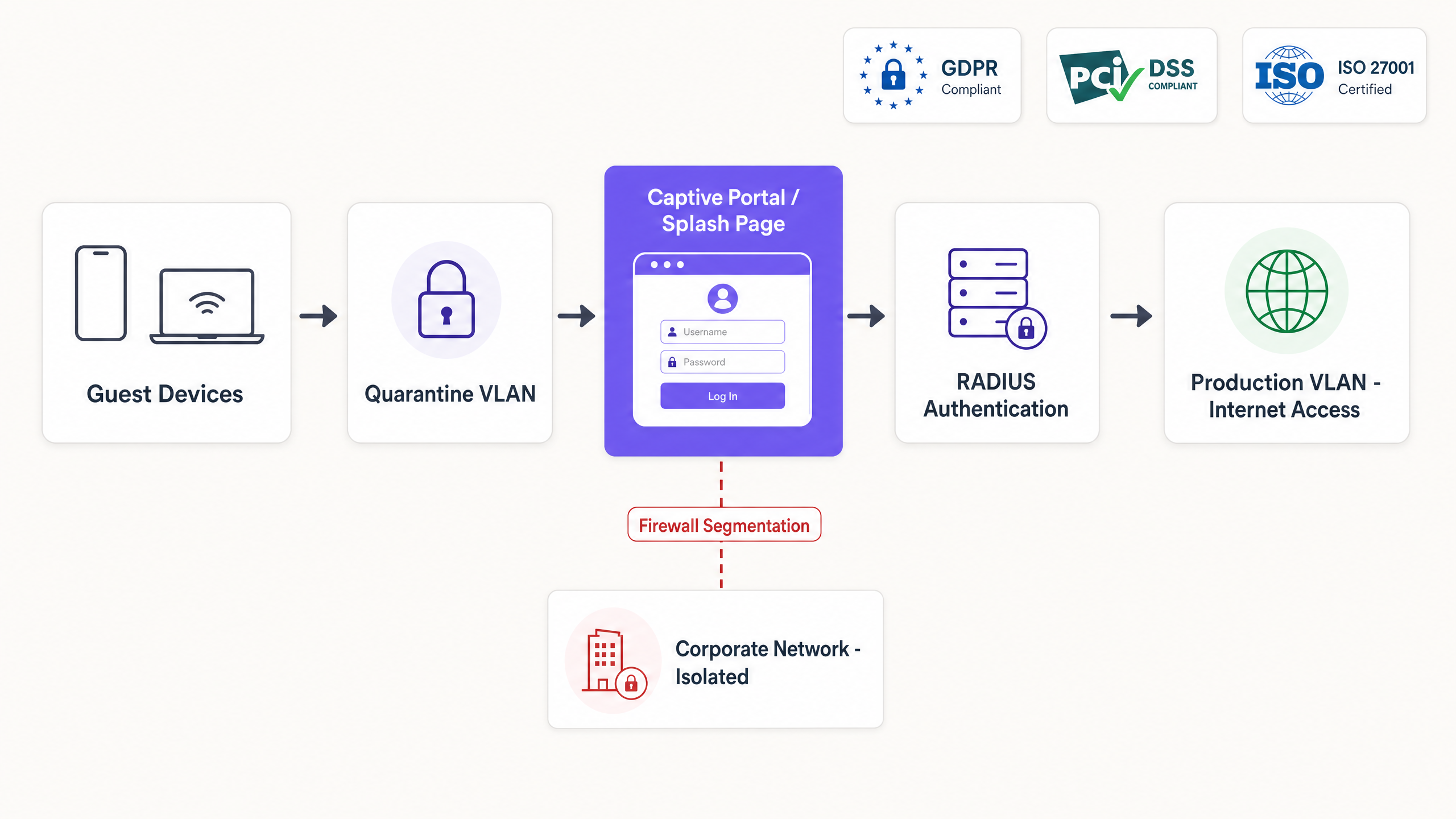
The core architecture places every guest device in a quarantine VLAN until authentication completes. A RADIUS server manages the session, and a Change of Authorisation (CoA) message releases the device to the production VLAN. Network segmentation ensures guest traffic never reaches corporate infrastructure or point-of-sale systems. This is a PCI DSS requirement in any environment where payment terminals share physical infrastructure with guest WiFi.
On the conversion side, every additional form field reduces opt-in rates by 8 to 12%. The right authentication method depends on your venue type and data objectives. Email capture delivers 65 to 80% conversion with directly owned data. Social login via OAuth 2.0 reduces friction but introduces third-party dependency risk. SMS OTP provides the highest data quality but the lowest conversion. Click-through is the correct choice for public-sector environments with no marketing objective.
Purple runs Guest WiFi infrastructure across 80,000+ venues. The guidance in this document reflects 440 million logins processed in 2024 (Purple internal data, 2024).
Technical deep-dive
What a captive portal actually does
A captive portal intercepts HTTP and HTTPS requests after a device associates with an SSID. The access point places the device in a quarantine VLAN, where a firewall permits only DNS queries and a small set of pre-approved destinations - the walled garden. The device's operating system detects this restricted state by probing a known URL (for example, captive.apple.com on iOS or connectivitycheck.gstatic.com on Android). When the probe returns an unexpected response, the OS launches the portal automatically.
The user authenticates. The portal communicates the result to the network's RADIUS server via a CoA message. The access controller drops the quarantine restrictions, moves the device to the production VLAN, and logs the session with timestamp, MAC address, identity, and applied policy. End-to-end, this flow takes one to ten seconds depending on the authentication method.
Network segmentation
The quarantine VLAN is not optional. Without it, an unauthenticated device on an open SSID can probe the internal network, access management interfaces, or reach point-of-sale systems. In a PCI DSS scope environment - any venue where card payment terminals share physical infrastructure with guest WiFi - the Payment Card Industry Data Security Standard v4.0 requires complete network isolation between cardholder data environments and guest networks.
Segmentation is implemented at the access controller level. On Cisco Meraki, this is configured via Group Policies. On HPE Aruba, via User Roles. On Ruckus, via Zone configuration. On Juniper Mist, via WLAN policies. The principle is identical across all four: unauthenticated devices receive a restricted policy; authenticated devices receive a production policy. The RADIUS server enforces the transition.
For venues with multiple user types - guests, staff, contractors - deploy separate SSIDs, each mapped to a distinct VLAN with its own firewall rules and bandwidth policies. Do not attempt to serve all user types from a single SSID with a single captive portal. The complexity of policy management outweighs any perceived simplicity.
Securing the wireless edge
The captive portal operates at Layer 7. It does not encrypt the wireless link. On an open SSID, traffic between the device and the access point is unencrypted and visible to any device within radio range.
Three approaches address this:
WPA3 with captive portal. WPA3-Personal provides Simultaneous Authentication of Equals (SAE), which eliminates the offline dictionary attacks possible against WPA2-PSK. The captive portal still triggers for authentication, but the wireless link is encrypted. This is the minimum acceptable standard for new deployments in 2026.
Passpoint (Hotspot 2.0) with 802.1X. Passpoint uses EAP-TLS or PEAP to provide certificate-based or credential-based authentication. The captive portal handles the initial onboarding and consent capture. On the second visit, Passpoint authenticates the device silently using the provisioned profile, bypassing the portal entirely. This is the architecture used by OpenRoaming, the carrier-grade roaming standard. For more detail on EAP methods, see our guide to EAP Method WiFi: A Guide to Secure Network Access .
iPSK (Identity Pre-Shared Key). iPSK assigns a unique WPA2 or WPA3 passphrase to each user or device via the portal. The passphrase is stored in the RADIUS server and mapped to a specific VLAN and policy. This provides individualised encryption and accountability on a shared SSID, without the infrastructure overhead of a full 802.1X deployment. It is the standard architecture for Multi-Tenant WiFi in build-to-rent and student accommodation environments.
For certificate-based authentication details, see WiFi Certificate Authentication: Secure Network Access .
Implementation guide
Step 1: Define the walled garden
Map every external dependency required for authentication before configuring the portal. If you offer Google social login, whitelist accounts.google.com and associated Google authentication domains. If you use Stripe for paid access, whitelist Stripe's API endpoints. If you use Apple sign-in, whitelist appleid.apple.com.
Failure to maintain an accurate walled garden is the primary cause of captive portal rendering failures in production. Use a walled garden validator to generate copy-paste rules for your specific controller. Purple provides a free Walled Garden Domain Validator that outputs ready-to-use rules for Cisco Meraki, Ubiquiti UniFi, HPE Aruba, and Catalyst controllers.
Step 2: Configure RADIUS integration
Integrate your access controllers with a cloud RADIUS provider. Configure the controllers to redirect unauthenticated traffic to the portal URL and specify the RADIUS servers for authentication and accounting. Ensure RADIUS shared secrets are at least 22 characters, contain mixed case and special characters, and are rotated every 90 days.
For Cisco Meraki deployments, configure the RADIUS server under Wireless > Access Control. For HPE Aruba, configure under Security > Authentication Servers. For Ruckus, configure under Services > Authentication. For Juniper Mist, configure under Network > WLAN.
Step 3: Select authentication methods
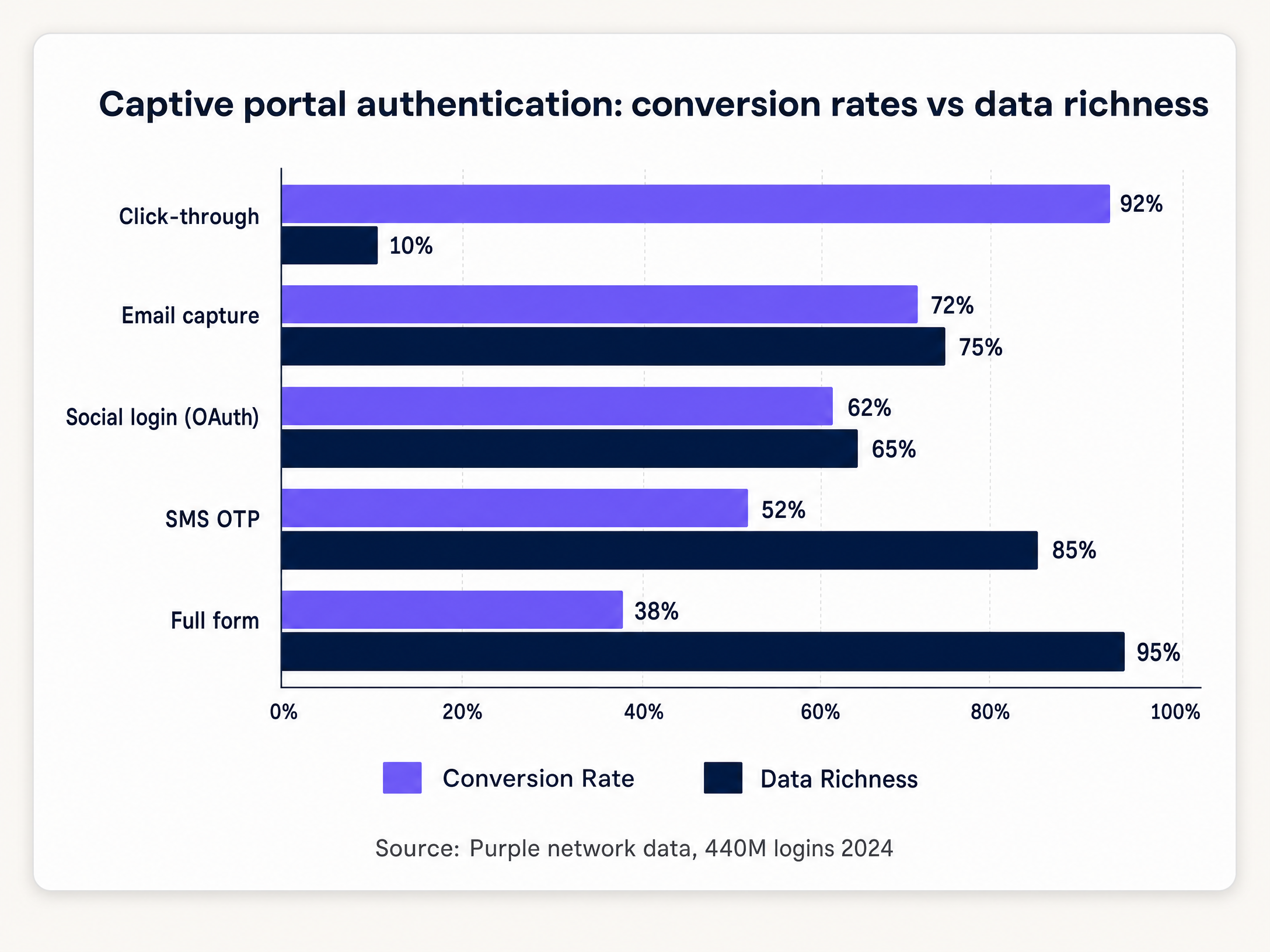
The table below maps venue type to the recommended authentication method and expected conversion range.
| Venue type | Recommended method | Expected conversion | Data captured |
|---|---|---|---|
| Hotel and hospitality | Email capture + social login | 65-80% | Email, name, optional demographics |
| Retail | Email capture | 68-75% | Email, name |
| Stadium and events | SMS OTP | 45-55% | Verified mobile number |
| Conference centre | Social login + email | 60-70% | Email, professional profile |
| Public sector | Click-through | 90-95% | MAC address, timestamp only |
| Healthcare | Click-through | 90-95% | MAC address, timestamp only |
Source: Purple network data, 440 million logins, 2024.
Step 4: Design the consent flow
Separate the terms required for network access from the consent required for marketing communications. These are two distinct lawful bases under UK GDPR (Regulation (EU) 2016/679 as retained in UK law).
Network access can be granted on the basis of legitimate interest under Article 6(1)(f), covering network management and security. Marketing communications require explicit consent under Article 6(1)(a). The consent must be freely given, specific, informed, and unambiguous. Pre-ticked boxes do not meet this standard.
Implement two distinct checkboxes on the portal. The first, mandatory, covers terms of service and network access. The second, optional and unticked by default, covers marketing opt-in. Log the timestamp, IP address, MAC address, and consent state for each session. This audit trail is your evidence of compliance in the event of a regulatory enquiry.
Step 5: Apply bandwidth policies via RADIUS VSAs
Configure the RADIUS server to return Vendor-Specific Attributes (VSAs) upon successful authentication. VSAs instruct the access point to apply specific bandwidth limits, content filters, and session timeouts based on the user's profile.
On HPE Aruba, the Aruba-User-Role VSA assigns the user to a named role with predefined policies. On Cisco Meraki, Group Policy IDs are returned via the Filter-Id attribute. On Ruckus, the Ruckus-User-Groups attribute maps the user to a configured group. This mechanism enables dynamic policy enforcement without requiring separate SSIDs for different user tiers.
Best practices
Conversion optimisation
Progressive profiling outperforms single-session data collection. Ask for an email address on the first visit. On the second visit, request a date of birth or postcode. On the third, ask for marketing preferences. This approach maintains high conversion rates while building a richer profile over time.
Over 85% of captive portal interactions occur on mobile devices (Purple internal data, 2024). Design for small screens. Buttons must be large enough to tap without zooming. Text must be legible at the default font size. The login flow must complete in three taps or fewer.
For Retail deployments, integrate the portal with your CRM or loyalty platform. Pizza Express used a branded captive portal to add 3.7 million guests to their CRM in two years, turning every WiFi connection into a verified marketing opt-in (Purple customer data, Pizza Express). The portal became the primary channel for loyalty enrolment and promotional re-engagement.
Behavioural analytics integration
The captive portal session is the join key between physical-venue analytics and digital marketing systems. Each authenticated session generates a footfall event with timestamp, dwell time, and repeat visit status. Integrated with WiFi Analytics , this data drives footfall attribution, demographic segmentation, and campaign ROI measurement.
For deeper insight into how behavioural data from WiFi networks informs venue operations, see Behavioural Analytics: Insights for WiFi Networks .
Security hardening
Serve the portal exclusively over HTTPS with a valid TLS certificate from a trusted Certificate Authority. HTTP portals expose user credentials to interception and trigger browser security warnings that reduce conversion. Implement HTTP Strict Transport Security (HSTS) with a minimum max-age of 31536000 seconds.
Implement rate limiting on the authentication endpoint. Without rate limiting, the portal is vulnerable to credential stuffing and brute-force attacks against voucher codes. Limit authentication attempts to five per minute per IP address.
Conduct penetration testing on the portal application annually, at minimum. Purple holds ISO 27001 certification and Cyber Essentials certification, and undergoes regular third-party penetration testing. For Healthcare and Transport deployments, quarterly testing is the appropriate standard.
Troubleshooting and risk mitigation
The portal does not appear
This is the most common failure mode. The device's OS sends a captivity probe to a known URL. If the firewall blocks that domain, the OS cannot detect the captive state, and the portal never launches automatically. The user must navigate to a non-HTTPS URL manually to trigger the redirect.
Check the walled garden configuration first. Ensure the following domains are accessible pre-authentication: captive.apple.com, www.apple.com, connectivitycheck.gstatic.com, clients3.google.com, and msftconnecttest.com. These are the probe URLs used by iOS, Android, and Windows respectively.
MAC address randomisation
iOS 14 and Android 10 introduced per-network MAC address randomisation by default. A returning device presents a new MAC address on each connection, breaking session persistence. The portal re-challenges the user, and they must log in again.
Mitigate this by provisioning a Passpoint profile on first login. The profile contains a credential that the device uses for subsequent connections, bypassing MAC-based identification entirely. Alternatively, use an app-based authentication flow that relies on an identity token stored in the app, rather than the device MAC address.
DHCP and DNS exhaustion at scale
At large venues - stadiums, conference centres, transport hubs - thousands of devices connect simultaneously at the start of an event or session. If the DHCP pool is undersized, devices cannot obtain an IP address. If the DNS server cannot handle the query volume, the captivity probe fails, and the portal does not appear.
Size your DHCP pool for peak concurrent connections, not average. For a stadium with 60,000 seats, assume 40,000 concurrent devices. Allocate a DHCP pool of at least 50,000 addresses with a short lease time (15 to 30 minutes) to recycle addresses rapidly. Deploy a dedicated DNS resolver for the guest network, separate from the corporate DNS infrastructure.
OAuth provider API changes
Social login providers change their API terms without notice. Facebook has progressively restricted the data available through its Graph API. If social login is your only authentication method and the provider changes its terms, your portal fails for all users.
Always deploy at least one non-OAuth method alongside social login. Email capture is the standard fallback. Configure monitoring on the OAuth authentication endpoint to alert on elevated error rates, which typically precede or coincide with API changes.
ROI and business impact
The captive portal is a cost centre if you measure it by infrastructure spend alone. It is a revenue asset if you measure it by the value of the data it captures and the marketing programmes it enables.
A 500-location retail chain processing 10,000 logins per month per location, with a 65% opt-in rate, generates 39 million verified CRM contacts annually. At a conservative email marketing revenue attribution of £0.10 per contact per year, that is £3.9 million in attributable revenue from a single data capture channel.
For Hospitality operators, the portal is the first touchpoint in the guest journey. Premier Inn and Whitbread use guest WiFi data to inform loyalty programme design and measure the correlation between WiFi engagement and repeat booking rates (Purple customer data, Whitbread).
For transport operators, the portal provides passenger flow data that informs retail placement, staffing decisions, and concession performance. Manchester Airports Group (MAG) uses WiFi analytics to measure passenger dwell time by terminal zone, correlating WiFi session data with retail spend per passenger (Purple customer data, MAG).
Measure portal performance against three metrics: opt-in rate (target above 60% for email capture), data quality rate (percentage of email addresses that pass verification, target above 80%), and repeat visit rate (percentage of returning users who authenticate without re-entering credentials, target above 70%).
Purple's WiFi Analytics platform provides these metrics in real time across all venues, with segmentation by location, time period, and user cohort.
Key Definitions
Captive portal
A web application that intercepts network traffic after a device associates with an SSID, requiring user interaction (authentication, payment, or terms acceptance) before granting internet access.
The primary mechanism for onboarding visitors onto public or guest WiFi networks. Every device that connects passes through it, making it the most consistent data capture surface in a physical venue.
Walled garden
A restricted network environment that allows access only to specific, approved IP addresses or domains prior to authentication.
Required to allow devices to reach the captive portal page, DNS servers, and necessary third-party authentication services before full internet access is granted. Misconfiguration is the leading cause of portal rendering failures.
RADIUS (Remote Authentication Dial-In User Service)
A networking protocol that provides centralised authentication, authorisation, and accounting management for users connecting to a network service.
The standard protocol used by captive portals to communicate with access points and controllers. Every enterprise-grade access point from Cisco Meraki, HPE Aruba, Ruckus, Juniper Mist, and Ubiquiti UniFi supports RADIUS.
Change of Authorisation (CoA)
A RADIUS extension defined in RFC 5176 that allows a server to dynamically modify the authorisation attributes of an active session.
Used by the captive portal to instruct the access controller to move a device from the quarantine VLAN to the production VLAN immediately after successful login, without requiring the device to reconnect.
Passpoint (Hotspot 2.0)
An IEEE 802.11u-based standard that enables mobile devices to automatically discover and connect to WiFi networks securely using 802.1X authentication, without manual portal interaction.
The standard approach for returning-user authentication in enterprise venues. The captive portal handles first-visit onboarding and consent capture; Passpoint handles all subsequent visits silently and securely.
VLAN (Virtual Local Area Network)
A logical subnetwork that groups devices from different physical network segments, enforcing traffic isolation at the data link layer.
Used to segment guest traffic from corporate traffic. Without VLAN segmentation, a guest device on the same physical switch as a point-of-sale terminal can probe or attack it.
iPSK (Identity Pre-Shared Key)
A security method where each user or device is assigned a unique WPA2 or WPA3 passphrase for the same SSID, stored and enforced by the RADIUS server.
Provides individualised encryption and per-user policy enforcement on a shared SSID without the infrastructure overhead of a full 802.1X deployment. Standard architecture for Multi-Tenant WiFi.
MAC address randomisation
A privacy feature in iOS 14+, Android 10+, and Windows 10+ that generates a per-network randomised MAC address to prevent cross-network device tracking.
Breaks MAC-based session persistence on captive portals. A returning device presents a new MAC address, triggering re-authentication. Mitigated by Passpoint profiles or app-based identity tokens.
Vendor-Specific Attribute (VSA)
A RADIUS attribute in the vendor-specific namespace (attribute 26) that carries hardware-vendor-specific policy instructions from the RADIUS server to the access controller.
Used to assign bandwidth limits, VLAN IDs, content filter policies, and session timeouts dynamically based on the authenticated user's profile. Each hardware vendor (Aruba, Meraki, Ruckus) defines its own VSA namespace.
Worked Examples
A 200-room hotel using HPE Aruba access points needs tiered WiFi: basic free access for standard guests and high-speed access for loyalty members. How should the captive portal and network be configured?
Deploy a single guest SSID across the property. Configure the captive portal to integrate with the hotel's Property Management System (PMS) via API. Present two authentication options on the portal: 'Log in with Room Number and Name' and 'Log in with Loyalty Credentials'. When a loyalty member authenticates, the portal queries the PMS, verifies the tier, and sends a RADIUS CoA to the Aruba controller. The RADIUS response includes an Aruba-User-Role VSA assigning the user to a high-bandwidth role (for example, 50 Mbps down, 20 Mbps up). Standard guests receive a default rate-limited role (5 Mbps down, 2 Mbps up). Both user types connect to the same SSID and VLAN, but receive different bandwidth policies enforced by the controller.
A national retail chain with 500 locations wants to implement guest WiFi to capture email addresses for marketing. The legal team has flagged GDPR compliance concerns. How should the portal consent flow be designed?
Design a portal with a single email input field. Below the field, implement two distinct checkboxes. Checkbox 1 (mandatory, unticked by default): 'I accept the Terms of Service and Privacy Policy. I understand that my device data will be processed to provide network access.' Checkbox 2 (optional, unticked by default): 'I consent to receive marketing communications, offers, and promotions by email.' Configure the backend to log the timestamp, IP address, MAC address, and the state of both checkboxes for each session. Store this consent audit trail in a GDPR-compliant data store with a retention period aligned to the marketing programme (typically 24 months from last interaction). Integrate the email addresses from Checkbox 2 opt-ins directly into the CRM via API.
Practice Questions
Q1. A stadium IT director reports that during halftime, the captive portal fails to load for thousands of users simultaneously, even though WiFi signal strength is strong across the venue. What is the most likely architectural bottleneck, and what is the remediation?
Hint: Consider the services a device requires before it can even request the portal page. Signal strength is not the constraint.
View model answer
The most likely bottleneck is DHCP pool exhaustion or DNS resolver overload. When thousands of devices connect simultaneously, each must obtain an IP address via DHCP and resolve the OS captivity probe URL via DNS before the portal can load. If the DHCP pool is undersized or the DNS server cannot handle the query volume, the process stalls before the user sees anything. Remediation: size the DHCP pool for peak concurrent connections (not average), set a short lease time of 15 to 30 minutes to recycle addresses, and deploy a dedicated DNS resolver for the guest network with sufficient capacity for peak query rates.
Q2. You are deploying a captive portal in a hospital waiting room. The primary goal is providing internet access for patients and visitors. There is no marketing objective. Which authentication method should you choose, and what are the compliance implications?
Hint: Balance friction against the value of the data collected. Consider what happens when you collect personal data you do not need.
View model answer
Click-through (terms and conditions only) is the correct choice. It delivers 90 to 95% conversion with minimal friction. Since there is no marketing objective, collecting personal data such as email addresses introduces GDPR compliance obligations (lawful basis, data minimisation, retention policies, subject access rights) without providing any business value. In a healthcare environment, the reputational risk of a data breach involving patient or visitor personal data is particularly significant. Click-through limits data collection to MAC address and timestamp, which is sufficient for network management under legitimate interest.
Q3. A retailer wants to offer Google and Apple social login on their captive portal. Their network uses Cisco Meraki access points. What network configuration is mandatory for social login to function, and what is the fallback risk?
Hint: How does the device reach the identity provider before it has internet access? What happens if the provider changes its terms?
View model answer
You must configure the walled garden on the Meraki access controller to whitelist the authentication domains for both providers: accounts.google.com and associated Google OAuth endpoints, and appleid.apple.com and associated Apple authentication endpoints. Without these entries, the quarantine VLAN will block the OAuth request, and social login will fail silently. The fallback risk is provider API change: if Google or Apple modifies its OAuth terms or API endpoints, the authentication flow breaks for all users who rely on that method. Always deploy email capture as a parallel authentication option so users have a non-OAuth fallback.
Q4. A conference centre operator wants to use SMS OTP as the primary authentication method for a three-day event with an expected 8,000 unique logins per day. What cost implications should be modelled before committing to this method?
Hint: SMS OTP has a per-message cost. Calculate the total at scale and consider the conversion rate impact.
View model answer
At 8,000 logins per day over three days, you are processing 24,000 SMS messages. At a typical UK carrier rate of 2 to 5 pence per message, the cost is between £480 and £1,200 for the event. If attendees are international, costs increase significantly (up to 10 to 15 pence per message for some markets). Additionally, SMS OTP conversion rates are 45 to 55%, meaning approximately 4,400 to 4,800 of the 8,000 expected logins will complete. The remaining attendees will need an alternative method. Model the per-message cost, factor in the conversion rate, and ensure a fallback method (email capture or click-through) is available for users who do not complete SMS verification.
Continue reading in this series
How to Set Up a Captive Portal on Starlink: A Guide for Remote & Maritime Venues
This guide details how to bypass the native Starlink hardware and integrate a cloud-managed captive portal using enterprise routing equipment. You will learn how to overcome the CGNAT limitation, enforce VLAN segmentation, manage satellite bandwidth constraints, and ensure regulatory compliance.
How to Set Up a Captive Portal on Starlink: A Guide for Remote & Maritime Venues
This guide details how to bypass the native Starlink hardware and integrate a cloud-managed captive portal using enterprise routing equipment. You will learn how to overcome the CGNAT limitation, enforce VLAN segmentation, manage satellite bandwidth constraints, and ensure regulatory compliance.
Hotel Guest WiFi Management: Integrating PMS, Portals, and Brand Standards
This technical guide details how to architect enterprise-grade hotel WiFi networks, focusing on VLAN segmentation, PMS integration for automated session management, and captive portal optimisation for GDPR-compliant data capture.