
WiFi GDPR Compliance: How to Securely Collect Guest Data via Captive Portals
This technical guide gives IT managers, network architects, and venue operations directors a practical framework for achieving GDPR compliance across guest WiFi deployments. It covers how captive portals collect personal data, how to secure explicit consent, and how to implement automated data retention policies that protect your organisation from regulatory fines of up to 4% of global turnover. Purple's guest WiFi platform maps directly to each compliance requirement, from consent logging to one-click data erasure.
Video overview
Listen to this guide
View podcast transcript
Part of our core series: Captive Portal Guide →

Executive Summary
Guest WiFi is no longer a simple convenience. Every Captive Portal login is a regulated data collection event. When guests connect to your network, you capture registration data, device identifiers, session metadata, and potential location data. Under GDPR, you are the Data Controller for all of this data.
As of January 2025, GDPR enforcement authorities have issued cumulative fines totalling approximately €5.88 billion (DLA Piper GDPR Fines and Data Breaches Survey, January 2025). A single infringement can result in fines of up to 4% of global annual turnover or €20 million, whichever is higher. For hotel groups or retail chains, this represents a significant financial risk.
This guide details the technical architecture required to securely and legally collect guest data. We cover Captive Portal consent design, network segmentation, data retention automation, and how to respond to Data Subject Access Requests within the 30-day statutory limit. Purple's Guest WiFi platform and WiFi Analytics tools map directly to each of these requirements, operating in over 80,000 physical venues and processing up to 440 million logins annually (Purple internal data, 2024).
Technical Deep Dive: What Data You Collect and Why It Matters
Understanding the importance of GDPR compliance for Guest WiFi begins with correctly classifying the data processed by your network. Many operators underestimate this scope. The GDPR definition of personal data is extremely broad: any information relating to an identified or identifiable natural person. In the context of Guest WiFi, this covers far more than just the fields on your login form.
| Data Category | Example | GDPR Classification | Required Legal Basis |
|---|---|---|---|
| Registration Data | Name, email address, phone number | Personal Data | Consent |
| Device Identifiers | MAC address, device type | Personal Data | Consent or Legitimate Interest |
| Session Metadata | Connection time, duration, data volume | Personal Data | Legitimate Interest (Network Management) |
| Location Data | Footfall heatmaps, zone dwell times | Sensitive Personal Data | Explicit Consent |
| Even without an associated name, a MAC address is personal data. Because it identifies a specific device and tracks its physical movement within a venue, this potential for identification is sufficient to constitute personal data under GDPR. MAC address randomisation on modern iOS and Android devices complicates analysis, but does not eliminate compliance obligations at the point of collection. |
Consent Architecture
The Captive Portal is your primary compliance interface. Article 7 of the GDPR requires that consent must be freely given, specific, informed, and unambiguous. In practice, this means your portal must do two things correctly.
Firstly, separate network access from marketing consent. You cannot condition WiFi access on a user agreeing to receive promotional emails. If a marketing checkbox must be ticked to connect, that is forced, not consent. The checkbox must be unticked by default, and users must be able to connect without ticking it.
Secondly, log every consent event. Your Consent Management Platform (CMP) must record who consented, when they consented, what they consented to, and the exact version of the privacy policy they were shown. This audit trail is your primary line of defence during a regulatory investigation.

Purple's Capture solution includes a built-in CMP that logs timestamps and privacy policy versions for all consent events. When the ICO requests proof of compliance, you can simply export the logs rather than trying to reconstruct them from memory.
Network Security Requirements
Article 32 of the GDPR requires appropriate technical measures to protect personal data. For guest WiFi, this translates into three non-negotiable controls.
Encryption in Transit. All Captive Portal traffic must use HTTPS. Modern deployments should implement WPA3 for stronger wireless encryption, replacing WPA2 where hardware support exists. WPA3's Simultaneous Authentication of Equals (SAE) handshake eliminates offline dictionary attacks that compromise WPA2-PSK networks.
Network Segmentation. Guest WiFi traffic must be isolated from the corporate network using a dedicated VLAN. This prevents compromised guest devices from accessing internal systems. On Cisco Meraki, HPE Aruba, and Juniper Mist deployments, Purple automatically configures this segmentation as part of the cloud overlay configuration.
Data Sovereignty. European guests' data must reside on servers hosted within the EU. If your WiFi platform stores data in US-based infrastructure without adequate transfer mechanisms, you are in breach of Chapter V of the GDPR. Purple maintains EU-based data residency for European deployments.
For a deeper dive into enterprise network security architecture, please refer to our Enterprise WiFi Security: A Complete Guide for 2026.
Got questions about your specific setup?
Our team works with venue operators, IT managers, and network engineers across 80,000 venues. Book a 20-minute call and we will show you how others like you solved it.
Implementation Guide: Deploying a Compliant Portal
Step 1: Audit Your Current Data Collection
Before reconfiguring anything, map every data point collected by your current portal. This includes fields on forms, data logged by RADIUS servers, and any third-party integrations receiving guest data. This Record of Processing Activities (RoPA) document is a GDPR requirement for most organisations and is the starting point for identifying gaps.
Step 2: Redesign Portal Forms
Apply the principle of data minimisation. If your goal is to provide basic network access, an email address is sufficient. If you are building a marketing database for a retail chain, include a first name. Do not include postal addresses, dates of birth, or phone numbers unless you have a specific, documented business need.
Implement email verification to reject invalid addresses. This protects database integrity and simplifies future Data Subject Access Requests. Purple's portals enforce real-time email verification before granting access.
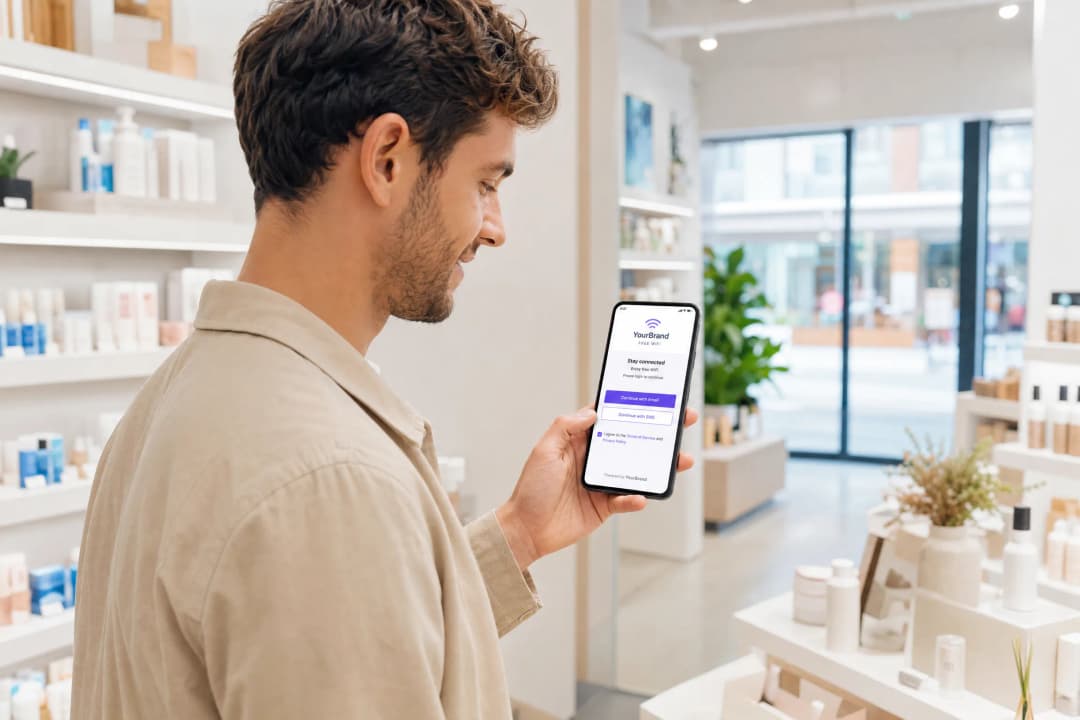
When designing your captive portal structure, you should include two distinct interactions:
- Acceptance of Terms of Service - required for connection, covering the basic data processing necessary to provide the network service.
- Marketing Consent Checkbox - optional, unticked by default, accompanied by a plain-language explanation of what the user is consenting to.
Step 3: Configure Automated Data Retention
GDPR prohibits the indefinite storage of data. Define retention periods for each category of data and automate their deletion.
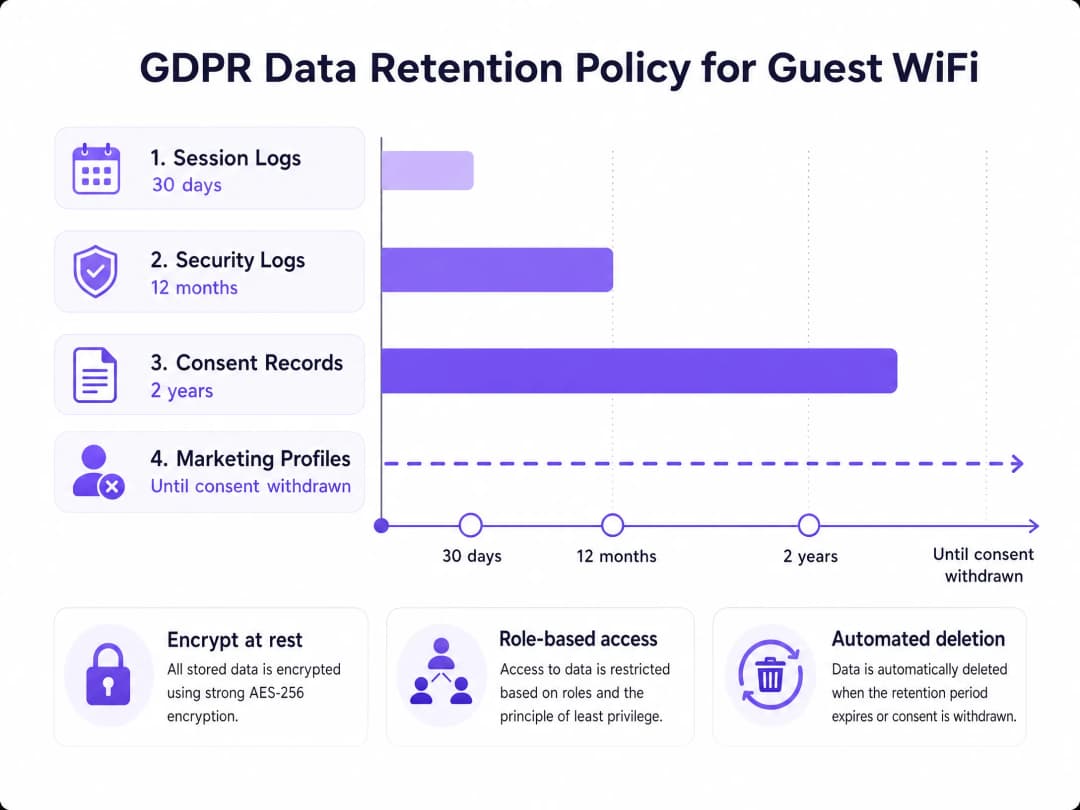
The retention periods shown above are recommended baselines. Adjust these to your specific operational requirements and document the rationale for each period. Purple natively applies these rules, purging logs without requiring manual database queries by your IT team.
Step 4: Enable Data Subject Rights Management
Under GDPR, users have the right to access, rectify, and delete their data. You have 30 days to respond to a request. Your systems must be capable of:
- Locating a user across all data stores using their email address or MAC address.
- Exporting their complete history in a machine-readable format (JSON or CSV).
- Executing a permanent deletion across active databases and marking records for removal from backups.
Purple centralises this operation into a single dashboard. Data Subject Access Requests that used to take hours of manual SQL queries can now be completed in minutes.
Step 5: Perform a Data Protection Impact Assessment
If you deploy location analytics, footfall heatmaps, or behavioural profiling via your WiFi network, a Data Protection Impact Assessment (DPIA) is a legal requirement prior to launch. A DPIA identifies privacy risks and documents the mitigation measures you have implemented. For large venues like stadiums or convention centres handling thousands of attendees simultaneously, this is a critical step.
For a detailed template, refer to our complete guide: The Network Administrator's Guide to GDPR and Guest Data Privacy Compliance.
Case Study: Premier Inn and Whitbread
Whitbread, the parent company of Premier Inn, operates one of the UK’s largest hospitality guest WiFi networks. By deploying Purple across their hospitality estates, they centralised consent management across hundreds of sites. Each portal page presents a clear, compliant consent journey. Through a transparent value exchange rather than forced bundling, they achieved a 30-40% marketing opt-in rate. The result is a verified first-party data asset that feeds directly into their CRM and loyalty programmes, complete with a full audit trail for every consent event.
Case Study: Manchester Airports Group (MAG)
MAG operates three major UK airports, handling passenger data at scale within transport hubs. Airport guest WiFi faces specific compliance challenges: passengers from multiple jurisdictions connecting simultaneously, each potentially subject to different data protection regulations. Purple's deployment for MAG enforces GDPR-compliant consent journeys for EU travellers while maintaining the operational flexibility to adjust portal configurations for each terminal. Session logs are automatically purged after 30 days, and the security team can respond to Data Subject Access Requests (DSARs) without querying fragmented RADIUS logs.
Best Practices
Conduct Vendor Assessments. Your WiFi platform provider acts as a Data Processor under GDPR. Before sharing any personal data with them, you must have a formal Data Processing Addendum (DPA) in place. Verify their security certifications. Purple is certified to ISO 27001, GDPR, CCPA, and Cyber Essentials.
Monitor Portal Completion Rates. High drop-off rates on your captive portal indicate overly complex forms or unclear consent language. Streamline data requests. Fewer fields improve compliance and enhance the guest experience.
Train Frontline Staff. Staff should understand how to handle guest questions about data collection, where to direct data subject requests, and why pre-ticked boxes are not permitted. A 30-minute briefing can prevent common compliance failures.
Review Your Portals Quarterly. Regulations evolve. Privacy notice language that was sufficient in 2023 may not reflect current ICO guidance. Schedule a quarterly review of your portal configurations, privacy policies, and consent logs.
For guidance on designing high-performing data collection forms that balance compliance with conversion rates, see our guide: Design of a Survey: A Practical Guide for Physical Spaces.
Troubleshooting and Risk Mitigation
Pre-ticked Consent Boxes. The most common compliance failure. Audit every portal across your estate and verify that all marketing checkboxes are unticked by default. On a high-traffic portal, a single pre-ticked box can constitute a systemic GDPR violation.
Vague Privacy Notices. Replace generic phrases like "We may use your data for various purposes" with specific descriptions: "We use your email address to send you promotional offers from [Brand]. You can unsubscribe at any time." Vague language does not meet the requirement of "informed consent" for valid consent.
Accumulation of Obsolete Data. If your database contains guest profiles from three or more years ago with no recent activity, you are retaining data beyond its lawful purpose. Run an audit to purge inactive records immediately and configure automated deletion moving forward.
Fragmented Data Storage. Guest data often ends up scattered across multiple systems: the WiFi platform, CRM, email marketing tools, and RADIUS servers. When a DSAR is received, you must locate and delete data across all of them. Map your data flows now to avoid a scramble under time pressure.
Breach Notification. Under Article 33 of GDPR, you must notify the ICO of a personal data breach within 72 hours of becoming aware of it. Integrate this timeline into your incident response plan. The clock starts when you detect it, not when the investigation is complete.
ROI and Business Impact
Compliance is not a cost centre. A well-configured, GDPR-compliant guest WiFi deployment drives three measurable business outcomes.
Higher-quality marketing data. Visitors who actively opt-in to marketing are more engaged than those who are forced. Compliant captive portals generate email lists that, whilst smaller, are of higher quality, yielding higher open rates, fewer complaints, and improved sender reputation.
Lower operational overheads. Automated consent logging and data retention features eliminate hours of manual database management. IT teams can focus their time on infrastructure rather than compliance maintenance.
Mitigate regulatory risk. With cumulative GDPR fines exceeding €5.88 billion as of early 2025 (DLA Piper, January 2025), the cost of non-compliance is significant. A compliant platform eliminates the risk of fines up to 4% of global turnover.
Purple has collected 29 billion data points across more than 80,000 venues, proving that enterprise-grade compliance scales with business growth. The platform’s 99.999% uptime ensures that compliance infrastructure is never a risk to network availability.
Key Definitions
Captive portal
A web page that a user must view and interact with before access is granted to a public WiFi network. Typically served by intercepting HTTP traffic and redirecting it to the portal URL.
The captive portal is the primary interface for GDPR compliance. It is where you present the privacy notice, secure explicit consent, and validate user credentials before granting network access.
Data Controller
The entity that determines the purposes and means of processing personal data.
When a venue offers guest WiFi, the venue operator is the Data Controller. They hold the primary legal responsibility for GDPR compliance, including the obligation to respond to DSARs and notify the ICO of breaches.
Data Processor
An entity that processes personal data on behalf of the Data Controller, under a formal Data Processing Addendum.
A guest WiFi platform like Purple acts as a Data Processor. The venue must have a signed DPA with Purple before any personal data is shared. Verify the processor's ISO 27001 and GDPR certifications before deployment.
Explicit consent
A clear and affirmative action by the user agreeing to the processing of their personal data for a specific purpose. Pre-ticked boxes, silence, and inactivity do not constitute valid consent under GDPR Article 7.
In captive portals, explicit consent requires an unticked checkbox with a plain-language description of the processing activity. A separate checkbox is required for each distinct purpose.
Data minimisation
The GDPR principle that personal data collected must be adequate, relevant, and limited to what is necessary for the stated purpose.
IT teams must apply data minimisation when configuring captive portal forms. Collecting a date of birth or postal address for the purpose of providing internet access is excessive and non-compliant.
Right to Erasure
Also known as the right to be forgotten, this allows users to request the deletion of their personal data where it is no longer necessary for the purpose it was collected.
IT teams must have a system capable of executing a complete data purge across all databases and backups within 30 days of a request. Fragmented data stores make this operationally complex without a centralised platform.
MAC address
A unique identifier assigned to a network interface controller, used for communications at the data link layer of a network.
Under GDPR, a MAC address is personal data because it can identify a specific device and track its physical movement. MAC address randomisation on modern devices complicates analytics but does not eliminate the compliance obligation at the point of collection.
Data Retention Policy
A documented framework defining how long different categories of personal data will be stored before automated deletion.
A retention policy is a GDPR requirement. Venues must define and enforce retention limits per data category: typically 30 days for session logs, 12 months for security logs, and until consent withdrawal for marketing profiles.
DPIA (Data Protection Impact Assessment)
A process to identify and mitigate privacy risks before deploying a new data processing activity, legally required under GDPR Article 35 for high-risk processing.
A DPIA is mandatory before deploying guest WiFi systems that involve large-scale location tracking, behavioural profiling, or processing data from vulnerable groups such as children.
VLAN (Virtual Local Area Network)
A logical segmentation of a physical network that isolates traffic between groups of devices.
Guest WiFi traffic must be isolated from corporate networks using dedicated VLANs. This prevents a compromised guest device from accessing internal systems and is a core GDPR technical security requirement.
Worked Examples
A 150-store retail chain wants to collect shopper emails via guest WiFi to integrate with their CRM, but the IT director is concerned about GDPR compliance regarding marketing consent. How should the portal be configured?
Deploy a captive portal via Purple over the existing Cisco Meraki access points. Configure the portal with two distinct interactions. First, a Terms of Service acceptance checkbox - required to connect - which establishes the lawful basis for processing basic connection data under legitimate interest. Second, a separate, unticked checkbox reading: 'I agree to receive promotional offers via email from [Brand].' Enable real-time email validation to reject invalid addresses. Configure the CRM integration to pass only profiles where the marketing consent flag is set to 'true.' If a shopper connects without ticking the marketing box, Purple logs the connection but flags the profile as opted-out and excludes it from the CRM sync. Session logs are purged automatically after 30 days. The IT team can export the consent audit log at any time to demonstrate compliance.
A stadium IT manager receives a Data Subject Access Request from a fan who wants all their connection history and personal data deleted. The fan connected to the guest WiFi at five events over two years. How should the IT team respond?
Using the Purple dashboard, the IT manager searches for the user's validated email address. The search returns the complete profile: MAC addresses associated with their device, connection timestamps for all five events, session metadata, and the consent log showing when and what they agreed to. The manager clicks 'Erase User Data.' Purple executes a hard delete from the active database and flags the records for removal from backups. The system generates a deletion confirmation with a timestamp, which the IT manager sends to the fan as evidence of compliance. The entire process takes under five minutes and occurs well within the 30-day legal window.
Practice Questions
Q1. The marketing team requests that the guest WiFi login form require users to provide their email address, date of birth, and home address before granting access. How should the IT manager respond, and what GDPR principle applies?
Hint: Consider which GDPR principle governs the amount of data collected relative to the purpose of the service being provided.
View model answer
The IT manager should reject the request on the grounds of data minimisation, a core GDPR principle under Article 5(1)(c). Collecting a date of birth and home address is excessive for the purpose of providing internet access. The form should be limited to an email address for access purposes. Marketing consent must remain a separate, optional field. The IT manager should document this decision in the Records of Processing Activities.
Q2. A user connects to the venue WiFi, accepts the Terms of Service, but leaves the marketing consent checkbox unticked. The system grants them access. Three days later, the marketing team sends them a promotional email using the email address captured at login. Is this compliant?
Hint: Review the requirements for explicit consent and the separation of network access from marketing communications.
View model answer
No. The user did not provide explicit consent for marketing communications. Sending a promotional email to a user who left the marketing checkbox unticked violates GDPR Article 7. The email address was collected for the purpose of providing network access, not for marketing. Using it for a different purpose without consent breaches the principle of purpose limitation. The marketing team must suppress all profiles where the consent flag is set to opted-out.
Q3. A hotel has been running guest WiFi for four years and has never deleted any connection logs or user profiles. A GDPR audit is scheduled in six weeks. What are the three immediate technical steps the network architect should take?
Hint: Think about storage limitation, automated deletion, and documentation requirements.
View model answer
First, implement an automated data retention policy immediately. Configure the system to purge session logs older than 30 days and flag security logs older than 12 months for review. Second, conduct a data audit to identify and delete profiles that have been inactive for an extended period and for which there is no documented legitimate purpose for continued storage. Third, document the retention policy in the Records of Processing Activities, specifying the retention period for each data category and the justification. These three steps demonstrate proactive compliance and reduce the volume of data at risk before the audit.
Continue reading in this series
Ubiquiti UniFi guest portal not redirecting: causes and fixes
This guide isolates a UniFi guest portal redirect failure by following the guest state, redirect, pre-authorisation route and controller authorisation in sequence. It gives venue IT teams a sourced method to address guest-network versus Hotspot confusion, external portal hand-offs, current UniFi OS account requirements and DNS isolation testing.
Cisco Meraki splash page not working: a troubleshooting flowchart
This practical day-two guide isolates where a Cisco Meraki splash flow has failed: client authorisation, HTTP redirect initiation, walled-garden reachability or RADIUS sign-on. It gives venue IT teams a controlled evidence path, so they can restore Guest WiFi without making broad changes to a live estate.
Enterprise Guest WiFi Setup Guide: VLAN Segmentation, Security, and Captive Portals
This technical guide shows IT teams how to set up Guest WiFi as a controlled internet-access service, using VLAN segmentation, firewall policy and a captive portal. It also explains how Purple's registration forms and onboarding controls support a proportionate visitor experience without weakening the boundary around staff, payment and operational systems.
Got questions about your specific setup?
Our team works with venue operators, IT managers, and network engineers across 80,000 venues. Book a 20-minute call and we will show you how others like you solved it.