
The Enterprise Guide to Setting Up Guest WiFi: Security, Segmentation, and Speed
This enterprise technical guide provides actionable instruction for IT managers and network architects on deploying secure, segmented guest WiFi. It covers VLAN architecture, WPA3 encryption, 802.1X authentication, PCI DSS and GDPR compliance, and integrating Purple's hardware-agnostic captive portal layer.
Video overview
Listen to this guide
View podcast transcript
📚 Part of our core series: Guest WiFi Guide →

Executive Summary
Guest WiFi is no longer an IT afterthought; it is critical business infrastructure. Across 80,000+ live venues globally, the failure to secure and segment wireless access leads directly to PCI DSS compliance failures, data breaches, and poor visitor experiences. This guide details the exact architecture required to isolate guest traffic from corporate assets while delivering seamless connectivity and compliant data capture. We cover VLAN segmentation, WPA3 implementation, RADIUS authentication for staff networks, and the legal requirements for captive portals under GDPR. Whether you are deploying Cisco Meraki, HPE Aruba, or Ubiquiti UniFi, the principles of Identity-Based Networks apply. By treating guest WiFi as an enterprise-grade service, you eliminate security risks and create a secure channel for first-party data collection.
Listen to the Audio Briefing
Technical Deep-Dive: Architecture and Standards
Network Segmentation and VLAN Design
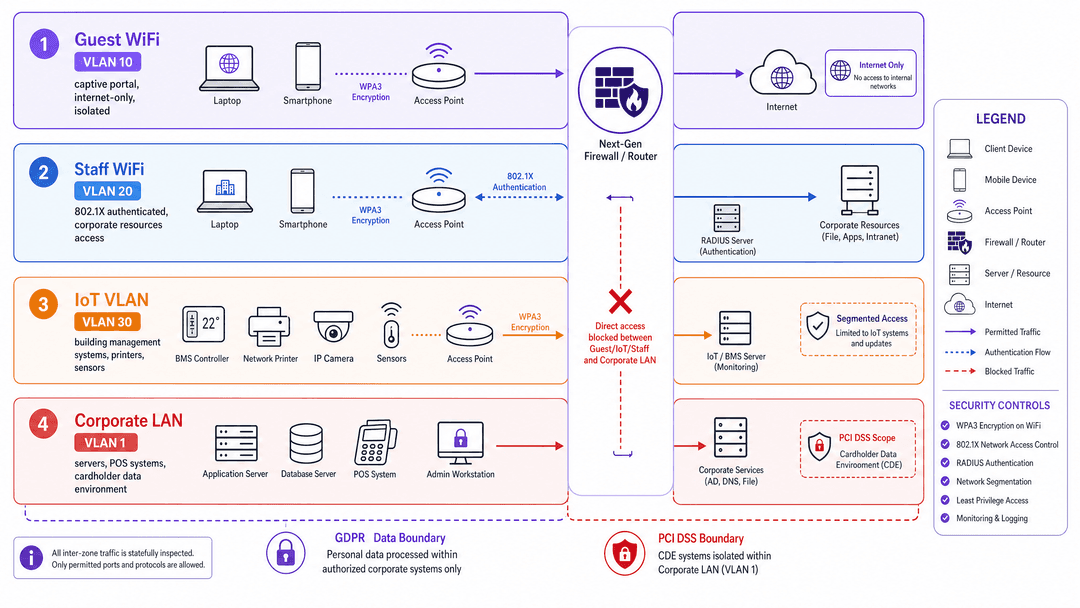
The foundation of secure enterprise WiFi is strict network segmentation. You must isolate untrusted devices from your corporate infrastructure at the network layer. Flat networks - where guests, staff, and point-of-sale systems share a broadcast domain - are a severe security risk and an immediate failure of PCI DSS Requirement 1.3.
An enterprise deployment requires at least three distinct Virtual Local Area Networks (VLANs):
- Guest WiFi (e.g., VLAN 10): Internet access only. Completely isolated from internal resources.
- Staff WiFi (e.g., VLAN 20): Authenticated access for corporate devices, providing a route to internal applications.
- IoT WiFi (e.g., VLAN 30): Dedicated segment for building management systems, sensors, and printers.
If your venue processes payments, you must maintain a separate Corporate LAN (e.g., VLAN 1) for the cardholder data environment (CDE). Stateful firewall rules must explicitly block traffic originating from the Guest or IoT VLANs from reaching the Staff or Corporate VLANs. This segmentation shrinks your PCI scope and limits lateral movement during a breach.
Wireless Encryption Standards
The WiFi Alliance ratified WPA3 to replace WPA2, addressing critical vulnerabilities like the KRACK attack. WPA3 introduces Simultaneous Authentication of Equals (SAE), which prevents offline dictionary attacks against captured handshakes.
For Guest WiFi , deploy WPA3 Enhanced Open (Opportunistic Wireless Encryption or OWE). This encrypts traffic between the client device and the access point without requiring a shared password, preventing passive packet sniffing on open networks.
For Staff WiFi, deploy WPA3 Enterprise. This uses 802.1X for port-based network access control, authenticating each device individually before granting access.
Authentication and Identity
Enterprise authentication relies on a RADIUS server querying an identity provider like Microsoft Entra ID, Okta, or Google Workspace. When a staff device attempts to connect, it presents credentials via an Extensible Authentication Protocol (EAP) method. EAP-TLS, which uses mutual certificate-based authentication, is the most secure approach for managed devices.
For guests, 802.1X is impractical. Instead, you deploy a captive portal. This web page intercepts the guest's initial HTTP request and requires them to authenticate or accept terms before the firewall permits internet access. Purple provides a hardware-agnostic cloud overlay that handles this captive portal layer across all major hardware vendors.
Implementation Guide
Deploying a secure guest network requires coordination between your core switches, wireless controllers, and captive portal platform. Follow this sequence for a standard deployment:
- Configure VLANs: Define your Guest, Staff, and IoT VLANs on your core switch infrastructure.
- Establish Firewall Rules: Implement stateful rules on your edge firewall to deny inter-VLAN routing from untrusted segments.
- Create SSIDs: On your wireless controller (e.g., Cisco Meraki, HPE Aruba, Juniper Mist), create separate SSIDs mapped to the corresponding VLAN tags.
- Configure Guest Authentication: Point your Guest SSID to Purple's captive portal URL and RADIUS servers. This offloads guest authentication and data capture to the cloud overlay.
- Configure Staff Authentication: Point your Staff SSID to your internal or cloud RADIUS server, integrating with your primary identity provider.
- Apply Bandwidth Limits: Implement Quality of Service (QoS) policies on the Guest SSID. A baseline of 10 Mbps download and 5 Mbps upload per client prevents single users from saturating the uplink.
Best Practices and Compliance
GDPR and Data Collection
If you collect personal data via a captive portal, you must comply with GDPR and local privacy laws. The legal basis for processing guest data is almost always consent. Consent must be freely given, specific, informed, and unambiguous. You cannot bundle marketing consent with network access, and you cannot use pre-ticked boxes.
Implement conscious-choice opt-ins. The user must actively choose to provide their data for marketing purposes separate from their agreement to the network terms of service. Purple's platform enforces this compliance by default, ensuring the first-party data you collect is legally sound and high-intent.
Content Filtering and DNS
Guest networks are a liability if users access illegal or malicious content. Configure your Guest VLAN to use a secure DNS resolver that blocks known malware domains and adult content. Purple's Shield add-on provides DNS-level content filtering directly integrated into the platform.
Troubleshooting & Risk Mitigation
The Flat Network Trap
Risk: Deploying a single SSID for all users, or mapping multiple SSIDs to the same subnet. Mitigation: Audit your switch configurations. Ensure every SSID drops traffic onto a distinct VLAN, and verify that your firewall drops packets attempting to cross from the guest subnet to the corporate subnet.
Captive Portal Certificate Errors
Risk: Guests encounter browser warnings when the captive portal intercepts their traffic using a self-signed certificate. Mitigation: Always use a valid TLS certificate from a trusted public Certificate Authority (CA) for your captive portal domain. Purple manages this automatically for hosted portals.
Infinite Session Durations
Risk: Guest devices remain authenticated indefinitely, skewing analytics and consuming IP addresses. Mitigation: Configure a hard session timeout on the captive portal. A 24-hour timeout suits hospitality; a 4-hour timeout is better for Retail .
ROI & Business Impact
Guest WiFi is an investment in first-party data. By deploying a secure, compliant captive portal, you transform an IT cost centre into a marketing asset. Purple's platform processes 440 million logins annually, turning anonymous visitors into known customer profiles.
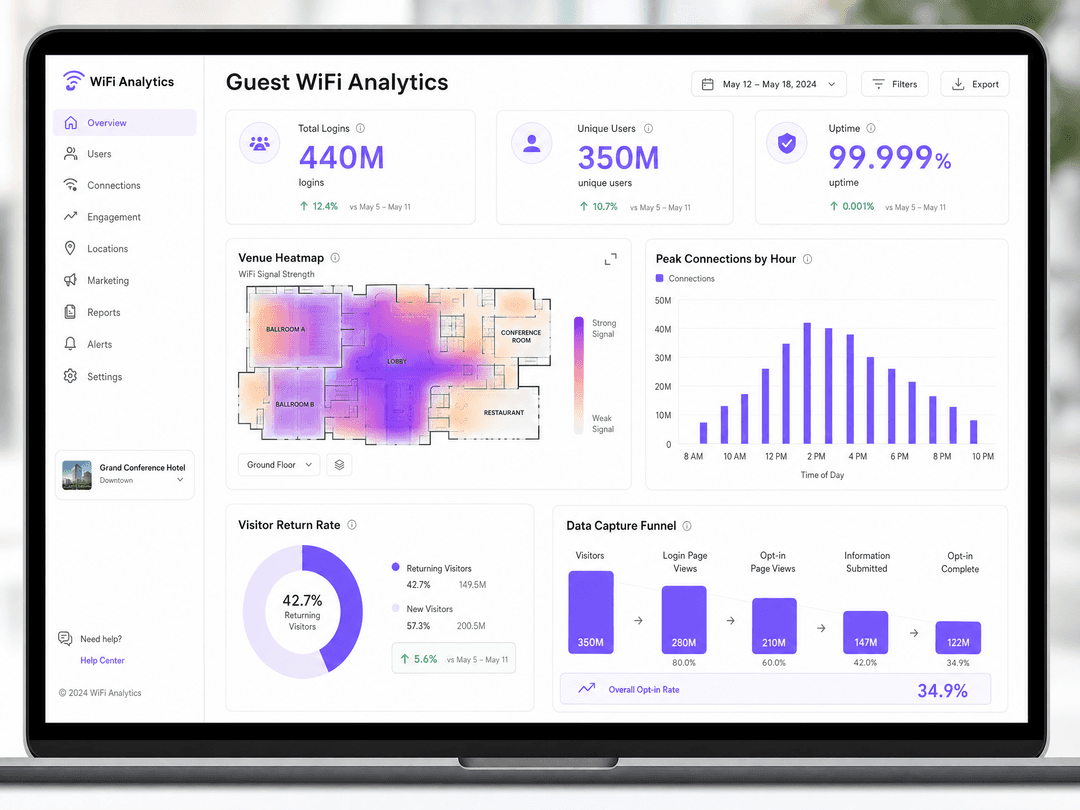
With proper segmentation, you reduce the scope and cost of PCI-DSS audits. With WPA3 and DNS filtering, you mitigate the risk of data breaches. And with WiFi Analytics , you gain visibility into footfall, dwell time, and return rates. For example, McDonald's used Purple's analytics to reduce physical IT engineer site visits by 90%, while Harrods achieved a 57x ROI by integrating WiFi data with their loyalty programme.
Key Definitions
VLAN (Virtual Local Area Network)
A logical grouping of network devices that acts as if they are on their own independent network, regardless of physical location.
Used to isolate guest traffic from corporate traffic on the same physical access points and switches.
802.1X
An IEEE standard for port-based network access control that authenticates devices before they can join the network.
The gold standard for staff WiFi security, preventing unauthorised devices from accessing the corporate LAN.
RADIUS
Remote Authentication Dial-In User Service; a protocol that provides centralised authentication, authorisation, and accounting.
The server that sits between your WiFi access points and your identity provider to validate staff credentials.
Captive Portal
A web page that the user of a public-access network is obliged to view and interact with before access is granted.
The mechanism used to capture guest data, present terms of service, and enforce bandwidth limits.
WPA3
Wi-Fi Protected Access 3; the latest security certification program developed by the WiFi Alliance.
Replaces WPA2 to provide stronger encryption and protect against offline dictionary attacks.
PCI-DSS
Payment Card Industry Data Security Standard; an information security standard for organisations that handle branded credit cards.
Requires strict network segmentation to keep guest WiFi traffic away from point-of-sale systems.
Passpoint (Hotspot 2.0)
A standard that allows mobile devices to automatically discover and connect to WiFi networks using pre-provisioned credentials.
Provides a seamless, cellular-like roaming experience for frequent visitors without requiring repeated captive portal logins.
First-Party Data
Information a company collects directly from its customers and owns entirely.
The primary business value of guest WiFi; collecting clean, compliant contact details to enrich CRM systems.
Worked Examples
A 200-room hotel needs to deploy secure WiFi for guests, staff, and new IoT smart thermostats. They currently run a flat network on HPE Aruba hardware. How should they re-architect the network to achieve PCI DSS compliance and secure the IoT devices?
- Create three new VLANs on the core switch: VLAN 10 (Guest), VLAN 20 (Staff), VLAN 30 (IoT), leaving VLAN 1 for the Corporate LAN (PMS and payment terminals).
- Configure the edge firewall to block all traffic from VLANs 10 and 30 to VLANs 1 and 20.
- On the Aruba controller, create three SSIDs. Map 'Hotel_Guest' to VLAN 10, 'Hotel_Staff' to VLAN 20, and a hidden SSID 'Hotel_IoT' to VLAN 30.
- Configure 'Hotel_Guest' with WPA3 Enhanced Open and point it to Purple's captive portal for GDPR-compliant onboarding.
- Configure 'Hotel_Staff' with WPA3 Enterprise, authenticating against a RADIUS server linked to Microsoft Entra ID.
- Configure 'Hotel_IoT' with WPA3 Personal using a strong, complex passphrase (or PPSK if supported), as IoT devices typically lack 802.1X support.
A national retail chain with 500 locations wants to collect customer email addresses via guest WiFi to build their loyalty programme. They plan to make email entry mandatory to access the internet. Is this compliant, and how should it be implemented using Cisco Meraki?
- Making email entry mandatory for marketing purposes violates GDPR consent rules. Consent must be freely given, not a condition of service.
- Implement a captive portal with conscious-choice opt-ins. The user must be able to connect by accepting the Terms of Service alone. A separate, unticked checkbox must be provided for marketing consent.
- In the Meraki dashboard, configure the Guest SSID's 'Splash page' setting to 'Click-through' or 'Sign-on with custom RADIUS'.
- Enter the Purple RADIUS server IP addresses and shared secrets in the Meraki configuration.
- Set the 'Custom splash URL' to the Purple portal address.
- In the Purple dashboard, design the splash page to include the required unbundled consent checkboxes and configure the integration to push opted-in emails directly to the retailer's CRM.
Practice Questions
Q1. Your venue is upgrading its wireless infrastructure to support WiFi 6E access points. The marketing team wants to implement a captive portal that requires users to log in using their Facebook or Google accounts to collect demographic data. The IT team is concerned about security. What is the correct implementation approach?
Hint: Consider the difference between authentication methods and data collection mechanisms.
View model answer
Deploy the new access points with WPA3 Enhanced Open on the guest SSID to ensure traffic encryption. Implement a captive portal that offers social login (OAuth) as an option, but ensure that the data requested from the social provider is minimised to what is strictly necessary. You must also provide an alternative login method (e.g., a simple form) for users who do not wish to use social login, ensuring consent remains freely given under GDPR.
Q2. A stadium with 50,000 seats experiences severe network degradation during half-time. Guests complain they cannot connect to the WiFi, and the core switch CPU utilisation spikes to 95%. What configuration changes should you implement?
Hint: Look at broadcast traffic and bandwidth management.
View model answer
- Implement client isolation (Layer 2 isolation) on the guest SSID to prevent devices from communicating with each other, reducing broadcast traffic. 2. Enforce strict QoS bandwidth limits per client (e.g., 5 Mbps) to prevent a few users from saturating the uplink. 3. Enable band steering to push clients to the 5GHz band, reducing congestion on the 2.4GHz spectrum. 4. Reduce the DHCP lease time to 30 minutes to free up IP addresses quickly in a high-turnover environment.
Q3. During a PCI-DSS audit, the assessor notes that the guest WiFi access points are plugged into the same physical switch as the point-of-sale terminals. The assessor threatens to fail the audit. How do you resolve this without buying new physical switches?
Hint: Physical separation is not the only way to achieve isolation.
View model answer
Implement logical segmentation using VLANs. Assign the switch ports connected to the access points to a dedicated Guest VLAN (e.g., VLAN 10). Assign the ports connected to the POS terminals to the Corporate VLAN (e.g., VLAN 1). Configure the uplink port to the firewall as a trunk port carrying both VLANs. Finally, configure stateful firewall rules to explicitly deny any routing between VLAN 10 and VLAN 1.
Continue reading in this series
How to Set Up Guest WiFi: The Enterprise Network Segmentation Guide
This guide details the technical architecture, authentication standards, and deployment methodology required to build a secure, segmented enterprise WiFi network. You will learn how to implement the three-SSID model, deploy 802.1X for staff authentication, configure captive portals for GDPR-compliant guest access, and reduce your PCI DSS scope.
How to Implement Time and Bandwidth Restrictions on Guest WiFi
An authoritative technical reference guide on implementing time and bandwidth restrictions on enterprise guest WiFi networks. This guide provides actionable architectural blueprints, vendor-neutral configurations, and real-world case studies to help IT leaders balance network performance, security compliance, and visitor experience.
The Ultimate Guide to Secure Guest WiFi Architecture
This guide provides IT managers, network architects, and CTOs at hotels, retail chains, stadiums, and public-sector organisations with a complete technical blueprint for deploying secure enterprise guest WiFi. It covers the three core architectural pillars — network segmentation, WPA3-OWE encryption, and identity-aware access control — alongside PCI DSS and GDPR compliance requirements, real-world case studies, and step-by-step deployment guidance.
Got questions about your specific setup?
Our team works with venue operators, IT managers, and network engineers across 80,000 venues. Book a 20-minute call and we will show you how others like you solved it.