
Nama guild iPSK: a comprehensive guide for businesses
This guide explains Identity Pre-Shared Key (iPSK) architecture for property developers, BTR operators, and landlords deploying multi-tenant WiFi. It covers RADIUS integration, dynamic VLAN assignment, Layer 2 isolation, and automated credential lifecycle management to deliver an instant-on resident experience at scale. It also details the business case for eliminating per-unit consumer routers and the operational advantages of integrating iPSK with identity providers like Microsoft Entra ID, Okta, and Google Workspace.
Listen to this guide
View podcast transcript

Executive summary
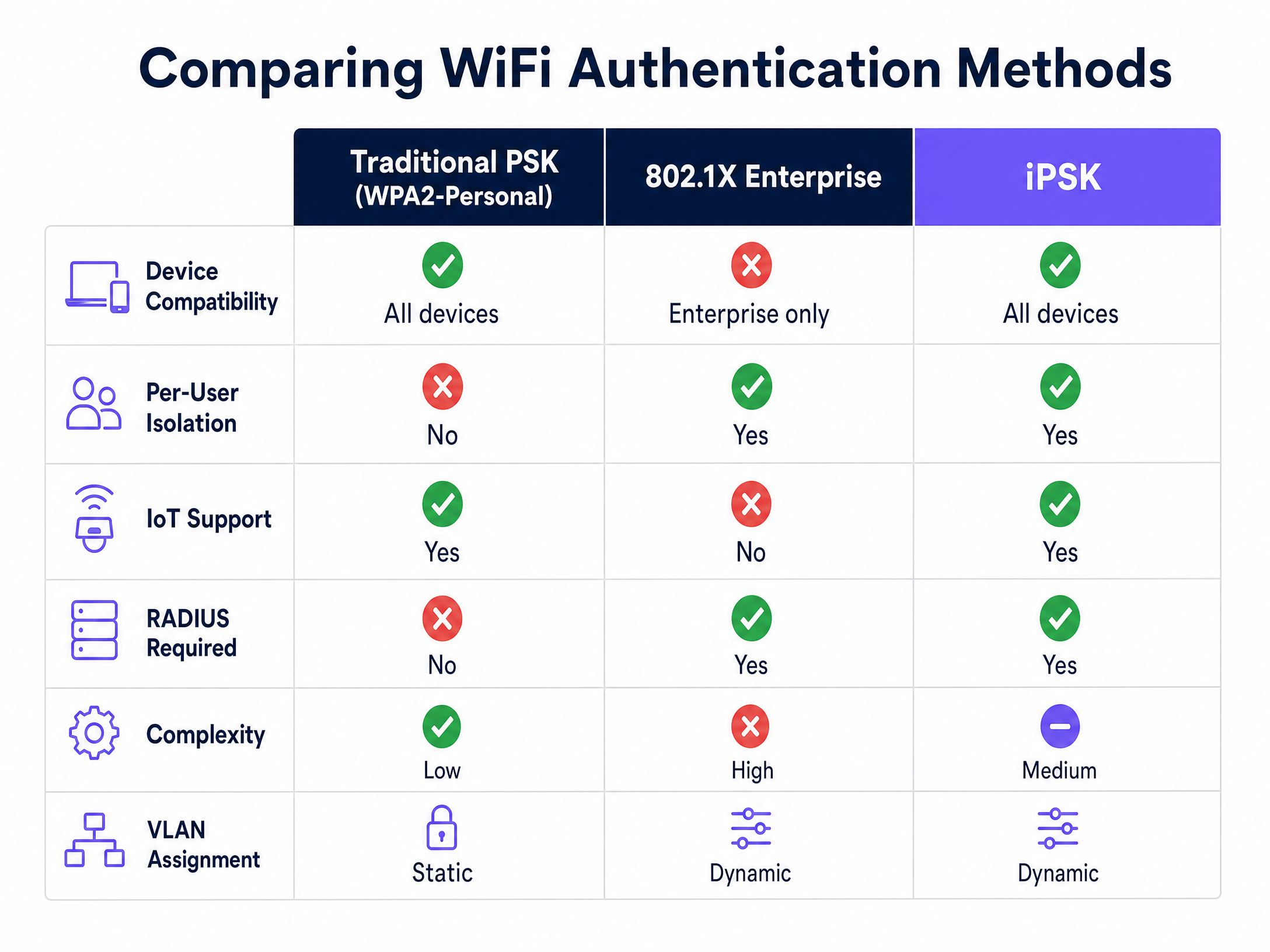
Traditional WiFi security forces a choice between two inadequate options. Standard WPA2-Personal is simple but offers no individual accountability. One leaked password compromises the entire network, and revoking access for a single resident means changing the password for everyone. WPA2-Enterprise or WPA3-Enterprise using IEEE 802.1X delivers per-user control but breaks connectivity for gaming consoles, smart TVs, and IoT devices that cannot process digital certificates.
Identity Pre-Shared Key (iPSK) resolves this tension. It assigns a unique password to every individual user or device on a single SSID, enabling dynamic VLAN assignment and Layer 2 isolation via a central RADIUS server. For Build-to-Rent (BTR) operators, property developers, and landlords, iPSK is the definitive standard for multi-tenant connectivity. It supports 100% of resident devices, creates a Private Area Network for each unit, and scales through automated lifecycle management integrated with identity providers like Microsoft Entra ID, Okta, or Google Workspace. Purple automates this entire workflow across 80,000+ live venues, integrating with Cisco Meraki, HPE Aruba, Ruckus, Juniper Mist, Ubiquiti UniFi, Cambium, Extreme Networks, and Fortinet.
Technical deep-dive
The mechanics of Identity PSK
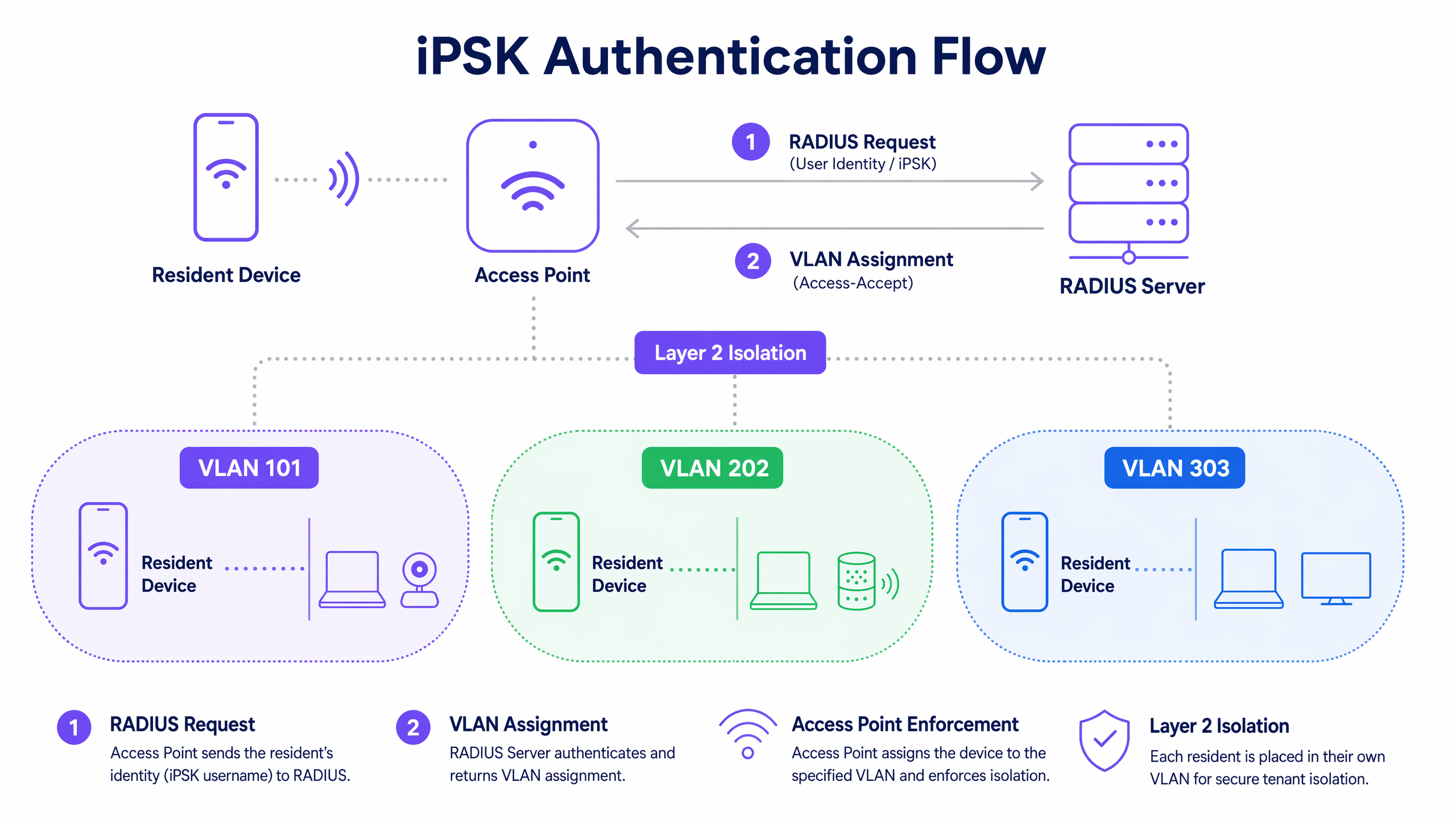
iPSK modifies the standard WPA2 four-way EAPOL handshake. When a client device associates with an access point using a specific pre-shared key, the access point does not grant access immediately. Instead, it sends a RADIUS request message to the central authentication server. This request contains vendor-specific attributes. For Cisco Meraki, these are the Meraki-IPSK attributes. The RADIUS server runs a dictionary check against its database of configured iPSKs. If a match is found, it responds with an access-accept message containing the passphrase and, critically, a dynamic VLAN assignment via the Tunnel-Private-Group-Id attribute.
This architecture requires no certificate infrastructure. The client device sees a standard WPA2-Personal network and connects with a password. The complexity is handled entirely between the access point and the RADIUS server. This is why iPSK supports 100% of consumer devices - gaming consoles, smart TVs, wireless printers, and IoT sensors all connect using the same simple password experience they use at home.
Layer 2 isolation and Private Area Networks
In a multi-tenant environment, a single SSID across hundreds of apartments is efficient for RF planning but creates serious security risks without proper segmentation. iPSK enables the creation of a Private Area Network (PAN) for each resident.
When a resident authenticates with their unique iPSK, the RADIUS server assigns their devices to a specific VLAN. The network infrastructure enforces Layer 2 isolation between these VLANs. One resident's iPhone can see their own printer or Chromecast, but the resident in the next apartment cannot discover or interact with those devices. This micro-segmentation is critical for GDPR compliance and for maintaining resident trust.
Because each resident has their own isolated VLAN, you can enable mDNS reflection within that specific VLAN. mDNS is the protocol that enables AirPlay, Chromecast casting, and wireless printing. Enabling mDNS reflection within each resident's private VLAN allows their own devices to communicate with each other, while remaining completely isolated from all other residents. The result is a home-like experience on shared infrastructure.
Hardware vendor implementations
Every major enterprise WiFi hardware vendor supports per-device PSK, but under different product names. The table below maps vendor terminology to the underlying technology.
| Vendor | Product name | RADIUS required | Dynamic VLAN |
|---|---|---|---|
| Cisco Meraki | iPSK | Yes | Yes |
| HPE Aruba | MPSK | Yes | Yes |
| Ruckus | DPSK | Yes | Yes |
| Juniper Mist | PPSK | Yes | Yes |
| Ubiquiti UniFi | PPSK | Yes | Yes |
| Cambium | PPSK | Yes | Yes |
| Extreme | PPSK | Yes | Yes |
| Fortinet | PPSK | Yes | Yes |
Purple is hardware-agnostic and provides a unified management layer across all of these platforms. You are not locked into a single vendor, and you can migrate hardware without rebuilding your authentication infrastructure.
Implementation guide
Deploying iPSK requires coordination between your wireless infrastructure, your RADIUS server, and your identity provider. Follow this sequence to deploy correctly.
Step 1 - Plan your VLAN architecture. Allocate one VLAN per residential unit. In a 300-unit development, you need 300 VLANs. Standard 802.1Q supports 4,094 VLANs, which is sufficient for most BTR developments. For larger deployments, plan for VXLAN overlays.
Step 2 - Deploy your RADIUS server. Purple provides a cloud-hosted RADIUS service with 99.999% uptime. Point your wireless controllers at Purple's RADIUS endpoint. Configure the shared secret between your access points and the RADIUS server.
Step 3 - Configure your wireless controller. Create a single SSID with WPA2-PSK security. Enable the vendor-specific iPSK or PPSK toggle. Enable AAA override so the RADIUS response can dynamically assign VLANs. Disable client isolation at the SSID level - isolation is handled per-VLAN.
Step 4 - Integrate your identity provider. Connect Purple to Microsoft Entra ID, Okta, or Google Workspace. Purple reads the resident directory and automatically provisions a unique iPSK and VLAN assignment for each resident.
Step 5 - Configure Change of Authorization (CoA). Set up CoA between Purple and your wireless controllers. This allows Purple to send a disconnect message when a resident's lease terminates, forcing immediate session termination.
Step 6 - Enable mDNS reflection per VLAN. Configure your network switches and wireless controllers to reflect mDNS traffic within each VLAN boundary. This enables AirPlay, Chromecast, and wireless printing within each apartment without leaking discovery traffic across the building.
For more on designing your overall WiFi architecture, see our guide on three SSIDs to rule them all: guest, Passpoint, and IoT WiFi .
Best practices
Avoid MAC address randomisation failures. Modern smartphones randomise their MAC address to protect user privacy. If your iPSK implementation relies on MAC Address Bypass (MAB), randomisation will break authentication. Ensure your infrastructure uses modern EAPOL-based iPSK verification, where the password itself is the authenticator rather than the MAC address.
Plan for RADIUS performance. iPSK places a heavier computational load on the RADIUS server than standard PSK because of the dictionary checks required during the EAPOL handshake. Use a cloud-hosted, high-performance RADIUS service. Purple's RADIUS infrastructure is built for this workload and maintains 99.999% uptime across 80,000+ venues.
Address WPA3 compatibility early. iPSK currently operates on WPA2. If you are deploying WiFi 6E or WiFi 7 access points on the 6 GHz band, you need a separate WPA3-Enterprise strategy for those clients. The 6 GHz band mandates WPA3 security, which does not currently support iPSK in the same way. Plan a dual-band strategy: WPA2 iPSK on 2.4 GHz and 5 GHz, WPA3-Enterprise on 6 GHz.
Automate credential delivery. Do not email passwords in plain text. Purple delivers credentials to residents via a secure, branded portal or via the Purple app. This creates an auditable record of credential delivery and ensures residents can self-serve password resets without contacting the helpdesk.
Test mDNS reflection before go-live. The most common resident complaint after an iPSK deployment is that their Chromecast or AirPlay does not work. Test mDNS reflection in each VLAN during commissioning. Use a laptop and a Chromecast on the same resident VLAN and verify casting works before handover.
For related guidance on how your WiFi network creates a first impression for residents, see how to make a great first impression with your guest WiFi .
Troubleshooting and risk mitigation
Stale sessions after key revocation. The most common failure mode in an iPSK deployment. Revoking a key in the RADIUS database prevents future connections but does not drop active sessions. Configure CoA on your wireless controllers and ensure Purple sends a CoA disconnect message on every key revocation event.
VLAN exhaustion. In very large multi-tenant deployments, you can exhaust the 4,094 VLAN limit. Mitigate this by using VXLAN overlays or by sharing VLANs between non-adjacent units where the risk of cross-contamination is negligible.
RADIUS server unavailability. If your RADIUS server goes offline, no new devices can connect. Configure RADIUS failover with a secondary server. Purple's cloud RADIUS service includes built-in redundancy and a 99.999% uptime SLA.
Key synchronisation delays. When a new resident moves in, there can be a delay between the lease being signed in the property management system and the iPSK being provisioned in RADIUS. Integrate your property management system directly with Purple's API to automate provisioning and eliminate this gap.
ROI and business impact
Eliminating per-unit consumer routers transforms the economics of multi-tenant WiFi. A typical 300-unit BTR development might spend £150 - £200 per unit on consumer routers, totalling up to £60,000 in hardware that needs replacing every three to five years. Centralised enterprise access points in corridors and common areas reduce hardware costs and eliminate the operational overhead of replacing broken consumer routers in occupied apartments.
More importantly, you deliver an instant-on resident experience. Residents connect to the WiFi the moment they walk in the door, using credentials delivered securely before move-in day. This premium amenity increases tenant satisfaction and supports higher rental yields. According to property industry research, managed WiFi is now cited by residents as one of the top three amenities they expect in a BTR development.
Purple's Multi-Tenant WiFi solution isolates traffic securely and supports resident smart devices, backed by 29 billion data points collected across our global network. Our WiFi Analytics platform gives property managers visibility into network utilisation, helping you right-size your infrastructure investment and demonstrate the value of the managed WiFi amenity to investors.
For BTR operators looking to extend resident engagement beyond connectivity, Purple's Guest WiFi platform integrates with property management systems to deliver targeted communications and loyalty programmes. See also our guide on how to use bulk SMS for marketing to increase return visits for practical tactics on resident retention.
Key Definitions
iPSK (Identity Pre-Shared Key)
A security mechanism that allows multiple unique passwords to be used on a single WiFi SSID, with each password tied to specific network policies including VLAN assignment and access control.
Used to provide enterprise-grade access control while supporting consumer devices that lack 802.1X capabilities. Cisco Meraki uses this exact term; other vendors use MPSK, DPSK, or PPSK for the same concept.
RADIUS (Remote Authentication Dial-In User Service)
A networking protocol that provides centralised authentication, authorisation, and accounting management for users who connect to a network service.
The backend server that validates iPSK passwords and returns VLAN assignments to the access point. Purple provides a cloud-hosted RADIUS service with 99.999% uptime.
VLAN (Virtual Local Area Network)
A logical subnetwork that groups a collection of devices, isolating their traffic from the rest of the physical network regardless of their physical location.
Used in multi-tenant WiFi to create a secure, private network segment for each individual apartment. Dynamic VLAN assignment via RADIUS is what makes per-resident isolation possible.
Layer 2 isolation
A network security feature that prevents devices on the same physical network from communicating directly with each other at the data link layer.
Ensures that residents cannot see or access devices belonging to their neighbours, even though they share the same physical WiFi infrastructure.
mDNS (Multicast Domain Name System)
A protocol used by Apple Bonjour and Google Cast to discover services on a local network without a central DNS server.
Must be carefully managed in multi-tenant networks. Enabling mDNS reflection within each resident's private VLAN allows AirPlay, Chromecast, and wireless printing to work normally without leaking device discovery across the building.
CoA (Change of Authorization)
A RADIUS extension defined in RFC 5176 that allows the authentication server to dynamically modify an active session's authorisation attributes or send a disconnect message.
Essential for instantly revoking access when a resident's lease terminates. Without CoA, a revoked key only prevents future connections - it does not drop the current active session.
EAPOL (Extensible Authentication Protocol over LAN)
The protocol used in WPA2 to negotiate encryption keys between the client device and the access point during the four-way handshake.
Modern iPSK implementations use the EAPOL handshake to verify the password securely. This is more reliable than MAC Address Bypass because it is not affected by MAC address randomisation.
MAC Address Bypass (MAB)
An authentication method that uses the device's hardware MAC address as both the username and password in a RADIUS request.
A legacy method sometimes confused with iPSK. MAB is now unreliable because modern iPhones and Android phones randomise their MAC address by default, causing authentication failures.
Private Area Network (PAN)
In the context of multi-tenant WiFi, a logically isolated network segment assigned to a single resident or unit, providing the equivalent of a private home router on shared infrastructure.
The outcome of combining iPSK authentication with dynamic VLAN assignment and Layer 2 isolation. Each resident gets their own PAN without requiring a physical router in their apartment.
Dynamic VLAN assignment
The process by which a RADIUS server returns a VLAN identifier in the access-accept message, instructing the access point to place the authenticated device into a specific network segment.
The mechanism that enables per-resident isolation in an iPSK deployment. Without dynamic VLAN assignment, all devices would share the same network segment regardless of which password they used.
Worked Examples
A 300-unit Build-to-Rent development needs to provide managed WiFi as a premium amenity. The operator wants to avoid installing 300 consumer routers. Residents must be able to use wireless printers, smart speakers, and Chromecast devices securely, and the operator needs to revoke access instantly when a tenant vacates.
Deploy enterprise access points from Cisco Meraki or HPE Aruba in corridors and common areas to provide full building coverage on a single SSID. Configure the wireless controller to use iPSK authentication pointing to Purple's cloud RADIUS server. Integrate the property management system with Purple's API. When a resident moves in, Purple automatically generates a unique password and assigns a dedicated VLAN (e.g., VLAN 150 for Unit 150). Enable mDNS reflection exclusively within each VLAN. Configure CoA so that when a lease is terminated in the property management system, Purple immediately sends a disconnect message to the wireless controller, dropping all active sessions for that VLAN.
A university student accommodation block of 500 rooms is experiencing security issues because students are sharing the standard WPA2-Personal password with non-residents. The IT team needs individual accountability and the ability to revoke access for specific students without disrupting the rest of the network.
Migrate the accommodation block to an iPSK architecture. Integrate the university's Microsoft Entra ID with Purple's WiFi authentication system. Purple automatically provisions a unique iPSK for each enrolled student at the start of the academic year. If a student shares their unique key with a non-resident, IT can identify the source from the RADIUS logs and revoke that specific key instantly without affecting any other students. When a student graduates or leaves, their specific key is automatically revoked via the Microsoft Entra ID integration.
Practice Questions
Q1. You are designing the WiFi network for a 200-unit co-living development. Members need to connect their laptops, phones, and wireless printers. The operator wants to revoke access instantly when a member's contract ends. Which authentication method should you choose and why?
Hint: Consider the device compatibility requirements for wireless printers and the operational requirement for instant revocation.
View model answer
iPSK is the correct choice. While 802.1X provides excellent security for laptops and phones, wireless printers typically do not support enterprise certificates. iPSK allows all devices to connect securely while still providing individual accountability and VLAN isolation for different members. To meet the instant revocation requirement, configure Change of Authorization (CoA) between Purple and the wireless controllers so that when a member's contract is terminated in the management system, a CoA disconnect message is sent immediately to drop all active sessions.
Q2. A resident reports that they cannot cast Netflix from their phone to their smart TV. Both devices are connected to the network using the resident's unique iPSK. The network engineer confirms both devices are on VLAN 210. What is the likely configuration issue and how do you fix it?
Hint: Think about how device discovery protocols operate and what is needed for casting to work.
View model answer
The network is enforcing strict Layer 2 isolation within VLAN 210 without enabling mDNS reflection. Chromecast uses mDNS (Google Cast protocol) to discover receivers on the local network. Without mDNS reflection within the VLAN, the phone cannot discover the smart TV even though they are on the same VLAN. Fix this by configuring the wireless controller or a dedicated mDNS proxy to reflect mDNS traffic within the boundary of VLAN 210. Do not enable mDNS globally - this would allow residents to discover each other's devices across VLANs.
Q3. A landlord terminates a tenancy and asks the IT team to immediately revoke the former tenant's WiFi access. The IT team deletes the tenant's iPSK from the RADIUS database, but the former tenant's laptop remains connected to the network for several hours. What went wrong and what should the IT team configure to prevent this in future?
Hint: Consider when RADIUS authentication actually occurs in the connection lifecycle.
View model answer
RADIUS authentication only occurs during the initial connection handshake. Once a device is authenticated and associated with the network, it maintains its session without re-authenticating. Deleting the key from RADIUS prevents future connections but does not terminate the active session. The IT team needs to configure Change of Authorization (CoA) support on the wireless controllers and ensure the management system sends a CoA disconnect message when a key is revoked. This instructs the access point to immediately de-authenticate and disassociate the device, terminating the session in real time.
Q4. You are planning a 600-unit BTR development and considering whether to use standard 802.1Q VLANs or VXLAN for the network segmentation layer. What factors should inform this decision?
Hint: Consider the VLAN limit of standard 802.1Q and the scale of the deployment.
View model answer
Standard 802.1Q supports 4,094 VLANs, which is sufficient for 600 units with headroom for management VLANs, IoT VLANs, and guest networks. For this deployment size, standard 802.1Q is appropriate. However, if the development is part of a larger campus or if you plan to extend the same network across multiple buildings with thousands of units, VXLAN provides a 16 million segment address space and better scalability across routed boundaries. For a standalone 600-unit development, keep it simple with 802.1Q and reserve VXLAN for multi-site or very large-scale deployments.
Continue reading in this series
Uu PPSK pdf: comparing features and deployment models
This technical reference guide compares Private Pre-Shared Key (PPSK) WiFi architecture against traditional 802.1X and standard PSK deployments. It provides network architects and IT managers with vendor-neutral implementation strategies for multi-tenant residential, IoT, and BTR environments.
Uu PPSK pdf: comparing features and deployment models
This technical reference guide compares Private Pre-Shared Key (PPSK) WiFi architecture against traditional 802.1X and standard PSK deployments. It provides network architects and IT managers with vendor-neutral implementation strategies for multi-tenant residential, IoT, and BTR environments.
Uu PPSK 2023: comparing features and deployment models
This technical reference guide compares Unique per-User Private Pre-Shared Key (UU PPSK) WiFi architecture against traditional shared PSK and 802.1X deployments, with a specific focus on the 2023 landscape of vendor implementations and platform capabilities. It provides property developers, BTR operators, and MDU landlords with actionable deployment strategies, VLAN architecture guidance, and automated lifecycle management workflows. The guide covers three deployment models, real-world case studies, and the compliance implications of each authentication approach.