
iPSK ff: a comprehensive guide for businesses
iPSK ff (Identity Pre-Shared Key) is the definitive WiFi authentication standard for multi-tenant environments - delivering a unique passphrase to every resident on a single SSID, with dynamic VLAN assignment and Layer 2 isolation. This guide covers the technical architecture, implementation steps, and commercial case for property developers, BTR operators, and landlords deploying managed WiFi at scale.
Listen to this guide
View podcast transcript
Executive summary
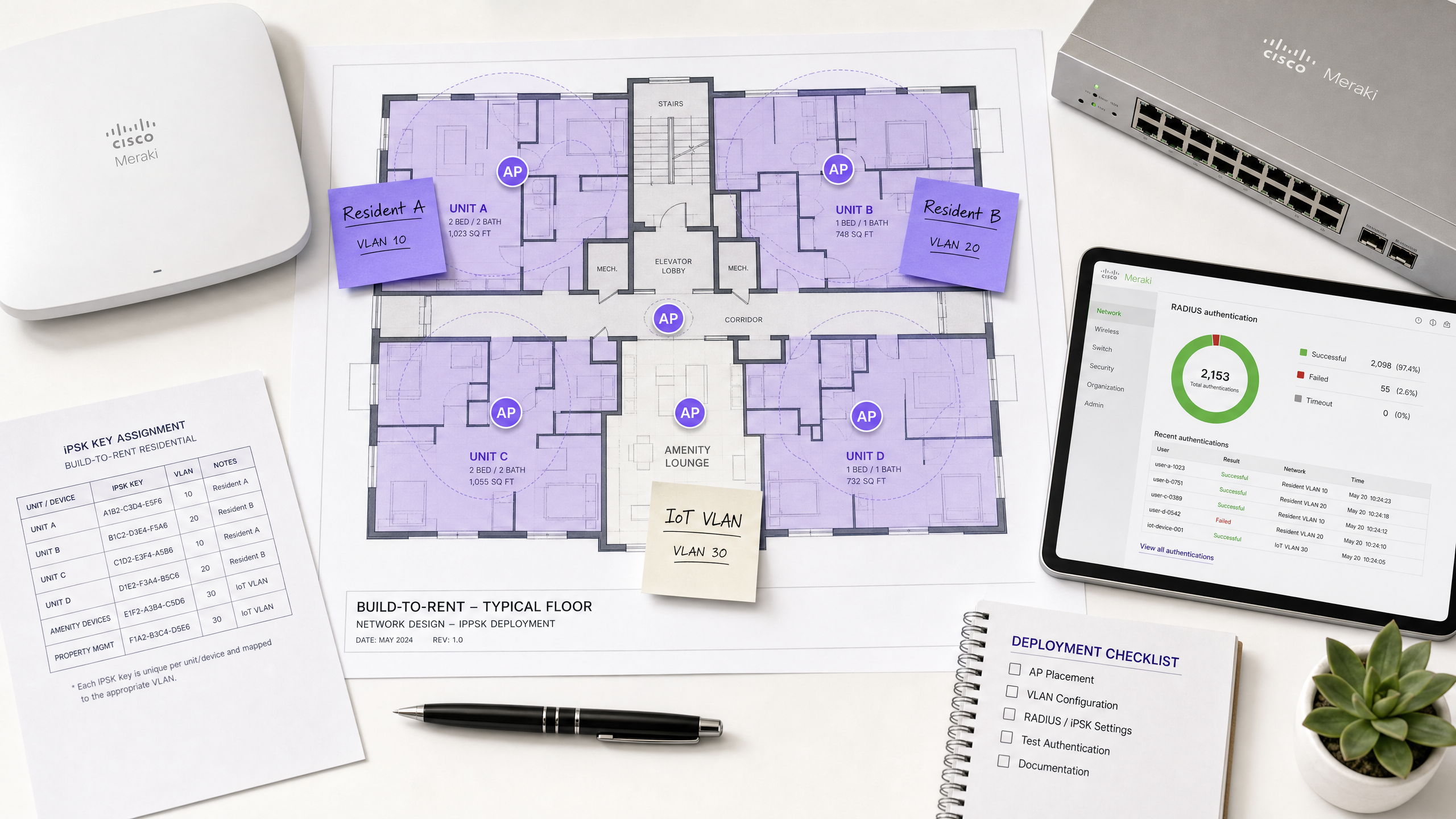
For Build-to-Rent (BTR) operators, property developers, and multi-dwelling unit (MDU) landlords, WiFi is no longer a nice-to-have amenity. It is the utility residents evaluate before they sign a lease. Traditional approaches fail at scale: shared PSK networks expose one resident's devices to every neighbour, 802.1X Enterprise authentication blocks the smart home devices residents rely on, and a physical router in every unit creates severe radio frequency (RF) interference that degrades speeds for the whole building.
Identity PSK (iPSK) resolves all three problems. It issues a unique WiFi passphrase to every household on a single building-wide network. Each passphrase maps to an isolated VLAN, creating a private WiFi bubble per resident. Devices within the bubble discover each other - phones cast to TVs, consoles connect to the internet, smart speakers respond to voice commands - while remaining completely invisible to neighbours. Purple delivers this as a hardware-agnostic cloud overlay, running on Cisco Meraki, HPE Aruba, Ruckus, Juniper Mist, Ubiquiti UniFi, Cambium, Extreme, and Fortinet access points. The result is a £15-30 per unit per month rent premium, five to ten day shorter void periods, and a 30-50% reduction in per-door connectivity costs compared to individual broadband contracts (Purple internal data, 2025).
Technical deep-dive
What iPSK actually does
iPSK (Identity Pre-Shared Key) - known as MPSK by HPE Aruba, DPSK by Ruckus, and ePSK by Cambium and Juniper Mist - allows a single SSID to accept thousands of different passphrases simultaneously. Each passphrase is unique to a resident or household. The network uses that passphrase as an identity signal, not just a door key.
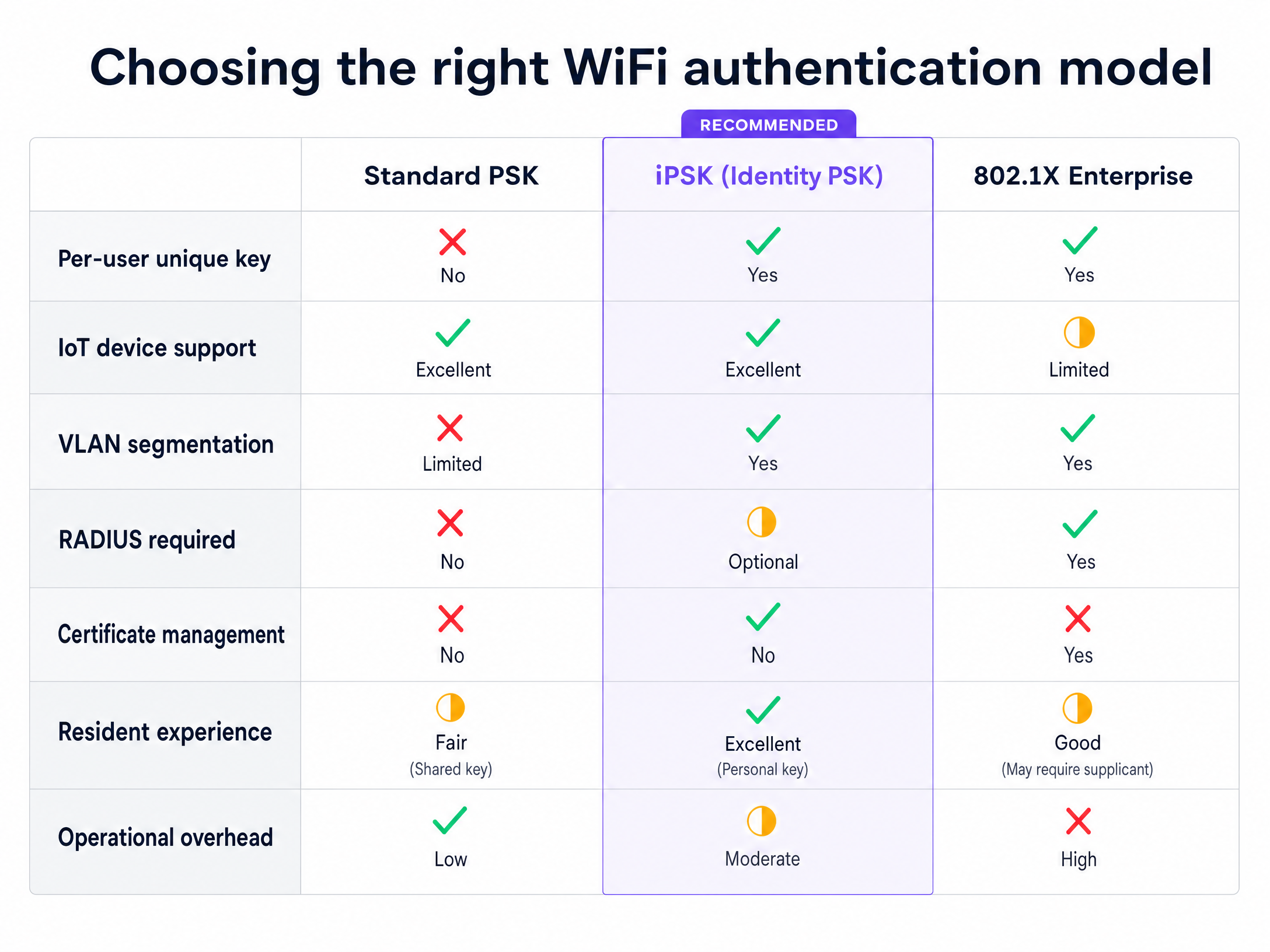
When a resident's device connects, the access point (AP) does not simply check whether the password is correct. It forwards the authentication request to a RADIUS (Remote Authentication Dial-In User Service) server. The RADIUS server validates the passphrase against the resident's profile and returns an Access-Accept message containing specific policy attributes - most importantly, the VLAN ID assigned to that resident. The AP then tags all traffic from that device with the correct VLAN, placing it inside the resident's isolated network segment.
This dynamic VLAN assignment is the mechanism that creates the per-resident WiFi bubble. Resident A's phone, laptop, and smart TV all share the same VLAN and can communicate freely using multicast and broadcast protocols (mDNS for AirPlay and Chromecast, SSDP for DLNA). Resident B's devices sit in a completely separate VLAN and are invisible to Resident A, even though both households share the same physical access points.
Why 802.1X does not work for residential
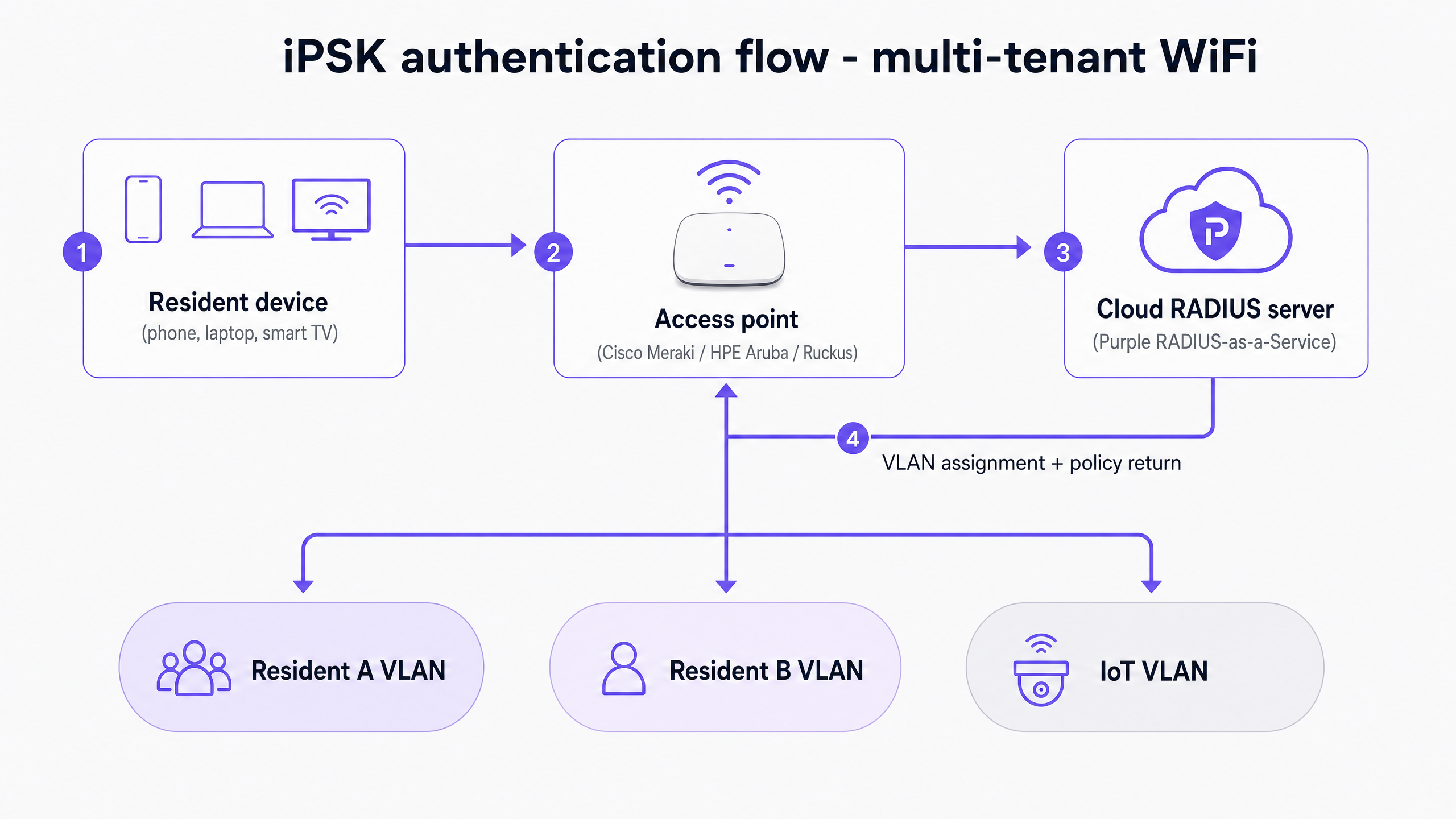
IEEE 802.1X is the gold standard for enterprise network authentication. It requires each device to present a username and password or a digital certificate to a RADIUS server via an EAP (Extensible Authentication Protocol) exchange. The problem in residential environments is device compatibility. Smart bulbs, voice assistants, gaming consoles, and most IoT sensors do not include an 802.1X supplicant. They cannot participate in an EAP exchange. Forcing 802.1X on a residential network means residents cannot connect their smart home devices, generating a flood of support calls and significant resident dissatisfaction.
iPSK uses WPA2-Personal or WPA3-Personal at the client level, which every consumer device supports. The enterprise-grade identity logic runs entirely on the backend between the AP and the RADIUS server, invisible to the connecting device.
Authentication flow in detail
The sequence below describes what happens from the moment a resident's device connects:
- The device broadcasts a probe request and associates with the SSID.
- The device sends its passphrase during the WPA2/WPA3 four-way handshake.
- The AP intercepts the passphrase and constructs a RADIUS Access-Request, including the device MAC address and the passphrase as a Cisco AV-Pair attribute (
psk-modeandpsk-password). - The cloud RADIUS server (Purple's RADIUS-as-a-Service) validates the passphrase against the resident database.
- On success, the RADIUS server returns an Access-Accept with the VLAN ID, QoS policy, and bandwidth profile for that resident.
- The AP assigns the device to the specified VLAN and completes the association.
- The device receives an IP address from the DHCP scope for that VLAN and is online within its isolated segment.
The entire sequence completes in under 500 milliseconds and is transparent to the resident.
Vendor implementation notes
The core concept is standardised, but vendor implementations differ in naming and attribute handling. Cisco Meraki uses the psk-mode and psk-password Cisco AV-Pairs. HPE Aruba ClearPass uses its own MPSK attribute set. Ruckus SmartZone supports DPSK natively without a RADIUS server for smaller deployments, though RADIUS integration is recommended for any estate above 50 units. Purple's cloud RADIUS layer abstracts these differences, presenting a single management interface regardless of the underlying hardware.
Implementation guide
Step 1: Subnet and VLAN design
In a high-density BTR environment, plan for 15 to 25 devices per unit. A standard /24 subnet (254 usable addresses) will quickly exhaust its DHCP pool in a building with more than ten units. Use /20 or /21 subnets for your client VLANs. Ensure your DHCP lease times are configured appropriately - typically eight to 12 hours for residential, but shorter for transient guest environments such as hotels or serviced apartments.
Design a separate VLAN for building management IoT devices (door entry systems, CCTV, HVAC sensors). This keeps operational infrastructure isolated from resident traffic and simplifies security auditing.
Step 2: Access point placement and RF planning
Remove individual unit routers before deploying managed APs. Place enterprise-grade APs in corridors, communal areas, and plant rooms to provide coverage without penetrating into individual units. Use a professional RF survey to determine AP density. For a typical residential building with standard concrete construction, one AP per two to four units is a reasonable starting point, but always validate with a site survey.
Configure APs to prioritise 5GHz and 6GHz bands. Reserve 2.4GHz for legacy IoT devices that cannot connect on higher bands. Enable band steering to push capable devices to the faster bands automatically.
Step 3: Automating key lifecycle management
Do not manage keys manually. Integrate your Property Management System (PMS) or Identity Provider (IdP) with your RADIUS infrastructure. When a new lease is signed, the system should automatically generate a unique iPSK and email it to the resident. When they move out, the key must be revoked instantly. Purple's platform acts as this orchestration layer, integrating with Microsoft Entra ID, Okta, and Google Workspace, as well as leading PMS platforms. This automation eliminates the manual overhead that makes large-scale iPSK deployments operationally unviable without the right tooling.
Step 4: Handling MAC address randomisation
Modern operating systems use MAC address randomisation by default for privacy reasons. iOS 14 and later, Android 10 and later, and Windows 11 all randomise the MAC address when connecting to new networks. Because iPSK relies on MAC addresses for identity lookup in some implementations, a randomised MAC can cause authentication failures or prevent VLAN assignment.
The recommended mitigation is to configure your onboarding portal to instruct residents to disable "Private Address" (iOS) or "Randomised MAC" (Android) for the building's SSID. Alternatively, implement a pre-registration workflow where the resident authenticates via a web portal on first connection, binding their device's current MAC address to their profile. Purple's self-service portal handles this automatically.
Step 5: Self-service device management
Residents add new devices regularly. Provide a self-service portal or app where residents can register new MAC addresses, view connected devices, and reset their passphrase without contacting building management. Purple's resident portal handles this, reducing support tickets by up to 60% compared to manually managed networks (Purple internal data, 2025).
Best practices
To maximise the effectiveness of your iPSK deployment, follow these industry-standard recommendations:
Enforce Layer 2 isolation at the SSID level. Configure peer-to-peer blocking on the SSID, overriding it only for devices within the same assigned VLAN. This ensures the PAN functions correctly and prevents cross-resident traffic at the wireless layer, not just at the routing layer.
Design for RADIUS redundancy. Your network is only as reliable as your RADIUS infrastructure. Deploy primary and secondary RADIUS servers across different availability zones or data centres. Configure the WLC with appropriate failover timers - typically three to five seconds before switching to the secondary server.
Monitor RF health continuously. Even with fewer APs than a router-per-unit design, monitor channel utilisation and co-channel interference. Use the built-in RF analytics in Cisco Meraki, HPE Aruba Central, or Juniper Mist AI to detect and resolve interference automatically.
Align with GDPR and data protection standards. iPSK itself is a network authentication mechanism, not a data collection tool. However, the identity data you store in your RADIUS database (resident names, email addresses, device MAC addresses) is personal data under GDPR. Ensure your data retention policies, consent mechanisms, and data processing agreements are in place before go-live. Purple is GDPR, CCPA, ISO 27001, and Cyber Essentials certified.
Test your IoT device fleet before go-live. Most IoT devices work correctly with iPSK, but some older devices have quirks around the WPA2-PSK handshake. Run a pre-deployment compatibility test, particularly for any bespoke or legacy hardware such as older access control systems or building management sensors.
For a broader view of how to structure your network across guest, staff, and IoT traffic, see our guide on Three SSIDs to rule them all: guest, Passpoint, and IoT WiFi .
Troubleshooting and risk mitigation
Authentication timeouts
If the RADIUS server is slow to respond, the WLC may drop the client before the handshake completes. Monitor RADIUS response latency and ensure it remains below 200ms. If you are using a cloud RADIUS service, verify WAN uplink stability and configure local RADIUS caching where the hardware supports it.
DHCP exhaustion
If devices connect but fail to receive an IP address, your subnet is too small or lease times are too long. Monitor DHCP pool utilisation and expand the scope before it reaches 80% capacity. In a 200-unit building with 25 devices per unit, you need a minimum of 5,000 available addresses - a /19 subnet provides 8,190 usable addresses and gives you headroom for growth.
Roaming issues
In a multi-AP environment, ensure 802.11k (neighbour reports), 802.11v (BSS transition management), and 802.11r (fast BSS transition) are enabled to assist client roaming. If a device drops its connection when moving between APs, verify that the VLAN exists and is trunked correctly across all switches and access points. A common mistake is configuring the VLAN on the WLC but forgetting to add it to the trunk port on the distribution switch.
MAC randomisation causing authentication failures
If residents report intermittent disconnections, particularly after their device has been idle, MAC randomisation is the most likely cause. Check your RADIUS logs for Access-Reject messages from unknown MAC addresses. Implement the pre-registration workflow described in Step 4 of the implementation guide.
ROI and business impact
Deploying iPSK transforms WiFi from a sunk cost into a strategic asset for BTR operators and property developers.
Rent premium. Managed WiFi as an included amenity supports a rent premium of £15-30 per unit per month in the UK BTR market (Purple internal data, 2025). On a 200-unit development, that represents £36,000-£72,000 of additional annual revenue.
Reduced void periods. The "Instant-On" experience - where a resident receives their unique key before move-in day and is online the moment they arrive - reduces void periods by five to ten days. At an average monthly rent of £1,500 per unit, that is £250-£500 per void avoided.
Lower hardware costs. Removing individual routers from 200 units eliminates the capital cost of 200 consumer devices (typically £50-£100 each) and the ongoing support overhead of managing them. Enterprise APs placed in corridors cost more per unit but cover multiple flats, reducing the total device count significantly.
Reduced support overhead. Automated key provisioning and revocation, combined with self-service device management, reduces WiFi-related support tickets by up to 60% (Purple internal data, 2025). For a property management team handling 500 units, that represents a meaningful reduction in operational cost.
Analytics and data. Purple's WiFi Analytics platform provides insight into network utilisation, peak usage times, and device density per floor. This data informs decisions about AP placement, bandwidth provisioning, and future infrastructure investment.
For more on how Purple's Guest WiFi platform supports multi-tenant deployments, including the full feature set for resident onboarding and lifecycle management, visit our dedicated product pages.
For related reading on PPSK deployment models and how they compare to iPSK across different vendor implementations, see our guide on PPSK usm kubang kerian: comparing features and deployment models .
Key Definitions
iPSK (Identity Pre-Shared Key)
A wireless authentication method that assigns a unique passphrase to every user or device on a single SSID. The passphrase acts as an identity signal, triggering dynamic VLAN assignment and per-user policy enforcement via a RADIUS server.
The primary authentication model for multi-tenant residential WiFi, replacing both shared PSK and 802.1X in environments with mixed device fleets.
VLAN (Virtual Local Area Network)
A logical subnetwork that groups devices from different physical locations into a single broadcast domain, isolating their traffic from other VLANs on the same physical infrastructure.
The mechanism that creates per-resident isolation in an iPSK deployment. Each resident's unique key maps to a specific VLAN ID returned by the RADIUS server.
RADIUS (Remote Authentication Dial-In User Service)
A networking protocol providing centralised Authentication, Authorisation, and Accounting (AAA) management. In an iPSK deployment, the RADIUS server validates the passphrase and returns the VLAN assignment.
The backend intelligence in an iPSK deployment. Purple provides RADIUS-as-a-Service, eliminating the need to self-host this infrastructure.
PAN (Private Area Network)
A virtualised, isolated network segment created for a specific resident, allowing their devices to discover and communicate with each other via mDNS and SSDP while remaining invisible to other residents on the same physical infrastructure.
The resident-facing benefit of iPSK's VLAN isolation. It enables AirPlay, Chromecast, and smart home device discovery within the resident's bubble.
MAC address randomisation
A privacy feature in iOS 14+, Android 10+, and Windows 11 that periodically changes the device's MAC address to prevent tracking across networks.
A significant operational challenge for iPSK deployments. Randomised MACs can cause authentication failures if the RADIUS server uses MAC addresses for device identification.
Headless device
A network-connected device without a traditional user interface (screen or keyboard), such as a smart bulb, environmental sensor, or streaming stick.
These devices cannot navigate captive portals or support 802.1X certificate authentication, making iPSK the only viable authentication method for them.
Layer 2 isolation
A network security configuration that prevents devices on the same subnet or SSID from communicating directly with each other at the data link layer.
Essential in multi-tenant deployments to prevent one resident from accessing another's devices, even if they are on the same physical infrastructure.
BTR (Build-to-Rent)
Purpose-built residential developments designed and managed specifically for long-term rental, typically with professional property management and shared amenities.
The primary market for managed iPSK WiFi deployments in the UK residential sector. BTR operators treat WiFi as a managed amenity included in the rent.
RADIUS-as-a-Service
A cloud-hosted RADIUS infrastructure that handles authentication, authorisation, and accounting without requiring the operator to deploy and manage on-premises RADIUS servers.
Purple provides RADIUS-as-a-Service as part of its Multi-Tenant WiFi platform, supporting Cisco Meraki, HPE Aruba, Ruckus, Juniper Mist, Ubiquiti UniFi, Cambium, Extreme, and Fortinet hardware.
Worked Examples
A 300-unit BTR development is experiencing severe WiFi performance issues. Residents complain of slow speeds and dropped connections. The current setup uses a standard PSK network with individual consumer routers in every flat. The building operator wants to upgrade to a managed solution without replacing the existing structured cabling.
The building is suffering from massive co-channel interference caused by 300 unmanaged routers broadcasting simultaneously on overlapping 2.4GHz and 5GHz channels. The remediation plan is as follows. First, conduct an RF survey to identify the worst interference zones and determine optimal AP placement in corridors and communal areas. Second, deploy enterprise-grade APs - Cisco Meraki MR46 or HPE Aruba AP-505 are appropriate for a residential corridor environment - connected to the existing structured cabling. Third, configure a single building-wide SSID with iPSK authentication, using Purple's RADIUS-as-a-Service as the identity backend. Fourth, integrate Purple with the property management system to auto-generate unique iPSKs for each resident and email them before move-in. Fifth, configure three VLANs: Resident (one per household), IoT (shared for building management devices), and Management (for AP administration). Sixth, remove the individual consumer routers from each flat. The expected outcome is a 60-80% reduction in support tickets, elimination of co-channel interference, and a measurable improvement in resident satisfaction scores.
A retail chain with 80 branches needs to connect POS terminals, staff tablets, digital signage, and customer guest WiFi to the same physical wireless infrastructure without compromising PCI-DSS compliance. The IT team wants to avoid broadcasting multiple SSIDs, which degrades WiFi performance.
Deploy iPSK on a single corporate SSID across all 80 branches. Generate four categories of iPSK: one for POS terminals, one for staff tablets, one for digital signage, and one for customer guest access. Configure the RADIUS server to return different VLAN IDs based on the iPSK used. VLAN 10: POS terminals - restricted to route traffic only to the payment gateway IP range. VLAN 20: Staff tablets - general corporate VLAN with internet access and internal application routing. VLAN 30: Digital signage - restricted to the content management server. VLAN 40: Customer guest - internet-only access with a captive portal for data capture, managed via Purple's Guest WiFi platform. Enforce Layer 2 isolation between all VLANs at the WLC and switch level. For PCI-DSS compliance, document the VLAN segmentation in your network diagram and include it in your annual QSA assessment. The single-SSID design eliminates the performance penalty of multiple SSIDs and simplifies the RF environment across all 80 branches.
Practice Questions
Q1. You are designing the WiFi network for a 500-bed student accommodation block. The client wants maximum security but insists that students must be able to connect their PlayStation and Xbox consoles without any manual configuration. Which authentication model do you recommend, and why?
Hint: Consider the capabilities of gaming consoles regarding certificate-based authentication and captive portal navigation.
View model answer
Recommend iPSK. While 802.1X offers maximum security for managed corporate devices, gaming consoles do not include an 802.1X supplicant and cannot participate in an EAP exchange. They also cannot navigate captive portals reliably. iPSK provides the necessary security through dynamic VLAN assignment and Layer 2 isolation, while allowing consoles to connect using a standard WPA2-Personal passphrase - exactly as they would at home. Each student receives a unique key, their devices are isolated from other students' devices, and the IT team can revoke access instantly if needed.
Q2. A hotel IT manager reports that guests using the new iPSK network are frequently disconnected and forced to re-authenticate, particularly when using modern iPhones and Android devices. The RADIUS logs show a high volume of Access-Reject messages from MAC addresses not found in the identity store. What is the most likely cause and how do you resolve it?
Hint: Think about how modern mobile operating systems handle their hardware identifiers to protect user privacy across different networks.
View model answer
The cause is MAC address randomisation. iOS 14+ and Android 10+ randomise the device MAC address when connecting to new networks, and periodically rotate it thereafter. Since the RADIUS server uses the MAC address to identify the device and look up the associated iPSK, a rotated MAC address results in an Access-Reject. The resolution is to implement a pre-registration workflow: on first connection, the guest authenticates via a web portal, which binds their current MAC address to their profile. Additionally, instruct guests to disable 'Private Address' for the hotel's SSID in their device settings. Purple's guest onboarding portal automates both steps.
Q3. You are deploying iPSK across a 200-unit BTR development. Six months after go-live, residents in units 150-200 report intermittent disconnections when moving between floors. RADIUS logs show successful authentication, but devices lose connectivity during movement. What is the most likely cause and how do you resolve it?
Hint: The RADIUS authentication is succeeding, so the issue is not with the identity layer. Focus on what happens after authentication when a device moves between access points.
View model answer
The issue is a roaming failure at the wireless layer. Although RADIUS authentication succeeds, the device is not transitioning cleanly between APs. Check that 802.11k (neighbour reports), 802.11v (BSS transition management), and 802.11r (fast BSS transition) are enabled on the SSID. Also verify that the resident VLANs are correctly trunked to all switches and APs on floors 4 and 5 - a common cause of post-roam connectivity loss is a VLAN that exists on the WLC but is missing from the trunk configuration on a specific distribution switch. Use the WLC's client roaming logs to identify which AP the device is roaming to and whether the VLAN handoff is completing correctly.
Continue reading in this series
Uu PPSK pdf: comparing features and deployment models
This technical reference guide compares Private Pre-Shared Key (PPSK) WiFi architecture against traditional 802.1X and standard PSK deployments. It provides network architects and IT managers with vendor-neutral implementation strategies for multi-tenant residential, IoT, and BTR environments.
Uu PPSK pdf: comparing features and deployment models
This technical reference guide compares Private Pre-Shared Key (PPSK) WiFi architecture against traditional 802.1X and standard PSK deployments. It provides network architects and IT managers with vendor-neutral implementation strategies for multi-tenant residential, IoT, and BTR environments.
Uu PPSK 2023: comparing features and deployment models
This technical reference guide compares Unique per-User Private Pre-Shared Key (UU PPSK) WiFi architecture against traditional shared PSK and 802.1X deployments, with a specific focus on the 2023 landscape of vendor implementations and platform capabilities. It provides property developers, BTR operators, and MDU landlords with actionable deployment strategies, VLAN architecture guidance, and automated lifecycle management workflows. The guide covers three deployment models, real-world case studies, and the compliance implications of each authentication approach.