
iPSK ind: a comprehensive guide for businesses
This guide details Identity Pre-Shared Key (iPSK ind) architecture, comparing it against standard PSK and 802.1X deployments. It provides actionable implementation guidance for property developers and IT teams to secure mixed-device fleets while maintaining a premium resident experience.
Listen to this guide
View podcast transcript
Executive Summary
Providing secure WiFi across multi-tenant environments requires a balance between strict access control and consumer-level simplicity. For property developers, build-to-rent operators, and landlords, the traditional choice was a compromise: use a single shared password that compromises security, or deploy complex 802.1X enterprise authentication that breaks smart devices.
Identity Pre-Shared Key (iPSK ind) eliminates this compromise. It assigns a unique, individually managed encryption key to every resident or device on a single network name (SSID). This approach delivers the granular security of an enterprise network with the frictionless experience of a home router.
This technical guide details the iPSK ind architecture, compares it against standard PSK and 802.1X deployments, and provides actionable implementation guidance. For IT leaders deploying managed WiFi at scale, iPSK ind is the definitive standard for securing mixed-device fleets while maintaining a premium resident experience.
Listen to the full technical briefing:
Technical Deep-Dive
To understand the value of iPSK ind, you must evaluate the limitations of traditional WiFi authentication models.
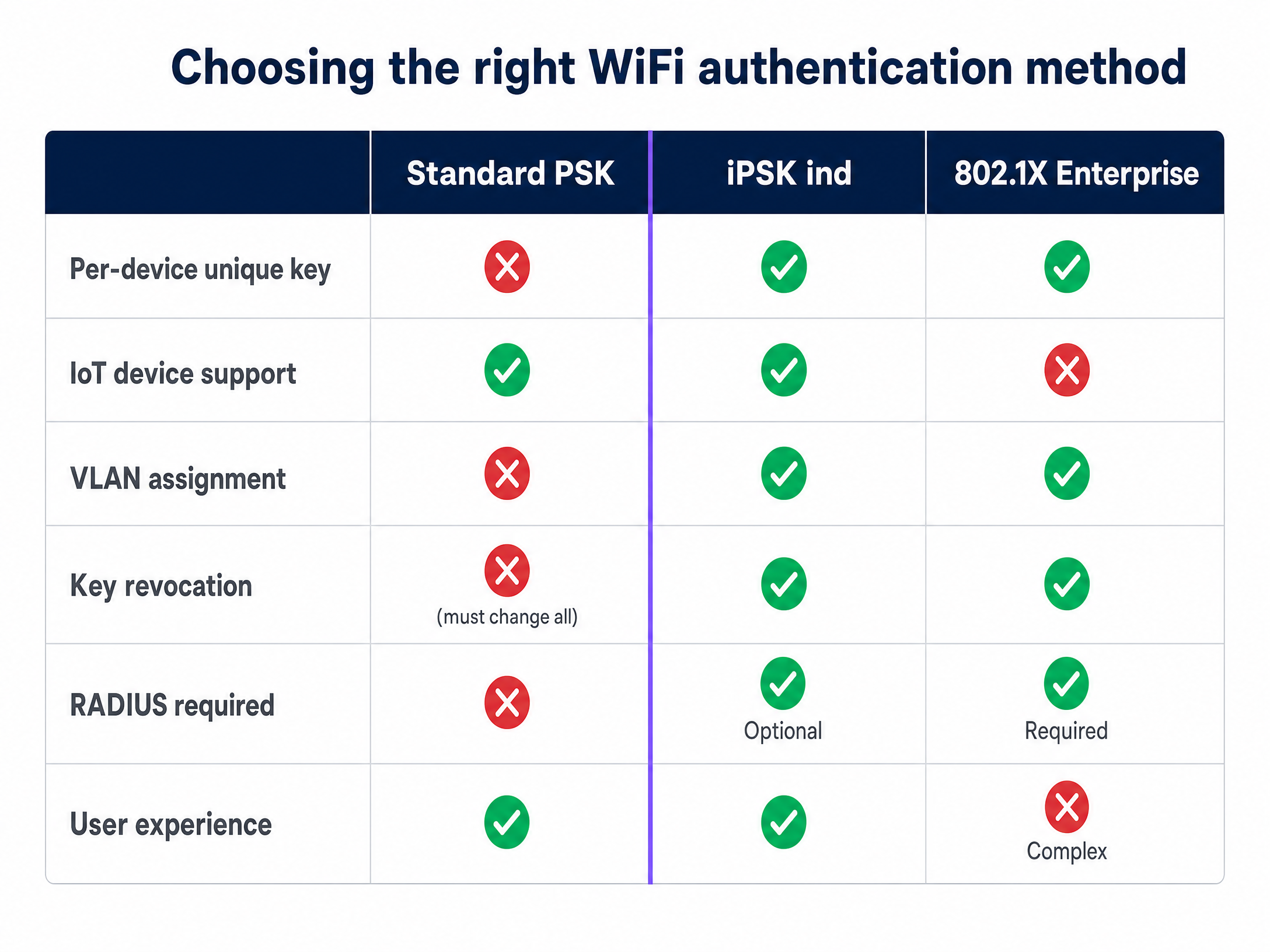
Standard WPA2-Personal (PSK) uses a single passphrase for all users. It is simple and universally supported, but it creates a single point of failure. If one resident shares the password, the entire network is exposed. Revoking access for a single departed tenant requires changing the password for every active resident - an impossible task in a 300-unit development.
WPA2/WPA3-Enterprise (802.1X) requires individual credentials or digital certificates validated against a RADIUS server. It provides excellent security and per-user control. However, many consumer devices - gaming consoles, smart TVs, and IoT sensors - lack the software supplicants required to handle certificate-based authentication. In a residential setting, 802.1X effectively blocks a significant portion of a resident's device fleet.
The iPSK ind Architecture
iPSK ind bridges this gap. Every device receives a unique pre-shared key, but all devices connect to the same SSID.
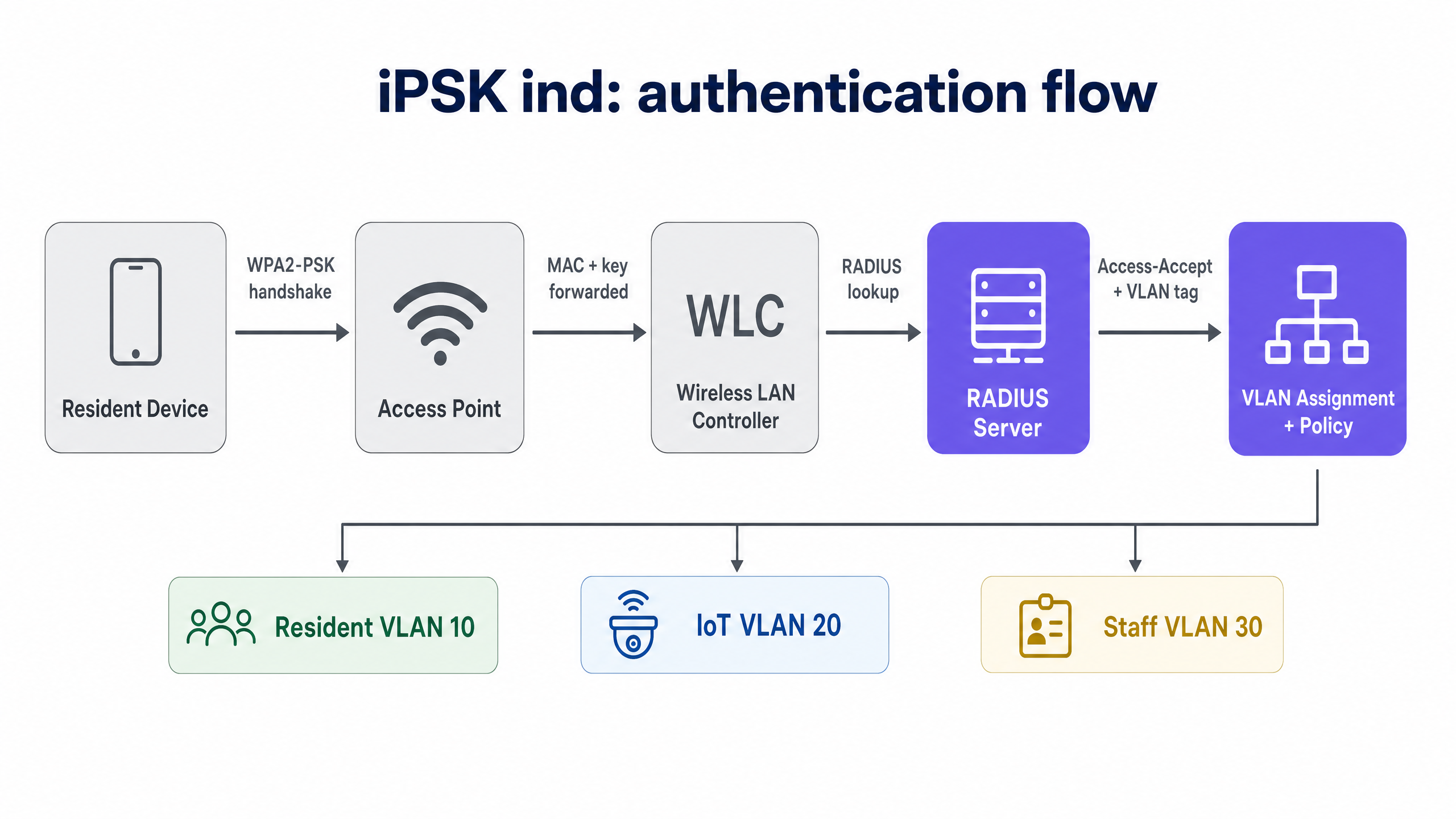
The authentication flow relies on MAC address validation:
- A device attempts to connect to the iPSK-enabled SSID.
- The Wireless LAN Controller (WLC) intercepts the connection and forwards the device's MAC address to a RADIUS server.
- The RADIUS server queries its identity store and returns an
Access-Acceptresponse containing the unique PSK assigned to that MAC address. - The WLC uses this passphrase to validate the key presented during the WPA2 four-way handshake.
This architecture enables dynamic network segmentation. The RADIUS response can include VLAN tags and bandwidth policies. A single SSID can automatically place residents on VLAN 10, IoT devices on VLAN 20, and property management staff on VLAN 30.
The Private Area Network (PAN)
For multi-tenant deployments, iPSK ind enables Layer 2 isolation. Even though hundreds of devices share the same physical access points, each resident's traffic is cryptographically isolated. By enabling mDNS reflection, residents can discover and interact with their own devices (e.g., casting to a Chromecast) without exposing them to neighbours. This delivers the "home-like" experience expected in premium developments.
Implementation Guide
Deploying iPSK ind requires coordination between your network infrastructure and your identity management systems.
1. Select Hardware
The major hardware vendors support iPSK ind, though naming conventions differ:
- Cisco Meraki: iPSK
- HPE Aruba: MPSK (Multi-PSK)
- Ruckus: DPSK (Dynamic PSK)
- Juniper Mist, Ubiquiti UniFi, Cambium, Extreme, Fortinet: Equivalent proprietary implementations.
2. Configure the RADIUS Infrastructure
Your deployment relies entirely on RADIUS availability. Configure a primary and secondary RADIUS server with failover on the WLC. Ensure the RADIUS server can return the specific vendor Attribute-Value Pairs (AVPs) required for PSK mode and VLAN assignment.
3. Automate Key Lifecycle Management
Managing thousands of unique keys manually is unscalable. Integrate your Property Management System (PMS) or Identity Provider (e.g., Microsoft Entra ID, Okta, Google Workspace) with a central orchestration platform like Purple. Keys must be automatically provisioned when a tenancy begins and revoked on the move-out date.
4. Address MAC Address Randomisation
Modern operating systems (iOS 14+, Android 10+, Windows 11) use MAC address randomisation by default. Because iPSK ind relies on MAC lookups, a randomised MAC will fail authentication. You must configure your onboarding workflow to require permanent MAC addresses, or implement a pre-registration portal where residents register their devices before connecting.
Best Practices
- Test IoT Compatibility: While iPSK ind supports headless devices, test legacy hardware prior to deployment to identify any WPA2 handshake quirks.
- Standardise on WPA2/WPA3 Transition Mode: If deploying WPA3, ensure your controllers support transition mode, as WPA3-SAE alters the handshake mechanism. Check vendor documentation, as some implementations (like Meraki's IPSK without RADIUS) do not support WPA3.
- Integrate Core Products: Use Guest WiFi for seamless onboarding and WiFi Analytics to monitor network utilisation across the property.
Troubleshooting & Risk Mitigation
- Authentication Failures: The most common cause is MAC address randomisation. Verify the device is presenting its permanent MAC address.
- RADIUS Timeouts: If the WLC cannot reach the RADIUS server, new connections will fail. Monitor RADIUS latency and ensure failover paths are active.
- VLAN Misassignment: Verify that the RADIUS server is returning the correct Tunnel-Private-Group-ID attributes for the specific vendor hardware.
ROI & Business Impact
Implementing iPSK indeed drives measurable business value for property operators:
- Reduced Support Tickets: Eliminating shared password resets and captive portal login issues significantly reduces IT helpdesk volume.
- Hardware Consolidation: Delivering secure, segmented access on a single SSID reduces RF interference and eliminates the need for individual routers in every apartment.
- Premium Resident Experience: Providing a seamless, secure connection for all devices - including gaming consoles and smart home tech - improves resident retention and justifies premium rental yields in Retail and Hospitality adjacent mixed-use developments.
Key Definitions
iPSK ind (Identity Pre-Shared Key)
A security mechanism that assigns a unique WiFi password to every individual user or device on a single SSID.
Used to provide enterprise-grade access control without requiring complex 802.1X certificate management.
RADIUS
Remote Authentication Dial-In User Service. A networking protocol that provides centralised authentication, authorisation, and accounting management.
The central intelligence in an iPSK deployment, storing MAC addresses and returning the unique PSKs and VLAN tags to the controller.
Private Area Network (PAN)
A virtual, cryptographically isolated network segment created around a specific user's devices on shared infrastructure.
Essential for multi-tenant environments to ensure resident privacy while allowing local device discovery (like casting to a smart TV).
mDNS Reflection
A network feature that allows multicast DNS traffic (used for device discovery like Apple Bonjour or Google Cast) to cross isolated network segments securely.
Required in a PAN to allow a resident's phone to find their smart speaker without exposing it to the entire building.
MAC Address Randomisation
A privacy feature in modern operating systems that generates a temporary, random MAC address when connecting to a network.
The primary cause of authentication failure in iPSK deployments, requiring users to disable it or register their permanent MAC address.
802.1X
An IEEE standard for port-based network access control, requiring individual user credentials or digital certificates.
The traditional enterprise alternative to iPSK, which often fails in residential settings because IoT devices do not support it.
VLAN Assignment
The process of dynamically placing a connected device onto a specific Virtual Local Area Network based on its identity.
Used in iPSK deployments to separate resident traffic from building management and IoT traffic on the same physical access points.
Headless Device
A network-connected device without a traditional screen or web browser interface, such as a smart thermostat or gaming console.
These devices cannot navigate captive portals or handle 802.1X certificates, making iPSK the only secure way to connect them.
Worked Examples
A 250-unit build-to-rent development needs to provide secure WiFi for residents. Residents bring an average of 6 devices, including gaming consoles and smart TVs. The property manager wants to ensure residents cannot see each other's devices on the network.
Deploy iPSK ind on a single SSID across the property. Integrate the Property Management System with Purple to automatically generate a unique PSK for each resident upon lease signing. Configure the WLC to apply Layer 2 isolation and mDNS reflection for each unique key. When a resident connects their devices using their unique PSK, they are placed in a Private Area Network (PAN).
A mixed-use facility requires network access for residents, retail tenants, and building IoT systems (smart thermostats and security cameras) using the same physical access points.
Implement iPSK ind with dynamic RADIUS VLAN assignment. Create a single SSID. Configure the RADIUS server to return specific VLAN tags based on the MAC address and associated PSK. Assign residents to VLAN 10, retail tenants to VLAN 20, and IoT devices to VLAN 30.
Practice Questions
Q1. A new resident moves into an apartment and attempts to connect their iPhone to the iPSK network using the unique key provided by the property manager. The connection fails repeatedly. What is the most likely cause?
Hint: Consider how modern iOS devices handle network identity by default.
View model answer
The resident's iPhone is likely using MAC address randomisation (Private WiFi Address). Because iPSK relies on the RADIUS server matching the device's MAC address to the assigned key, the randomised MAC is not recognised. The resident must disable Private WiFi Address for this specific network.
Q2. You are designing the network architecture for a 500-bed student accommodation facility. You need to support laptops, phones, gaming consoles, and smart speakers. Should you deploy WPA3-Enterprise (802.1X) or iPSK ind?
Hint: Evaluate the device fleet capabilities.
View model answer
Q3. A property developer wants to deploy 4 different SSIDs (Residents, Guests, Retail, IoT) to segment traffic. What is the recommended alternative approach using iPSK?
Hint: Consider the impact of multiple SSIDs on RF performance and how RADIUS can help.
View model answer
The recommended approach is to deploy a single SSID using iPSK ind with dynamic RADIUS VLAN assignment. Broadcasting multiple SSIDs creates significant management overhead and degrades RF performance (airtime). With iPSK, the RADIUS server can dynamically assign the correct VLAN (Resident, Guest, Retail, or IoT) based on the unique key used, achieving segmentation on a single network name.
Continue reading in this series
Uu PPSK pdf: comparing features and deployment models
This technical reference guide compares Private Pre-Shared Key (PPSK) WiFi architecture against traditional 802.1X and standard PSK deployments. It provides network architects and IT managers with vendor-neutral implementation strategies for multi-tenant residential, IoT, and BTR environments.
Uu PPSK pdf: comparing features and deployment models
This technical reference guide compares Private Pre-Shared Key (PPSK) WiFi architecture against traditional 802.1X and standard PSK deployments. It provides network architects and IT managers with vendor-neutral implementation strategies for multi-tenant residential, IoT, and BTR environments.
Uu PPSK 2023: comparing features and deployment models
This technical reference guide compares Unique per-User Private Pre-Shared Key (UU PPSK) WiFi architecture against traditional shared PSK and 802.1X deployments, with a specific focus on the 2023 landscape of vendor implementations and platform capabilities. It provides property developers, BTR operators, and MDU landlords with actionable deployment strategies, VLAN architecture guidance, and automated lifecycle management workflows. The guide covers three deployment models, real-world case studies, and the compliance implications of each authentication approach.