
Kepanjangan iPSK ff: a comprehensive guide for businesses
iPSK - Identity Pre-Shared Key - is the authentication standard that enables multi-tenant WiFi in Build-to-Rent, student accommodation, and MDU environments. It assigns a unique WiFi password to every resident, creating an isolated Private Area Network (PAN) on shared infrastructure. This guide covers the technical architecture, RADIUS-based authentication flow, vendor-specific implementation details, and the commercial case for deploying iPSK as a managed amenity.
Listen to this guide
View podcast transcript
Executive summary
iPSK - Identity Pre-Shared Key - solves the fundamental tension in multi-tenant WiFi: residents expect a home-like experience, but operators need enterprise-grade security and control. Standard WPA2-Personal (a single shared password) is insecure at scale and breaks the moment a resident moves out. WPA2-Enterprise (802.1X) is secure but incompatible with the smart TVs, gaming consoles, and IoT devices that residents bring. iPSK sits precisely between the two. Each resident receives a unique password. To them, connecting feels like home. To the network, each connection is individually authenticated, isolated, and policy-controlled via a RADIUS server.
Purple's Multi-Tenant WiFi solution runs as a hardware-agnostic cloud overlay on Cisco Meraki, HPE Aruba, Ruckus, Juniper Mist, Ubiquiti UniFi, Cambium, Extreme, and Fortinet access points. It automates the full iPSK lifecycle - key generation on move-in, key revocation on move-out - and integrates with Microsoft Entra ID, Okta, and Google Workspace. Purple operates across 80,000+ live venues with 99.999% uptime, ISO 27001 certification, and full GDPR compliance.
Technical deep-dive
The three WiFi security models compared
To understand why iPSK matters, you need to understand what it replaces and what it avoids.
Standard PSK (WPA2-Personal) uses a single password shared by every user on the network. It is simple to deploy but unmanageable at scale. There is no individual accountability. Revoking one user's access means changing the password for everyone. In a 200-unit building, that is operationally impossible. The British Property Federation notes that password rotation is one of the top three WiFi support burdens for BTR operators (Purple internal data, 2024).
WPA2/3-Enterprise (IEEE 802.1X) requires each user to authenticate with individual credentials - a username and password, or a digital certificate - via a RADIUS server. It is the gold standard for corporate networks. But it has two critical weaknesses in residential and hospitality settings. First, it is complex to deploy and maintain. Second, headless devices - gaming consoles, smart speakers, Chromecasts, smart thermostats - cannot complete the 802.1X authentication flow. They have no screen, no browser, no certificate store.
iPSK (Identity Pre-Shared Key) - also called DPSK (Dynamic PSK) by Ruckus, MPSK (Multiple PSK) by HPE Aruba, and Personal Private Network by Cisco Meraki - bridges the gap. It uses the WPA2-Personal authentication mechanism (a simple password entry) but authenticates each connection individually against a RADIUS server and applies per-connection network policies. Every device on the network is individually identified, isolated, and controlled, without requiring certificates or complex client configuration.
| Feature | Standard PSK | 802.1X Enterprise | iPSK |
|---|---|---|---|
| Per-user unique credentials | No | Yes | Yes |
| IoT device support | Yes | No | Yes |
| Individual access revocation | No | Yes | Yes |
| RADIUS required | No | Yes | Yes |
| Client configuration complexity | None | High | None |
| VLAN assignment per user | No | Yes | Yes |
The iPSK authentication flow
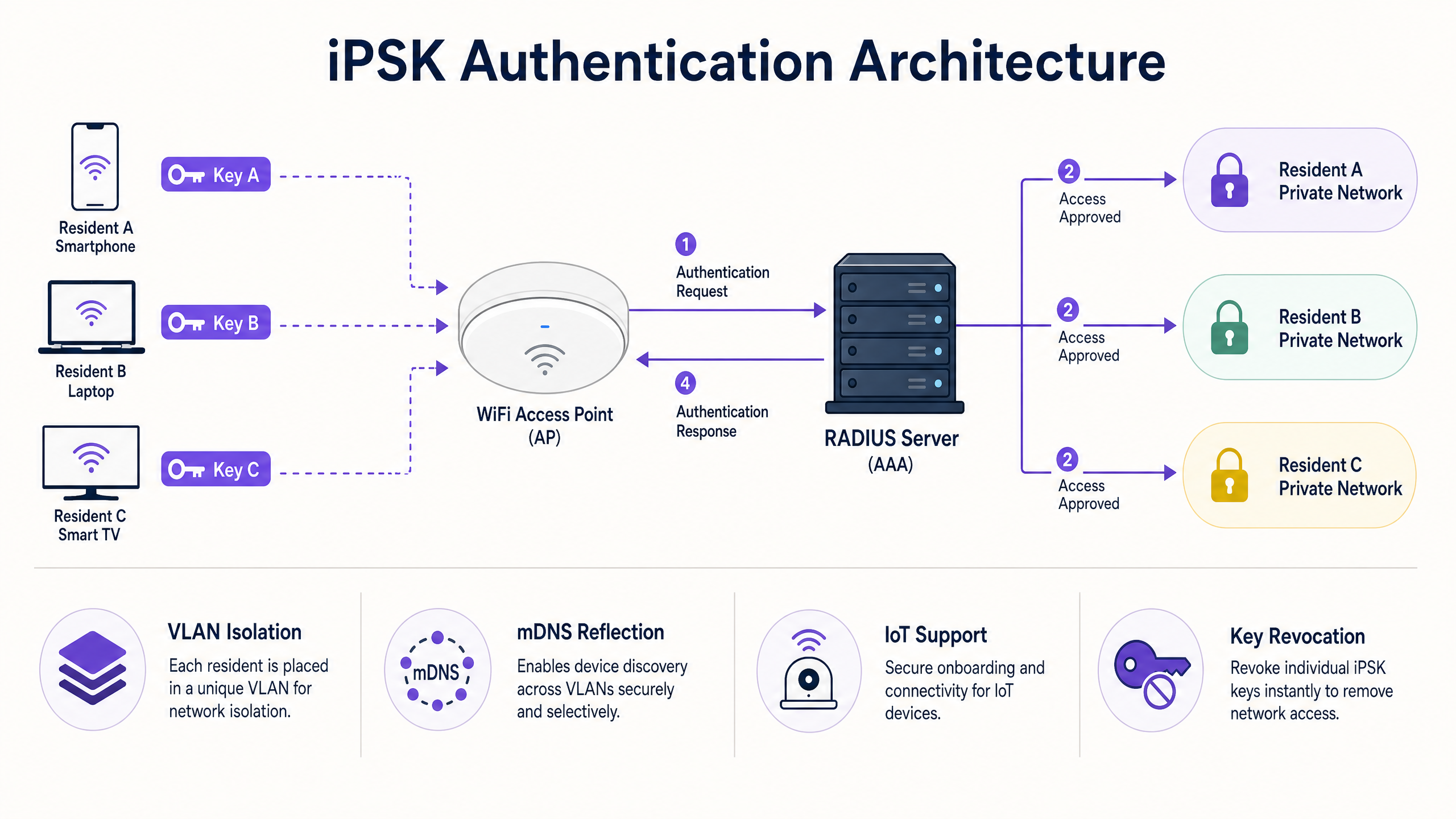
The iPSK authentication flow involves four steps, executed in under two seconds for each connecting device.
Step 1 - Association request. The client device sends a standard WPA2 association request to the SSID, presenting its unique PSK.
Step 2 - RADIUS Access-Request. The Access Point (AP) intercepts the connection attempt and forwards a RADIUS Access-Request to the authentication server. This request includes the client's MAC address. In advanced implementations like Cisco Meraki's Easy PSK, the AP also passes EAPOL handshake parameters (the MIC and ANonce from the 4-way handshake), allowing the RADIUS server to validate the PSK directly without relying solely on MAC address matching.
Step 3 - Policy assignment. The RADIUS server validates the MAC address against its database of registered keys. If the match succeeds, it returns a RADIUS Access-Accept message containing Cisco AV-Pairs or vendor-specific attributes. These attributes specify the VLAN ID to assign, QoS policies, session timeout, and any ACLs.
Step 4 - VLAN placement. The AP reads the AAA Override attributes and places the client on the specified VLAN. The client is now on its private network segment, isolated from all other residents.
The Private Area Network (PAN)
The VLAN assignment creates what we call a Private Area Network - a WiFi bubble around each resident's devices. Every device using Resident A's iPSK is placed on Resident A's VLAN. Those devices can discover and communicate with each other via mDNS reflection (enabling AirPlay, Google Cast, DLNA, and UPnP). No device on a different key can see or interact with Resident A's devices, even if they are connected to the same physical AP.
This is Layer 2 isolation. It is the technical mechanism that makes multi-tenant WiFi genuinely private, not just segmented. A resident in flat 14 cannot run a network scan and discover the devices in flat 15. Their Chromecast appears on their phone, not on their neighbour's.
Vendor implementation differences
All major enterprise WiFi vendors support per-device PSK, but the implementation details vary.
| Vendor | Product name | MAC-based auth | PSK-based auth (no MAC pre-reg) | WPA3 support |
|---|---|---|---|---|
| Cisco Meraki | iPSK / Easy PSK | Yes | Yes (Easy PSK, MR 32.1.3+) | No (WPA2 only) |
| HPE Aruba | MPSK | Yes | Partial | Limited |
| Ruckus | DPSK | Yes | Yes | Limited |
| Juniper Mist | Per-user PSK | Yes | Yes | In development |
| Ubiquiti UniFi | PPSK with RADIUS | Yes | Yes | No |
| Cambium | Per-device PSK | Yes | No | No |
| Extreme | PPSK | Yes | Yes | Limited |
| Fortinet | MPSK | Yes | No | No |
Implementation guide
Phase 1: infrastructure assessment
Before deploying iPSK, audit your existing infrastructure against three criteria. First, confirm your APs support iPSK or DPSK/MPSK - check firmware versions, as most vendors require relatively recent releases. Second, verify your network switching supports the number of VLANs you need. A 200-unit building with one VLAN per unit requires 200 VLANs, plus management and common-area VLANs. Third, confirm your RADIUS server capacity. Purple provides RADIUS-as-a-Service as part of its Multi-Tenant WiFi platform, removing the need to self-host.
Phase 2: RADIUS server configuration
The RADIUS server is the authentication engine. Configuration involves three steps.
Define AP clients. Register each AP (or the WLC/controller) as a RADIUS client with a shared secret. This secures the communication channel between the AP and the RADIUS server.
Create authorisation profiles. Define the policies to apply upon successful authentication. Each profile specifies a VLAN ID and any additional attributes (QoS, ACLs, session timeout). In a BTR deployment, you create one profile per residential unit.
Manage MAC-to-PSK bindings. The RADIUS database maps each client MAC address to its assigned PSK and authorisation profile. In a manual deployment, this is done via the RADIUS users file or ISE policy engine. In a managed deployment with Purple, this is automated via API integration with your property management system.
Phase 3: AP and SSID configuration
The exact steps vary by vendor, but the core configuration is consistent.
Create a single SSID for resident access. Configure it with WPA2-Personal security. Enable the vendor-specific iPSK feature (Identity PSK with RADIUS in Meraki, MPSK in Aruba, DPSK in Ruckus). Enable AAA Override - this is the setting that allows the RADIUS server's VLAN assignment to take effect. Without it, all clients land on the SSID's default VLAN.
For Cisco Meraki specifically: navigate to Wireless > Configure > Access control, select your SSID, and choose Identity PSK with RADIUS or Easy PSK from the Security section. Set RADIUS Override to Override VLAN tag under Client IP and VLAN.
Phase 4: resident onboarding
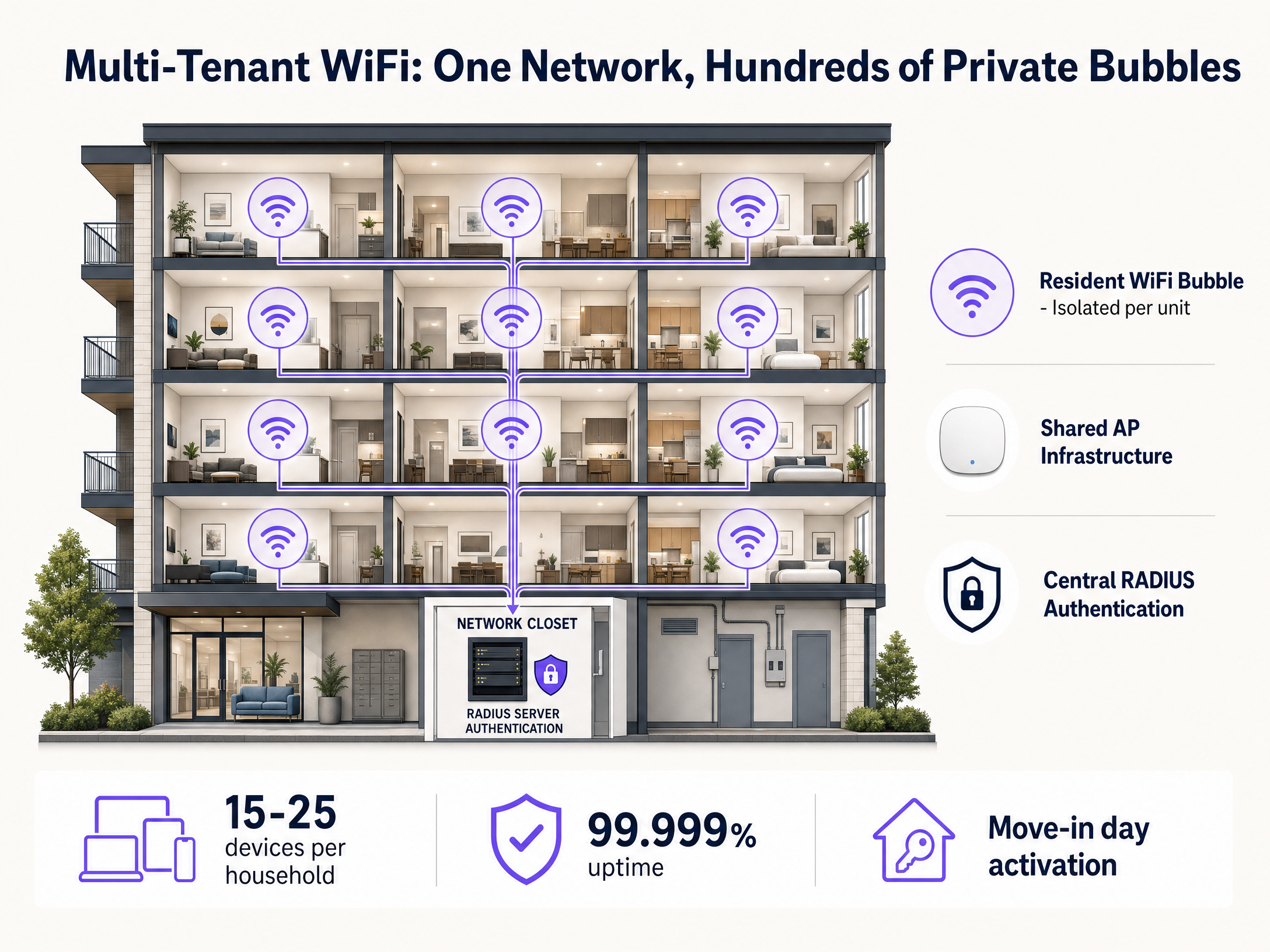
The onboarding flow determines the resident experience. The best practice is pre-move-in activation: generate the resident's unique PSK when the tenancy is created in your property management system, and deliver it to the resident via email or a resident app before their move-in date. On day one, they connect all their devices using a single password. No captive portal, no certificate installation, no support call.
For mid-tenancy device additions, provide a self-service portal where residents can view their PSK and connect new devices. Purple's resident portal handles this automatically.
Phase 5: MAC randomisation mitigation
MAC address randomisation is the most common operational challenge in iPSK deployments. iOS 14+, Android 10+, and Windows 10 all randomise MAC addresses by default on new network connections. This breaks MAC-based RADIUS lookups.
Two mitigations work in practice. First, instruct residents to disable MAC randomisation for the building's SSID - both iOS and Android allow you to set a persistent MAC address for a specific network. Second, use advanced PSK-based authentication (Meraki Easy PSK) that validates the PSK via EAPOL parameters rather than relying solely on the MAC address. This is the more resilient approach and removes the resident education burden.
-
Best practices
Automate the lifecycle. Manual MAC address management is unsustainable beyond 50 units. Connect your WiFi orchestration layer to your property management system. Purple integrates with Microsoft Entra ID, Okta, and Google Workspace to automate key generation and revocation. When a tenancy ends, the key is revoked in seconds.
Plan your VLAN architecture before deployment. In buildings above 200 units, VLAN exhaustion is a real risk. Most enterprise switches support 4,094 VLANs (IEEE 802.1Q), but hardware and software limits vary. Implement VLAN pooling - grouping residents into shared VLAN pools with intra-pool isolation - for very large deployments.
Enable mDNS reflection per VLAN. Without mDNS reflection, Chromecast, AirPlay, and smart home device pairing will not work within the resident's PAN. Confirm your AP vendor supports and has enabled mDNS reflection (or AirPlay/DLNA proxy) within each VLAN.
Maintain WPA2 for iPSK SSIDs. iPSK is a WPA2 technology. WPA3 introduces SAE (Simultaneous Authentication of Equals), which changes the 4-way handshake in a way that is incompatible with current iPSK implementations. Maintain WPA2 for your resident SSID. Introduce WPA3-Enterprise separately for staff or corporate networks.
Segment IoT traffic. Consider a secondary SSID for high-risk IoT devices (security cameras, door locks, environmental sensors) with stricter ACLs and no mDNS reflection. This limits the blast radius if a device is compromised.
-
Troubleshooting and risk mitigation
Symptom: Chromecast or AirPlay not working. Root cause: mDNS reflection not enabled, or devices on different VLANs. Fix: verify all devices for the resident share the same VLAN assignment in the RADIUS database, and confirm mDNS reflection is enabled on the AP.
Symptom: Client connects but lands on wrong VLAN. Root cause: AAA Override not enabled on the AP or SSID. Fix: enable AAA Override and verify the RADIUS Access-Accept message contains the correct VLAN attribute (Tunnel-Private-Group-ID for most vendors).
Symptom: Client fails to authenticate after iOS update. Root cause: MAC randomisation enabled after OS update. Fix: instruct the resident to set a persistent MAC address for the SSID, or migrate to Easy PSK authentication.
Symptom: EAPOL handshake timeout. Root cause: RADIUS server latency too high. Fix: ensure the RADIUS server is geographically proximate (or cloud-hosted with low-latency routing), and check for network congestion between the AP and RADIUS server.
Risk: RADIUS server single point of failure. Mitigation: configure a secondary RADIUS server on all APs. Purple's RADIUS-as-a-Service includes built-in redundancy.
-
ROI and business impact
For BTR operators and property developers, WiFi is no longer an optional amenity. It is a revenue driver with a measurable return.
Rent premium. Managed WiFi as an amenity commands a £15-30 per unit per month premium in BTR environments, according to British Property Federation research cited in Purple's multi-tenant WiFi guide. On a 200-unit building, that is £3,000-6,000 per month in incremental revenue.
Void period reduction. Move-in-day WiFi readiness - no waiting for a broadband engineer - reduces void periods by five to 10 days on average (Purple internal data, 2024). At average BTR rents, each day of void costs the operator real money.
Operational cost reduction. Eliminating per-unit routers removes hardware procurement, installation, and ongoing maintenance costs. A software overlay on shared infrastructure costs 30-50% less per door than per-unit broadband contracts (Purple multi-tenant WiFi guide, 2024).
Resident retention. WiFi quality ranks in the top five amenity factors in BTR and purpose-built student accommodation booking research (Purple internal data, 2024). Operators who lead on WiFi quality consistently outperform sector averages on amenity satisfaction scores.
Support ticket reduction. Automated lifecycle management eliminates the most common WiFi support tickets: forgotten passwords, device pairing failures, and move-out password rotation. Purple customers report a reduction in WiFi-related support tickets of over 60% after deploying iPSK with automated lifecycle management (Purple internal data, 2024).
For a 200-unit BTR development running Purple's Multi-Tenant WiFi on existing HPE Aruba infrastructure, the typical payback period on the software overlay investment is under 12 months when the rent premium and operational savings are combined.
Related resources
For a broader view of how WiFi infrastructure supports resident and visitor experiences, see our guide on Apartment WiFi solutions: a comprehensive guide for businesses . If you are evaluating WiFi across multiple verticals, explore our coverage of Hospitality , Retail , and Healthcare deployments. For the technical foundations of multi-SSID design in mixed-use environments, read Three SSIDs to rule them all: guest, Passpoint, and IoT WiFi .
References
[1] Purple. "What is iPSK? The Complete Guide to Identity-Based WiFi Security." Purple.ai, February 2026. [2] Ruckus Networks. "Dynamic Pre-Shared Key (DPSK)." Ruckusnetworks.com. [3] Cisco Meraki. "IPSK with RADIUS Authentication." Documentation.meraki.com. [4] Cisco. "8.5 Identity PSK Feature Deployment Guide." Cisco.com, December 2021. [5] Purple. "Multi-tenant WiFi: a complete guide for residential operators." Purple.ai. [6] The Networking Nerds. "The iPSK Challenge: What to Know Before Upgrading to WPA3, 6 GHz, or WiFi 7." Thenetworkingnerds.co.uk, October 2025. [7] British Property Federation. BTR amenity research, cited in Purple multi-tenant WiFi guide, 2024.
Key Definitions
iPSK (Identity Pre-Shared Key)
A WiFi authentication mechanism that assigns a unique pre-shared key to each user or device on a single SSID. The RADIUS server uses the key to identify the client and apply per-client network policies, including VLAN assignment.
The primary authentication standard for multi-tenant WiFi in BTR, student accommodation, and MDU environments. Also called DPSK (Ruckus), MPSK (HPE Aruba), and Personal Private Network (Cisco Meraki).
RADIUS (Remote Authentication Dial-In User Service)
A networking protocol that provides centralised Authentication, Authorisation, and Accounting (AAA) management for network access. In iPSK deployments, the RADIUS server validates client credentials and returns VLAN assignment and policy attributes.
The authentication engine in every iPSK deployment. Can be self-hosted (FreeRADIUS, Cisco ISE, Microsoft NPS) or consumed as a service (Purple RADIUS-as-a-Service).
Private Area Network (PAN)
A virtual isolated network segment created for an individual resident or household within a shared WiFi infrastructure. Devices on the same PAN can discover and communicate with each other; devices on different PANs are invisible to each other.
The resident-facing outcome of iPSK with dynamic VLAN assignment. Enables Chromecast, AirPlay, and smart home device pairing while maintaining privacy between residents.
VLAN (Virtual Local Area Network)
A logical network segment created within a physical network infrastructure, defined by IEEE 802.1Q. VLANs isolate broadcast domains and enforce Layer 2 separation between network segments.
The technical mechanism that creates the per-resident PAN. Each resident is assigned a unique VLAN ID by the RADIUS server upon iPSK authentication.
mDNS Reflection
A network feature that forwards multicast DNS (mDNS) packets within or across VLAN boundaries in a controlled manner. Enables device discovery protocols (AirPlay, Google Cast, DLNA, UPnP) to function within an isolated VLAN.
Required for smart home device pairing within a resident's PAN. Must be enabled per VLAN, not globally, to maintain isolation between residents.
AAA Override
A configuration setting on a Wireless LAN Controller or Access Point that allows the RADIUS server's response attributes (such as VLAN ID) to override the SSID's default settings.
Without AAA Override, all iPSK clients land on the SSID's default VLAN regardless of the RADIUS response. It must be enabled for dynamic VLAN assignment to function.
MAC Randomisation
A privacy feature in modern operating systems (iOS 14+, Android 10+, Windows 10+) that generates a unique, randomised MAC address for each WiFi network connection, preventing device tracking across networks.
The primary operational challenge in MAC-based iPSK deployments. Breaks the MAC-to-PSK mapping in the RADIUS database when a device's MAC address changes after an OS update.
Easy PSK
Cisco Meraki's advanced iPSK implementation (available from MR 32.1.3 firmware) that authenticates the PSK by passing EAPOL handshake parameters (MIC, ANonce) to the RADIUS server, rather than relying solely on MAC address matching.
Resolves the MAC randomisation problem in Meraki deployments by authenticating the PSK itself, not the device's MAC address. The recommended approach for consumer residential environments.
EAPOL (Extensible Authentication Protocol over LAN)
The protocol used for the WPA2/WPA3 4-way handshake between a client device and an Access Point to derive session encryption keys. In Easy PSK, EAPOL parameters are passed to the RADIUS server to validate the PSK.
Relevant when configuring advanced iPSK implementations that bypass MAC-based authentication. Understanding the EAPOL flow is essential for troubleshooting authentication failures.
VLAN Pooling
A network design technique that distributes client devices across multiple VLANs to manage broadcast domain size and avoid IP address exhaustion, while maintaining isolation within each pool.
Used in large MDU deployments (500+ units) where assigning a unique VLAN to every resident would approach or exceed hardware VLAN limits (IEEE 802.1Q supports up to 4,094 VLANs).
Worked Examples
A 300-unit Build-to-Rent development in Manchester is deploying managed WiFi for the first time. The developer wants residents to connect smart TVs, gaming consoles, and smart home devices seamlessly. The IT team mandates strict isolation between apartments and automated key management tied to the property management system. The existing infrastructure is Cisco Meraki. How should the network be designed and deployed?
Deploy a single resident SSID configured for iPSK with RADIUS on all Cisco Meraki APs. Enable Easy PSK (MR 32.1.3+ firmware required) to handle MAC randomisation without requiring residents to disable the feature. Configure Purple's RADIUS-as-a-Service as the authentication engine, integrating with the property management system via API. When a new tenancy is created, Purple automatically generates a unique PSK, assigns a VLAN ID from the pre-allocated pool, and delivers the key to the resident via the resident app. On move-in day, the resident connects all devices using one password. The Meraki AP places each device on the resident's VLAN. Enable mDNS reflection per VLAN to support Chromecast and AirPlay. Configure a secondary SSID for high-risk IoT devices (cameras, door locks) with stricter ACLs. On move-out, the property management system triggers Purple to revoke the key instantly.
A 500-bed purpose-built student accommodation (PBSA) block is experiencing WiFi chaos during September move-in week. Students cannot pair their Chromecasts, gaming consoles get NAT type errors, and the IT team is overwhelmed with support tickets. The existing network uses a single shared WPA2-Personal SSID. What is the remediation plan?
Migrate from shared PSK to iPSK. Deploy Purple's Multi-Tenant WiFi platform on the existing Ruckus infrastructure (DPSK). Integrate with the student management system to pre-provision unique PSKs for all students before September. Deliver keys via the student welcome email. Enable mDNS reflection per student VLAN to resolve Chromecast and AirPlay pairing. Configure correct CGNAT and UPnP handling per resident segment to resolve NAT type issues for PlayStation and Xbox. For the following September, automate bulk key provisioning for the incoming cohort and bulk revocation for the outgoing cohort at the end of the academic year.
Practice Questions
Q1. A resident in a 150-unit BTR building reports that their Chromecast shows as 'unavailable' on their phone, even though both devices are connected to the building's WiFi. The network uses iPSK with dynamic VLAN assignment. What are the two most likely causes, and how would you diagnose each?
Hint: Device discovery protocols like Google Cast rely on mDNS. Consider both the VLAN assignment and the mDNS configuration.
View model answer
Cause 1: The phone and Chromecast are on different VLANs. This happens when the two devices connected using different PSKs (e.g., the resident has two separate keys in the RADIUS database). Diagnose by checking the RADIUS database to confirm both MAC addresses are mapped to the same PSK and VLAN ID. Cause 2: mDNS reflection is not enabled within the resident's VLAN. Even if both devices are on the same VLAN, mDNS packets will not traverse the VLAN boundary without explicit reflection configuration. Diagnose by checking the AP or controller configuration for mDNS proxy or reflection settings per VLAN.
Q2. You are designing the iPSK deployment for a 600-unit student accommodation block. Each student brings an average of seven devices. Calculate the minimum number of VLANs required and identify whether VLAN pooling is necessary, given that IEEE 802.1Q supports a maximum of 4,094 VLANs.
Hint: Consider management VLANs, common area VLANs, and IoT SSIDs in addition to resident VLANs.
View model answer
600 students x 1 VLAN each = 600 resident VLANs. Add management VLAN, common area VLAN, IoT SSID VLAN, and staff VLAN = approximately 604 VLANs total. This is well within the 4,094 VLAN limit of IEEE 802.1Q, so VLAN pooling is not required for this deployment. However, if the building is part of a larger campus with multiple blocks sharing the same switching infrastructure, the cumulative VLAN count across all blocks may approach hardware limits and pooling should be evaluated.
Q3. A BTR operator is evaluating whether to deploy iPSK on their existing Ubiquiti UniFi infrastructure or replace it with Cisco Meraki to access Easy PSK functionality. The building has 200 units and the operator expects high iOS device penetration among residents. What is your recommendation and reasoning?
Hint: Consider the MAC randomisation risk, the cost of hardware replacement, and available mitigations on the existing platform.
View model answer
Recommend deploying iPSK on the existing UniFi infrastructure first, with a clear MAC randomisation mitigation strategy, before committing to hardware replacement. UniFi supports PPSK with RADIUS, which provides the core iPSK functionality. For MAC randomisation, include clear onboarding instructions for residents to disable the feature for the building SSID (both iOS and Android support per-network persistent MAC settings). Monitor authentication failure rates for the first 90 days. If failure rates remain above 5% despite onboarding guidance, then evaluate the cost-benefit of migrating to Cisco Meraki for Easy PSK. Hardware replacement is a significant capital cost that should only be justified if the existing platform demonstrably cannot meet the operational requirement.
Q4. A property manager reports that a resident's WiFi access was not revoked after they moved out three weeks ago. The former resident is still connecting to the network. What process failure caused this, and how should the operator redesign the offboarding workflow?
Hint: Consider the integration between the property management system and the WiFi orchestration layer.
View model answer
The failure is a broken or absent integration between the property management system (PMS) and the WiFi orchestration layer. The move-out event in the PMS did not trigger an automated key revocation in the RADIUS database. The operator should implement API-driven automation: when a tenancy is closed in the PMS, an automated webhook or scheduled job triggers the WiFi platform to revoke the associated PSK immediately. Purple's platform provides this integration out of the box with most major PMS providers. As an interim measure, the operator should manually revoke the former resident's key immediately and audit all other active keys against current tenancy records to identify any other orphaned access.
Continue reading in this series
Uu PPSK pdf: comparing features and deployment models
This technical reference guide compares Private Pre-Shared Key (PPSK) WiFi architecture against traditional 802.1X and standard PSK deployments. It provides network architects and IT managers with vendor-neutral implementation strategies for multi-tenant residential, IoT, and BTR environments.
Uu PPSK pdf: comparing features and deployment models
This technical reference guide compares Private Pre-Shared Key (PPSK) WiFi architecture against traditional 802.1X and standard PSK deployments. It provides network architects and IT managers with vendor-neutral implementation strategies for multi-tenant residential, IoT, and BTR environments.
Uu PPSK 2023: comparing features and deployment models
This technical reference guide compares Unique per-User Private Pre-Shared Key (UU PPSK) WiFi architecture against traditional shared PSK and 802.1X deployments, with a specific focus on the 2023 landscape of vendor implementations and platform capabilities. It provides property developers, BTR operators, and MDU landlords with actionable deployment strategies, VLAN architecture guidance, and automated lifecycle management workflows. The guide covers three deployment models, real-world case studies, and the compliance implications of each authentication approach.