
Kepanjangan iPSK: a comprehensive guide for businesses
This guide details how Identity Pre-Shared Key (iPSK) technology enables secure, isolated multi-tenant WiFi for Build to Rent (BTR) and MDU properties. It covers the technical architecture, dynamic VLAN assignment, and the business case for deploying WiFi as a managed amenity.
Listen to this guide
View podcast transcript

Executive Summary
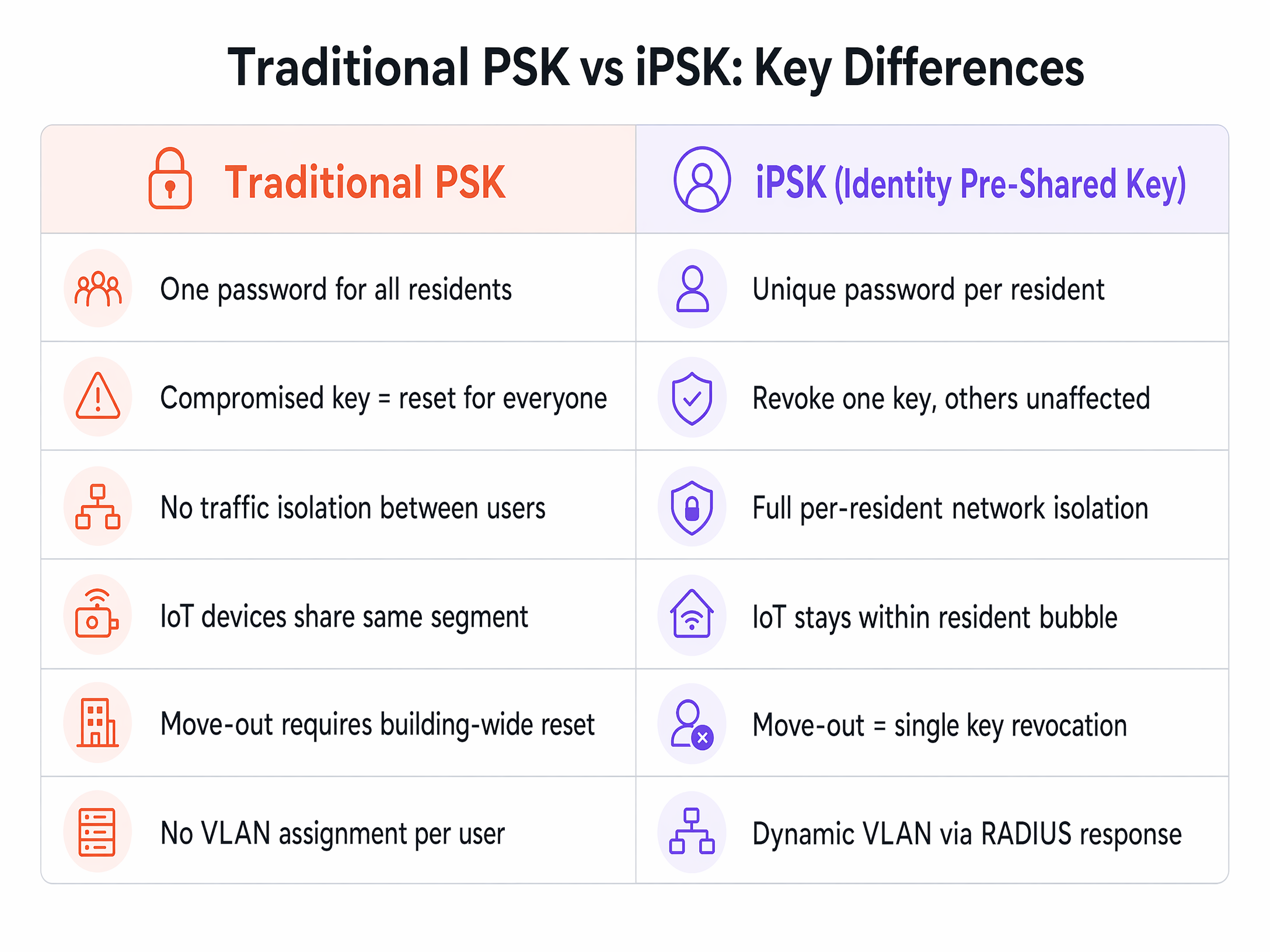
If you operate a Build to Rent (BTR) development, student accommodation block, or multi-dwelling unit (MDU), you face a fundamental network design problem. You have hundreds of residents sharing the same physical WiFi infrastructure. Traditional pre-shared keys (PSK) fail at this scale. If one resident compromises the shared password, you must reset it for the entire building. This operational nightmare breaks every smart TV, console, and IoT device simultaneously.
Identity Pre-Shared Key (iPSK) solves this. Often searched as "kepanjangan iPSK" in Southeast Asian markets, this technology issues a unique WiFi password to each resident while keeping everyone on a single SSID. Devices using the same key recognise each other, creating a private "WiFi bubble" for each household. Devices using different keys remain invisible to each other. When a resident moves out, Purple revokes their specific key. No other resident is affected. This guide details the architecture, implementation strategies, and business impact of deploying iPSK as a managed amenity.
Technical Deep-Dive
To understand iPSK, you must first understand the limitations of the alternatives. A standard WPA2-PSK network provides no isolation between users. 802.1X (WPA2-Enterprise) provides excellent security but fails because headless IoT devices like smart speakers, wireless printers, and smart bulbs lack the supplicant software required to authenticate via username and password.
iPSK bridges this gap. It combines the simplicity of a standard WiFi password with the dynamic policy enforcement of 802.1X. The architecture relies on three core components working together.
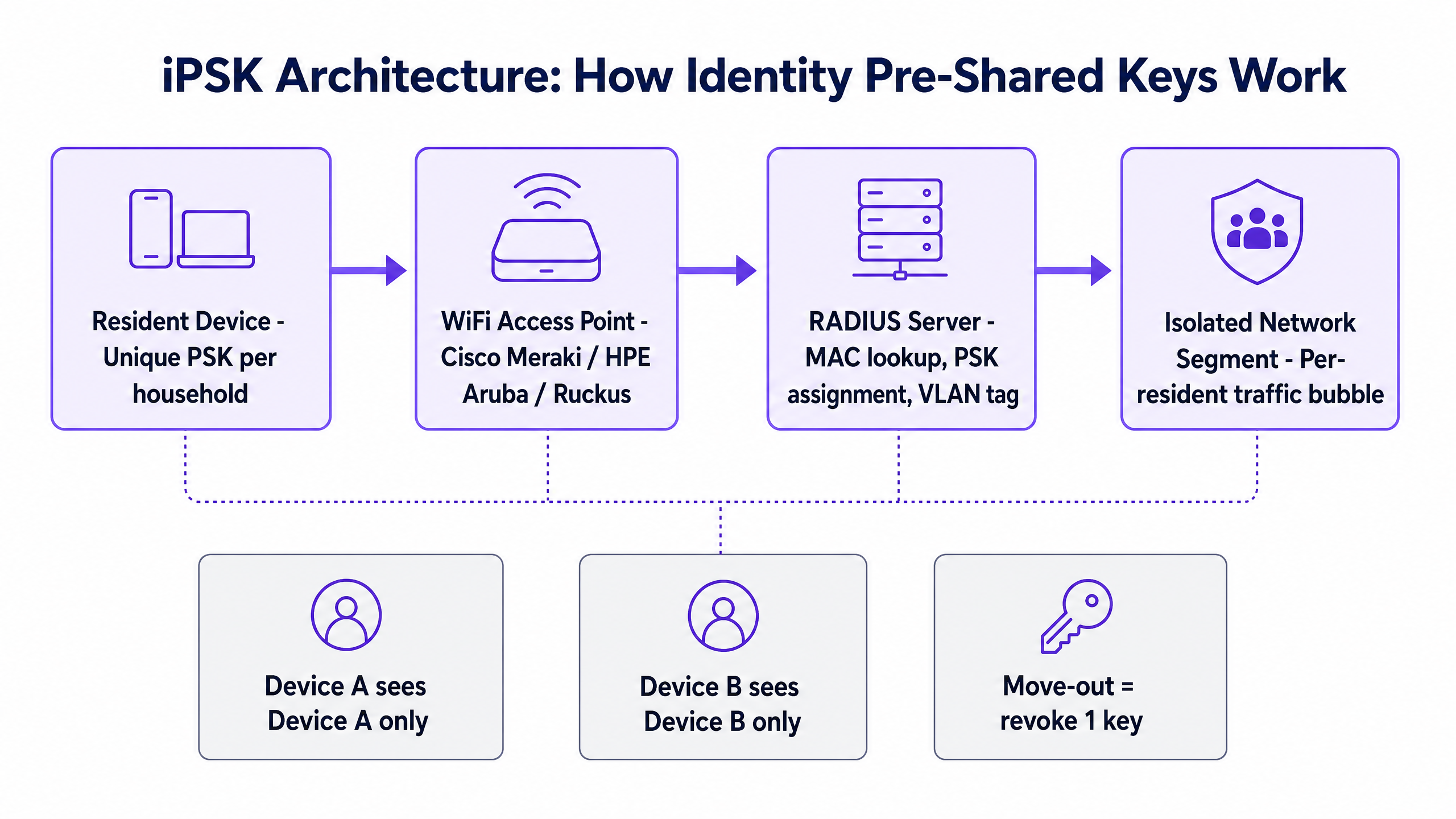
First, the WiFi access point intercepts the connection attempt. When a device tries to associate with the SSID, the access point captures the device's MAC address. Second, the access point forwards this MAC address to a RADIUS server via an Access-Request message. Third, the RADIUS server looks up the MAC address in its database. If the device is registered to a resident, the RADIUS server responds with an Access-Accept message containing a Cisco AV-pair. This AV-pair contains the specific passphrase assigned to that resident.
The access point uses this dynamically returned passphrase to complete the WPA2 four-way handshake. The device connects seamlessly. The entire authentication process takes under 200 milliseconds.
Dynamic VLAN Assignment
The most powerful capability of a RADIUS-backed iPSK deployment is dynamic VLAN assignment. The RADIUS server does not merely return the passphrase. It also returns a VLAN ID. This means the network dynamically segments traffic based on identity, not physical location.
Resident A connects and the RADIUS server assigns them to VLAN 101. Resident B connects and lands on VLAN 102. The building management systems operate on VLAN 10. This strict Layer 2 isolation ensures that one resident cannot cast to another resident's television, access their wireless printer, or intercept their traffic. It provides the privacy of a home network across shared enterprise infrastructure.
Implementation Guide
Deploying iPSK requires a structured approach to hardware, authentication, and resident onboarding. Purple operates as a hardware-agnostic cloud overlay, meaning you can deploy this architecture on the enterprise access points you already own.
1. Hardware Selection and Configuration
Your access points must support iPSK and dynamic RADIUS authentication. We integrate natively with Cisco Meraki, HPE Aruba, Ruckus, Juniper Mist, Ubiquiti UniFi, Cambium, Extreme, and Fortinet.
Configure a single SSID broadcast across the entire property. Enable MAC-based access control and point the authentication requests to Purple's cloud RADIUS servers. Ensure your switches and firewalls are configured to handle the dynamic VLAN tags that the RADIUS server will return.
2. Resident Onboarding Flow
The onboarding experience defines the success of a multi-tenant WiFi deployment. Do not rely on manual IT ticket creation.
Integrate Purple with your Property Management System (PMS). When a new tenancy begins, Purple automatically generates a unique iPSK for that household. The resident receives an automated email containing their key and a QR code. Upon arrival, they scan the QR code or enter the passphrase, and their primary device connects.
For subsequent devices, residents use a self-service portal to register new MAC addresses. This portal allows them to manage their own "WiFi bubble" without contacting the property helpdesk.
3. Handling Move-Outs
When a tenancy ends, the PMS integration triggers an automated revocation in Purple. The specific iPSK is disabled. All devices associated with that key are immediately disconnected from the network. The SSID remains unchanged, and the thousands of other devices in the building experience zero disruption.
Best Practices
Successful iPSK deployments adhere to strict operational standards. Follow these vendor-neutral recommendations to ensure stability and security.
Address MAC Randomisation Proactively
Modern iOS and Android devices randomise their MAC addresses by default to prevent tracking. Because iPSK relies on MAC address lookups at the RADIUS server, randomisation will break the authentication flow. You must instruct residents to disable "Private WiFi Address" or enable "Use Device MAC" for your specific building SSID. Include clear, OS-specific instructions in your move-in documentation and Captive Portal flows.
Plan for IoT Density
A modern BTR apartment contains 15 to 25 connected devices. A 200-unit building will place 3,000 to 5,000 concurrent devices on the network. Design your RF environment for high density, not just coverage. Deploy access points in every apartment rather than relying solely on hallway units. This "in-room" deployment model reduces co-channel interference and provides the signal strength required for latency-sensitive applications like gaming and video calls.
Implement Robust Failover
If your RADIUS server goes offline, new devices cannot authenticate. Existing WPA2 sessions will persist, but new connections will fail. Purple provides RADIUS-as-a-Service with a 99.999% uptime SLA, distributed across multiple availability zones. If you manage your own RADIUS infrastructure, you must deploy redundant servers and configure your access points to fail over automatically.
Troubleshooting & Risk Mitigation
When deploying multi-tenant WiFi, you will encounter specific failure modes. Prepare your operations team to handle these efficiently.
The "Chromecast Won't Connect" Ticket
This is the most common support request in MDU environments. Smart home devices often use temporary local WiFi networks for initial setup before joining the main network. If a resident attempts this setup before registering the new device's MAC address in the self-service portal, the RADIUS server will reject the connection.
Mitigation: Provide a clear, step-by-step guide for IoT device registration. Ensure the self-service portal is accessible via mobile data so residents can add MAC addresses before the device attempts to connect.
NAT Type Restrictions for Gaming
Gamers using PlayStation, Xbox, or Nintendo Switch consoles require specific Network Address Translation (NAT) types for peer-to-peer multiplayer. A strict building-wide firewall policy will result in "NAT Type 3" (Strict), which breaks matchmaking.
Mitigation: Implement correct Carrier-Grade NAT (CGNAT) and UPnP handling per resident VLAN segment. Do not loosen the firewall policy for the entire building; apply gaming-friendly port forwarding rules specifically to the resident VLANs that request it.
ROI & Business Impact
Treating WiFi as a managed amenity rather than a tenant responsibility delivers measurable commercial returns for property operators.
Rent Premium and NOI
High-performance, instant-on WiFi justifies a rent premium. Sector benchmarks indicate a premium of £15 to £30 per unit, per month in the UK BTR market. For a 250-unit development, this generates £45,000 to £90,000 in additional annual revenue. Because deploying iPSK as a software overlay on owned hardware costs 30% to 50% less per door than individual retail broadband contracts, the net operating income (NOI) impact is highly positive.
Void Period Reduction
"Day-one connectivity" is a powerful marketing differentiator. When residents can connect to high-speed WiFi the moment they walk through the door, void periods decrease. Operators report void periods shrinking by 5 to 10 days when managed WiFi is included as a core amenity.
Operational Efficiency
The traditional shared-password model generates endless IT support tickets and requires building-wide resets every time a tenancy ends. iPSK eliminates this friction. By automating key provisioning and revocation through PMS integration, property managers reclaim hours of administrative time each week. The network becomes a silent utility rather than a constant operational headache.
Listen to our senior technical consultant explain the architecture and business case in detail in the audio briefing below.
Key Definitions
iPSK (Identity Pre-Shared Key)
A wireless security mechanism that allows multiple unique passwords to be used on a single SSID, with each password tied to specific access policies.
Used in multi-tenant environments to provide per-resident network isolation without the complexity of 802.1X.
RADIUS Server
A networking protocol that provides centralised Authentication, Authorization, and Accounting management for users who connect and use a network service.
In an iPSK deployment, the RADIUS server holds the database mapping MAC addresses to unique passphrases and VLAN IDs.
Dynamic VLAN Assignment
The process where a RADIUS server instructs an access point to place a specific user's traffic onto a specific Virtual LAN, rather than using a static port configuration.
Crucial for BTR WiFi, as it ensures Resident A's traffic is logically separated from Resident B's traffic, even when connected to the same access point.
MAC Randomisation
A privacy feature in modern mobile operating systems that generates a fake MAC address when scanning for or connecting to WiFi networks.
This feature breaks iPSK authentication because the RADIUS server cannot recognise the changing MAC address. Residents must disable it for the building network.
Headless IoT Device
A connected device that lacks a screen or traditional user interface, such as a smart bulb, wireless printer, or smart speaker.
These devices cannot connect to 802.1X networks because they cannot prompt a user for credentials. iPSK solves this by using MAC-based authentication.
WPA2-PSK
WPA2 with Pre-Shared Key. The standard security protocol for home WiFi networks, using a single password for all devices.
Unsuitable for multi-tenant buildings because a single compromised password requires a network-wide reset.
CGNAT (Carrier-Grade NAT)
A method of sharing a single public IP address among multiple private IP addresses, commonly used by ISPs and large managed networks.
Must be configured carefully in BTR environments to ensure gaming consoles achieve the correct NAT type for multiplayer connectivity.
Software Overlay
A cloud-based management and authentication platform that sits on top of existing physical network hardware.
Purple operates as a software overlay, meaning operators can deploy iPSK without ripping and replacing their Cisco, Aruba, or Ruckus access points.
Worked Examples
A 250-unit BTR development needs to provide instant-on WiFi for residents while ensuring complete privacy between apartments. The operator wants to avoid the operational overhead of resetting passwords when tenants move out.
Deploy iPSK using a cloud RADIUS overlay on the existing access points. Integrate the RADIUS platform with the Property Management System (PMS). At move-in, the PMS triggers the generation of a unique passphrase for the resident. All devices using this passphrase are automatically assigned to a dedicated, resident-specific VLAN. At move-out, the PMS triggers the revocation of that specific key, disconnecting the resident without affecting the rest of the building.
A student accommodation block experiences severe network disruption during the September move-in week. Students arrive with 15+ devices each, including headless IoT devices that cannot authenticate via 802.1X. How can the network handle this density securely?
Implement an iPSK architecture with a self-service device registration portal. Issue each student a unique iPSK during the pre-arrival onboarding process. Students connect their primary devices (phones, laptops) using the key. For headless IoT devices (smart speakers, gaming consoles), students log into the portal and register the device MAC addresses against their profile. The RADIUS server authenticates these devices and assigns them to the student's personal VLAN.
Practice Questions
Q1. You are deploying WiFi in a 150-unit BTR building. A resident complains that they cannot connect their new smart TV to the network using the passphrase they were given at move-in. Their phone and laptop connected perfectly. What is the most likely cause?
Hint: Consider how the RADIUS server identifies devices attempting to use an iPSK.
View model answer
The smart TV's MAC address has not been registered in the system. Because iPSK relies on MAC authentication at the RADIUS server, the access point will reject the connection attempt until the resident logs into the self-service portal and adds the TV's MAC address to their profile.
Q2. A property developer wants to use 802.1X (WPA2-Enterprise) for their new student accommodation block because it offers superior security to a standard PSK. Why should you advise them to use iPSK instead?
Hint: Think about the types of devices students bring with them to university.
View model answer
While 802.1X provides excellent security for laptops and smartphones, it requires a software supplicant to handle the username/password authentication. Students bring numerous 'headless' IoT devices - smart speakers, gaming consoles, wireless printers - that lack this software and cannot connect to an 802.1X network. iPSK provides the necessary security and isolation while supporting all device types.
Q3. During a network audit, you notice that a resident's iPhone is repeatedly failing authentication, despite the resident entering the correct iPSK. The logs show the device presenting a different MAC address every few minutes. How do you resolve this?
Hint: This is a common privacy feature introduced in recent mobile operating systems.
View model answer
The resident has 'Private WiFi Address' (MAC randomisation) enabled on their device. Because the MAC address keeps changing, the RADIUS server cannot match it to the resident's profile. You must instruct the resident to disable this feature specifically for the building's SSID, ensuring the device presents its true, stable MAC address.
Continue reading in this series
Uu PPSK pdf: comparing features and deployment models
This technical reference guide compares Private Pre-Shared Key (PPSK) WiFi architecture against traditional 802.1X and standard PSK deployments. It provides network architects and IT managers with vendor-neutral implementation strategies for multi-tenant residential, IoT, and BTR environments.
Uu PPSK pdf: comparing features and deployment models
This technical reference guide compares Private Pre-Shared Key (PPSK) WiFi architecture against traditional 802.1X and standard PSK deployments. It provides network architects and IT managers with vendor-neutral implementation strategies for multi-tenant residential, IoT, and BTR environments.
Uu PPSK 2023: comparing features and deployment models
This technical reference guide compares Unique per-User Private Pre-Shared Key (UU PPSK) WiFi architecture against traditional shared PSK and 802.1X deployments, with a specific focus on the 2023 landscape of vendor implementations and platform capabilities. It provides property developers, BTR operators, and MDU landlords with actionable deployment strategies, VLAN architecture guidance, and automated lifecycle management workflows. The guide covers three deployment models, real-world case studies, and the compliance implications of each authentication approach.