
Cisco Meraki splash page not working: a troubleshooting flowchart
This practical day-two guide isolates where a Cisco Meraki splash flow has failed: client authorisation, HTTP redirect initiation, walled-garden reachability or RADIUS sign-on. It gives venue IT teams a controlled evidence path, so they can restore Guest WiFi without making broad changes to a live estate.
Listen to this guide
View podcast transcript
Part of our core series: Captive Portal Guide →
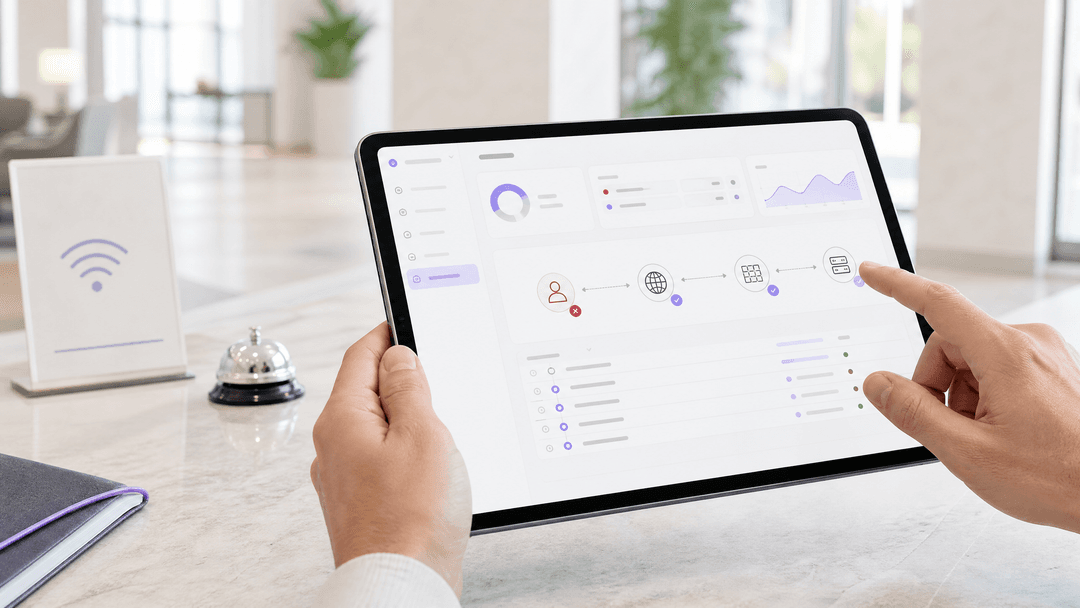
Cisco Meraki splash pages stop appearing when a client is still authorised, cannot issue the HTTP request that triggers the redirect, cannot reach an allowed splash dependency, or cannot complete RADIUS authentication. Start with one affected client, filter Auth, DHCP and RADIUS records by its MAC address, then test the relevant branch below. 1 2 3 5
What must still work for a Meraki splash page to appear?
Treat a captive portal as a short chain, not a single web page. A device must associate to the correct SSID, receive valid addressing, be classed as unauthorised, send traffic that can initiate the splash flow, reach the required hosted service, then receive authorisation. Cisco Meraki describes the trigger as an HTTP GET from an unauthorised client. The AP intercepts that request and returns an HTTP 307 redirect to the splash URL. 1
That explains a common support call: a guest can join your Guest WiFi but says the splash page is not loading. The access point may be working as designed. If the device opens an HTTPS-only destination first, the encrypted request cannot be redirected. Cisco Meraki specifically identifies this as a browser timeout scenario. Test the controlled HTTP branch before changing the SSID, page design or RADIUS server. 2
The same discipline avoids a second common mistake: treating every repeat prompt as a page failure. Splash frequency is authorisation policy. Cisco Meraki keeps splash state at the gateway access point and cloud controller, while the browser retains a session cookie. A client with a valid authorisation period may not see the page again after you shorten the configured frequency. Conversely, a client with disabled or cleared cookies can appear to be prompted too often. 2
| What the client reports | First evidence to collect | Most likely branch | First controlled check |
|---|---|---|---|
| “I join but no page opens” | Client MAC, SSID, AP and time | HTTP-trigger or client authorisation | Confirm Splash: Not authorized, then browse to an HTTP test destination. 1 2 |
| “It worked yesterday but not today” | Authorisation state and recent AP availability | Splash frequency or gateway state | Compare expiry with the client state. Revoke authorisation only for the nominated test client. 2 3 |
| “The page is blank” | Browser cookie setting and device type | Browser session state | Enable cookies and repeat the flow on the same client. 2 |
| “The page opens but sign-in spins or fails” | Login attempt, Auth events and RADIUS records | Cloud-to-RADIUS reachability or policy | Run the Dashboard RADIUS test where Cisco Meraki provides it, then review firewall, source range and shared-secret alignment. 4 |
| “The custom page has no styling or form” | Page host and every external dependency | Walled garden | Compare the custom page, asset and identity endpoints with walled-garden entries. 3 7 8 |
What should you capture before changing anything?
Start with one reproducible report. Record the client MAC address, SSID, gateway access point or MX, device type, local time, browser and whether the device had previously completed splash authentication. Ask the reporter to leave the device connected while you inspect it. This gives you an incident boundary and keeps a busy hotel, retail site or event venue from turning a broad complaint into blind configuration changes.
Open the client details and check whether it is authorised. Cisco Meraki identifies an unauthorised client as Splash: Not authorized; an authorised client shows its remaining authorisation time. Do not use a saved browser tab as your test. That can mix a past session with the present radio and DHCP state. 1
Then filter the Dashboard event log by the client MAC address and incident time. For MR access points, the Auth event type represents splash-page authentication. 802.11 shows association and disassociation, DHCP carries lease-related events, and RADIUS identifies RADIUS or MAC Authentication Bypass activity. The same Auth filter is available for MX splash authentication. Cisco Meraki notes that devices upload stored events after returning online, while retaining original timestamps, so line up the time zone before deciding what happened first. 5
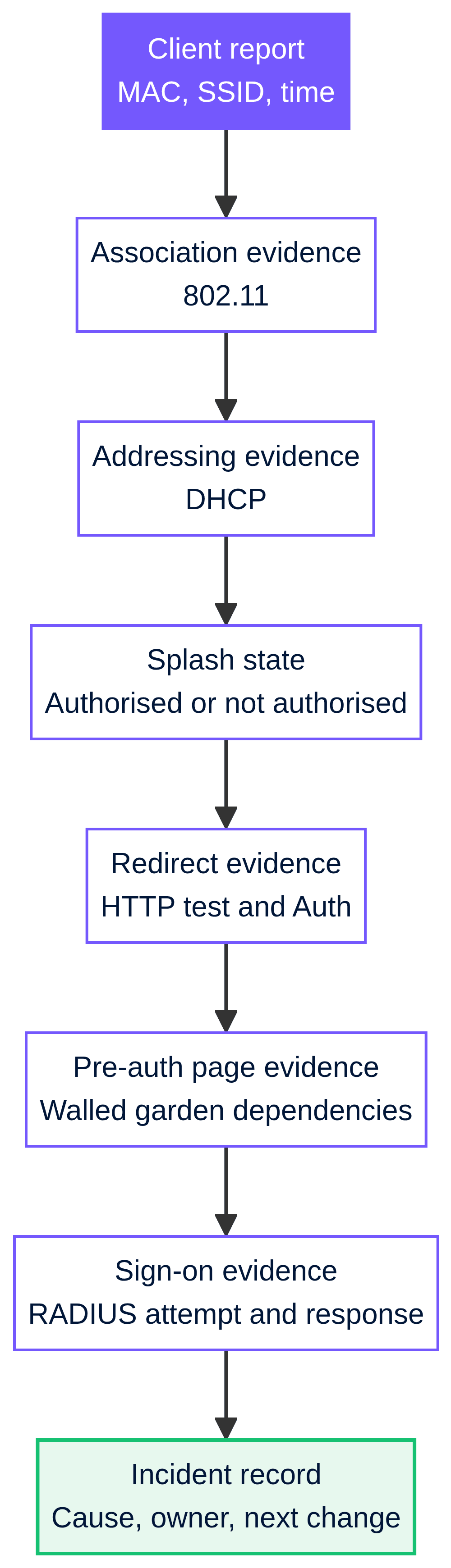
Use the following ordered record. It cuts the fault domain without guessing.
| Evidence checkpoint | Healthy indication | If it is absent or wrong | What it tells you |
|---|---|---|---|
802.11 association |
The client joined the expected AP and SSID | No association, repeated disassociation or unexpected AP | Diagnose radio association before captive portal behaviour. 6 |
| Addressing | A valid client address and no DHCP error around the report time | DHCP error or no usable client configuration | Check SSID/client addressing and the VLAN path. 2 6 |
| Splash state | Client is not authorised for a fresh test | Client remains authorised | Revoke only the designated test client, then retest. 2 3 |
Auth |
A splash-related event aligns with the test | No event after HTTP test | The redirect trigger or client test is incomplete. 5 |
| RADIUS evidence | Attempt and response align with the sign-on time | Timeout, rejection or no response | Move to the Dashboard-to-RADIUS branch. 4 5 |
How do you run the troubleshooting flowchart?
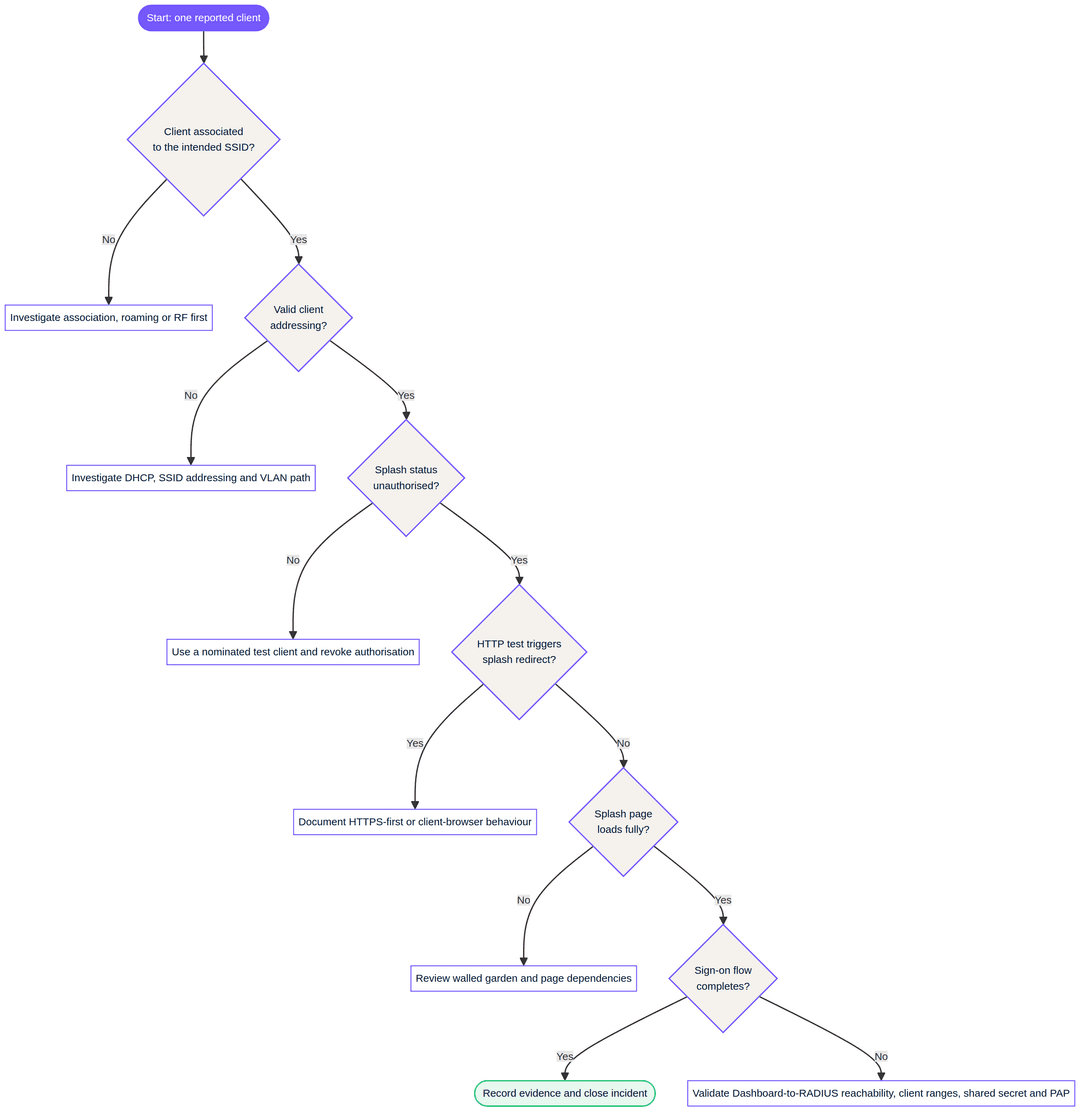
Use the flowchart once for a clean test client and once for a known affected client. The difference is useful. If a clean client reaches splash and the known device does not, you have evidence for authorisation, browser state or client-specific policy rather than a venue-wide outage.
Confirm association and addressing. If the event log does not show the client associating to the intended SSID, do not troubleshoot splash. If it associates but DHCP records show an error, correct the addressing or VLAN path first. Cisco Meraki identifies VLAN tagging at the SSID or upstream switch port as a common DHCP failure area. 6
Confirm the client is unauthorised. A previously authorised device may not require another splash page yet. Cisco Meraki documents a client-authorisation revoke function for controlled retesting. Use this on the nominated device, rather than changing splash frequency for every venue user. 2 3
Test the trigger with HTTP. Clear the browser cache only where this fits your test procedure, confirm cookies are enabled, then open an HTTP destination. Cisco Meraki says an HTTPS-first request cannot be redirected because the traffic is encrypted. If the HTTP test works, document the client behaviour as the cause. The network has not lost its splash redirect. 1 2
Test page reachability and the walled garden. A walled garden permits named IP addresses, ranges or hostnames before splash authentication, including wildcard domains. If you use a custom splash URL, Cisco Meraki says the custom page IP address and/or URL must be in the walled garden. When the page relies on separate asset, identity or service endpoints, review each required destination with the service owner. Do not guess IP addresses or add broad internet access as a shortcut. 3
Purple pages make the distinction clear. An offline splash page appears before login and cannot include external links or resources because the visitor is in the walled garden. An online page appears after successful login and can carry external media or links. If an offline Purple HTML page lost an image, stylesheet, script or third-party identity element after a change, compare those dependencies with the permitted pre-authentication entries before changing the design. 7 8
Test sign-on RADIUS only after the page has loaded. RADIUS, the protocol used here for central authentication requests, is not the first suspect when no splash page appears. It becomes relevant when the sign-on form loads but authentication fails or times out. For this Cisco Meraki flow, the Dashboard cloud originates the RADIUS access request, not the local AP or MX. The server needs public reachability from the documented Dashboard source ranges, a matching shared secret, and support for PAP. Cisco Meraki states that RADSec is not supported for splash authentication. 4
Run the supported RADIUS check and examine the server record. Cisco Meraki provides a Dashboard RADIUS test for the documented wireless configuration, though the test button does not exist for MX or Z-series networks. A timeout means you should verify the current Dashboard firewall information, RADIUS client entries, public host reachability, shared-secret alignment and policy behaviour. Cisco Meraki’s health check sends periodic access requests and treats the server as unreachable after six unanswered attempts, spaced 20 seconds apart. 4
Got questions about your specific setup?
Our team works with venue operators, IT managers, and network engineers across 80,000 venues. Book a 20-minute call and we will show you how others like you solved it.
How do you isolate the common failure points?
Splash frequency looks wrong
If the splash page appears less often than policy suggests, check whether the client was already authorised when the frequency changed. Cisco Meraki says the existing authorisation period remains in effect. Revoking the selected client’s authorisation creates a valid test of the updated setting. If the page appears more often, check browser cookie acceptance, cache clearing and gateway access-point continuity. A gateway restart may require authentication again unless the browser can present its cookie. 2
This matters in hospitality. An illustrative 200-room hotel should test with a controlled handset after a change, then measure the result as three simple outcomes: the client changes to authorised, it receives the expected expiry, and the next fresh HTTP request behaves as intended. That is a better release gate than asking reception whether complaints have stopped.
The guest WiFi is not redirecting
Do not state that HTTPS has “broken” captive portals. Cisco Meraki’s documented behaviour is narrower: the redirect mechanism works on an unauthorised HTTP GET, while an HTTPS-first request cannot be redirected. Modern devices may launch their operating-system captive-portal detection flow on association. If that prompt does not appear, use the HTTP test to establish whether the network branch works. 1 2
For an illustrative retail rollout, a store IT team can reproduce the complaint with a staff test device on the sales-floor SSID. The acceptance evidence is not a vague page-load claim. Capture the association record, valid address, unauthorised state, Auth event after the HTTP test and the resulting authorisation state. This record can be compared across stores without exposing visitor credentials.
The walled garden is incomplete
A walled garden is intentionally limited pre-authorisation access. It should not become a bypass list. Review the splash host first, then dependencies your pre-authentication page genuinely needs. Cisco Meraki permits IP addresses, IP ranges and hostnames, with wildcard domains. Cisco also requires a custom splash page URL or IP address in the walled garden when that feature is enabled. 3
A Purple offline page is the most constrained stage. Purple states that it cannot use external links or resources while the visitor is in the walled garden. The HTML editor lets your team upload assets into the portal and preview the current page, which can reduce unnecessary remote dependencies. Follow Purple’s published steps before publishing an edited template. 7 8
Sign-on splash times out or rejects credentials
Separate rejection from timeout. A rejection is an authentication or policy outcome. A timeout or “difficulty connecting” message points first to reachability between the Dashboard and the configured RADIUS server. Cisco Meraki documents that sign-on splash requests originate in the Dashboard cloud and cannot use a private LAN address for the RADIUS server. 4
Confirm the server expects PAP for this splash mode, the documented Dashboard source ranges are allowed, all relevant source IPs are configured as RADIUS clients, and the shared secret matches at both ends. Cisco Meraki also says the external splash integration must use the supplied login_url without modification, and filtering must allow its varying hostname rather than one fixed pattern. 4
What do Meraki splash events in the event log mean?
Read the record as a timeline. 802.11 association means the client joined an AP. It does not mean that the client has an address, reached the splash page or gained internet access. An Auth event is the event category for splash-page authentication. A DHCP event near the same time may shift the investigation to addressing. A RADIUS event matters for a RADIUS-backed sign-on flow, but it is not proof that the browser reached the page. 5 6
Avoid conflating 802.1X with a sign-on splash page. Cisco Meraki identifies 802.1X and RADIUS messages for WPA2-Enterprise SSIDs. Its separate sign-on splash RADIUS documentation describes PAP between the Dashboard cloud and your RADIUS server. In this guide, use the association, Auth, DHCP and RADIUS categories to locate the failing stage. Do not infer an exact root cause from one log line. 4 6
| Event or record | Meaning in this investigation | Next question |
|---|---|---|
802.11 association |
The device joined an AP | Did it receive valid addressing and remain connected? 6 |
802.11 disassociation |
The device left or was removed from the AP table | Is RF movement, sleep state or disconnection interrupting the test? 6 |
Auth |
Splash-page authentication category | Did it occur after a controlled HTTP trigger? 5 |
DHCP |
Address allocation or error category | Is client addressing or VLAN carriage blocking the next step? 5 6 |
RADIUS |
RADIUS or MAB related category | Is this a sign-on splash attempt, and did the cloud receive a server response? 4 5 |
| Splash login attempt record | Login time, SSID, client and gateway identifiers, plus authorisation status | Does the recorded result match the venue report? 9 |
Cisco Meraki also exposes splash login attempts through its documented Dashboard API. The record includes the login time, SSID, gateway-device MAC, client MAC and authorisation status. For multi-site IT teams, that lets you match the venue ticket to an authentication outcome without treating an anecdote as incident evidence. 9
How do you keep a fixed splash page from failing again?
Keep a short operating runbook alongside your Guest WiFi service owner. The runbook should identify the test SSID, test device, authorisation-revoke procedure, expected page host, pre-authentication dependencies, RADIUS ownership and escalation contact. It should also state the deployment’s controller-disconnection behaviour. Cisco Meraki documents open, restricted and default behaviour when the cloud controller is unavailable. 3
For estates that use a captive portal for consent, branding and access policy, treat the offline page as a controlled application component. Purple provides offline, online and out-of-hours page types. Use the published Splash Pages guidance for access-journey changes and the HTML editor guide for uploaded assets and preview. Keep day-two diagnosis separate from greenfield configuration. 7 8
When this becomes a repeat venue issue, centralise the evidence rather than centralising guesswork. Correlate the incident time, client MAC, AP or MX, SSID, authorisation state, event-log categories and RADIUS server response. This approach fits Hospitality , Retail and Transport sites where local teams need a clear escalation boundary and the network team needs reproducible evidence. For wider service design, see Guest WiFi Management: Smart Authentication & Segmentation .
Frequently asked questions
Does Purple work with existing Cisco Meraki access points?
Yes. Purple supports Guest WiFi deployments that layer on existing infrastructure, including Cisco Meraki. This guide covers day-two diagnosis of a Meraki splash failure. It does not replace the design and onboarding work needed for a new captive portal. Use the published Purple Splash Pages guidance for supported page types and access-journey changes. 7
How much work is needed to migrate a Meraki splash page to Purple?
The work depends on the existing authentication flow, pre-authentication dependencies and page design. Start by inventorying the current page host, walled-garden entries, sign-on method and post-login destination. Purple supports standard and HTML splash-page templates, including uploaded assets and live preview. Plan migration as a controlled change, not an incident fix. 7 8
Can a Cisco Meraki splash page redirect an HTTPS-only request?
No. Cisco Meraki documents that its splash redirect begins when an unauthorised client sends an HTTP GET. HTTPS-first traffic is encrypted and cannot be redirected by that mechanism. Test with an HTTP destination, then distinguish a client browser behaviour from a network-wide splash failure. 1 2
Which walled-garden entries does a custom Meraki splash page need?
The walled garden must allow the custom splash page IP address and/or URL when it is enabled. Then allow only the additional pre-authentication endpoints that the page genuinely requires. Cisco Meraki supports IP addresses, ranges and hostnames, including wildcard domains. Do not replace that review with unrestricted internet access. 3
Why does a Meraki sign-on splash page time out with RADIUS?
A timeout often means the Cisco Meraki Dashboard cloud cannot obtain a response from the configured RADIUS server. Check public reachability, the current Dashboard source ranges, matching RADIUS client shared secrets and PAP support. The local AP or MX is not the source of splash RADIUS requests. 4
How do we monitor splash login failures across several venues?
Use the Meraki event log to filter the affected client and time window, then correlate Auth, DHCP and RADIUS categories. Cisco’s splash-login-attempts API can return the login time, SSID, gateway device, client identifier and authorisation status. That creates a consistent evidence record for a multi-site support desk. 5 9
References
Key Definitions
Captive portal
A controlled pre-authentication network state that restricts a client until it completes the configured splash interaction.
You troubleshoot the captive portal when a device joins Guest WiFi but has not yet received normal network access.
Splash authorisation
The Cisco Meraki state that records whether a client has passed the splash requirement and, where applicable, how long that authority remains valid.
Check this first when a previously working device does not receive the splash page again.
Walled garden
The restricted list of IP addresses, ranges and hostnames an unauthorised client may reach before completing splash authentication.
Review it when a custom page lacks assets, form behaviour or another legitimate pre-authentication dependency.
Splash frequency
The configured interval that governs how often a client is presented with the splash page.
It helps explain why a device remains authorised after a policy change, or appears to be prompted repeatedly.
HTTP redirect trigger
The unauthorised client’s HTTP GET that Cisco Meraki intercepts to begin the splash redirect process.
Use a controlled HTTP test to separate redirect initiation from an HTTPS-first browser request.
HTTPS-first request
A client attempt to reach an encrypted HTTPS destination before splash authorisation.
Cisco Meraki documents that this traffic cannot be redirected by the HTTP splash mechanism, so it can look like a page timeout.
RADIUS
Remote Authentication Dial-In User Service, a protocol used here to validate sign-on splash credentials against a centrally managed authentication server.
Investigate it after the sign-on page loads but authentication rejects or times out.
PAP
Password Authentication Protocol, the authentication method Cisco Meraki documents for sign-on splash use with a customer-hosted RADIUS server.
Confirm that the RADIUS policy permits PAP before treating the problem as a generic server outage.
Auth event
The Cisco Meraki Dashboard event-log category used for splash-page authentication activity.
Read it alongside association, DHCP and RADIUS records to reconstruct the point at which the client flow stopped.
802.1X
A port-based network access control framework used for Enterprise WiFi authentication, separate from the RADIUS-backed sign-on splash flow described in this guide.
Do not mistake 802.1X event records for proof that a browser-based sign-on splash page loaded.
Worked Examples
Illustrative hospitality scenario: a 200-room hotel needs to diagnose intermittent Guest WiFi splash reports without disrupting checked-in guests.
Nominate one test handset and record its MAC address, SSID, serving access point and local time. Confirm association and valid addressing, then inspect client splash state. Revoke authorisation only for that handset when a fresh test is needed. Run an HTTP test and compare the matching Auth, DHCP and RADIUS evidence. The measurable release record is one authorised test client, the expected authorisation expiry and a documented result for each checkpoint.
Illustrative retail scenario: a store’s custom pre-authentication page opens but loses its sign-on element after a content change.
Do not make the whole internet available before login. Confirm that the page itself loads on an unauthorised test device, then inventory its required pre-authentication endpoints. Compare the page host and every required asset or identity dependency with the walled-garden policy. Retest using the same client and capture the splash state, Auth timeline and authorisation result. The measurable outcome is a completed sign-on flow with no unapproved broadening of pre-authentication access.
Sources
- Cisco Meraki: Splash Page Traffic Flow and Troubleshooting
- Cisco Meraki: Troubleshooting Splash Page Appearance Frequency
- Cisco Meraki: Splash Page Overview
- Cisco Meraki: Configuring RADIUS Authentication with a Sign-On Splash Page
- Cisco Meraki: How to Use the Meraki Event Log
- Cisco Meraki: Common Wireless Event Log Messages and Issues
- Purple: Splash Pages
- Purple: Splash Page Editor - HTML
- Cisco Meraki Dashboard API: Get Network Splash Login Attempts
Continue reading in this series
Ubiquiti UniFi guest portal not redirecting: causes and fixes
This guide isolates a UniFi guest portal redirect failure by following the guest state, redirect, pre-authorisation route and controller authorisation in sequence. It gives venue IT teams a sourced method to address guest-network versus Hotspot confusion, external portal hand-offs, current UniFi OS account requirements and DNS isolation testing.
Enterprise Guest WiFi Setup Guide: VLAN Segmentation, Security, and Captive Portals
This technical guide shows IT teams how to set up Guest WiFi as a controlled internet-access service, using VLAN segmentation, firewall policy and a captive portal. It also explains how Purple's registration forms and onboarding controls support a proportionate visitor experience without weakening the boundary around staff, payment and operational systems.
Captive portal for Ruijie: set it up with Purple guest WiFi
How Purple's cloud guest WiFi sits on top of Ruijie RG Series access points using web authentication and RADIUS, configured from the command line, and where to find the exact setup steps.
Got questions about your specific setup?
Our team works with venue operators, IT managers, and network engineers across 80,000 venues. Book a 20-minute call and we will show you how others like you solved it.