
Logo iPSK: a comprehensive guide for businesses
This guide explains how Identity Pre-Shared Key (iPSK) technology solves the core security challenge in multi-tenant WiFi environments: delivering enterprise-grade isolation and per-user control without breaking compatibility for IoT devices, gaming consoles, and smart home tech. It covers the full technical architecture, deployment strategies, and business case for property developers, BTR operators, and hospitality IT teams.
Listen to this guide
View podcast transcript
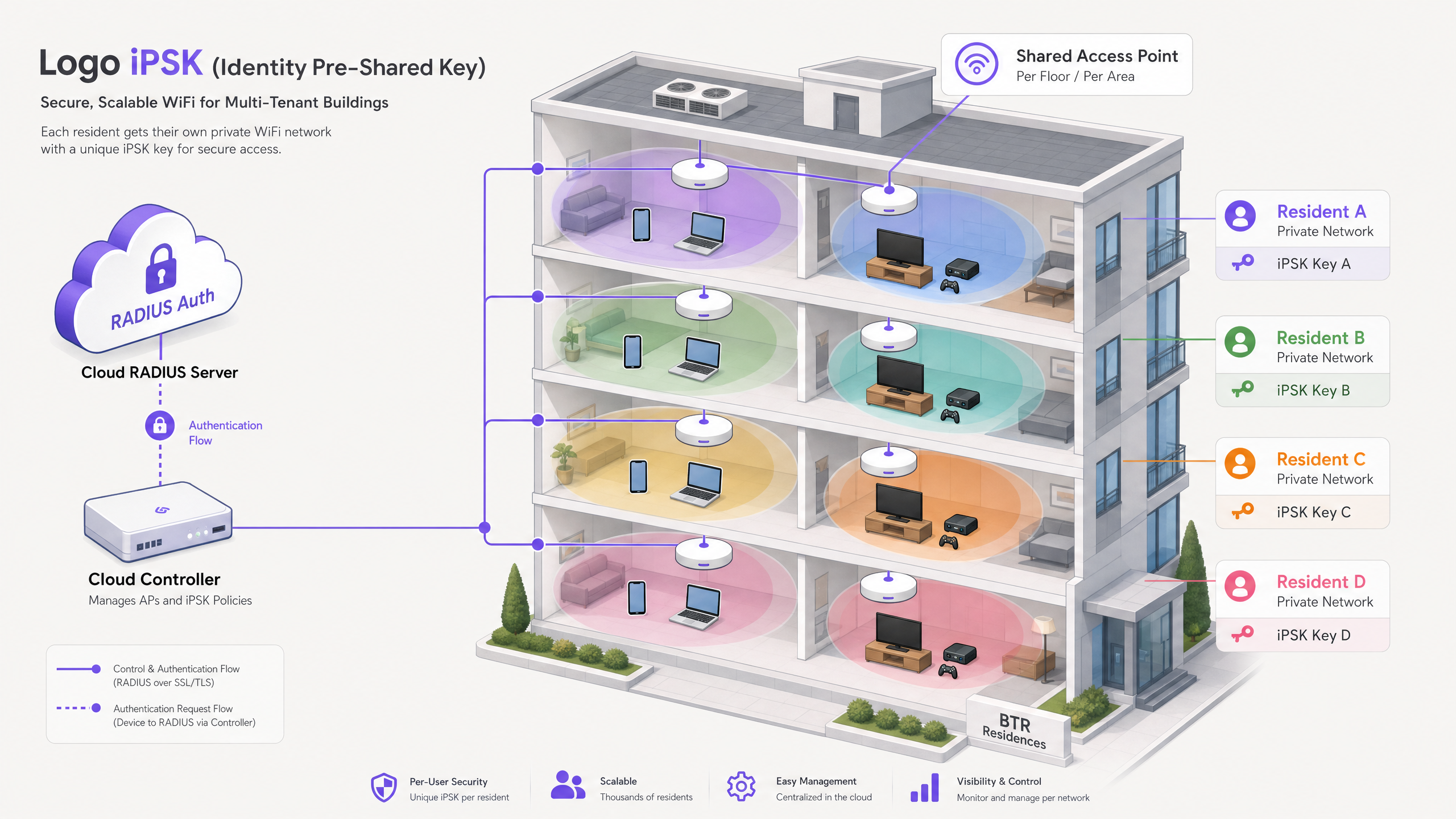
Executive summary
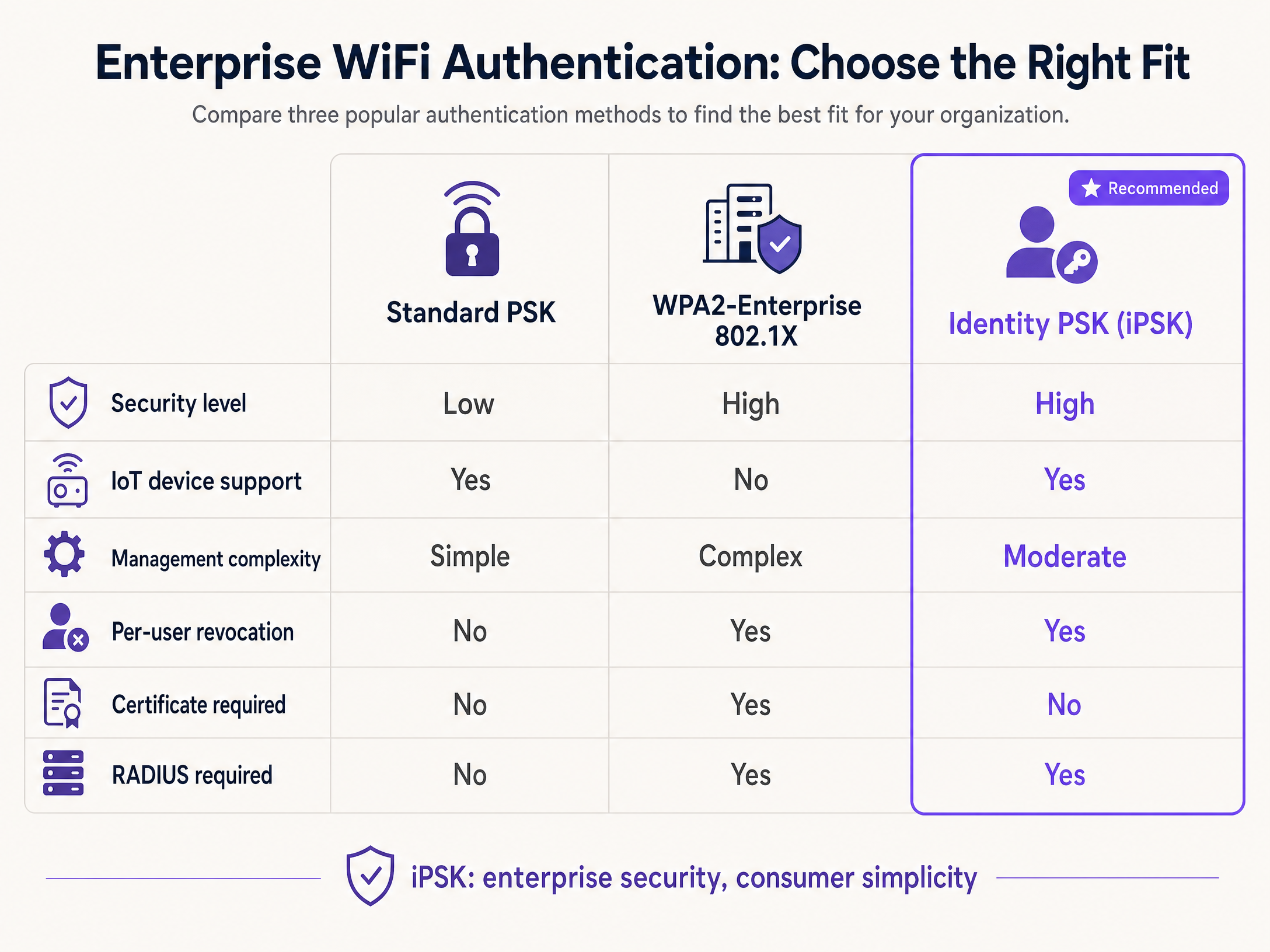
Providing secure, high-performance WiFi in multi-tenant environments - such as Build to Rent (BTR) properties, student accommodation, and hospitality venues - presents a fundamental conflict. Standard shared passwords (WPA2-Personal) offer the simplicity required for smart devices but lack the security and control necessary for enterprise networks. Conversely, Enterprise authentication (802.1X) provides strong security but routinely fails to support the "headless" IoT devices and gaming consoles that modern residents rely on.
Identity Pre-Shared Key (iPSK) resolves this conflict. By assigning a unique, easily managed WiFi password to every individual user or device on a single shared network name (SSID), iPSK delivers the security and per-user control of an enterprise network with the frictionless "at-home" experience of a consumer router. This guide details the technical architecture, deployment strategies, and business benefits of implementing Logo iPSK, providing actionable guidance for IT managers and venue operators looking to deploy secure, scalable Multi-Tenant WiFi.
Purple operates across 80,000+ live venues and has processed 440 million logins in 2024 (Purple internal data). Our Multi-Tenant WiFi solution runs as a hardware-agnostic cloud overlay, supporting the full range of enterprise access points your team already manages.
Technical deep-dive: understanding iPSK architecture
At its core, iPSK bridges the gap between consumer simplicity and enterprise control by using dynamic RADIUS authentication to manage standard Pre-Shared Keys on a per-user basis.
The authentication flow
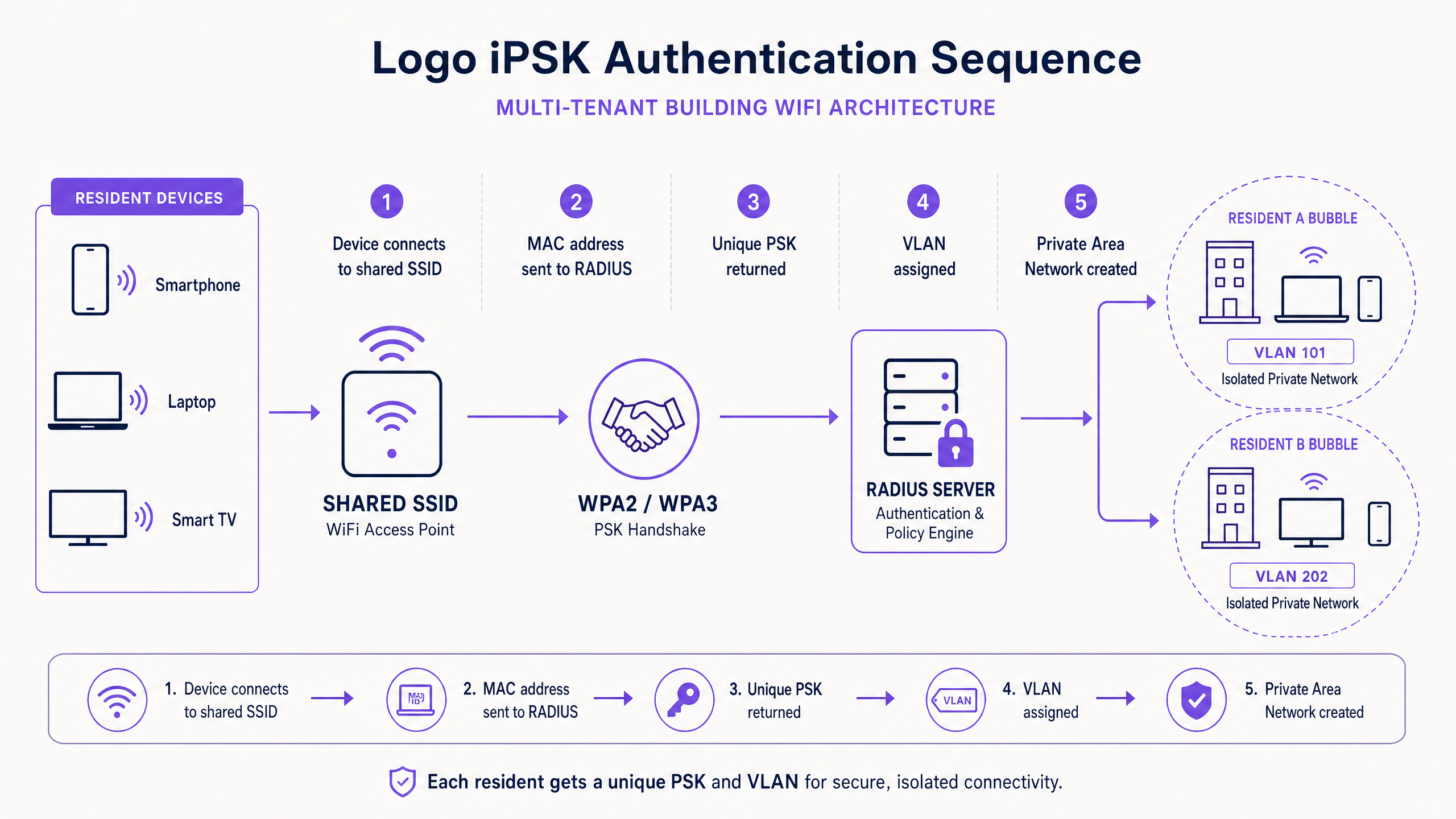
In a traditional WPA2-PSK network, the access point validates the client's password locally against a single, globally configured key. In an iPSK deployment, the access point defers this validation to a central authentication server. The sequence runs as follows.
First, the user's device attempts to connect to the shared SSID using their unique, provisioned iPSK password. Second, the wireless controller intercepts the connection attempt and sends a RADIUS Access-Request to the authentication server - such as Cisco ISE, HPE Aruba ClearPass, or Purple's cloud RADIUS. This request typically includes the client's MAC address and the submitted passphrase. Third, the RADIUS server queries its database to verify the credentials. Importantly, it does not merely return a binary Accept or Reject. Upon successful authentication, the RADIUS server returns an Access-Accept message populated with specific vendor attributes - such as Cisco AV-Pairs. These attributes dynamically assign the client to a specific Virtual Local Area Network (VLAN), apply Quality of Service (QoS) profiles, and enforce bandwidth limits.
The Private Area Network (PAN)
The most significant operational advantage of iPSK in multi-tenant environments is the creation of the Private Area Network (PAN). In a BTR development, hundreds of residents connect to the same physical access points. Without isolation, this poses a significant security risk. However, applying blanket Layer 2 isolation - typical in Guest WiFi networks - breaks device discovery protocols like mDNS and Bonjour. This prevents a resident's smartphone from communicating with their own Chromecast, Sonos speaker, or wireless printer.
iPSK solves this by assigning each resident's unique key to a specific, isolated VLAN. Devices authenticated with Resident A's key are placed in VLAN 101. Layer 2 isolation is disabled within this VLAN, allowing seamless device discovery and communication, replicating a private home network experience. Devices authenticated with Resident B's key are placed in VLAN 102. Strict isolation is enforced between VLANs. Resident A cannot see or interact with Resident B's devices, ensuring absolute privacy across the shared infrastructure.
Vendor terminology
While the underlying IEEE 802.11 standards and RADIUS protocols remain consistent, enterprise hardware vendors use varying terminology for this technology. Cisco uses Identity PSK (iPSK) or Personal Private Network. HPE Aruba uses Multi-PSK (MPSK). Ruckus uses Dynamic PSK (DPSK). The concept and authentication flow are identical across all three. Purple's platform abstracts these differences, providing a single management layer across Cisco Meraki, HPE Aruba, Ruckus, Juniper Mist, Ubiquiti UniFi, Cambium, Extreme, and Fortinet hardware.
Implementation guide: deploying iPSK
Deploying iPSK requires careful coordination between your wireless infrastructure, your Identity Provider (IdP), and your network orchestration layer.
1. Infrastructure preparation
Ensure your wireless controllers and access points support dynamic VLAN assignment via RADIUS. Purple's platform integrates as a hardware-agnostic cloud overlay, supporting the canonical hardware list above. You must also architect your IP addressing strategy to handle high device density. A typical BTR apartment may house 15 to 25 connected devices. A 200-unit building therefore requires DHCP scopes sized for 3,000 to 5,000 concurrent devices. Ensure your subnet masks are sized appropriately - a /22 or /21 per resident VLAN pool is a common starting point.
2. Identity Provider integration
Manual key management is unscalable. Your iPSK deployment must integrate with your organisation's Identity Provider, such as Microsoft Entra ID, Okta, or Google Workspace. When a new resident is added to the IdP - for example, upon signing a lease - the orchestration layer automatically generates a unique iPSK key and provisions the corresponding RADIUS profile. When the lease terminates, the IdP triggers the orchestration layer to instantly revoke the key, terminating network access without affecting any other resident.
For hospitality operators, the same logic applies via the Property Management System. Purple integrates directly with leading PMS platforms to automate key generation at check-in and revocation at check-out.
3. User onboarding
The onboarding experience must be straightforward. Provide the iPSK key to the resident prior to their arrival via automated email or SMS. For headless IoT devices, provide a self-service portal where residents can manually register the MAC addresses of devices that lack a user interface - smart thermostats, wireless printers, gaming consoles - ensuring they are placed into the correct Private Area Network.
For a deeper look at SSID architecture alongside iPSK, see our guide on three SSIDs to rule them all: guest, Passpoint, and IoT WiFi .
Best practices
Automate the lifecycle. Never manage iPSK keys manually. Rely on automated provisioning and revocation tied directly to your IdP or Property Management System. Purple's orchestration layer handles this end-to-end.
Implement MAC limiting. Configure the RADIUS server to restrict the maximum number of concurrent MAC addresses allowed per unique iPSK key. This prevents a single key from being shared across an entire floor.
Segment staff and residents. Do not mix operational staff and residents on the same logical network. Use iPSK to dynamically assign staff devices to a dedicated administrative VLAN with access to building management systems, while restricting resident VLANs to internet-only access.
Standardise on WPA3. Where client hardware supports it, deploy WPA3-Personal alongside iPSK to benefit from Simultaneous Authentication of Equals (SAE), which protects against offline dictionary attacks. WPA3 is defined under IEEE 802.11-2020 and is the current industry standard for new deployments.
Plan for DHCP lease management. Implement aggressive DHCP lease times - four to eight hours - to quickly reclaim IP addresses from transient devices and prevent exhaustion in high-density environments.
Troubleshooting and risk mitigation
IP address exhaustion. High device density in multi-tenant environments rapidly consumes available IP addresses, preventing new devices from connecting. Implement short DHCP lease times and use large subnets (e.g., /22 or /21) for resident VLANs. Monitor DHCP pool utilisation via your WiFi Analytics dashboard.
mDNS flooding. In large deployments, multicast DNS traffic from thousands of IoT devices can degrade overall wireless performance. Ensure your wireless controllers are configured to drop mDNS traffic that attempts to cross VLAN boundaries. The Private Area Network architecture inherently limits mDNS propagation to the individual resident's VLAN.
RADIUS latency. Slow response times from the RADIUS server cause client authentication timeouts and a poor user experience. Use geographically distributed, highly available cloud RADIUS infrastructure. Purple guarantees 99.999% uptime (Purple SLA data), ensuring reliable authentication regardless of venue location.
Firmware compatibility. Not all access point firmware versions support dynamic VLAN assignment via RADIUS. Before deployment, verify that your hardware is running a firmware version that supports the full iPSK feature set, including AAA Override and dynamic VLAN assignment.
ROI and business impact
Treating WiFi as a managed amenity rather than a utility transforms the commercial model for multi-tenant operators.
| Metric | BTR Benchmark | Source |
|---|---|---|
| Rent premium per unit per month | £15-30 | British Property Federation sector research |
| Reduction in void period | 5-10 days | BTR sector operator benchmarks |
| Per-door cost vs. per-unit broadband | 30-50% lower | Purple deployment data |
| Amenity ranking in tenant surveys | Top 5 | BTR and PBSA booking research |
For IT teams, iPSK dramatically reduces support tickets. You eliminate the "my console won't connect" calls because iPSK supports headless devices natively. You eliminate the manual password rotations when a resident moves out. For venue operators, it turns WiFi from a cost centre into a value driver.
Purple's Multi-Tenant WiFi solution sits as a cloud overlay on your existing enterprise hardware. We handle the RADIUS authentication, the key lifecycle management, and the resident onboarding, allowing you to deliver a seamless, identity-based network without the administrative overhead. Purple is ISO 27001 certified, GDPR compliant, and holds Cyber Essentials certification.
For hospitality operators, iPSK eliminates the most common guest complaint - the recurring captive portal login - while maintaining the security and data capture capabilities of a managed Guest WiFi platform. For retail environments, iPSK secures staff and IoT device networks on a single SSID without the complexity of 802.1X certificate management. For healthcare settings, iPSK isolates sensitive medical IoT devices on their own VLAN while providing simple, private connectivity for patients and visitors. For transport hubs, iPSK scales to the high device density of passenger concourses while maintaining per-session isolation.
Key Definitions
Identity Pre-Shared Key (iPSK)
A wireless security method that allows multiple unique passwords to be used on a single shared network name (SSID), with each password tied to specific user policies via a RADIUS server. Cisco uses the term iPSK; HPE Aruba uses MPSK; Ruckus uses DPSK.
When IT teams need to secure a shared network without breaking compatibility for IoT devices and gaming consoles, and when per-user revocation is required without the complexity of 802.1X certificates.
Private Area Network (PAN)
A dynamically assigned, isolated network segment - typically a VLAN - created for an individual user or household. Devices within the PAN can communicate with each other via mDNS and Layer 2 protocols, while remaining isolated from all other users on the same physical infrastructure.
Key for multi-tenant environments where residents expect their wireless printers, smart speakers, and streaming devices to work securely, as they would on a private home router.
RADIUS
Remote Authentication Dial-In User Service. A networking protocol that provides centralised Authentication, Authorisation, and Accounting (AAA) management for users connecting to a network service. Defined in RFC 2865.
The backend engine that makes iPSK possible by validating the unique keys, returning specific VLAN assignments, and enforcing per-user bandwidth policies.
mDNS Reflection
A network service that allows multicast DNS traffic - used by protocols like Apple Bonjour and Google Cast for device discovery - to operate within specific network segments, enabling devices to find each other without a traditional DNS server.
Required for residents to cast Netflix from their phone to their smart TV, or for a laptop to discover a wireless printer, over the building's shared WiFi infrastructure.
Layer 2 Isolation
A security setting that prevents devices connected to the same access point or VLAN from communicating directly with each other at the data-link layer.
Used in guest networks to protect users from each other, but must be carefully managed in iPSK deployments to allow a resident's own devices to interact within their PAN while remaining isolated from other residents.
Captive Portal
A web page that a user must view and interact with before access is granted to a public WiFi network. Typically used for terms acceptance, authentication, or data capture.
A common source of friction for long-term residents and incompatible with headless IoT devices. iPSK is deployed to eliminate the need for recurring captive portal logins in residential and hospitality environments.
Headless Device
A network-connected device that lacks a traditional screen or web browser interface, such as a smart thermostat, wireless printer, gaming console, or smart speaker.
These devices cannot navigate captive portals or 802.1X certificate prompts, making iPSK the only viable secure enterprise authentication method for them.
WPA3-Personal
The latest generation of standard WiFi security, defined under IEEE 802.11-2020, which uses Simultaneous Authentication of Equals (SAE) to replace the Pre-Shared Key handshake and protect against offline dictionary attacks.
Should be deployed alongside iPSK to provide the highest level of encryption for compatible client devices, particularly in new-build properties where hardware supports it.
VLAN (Virtual Local Area Network)
A logical network segment that groups devices together regardless of their physical location, providing traffic isolation and security boundaries within a shared physical network infrastructure.
The mechanism by which iPSK creates per-resident Private Area Networks. Each resident's unique key is mapped to a specific VLAN ID by the RADIUS server.
Worked Examples
A 250-unit Build to Rent property is experiencing a high volume of IT support tickets because residents cannot connect their smart TVs, gaming consoles, and wireless printers to the building's WPA2-Enterprise network. The IT team needs a solution that maintains enterprise-grade security and per-user revocation without requiring residents to configure certificates.
Migrate the resident SSID from WPA2-Enterprise (802.1X) to an iPSK architecture. Integrate the Property Management System with Purple's cloud RADIUS via the Purple app. Configure the RADIUS server to dynamically assign each resident's unique key to a dedicated VLAN, creating a Private Area Network per apartment. Enable mDNS reflection within each resident VLAN so that smart TVs, printers, and gaming consoles can be discovered by the resident's phone or laptop. Residents connect their devices using their unique key - presented as a standard WPA2/WPA3 password prompt - with no certificate configuration required. When a resident moves out, the PMS triggers Purple to instantly revoke the key, terminating all access without affecting other residents.
A 150-room hotel wants to eliminate daily captive portal logins for guests, which are causing friction and breaking connectivity for streaming devices, without reverting to a single, insecure shared password for the entire property. The hotel also wants to ensure that when a guest checks out, their WiFi access is immediately terminated.
Deploy iPSK integrated with the hotel's Property Management System. Upon check-in, the PMS triggers Purple to generate a unique WiFi key and send it to the guest via email or SMS. The guest connects their devices once using this key. The RADIUS server assigns the guest to an isolated VLAN for the duration of their stay. Upon check-out, the PMS triggers Purple to instantly revoke the key. The guest's devices lose connectivity immediately. The hotel maintains a separate Guest WiFi SSID for lobby visitors using a standard captive portal flow, keeping the two use cases architecturally separate.
Practice Questions
Q1. Your BTR property currently uses WPA2-Enterprise (802.1X). Residents are complaining that they cannot connect their PlayStation 5 consoles or Amazon Echo devices to the network. The IT team has confirmed the devices are functioning correctly. What is the most secure and scalable architectural change to resolve this?
Hint: Consider the authentication capabilities of headless gaming consoles and smart speakers versus enterprise security requirements.
View model answer
Migrate the resident SSID from WPA2-Enterprise to Identity PSK (iPSK). Gaming consoles and smart speakers lack the supplicant software required to process 802.1X certificates or complex username and password prompts. iPSK provides the simple WPA2/WPA3 password prompt these devices require, while the RADIUS server maintains enterprise-level security, dynamic VLAN assignment, and per-user revocation. The resident's unique key maps their devices to a dedicated VLAN, creating a Private Area Network that enables device discovery while isolating them from other residents.
Q2. You are deploying iPSK across a 500-unit student accommodation block. During testing, you notice that while devices connect successfully, Resident A can cast YouTube videos to Resident B's smart TV on the floor below. What configuration is missing?
Hint: Review how the RADIUS server handles authorization after validating the credentials, and how the controller enforces the returned policy.
View model answer
The RADIUS server is failing to assign unique VLANs per user, or the wireless controller is failing to enforce Layer 2 isolation between those VLANs. The RADIUS Access-Accept response must include the specific vendor attributes - such as Cisco AV-Pairs or Tunnel-Private-Group-ID - to dynamically assign Resident A and Resident B to separate VLANs. Without this, all residents land on the same broadcast domain and mDNS traffic crosses between them. Verify that AAA Override is enabled on the WLAN and that the RADIUS profile includes the correct VLAN assignment attributes.
Q3. A venue operator wants to implement iPSK but plans to manually generate and email the unique keys using a master spreadsheet updated by the front desk staff every week. Why is this approach fundamentally flawed, and what should replace it?
Hint: Consider the operational overhead and security implications of manual credential lifecycle management at scale.
View model answer
Manual key management does not scale and introduces severe security risks. Delays in manual updates mean former residents retain network access long after moving out, creating a significant security exposure. New residents experience delays getting online, damaging the move-in experience. The deployment must integrate the network orchestration layer directly with the Identity Provider - such as Microsoft Entra ID or Okta - or the Property Management System to automate key generation at move-in and instant revocation at move-out. This eliminates human error, ensures zero-delay revocation, and removes the ongoing administrative burden from front desk staff.
Q4. A 300-unit BTR property has deployed iPSK successfully. Six months in, residents are reporting intermittent connectivity failures where their devices cannot obtain an IP address. The wireless hardware is functioning correctly. What is the most likely cause?
Hint: Consider the relationship between device density, DHCP lease duration, and IP address pool size.
View model answer
The most likely cause is DHCP address pool exhaustion. With 15 to 25 devices per household, a 300-unit building can have 4,500 to 7,500 concurrent devices. If the DHCP scopes were sized for a lower device density, or if lease times are too long - allowing departed devices to hold addresses - the pool will exhaust. The fix is to review and expand the DHCP subnet size (moving to /21 or /20 per VLAN pool if necessary) and to reduce DHCP lease times to four to eight hours to ensure rapid address reclamation from transient or offline devices.
Continue reading in this series
PPSK wpa3: comparing features and deployment models
This technical reference guide compares PPSK and WPA3-SAE, explaining their architectural differences and deployment models for multi-tenant environments. It provides actionable guidance for IT managers and property developers on achieving secure, isolated WiFi networks using Purple's identity-based solutions.
PPSK wpa3: comparing features and deployment models
This technical reference guide compares PPSK and WPA3-SAE, explaining their architectural differences and deployment models for multi-tenant environments. It provides actionable guidance for IT managers and property developers on achieving secure, isolated WiFi networks using Purple's identity-based solutions.
PPSK life: comparing features and deployment models
This guide compares PPSK (Private Pre-Shared Key) against standard PSK and 802.1X, detailing implementation models for multi-tenant environments. It equips IT managers and property operators to deploy secure, resident-isolated WiFi that supports smart home devices and drives measurable business value.