
Nama ff iPSK dragon: a comprehensive guide for businesses
This guide explains how Identity Pre-Shared Key (iPSK) architecture - the 'dragon' deployment model for robust, scalable, multi-tenant WiFi - solves the connectivity dilemma for Build-to-Rent operators, property developers, and landlords. It covers technical authentication flows, RADIUS integration, dynamic VLAN assignment, and the business case for delivering secure, isolated, Instant-On resident connectivity at scale.
Listen to this guide
View podcast transcript
Executive summary
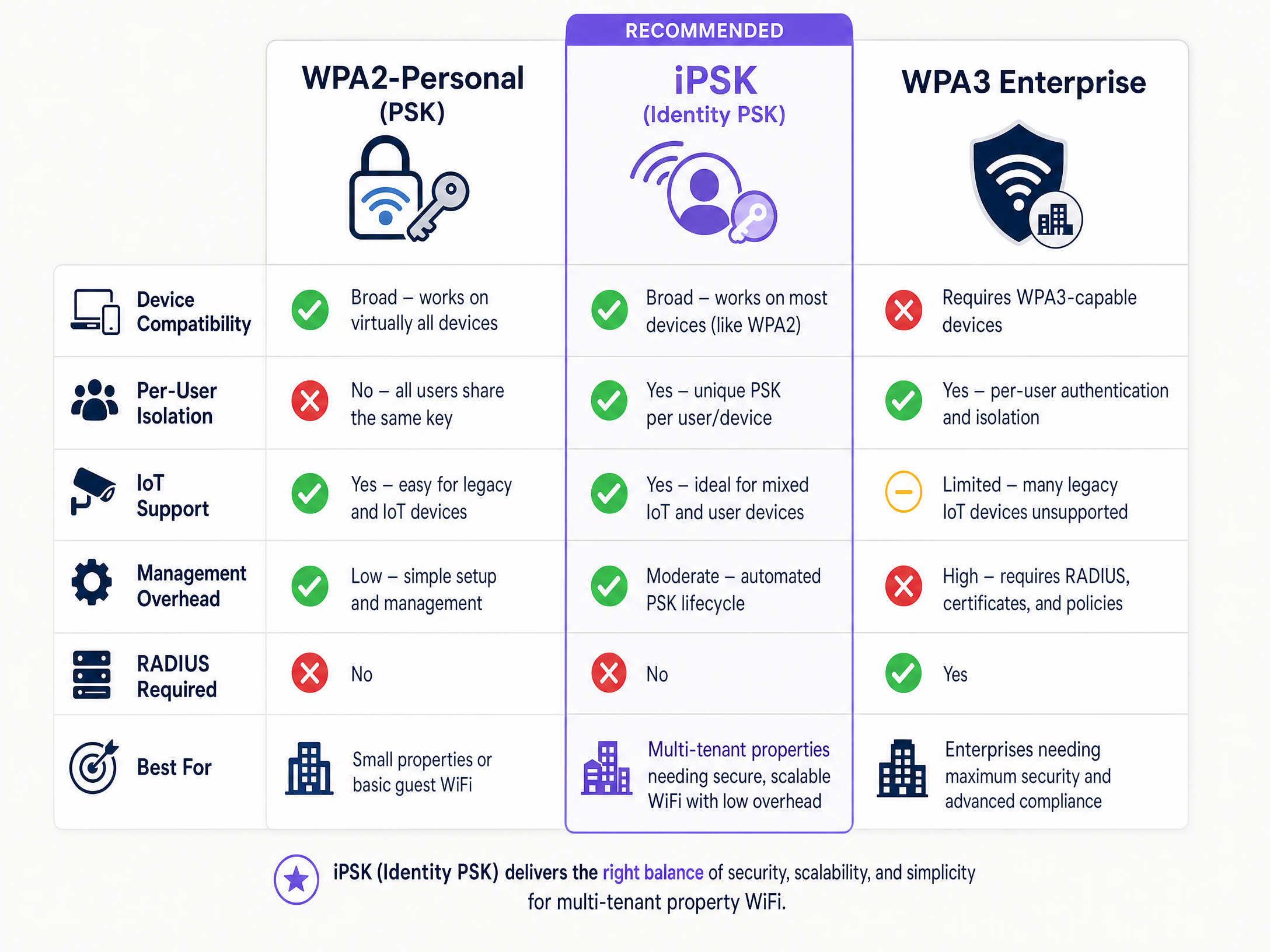
Traditional WiFi security forces a choice between two inadequate options. Standard WPA2-Personal is simple but offers no individual accountability - one leaked password compromises the entire network. WPA2/3-Enterprise (IEEE 802.1X) delivers per-user control but breaks connectivity for gaming consoles, smart TVs, and IoT devices that cannot process digital certificates.
Identity Pre-Shared Key (iPSK) - the architecture at the heart of what practitioners call the "dragon" deployment model for robust, scalable, multi-tenant WiFi - resolves this tension. It assigns a unique password to every individual user or device on a single SSID, enabling dynamic VLAN assignment and Layer 2 isolation via a central RADIUS server. For Build-to-Rent (BTR) operators, property developers, and landlords, iPSK is the definitive standard for multi-tenant connectivity. It supports 100% of resident devices, creates a Private Area Network (PAN) for each unit, and scales through automated lifecycle management integrated with identity providers like Microsoft Entra ID, Okta, or Google Workspace. Purple automates this entire workflow across 80,000+ live venues, integrating with Cisco Meraki, HPE Aruba, Ruckus, Juniper Mist, Ubiquiti UniFi, Cambium, Extreme, and Fortinet.
Technical deep-dive: the iPSK architecture
iPSK solves a problem that has existed since the first shared WiFi password was written on a hotel lobby chalkboard. Standard WPA2-Personal uses one passphrase for every device on the network. Change it for one person and you change it for everyone. Worse, Layer 2 isolation is absent by default, so a resident's smart TV is visible to every neighbour on the same segment. WPA3-Enterprise with IEEE 802.1X solves the security problem but creates a new one: it requires every device to run a supplicant capable of certificate or credential-based authentication. Gaming consoles, smart speakers, IoT sensors, and streaming sticks cannot do this. In a 200-unit building with 15-25 devices per household, that is thousands of devices that simply will not connect.
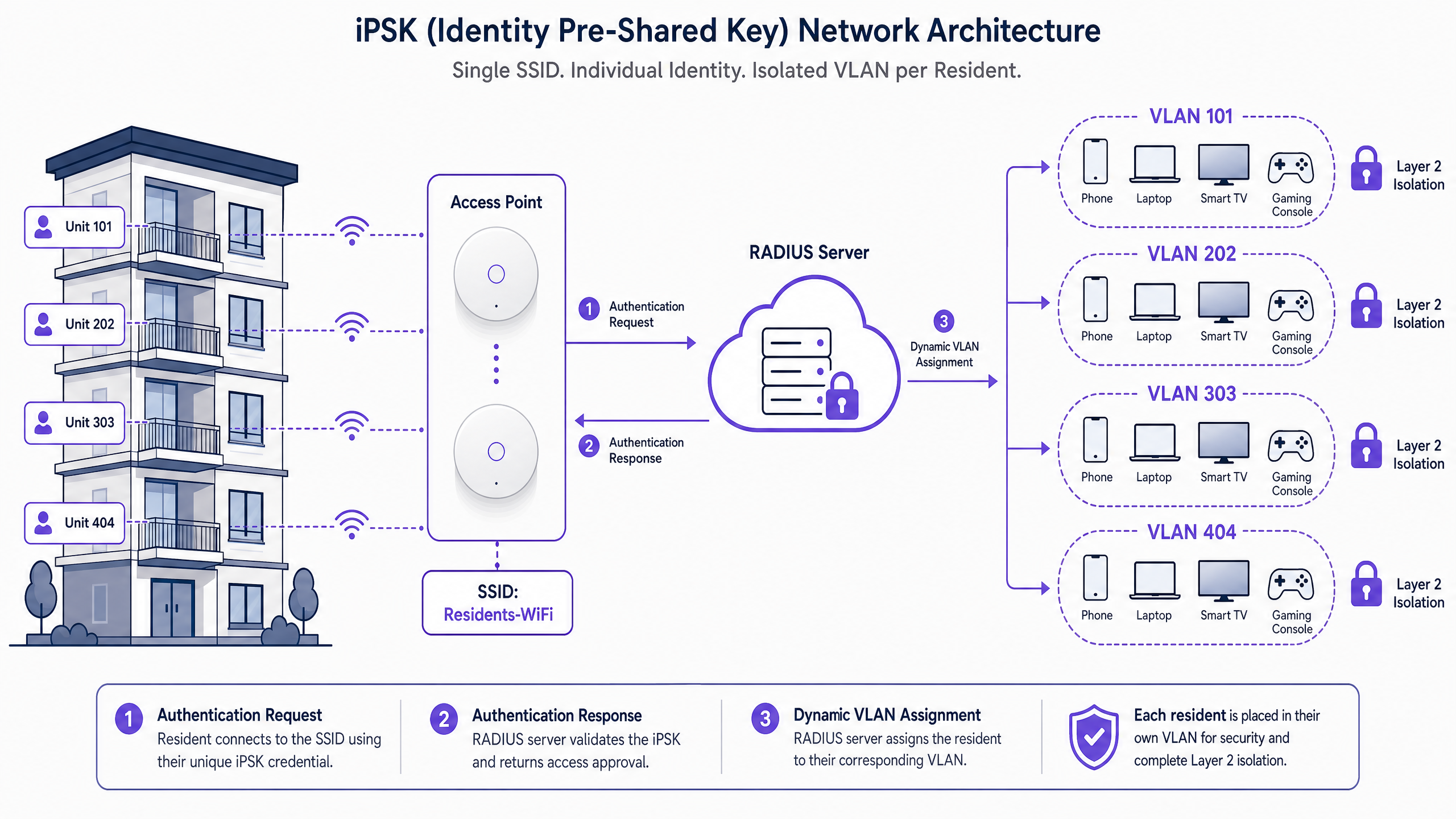
iPSK assigns a unique pre-shared key to each resident or device, but all keys share a single SSID. The authentication flow works as follows. When a device sends an association request, the Wireless LAN Controller (WLC) intercepts the connection attempt and forwards the device's MAC address to a RADIUS server. The RADIUS server looks up that MAC address in its identity store and returns an Access-Accept response. Embedded in that response is a vendor-specific attribute containing the unique passphrase for that client. The controller receives this unique passphrase and uses it to validate the key the device presented. If they match, the device is authenticated and placed on the appropriate network segment.
Layer 2 isolation and Private Area Networks
In a multi-tenant environment, a single SSID across hundreds of apartments is efficient for RF planning but creates serious security risks without proper segmentation. iPSK enables the creation of a Private Area Network (PAN) for each resident.
When a resident authenticates with their unique iPSK, the RADIUS server assigns their devices to a specific VLAN. The network infrastructure enforces Layer 2 isolation between these VLANs. Resident A's iPhone can see their own printer or Chromecast, but Resident B in the next apartment cannot discover or interact with those devices. This micro-segmentation is critical for GDPR compliance and for maintaining resident trust.
Because each resident has their own isolated VLAN, you can enable mDNS reflection within that specific VLAN. mDNS is the protocol that enables AirPlay, Chromecast casting, and wireless printing. Enabling mDNS reflection within each resident's private VLAN allows their own devices to communicate with each other, while remaining completely isolated from all other residents. The result is a home-like experience on shared infrastructure.
Implementation guide
Deploying iPSK effectively requires moving beyond the technical configuration and focusing on the operational lifecycle of the keys.
Step 1: Device profiling and categorisation
Before selecting a security model, conduct a comprehensive audit of all endpoint types expected on the network. Categorise devices into two primary buckets: supplicant-capable devices (corporate laptops, modern smartphones, and tablets) that should be targeted for WPA3 Enterprise; and headless or legacy devices (IoT sensors, printers, IP cameras, and legacy scanners) that are candidates for iPSK. For further architectural guidance, see Three SSIDs to rule them all: guest, Passpoint, and IoT WiFi .
Step 2: Designing the SSID architecture
A best-practice deployment involves a dual-SSID strategy to balance security and compatibility. The Corporate SSID uses WPA3 Enterprise and is dedicated to staff devices, utilising EAP-TLS for certificate-based authentication or PEAP-MSCHAPv2 where certificates are unfeasible. The IoT/Device SSID uses WPA2/WPA3 iPSK for headless devices. The RADIUS server assigns VLANs based on device type, ensuring lateral movement is restricted even if a device is compromised.
Step 3: RADIUS and policy configuration
Configure your RADIUS infrastructure to handle both authentication types. For iPSK, ensure the policy engine maps MAC addresses to specific keys and VLAN attributes. Implement strict MAC address profiling to detect spoofing attempts. Cisco Meraki, HPE Aruba, Ruckus, Juniper Mist, Ubiquiti UniFi, Cambium, Extreme, and Fortinet all support per-device PSK with dynamic VLAN assignment, though the vendor-specific attribute names differ across platforms.
Step 4: Lifecycle automation
The most common mistake is treating iPSK as a purely technical project rather than an operational one. Manually managing hundreds or thousands of unique keys is not feasible for any IT team. Purple integrates with Microsoft Entra ID, Okta, or Google Workspace. When a new resident signs a lease, Purple automatically generates a unique iPSK, assigns a VLAN, and delivers the credentials to the resident. When their lease ends, the key is automatically revoked.
Best practices
Automate key management from day one. Never attempt to manage iPSK credentials manually at scale. Integrate your network access control system with your Property Management System or Identity Provider.
Enable Change of Authorization (CoA). Revoking a key in the RADIUS database does not immediately disconnect a device that is already associated with the network. To force immediate disconnection, your management system must send a CoA disconnect message directly to the wireless controller. Confirm your management platform supports CoA before go-live.
Address MAC address randomisation proactively. Modern smartphones randomise their MAC address to protect user privacy. If your iPSK implementation relies on MAC Address Bypass, randomisation will break authentication. Educate residents on how to disable private MAC addresses for their home network, or implement a pre-registration workflow.
Design for RADIUS resilience. iPSK places a heavier computational load on the RADIUS server because of the dictionary checks required during the EAPOL handshake. Use a cloud-hosted, high-performance RADIUS service with geographic redundancy. A single-point RADIUS failure means no new devices can authenticate.
Plan for WPA3 transition. iPSK currently operates primarily on WPA2. If you are deploying WiFi 6E or WiFi 7 access points on the 6 GHz band, you will need a separate WPA3-Enterprise strategy for those clients. See PPSK wpa3: comparing features and deployment models for a deeper comparison.
Troubleshooting and risk mitigation
Authentication failures are most commonly caused by MAC address randomisation in iOS 14+, Android 10+, and Windows 11. Ensure clear onboarding instructions are provided to residents, and consider a pre-registration portal where residents register their device's permanent MAC address.
Device discovery issues - if residents cannot cast to their smart TVs or use AirPlay - typically indicate that mDNS reflection is not enabled within the resident's specific VLAN. Verify multicast traffic is not being dropped by the wireless controller.
RADIUS timeouts occur when latency between the wireless controller and the RADIUS server exceeds the EAPOL timeout threshold. Ensure your RADIUS infrastructure is geographically proximate to your venues or use a distributed cloud architecture. Purple's cloud-hosted RADIUS infrastructure operates at 99.999% uptime, eliminating this as a single point of failure.
Key revocation delays happen when CoA is not configured. Deleting a key from RADIUS prevents future connections but does not drop active sessions. Configure CoA on your wireless controller and test it during commissioning.
ROI and business impact
For BTR operators and property developers, the business case for iPSK is direct. Eliminating individual consumer routers in every apartment reduces capital expenditure and ongoing hardware maintenance costs. It also eliminates the RF interference caused by hundreds of unmanaged access points competing for airtime in the same building.
More importantly, managed WiFi delivered via iPSK provides a premium resident experience. Residents receive an Instant-On connection from day one, without the hassle of setting up a broadband contract or waiting for an engineer. According to British Property Federation benchmarks, BTR operators offering high-quality managed WiFi see a £15-30 per unit per month rent premium and void periods that are five to ten days shorter.
Purple has deployed Multi-Tenant WiFi across 80,000+ venues globally. Our hardware-agnostic cloud overlay runs on the access points you already own, and our automated key lifecycle management integrates with the property management systems your operations team already uses. For more on the value of connected venues, explore our Guest WiFi and WiFi Analytics platforms, or see how we serve the Hospitality sector specifically.
For further reading on related security architectures, see How to make a great first impression with your guest WiFi and Três SSIDs para a todos governar .
Key Definitions
iPSK (Identity Pre-Shared Key)
A security model that assigns a unique WiFi password to every individual user or device on a single SSID, bridging the gap between WPA2-Personal simplicity and WPA2-Enterprise control. Also known as MPSK (Aruba), DPSK (Ruckus), or PPSK depending on the vendor.
When IT teams need to secure IoT devices or provide managed WiFi in multi-tenant buildings without the complexity of 802.1X certificates.
Private Area Network (PAN)
A virtual network segment created within a larger shared infrastructure, providing Layer 2 isolation so a user's devices can communicate with each other but remain invisible to other users on the same physical network.
Essential for privacy and security in Build-to-Rent and student accommodation environments where hundreds of residents share the same access points.
RADIUS (Remote Authentication Dial-In User Service)
A networking protocol that provides centralised Authentication, Authorisation, and Accounting (AAA) management for users who connect and use a network service. Defined in RFC 2865.
The central server in an iPSK deployment that validates the unique keys and assigns the corresponding VLANs to each authenticated device.
VLAN (Virtual Local Area Network)
A logical subnetwork that groups a collection of devices from different physical LANs. iPSK uses dynamic VLAN assignment via RADIUS to isolate users into separate broadcast domains.
Used to segment traffic, improving security and performance by restricting broadcast domains and preventing lateral movement between residents or device types.
mDNS Reflection
A feature that allows Multicast DNS packets (used by services like AirPlay, Chromecast, and DLNA) to be forwarded across network segments or within isolated VLANs.
Crucial for enabling device discovery within a resident's Private Area Network, allowing them to cast from a phone to a TV without exposing those devices to neighbours.
Change of Authorization (CoA)
A RADIUS extension (RFC 5176) that allows a server to dynamically modify the authorisation attributes of an active session, such as disconnecting a user or reassigning their VLAN.
Required to instantly disconnect a device from the network when its iPSK is revoked. Without CoA, active sessions persist until the device naturally disconnects and attempts to re-authenticate.
MAC Address Randomisation
A privacy feature in modern operating systems (iOS 14+, Android 10+, Windows 11) that generates a random MAC address for each WiFi network, preventing device tracking across locations.
The most common cause of authentication failures in iPSK networks, as the RADIUS server relies on knowing the device's true MAC address to look up the correct pre-shared key.
Layer 2 Isolation
A security measure that prevents devices on the same local network segment from communicating directly with each other at the data link layer, even when they share the same physical access point.
Ensures that residents sharing the same physical access point cannot access each other's devices, which is a baseline requirement for GDPR compliance in multi-tenant environments.
EAPOL (Extensible Authentication Protocol over LAN)
The network port authentication protocol defined in IEEE 802.1X that encapsulates EAP messages over a local area network. In iPSK, the EAPOL handshake is used to validate the unique pre-shared key against the RADIUS identity store.
Understanding the EAPOL handshake is important for diagnosing iPSK authentication failures and for understanding why RADIUS server performance matters.
Worked Examples
A 300-unit Build-to-Rent development needs to provide managed WiFi as a premium amenity. Residents must be able to connect smart TVs, gaming consoles, and IoT devices easily, but their devices must be completely isolated from neighbouring apartments. How should the network be designed?
Deploy a single SSID across the entire building using iPSK authentication backed by a cloud-hosted RADIUS server. Integrate the network access control system with the Property Management System to automatically generate a unique iPSK for each new lease. Configure the RADIUS server to return a unique VLAN assignment for each resident's key, creating a Private Area Network. Enable mDNS reflection within each VLAN to allow residents to cast to their own devices. Configure Change of Authorisation (CoA) on the wireless controller so that when a lease ends and the key is revoked in RADIUS, the active session is immediately terminated.
A retail chain needs to secure 500 legacy barcode scanners that only support WPA2-PSK, alongside a modern WPA3-Enterprise network for staff laptops. How can they secure the scanners without using a single, easily compromised password?
Implement a dual-SSID strategy. Keep staff laptops on the WPA3-Enterprise SSID using EAP-TLS. Create a separate IoT/Device SSID using iPSK. Generate a unique key per MAC address for each barcode scanner via the NAC's API. Assign these scanners to an isolated VLAN that only has access to the required inventory systems, blocking lateral movement to point-of-sale terminals. If a scanner is lost or compromised, revoke that single key without affecting any other device on the network.
Practice Questions
Q1. A resident in a 200-unit BTR development complains they cannot cast Netflix from their iPhone to their new Chromecast. Both devices are connected to the iPSK network using the resident's unique key. What is the most likely configuration issue and how do you resolve it?
Hint: Consider how devices discover each other on a local network, and what protocol enables this.
View model answer
The most likely issue is that mDNS reflection is not enabled within the resident's specific VLAN. Without mDNS, the discovery packets used by Chromecast (and AirPlay) cannot traverse the network, even if both devices are on the same isolated segment. The fix is to enable mDNS reflection or proxy within the resident's VLAN on the wireless controller. Verify that multicast traffic is not being globally suppressed, which is a common default on enterprise controllers.
Q2. You are deploying iPSK in a new student accommodation block. During testing, an iPhone connects successfully the first time, but fails to authenticate the next day. The student has not changed their password. What is the cause and how do you resolve it?
Hint: Think about modern smartphone privacy features introduced in iOS 14.
View model answer
The cause is MAC address randomisation. The iPhone generated a new random MAC address for the connection attempt on the second day. Because the RADIUS server uses the MAC address as the identity lookup for the iPSK, it did not recognise the new MAC and rejected the connection. The resolution is to instruct the student to disable private WiFi address for this specific network in their iPhone settings, which forces the device to use its permanent hardware MAC address. Alternatively, implement a pre-registration portal where students register their device's permanent MAC before their iPSK is provisioned.
Q3. An employee leaves the company, and their iPSK is deleted from the RADIUS database. However, their laptop remains connected to the network for several hours until they physically leave the building. How do you prevent this in future deployments?
Hint: RADIUS authentication only happens during the initial connection handshake, not continuously.
View model answer
Configure Change of Authorization (CoA) on the wireless controller. Deleting the key in RADIUS only prevents future authentications. To terminate an active session, the management system must send a CoA disconnect message (RFC 5176) to the wireless controller to drop the client immediately. Ensure CoA is tested during commissioning, not discovered as a gap after go-live. Purple's management platform sends CoA automatically when a key is revoked.
Q4. A property developer is planning a 500-unit BTR development and asks whether they need a consumer router in every apartment. What is your recommendation and why?
Hint: Consider RF interference, hardware maintenance costs, and the resident experience.
View model answer
No. Deploy a managed WiFi infrastructure using iPSK with access points in common areas and corridors, using a centralised cloud-managed controller. iPSK provides each resident with their own isolated Private Area Network, equivalent to having their own router, without the hardware cost or RF interference of 500 individual consumer routers competing for airtime in the same building. Residents receive an Instant-On connection from day one. According to British Property Federation benchmarks, this model supports a £15-30 per unit per month rent premium and shorter void periods.
Continue reading in this series
Uu PPSK pdf: comparing features and deployment models
This technical reference guide compares Private Pre-Shared Key (PPSK) WiFi architecture against traditional 802.1X and standard PSK deployments. It provides network architects and IT managers with vendor-neutral implementation strategies for multi-tenant residential, IoT, and BTR environments.
Uu PPSK pdf: comparing features and deployment models
This technical reference guide compares Private Pre-Shared Key (PPSK) WiFi architecture against traditional 802.1X and standard PSK deployments. It provides network architects and IT managers with vendor-neutral implementation strategies for multi-tenant residential, IoT, and BTR environments.
Uu PPSK 2023: comparing features and deployment models
This technical reference guide compares Unique per-User Private Pre-Shared Key (UU PPSK) WiFi architecture against traditional shared PSK and 802.1X deployments, with a specific focus on the 2023 landscape of vendor implementations and platform capabilities. It provides property developers, BTR operators, and MDU landlords with actionable deployment strategies, VLAN architecture guidance, and automated lifecycle management workflows. The guide covers three deployment models, real-world case studies, and the compliance implications of each authentication approach.