
Nama iPSK yang keren: a comprehensive guide for businesses
This guide explains how to design and implement a structured iPSK (Identity Pre-Shared Key) naming taxonomy for enterprise WiFi deployments across multi-tenant residential, hospitality, and retail environments. It covers the full authentication architecture, a four-part naming framework, automated key lifecycle management via Purple's cloud overlay, and real-world case studies from hotel and BTR deployments. Property developers, landlords, and BTR operators will find actionable guidance on segmenting resident, staff, IoT, and visitor traffic on a single SSID while maintaining strict Layer 2 isolation and compliance with GDPR and PCI DSS.
Listen to this guide
View podcast transcript
Executive summary
iPSK (Identity Pre-Shared Key) gives every user or device on your network its own unique WiFi password while they all connect to the same SSID. For property developers, landlords, and BTR operators managing multi-tenant buildings, this means each resident gets a private WiFi bubble - their devices see each other but cannot see any other resident's devices. The technology sits between standard WPA2-Personal (one shared password for everyone) and WPA3 Enterprise with 802.1X (certificates, RADIUS, PKI). iPSK delivers individual access control without the device compatibility constraints of 802.1X.
The critical, under-addressed question is: how do you name your iPSK keys? A structured naming taxonomy - what this guide calls a "nama iPSK yang keren" or smart iPSK naming strategy - determines whether your deployment scales to thousands of keys across hundreds of units, or collapses under operational overhead. This guide provides the framework, the architecture, and the deployment guidance to get it right.
Technical deep-dive
How iPSK authentication works
When a device connects to an iPSK-enabled SSID, the Wireless LAN Controller (WLC) intercepts the connection attempt and forwards the device's MAC address to a RADIUS server. The RADIUS server queries its identity store and returns an Access-Accept message containing a vendor-specific Attribute-Value Pair: the unique PSK assigned to that device. The WLC validates the key presented by the device against the returned PSK. If they match, the device authenticates.
Critically, the RADIUS response also carries VLAN assignment and bandwidth policy attributes. This means a single SSID can serve residents on VLAN 10, staff on VLAN 20, IoT devices on VLAN 30, and visitors on VLAN 40 - each with different network policies - without any additional SSIDs or physical infrastructure.
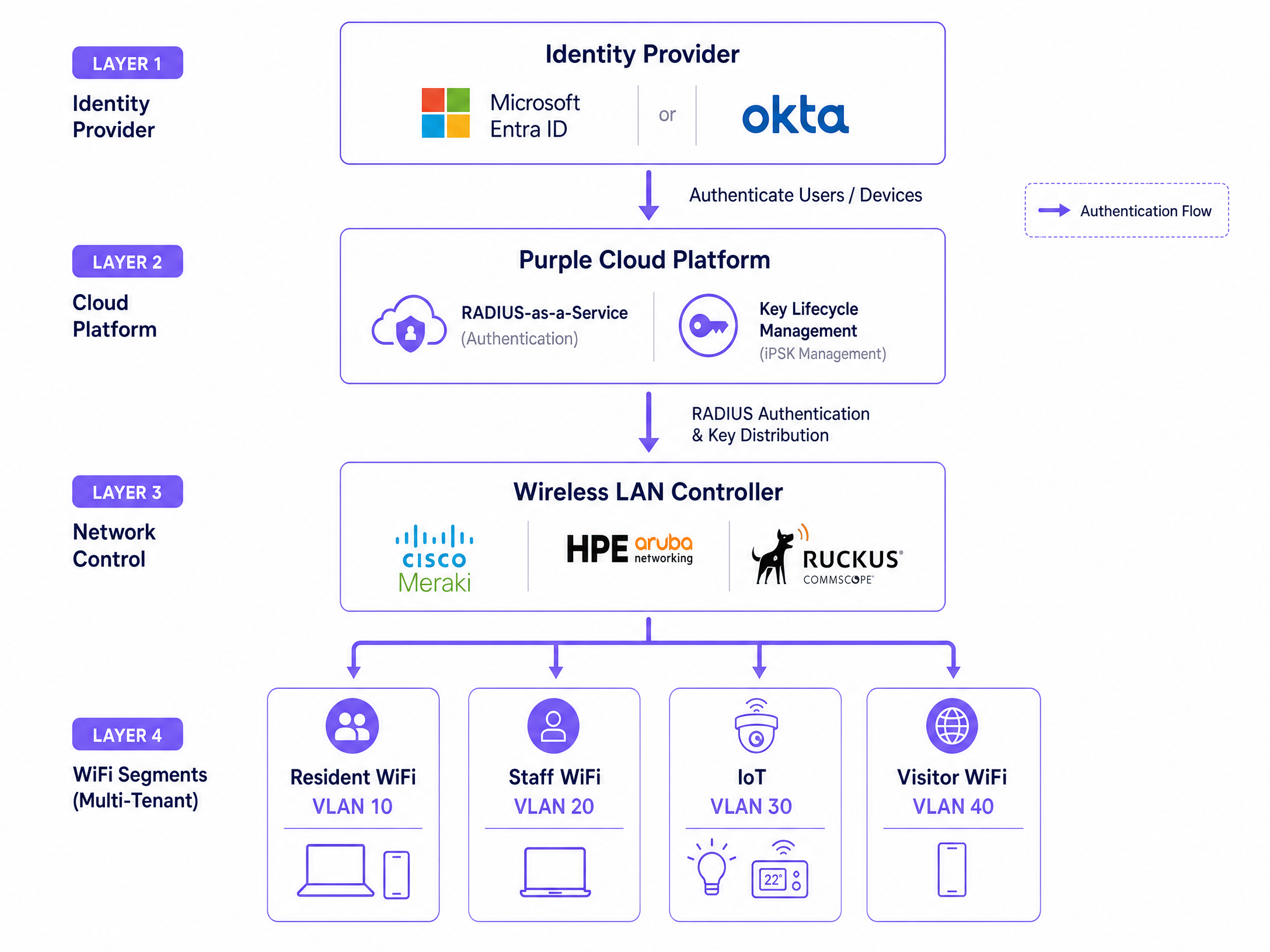
Vendor terminology differs: Cisco Meraki calls this iPSK, HPE Aruba calls it MPSK (Multi-PSK), and Ruckus calls it DPSK (Dynamic PSK). The underlying IEEE 802.11 standard and RADIUS attribute exchange are consistent across all three; the vendor-specific RADIUS dictionaries differ. Purple's cloud overlay abstracts this vendor complexity, presenting a unified key management interface regardless of whether your access points are Cisco Meraki, HPE Aruba, Ruckus, Juniper Mist, Ubiquiti UniFi, Cambium, Extreme, or Fortinet.
iPSK vs 802.1X: when to use each
WPA3 Enterprise with 802.1X is the correct choice for a fully managed corporate device fleet. If your laptops and phones are enrolled in MDM with certificates already deployed, 802.1X provides the strongest security posture. iPSK is the correct choice when you do not control the devices connecting to your network - which describes every multi-tenant residential, hospitality, and retail environment. IoT devices, smart TVs, gaming consoles, and streaming sticks have no 802.1X supplicant. iPSK supports them without compromise.
Layer 2 isolation and the WiFi bubble
The defining feature of iPSK for multi-tenant deployments is Layer 2 isolation. Devices on Resident A's key cannot see devices on Resident B's key, even when both are connected to the same physical access point. With mDNS reflection enabled, Resident A's Chromecast, smart speaker, and connected appliances all discover each other as they would on a home network. This is Purple's Multi-Tenant WiFi architecture: one network, one per-resident WiFi bubble, full IoT support, and strict inter-resident isolation.
Implementation guide: the "nama iPSK yang keren" taxonomy
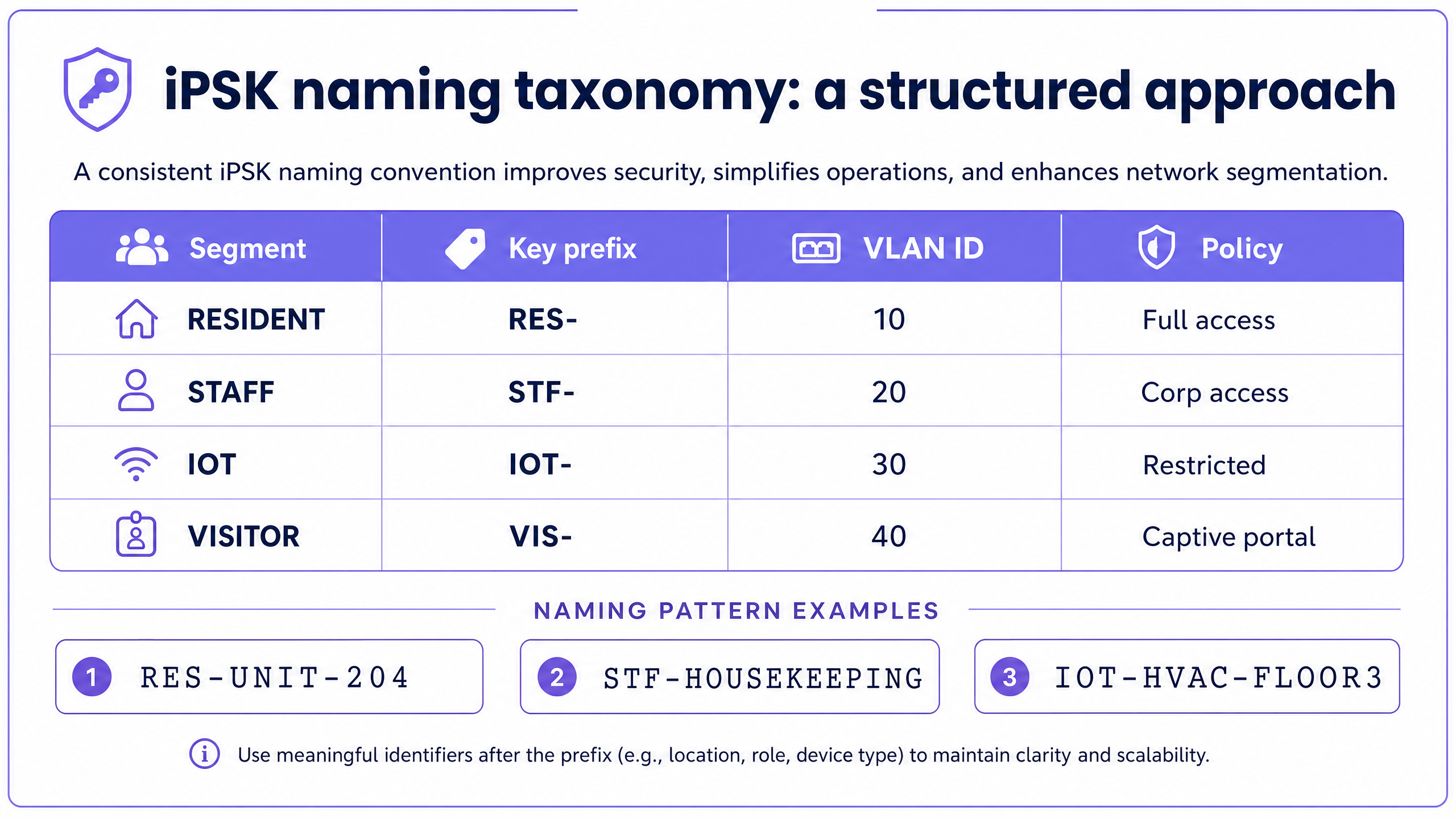
A scalable iPSK deployment requires a structured, machine-readable naming convention. Without it, managing thousands of keys across multiple sites becomes an operational bottleneck. The name of the key is not cosmetic - it is the primary identifier linking the network policy to the provisioning system.
The 4-part naming framework
We recommend a four-part structure: [Segment]-[Location]-[Identifier]-[Role]
Segment defines the high-level network category. Use short, consistent prefixes: RES for Resident, STF for Staff, IOT for Internet of Things, VIS for Visitor, GST for Guest (transient, as in hotel). Keep prefixes to three characters for readability in RADIUS logs.
Location encodes the physical site or building. Use a consistent site code from your property management system: LND for London, BLD1 for Building 1, HTLMCR for Manchester Hotel. This allows multi-site operators to filter keys by location without querying a separate database.
Identifier specifies the unit, department, or device group. For residential: APT204, UNIT07B. For staff: HR, HOUSEKEEPING, MAINTENANCE. For IoT: HVAC, CCTV, LIFT. Keep identifiers short and derived from your existing asset register or tenancy system.
Role defines the access policy tier. FULL for unrestricted resident access, ADMIN for elevated staff access, SENSOR for IoT read-only, CAPTIVE for visitor portal access. This field maps directly to the RADIUS policy profile returned on authentication.
Worked examples:
RES-BLD1-APT204-FULL: Resident in Building 1, Apartment 204, full network access.STF-LND-HR-ADMIN: Staff in London, HR department, admin-tier access.IOT-BLD2-HVAC-SENSOR: IoT device in Building 2, HVAC system, sensor-only access.GST-HTLMCR-RM312-FULL: Hotel guest in Manchester, Room 312, full guest access.
Automating key lifecycle management
The naming convention only delivers its value when it is integrated with your provisioning systems. In a BTR environment, the key name must map to a field in your Property Management System (PMS). When a tenancy record is created, the PMS triggers Purple to generate the key RES-BLD1-APT204-FULL and activate it. When the tenancy ends, the PMS triggers Purple to revoke it. No manual intervention. No password rotation for other residents.
Purple integrates with Microsoft Entra ID, Okta, and Google Workspace as identity providers. For staff WiFi, SCIM provisioning ensures that when a staff member's account is deprovisioned in your IdP, their iPSK key is revoked automatically. This closes the access gap that manual processes leave open.
Best practices
Four operational standards define a production-grade iPSK deployment.
First, enforce permanent MAC addresses. iOS 14 and later, Android 10 and later, and Windows 11 use MAC address randomisation by default. A randomised MAC address will not match the RADIUS identity store and will fail authentication. Implement a pre-registration portal where users register their device's permanent MAC address before connecting, or configure your SSID to require permanent MAC addresses via the WLC settings.
Second, design for RADIUS resilience. Your iPSK deployment is only as reliable as your RADIUS infrastructure. Deploy primary and secondary RADIUS servers with automated failover configured on the WLC. Purple's RADIUS-as-a-Service provides 99.999% uptime, removing the operational burden of managing RADIUS infrastructure in-house.
Third, validate vendor-specific RADIUS dictionaries during staging. Cisco Meraki uses the Tunnel-Password attribute. HPE Aruba uses Aruba-MPSK-Passphrase. Ruckus uses Ruckus-DPSK-Passphrase. Your RADIUS server must have the correct vendor dictionary loaded and your policy profiles must reference the correct attribute name for your hardware. Test this in a staging environment before production rollout.
Fourth, segment IoT traffic from day one. Always assign IoT devices to a dedicated VLAN with restricted outbound access. The IOT- prefix in your naming convention should automatically trigger the IoT RADIUS policy profile, which places the device on VLAN 30 with firewall rules that block lateral movement to resident or staff VLANs.
Troubleshooting and risk mitigation
| Failure mode | Root cause | Mitigation |
|---|---|---|
| Authentication timeout on first connect | RADIUS server latency exceeds WLC timeout threshold | Optimise RADIUS query performance; enable local RADIUS caching on the WLC where supported by the vendor |
| Device rejected despite correct passphrase | Client device presenting a randomised MAC address | Enforce permanent MAC address via MDM policy or pre-registration portal |
| VLAN misassignment | Incorrect RADIUS attribute mapping for the specific hardware vendor | Validate vendor-specific RADIUS dictionaries during staging; test VLAN assignment explicitly for each segment |
| Key exhaustion on high-density SSID | WLC hardware limit on maximum unique PSKs per SSID | Offload key management to Purple's cloud RADIUS; segment high-density areas across multiple SSIDs if hardware limits are rigid |
| Stale keys after staff departure | Manual key revocation process not followed | Integrate with Microsoft Entra ID or Okta via SCIM; automate revocation on account deprovisioning |
ROI and business impact
For BTR operators, managed WiFi as an amenity delivered via iPSK commands a £15-30 per unit per month rent premium, according to British Property Federation sector research. Move-in void periods reduce by 5-10 days because connectivity is available on day one without a broadband installation wait. At 200 units, a £20 per unit monthly premium represents £48,000 per year in incremental revenue - against a software overlay cost that is a fraction of that figure.
For hospitality operators, automated key lifecycle management via PMS integration eliminates the front-desk WiFi password workflow entirely. Guests receive their unique key at check-in, and it is revoked at check-out. The network audit log provides a complete record of which room was connected at any given time, supporting both security investigations and PCI DSS compliance evidence.
For retail, iPSK enables PCI DSS-compliant segmentation of payment processing devices onto a cryptographically isolated VLAN, even on shared physical infrastructure. This removes the need for separate physical networks for POS terminals and guest WiFi, reducing hardware and cabling costs at each site.
To explore these capabilities further, see our resources on Guest WiFi , WiFi Analytics , and our vertical guides for Retail , Healthcare , Hospitality , and Transport . For related technical reading, see Three SSIDs to rule them all: guest, Passpoint, and IoT WiFi and the companion guide Logo guild iPSK: a comprehensive guide for businesses .
Key Definitions
iPSK (Identity Pre-Shared Key)
An authentication mechanism where every user or device receives a unique pre-shared key for a single SSID. The WLC forwards the device's MAC address to a RADIUS server, which returns the correct PSK and associated network policy. Also called MPSK (HPE Aruba) or DPSK (Ruckus).
IT teams encounter iPSK when they need per-device access control in environments where 802.1X is impractical - multi-tenant residential, hospitality, retail, and IoT deployments.
RADIUS (Remote Authentication Dial-In User Service)
A networking protocol defined in RFC 2865 that provides centralised authentication, authorisation, and accounting (AAA) for network access. In an iPSK deployment, the RADIUS server holds the identity store mapping MAC addresses to unique PSKs and VLAN assignments.
RADIUS is the intelligence layer in an iPSK deployment. Without a functioning RADIUS server, no new devices can authenticate. RADIUS resilience - primary and secondary servers with failover - is a non-negotiable design requirement.
VLAN (Virtual Local Area Network)
A logical network segment defined at Layer 2 of the OSI model. In an iPSK deployment, RADIUS returns a VLAN tag with each Access-Accept response, placing the authenticated device on the correct network segment - resident, staff, IoT, or visitor.
VLAN assignment via RADIUS is what makes iPSK useful for multi-tenant deployments. Without it, all devices share the same network segment regardless of their key, eliminating the security and policy benefits.
WLC (Wireless LAN Controller)
The network device that manages access points and enforces WiFi policies. In an iPSK deployment, the WLC intercepts connection attempts, queries the RADIUS server, and applies the returned PSK and VLAN policy to the connecting device.
WLC vendor choice determines which RADIUS attributes and vendor-specific dictionaries you need. Cisco Meraki, HPE Aruba, and Ruckus each implement iPSK with slightly different attribute names.
MAC address randomisation
A privacy feature in iOS 14+, Android 10+, and Windows 11 that causes devices to present a randomly generated MAC address instead of their permanent hardware MAC address when connecting to WiFi networks.
MAC randomisation is the most common cause of iPSK authentication failures in new deployments. Because iPSK relies on MAC address lookups in the RADIUS identity store, a randomised MAC will not match any record and the connection will be rejected.
SSID (Service Set Identifier)
The name of a WiFi network as broadcast by access points. In an iPSK deployment, all user segments - residents, staff, IoT, visitors - connect to the same SSID. The RADIUS server differentiates them by MAC address and returns the appropriate key and policy.
A key design goal of iPSK is to minimise the number of SSIDs. Each additional SSID consumes airtime with management frames. A well-designed iPSK deployment serves all segments from a single SSID.
Layer 2 isolation
Network segmentation at the data link layer (OSI Layer 2) that prevents devices on different network segments from communicating directly, even when they share the same physical infrastructure and SSID.
Layer 2 isolation is the technical mechanism that creates the WiFi bubble in multi-tenant deployments. It ensures that Resident A's devices cannot see Resident B's devices, satisfying both security requirements and GDPR obligations around resident privacy.
mDNS (Multicast DNS)
A protocol that enables devices to discover each other on a local network without a central DNS server, used by Chromecast, Apple AirPlay, Sonos, and most smart home devices for device discovery.
mDNS reflection must be explicitly enabled within each resident's network segment for smart home devices to work correctly. Without it, a resident's Chromecast and phone will be on the same key but unable to discover each other, generating support tickets.
SCIM (System for Cross-domain Identity Management)
An open standard protocol (RFC 7643, RFC 7644) for automating the exchange of user identity information between identity providers and service providers. In an iPSK context, SCIM enables automatic key provisioning and revocation when staff accounts are created or deleted in Microsoft Entra ID or Okta.
SCIM integration closes the access gap that manual processes leave open. Without it, a staff member's iPSK key may remain active after they leave the organisation, representing a security risk that is difficult to audit at scale.
Worked Examples
A 200-room hotel needs to provide WiFi to guests, staff, and IoT devices (door locks, HVAC sensors, IP cameras) from a single physical infrastructure. The IT team wants automated key provisioning tied to the PMS check-in/check-out workflow. How should they structure their iPSK naming convention and provisioning architecture?
Define four segments: GST (guest), STF (staff), IOT (IoT devices), and MGT (management). Use the hotel's site code (e.g., HTLMCR for Manchester) as the location field. For guest keys, use the room number as the identifier: GST-HTLMCR-RM201 through GST-HTLMCR-RM400. For staff keys, use the department: STF-HTLMCR-HOUSEKEEPING, STF-HTLMCR-RECEPTION. For IoT, use the device type and floor: IOT-HTLMCR-DOORLOCK-FL1, IOT-HTLMCR-HVAC-FL2.
Integrate the PMS with Purple's API. On check-in, the PMS triggers Purple to activate the key for the assigned room. On check-out, it triggers revocation. Staff keys are provisioned via Microsoft Entra ID SCIM integration and revoked on account deprovisioning.
RADIUS policy profiles map each segment to a VLAN: VLAN 10 for guests (internet access, captive portal bypass after PMS activation), VLAN 20 for staff (corporate access), VLAN 30 for IoT (restricted outbound, no lateral movement). Deploy primary and secondary RADIUS servers with failover configured on the WLC.
A BTR operator is deploying multi-tenant WiFi across a 150-unit residential building. Residents expect home-network behaviour: Chromecast, smart speakers, and IoT appliances must all work together. The operator also needs to ensure that when a resident moves out, their access is terminated without affecting any other resident. How should iPSK be configured and named?
Assign each resident a unique key following the pattern RES-BLD1-APT[unit number]-FULL, for example RES-BLD1-APT047-FULL. All devices belonging to that resident - phone, laptop, Chromecast, smart speaker, connected appliances - use the same key. The RADIUS policy for the RES- segment enables mDNS reflection within the resident's VLAN, so devices on the same key discover each other as they would on a home network.
Layer 2 isolation is enforced between keys: Resident A's devices cannot see Resident B's devices even on the same access point. Integrate with the property management platform via Purple's API. On move-in, the platform activates the key for the assigned apartment. On move-out, it revokes it. The next resident receives a fresh key at their move-in date.
For common-area IoT (lifts, access control, CCTV), use a separate IOT- segment with a restricted VLAN. For visitor access (delivery drivers, contractors), deploy a VIS- segment with a captive portal and time-limited keys.
Practice Questions
Q1. You are the IT director for a 300-unit BTR development. The property manager wants to allow residents to add new devices to their network without calling the helpdesk. MAC address randomisation is enabled on most resident devices. Design an onboarding flow that solves both problems without compromising the iPSK security model.
Hint: Consider a self-service portal that captures the permanent MAC address during the device registration step, and how this integrates with the RADIUS identity store.
View model answer
Deploy a resident self-service portal accessible via the building's captive portal on first connection. When a resident connects a new device, the portal detects the MAC address and prompts them to log in with their resident credentials (integrated with the property management system via OAuth). On login, the portal registers the device's permanent MAC address against the resident's existing iPSK key (e.g. RES-BLD1-APT204-FULL) in the RADIUS identity store. The device is then added to the resident's existing VLAN 10 segment. To handle MAC randomisation, the portal includes a step-by-step guide for disabling MAC randomisation on the specific device type (iOS, Android, Windows), with the permanent MAC address displayed for confirmation before registration. This approach maintains the security model - only authenticated residents can register devices - while eliminating helpdesk calls for device additions.
Q2. A retail chain with 50 stores wants to use iPSK to segment POS terminals, staff tablets, digital signage, and guest WiFi onto separate VLANs. The IT team is concerned about PCI DSS compliance for the POS segment. What naming convention and RADIUS policy design would you recommend?
Hint: PCI DSS requires that cardholder data environments are isolated from other network segments. Consider how the RADIUS VLAN assignment can enforce this isolation, and what evidence the audit trail provides.
View model answer
Define four segments with distinct VLAN assignments: POS- (VLAN 10, PCI-DSS cardholder data environment, strict outbound firewall rules, no lateral movement), STF- (VLAN 20, staff tablets and corporate access), SGN- (VLAN 30, digital signage, internet-only, no corporate access), GST- (VLAN 40, guest WiFi with Captive Portal). Use the store code as the location field: POS-STORE042-TILL01, STF-STORE042-TABLET03, SGN-STORE042-DISPLAY01, GST-STORE042-GUEST.
The RADIUS policy for POS- must return VLAN 10 with firewall rules that restrict outbound traffic to the payment processor's IP range only and block all inbound lateral connections. For PCI-DSS audit evidence, the RADIUS logs provide a timestamped record of every POS terminal authentication, including MAC address, VLAN assignment, and session duration. This demonstrates that POS devices are consistently placed on the isolated VLAN, satisfying PCI-DSS Requirement 1.3 (restrict inbound and outbound traffic to that which is necessary for the cardholder data environment).
Q3. Your RADIUS server goes offline during a busy Saturday at a 200-room hotel. New guests cannot connect to WiFi, but existing connected devices are unaffected. The hotel's IT vendor says the fix will take four hours. What immediate mitigations are available, and what architectural change would prevent this scenario in future?
Hint: Consider both the immediate guest experience impact and the longer-term resilience design. Think about what happens to existing sessions vs new authentications when RADIUS is unavailable.
View model answer
Immediate mitigation: most WLC platforms support a RADIUS failover mode that falls back to a local PSK if the RADIUS server is unreachable. Configure a temporary fallback SSID with a time-limited shared PSK for new guest connections during the outage, communicated via the front desk. Existing authenticated sessions are unaffected because the WLC only queries RADIUS for new connection attempts, not for ongoing sessions.
Longer-term architectural change: deploy a secondary RADIUS server in a different availability zone or data centre, with automatic failover configured on the WLC. Purple's RADIUS-as-a-Service provides this redundancy by default, with a 99.999% uptime SLA. For on-premise RADIUS deployments, configure the WLC with a primary and secondary RADIUS server address, and set the failover timeout to no more than three seconds to minimise guest impact during a primary server failure. Test failover quarterly as part of your network maintenance schedule.
Continue reading in this series
Uu PPSK pdf: comparing features and deployment models
This technical reference guide compares Private Pre-Shared Key (PPSK) WiFi architecture against traditional 802.1X and standard PSK deployments. It provides network architects and IT managers with vendor-neutral implementation strategies for multi-tenant residential, IoT, and BTR environments.
Uu PPSK pdf: comparing features and deployment models
This technical reference guide compares Private Pre-Shared Key (PPSK) WiFi architecture against traditional 802.1X and standard PSK deployments. It provides network architects and IT managers with vendor-neutral implementation strategies for multi-tenant residential, IoT, and BTR environments.
Uu PPSK 2023: comparing features and deployment models
This technical reference guide compares Unique per-User Private Pre-Shared Key (UU PPSK) WiFi architecture against traditional shared PSK and 802.1X deployments, with a specific focus on the 2023 landscape of vendor implementations and platform capabilities. It provides property developers, BTR operators, and MDU landlords with actionable deployment strategies, VLAN architecture guidance, and automated lifecycle management workflows. The guide covers three deployment models, real-world case studies, and the compliance implications of each authentication approach.