
Why 5GHz is Faster but 2.4GHz is More Reliable
This comprehensive technical guide explores the architectural trade-offs between 2.4GHz and 5GHz wireless frequencies, providing actionable deployment strategies for IT managers and network architects. It covers the physics of frequency propagation, channel planning, band steering, and real-world implementation scenarios across hospitality, retail, and public-sector environments. Venue operators and CTOs will find concrete guidance on optimising coverage, mitigating interference, and measuring ROI from their wireless infrastructure investments.
Listen to this guide
View podcast transcript
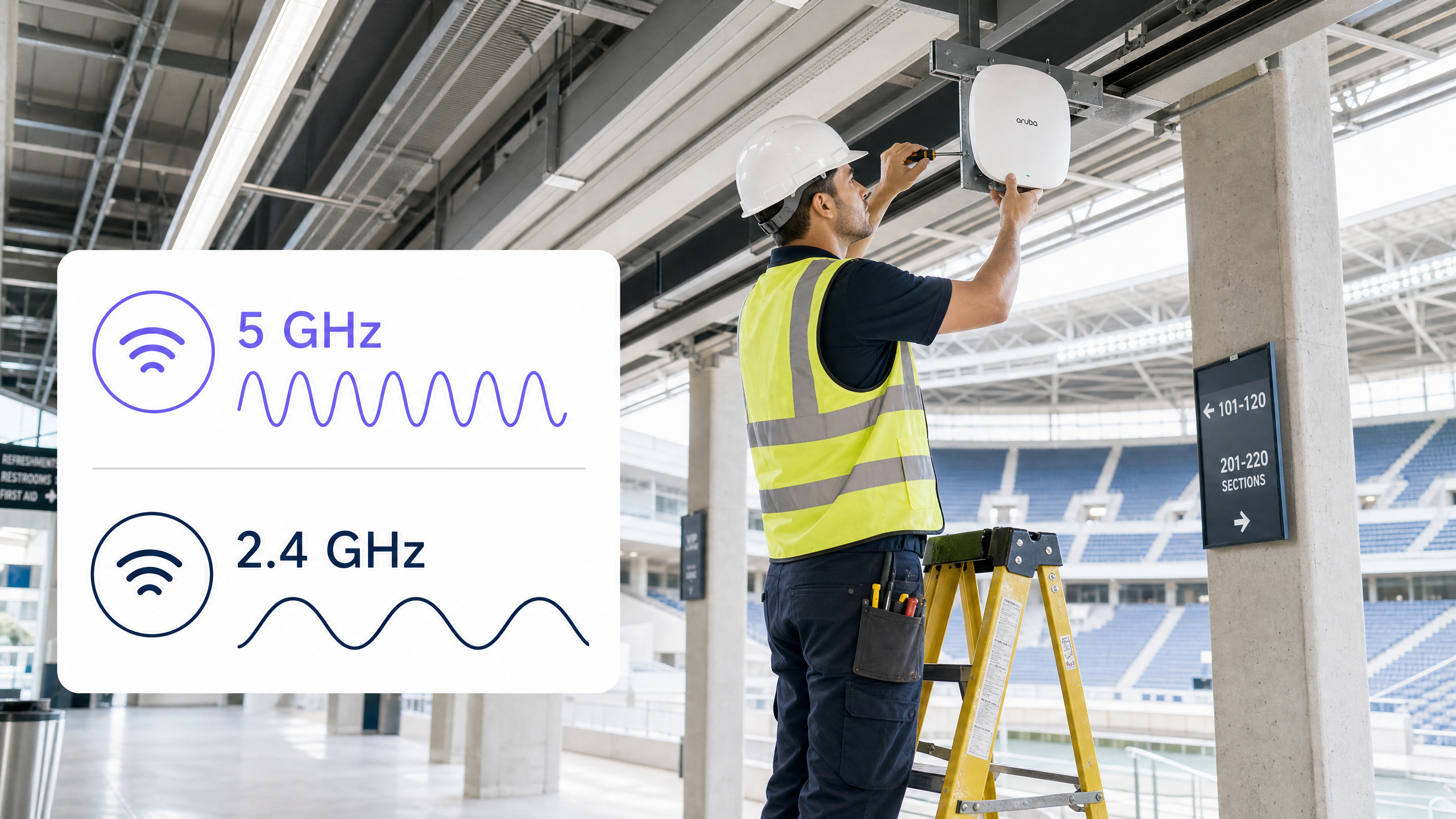
Executive Summary
For CTOs and network architects managing enterprise wireless deployments, the decision between 2.4GHz and 5GHz is not a binary choice — it is a foundational architectural strategy. 5GHz delivers the massive throughput required for high-density environments and complex applications, while 2.4GHz provides the critical coverage layer necessary to penetrate physical barriers and support legacy IoT devices. This guide dissects the physics behind these two frequencies, explains why 5GHz delivers exponential speed increases, and why 2.4GHz remains indispensable for baseline reliability. We provide vendor-neutral, actionable recommendations for channel planning, transmit power tuning, and intelligent band steering. By implementing a properly tuned dual-band strategy supported by robust analytics platforms like Guest WiFi , venue operators can mitigate risk, optimise ROI, and deliver a seamless connectivity experience across Hospitality , Retail , Healthcare , and Transport environments.
Technical Deep-Dive
The Physics of Frequency: Why Wavelength Determines Everything
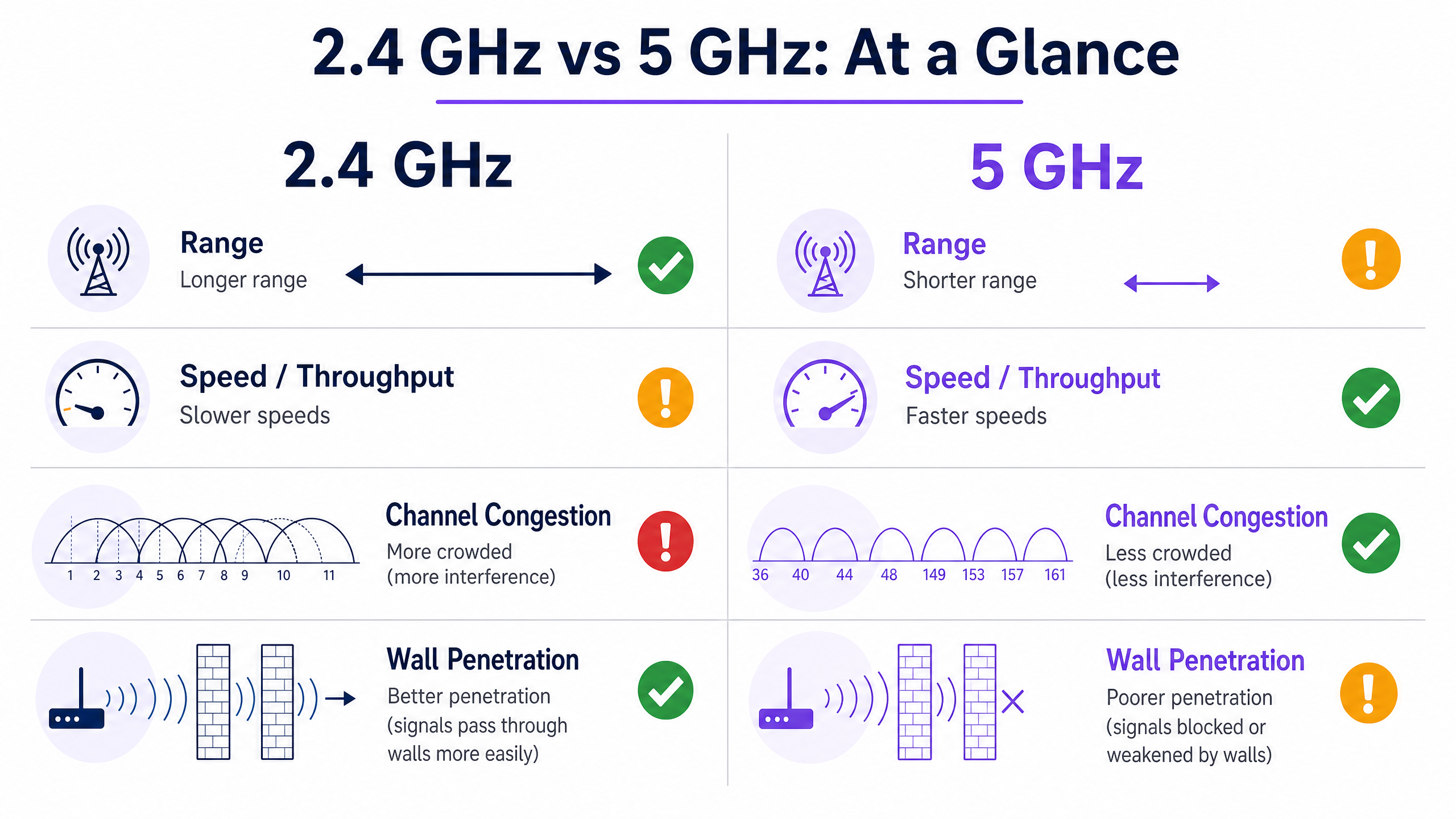
The fundamental difference between 2.4GHz and 5GHz lies in their wavelength. The 2.4GHz band operates on longer wavelengths (approximately 12.5 cm), which are highly effective at penetrating solid objects such as concrete walls, steel doors, and even human bodies in crowded venues. This physical characteristic is why 2.4GHz provides a wider coverage footprint and is often perceived as more reliable when users are moving through complex environments or situated far from an access point.
However, this longer range comes with significant trade-offs. The 2.4GHz spectrum is notoriously narrow, offering only three non-overlapping channels (1, 6, and 11) in most regulatory domains. In dense deployments — a hotel floor, a retail store, a conference centre — this inevitably leads to severe co-channel interference (CCI). Furthermore, the 2.4GHz band is a shared, congested resource: it competes with Bluetooth devices, microwave ovens, baby monitors, and a growing ecosystem of legacy IoT hardware, all of which drag down overall throughput for every device on the network.
Conversely, the 5GHz band operates on shorter wavelengths (approximately 6 cm). While this limits its ability to penetrate physical barriers — a signal that easily passes through a wall on 2.4GHz may be entirely blocked on 5GHz — it offers a vastly wider spectrum. With up to 24 non-overlapping channels available (depending on regulatory domain and DFS channel availability), 5GHz allows for wider channel bonding: 40MHz, 80MHz, or even 160MHz under IEEE 802.11ac (Wi-Fi 5) and 802.11ax (Wi-Fi 6/6E). This wider channel is the key to achieving the massive throughput required for high-density environments, HD video streaming, and modern enterprise applications. When a device connects on 5GHz with a clear line of sight, the achievable speeds are exponentially higher than what 2.4GHz can deliver.
Channel Architecture and Interference Models
Understanding channel architecture is critical to any enterprise deployment. On 2.4GHz, the IEEE 802.11 standard defines 14 channels (though regulatory domains vary), but only channels 1, 6, and 11 are truly non-overlapping. This means that in any given area, a maximum of three access points can operate simultaneously without causing adjacent-channel interference. In a multi-storey hotel or a dense retail environment, this constraint becomes a hard ceiling on network capacity.
On 5GHz, the picture is dramatically different. The UNII-1 (5.15–5.25 GHz), UNII-2 (5.25–5.35 GHz), UNII-2 Extended (5.47–5.725 GHz), and UNII-3 (5.725–5.85 GHz) bands collectively provide up to 24 non-overlapping 20MHz channels. Architects can deploy significantly more access points in the same physical space without creating interference, enabling the high-density designs required for stadiums, conference centres, and large retail environments.
Dynamic Frequency Selection (DFS) channels, which fall within the UNII-2 and UNII-2 Extended bands, expand the available spectrum further but require careful consideration. These channels must be shared with radar systems, and an access point detecting a radar signal must vacate the channel within 10 seconds and remain off that channel for 30 minutes. In environments near airports or weather stations, DFS channel instability can disrupt critical services, so architects should plan fallback channels accordingly.
Implementation Guide
Dual-Band Architecture and Band Steering
The industry-standard approach to modern wireless architecture is a dual-band deployment with aggressive band steering. Access points must be configured to actively encourage dual-band capable devices — modern smartphones, laptops, and tablets — onto the 5GHz band. This strategy clears the 2.4GHz airspace for legacy devices, critical IoT sensors, and edge-case coverage areas where 5GHz cannot reach.
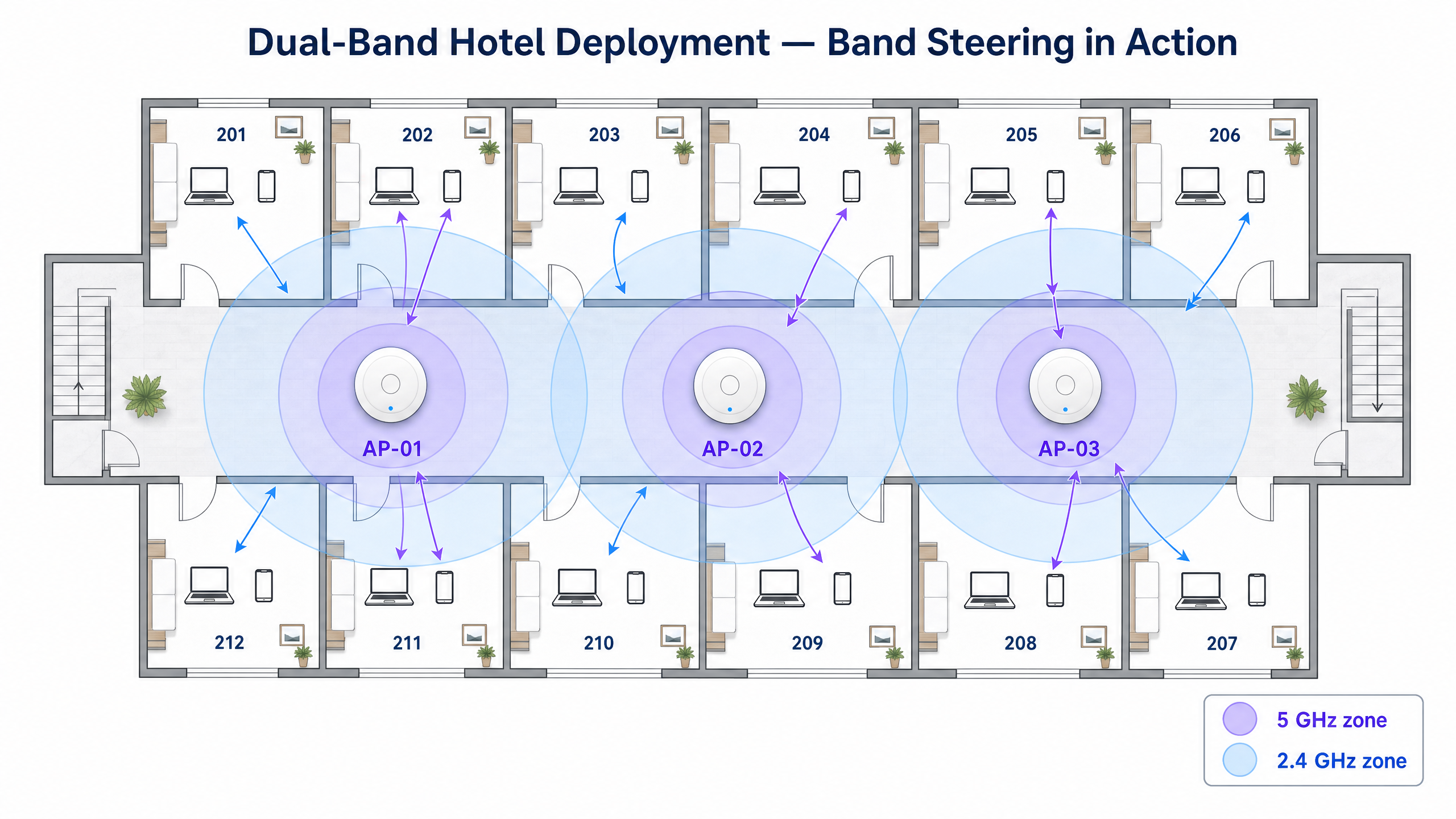
Band steering operates by suppressing 2.4GHz probe responses for capable clients until they either associate on 5GHz or fail to respond after a defined number of attempts. Most enterprise-grade infrastructure vendors implement this natively, but the aggressiveness of the steering policy must be tuned to the environment. In a venue where many older devices are present — a public-sector building or a healthcare facility, for example — overly aggressive band steering can prevent legitimate 2.4GHz-only devices from connecting at all.
Designing for Capacity, Not Coverage
A common and costly pitfall in Hospitality and Retail deployments is increasing the transmit power on 5GHz radios in an attempt to match the coverage footprint of 2.4GHz. This approach creates the "sticky client" problem: devices hold onto a weak 5GHz signal rather than roaming to a stronger access point, resulting in degraded performance for the affected client and consuming airtime that degrades performance for all other clients in the cell.
The correct approach is to design for capacity by deploying more access points at lower transmit power settings. Smaller, well-defined coverage cells ensure seamless roaming, optimal channel reuse, and a balanced load across the network. As a practical rule, 5GHz transmit power should typically be set 6–9 dBm higher than 2.4GHz transmit power, creating a natural coverage differential that encourages clients to prefer 5GHz when they are close to an AP and fall back to 2.4GHz at the cell edge.
Integrating a hardware-agnostic platform like Purple's WiFi Analytics allows venue operators to capture performance data across both bands, providing the visibility needed to identify sticky clients, high-interference zones, and underperforming access points. This data-driven approach to network optimisation is particularly valuable in dynamic environments such as event venues, where the RF environment changes dramatically between events.
Step-by-Step Deployment Checklist
| Phase | Action | Standard / Reference |
|---|---|---|
| 1. RF Survey | Conduct a passive and active site survey to map existing interference sources | IEEE 802.11-2020 |
| 2. Channel Plan | Assign non-overlapping channels; use 1, 6, 11 on 2.4GHz; allocate DFS channels on 5GHz with caution | Wi-Fi Alliance Best Practices |
| 3. Power Tuning | Set 5GHz transmit power 6–9 dBm above 2.4GHz; avoid maximum power settings | Vendor-specific RRM guidelines |
| 4. Band Steering | Enable band steering; tune aggressiveness based on device mix | IEEE 802.11v (BSS Transition) |
| 5. Minimum RSSI | Configure minimum RSSI thresholds to prevent sticky clients | Vendor-specific |
| 6. Security | Implement WPA3-SAE on guest networks; WPA3-Enterprise (IEEE 802.1X) on corporate SSIDs | WPA3 Specification, GDPR |
| 7. Analytics | Deploy WiFi Analytics to monitor band utilisation, client counts, and roaming events | Purple Platform |
Best Practices
Strict Channel Planning is non-negotiable. Adhere to channels 1, 6, and 11 on the 2.4GHz band to avoid adjacent-channel interference. On 5GHz, utilise DFS channels where the environment permits, but maintain a documented fallback plan for radar-triggered channel changes.
Disable Legacy Data Rates on both bands. Removing support for 802.11b data rates (1, 2, 5.5, and 11 Mbps) on 2.4GHz significantly reduces management overhead and forces clients with poor signal to roam to a closer access point rather than holding onto a degraded connection. This single configuration change can improve overall network efficiency by 20–30% in dense environments.
Implement 802.11r (Fast BSS Transition) to enable seamless roaming between access points. In environments where users are mobile — retail floors, hospital wards, transport hubs — 802.11r reduces the roaming handoff time from several hundred milliseconds to under 50ms, which is critical for voice-over-WiFi and real-time applications.
Segment SSIDs by Purpose. Avoid the temptation to run all traffic on a single SSID. A properly segmented network separates guest traffic (managed via Guest WiFi with appropriate captive portal and data capture), corporate traffic (secured with IEEE 802.1X and WPA3-Enterprise), and IoT devices (isolated on a dedicated VLAN). This segmentation also supports PCI DSS compliance for retail environments handling card payments.
Troubleshooting & Risk Mitigation
Co-Channel Interference (CCI)
Risk: Multiple access points operating on the same channel within hearing distance of each other, causing devices to wait for clear airtime before transmitting. This is the single most common cause of poor WiFi performance in enterprise environments.
Mitigation: Implement automated Radio Resource Management (RRM) or manually audit channel assignments quarterly. Use spectrum analysis tools to identify rogue access points and non-WiFi interference sources. In multi-tenant buildings, coordinate channel plans with neighbouring tenants where possible.
Sticky Clients
Risk: Devices remaining connected to an access point with a weak signal even when a stronger one is available, consuming airtime and degrading cell performance.
Mitigation: Configure minimum RSSI thresholds (typically –70 to –75 dBm) to gently disassociate clients with poor signal. Combine with 802.11v BSS Transition Management to steer clients to better access points before disassociation becomes necessary.
DFS Channel Instability
Risk: Radar detection events forcing access points off DFS channels, causing brief connectivity interruptions for associated clients.
Mitigation: In environments near airports, military installations, or weather stations, avoid DFS channels entirely. In other environments, ensure access points are configured to move to a pre-defined fallback channel rather than selecting a new channel dynamically, which can cause unpredictable interference.
IoT Device Compatibility
Risk: Legacy IoT devices — environmental sensors, payment terminals, access control readers — may only support 2.4GHz and older security protocols, creating a vulnerability if these devices share the same network as guest or corporate traffic.
Mitigation: Isolate IoT devices on a dedicated SSID and VLAN. Ensure the 2.4GHz radio is not disabled in an attempt to simplify the network, as this will render these devices inoperable. For guidance on managing network address constraints in high-density IoT environments, see our guide on Managing Public IP Exhaustion in Student Accommodation .
ROI & Business Impact
A properly architected dual-band network delivers measurable business outcomes across every vertical. In Hospitality , reliable high-speed WiFi is consistently ranked among the top factors in guest satisfaction scores, directly influencing review ratings and repeat bookings. A well-tuned 5GHz deployment ensures guests can stream content, conduct video calls, and use cloud applications without interruption, while the 2.4GHz layer ensures connectivity is maintained even in rooms furthest from the access point.
In Retail environments, the business case is even more direct. A reliable 5GHz network ensures point-of-sale systems process transactions without latency, while the 2.4GHz network supports inventory scanners deep within the aisles. Downtime caused by a poorly designed RF environment translates directly to lost revenue. By leveraging WiFi Analytics , retail operators can also measure dwell time and footfall patterns, converting the network infrastructure into a first-party data asset.
For public-sector organisations and transport operators, the ROI calculation includes risk mitigation as well as direct revenue. A network that fails during peak demand — a stadium event, a rush-hour commute — creates reputational damage that is difficult to quantify but easy to avoid with proper architecture. Purple's work in this space, including the appointment of specialist leadership for public-sector digital inclusion as detailed in the Iain Fox announcement , reflects the growing recognition that enterprise WiFi is critical public infrastructure.
The emergence of passwordless authentication technologies, as explored in our guide on How a WiFi Assistant Enables Passwordless Access in 2026 , further increases the ROI of a well-designed network by reducing support overhead and improving the guest onboarding experience. Offline resilience capabilities, such as those described in Purple's Offline Maps Mode , ensure that the user experience remains intact even when upstream connectivity is degraded.
Expected Outcomes from a Properly Tuned Dual-Band Deployment:
| Metric | Typical Improvement |
|---|---|
| Guest WiFi satisfaction scores | +15–25% |
| Network-related support tickets | –30–40% |
| Peak-hour throughput per client | +40–60% |
| Roaming handoff time (with 802.11r) | –80% (from ~300ms to <50ms) |
| 2.4GHz airtime utilisation | –20–30% (offloaded to 5GHz) |
Key Definitions
Band Steering
A mechanism by which an access point suppresses 2.4GHz probe responses for dual-band capable clients, encouraging them to associate on the 5GHz band instead.
Critical for optimising airtime utilisation in dense environments. Must be tuned carefully to avoid blocking legitimate 2.4GHz-only devices.
Co-Channel Interference (CCI)
Interference that occurs when two or more access points operating on the same channel are within hearing distance of each other, causing the CSMA/CA protocol to force devices to wait for clear airtime before transmitting.
The primary cause of poor WiFi performance in enterprise deployments. Mitigated through careful channel planning and appropriate AP density.
Channel Bonding
The practice of combining adjacent 20MHz channels to create wider channels (40MHz, 80MHz, 160MHz), increasing the available throughput for associated clients.
Highly effective on 5GHz for high-bandwidth applications. Should be avoided on 2.4GHz due to the limited spectrum available.
Dynamic Frequency Selection (DFS)
A regulatory requirement that forces WiFi devices operating on certain 5GHz channels to detect and avoid radar signals, vacating the channel within 10 seconds if radar is detected.
Expands the available 5GHz channel set but introduces the risk of channel changes during radar detection events. Requires careful planning near airports and military installations.
Received Signal Strength Indicator (RSSI)
A measurement of the power present in a received radio signal, typically expressed in dBm (negative values, where closer to 0 is stronger).
Used to determine client health, trigger roaming events, and validate coverage during site surveys. A minimum of –70 dBm is typically required for reliable enterprise WiFi operation.
Sticky Client
A device that remains associated with an access point despite having a weak signal (low RSSI), when a stronger access point is available. This occurs because the 802.11 standard gives clients full control over roaming decisions.
Degrades performance for the affected client and consumes airtime that reduces performance for all other clients in the cell. Mitigated by minimum RSSI thresholds and 802.11v BSS Transition Management.
Throughput
The actual quantity of data successfully transferred across the network in a given time period, as distinct from the theoretical maximum data rate (PHY rate) advertised by the access point.
The practical metric for user experience. Throughput is always lower than the PHY rate due to protocol overhead, retransmissions, and shared airtime.
Radio Resource Management (RRM)
An automated system that dynamically adjusts channel assignments and transmit power levels across a group of access points to minimise interference and optimise coverage.
Available on most enterprise-grade wireless controllers. Reduces the operational overhead of manual channel planning but should be validated regularly, as RRM decisions are not always optimal in complex environments.
IEEE 802.11r (Fast BSS Transition)
An amendment to the 802.11 standard that pre-authenticates clients with neighbouring access points, reducing the roaming handoff time from several hundred milliseconds to under 50ms.
Essential for voice-over-WiFi, real-time applications, and mobile worker environments such as retail floors and hospital wards.
Worked Examples
A 200-room hotel is experiencing widespread complaints of slow WiFi during the evening peak (18:00–22:00). The current deployment uses corridor-mounted access points with both 2.4GHz and 5GHz radios set to maximum transmit power. A site survey reveals that most rooms are 8–12 metres from the nearest AP, with two concrete walls between the device and the AP.
Step 1 — Reduce transmit power on both bands. Set 5GHz to 17 dBm and 2.4GHz to 10 dBm. This creates a natural coverage differential that encourages clients to prefer 5GHz when close to the AP and fall back to 2.4GHz at the cell edge, reducing sticky client incidents.
Step 2 — Enable aggressive band steering. Configure the infrastructure to suppress 2.4GHz probe responses for dual-band capable devices for at least 200ms, giving 5GHz priority. Monitor the band utilisation ratio via the analytics platform; target 70–80% of clients on 5GHz during peak hours.
Step 3 — Disable legacy 802.11b data rates on 2.4GHz (1, 2, 5.5, 11 Mbps). This reduces management overhead and forces clients with poor signal to roam rather than holding onto a degraded connection.
Step 4 — Implement 802.11r Fast BSS Transition and configure minimum RSSI thresholds at –72 dBm to ensure clients roam before signal quality degrades below usable levels.
Step 5 — Plan a phased upgrade to in-room access points for the top three floors (highest complaint density). In-room APs provide direct 5GHz line-of-sight to guest devices, eliminating the wall penetration problem entirely for those floors.
A large retail warehouse (15,000 sq m) needs WiFi connectivity for both a corporate office area (50 staff using laptops and video conferencing) and a warehouse floor (200 legacy barcode scanners navigating 8-metre-high metal racking). The existing network uses a single SSID on both bands.
Step 1 — Segment the network. Create three SSIDs: CORP (WPA3-Enterprise, 802.1X, 5GHz preferred), WAREHOUSE (WPA2-PSK, 2.4GHz only, isolated VLAN), and GUEST (captive portal via Purple Guest WiFi, dual-band).
Step 2 — Design the office area for 5GHz capacity. Deploy access points at 10–12 metre spacing with 80MHz channel bonding on 5GHz for high-throughput video conferencing. Disable 2.4GHz on office-area APs or reduce its power to a minimum.
Step 3 — Design the warehouse floor specifically for 2.4GHz reliability. The metal racking creates a severe multipath environment for 5GHz, causing rapid signal degradation. Deploy APs at the end of each aisle at 2.4GHz-optimised power levels. Use channels 1, 6, and 11 in a strict alternating pattern across aisles to minimise CCI.
Step 4 — Validate scanner connectivity with a walkthrough test, measuring RSSI at the far end of each aisle. Target a minimum of –65 dBm for reliable scanner operation.
Step 5 — Integrate Purple WiFi Analytics to monitor scanner roaming events and identify any aisles with coverage gaps.
Practice Questions
Q1. You are designing the WiFi network for a new university lecture hall expected to seat 300 students, each bringing 2–3 devices. The hall has a flat ceiling at 4 metres and no internal walls. What is your primary frequency strategy and AP placement approach?
Hint: Consider the density of devices, the physical environment, and the need to minimise co-channel interference.
View model answer
The primary strategy is high-density 5GHz coverage. With up to 900 devices in a single room, the 2.4GHz band would be immediately saturated due to its three-channel constraint. Deploy 6–8 access points with directional antennas across the ceiling, creating small, non-overlapping 5GHz coverage cells. Set transmit power low (12–15 dBm on 5GHz) to define tight cell boundaries and prevent sticky clients. Enable aggressive band steering and disable 2.4GHz on most APs, leaving it active on 1–2 APs at the back of the hall for any legacy devices. Use 40MHz channel bonding on 5GHz to balance throughput and channel reuse.
Q2. A hospital IT director reports that medical telemetry carts frequently drop their WiFi connection when moving between wards. The network is dual-band with band steering enabled. What is the most likely cause and what is your recommended remediation?
Hint: Consider roaming behaviour, the physical characteristics of hospital construction, and the impact of band steering on mobile devices.
View model answer
The most likely cause is a combination of sticky client behaviour and overly aggressive band steering. The carts are probably holding onto a weak 5GHz signal as they move through concrete walls, rather than roaming to a stronger AP. When they finally roam, the handoff delay is causing the application to drop its connection. Remediation: (1) Audit transmit power settings — ensure 2.4GHz is set lower than 5GHz to create clear cell boundaries. (2) Configure minimum RSSI thresholds at –70 dBm to trigger roaming before signal degrades to unusable levels. (3) Implement 802.11r Fast BSS Transition to reduce roaming handoff time to under 50ms. (4) If the telemetry application only requires low bandwidth, consider configuring the carts to connect exclusively to 2.4GHz, which will provide more consistent coverage through the hospital's concrete walls.
Q3. A retail chain wants to deploy WiFi-based location analytics across 50 stores to measure dwell time and customer journey mapping. Should the analytics platform rely primarily on 2.4GHz or 5GHz probe data, and why?
Hint: Consider which frequency devices probe on most frequently, the range implications for triangulation accuracy, and the role of a platform like Purple WiFi Analytics.
View model answer
Location analytics should rely primarily on 2.4GHz probe data, for two reasons. First, 2.4GHz has a longer range, meaning access points can detect device probe requests from greater distances, providing more data points for triangulation and improving accuracy. Second, many smartphones still probe more aggressively on 2.4GHz to conserve battery, resulting in a higher volume of probe data. However, a robust platform like Purple's WiFi Analytics will aggregate probe data from both bands to maximise coverage and accuracy. It is also important to note that iOS 14+ and Android 10+ implement MAC address randomisation for probe requests, which requires the analytics platform to use statistical fingerprinting techniques rather than relying solely on MAC-based tracking.