
PPSK adalah: comparing features and deployment models
This authoritative technical reference compares Private Pre-Shared Key (PPSK) with 802.1X and standard PSK authentication. It provides actionable deployment architectures, vendor-neutral recommendations, and real-world case studies for IT leaders deploying multi-tenant WiFi in hospitality, retail, and residential environments.
Listen to this guide
View podcast transcript
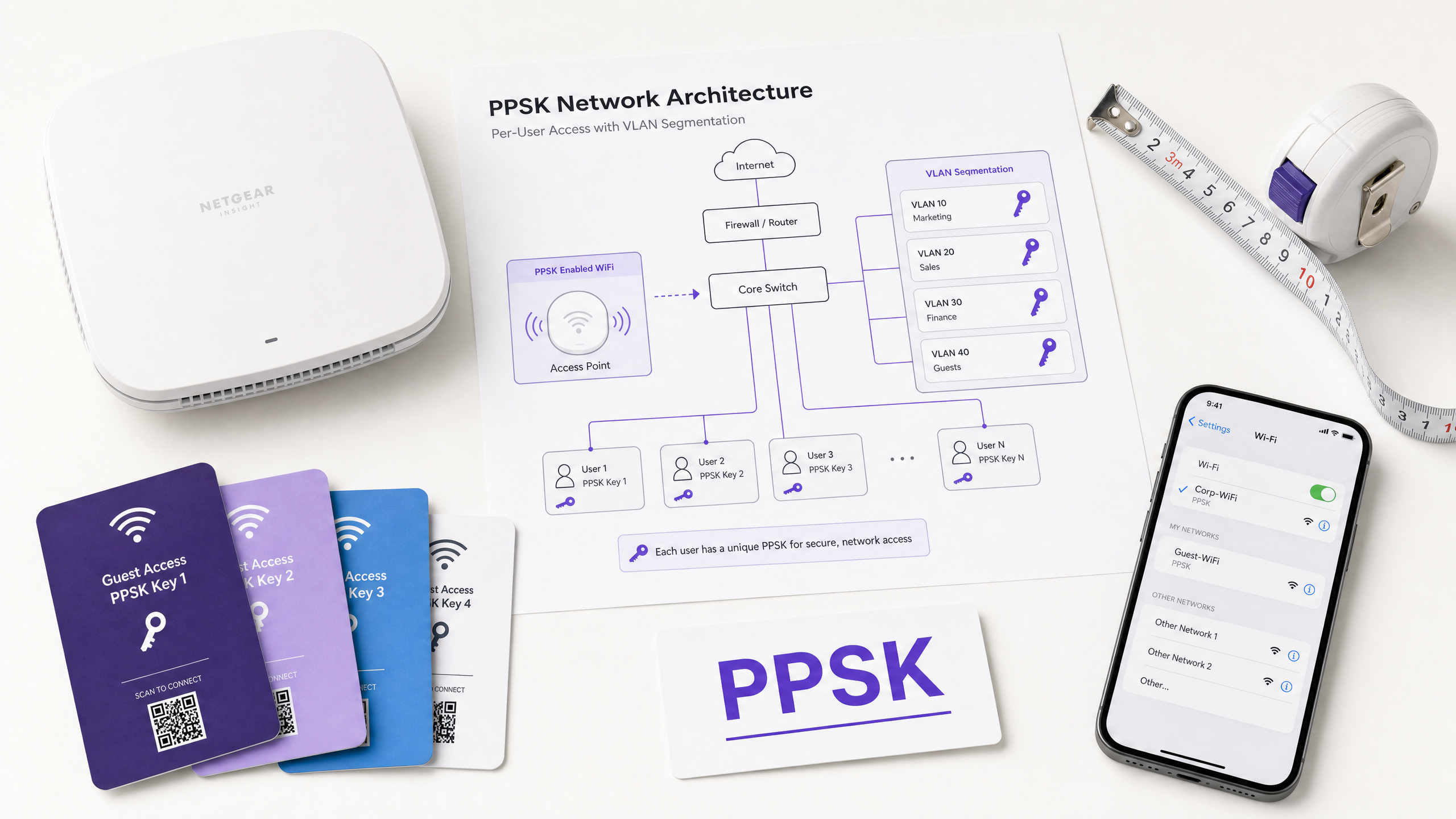
Executive Summary
For IT managers and network architects deploying multi-tenant networks, selecting the correct authentication model is a strategic decision that determines security posture, operational overhead, and compliance. This guide examines PPSK (Private Pre-Shared Key) architecture, comparing it against 802.1X and standard PSK.
PPSK provides per-user network isolation and individual access revocation without the complexity of an 802.1X enterprise deployment. It bridges the gap between the insecurity of shared passwords and the strict endpoint requirements of RADIUS-backed certificate authentication. By issuing unique keys that map directly to isolated VLANs, venue operators can securely support headless IoT devices, deliver a "home network" experience in multi-dwelling units (MDUs), and simplify onboarding for thousands of transient users. We detail the technical implementation, evaluate vendor approaches, and provide concrete deployment frameworks for Hospitality , Build to Rent (BTR), and Retail environments.
Technical Deep-Dive
The Architecture of PPSK
PPSK (Identity Pre-Shared Key, or iPSK in Cisco terminology) fundamentally alters how WPA2/WPA3-Personal operates. In a standard PSK deployment, every device shares a single cryptographic key. If that key is compromised, the entire network segment is vulnerable, and revoking access for one user requires changing the password for everyone.
PPSK solves this by allowing a single SSID to accept thousands of unique passphrases. When a client device initiates the 4-way handshake, the access point captures the MAC address and the specific passphrase used. It forwards this data to a RADIUS server (or a local controller database). The authentication server validates the key and returns an Access-Accept message containing specific RADIUS attributes - most critically, the VLAN ID assigned to that specific user.
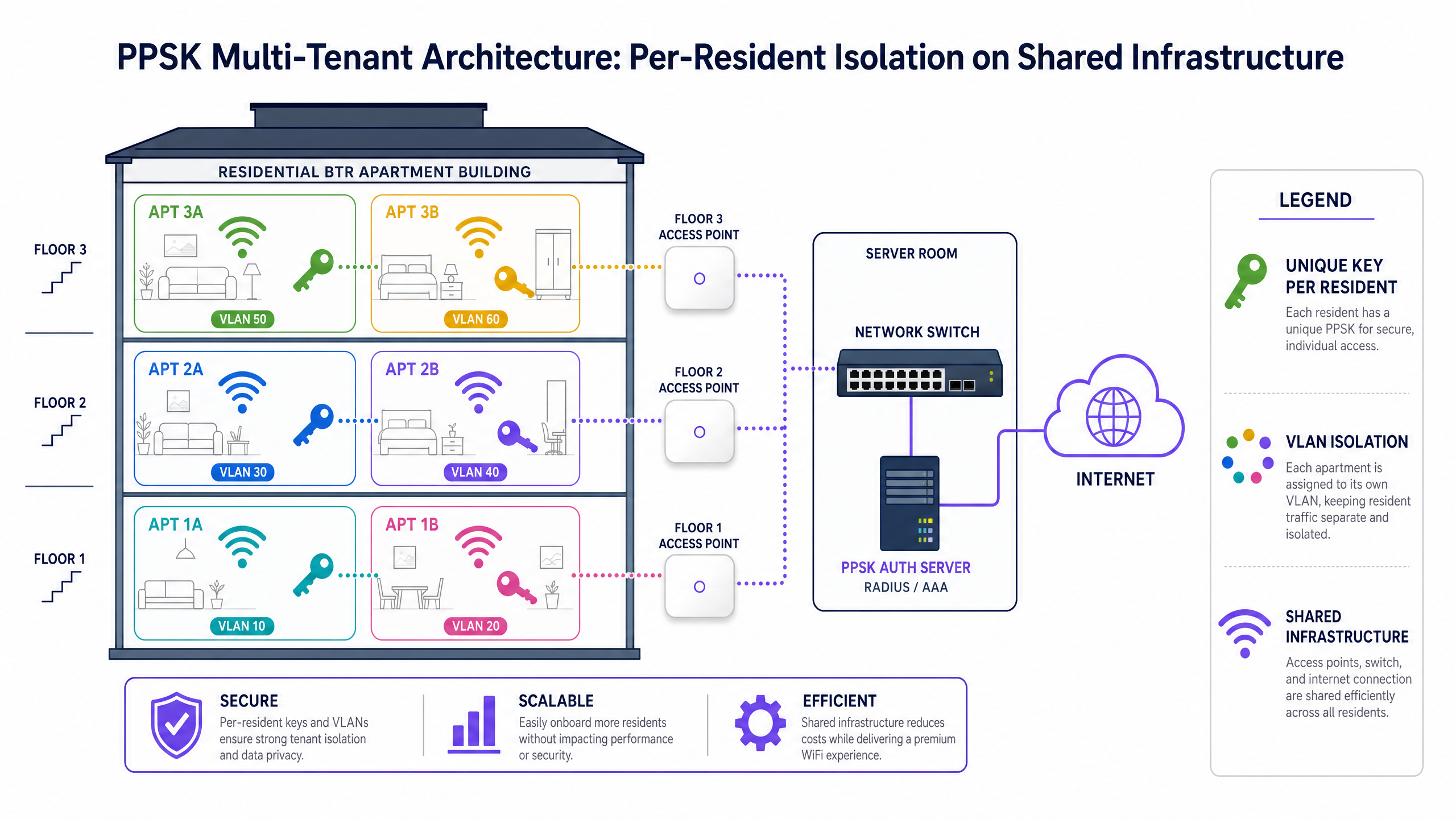
This mechanism enables the "WiFi bubble" concept. Every resident in a BTR property, or every vendor in a retail complex, connects to the same physical access point broadcasting the same SSID. However, the network dynamically assigns them to isolated VLANs based on their unique key.
PPSK vs 802.1X vs Standard PSK
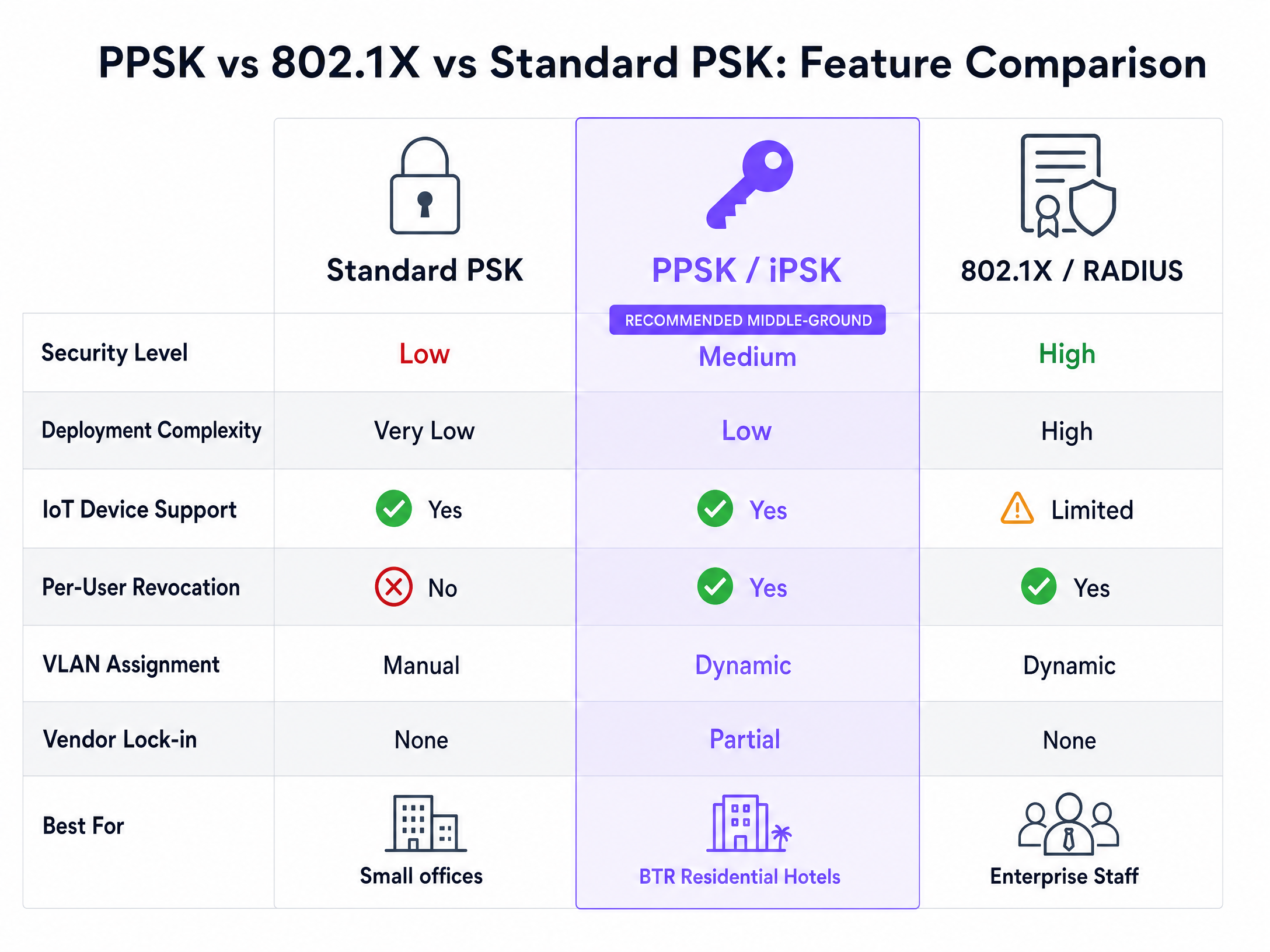
Understanding when to deploy PPSK requires comparing it against the alternatives.
802.1X (WPA2/3-Enterprise) remains the gold standard for corporate staff networks. It provides individual accountability and integrates natively with Microsoft Entra ID or Okta. However, 802.1X requires a supplicant on the client device. Most IoT devices - smart TVs, thermostats, gaming consoles, and access control systems - do not support 802.1X.
Standard PSK is suitable only for small, controlled environments. It provides no individual accountability, no granular VLAN assignment, and no practical method for revoking access at scale.
PPSK sits in the middle. It provides the individual accountability and dynamic VLAN assignment of 802.1X, but uses the universal compatibility of standard PSK. This makes it the definitive choice for multi-tenant environments and IoT deployments.
Implementation Guide
Deploying PPSK successfully requires strict adherence to network segmentation principles and a clear understanding of your hardware capabilities.
1. VLAN Design and Network Segmentation
The foundation of a PPSK deployment is VLAN segmentation. You must design a logical architecture where each tenant, resident, or device category is assigned a distinct VLAN. Traffic on these VLANs must be isolated at Layer 2. You must configure your core and distribution switches to permit these VLANs on all relevant trunk ports. Failure to configure trunk ports correctly is the most common cause of deployment failure.
2. Choosing the Authentication Backend
You must decide where the PPSK keys will reside.
- Local Controller Database: Suitable for smaller deployments. Keys are stored directly on the wireless LAN controller (e.g., Cisco Meraki dashboard). This is simple to configure but lacks scalability and integration capabilities.
- External RADIUS Server: Mandatory for enterprise deployments. Keys are managed in a central database and validated via RADIUS (e.g., Aruba ClearPass, Cisco ISE, or a cloud RADIUS provider). This allows you to scale to thousands of keys and automate provisioning via APIs.
3. Automated Key Provisioning
Generating keys is trivial; distributing them securely is the challenge. Do not rely on manual processes. Integrate your property management system (PMS) or identity provider with your WiFi management platform. When a resident signs a lease, the system should automatically generate a PPSK, assign a VLAN, and email the credentials to the user. When the lease terminates, the system must automatically revoke the key.
4. Hardware and Vendor Considerations
Ensure your access points support dynamic VLAN assignment via RADIUS. The canonical hardware list for enterprise deployments includes Cisco Meraki, HPE Aruba, Ruckus, Juniper Mist, Ubiquiti UniFi, Cambium, Extreme, and Fortinet. Purple's multi-tenant overlay integrates with these platforms to provide a hardware-agnostic management layer.
Best Practices
- Enforce Strict Egress Filtering: Isolate IoT devices on dedicated VLANs and apply strict firewall rules. An HVAC controller should only communicate with the vendor's cloud platform, not the local subnet.
- Limit SSID Sprawl: Every SSID broadcast consumes valuable airtime. Use PPSK to consolidate multiple user groups onto a single SSID, relying on dynamic VLAN assignment for separation. See our guide on Three SSIDs to rule them all: guest, Passpoint, and IoT WiFi for architectural patterns.
- Adopt WPA3: Where hardware supports it, deploy WPA3-Personal with Simultaneous Authentication of Equals (SAE). This hardens the network against offline dictionary attacks, a known vulnerability in WPA2-PSK.
- Monitor Co-Channel Interference (CCI): In dense multi-dwelling units, conduct rigorous RF site surveys. Ensure access points are placed optimally to minimise interference between adjacent units.
Troubleshooting & Risk Mitigation
The most significant risk in a PPSK deployment is administrative overhead caused by poor onboarding processes. If residents cannot connect their smart devices easily, your support desk will be overwhelmed.
- Failure Mode: Chromecast/IoT Discovery Fails.
- Cause: The network is enforcing client isolation (Layer 2 isolation) within the VLAN, or multicast/mDNS traffic is being dropped.
- Mitigation: Disable client isolation for the specific tenant VLANs so devices sharing a key can communicate. Ensure your wireless controller is configured to forward mDNS traffic correctly within the VLAN boundaries.
- Failure Mode: Devices Silently Drop Off the Network.
- Cause: The RADIUS server is unreachable, or the access point has lost its connection to the cloud controller.
- Mitigation: Implement redundant RADIUS servers. Ensure your access points are configured to fail open or cache keys locally if the primary authentication server goes offline.
- Failure Mode: MAC Randomisation Breaks Authentication.
- Cause: Modern smartphones use randomised MAC addresses by default. If a user registers their device with one MAC and connects with another, authentication will fail.
- Mitigation: Educate users during the onboarding flow to disable MAC randomisation for the residential network, or utilise a management platform that handles MAC rotation gracefully.
ROI & Business Impact
Treating WiFi as a managed amenity rather than a cost centre transforms the commercial model for property operators.
In the Build to Rent sector, providing a premium, move-in ready WiFi experience with full IoT support is a critical differentiator. Industry data indicates that managed WiFi commands a rent premium of £15 to £30 per unit, per month. For a 300-unit property, this represents up to £108,000 in additional annual Net Operating Income (NOI).
Furthermore, by utilising a software overlay on owned hardware rather than outsourcing to a managed service provider who retains the subscriber revenue, landlords capture the full commercial value of the network. Purple's platform enables this model, providing the provisioning, analytics, and management tools required to operate a carrier-grade network efficiently.
Key Definitions
PPSK (Private Pre-Shared Key)
An authentication method that allows a single WiFi network name (SSID) to accept multiple unique passwords, assigning each password to a specific user and network segment.
Crucial for IT teams deploying multi-tenant networks where residents need secure, isolated access for IoT devices that do not support enterprise authentication.
802.1X
An IEEE standard for port-based network access control that authenticates users individually via a RADIUS server, often using digital certificates or corporate credentials.
The mandatory standard for corporate staff networks requiring strict individual accountability and instant access revocation.
RADIUS (Remote Authentication Dial-In User Service)
A networking protocol that provides centralised Authentication, Authorisation, and Accounting management for users connecting to a network service.
The backend engine that validates PPSK credentials and instructs the access point which VLAN to assign to the connecting device.
VLAN (Virtual Local Area Network)
A logical subnetwork that groups a collection of devices together, isolating their broadcast traffic from other devices on the same physical infrastructure.
The fundamental building block of multi-tenant security; PPSK relies on dynamic VLAN assignment to keep resident traffic separated.
Captive Portal
A web page that a user must view and interact with before access is granted to a public WiFi network, typically used for authentication, payment, or accepting terms of service.
A business control mechanism used on Guest WiFi networks to capture first-party data and enforce acceptable use policies.
Supplicant
The software client on an endpoint device (laptop, smartphone) that negotiates authentication with the network infrastructure.
Many IoT devices lack an 802.1X supplicant, which is why PPSK is required for smart home and operational technology deployments.
WPA3-Personal
The latest generation of WiFi security for consumer networks, introducing Simultaneous Authentication of Equals (SAE) to protect against offline dictionary attacks.
IT managers should enable WPA3 alongside PPSK wherever endpoint hardware supports it to harden the network against brute-force attacks.
mDNS (Multicast DNS)
A protocol that resolves hostnames to IP addresses within small networks that do not include a local name server.
Essential for device discovery protocols like Apple Bonjour and Google Cast; must be configured correctly within a PPSK VLAN to allow smart devices to pair.
Worked Examples
A 350-unit Build to Rent (BTR) development requires move-in ready WiFi. Residents need to connect smartphones, laptops, smart TVs, and wireless speakers. The operator needs to instantly revoke access when tenancies end. Standard PSK is unmanageable, and 802.1X is incompatible with the smart speakers. How should the network be architected?
Deploy a single building-wide SSID using PPSK backed by a cloud RADIUS server. Integrate the property management system via API to automatically generate a unique 12-character passphrase and assign a dedicated VLAN ID (e.g., VLAN 101 for Unit 1, VLAN 102 for Unit 2) when a lease is signed. Disable Layer 2 client isolation within these specific VLANs to allow Chromecast and smart speaker discovery. When the lease terminates, the API call instantly revokes the key in the RADIUS database, terminating access for all devices associated with that resident.
A retail chain needs to provide secure WiFi for corporate staff, open WiFi for shoppers, and isolated connectivity for headless IoT devices (digital signage, inventory scanners) across 50 locations. How do you segment this traffic efficiently without broadcasting 6 different SSIDs and degrading RF performance?
Deploy exactly three SSIDs. 1) 'Staff WiFi' using 802.1X/RADIUS tied to Microsoft Entra ID for corporate laptops. 2) 'Guest WiFi' using Open authentication with a captive portal for data capture. 3) 'Operations WiFi' using PPSK. The digital signage vendor receives Key A (mapping to VLAN 40), and the inventory scanners use Key B (mapping to VLAN 50). Apply strict egress firewall rules to VLAN 40 and 50, permitting traffic only to specific vendor IP addresses.
Practice Questions
Q1. You are deploying WiFi in a 100-room hotel. The general manager wants a single password for all guests to make it 'easy'. You must comply with GDPR and ensure guests cannot access the hotel's back-office booking system. What is the correct architectural approach?
Hint: Consider the difference between encryption and access control, and the role of network segmentation.
View model answer
Reject the single password approach. Deploy an Open SSID with a Captive Portal for guests, isolating them on a dedicated Guest VLAN with strict egress filtering (internet access only). Deploy a separate hidden SSID using 802.1X for staff devices, placing them on a Corporate VLAN. This ensures compliance, protects the booking system, and provides frictionless guest access.
Q2. A coworking space operator complains that members cannot print to the shared wireless printers when using their individual PPSK credentials. What network configuration is likely causing this issue?
Hint: Think about how devices communicate across different network segments.
View model answer
The members and the printers are likely on different VLANs due to the PPSK dynamic assignment, and inter-VLAN routing is blocked by the firewall. Alternatively, mDNS/Bonjour traffic is not being forwarded across the VLAN boundaries. The solution is to place the printers on a dedicated services VLAN and configure the firewall to permit print traffic (e.g., IPP, port 9100) from the member VLANs to the printer VLAN, while enabling an mDNS gateway on the controller.
Q3. Your organisation is migrating from standard WPA2-Personal to PPSK across 50 retail branches. The IT director asks if you can use the local controller database for key storage to save money on RADIUS licensing. What is the strategic recommendation?
Hint: Consider the operational overhead of managing keys at scale across multiple distributed sites.
View model answer
Recommend against the local database for a 50-site deployment. While it saves immediate licensing costs, local databases lack the scalability and API integration required for enterprise management. Managing keys manually across 50 controllers will create massive operational overhead. A cloud-hosted RADIUS server provides centralised policy management, automated provisioning, and a single source of truth for audits.
Continue reading in this series
Managed WiFi services in dubai: a comprehensive guide for businesses
This guide gives IT managers, network architects, and property developers a practical framework for deploying managed WiFi services in Dubai. It covers multi-tenant isolation using iPSK, VLAN segmentation architecture, TDRA and UAE PDPL compliance, and the commercial case for treating connectivity as a managed amenity across hospitality, retail, and BTR environments.
Managed WiFi services in Dubai: a comprehensive guide for businesses
This guide gives IT managers, network architects, and property developers a practical framework for deploying managed WiFi services in Dubai. It covers multi-tenant isolation using iPSK, VLAN segmentation architecture, TDRA and UAE PDPL compliance, and the commercial case for treating connectivity as a managed amenity across hospitality, retail, and BTR environments.
WiFi managed service: a comprehensive guide for businesses
This guide covers the technical architecture, deployment strategy, and business case for a WiFi managed service in multi-tenant and enterprise environments. It explains how iPSK isolation works, how to segment resident, staff, and guest networks, and how to measure ROI - with specific relevance to BTR operators, property developers, and landlords.