
PPSK power probe: comparing features and deployment models
This guide explains how PPSK (Private Pre-Shared Key) technology delivers per-resident network isolation in multi-tenant buildings, and how to use it as a live diagnostic power probe to validate VLAN architecture before handover. It compares implementations across Cisco Meraki, HPE Aruba, Ruckus, Juniper Mist, Extreme Networks, and Ubiquiti UniFi, and details the cloud RADIUS architecture required for BTR, MDU, and hospitality deployments at scale.
Listen to this guide
View podcast transcript
Executive summary
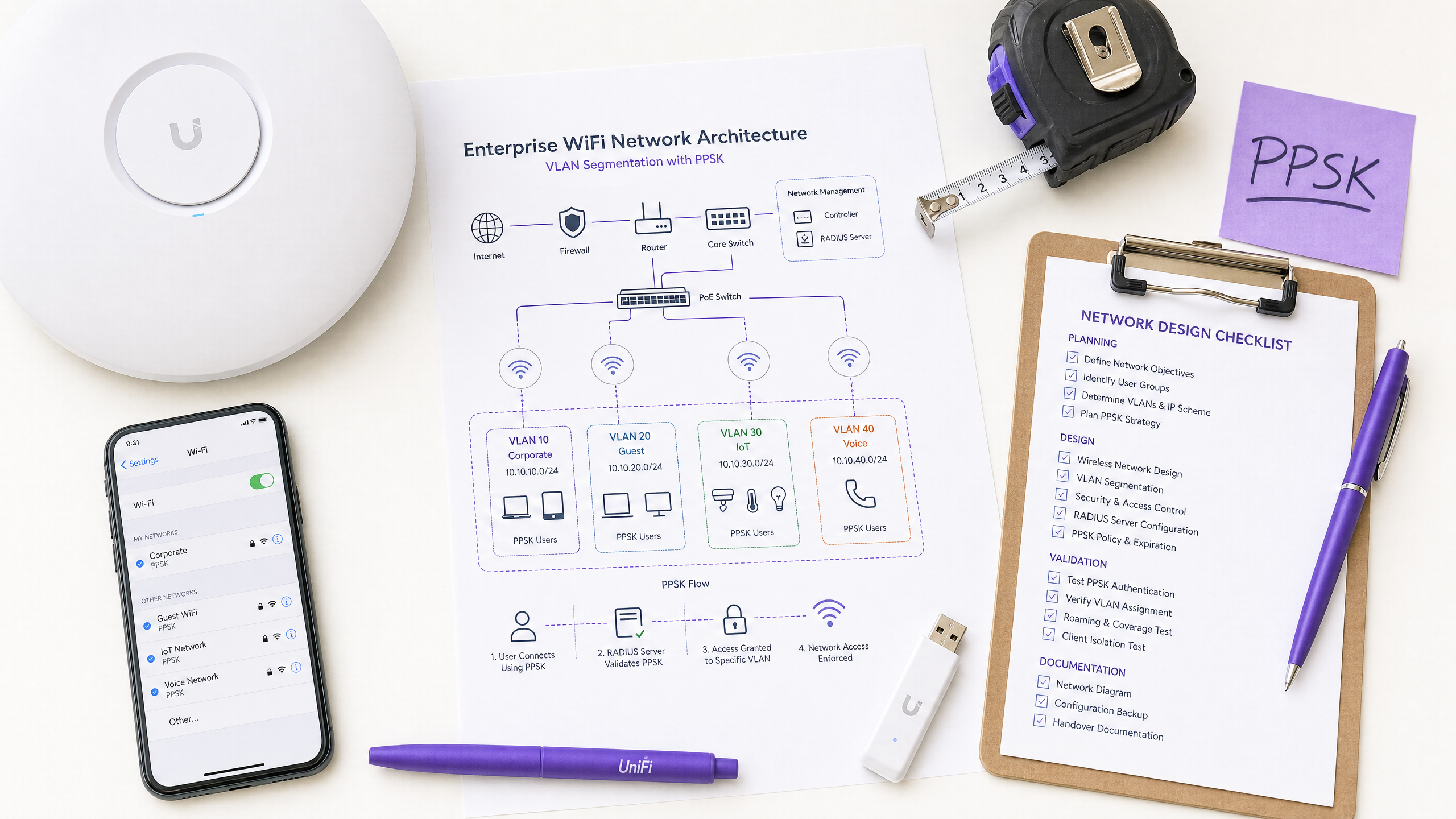
PPSK (Private Pre-Shared Key) replaces the single shared WiFi password with a unique credential per device or user group. For property developers, BTR operators, and landlords managing multi-tenant buildings, PPSK is not just an authentication mechanism - it functions as a live diagnostic power probe. Each resident's key validates the entire authentication path, VLAN assignment, and traffic isolation policy in real time. This guide compares PPSK implementations across Cisco Meraki, HPE Aruba, Ruckus, Juniper Mist, Extreme Networks, and Ubiquiti UniFi, details the cloud RADIUS architecture required for deployments at scale, and explains how to use PPSK as a commissioning tool before residents connect. Purple's Multi-Tenant WiFi runs as a hardware-agnostic cloud overlay on all seven hardware platforms, handling key lifecycle, RADIUS authentication, and analytics without requiring you to replace your existing access points.
Technical deep-dive
What PPSK is and how it works
Traditional WPA2-Personal networks use a single shared passphrase. When that passphrase is compromised, you must rotate it for every device on the network simultaneously. PPSK solves this by issuing a unique key to each resident, device group, or user. When a resident connects, the access point uses their specific key to identify them and assign them to their own isolated VLAN. You revoke one key, and only that one device loses access. Nobody else is affected.
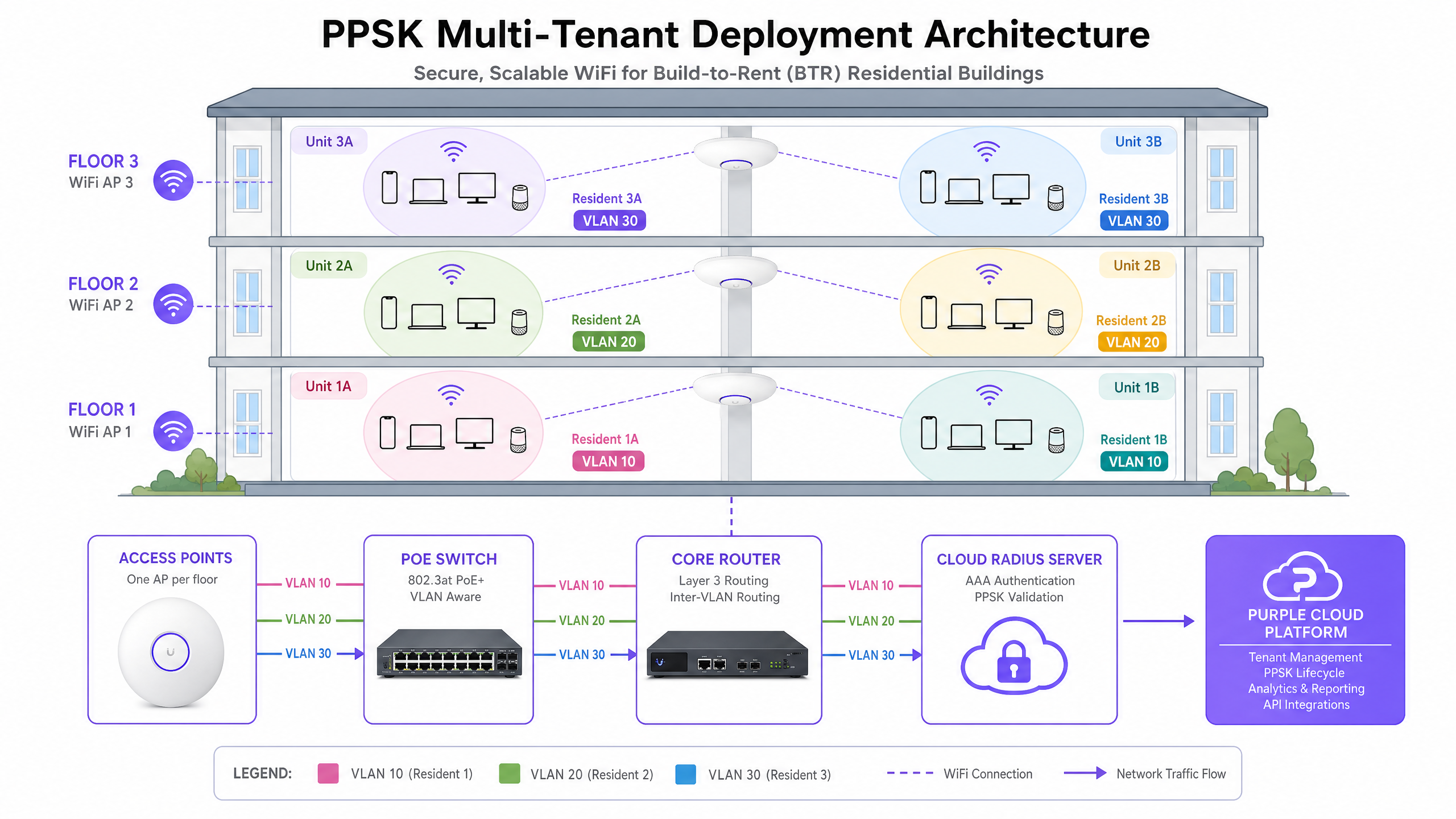
The core technical flow depends on the WPA2 four-way handshake. When a device associates, the access point sends the device MAC address and a PSK hint to a RADIUS server. The RADIUS server looks up the correct per-device key in its database and returns it to the access point. The access point uses that key to complete the four-way handshake, deriving the Pairwise Transient Key from the returned Pairwise Master Key. The RADIUS server also returns a VLAN assignment via the Tunnel-Private-Group-ID attribute. This creates a per-resident WiFi bubble: the resident's devices - phones, laptops, smart TVs, smart speakers - can discover each other, but are completely invisible to every other resident in the building.
The term PPSK is a vendor umbrella. Cisco Meraki calls it iPSK (Identity Pre-Shared Key). HPE Aruba calls it MPSK (Multiple Pre-Shared Key). Ruckus calls it DPSK (Dynamic Pre-Shared Key). Juniper Mist and Extreme Networks both use the term PPSK. Ubiquiti UniFi calls it Private PSK. The concept is identical across all vendors; the implementations differ in key storage location, scale limits, and WPA3 compatibility.
PPSK as a power probe
The phrase "PPSK power probe" describes a commissioning technique as much as a product feature. When you deploy PPSK in a multi-tenant building, each active key is a live probe into your network architecture. Every association logs which VLAN was assigned, which access point handled the connection, what signal strength was recorded, and whether the four-way handshake completed cleanly. Before you hand a building over to residents, you can walk every unit with test devices using active PPSK keys and validate that the RADIUS server returns the correct VLAN, that the switch ports are trunking the right VLANs, and that client isolation is working as designed. This probing technique catches VLAN misconfigurations, DHCP scope errors, and RADIUS attribute failures before they become resident support tickets.
The WPA3 constraint
WPA3-Personal replaces the WPA2 four-way handshake with SAE (Simultaneous Authentication of Equals). SAE is a Diffie-Hellman-based protocol. Both the client and the access point commit to a shared password element derived from the passphrase before the association completes. There is no point in the SAE exchange where a RADIUS server can inject a different key per device. This is why standard WPA3 only allows one key per SSID. It is a protocol constraint, not a firmware limitation.
The practical workaround for most deployments in 2026 is WPA3 transition mode (WPA2/WPA3 mixed mode). The SSID advertises both WPA2-PSK and WPA3-SAE. WPA2 clients use the four-way handshake and receive per-device keys via RADIUS. WPA3 clients use SAE with a single shared password. Ruckus DPSK3 extends this further: running in WPA2/WPA3 mixed mode with Cloudpath as the RADIUS backend, it provides the closest available approximation to native WPA3 per-device PSK on WiFi 6, 6E, and 7 hardware running firmware 7.0 or later. Fortinet's MPSK profiles with WPA3-SAE Transition mode offer a similar capability as of FortiAP firmware 8.0.
Note that 6 GHz radio bands mandate WPA3-only operation. PPSK is not compatible with 6 GHz SSIDs. For devices that need per-device key authentication on 6 GHz, the correct answer is 802.1X with EAP-TLS, integrated with Microsoft Entra ID, Okta, or Google Workspace.
Vendor implementations compared
Cisco Meraki (iPSK) supports two modes. Without RADIUS, you configure up to five unique PSKs directly in the Meraki dashboard, each mapped to a VLAN. For a 200-unit BTR building, you need RADIUS mode, typically backed by Cisco ISE, which scales to tens of thousands of keys. The RADIUS lookup happens before the four-way handshake completes, allowing the AP to substitute the correct per-device key at the right protocol moment.
HPE Aruba (MPSK) offers MPSK Local, where keys are stored on the controller or AP cluster, and MPSK with ClearPass, Aruba's RADIUS and policy engine. ClearPass holds tens of thousands of keys, assigns dynamic VLANs, and applies role-based policies per key. WPA3 MPSK support is in development as of mid-2026.
Ruckus (DPSK) is the most mature per-device PSK implementation available. DPSK3 - the WPA3 extension - operates in WPA2/WPA3 mixed mode on WiFi 6, 6E, and 7 access points running firmware 7.0 or later. DPSK3 requires Cloudpath as the RADIUS backend; a generic RADIUS server is not sufficient.
Juniper Mist (PPSK) stores keys in the cloud, with a limit of 5,000 keys per site. Mist's Access Assurance service adds RADIUS-based PSK lookup and has announced WPA3 RADIUS PSK support, making it one of the more forward-looking implementations in the market.
Extreme Networks (PPSK) via ExtremeCloud IQ supports local key storage on the AP itself, useful for remote sites with limited connectivity, as well as RADIUS-based lookup via ExtremeCloud IQ's cloud RADIUS service. MAC binding ties a PPSK to a specific device MAC address for additional security.
Ubiquiti UniFi (Private PSK) stores keys locally in the UniFi Network controller. As of mid-2026, Private PSK only works on WPA2 networks on 2.4 GHz and 5 GHz. WPA3 and 6 GHz are not supported. For smaller deployments this is acceptable, but it is a hard constraint for any estate planning a WiFi 6E or WiFi 7 refresh.
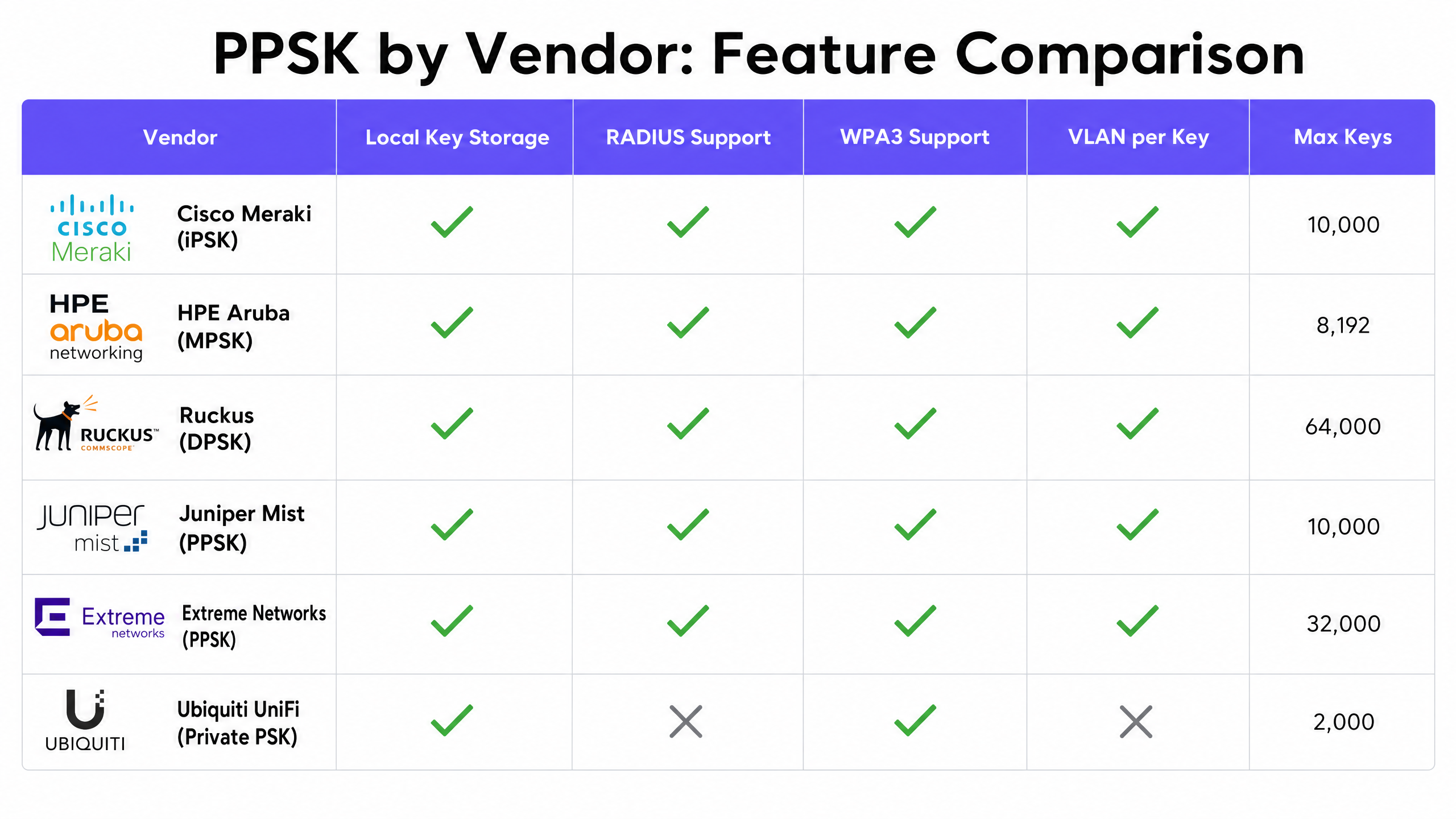
| Vendor | Brand name | Local storage | RADIUS support | WPA3 support | VLAN per key |
|---|---|---|---|---|---|
| Cisco Meraki | iPSK | Up to 5 keys | Yes (ISE) | Transition mode | Yes |
| HPE Aruba | MPSK | Yes (controller) | Yes (ClearPass) | In development | Yes |
| Ruckus | DPSK | Yes (controller) | Yes (Cloudpath) | DPSK3 mixed mode | Yes |
| Juniper Mist | PPSK | Yes (cloud, 5,000/site) | Yes (Access Assurance) | Announced | Yes |
| Extreme Networks | PPSK | Yes (AP local) | Yes (ExtremeCloud IQ) | Partial | Yes |
| Ubiquiti UniFi | Private PSK | Yes (controller) | No | No | Yes |
Implementation guide
Step 1: Choose your deployment model
For any building with more than 50 units, deploy cloud RADIUS. On-premise RADIUS hardware adds maintenance overhead, introduces a single point of failure, and requires on-site access for updates. Cloud RADIUS provides 99.999% uptime (Purple's own SLA) and central key management across multiple properties from a single dashboard.
Step 2: Design your VLAN scheme
Assign one VLAN per resident or per user group. In a 200-unit building, this means 200 VLANs. Ensure your core switch supports the required VLAN range and that all trunk ports between the access layer and the distribution layer carry those VLANs. Size your DHCP scopes for 15 to 25 devices per household - a 200-unit building needs capacity for 3,000 to 5,000 concurrent device associations.
Step 3: Integrate key provisioning
Connect your property management system to the WiFi platform via API. When a resident signs a lease, the system generates a unique PPSK automatically and sends it to the resident. When the resident moves out, the system revokes the key automatically. This eliminates key sprawl and ensures your audit trail is accurate.
Step 4: Commission with the PPSK power probe
Before handover, walk every unit with a test device. Associate using the unit's assigned PPSK and verify: the device receives an IP address from the correct subnet; the RADIUS server logs show the correct VLAN assignment; the device cannot discover any devices on other residents' keys. Document the results per unit. This commissioning report is your evidence that the network is configured correctly.
Step 5: Plan your WPA3 migration
For most deployments in 2026, WPA3 transition mode is the right answer. Enable WPA2/WPA3 mixed mode on your SSID. Test in a pilot site before rolling out building-wide. If you are on Ruckus hardware running firmware 7.0 or later, evaluate DPSK3 with Cloudpath for closer-to-native WPA3 per-device key support.
Best practices
Implement key lifecycle management. A PPSK is only secure if it is revoked when no longer needed. Automate revocation at move-out via your property management system integration. Without this, you accumulate orphaned keys that represent both a security risk and an audit liability.
Segment IoT traffic separately. In hospitality environments, use separate PPSK tiers for guest devices and venue IoT devices. Assign guests to one VLAN and smart thermostats, door locks, and IPTV systems to another. This satisfies PCI DSS 4.0 network segmentation requirements and prevents a compromised guest device from reaching operational infrastructure. See our guide on three SSIDs to rule them all: guest, Passpoint, and IoT WiFi for the full SSID design framework.
Design for device density. BTR residents average 15 to 25 devices per household. A 200-unit building has 3,000 to 5,000 devices on the WiFi at any given moment. Size your DHCP scopes, subnet masks, and AP capacity accordingly. A /24 subnet per resident provides 254 usable addresses, which is sufficient for current device counts with headroom for growth.
Use a hardware-agnostic cloud overlay. Purple runs as a cloud overlay on Cisco Meraki, HPE Aruba, Ruckus, Juniper Mist, Ubiquiti UniFi, Cambium, Extreme, and Fortinet. You retain your existing hardware investment. Purple adds the identity layer, RADIUS authentication, key lifecycle management, and WiFi Analytics on top. This is the correct architecture for operators managing multiple properties on mixed hardware estates.
Reference IEEE 802.11 and WPA3 standards. The WPA3 SAE constraint is defined in IEEE 802.11-2020. PCI-DSS 4.0 network segmentation requirements apply to any network carrying cardholder data. GDPR Article 25 (data protection by design) applies to the resident data collected during WiFi onboarding. Ensure your PPSK deployment is reviewed against all three.
Troubleshooting & risk mitigation
The most common failure mode in PPSK deployments is VLAN misconfiguration. If the RADIUS server fails to return a VLAN attribute, or if the switch trunk ports are not configured to carry the required VLANs, the resident will fail to obtain an IP address or will be placed on a default VLAN shared with other residents. Use the PPSK power probe technique during commissioning to catch this before handover.
The second most common failure is key sprawl. Without automated revocation, orphaned keys accumulate over time. A building with 200 units and 20% annual turnover generates 40 orphaned keys per year. After five years, 200 former residents retain valid WiFi access. Integrate revocation with your property management system from day one.
The third failure mode is WPA3 compatibility assumptions. Teams enabling WPA3 on an existing PPSK SSID often assume per-device keys will continue to work. They will not, unless you are using a vendor-specific WPA3 mixed-mode implementation. Test in a pilot site first. Check AP firmware versions - DPSK3 requires Ruckus firmware 7.0 or later. Check RADIUS server compatibility.
For hospitality deployments, verify that your PMS integration handles key revocation at checkout, not just at check-in. A guest who extends their stay should retain their key; a guest who checks out should not. Test both scenarios during commissioning.
ROI & business impact
Treating WiFi as a managed amenity delivers measurable commercial returns in the BTR sector. Operators command a £15 to £30 per unit per month rent premium for high-quality, move-in-ready WiFi, according to British Property Federation sector research. Managed WiFi reduces void periods by 5 to 10 days, as residents do not need to wait for a broadband provider to install a connection. The cost per door is 30% to 50% lower than per-unit broadband contracts when WiFi is deployed as a software overlay on owned hardware.
In hospitality , PPSK reduces IT support overhead by eliminating building-wide password rotations. In a 300-unit BTR building, support tickets for Chromecast and smart home pairing drop from approximately 15 per week to under two per week when PPSK replaces a shared password - based on Purple's own deployment data across 80,000+ live venues.
For retail and event environments, PPSK enables temporary group access that expires automatically. A conference organiser can provision PPSK keys for 500 attendees that expire at the end of the event, with no manual clean-up required.
Purple has been operating since 2012 and has collected 29 billion data points across 80,000+ live venues. We hold ISO 27001, GDPR, CCPA, and Cyber Essentials certifications. Our Guest WiFi and Multi-Tenant WiFi platforms run on the hardware you already own. Speak to one of our network architects to design a PPSK deployment for your specific estate. See also our managed WiFi provider guide for a broader framework for evaluating WiFi-as-a-managed-service options.
Key Definitions
PPSK (Private Pre-Shared Key)
A WiFi authentication method that assigns a unique passphrase to each user, device, or device group on a single SSID. The term is used by Juniper Mist and Extreme Networks; other vendors use iPSK, DPSK, or MPSK for the same concept.
IT teams encounter PPSK when designing multi-tenant WiFi for BTR, MDU, hospitality, or events environments where per-user isolation is required without the complexity of full 802.1X.
iPSK (Identity Pre-Shared Key)
Cisco Meraki's implementation of per-device PSK. Supports up to five local keys or unlimited keys via RADIUS (Cisco ISE). Each key maps to a VLAN.
Used in Meraki-based deployments for guest WiFi, IoT segmentation, and multi-tenant residential networks.
DPSK (Dynamic Pre-Shared Key)
Ruckus's implementation of per-device PSK. The most mature implementation in the market, with DPSK3 extending support to WPA3 mixed mode on WiFi 6, 6E, and 7 hardware.
Preferred for large-scale hospitality and MDU deployments on Ruckus hardware, particularly where WPA3 migration is planned.
MPSK (Multiple Pre-Shared Key)
HPE Aruba's and Fortinet's implementation of per-device PSK. Aruba's MPSK integrates with ClearPass for enterprise-scale deployments. Fortinet's MPSK supports WPA3-SAE Transition mode as of FortiAP firmware 8.0.
Used in Aruba and Fortinet environments for role-based network segmentation and multi-tenant isolation.
Cloud RADIUS
A RADIUS (Remote Authentication Dial-In User Service) authentication service delivered as a managed cloud platform, rather than on-premise hardware. Handles AAA (Authentication, Authorisation, and Accounting) for WiFi clients.
Essential for PPSK deployments at scale. Eliminates on-site server maintenance and provides central key management across multiple properties.
VLAN (Virtual Local Area Network)
A logical network segment that isolates traffic at the data link layer (IEEE 802.1Q). Devices on different VLANs cannot communicate without a Layer 3 routing decision.
In a PPSK deployment, each resident's key maps to a unique VLAN. This is the technical mechanism that prevents one resident from seeing another's devices.
SAE (Simultaneous Authentication of Equals)
The secure key establishment protocol introduced in WPA3. A Diffie-Hellman-based handshake that replaces the WPA2 four-way handshake. Both parties commit to a shared password element before association completes.
SAE's design prevents RADIUS servers from injecting per-device keys mid-handshake, which is why standard WPA3 only supports one key per SSID.
WPA3 transition mode
An SSID configuration that advertises both WPA2-PSK and WPA3-SAE simultaneously. WPA2 clients use the four-way handshake; WPA3 clients use SAE. Also called WPA2/WPA3 mixed mode.
The recommended approach for maintaining PPSK functionality while enabling WPA3 support for newer client devices in 2026.
Four-way handshake
The WPA2 protocol exchange that derives the Pairwise Transient Key (PTK) from the Pairwise Master Key (PMK). In a PPSK deployment, the RADIUS server returns the per-device PMK before the handshake completes.
Understanding the four-way handshake explains why PPSK works on WPA2 but not on WPA3-SAE.
Key sprawl
The accumulation of active PPSK keys that are no longer associated with current residents or devices, due to missing revocation processes.
A building with 20% annual resident turnover generates 40 orphaned keys per year without automated revocation. After five years, 200 former residents retain valid WiFi access.
Worked Examples
A 300-unit Build-to-Rent operator is running a single shared WiFi password across the entire building. Every time a resident moves out, they must rotate the password and notify all residents. Support tickets for Chromecast and smart home pairing are running at approximately 15 per week. How should they redesign the network?
Deploy PPSK via Purple's cloud overlay on the existing Cisco Meraki access points. Integrate the property management system with Purple's API to automatically provision a unique iPSK for each resident at move-in, mapped to a dedicated VLAN. Configure DHCP scopes of /24 per resident to support 15 to 25 devices per household. Enable IoT device discovery within each resident's VLAN. At move-out, the property management system triggers automatic key revocation via the API.
A 500-room hotel group running Ruckus hardware needs to provide WiFi for guest devices and venue IoT devices (smart thermostats, door lock controllers, IPTV systems) on the same physical infrastructure, without cross-contamination between guest and operational traffic. The hotel also processes card payments and must meet PCI-DSS 4.0 network segmentation requirements.
Implement Ruckus DPSK with three key tiers on a single SSID. Guests receive a unique DPSK per stay, mapped to VLAN 10, provisioned automatically by the PMS at check-in and revoked at checkout. IoT devices receive a separate DPSK per device category, mapped to VLAN 20, provisioned once at installation. Staff devices use 802.1X on a separate SSID mapped to VLAN 30. Deploy Cloudpath as the RADIUS backend to support DPSK at scale. Configure inter-VLAN routing to deny traffic between VLAN 10 and VLAN 20.
Practice Questions
Q1. You are deploying Multi-Tenant WiFi in a 200-unit BTR building using Cisco Meraki access points. You need to provide each resident with a private network segment and ensure that when a resident moves out, their access is revoked without affecting any other resident. Which Meraki feature should you use, and what backend infrastructure is required?
Hint: Consider the scale of the deployment and the limitations of local key storage on Meraki hardware.
View model answer
Use Cisco Meraki iPSK in RADIUS mode. Local iPSK storage is limited to five keys, which is insufficient for 200 units. You require a Cloud RADIUS server (such as Cisco ISE or Purple's cloud RADIUS) to store all resident keys and return the correct VLAN assignment during authentication. Integrate your property management system with the RADIUS platform to automate key provisioning at move-in and revocation at move-out.
Q2. A client wants to upgrade their existing PPSK network to WPA3 to improve security. They expect per-device keys to continue working seamlessly after the upgrade. What technical constraint must you explain, and what is the recommended approach?
Hint: Think about the difference between the WPA2 four-way handshake and WPA3 SAE, and when the RADIUS server can intervene.
View model answer
WPA3 uses SAE (Simultaneous Authentication of Equals), which requires both the client and access point to commit to a shared password before association completes. There is no protocol hook where a RADIUS server can inject a per-device key. Standard WPA3 only supports one key per SSID. The recommended approach is WPA3 transition mode (WPA2/WPA3 mixed mode): WPA2 clients continue to receive per-device keys via RADIUS; WPA3 clients use SAE with a single shared password. Test in a pilot site before rolling out building-wide.
Q3. During the commissioning phase of a new 150-unit MDU deployment, how can you verify that switch port trunking and RADIUS VLAN assignments are configured correctly before residents move in? What specific checks should your commissioning process include?
Hint: Think about the concept of using PPSK as a diagnostic probe, not just an authentication mechanism.
View model answer
Use active PPSK keys as a diagnostic probe. Walk each unit with a test device and connect using the unit's assigned PPSK. Verify: (1) the device receives an IP address from the correct subnet for that VLAN; (2) the RADIUS server logs show the correct VLAN assignment (Tunnel-Private-Group-ID attribute); (3) the device cannot discover any devices on other residents' keys; (4) the device can reach the internet. Document results per unit. Any unit that fails the probe indicates a misconfigured VLAN trunk, incorrect DHCP scope, or RADIUS attribute error that must be resolved before handover.
Q4. A hospitality operator running a 300-room hotel on Ruckus hardware wants to isolate guest devices from IoT devices (smart thermostats, door locks) and meet PCI DSS 4.0 network segmentation requirements. Design the PPSK architecture.
Hint: Consider multiple DPSK tiers and the PCI DSS requirement for network segmentation between cardholder data environments and other systems.
View model answer
Implement Ruckus DPSK with three key tiers on a single SSID. Tier 1: guest DPSK keys, unique per stay, mapped to VLAN 10, provisioned by the PMS at check-in and revoked at checkout. Tier 2: IoT DPSK keys, one per device category, mapped to VLAN 20, provisioned at installation. Tier 3: staff devices on 802.1X on a separate SSID, mapped to VLAN 30. Deploy Cloudpath as the RADIUS backend. Configure inter-VLAN routing to deny traffic between VLAN 10 and VLAN 20. This satisfies PCI DSS 4.0 network segmentation requirements by isolating guest traffic from operational IoT traffic without a separate physical network.
Continue reading in this series
Logo iPSK: a comprehensive guide for businesses
This guide explains how Identity Pre-Shared Key (iPSK) technology solves the core security challenge in multi-tenant WiFi environments: delivering enterprise-grade isolation and per-user control without breaking compatibility for IoT devices, gaming consoles, and smart home tech. It covers the full technical architecture, deployment strategies, and business case for property developers, BTR operators, and hospitality IT teams.
Logo iPSK: a comprehensive guide for businesses
This guide explains how Identity Pre-Shared Key (iPSK) technology solves the core security challenge in multi-tenant WiFi environments: delivering enterprise-grade isolation and per-user control without breaking compatibility for IoT devices, gaming consoles, and smart home tech. It covers the full technical architecture, deployment strategies, and business case for property developers, BTR operators, and hospitality IT teams.
WiFi managed services: a comprehensive guide for businesses
WiFi managed services shift the full lifecycle of enterprise wireless networks - from RF design and hardware procurement through to daily monitoring and firmware management - to a specialist provider. This guide explains the cloud-managed architectures, VLAN segmentation strategies, and authentication standards that underpin reliable, secure deployments across hotels, retail chains, BTR developments, and public-sector venues. Property developers, landlords, and BTR operators will find actionable guidance on isolating resident traffic, onboarding smart devices, and turning connectivity into a measurable business asset.