
PPSK xaverius: comparing features and deployment models
This authoritative guide examines PPSK xaverius architecture for multi-tenant environments like Build to Rent and student accommodation. It compares deployment models, details implementation strategies, and explains how per-unit VLAN isolation delivers a home-like WiFi experience while maintaining enterprise security.
Listen to this guide
View podcast transcript
Executive Summary
For IT managers and network architects deploying WiFi in multi-tenant environments, the choice of authentication architecture dictates both security posture and operational overhead. This guide examines Private Pre-Shared Key (PPSK) technology, specifically focusing on the "PPSK xaverius" architecture class - what it is, how it works, and where it is the right tool. By assigning a unique cryptographic key to each resident or device group, PPSK enables per-unit VLAN isolation on a single SSID. This eliminates the blast radius of a shared password, provides seamless support for headless IoT devices that cannot run an 802.1X supplicant, and automates the key lifecycle from move-in to move-out. We provide vendor-neutral deployment guidance across Cisco Meraki, HPE Aruba, Ruckus, Juniper Mist, Ubiquiti UniFi, Cambium, Extreme, and Fortinet. Purple's Multi-Tenant WiFi solution integrates with all of these platforms via a cloud RADIUS overlay, giving Build to Rent operators and landlords the orchestration layer to manage keys, VLANs, and resident onboarding at scale. Founded in 2012, Purple serves 80,000+ live venues and processed 440 million logins in 2024, maintaining 99.999% uptime.
Listen to the technical briefing podcast:
Technical Deep-Dive
What is PPSK xaverius?
Private Pre-Shared Key (PPSK) - also referred to as iPSK (Cisco Meraki), MPSK (HPE Aruba), DPSK (Ruckus), ePSK (Juniper Mist), and PPSK xaverius - is a WiFi authentication method in which each user or device group receives a unique pre-shared key. All devices connect to the same SSID, but the access point uses the unique key to identify the device owner and assign them to a specific VLAN.
To the resident, it feels exactly like a home network. Their phone discovers their Chromecast, their smart speaker pairs with their bulbs, and their console finds their TV. To the operator, it is a single managed network with strong tenant isolation. Devices on resident A's key cannot see devices on resident B's key, even when connected to the same access point.
PPSK vs Standard PSK vs 802.1X
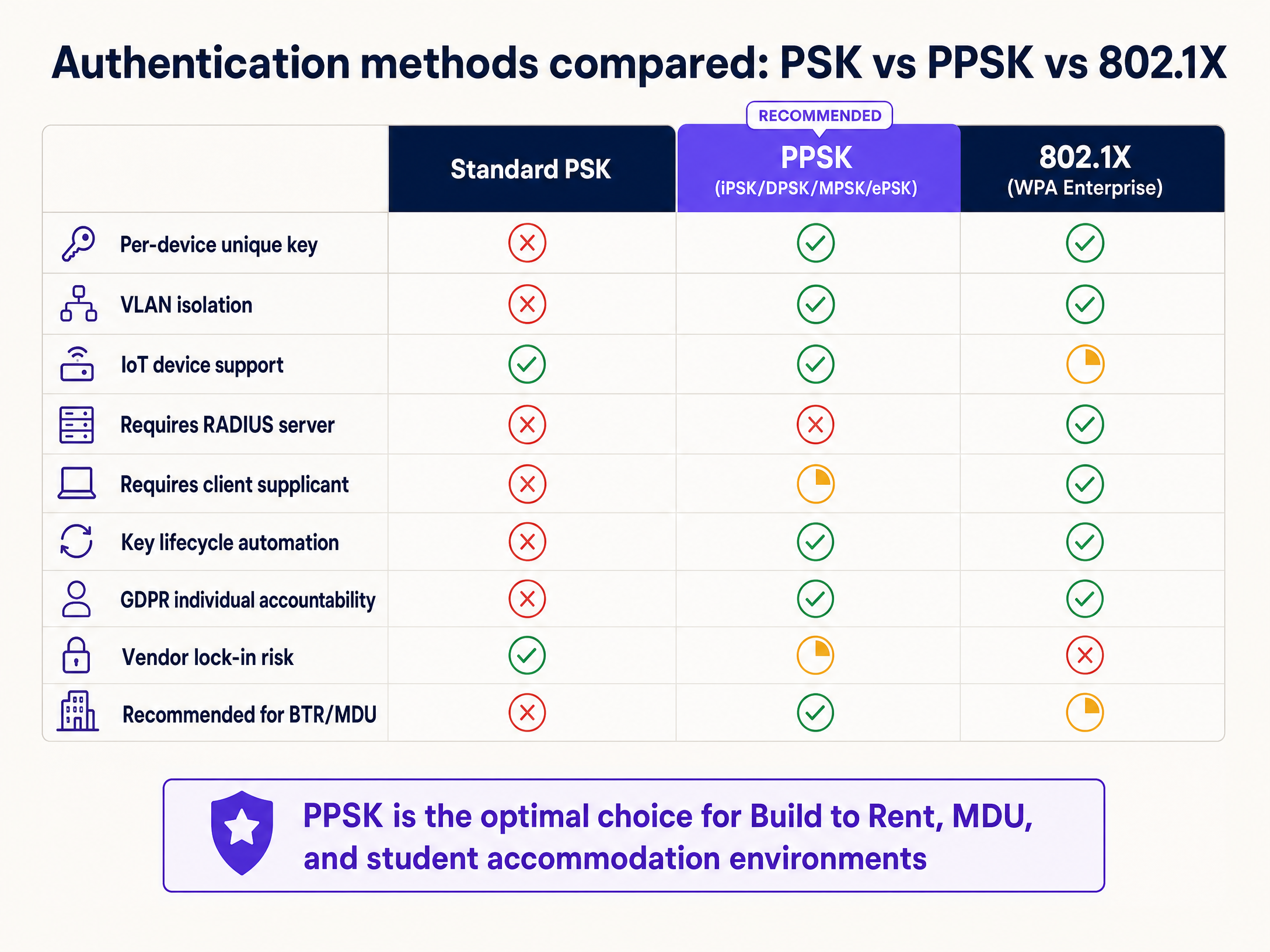
When evaluating authentication models for multi-tenant environments like Build to Rent or student accommodation, operators must choose between three primary architectures.
Standard PSK is the traditional shared password model. It provides zero isolation, creating a significant privacy risk in residential buildings. Furthermore, it creates an administrative nightmare when tenancies end. You either rotate the building-wide password (breaking connectivity for everyone else) or leave former residents with access. 802.1X (WPA2/WPA3-Enterprise) is the gold standard for corporate networks, requiring a RADIUS server, an identity provider, and a client supplicant. While highly secure, it fails in residential environments because headless IoT devices (smart TVs, voice assistants, smart plugs) lack the interface to support 802.1X authentication.
PPSK sits in the middle. It provides the per-resident isolation and automated key lifecycle management of an enterprise network, while maintaining the universal device compatibility of a home network.
The Hybrid Architecture Recommendation
For complex deployments, the optimal approach is a hybrid architecture. Deploy PPSK for resident and IoT networks to ensure maximum compatibility and seamless onboarding. Simultaneously, deploy 802.1X for staff networks, building management systems, and back-of-house operations where individual accountability and certificate-based security are paramount. This allows operators to run Three SSIDs to rule them all: guest, Passpoint, and IoT WiFi on a single physical infrastructure.
Implementation Guide
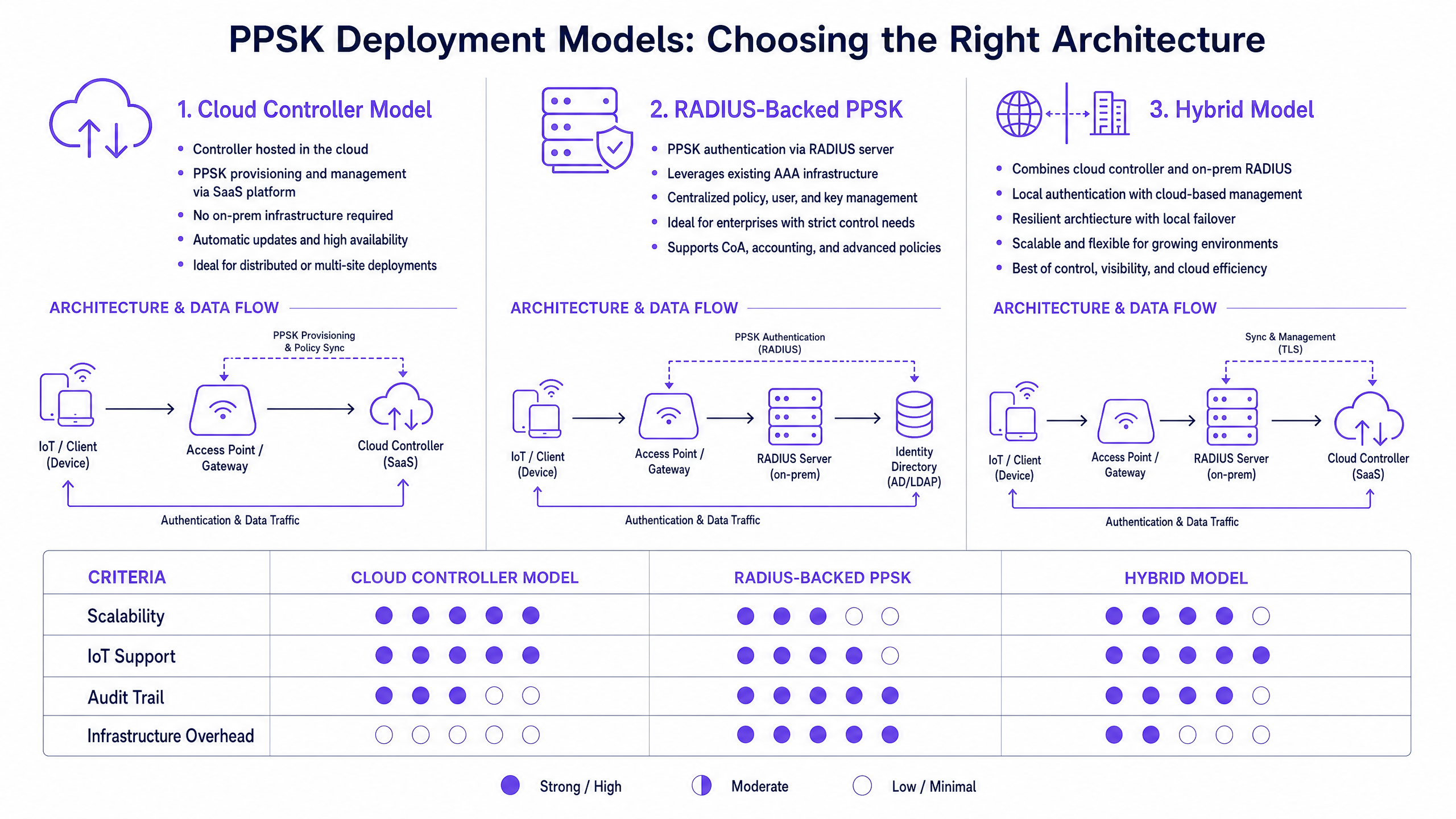
Deploying a PPSK xaverius architecture requires careful planning across three primary deployment models.
1. Cloud Controller Model
In this model, the PPSK key store lives directly in the vendor's cloud management platform. When a key is provisioned, the controller pushes the policy to every access point. This is operationally simple and requires no on-premise RADIUS infrastructure. It is ideal for distributed portfolios or mid-sized Build to Rent developments.
2. RADIUS-Backed PPSK
Here, the access point forwards the authentication request to a RADIUS server, which validates the key against an external directory (such as Microsoft Entra ID or Okta) and returns the VLAN assignment. This provides centralised logging, advanced policy control, and integration with existing identity platforms. For deployments exceeding 500 units, this is the recommended architecture.
3. Hybrid Model
Combining local survivability with cloud management, this model uses local RADIUS for authentication while relying on a cloud platform for configuration and analytics.
Step-by-Step Deployment Guidance
- Logical Design First: Map out your resident count, IoT device categories, and staff systems before touching hardware. Assign VLANs systematically. A typical 200-unit deployment requires VLAN 10 through 210 for residents, VLAN 99 for IoT, and VLAN 100 for building management.
- Subnet Sizing: A modern household averages 15 to 25 connected devices. Ensure your DHCP scopes and RFC 1918 private addressing schemes accommodate this density. A 200-unit building will see 3,000 to 5,000 concurrent connections.
- Automate Key Distribution: Generating keys is simple; securely distributing them is the challenge. Integrate your property management system via API so that a unique PPSK is automatically generated and emailed (often with a QR code) when a lease is signed.
Best Practices
Consolidate SSIDs
Every SSID broadcast consumes valuable airtime for beacon frames, reducing overall network capacity. Keep your design to a maximum of three SSIDs per radio. Use PPSK to serve hundreds of resident segments from a single SSID.
Validate Trunk Ports
A common failure mode in PPSK deployments is correct authentication followed by silent traffic drops. This occurs when the access point correctly assigns the VLAN, but the upstream switch trunk port is not configured to permit that VLAN. Validate every trunk port during commissioning.
Address MAC Randomisation
Modern operating systems (iOS 14+, Android 10+, Windows 11) use randomised MAC addresses by default. If your RADIUS implementation relies heavily on MAC caching alongside PPSK, randomisation will cause authentication failures. Build a pre-registration workflow into your resident onboarding process.
Treat WiFi as a Managed Amenity
For BTR operators, high-speed, reliable WiFi is no longer an optional extra. It is a critical utility. Deploying a centralised PPSK architecture via Purple allows property developers to consolidate network hardware. Instead of installing individual routers in every flat (which creates massive RF interference), deploy enterprise access points in corridors and living spaces. This reduces hardware costs by 30-50% compared to per-unit broadband contracts and allows operators to capture a £15-30 per unit per month rent premium.
Troubleshooting & Risk Mitigation
The "Chromecast Won't Connect" Scenario
When a resident reports that their phone cannot see their smart TV or casting device, the issue is almost always VLAN assignment. Verify that both devices are authenticating using the exact same PPSK. If they are, check that client isolation (Layer 2 isolation) is disabled within the resident's specific VLAN, while remaining active between different VLANs.
Handling Move-Outs
Without automated key lifecycle management, former residents retain network access. When integrated with property management software, the system should automatically revoke the unique PPSK at the end of the tenancy. This ensures the network remains secure and the next tenant receives a fresh, private segment immediately.
ROI & Business Impact
The business case for treating WiFi as a managed amenity in multi-tenant environments is compelling. By deploying a software overlay on owned hardware, operators avoid the margin erosion associated with bundling third-party broadband contracts.
Measurable outcomes include:
- Reduced Support Overhead: Automating onboarding and eliminating shared password rotations typically reduces WiFi-related support tickets by 50%.
- Increased Asset Value: Premium connectivity is a top-five amenity factor in BTR and purpose-built student accommodation booking research, directly contributing to shorter void periods.
- Operational Visibility: Centralised management provides aggregate analytics on network health and utilisation, without compromising individual resident privacy.
For more information on deploying these architectures across specific verticals, review our guidance for Hospitality , Retail , and Healthcare .
Key Definitions
PPSK (Private Pre-Shared Key)
An authentication method where each user or device receives a unique password on a shared SSID, mapping them to a specific VLAN.
When IT teams need to provide secure, isolated access for IoT devices that cannot support 802.1X.
VLAN Isolation
The logical separation of network traffic, ensuring devices in one segment cannot communicate with devices in another.
Crucial in multi-tenant buildings to ensure resident A cannot cast to resident B's television.
802.1X
An IEEE standard for port-based network access control, requiring a RADIUS server and client supplicant.
The standard for corporate networks, but generally unsuitable for residential IoT environments.
RADIUS
Remote Authentication Dial-In User Service; a networking protocol that provides centralised Authentication, Authorization, and Accounting (AAA).
Used as the backend engine for enterprise PPSK deployments to validate keys against a central directory.
BTR (Build to Rent)
Purpose-built residential accommodation designed specifically for renting rather than sale.
A primary market for PPSK deployments, where WiFi is treated as a core managed amenity.
MAC Randomisation
A privacy feature in modern operating systems that generates a fake MAC address for each network to prevent tracking.
Causes authentication failures if a network relies solely on MAC caching; requires pre-registration workflows to bypass.
Supplicant
A software client on a device that communicates with the authenticator in an 802.1X setup.
Laptops and phones have them; smart plugs and cheap TVs do not, making 802.1X fail for smart homes.
Trunk Port
A switch port configured to carry traffic for multiple VLANs simultaneously.
Must be correctly configured in a PPSK deployment, otherwise correctly authenticated traffic will be silently dropped.
Worked Examples
A 180-unit Build to Rent development needs to provide resident WiFi. They currently plan to install a consumer broadband router in every flat to ensure residents can use their smart home devices privately.
Instead of 180 individual routers causing massive RF interference, deploy enterprise access points (e.g., HPE Aruba or Cisco Meraki) in corridors and living spaces. Configure a single building-wide SSID using PPSK. Integrate the WiFi management platform (like Purple) with the property management system. When a resident signs a lease, the system automatically generates a unique PPSK and emails it to them with a QR code. When they connect, the access point assigns them to their own dedicated VLAN.
A 400-bed purpose-built student accommodation block experiences severe network degradation during the September move-in week when thousands of devices attempt to connect simultaneously.
Deploy a RADIUS-backed PPSK architecture. Pre-generate 400 unique keys and include them in the student welcome packs as QR codes. Configure the DHCP scopes to handle 15 - 25 devices per room (using a /20 or /19 subnet for the entire site, segmented logically). Ensure the RADIUS server is scaled to handle the authentication spike.
Practice Questions
Q1. A property developer is designing a 250-unit BTR block. They want to provide building-wide WiFi. The security consultant insists on using 802.1X for all connections to ensure maximum security. Why is this recommendation problematic for a residential environment?
Hint: Consider the types of devices residents bring into their homes.
View model answer
While 802.1X provides excellent security, it requires a client supplicant to process certificates or credentials. Many consumer IoT devices (smart TVs, voice assistants, smart plugs, games consoles) do not have this capability and cannot connect to an 802.1X network. PPSK is the correct approach here, providing enterprise security on the backend while presenting a standard WPA2/3 Personal connection to the client devices.
Q2. After deploying PPSK in a student accommodation block, the IT team notices that residents are authenticating successfully, but they cannot reach the internet or the DHCP server. What is the most likely configuration error?
Hint: The issue is occurring after the wireless association phase.
View model answer
The most likely issue is missing VLAN configurations on the switch trunk ports. The access point is successfully authenticating the user and tagging their traffic with the correct VLAN ID, but the upstream switch is dropping the packets because that specific VLAN is not permitted on the trunk link connecting the AP to the switch.
Q3. You are migrating a hotel from a legacy shared-password system to a PPSK architecture. The existing network broadcasts 5 different SSIDs (Guest, Staff, Events, Management, IoT). How should you restructure the SSIDs?
Hint: Consider the impact of SSID proliferation on airtime.
View model answer
You should consolidate the SSIDs to a maximum of three to reduce management frame overhead and preserve airtime. You could use one SSID with PPSK to handle Guests, Events, and IoT (assigning them to different VLANs based on their unique key), and a second SSID using 802.1X for Staff and Management.
Continue reading in this series
Uu PPSK pdf: comparing features and deployment models
This technical reference guide compares Private Pre-Shared Key (PPSK) WiFi architecture against traditional 802.1X and standard PSK deployments. It provides network architects and IT managers with vendor-neutral implementation strategies for multi-tenant residential, IoT, and BTR environments.
Uu PPSK pdf: comparing features and deployment models
This technical reference guide compares Private Pre-Shared Key (PPSK) WiFi architecture against traditional 802.1X and standard PSK deployments. It provides network architects and IT managers with vendor-neutral implementation strategies for multi-tenant residential, IoT, and BTR environments.
Uu PPSK 2023: comparing features and deployment models
This technical reference guide compares Unique per-User Private Pre-Shared Key (UU PPSK) WiFi architecture against traditional shared PSK and 802.1X deployments, with a specific focus on the 2023 landscape of vendor implementations and platform capabilities. It provides property developers, BTR operators, and MDU landlords with actionable deployment strategies, VLAN architecture guidance, and automated lifecycle management workflows. The guide covers three deployment models, real-world case studies, and the compliance implications of each authentication approach.