
Spectrum managed WiFi customer service: a comprehensive guide for businesses
This comprehensive guide details how build-to-rent operators and property developers can deploy spectrum managed WiFi to provide secure, isolated network experiences for residents. It covers the technical architecture of cloud RADIUS, VLAN isolation, and iPSK, alongside practical implementation strategies to reduce support overhead.
Video overview
Listen to this guide
View podcast transcript
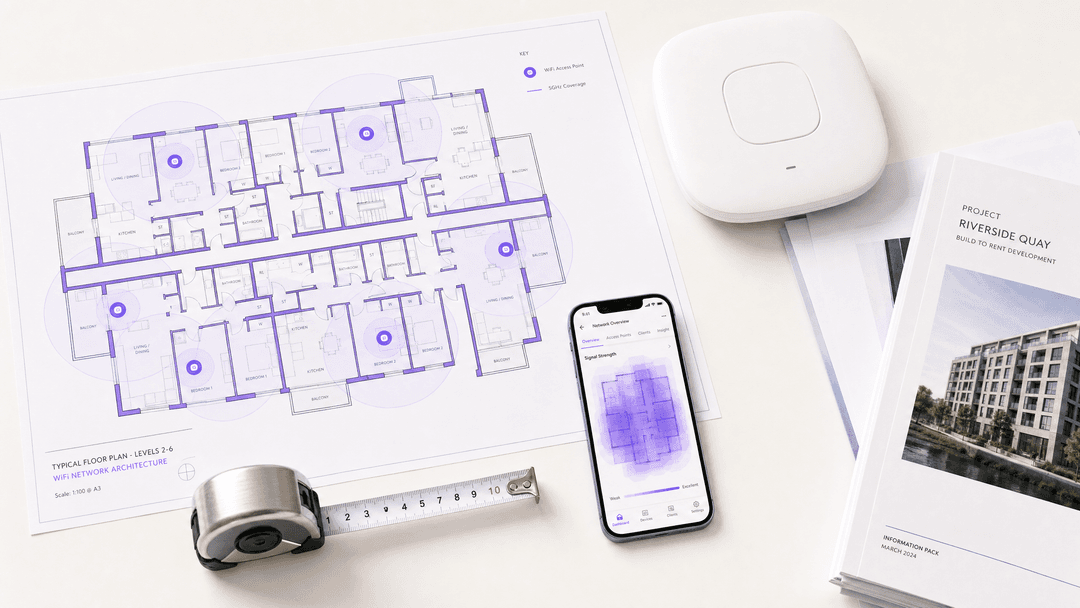
Executive Summary
Spectrum managed WiFi customer service provides build-to-rent (BTR) operators and property developers with a fully outsourced, enterprise-grade wireless network that delivers isolated, private connectivity to hundreds of tenants simultaneously. Rather than running individual broadband lines to every unit - a model that introduces hardware clutter and support overhead - a managed WiFi overlay creates secure, private network bubbles for every resident over shared access point infrastructure.
For the IT director or facilities manager, this architecture shifts the operational burden of network design, hardware maintenance, and resident support to a specialist provider. Supported by a cloud RADIUS identity layer, the network uses 802.1X and WPA3-Enterprise to secure laptops and phones, while deploying Identity Pre-Shared Keys (iPSK) to connect browserless devices like smart TVs and consoles.
This guide details the technical architecture required to deploy a multi-tenant managed WiFi service, the hardware integration requirements, and the business case for centralising network management.
Technical Deep-Dive
The Multi-Tenant Architecture
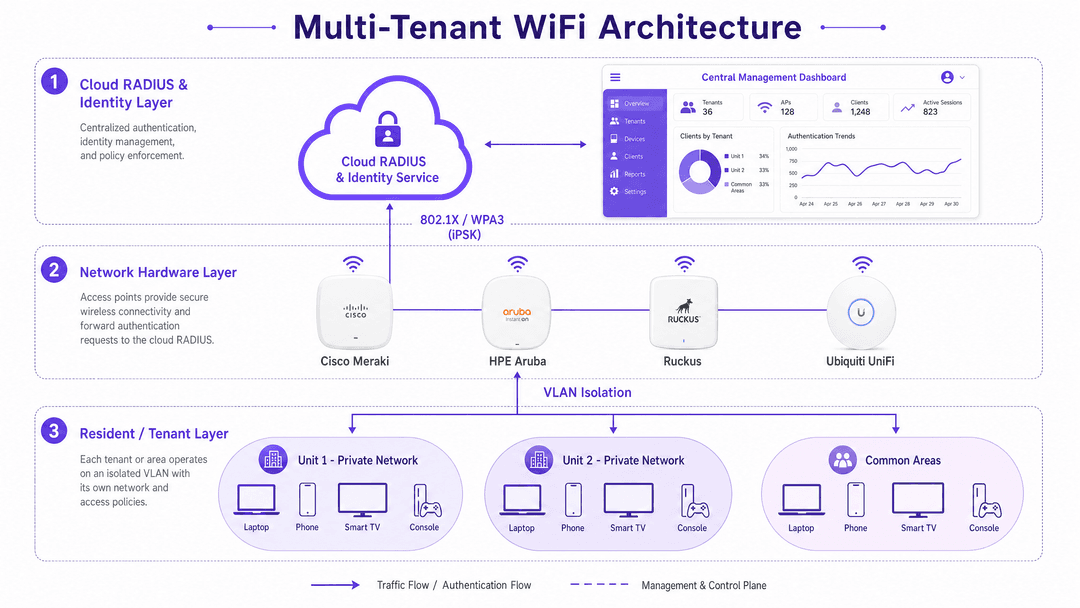
Deploying WiFi in a high-density residential environment requires more than simply installing access points in corridors. You must provide a network that feels like a private home connection, while operating on shared enterprise hardware. This is achieved through a three-tier architecture: the hardware layer, the network layer, and the identity layer.
The Identity Layer: Cloud RADIUS
The core of a managed WiFi deployment is the RADIUS (Remote Authentication Dial-In User Service) server. In a modern architecture, this is hosted in the cloud. When a resident attempts to connect, the access point forwards the authentication request to the cloud RADIUS. The RADIUS server validates the credentials against an identity provider (such as Microsoft Entra ID or Google Workspace) and returns an accept or reject message, along with specific policy attributes.
Purple's cloud overlay provides this identity layer as a managed service, handling 440 million logins in 2024 across 80,000 live venues. By abstracting the identity management away from the physical hardware, you maintain hardware-agnostic flexibility.
The Network Layer: VLAN Isolation and iPSK
Once authenticated, the RADIUS server instructs the access point to place the user's device into a specific Virtual Local Area Network (VLAN). This micro-segmentation ensures that devices in Unit 14 cannot communicate with, or even see, devices in Unit 15.
For devices that support 802.1X (laptops, smartphones), authentication is seamless and certificate-based. However, the average resident brings multiple browserless devices - smart TVs, games consoles, and IoT sensors - that cannot process an 802.1X certificate.
To solve this, managed WiFi platforms use Identity Pre-Shared Keys (iPSK). Instead of a global password for the building, the cloud RADIUS generates a unique passcode tied specifically to that resident's identity. When a smart TV connects using that iPSK, the RADIUS server recognises the key, identifies the resident, and drops the TV into their private VLAN bubble. The resident's phone and TV can now communicate (using mDNS reflection for discovery), while remaining invisible to the rest of the building.
The Hardware Layer: Access Points and RF Design
The physical access points must support enterprise features: 802.1X forwarding, dynamic VLAN assignment, and high client density. The canonical hardware list for these deployments includes Cisco Meraki, HPE Aruba, Ruckus, Juniper Mist, Ubiquiti UniFi, Cambium, Extreme, and Fortinet.
In concrete-frame BTR developments, 5GHz signal attenuation is significant. A standard deployment requires one access point per two to three units, plus dedicated coverage for common areas. WiFi 6 (802.11ax) is the baseline standard, utilising OFDMA (Orthogonal Frequency Division Multiple Access) to serve multiple devices simultaneously and BSS Colouring to mitigate co-channel interference between adjacent access points.
Implementation Guide
1. The RF Survey and Network Design
Never rely on a predictive, desk-based survey for a concrete building. A physical walkthrough with a spectrum analyser is mandatory to identify attenuation factors. Design for the 5GHz band as primary, with 2.4GHz relegated to legacy IoT devices. Plan for an average of 8 to 12 connected devices per resident.
2. Hardware Selection and Integration
Select access points from the canonical list above. Configure the controllers to point to the managed provider's cloud RADIUS IP addresses. Define the VLAN pools on your core switches to accommodate the total number of units plus common areas.
3. Identity Provider Integration
Integrate the managed WiFi platform with your property management system or identity provider. If you use Microsoft Entra ID to manage tenancy records, configure SAML or SCIM provisioning so that when a tenancy begins, the resident's network access is automatically created, and when the tenancy ends, Purple revokes access immediately.
4. The Onboarding Flow
The onboarding experience dictates your early support ticket volume. Residents should download the Purple app, authenticate via single sign-on, and receive their iPSK passcodes for browserless devices. Test this flow extensively with consumer devices (PlayStation, Xbox, Roku, Apple TV) before resident handover.
Best Practices
Standardise on WPA3-Enterprise
WPA3-Enterprise is the current security standard mandated by the Wi-Fi Alliance. It uses 192-bit security mode with GCMP-256 encryption. While WPA3 access points support WPA2 clients in transition mode, you should specify WPA3 for all new hardware deployments to future-proof the network.
Implement Three SSIDs
Do not mix resident, staff, and guest traffic on a single SSID. Deploy a three-SSID architecture:
- Resident WiFi: 802.1X with iPSK for smart devices, isolated by unit VLANs.
- Staff/Admin WiFi: 802.1X certificate-based authentication for property management staff and building systems.
- Guest/Retail WiFi: Captive portal authentication for visitors to common areas or ground-floor retail, capturing first-party data.
For more detail on this architecture, read our guide on Three SSIDs to rule them all: guest, Passpoint, and IoT WiFi .
Retain Hardware Agnosticism
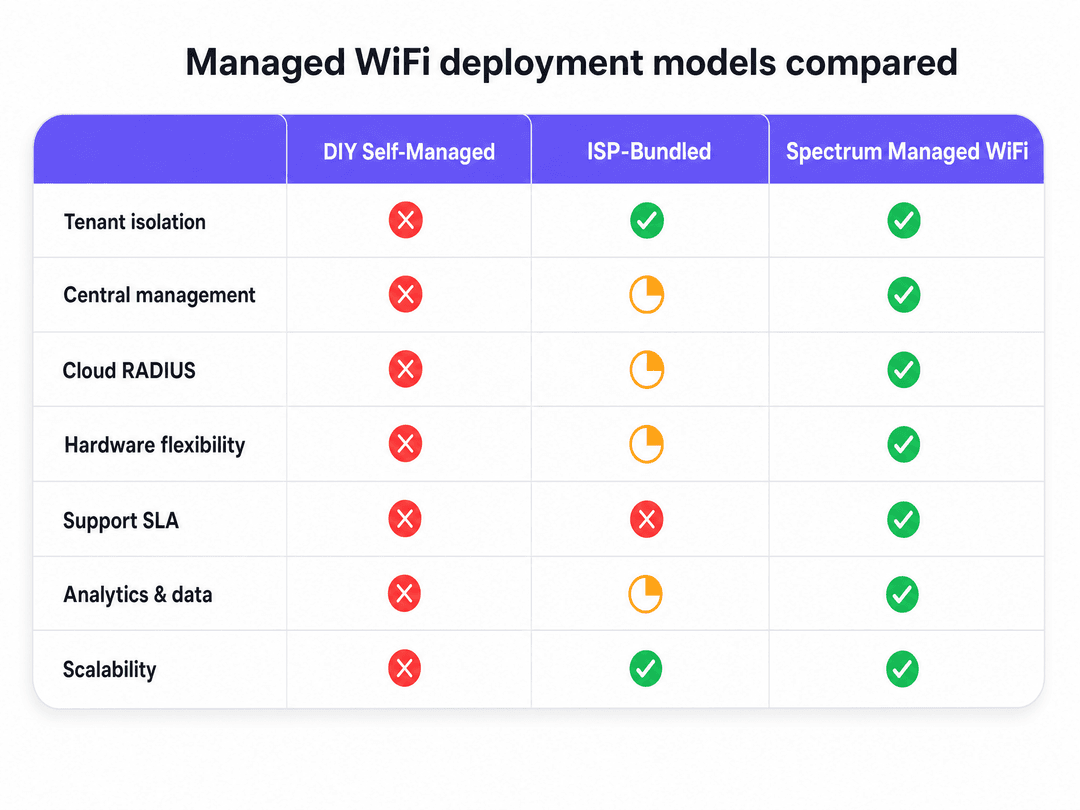
Do not lock your identity and management layer to a single hardware vendor. By using a cloud overlay like Purple, you can deploy Ruckus in one building and Cisco Meraki in another, while managing all residents through a single, centralised dashboard.
Troubleshooting & Risk Mitigation
The "My TV Won't Connect" Failure Mode
Risk: A resident attempts to connect a legacy smart TV to the 802.1X network, fails, and logs a support ticket. Mitigation: Clear onboarding documentation directing browserless devices to the iPSK workflow. The managed service provider's support desk can view the RADIUS logs to confirm if the device is attempting the wrong authentication method and guide the resident remotely.
Co-Channel Interference
Risk: In dense MDU environments, access points on the same channel interfere with each other, degrading throughput. Mitigation: Implement automated channel planning on the wireless controller. Enable BSS Colouring on WiFi 6 access points to allow devices to ignore frames from adjacent networks.
Compliance and Data Privacy
Risk: Capturing resident data during onboarding violates GDPR or CCPA if mishandled. Mitigation: Use a certified platform. Purple is ISO 27001, GDPR, and CCPA certified, using conscious-choice opt-ins to ensure all data collection is lawful and auditable.
ROI & Business Impact
Transitioning to spectrum managed WiFi customer service fundamentally changes the operating model of a residential building.
First, it eliminates the capital expenditure of running individual broadband lines and installing consumer routers in every unit. You deploy a single, enterprise-grade network infrastructure that serves the entire building.
Second, it reduces support overhead. In a DIY deployment, your facilities team handles every connectivity complaint. With a managed service, the provider takes first-line support, backed by a Service Level Agreement (SLA). Purple delivers 99.999% uptime, ensuring reliable connectivity.
Finally, it increases asset value. Build-to-rent operators can bundle high-speed, frictionless WiFi into the tenancy agreement, increasing yield and resident retention. The network data also provides facilities management with utilisation metrics - showing which common areas are heavily used and when, allowing you to optimise heating, lighting, and cleaning schedules based on actual occupancy.
Key Definitions
Cloud RADIUS
A cloud-hosted authentication server that verifies user identities and enforces network access policies before granting WiFi access.
Essential for managed WiFi, it removes the need for on-premise authentication servers and centralises management across multiple properties.
VLAN (Virtual Local Area Network)
A logical subnetwork that groups a collection of devices together, isolating their traffic from the rest of the physical network.
Used to create private network bubbles for individual units in a multi-tenant building, ensuring residents cannot see each other's devices.
iPSK (Identity Pre-Shared Key)
A unique WiFi password generated for a specific user or device, rather than a single shared password for the entire network.
Crucial for connecting smart TVs, games consoles, and IoT devices that do not support enterprise 802.1X authentication.
802.1X
An IEEE standard for port-based network access control that provides an authentication mechanism to devices wishing to attach to a LAN or WLAN.
The foundation of enterprise WiFi security, ensuring only authorised residents can access the network infrastructure.
WPA3-Enterprise
The latest WiFi Alliance security certification, offering 192-bit cryptographic strength for highly secure environments.
The mandatory security standard for new enterprise deployments, protecting resident data from interception.
mDNS Reflection
A network feature that allows multicast discovery protocols (like Apple Bonjour or Google Cast) to operate across specific network segments.
Required so a resident can use their smartphone to cast video to their smart TV within their private VLAN bubble.
BSS Colouring
A WiFi 6 feature that adds a spatial reuse tag to network frames, allowing access points to ignore traffic from overlapping adjacent networks.
Vital in dense apartment buildings to prevent access points in neighbouring units from interfering with each other.
OFDMA
Orthogonal Frequency Division Multiple Access - a technology that subdivides a WiFi channel into smaller frequency allocations.
Allows a single access point to communicate with multiple resident devices simultaneously, reducing latency in high-density environments.
Worked Examples
A 200-unit BTR development requires secure WiFi for residents, alongside connectivity for property management staff and a ground-floor retail coffee shop. How should the network be segmented?
Deploy a three-SSID architecture across shared physical access points. SSID 1 (Residents): Uses 802.1X authentication with iPSK for smart devices, assigning each unit to a dedicated VLAN. SSID 2 (Staff): Uses 802.1X tied to Microsoft Entra ID for secure access to building management systems. SSID 3 (Retail Guest): Uses a captive portal for data capture and terms acceptance, routing traffic directly to the internet outside the corporate firewall.
A resident in Unit 42 needs to connect a smartphone, a corporate laptop, an Xbox, and a smart TV. The corporate laptop has strict VPN requirements, and the Xbox requires NAT type open for multiplayer gaming. How does the architecture handle this?
The smartphone and laptop authenticate via the Purple app using 802.1X, while the Xbox and smart TV connect using the resident's unique iPSK. The cloud RADIUS assigns all four devices to VLAN 42. The network controller is configured to allow mDNS reflection within VLAN 42, so the phone can cast to the TV. The firewall is configured to allow outbound VPN traffic on standard ports, and UPnP is enabled selectively on the resident VLANs to support console gaming.
Practice Questions
Q1. Your property management team wants to use consumer-grade mesh routers in each unit to save capital expenditure on the initial fit-out. What are the operational risks of this approach?
Hint: Consider the ongoing support model, RF interference, and central visibility.
View model answer
Consumer mesh routers create a massive support burden, as the facilities team has no central dashboard to diagnose faults. They also cause severe co-channel interference in dense buildings, as each router fights for airspace. Finally, they lack the enterprise security features (802.1X, VLAN tagging) required to isolate traffic securely or comply with data protection standards.
Q2. A new BTR development is specifying hardware. The developer wants to lock into a single vendor for access points, switches, and the authentication server to simplify procurement. Why might you advise against this?
Hint: Think about the lifecycle of the building versus the lifecycle of the hardware.
View model answer
Locking into a single vendor's proprietary authentication stack limits your future flexibility. If you use a hardware-agnostic cloud RADIUS overlay (like Purple), you separate the identity layer from the physical layer. This allows you to upgrade hardware, switch vendors, or manage a mixed portfolio of properties without migrating your user database or changing the resident onboarding experience.
Q3. During onboarding, a resident complains that their wireless printer cannot connect to the network, despite their laptop connecting perfectly. Diagnose the likely issue.
Hint: Consider the authentication capabilities of headless devices.
View model answer
The wireless printer is likely a browserless device that does not support 802.1X certificate-based authentication. The resident needs to be directed to use their unique iPSK (Identity Pre-Shared Key) to connect the printer. Once connected via iPSK, the RADIUS server will place the printer in the same VLAN as the laptop, allowing them to communicate.
Continue reading in this series
Staff WiFi vs. Guest WiFi: Best Practices for Corporate Network Segmentation
A comprehensive technical guide for IT leaders on segmenting staff and guest WiFi networks. It covers VLAN architecture, 802.1X authentication, firewall policies, and the business impact of secure network design.
Apartment WiFi solutions: a comprehensive guide for businesses
This guide covers the architecture, deployment, and business case for apartment WiFi solutions in Build to Rent and multi-dwelling unit properties. It explains how Identity Pre-Shared Key (iPSK) technology creates secure, isolated network bubbles for each resident while supporting smart devices and IoT. Property developers, landlords, and BTR operators will find actionable deployment guidance, ROI data, and worked implementation scenarios.
Cox business managed WiFi: a comprehensive guide for businesses
This guide details how property developers and BTR operators can deploy scalable, secure networks using Cox Business managed WiFi. It covers network architecture, vendor-neutral hardware deployment, and the business impact of transitioning connectivity from an operational headache to reliable infrastructure.
Got questions about your specific setup?
Our team works with venue operators, IT managers, and network engineers across 80,000 venues. Book a 20-minute call and we will show you how others like you solved it.