
How to Implement 802.1X Authentication with Cloud RADIUS
This technical reference guide provides a comprehensive framework for implementing 802.1X authentication with Cloud RADIUS across distributed enterprise estates. It details the architecture, EAP method selection, deployment sequencing, and risk mitigation strategies required to secure network access while eliminating the operational overhead of on-premises infrastructure.
Listen to this guide
View podcast transcript
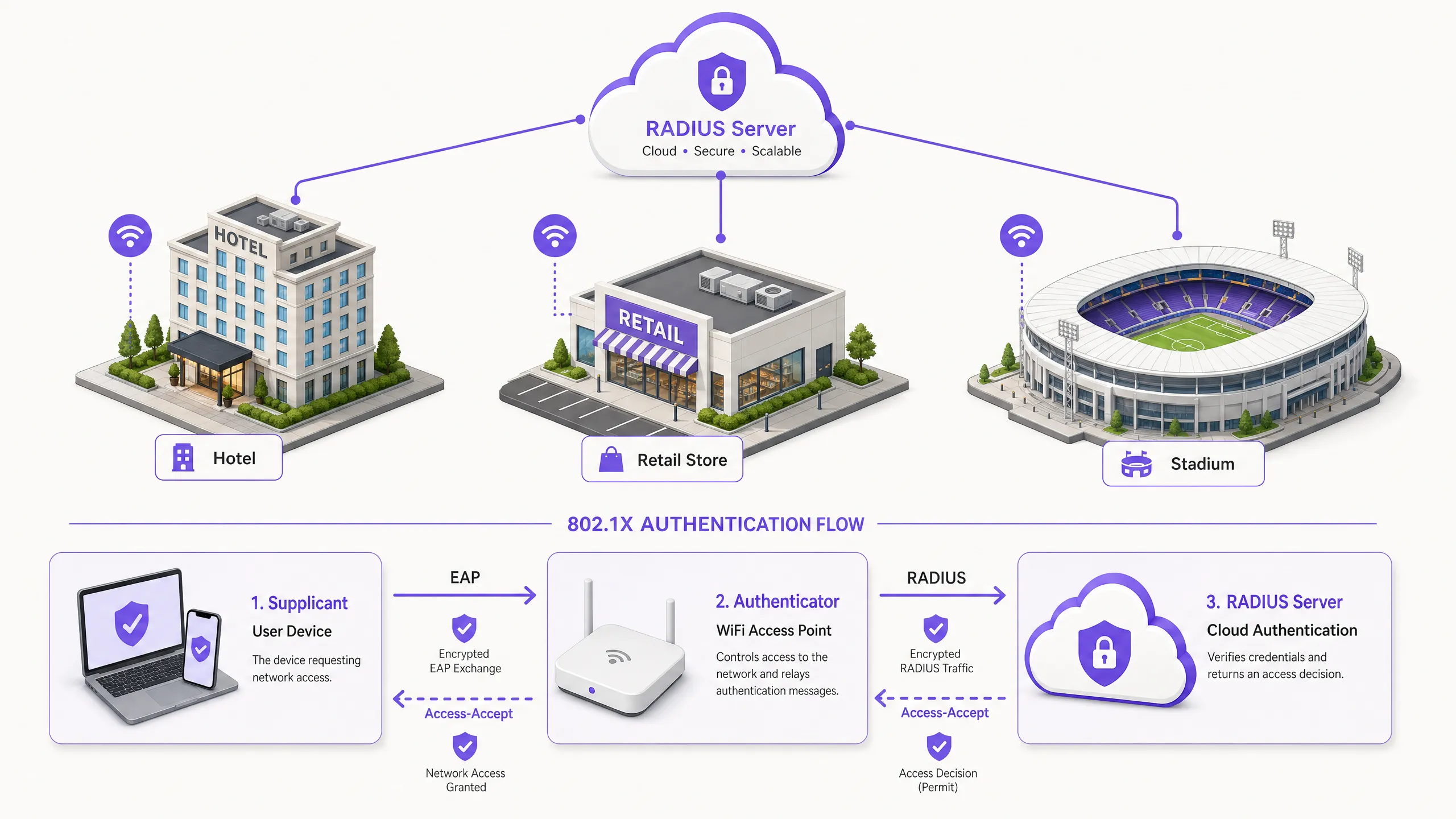
执行摘要
对于管理酒店、零售和公共部门等分布式网络环境的 IT 决策者而言,保护网络访问已从一种运营偏好转变为严格的合规性强制要求。依赖预共享密钥 (PSK) 会带来不可接受的风险,无法满足 PCI DSS 等现代审计标准,并在凭据泄露时使组织面临横向移动的风险。过渡到基于 IEEE 802.1X 端口的网络访问控制,通过在授予 IP 连接之前对设备进行身份验证,可以有效降低这些风险。
从历史上看,由于需要本地化的 RADIUS 基础设施来管理延迟和可用性,在多站点资产中部署 802.1X 受到阻碍。Cloud RADIUS 架构的成熟从根本上改变了这一现状。通过集中身份验证决策并直接与云身份提供商(如 Azure AD 或 Okta)集成,组织可以在所有位置统一实施强大的访问策略,而无需承担本地服务器的资本支出和维护负担。本指南概述了成功实施基于 Cloud RADIUS 的 802.1X 身份验证的技术架构、部署方法和运营最佳实践,确保企业 Guest WiFi 和企业网络的安全性与可扩展性。
技术深度解析
现代企业无线安全的基础建立在 IEEE 802.1X 标准之上。与应用层身份验证不同,802.1X 运行在 OSI 模型的第 2 层。当设备(客户端)尝试与接入点(认证系统)关联时,端口保持在未授权状态,仅允许通过可扩展身份验证协议 (EAP) 流量。该流量被封装在 RADIUS 数据包中并转发到身份验证服务器(Cloud RADIUS 实例)。只有在收到 Access-Accept 消息后,认证系统才会将端口转换为授权状态,从而授予网络访问权限。
Cloud RADIUS 架构
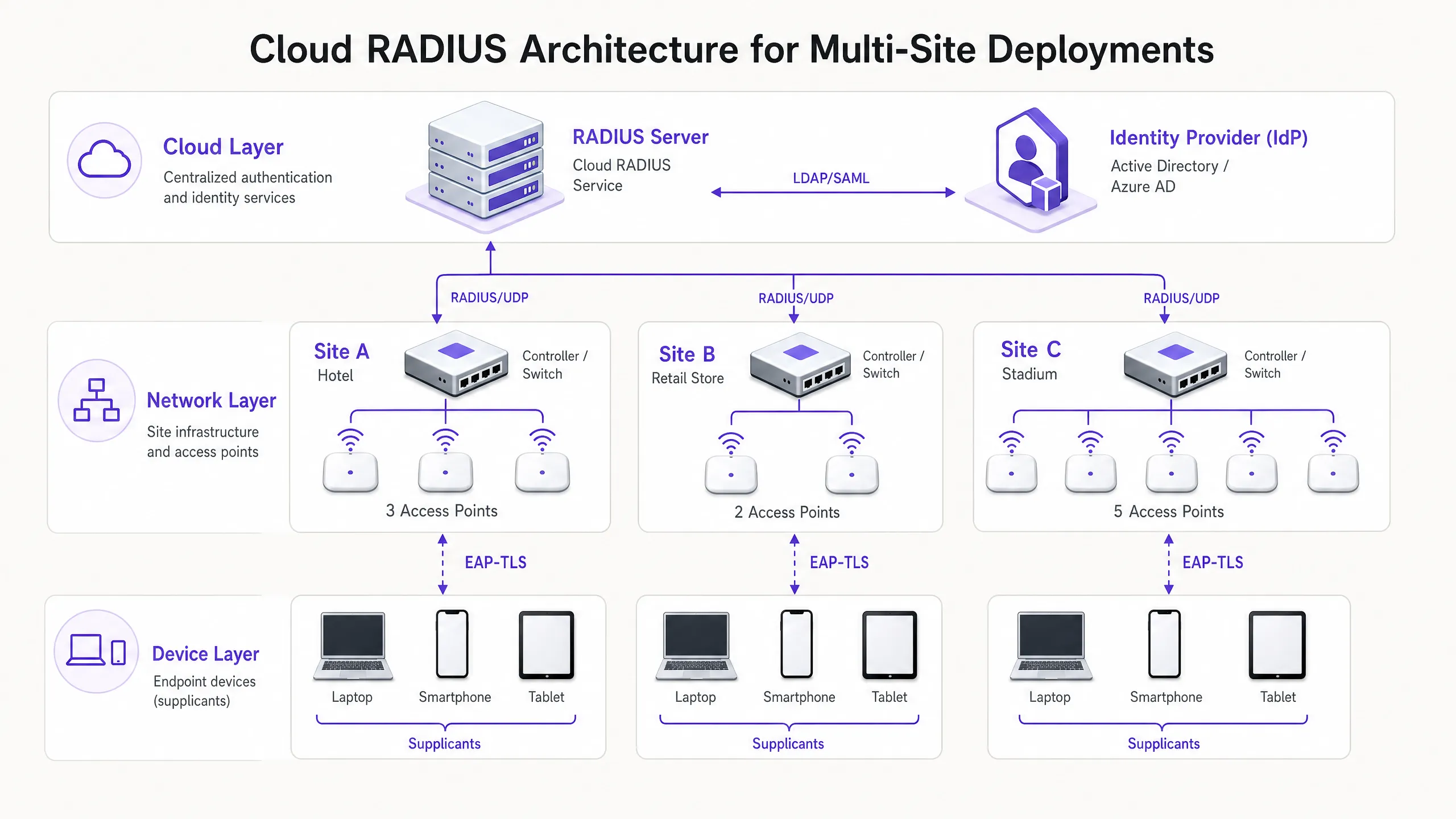
从本地到 Cloud RADIUS 的架构转变消除了对分布式 FreeRADIUS 或 Microsoft NPS 服务器的需求。在云模式中,接入点或无线局域网控制器通过互联网直接与全球分布的 RADIUS 服务进行通信。为了确保此传输的安全,实施 RadSec (RADIUS over TLS) 至关重要,它对身份验证负载进行加密,防止其被拦截。Cloud RADIUS 服务充当中介,通过 LDAP、SAML 或原生 API 集成,对照中央身份提供商 (IdP) 验证凭据。这实现了动态策略实施,例如基于 Azure AD 组群成员身份分配 VLAN,将网络访问与更广泛的企业身份管理策略无缝集成。
EAP 方法选择
EAP 方法的选择决定了部署的安全态势和运营复杂度。
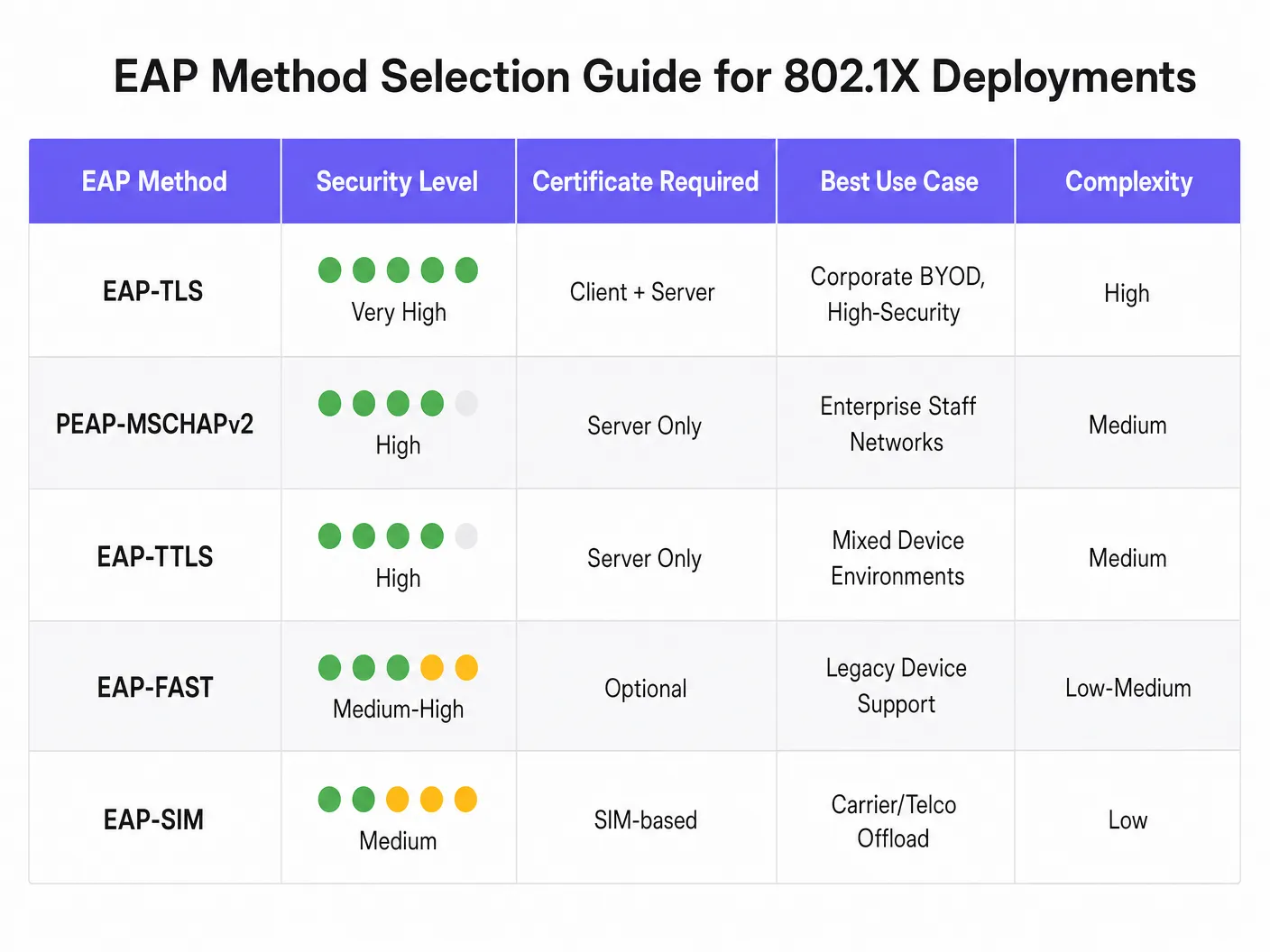
- EAP-TLS (传输层安全): 最安全的方法,需要服务器和客户端证书进行双向身份验证。由于不交换密码,它消除了凭据被盗的风险。但是,它需要公共密钥基础设施 (PKI) 和移动设备管理 (MDM) 来分发客户端证书。强烈推荐用于企业设备。
- PEAP-MSCHAPv2 (受保护的 EAP): 由于在 Windows 中获得原生支持且仅依赖服务器端证书,因此部署广泛。它在 TLS 会话中对凭据交换进行隧道传输。虽然更易于部署,但如果未严格执行客户端证书验证,它很容易受到凭据收集攻击。
- EAP-TTLS: 类似于 PEAP,但在内部身份验证协议中提供了更大的灵活性,使其适用于具有多种客户端操作系统的环境。
实施指南
使用 Cloud RADIUS 部署 802.1X 需要采用分阶段、系统化的方法,以尽量减少对现有业务的中断。
- 身份提供商集成: 建立并验证 Cloud RADIUS 服务与企业 IdP 之间的连接。确保目录同步准确,并且必要的用户属性(例如组群成员身份)可用于策略制定。
- 证书管理: 对于 PEAP 部署,从受信任的公共证书颁发机构 (CA) 获取服务器证书。至关重要的是,通过 MDM 或组策略配置客户端,以明确信任此 CA 并验证服务器证书名称。对于 EAP-TLS,部署内部 CA 基础设施并开始向托管设备颁发客户端证书。
- 网络基础设施配置: 配置无线控制器和接入点以指向 Cloud RADIUS 端点。如果硬件供应商支持,请实施 RadSec。使用强加密安全字符串定义 RADIUS 共享密钥,确保每个站点或控制器集群的密钥唯一。
- 策略定义: 在 Cloud RADIUS 平台内构建身份验证策略。根据用户组、设备类型或位置定义条件,以便在成功身份验证后动态分配 VLAN 或应用访问控制列表 (ACL)。
- 试点和分阶段推广: 选择具有代表性的用户和设备子集进行初始试点。密切监控身份验证日志,以识别延迟问题、证书验证n 次失败,或错误的 VLAN 分配。在试点成功后,执行分阶段部署,优先考虑高风险场所,例如行政办公室或处理敏感数据的场所。
最佳实践
- 强制执行客户端证书验证: PEAP 部署中最常见的漏洞是未能强制客户端进行服务器证书验证。如果允许客户端盲目信任任何呈现的证书,它们就很容易受到流氓接入点攻击。
- 谨慎实施 MAC 身份验证绕过 (MAB): 对于无法运行 802.1X 客户端的无头设备(例如打印机、IoT 传感器),可以使用 MAB。然而,MAC 地址极易被伪造。MAB 设备必须隔离在受到严格限制的 VLAN 上,并配合严格的防火墙规则来限制其网络访问。
- 利用 802.11r 进行漫游: 在设备频繁在接入点之间移动的环境中,完整的 802.1X 身份验证过程可能会引入不可接受的延迟,从而干扰语音等实时应用。实施 802.11r(快速 BSS 过渡)通过缓存身份验证密钥来简化漫游。
- 与分析系统集成: 对于同时运营企业 802.1X 网络和公共访问网络的场所,将身份验证基础设施与 WiFi Analytics 集成,可以全面了解整个区域的网络利用率和设备行为。
故障排除与风险缓解
802.1X 环境中的身份验证失败可能导致大范围的连接中断。强大的故障排除流程至关重要。
- 证书过期: 服务器或客户端证书过期将导致立即的身份验证失败。对证书有效期实施自动化监控和告警,确保在过期前尽早处理更新。
- 延迟和超时: 如果 Cloud RADIUS 服务或 IdP 出现高延迟,认证器可能会超时并断开连接。在无线控制器上配置适当的超时值(通常为 5-10 秒),并部署备份 RADIUS 服务器以提供冗余。
- RADIUS 共享密钥不匹配: 认证器上配置的共享密钥与 RADIUS 服务器上的不匹配将导致数据包被静默丢弃。标准化密钥管理,并尽可能避免手动输入。
ROI 与业务影响
过渡到带有 Cloud RADIUS 的 802.1X 可带来可衡量的业务价值。它通过消除共享密码,极大地减少了攻击面,直接支持符合 PCI DSS(要求 1 和 8)以及 GDPR 数据保护指令。在运营方面,它实现了集中式访问控制,使 IT 团队只需在中央目录中禁用用户帐户,即可立即撤销其在全球所有地点的访问权限。此外,通过停用传统的本地 RADIUS 服务器,企业降低了硬件维护成本、软件许可费用,以及修补和管理分布式基础设施的行政负担。对于 Retail 和 Hospitality 等行业的全面部署,这种集中式的安全态势是实现安全数字化转型的关键推动力。
听听我们关于该主题的全面简报:
Key Definitions
Supplicant
The software client on an end-user device (laptop, smartphone) that negotiates network access using EAP.
IT teams must ensure the supplicant is correctly configured (often via MDM) to validate server certificates to prevent credential theft.
Authenticator
The network device (typically a WiFi access point or switch) that controls physical or logical access to the network based on the authentication status.
The authenticator acts as the middleman, relaying EAP messages between the supplicant and the RADIUS server.
Cloud RADIUS
A centralised, cloud-hosted authentication service that processes RADIUS requests from distributed network infrastructure without requiring on-premises servers.
Essential for multi-site organisations looking to implement enterprise-grade security without the hardware maintenance overhead.
EAP (Extensible Authentication Protocol)
The framework used to encapsulate authentication messages between the supplicant and the authentication server.
Choosing the right EAP method (e.g., PEAP vs. EAP-TLS) determines the security strength and deployment complexity of the wireless network.
RadSec
A protocol that transmits RADIUS data over a TLS tunnel, ensuring encryption of authentication traffic in transit.
Crucial when using Cloud RADIUS, as it protects sensitive credential exchanges from interception over the public internet.
Dynamic VLAN Assignment
The process where the RADIUS server instructs the authenticator to place a device onto a specific virtual network segment based on the user's identity or group membership.
Allows IT to broadcast a single SSID while securely segmenting traffic (e.g., putting HR staff and IT staff on different subnets).
Mutual Authentication
A security process where both the client verifies the server's identity, and the server verifies the client's identity (typically using certificates).
The defining characteristic of EAP-TLS, making it highly resistant to man-in-the-middle attacks.
MAC Authentication Bypass (MAB)
A fallback authentication method that uses a device's MAC address as its credential when it cannot support an 802.1X supplicant.
Used for legacy hardware like printers or IoT devices, but requires strict network segmentation due to the ease of MAC spoofing.
Worked Examples
A 200-room hotel operating a legacy PSK network for back-of-house operations (housekeeping tablets, point-of-sale terminals, manager laptops) needs to achieve PCI DSS compliance ahead of an upcoming audit. They lack on-site IT staff and cannot deploy local servers.
The hotel should deploy a Cloud RADIUS solution integrated directly with their central Azure AD tenant. For manager laptops (Windows/macOS), they should implement PEAP-MSCHAPv2, utilising an MDM profile to push the trusted server certificate and enforce validation. For point-of-sale terminals that may lack robust supplicants, they should utilise MAC Authentication Bypass (MAB) but strictly assign these devices to an isolated VLAN that only permits communication with the payment gateway. The deployment requires configuring the existing cloud-managed access points to point to the Cloud RADIUS IP addresses, securing the connection with RadSec.
A national retail chain is rolling out a new fleet of corporate-owned tablets for inventory management across 500 stores. They want to ensure that even if a tablet is stolen, it cannot be used to access the network, and they want to eliminate password-related helpdesk tickets.
The retailer must implement EAP-TLS. They will deploy an internal Certificate Authority (CA) and integrate it with their MDM platform. When a tablet is provisioned, the MDM pushes a unique client certificate to the device. The Cloud RADIUS service is configured to authenticate devices based solely on the presence of a valid client certificate. If a tablet is reported stolen, the IT team simply revokes that specific certificate in the CA. The Cloud RADIUS service, checking the Certificate Revocation List (CRL) or via OCSP, will immediately deny network access.
Practice Questions
Q1. Your organisation is migrating from a shared PSK to 802.1X using PEAP-MSCHAPv2. During the pilot phase, users report they can connect, but a security audit reveals that devices are silently accepting any server certificate presented to them. What is the immediate risk, and how must it be remediated?
Hint: Consider what happens if an attacker sets up an access point broadcasting your corporate SSID.
View model answer
The immediate risk is a Man-in-the-Middle (MitM) attack via a rogue access point. An attacker can broadcast the corporate SSID, present a self-signed certificate, and harvest user credentials as devices attempt to authenticate. To remediate this, the IT team must configure the supplicant profiles (via MDM or Group Policy) to explicitly validate the server certificate. This involves specifying the exact Trusted Root CA that issued the RADIUS server's certificate and strictly defining the expected server hostname.
Q2. A remote retail branch has lost its internet connection. The local access points are still powered on. Will staff devices currently connected to the 802.1X network remain connected, and will new devices be able to authenticate? Assume standard Cloud RADIUS architecture without local survivability nodes.
Hint: Think about the path an authentication request must take and the state of already authorised ports.
View model answer
Devices that are already authenticated and connected will typically remain connected until their session timeout expires or they disconnect, as the authenticator port is already in the authorised state. However, new devices attempting to connect, or devices attempting to re-authenticate, will fail. Because the internet connection is down, the access points cannot reach the Cloud RADIUS server to process the EAP exchange. This highlights the importance of resilient WAN links when relying on cloud-based authentication.
Q3. You need to secure network access for a fleet of legacy barcode scanners in a warehouse. These scanners do not support 802.1X supplicants and only support WPA2-Personal (PSK). You cannot upgrade the hardware. How do you integrate these devices into a secure network architecture alongside your 802.1X corporate devices?
Hint: You need an alternative to 802.1X that still provides access control, combined with network-level isolation.
View model answer
The recommended approach is to utilise MAC Authentication Bypass (MAB) for the barcode scanners. The access point will use the scanner's MAC address as the identity and send it to the RADIUS server. Because MAC addresses are easily spoofed, this provides weak authentication. Therefore, the RADIUS server must be configured to return a specific VLAN attribute upon successful MAB authentication. This VLAN must be heavily restricted via firewalls or ACLs, allowing the scanners to communicate only with the specific inventory servers they require, and blocking all other lateral network access.
Continue reading in this series
The Security Benefits of RADIUS as a Service for Hybrid Workforces
This technical reference guide explains how RADIUS as a Service secures network access for hybrid workforces across distributed venues. It covers the architecture, security benefits, and deployment steps for replacing on-premise RADIUS infrastructure with a cloud-managed authentication service. For IT managers and network architects at hotels, retail chains, stadiums, and public-sector organisations, this guide provides the evidence needed to evaluate and act on a cloud RADIUS migration this quarter.
The Security Benefits of RADIUS as a Service for Hybrid Workforces
This technical reference guide explains how RADIUS as a Service secures network access for hybrid workforces across distributed venues. It covers the architecture, security benefits, and deployment steps for replacing on-premise RADIUS infrastructure with a cloud-managed authentication service. For IT managers and network architects at hotels, retail chains, stadiums, and public-sector organisations, this guide provides the evidence needed to evaluate and act on a cloud RADIUS migration this quarter.
Integrating RADIUS as a Service with Cloud Directories (Azure AD & Google Workspace)
This technical reference guide details how to integrate RADIUS as a Service with cloud directories - Microsoft Entra ID and Google Workspace - for enterprise WiFi authentication. It covers the architectural shift from on-premises NPS to cloud-native RADIUS, the deployment of certificate-based EAP-TLS authentication, and the operational best practices for securing wireless access across hospitality, retail, and public-sector environments. For IT managers and network architects already invested in cloud identity, this guide bridges the gap between directory management and physical network security.