
Managed WiFi solution: a comprehensive guide for businesses
This authoritative technical reference guide explains how to design, deploy, and scale a managed WiFi solution across multi-tenant environments including build-to-rent properties, hotels, retail complexes, and stadiums. It covers VLAN segmentation, per-device PSK architecture, identity-based network design, and compliance with PCI DSS and GDPR - giving IT managers, network architects, and venue operations directors the practical frameworks they need to make decisions this quarter.
Video overview
Listen to this guide
View podcast transcript

Executive summary
For CTOs and network architects managing multi-tenant environments - whether build-to-rent (BTR) properties, hotels, or retail complexes - WiFi is no longer an amenity. It is critical utility infrastructure. However, deploying enterprise WiFi across shared physical spaces introduces severe challenges regarding security, spectrum congestion, and operational overhead that a flat, unmanaged network simply cannot address.
This guide provides a definitive architectural blueprint for a managed WiFi solution. We examine how to replace flat, unmanageable networks with identity-based segmentation using IEEE 802.1Q VLANs and per-device Pre-Shared Keys (xPSK). By separating the control plane from the data plane and moving to a cloud-managed overlay, you can collapse SSID sprawl, enforce strict isolation for IoT and point-of-sale devices, and maintain compliance with PCI DSS and GDPR.
Purple currently orchestrates identity-based networks across 80,000+ live venues, processing 440 million logins in 2024 and collecting 29 billion data points. This guide distils that operational reality into actionable deployment strategies for your next hardware refresh or greenfield build.
Technical deep-dive
The foundation of a managed WiFi solution is the separation of the management plane from the physical access layer. You do not configure individual access points; you define policies centrally in a cloud controller and push them to the edge. This architecture gives you operational visibility, automated provisioning, and the ability to revoke access or modify bandwidth policies without touching a single switch CLI.
Network segmentation and VLAN architecture
In a multi-tenant environment, logical isolation is your primary defence mechanism. The standard approach uses VLAN tagging under IEEE 802.1Q to separate traffic classes across a shared physical infrastructure. A typical BTR or MDU deployment requires at minimum five distinct VLANs:
| VLAN | Traffic Class | Routing Policy |
|---|---|---|
| Management | AP and switch management traffic | Isolated, no tenant access |
| Residents | Per-unit isolated subnets | Internet + permitted internal services |
| Guests | Lobby and common area visitors | Internet only, captive portal |
| IoT | HVAC, smart locks, sensors | Restricted egress to management IPs only |
| Staff | Building operations and POS | Internal resources, payment gateway |
VLANs provide isolation, not security. You must enforce strict inter-VLAN routing policies at the firewall. A misconfigured trunk port can collapse your entire segmentation model. A smart thermostat on your IoT VLAN should have zero route to the payment terminals on your staff VLAN. That is non-negotiable for PCI DSS compliance.
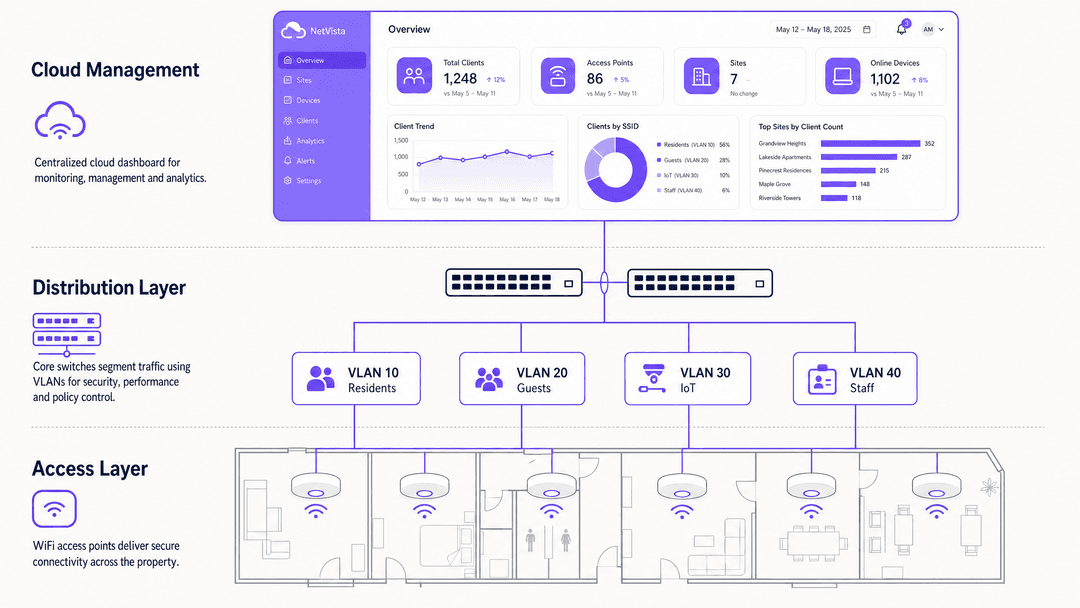
The SSID sprawl problem
Historically, IT teams achieved segmentation by broadcasting a separate SSID for each user group. This approach destroys wireless performance. Every enabled SSID broadcasts a beacon frame every 100 milliseconds at the lowest basic data rate - typically one to two megabits per second. Broadcasting six SSIDs from a single access point generates 60 beacons per second. In a dense environment where a client device can hear four access points on the same channel, that channel carries 240 beacons per second before a single packet of user data is transmitted. This overhead consumes up to 20% of available airtime, increases latency, and causes jitter on voice calls.
The industry consensus is clear: broadcast no more than three SSIDs per radio. Ideally, broadcast one or two. See our guide on three SSIDs to rule them all for the canonical SSID architecture covering guest, Passpoint, and IoT WiFi.
Per-device PSK (xPSK) and dynamic VLAN assignment
The modern enterprise standard for resolving the SSID sprawl problem without sacrificing segmentation is per-device PSK, referred to here as xPSK. You broadcast a single SSID. Each device or user group receives a unique passphrase. When a device connects, the wireless controller validates the passphrase against a RADIUS database and uses standard IETF RADIUS attributes to dynamically assign that session to the correct VLAN.
The three RADIUS attributes that drive this are:
- Attribute 64 (Tunnel-Type): set to VLAN
- Attribute 65 (Tunnel-Medium-Type): set to IEEE 802
- Attribute 81 (Tunnel-Private-Group-ID): contains the VLAN ID string
One SSID in the air. Total logical isolation on the wired network. This architecture is supported across the canonical hardware list:
| Vendor | xPSK Implementation | Scale Limit |
|---|---|---|
| Cisco Meraki | iPSK (Identity PSK) | Unlimited via Cisco ISE |
| HPE Aruba | MPSK (Multi Pre-Shared Key) | Unlimited via ClearPass |
| Ruckus | DPSK (Dynamic PSK) | 10,000 keys per SSID |
| Juniper Mist | PPSK (Private Pre-Shared Key) | 5,000 keys per organisation |
| Ubiquiti UniFi | PPSK | Built-in, no additional licensing |
Authentication standards
IEEE 802.1X with RADIUS authentication remains the gold standard for corporate devices managed via MDM, where certificates can be deployed silently. It is completely unworkable for headless IoT devices, smart TVs, and resident mobile phones. xPSK bridges this gap. For encryption, WPA3-Enterprise is the current recommended standard, eliminating the vulnerabilities associated with the WPA2 four-way handshake and providing 192-bit security mode for high-sensitivity environments.
Implementation guide
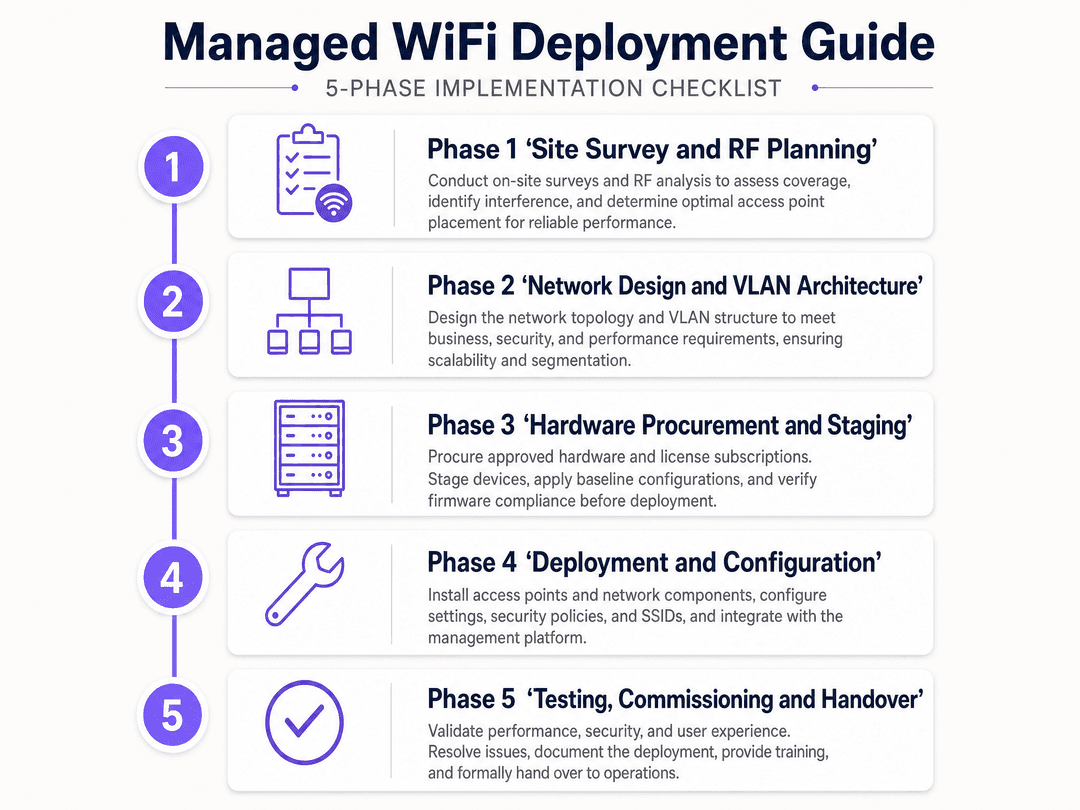
Phase 1: RF planning and site survey
Do not rely on predictive vendor coverage maps. Commission an active, on-site RF survey before any hardware is procured. In dense MDU environments, co-channel interference (CCI) is the primary cause of poor performance post-deployment. Map signal propagation through physical walls, identify external interference sources, and inform your channel allocation strategy.
The 2.4 GHz band provides only three non-overlapping channels in most regulatory domains (1, 6, and 11). The 5 GHz band provides significantly more. WiFi 6 and WiFi 6E extend into the 6 GHz band, providing clean spectrum largely free from legacy device interference. For new deployments, specify WiFi 6E capable access points. The additional spectrum headroom pays dividends in dense environments.
Phase 2: Logical design
Document your IP addressing scheme and VLAN assignments before touching any hardware. Map your tenant count, traffic classes, and inter-VLAN routing policy. Define your identity provider integration. Purple integrates directly with Microsoft Entra ID, Okta, and Google Workspace to automate the credential lifecycle. When a resident moves in, the property management system generates their unique key. When they move out, Purple revokes it automatically.
Phase 3: Hardware staging and deployment
Ensure all trunk ports on your distribution switches explicitly permit the required VLANs. The management VLAN must be completely isolated from all tenant and guest VLANs. Plan for approximately one access point per 15 to 20 active devices in high-density areas, rather than one per physical room.
Phase 4: Testing and commissioning
Validate VLAN assignment for each device class before go-live. Confirm that guest traffic has zero route to any internal subnet. Test POS terminal isolation against PCI-DSS requirements. Verify that IoT device egress is restricted to designated management IPs only.
Best practices
Automate key lifecycles. Never manage xPSK passwords manually at scale. Integrate with your property management system (PMS) or identity provider to generate keys upon onboarding and revoke them at offboarding. Stale keys are a security liability.
Address MAC randomisation. Modern iOS and Android devices rotate MAC addresses per network. Ensure your managed WiFi platform binds the session identity to the credential, not just the hardware address. Purple's orchestration layer handles device profiling intelligently across 80,000+ venues.
Limit SSID count. Broadcast no more than three SSIDs per radio. Use dynamic VLAN assignment via RADIUS attributes rather than separate SSIDs to serve multiple user groups.
Isolate IoT. IoT devices represent a significant attack surface - they are notoriously difficult to patch. Place them on a dedicated VLAN with strict egress filtering. They should communicate only with their designated management platforms.
For hospitality deployments, ensure your Guest WiFi network captures first-party data via conscious-choice opt-ins on the captive portal. For retail environments, use WiFi Analytics to trigger automated marketing campaigns based on visitor dwell time. For healthcare and transport venues, apply the same VLAN isolation principles to visitor and patient networks.
Troubleshooting and risk mitigation
Silent traffic drops
The most common failure mode in multi-tenant deployments is incomplete trunk port configuration. Architects design a VLAN scheme and then fail to explicitly permit the relevant VLANs on every trunk link in the path. Traffic silently drops, residents complain, and the support team spends days tracing the issue. Document your trunk configurations meticulously and validate them during commissioning.
Credential exhaustion
Some local xPSK implementations limit the number of keys stored on the access point (HPE Aruba MPSK-Local is limited to 24 keys). Always use a centralised RADIUS server for enterprise deployments to remove scale limits.
Management plane exposure
Your management VLAN must be completely isolated from all tenant and guest VLANs. If a tenant can reach your management plane, you have a critical security vulnerability. Use out-of-band management where possible and apply strict ACLs to management traffic.
ROI and business impact
A properly architected managed WiFi solution transitions connectivity from a sunk cost to a measurable asset. Centralised management and automated onboarding reduce support tickets by up to 40% compared to unmanaged deployments. Proper VLAN segmentation simplifies PCI DSS audits by clearly defining the cardholder data environment (CDE) boundary. GDPR compliance is maintained by isolating guest traffic and capturing data only via conscious-choice opt-ins.
Beyond cost reduction, Purple's cloud overlay enables venues to capture first-party data at scale. With 29 billion data points collected globally, operators use this intelligence to trigger automated marketing campaigns, measure dwell time, and build loyalty programmes. Premier Inn and Whitbread use Purple's platform to drive repeat visits. McDonald's uses it to measure footfall attribution across venues.
For BTR operators specifically, Purple's Multi-Tenant WiFi isolates each resident's traffic securely, supports resident smart devices via xPSK, and provides a branded onboarding experience that differentiates the property. Connectivity becomes an amenity residents expect and a differentiator landlords can market.
For further reading on managed WiFi deployments in specific geographies, see our guide on managed WiFi services in Dubai .
Key Definitions
Managed WiFi solution
An enterprise wireless architecture where the control and management planes are separated from physical access points, typically hosted in a cloud controller, enabling centralised policy enforcement, analytics, and automated provisioning.
Essential for scaling networks across multiple venues or large multi-tenant buildings without linear increases in IT headcount.
VLAN (Virtual Local Area Network)
A logical subnetwork that groups a collection of devices from different physical LAN segments, defined under IEEE 802.1Q. Traffic on one VLAN cannot reach traffic on another VLAN unless explicitly permitted through a routing or firewall policy.
The fundamental building block for separating guest, staff, resident, and IoT traffic on shared physical infrastructure.
xPSK (per-device Pre-Shared Key)
A security architecture that allows multiple unique passwords to be used on a single SSID, with each password tying the device to a specific identity and VLAN. Known as iPSK (Cisco Meraki), MPSK (HPE Aruba), DPSK (Ruckus), and PPSK (Juniper Mist, Ubiquiti UniFi).
Used to eliminate SSID sprawl while maintaining strict network segmentation for devices that cannot support 802.1X certificate-based authentication.
RADIUS (Remote Authentication Dial-In User Service)
A networking protocol that provides centralised Authentication, Authorisation, and Accounting (AAA) management for users connecting to a network service. Defined in IETF RFC 2865.
The engine that validates xPSK passwords and sends the dynamic VLAN assignment attributes back to the access point.
Captive portal
A web page that users of a public-access network are required to view and interact with before internet access is granted. Used to capture consent, display terms of service, or collect first-party data.
The primary mechanism for capturing first-party data and enforcing terms of service on Guest WiFi networks.
Beacon frame
A management frame in IEEE 802.11 based WLANs that contains all the information about the network, transmitted every 100 milliseconds at the lowest basic data rate to announce the presence of a wireless LAN.
The reason SSID sprawl degrades performance. Too many beacons consume available airtime at low data rates before any user data is transmitted.
WPA3-Enterprise
The latest WiFi security protocol offering 192-bit cryptographic strength in its highest security mode, defined by the Wi-Fi Alliance. It eliminates the vulnerabilities associated with the WPA2 four-way handshake.
The recommended encryption standard for new enterprise deployments, particularly in environments handling sensitive data or requiring compliance with government security frameworks.
MAC randomisation
A privacy feature in modern operating systems (iOS 14+, Android 10+) that generates a random Media Access Control address for each WiFi network a device joins, preventing cross-network tracking.
A significant challenge for legacy authentication systems that rely on static hardware addresses to identify returning users or bind xPSK credentials.
Co-channel interference (CCI)
Interference that occurs when two or more access points broadcast on the same radio frequency channel within range of each other, causing contention and degraded throughput.
The primary cause of poor WiFi performance in dense MDU environments. Mitigated through proper RF planning and channel allocation.
Worked Examples
A 250-unit build-to-rent property requires secure WiFi for residents, a public guest network in the lobby, and connectivity for building management IoT sensors. The current setup uses a flat network with a single shared password, and residents are experiencing severe latency.
Deploy a cloud-managed architecture using Cisco Meraki access points with iPSK. Create a single SSID. Integrate the Meraki dashboard with Cisco ISE as the RADIUS backend, and connect ISE to the property's PMS via API. When a resident moves in, the PMS triggers ISE to generate a unique WPA2/WPA3 passphrase. The RADIUS server assigns resident devices to isolated per-unit VLANs (VLAN 100 to 350). IoT devices receive static keys and are steered to VLAN 40 with strict egress firewall rules permitting only outbound traffic to the BMS management platform. Lobby guests connect via a second SSID with a Purple captive portal, isolated on VLAN 50 with internet-only routing and a firewall rule blocking all access to internal subnets.
A 50-site retail chain needs to deploy point-of-sale terminals securely over WiFi while offering shopper connectivity in-store, ensuring PCI DSS compliance without running separate physical access points per site.
Deploy a managed WiFi solution using Juniper Mist PPSK across all 50 sites, managed from a single Mist cloud organisation. Create two SSIDs per site. SSID 1 (Corporate) uses PPSK. Assign long, complex, static keys to the POS terminals. The Mist RADIUS backend steers these devices to VLAN 20. Configure the firewall to restrict VLAN 20 traffic exclusively to the payment gateway IPs, with all other outbound traffic blocked. SSID 2 (Guest) uses an open network with Purple's captive portal for shopper opt-in, steering traffic to VLAN 30 with internet-only access. Use Juniper Mist's AI-driven anomaly detection to alert on any unexpected device behaviour on VLAN 20.
Practice Questions
Q1. You are deploying a managed WiFi solution in a retail environment. The marketing team wants 4 distinct SSIDs for different customer loyalty tiers, plus 2 SSIDs for staff and POS terminals. What is the architectural risk, and how do you resolve it?
Hint: Consider the impact of beacon frames on available airtime in a shared wireless medium.
View model answer
Broadcasting 6 SSIDs will cause severe beacon overhead, consuming up to 20% of available airtime and degrading performance for all users. The solution is to collapse the networks. Deploy one open SSID with a Purple captive portal for all shoppers. Use Purple's platform to identify loyalty tiers post-authentication and deliver personalised content. Deploy a second SSID with xPSK (e.g., Meraki iPSK) to dynamically assign staff and POS devices to their respective isolated VLANs via RADIUS. Two SSIDs instead of six. Airtime reclaimed. Segmentation maintained.
Q2. A hotel guest connects to the open Guest WiFi network. The property also has a secure Staff VLAN containing the property management system. What specific network configuration is required to ensure GDPR and PCI-DSS compliance regarding this guest traffic?
Hint: VLANs alone do not prevent routing between segments.
View model answer
The Guest WiFi must be mapped to a dedicated VLAN (e.g., VLAN 50). Crucially, explicit ACLs or firewall rules must block all routing from VLAN 50 to the Staff VLAN, Management VLAN, and any internal subnets. The guest traffic must be routed directly to the internet with client isolation enabled, preventing lateral movement between guest devices. The Captive Portal must present a clear opt-in mechanism for any data capture, satisfying GDPR consent requirements.
Q3. During commissioning of a new BTR property, resident devices authenticate successfully via PPSK, but fail to obtain an IP address. Devices on the Management VLAN are working correctly. What is the most likely Layer 2 configuration error?
Hint: Think about the path between the access point and the DHCP server.
View model answer
The most likely error is a misconfigured trunk port on the distribution or core switches. The AP is correctly tagging the resident traffic with the dynamic VLAN ID returned by the RADIUS server, but that specific VLAN has not been explicitly permitted on the trunk links between the AP, the switch fabric, and the DHCP server or gateway. The traffic is silently dropped at the trunk. Resolve by auditing the allowed VLAN list on every trunk port in the path and explicitly permitting the resident VLAN IDs.
Continue reading in this series
Staff WiFi vs. Guest WiFi: Best Practices for Corporate Network Segmentation
A comprehensive technical guide for IT leaders on segmenting staff and guest WiFi networks. It covers VLAN architecture, 802.1X authentication, firewall policies, and the business impact of secure network design.
Apartment WiFi solutions: a comprehensive guide for businesses
This guide covers the architecture, deployment, and business case for apartment WiFi solutions in Build to Rent and multi-dwelling unit properties. It explains how Identity Pre-Shared Key (iPSK) technology creates secure, isolated network bubbles for each resident while supporting smart devices and IoT. Property developers, landlords, and BTR operators will find actionable deployment guidance, ROI data, and worked implementation scenarios.
Cox business managed WiFi: a comprehensive guide for businesses
This guide details how property developers and BTR operators can deploy scalable, secure networks using Cox Business managed WiFi. It covers network architecture, vendor-neutral hardware deployment, and the business impact of transitioning connectivity from an operational headache to reliable infrastructure.
Got questions about your specific setup?
Our team works with venue operators, IT managers, and network engineers across 80,000 venues. Book a 20-minute call and we will show you how others like you solved it.