
Three SSIDs to rule them all: guest, Passpoint, and IoT WiFi setup guide
This technical guide provides a definitive blueprint for implementing the three-SSID WiFi design across enterprise venues. It details the configuration of an open Guest WiFi portal, automated Passpoint onboarding, and per-device xPSK authentication to achieve complete VLAN segmentation and zero-trust network access.
Video overview
Listen to this guide
View podcast transcript
📚 Part of our core series: Enterprise WiFi Security Guide →
Executive Summary
Most enterprise venues still operate legacy wireless architectures that collapse all traffic onto one or two SSIDs. This approach creates unacceptable risk by placing unmanaged IoT devices, contractor hardware, and public visitors on shared network segments. The three-SSID WiFi design eliminates this vulnerability by assigning every class of device and user its own dedicated network, its own VLAN, and its own authentication method. This guide provides a step-by-step blueprint for deploying three distinct SSIDs: an open Guest WiFi network for compliance and data capture, a Passpoint (Hotspot 2.0) network for automated secure access via the Purple app or SDK, and an xPSK network that consolidates all headless devices under per-device keys. By standardising on this architecture, IT teams can achieve strict VLAN segmentation, reduce radio frequency overhead, and streamline network operations across Cisco Meraki, HPE Aruba, Ruckus, Juniper Mist, and Ubiquiti UniFi deployments.
Listen to the Briefing
Technical Architecture Deep-Dive
The three-SSID design is a zero-trust approach applied to the wireless edge. It relies on the principle that the SSID is merely the entry point; the actual security boundary is the VLAN assignment dictated by the authentication method.
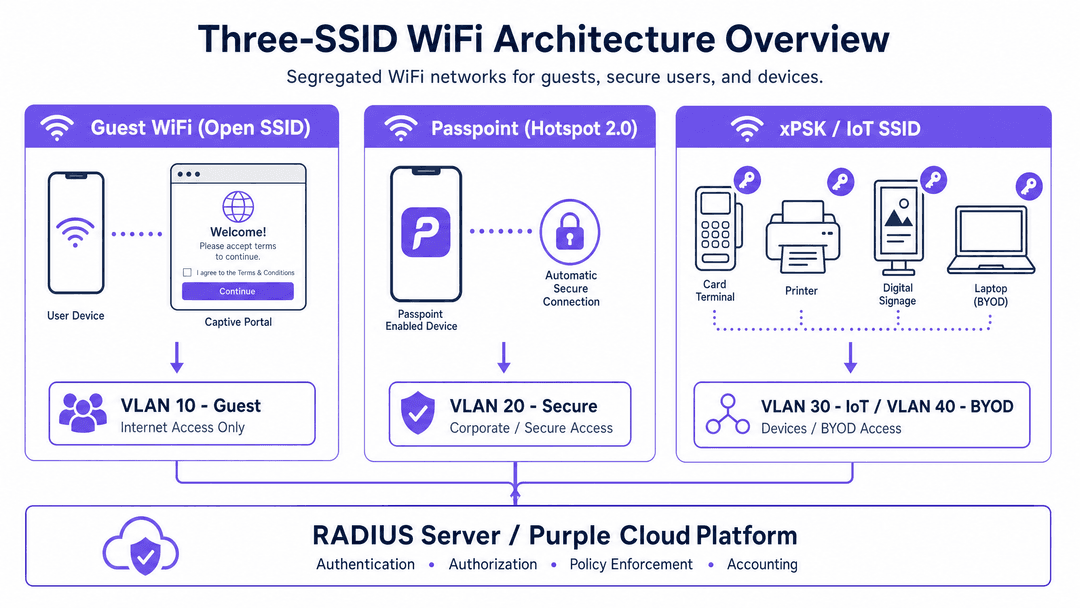
1. Guest WiFi (Open SSID)
The first SSID is an open network with a captive portal. It serves visitors, temporary guests, and casual users. Because it is open, there is zero friction at the point of connection. The security control point shifts to the portal layer. When a device connects, it is assigned an IP address from a heavily restricted subnet and placed in a walled garden. The user is redirected to a splash page where they accept terms of service and optionally provide identity data.
This SSID is critical for compliance. Under GDPR, you must record consent and the lawful basis for processing data. Purple handles this natively, logging the consent timestamp and capturing first-party data. Once authenticated, the session is mapped to VLAN 10. Firewall rules enforce that VLAN 10 has internet access only, completely isolated from internal systems. For venues subject to PCI DSS, this segmentation ensures guest traffic never touches the cardholder data environment.
2. Passpoint (Hotspot 2.0)
The second SSID leverages IEEE 802.11u Passpoint to provide automated, encrypted access. This is designed for returning guests, loyalty members, and staff. Instead of a captive portal, Passpoint uses an installed profile to negotiate authentication in the background via EAP-TLS or EAP-TTLS with PEAP.
When a user with the Purple app (or your own app integrating the Purple SDK) enters the venue, their device detects the Passpoint SSID broadcasting specific ANQP (Access Network Query Protocol) elements. It matches these against its profile and connects automatically. Purple acts as the cloud RADIUS server, processing the credential and returning a RADIUS Access-Accept message. Crucially, this message includes VLAN assignment attributes (such as Tunnel-Private-Group-ID). A loyalty member might be assigned to VLAN 20, while a staff member using the same SSID is assigned to VLAN 30. This dynamic VLAN assignment enables policy enforcement per identity rather than per SSID.
3. xPSK (IoT and BYOD)
The third SSID consolidates all other use cases - card terminals, digital signage, printers, contractors, and BYOD - using xPSK (iPSK, PPSK, DPSK, or MPSK). Instead of a single shared password, every device or group receives a unique pre-shared key.
When a device connects, the access point sends the device's MAC address and the specific PSK used to the Purple RADIUS server. Purple validates the key and returns the corresponding VLAN assignment. A card terminal lands on VLAN 40 (PCI-scoped), while a digital signage player lands on VLAN 50. If a contractor's key is revoked, their access is terminated immediately without affecting any other device. This eliminates the need for MAC authentication bypass (MAB) lists and shared passwords.
Implementation Guide
Deploying this architecture requires strict sequencing. Do not configure the wireless controllers until the underlying wired network is prepared.
Step 1: Switch and Firewall Configuration
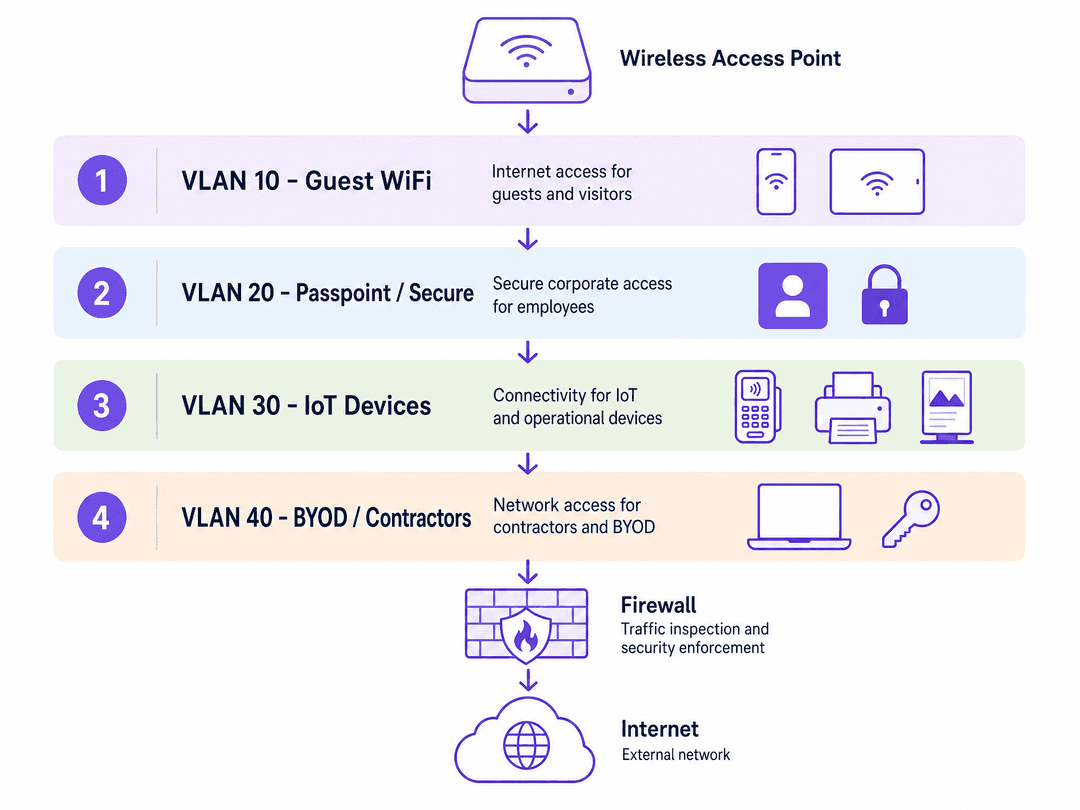
Define your VLANs at the switch layer first. Create discrete VLANs for each device class (e.g., VLAN 10 Guest, VLAN 20 Secure, VLAN 30 IoT, VLAN 40 PCI). Configure inter-VLAN routing policies on your firewall to enforce strict isolation. Guest and IoT VLANs should typically only have outbound internet access. Ensure that all access point uplink ports are configured as trunks carrying all required VLANs.
Step 2: RADIUS Server Integration
Navigate to the Purple portal and generate your RADIUS credentials. Note the primary and secondary IP addresses, the authentication port (typically 1812), the accounting port (1813), and the shared secret. Enter these details into your wireless controller's AAA configuration. Set the RADIUS timeout to at least two seconds to accommodate cloud latency.
Step 3: SSID Configuration
Configure the three SSIDs according to your vendor's specific implementation:
Guest SSID: Set security to Open. Enable captive portal redirect and point it to your Purple portal URL. Configure the walled garden to allow access to Purple's domains, your DNS resolver, and OS captive portal detection endpoints (e.g., captivedetect.apple.com).
Passpoint SSID: Enable 802.11u/Hotspot 2.0. Configure the ANQP elements, ensuring the NAI Realm matches the profile deployed by the Purple app exactly. Set security to WPA2-Enterprise or WPA3-Enterprise and point authentication to the Purple RADIUS servers.
xPSK SSID: Enable the vendor-specific xPSK feature (e.g., iPSK on Cisco Meraki, MPSK on HPE Aruba). Point the MAC authentication to the Purple RADIUS servers and enable dynamic VLAN assignment.
Best Practices
- Limit SSID Count: Never broadcast more than four SSIDs per access point. Excessive SSIDs increase beacon overhead, which degrades overall network performance. The three-SSID design optimises airtime utilisation.
- Walled Garden Accuracy: Keep your walled garden as tight as possible. Only include domains essential for the portal flow and OS detection. Broad IP ranges create security loopholes.
- Key Lifecycle Management: Establish a strict lifecycle for xPSK keys. Set expiry dates for contractor keys at the time of provisioning. Review and rotate IoT keys annually.
Troubleshooting & Risk Mitigation
- RADIUS Timeouts: If devices fail to connect to the Passpoint or xPSK networks, check the RADIUS timeout settings on the controller. Cloud RADIUS requires a slightly longer timeout than local servers. Ensure both primary and secondary Purple RADIUS IPs are configured.
- VLAN Tagging Failures: If a device authenticates successfully but fails to obtain an IP address, the issue is almost always a missing VLAN tag on the access point's switch port. Verify the trunk configuration.
- Passpoint Discovery Issues: If devices ignore the Passpoint SSID, verify the ANQP NAI Realm configuration. Even a minor typo will cause the device to silently reject the network.
ROI & Business Impact
Implementing the three-SSID design delivers measurable business value. By consolidating SSIDs, venues reduce RF interference and improve client performance. Dynamic VLAN assignment via Passpoint and xPSK significantly reduces IT support tickets related to password resets and MAC address whitelisting. Furthermore, the robust segmentation ensures compliance with PCI DSS and GDPR, mitigating the financial risk of data breaches while maximising the collection of first-party data through the Guest WiFi portal.
Key Definitions
Passpoint (Hotspot 2.0)
An IEEE 802.11u standard that enables mobile devices to automatically discover and securely connect to WiFi networks without user interaction.
Crucial for delivering cellular-like roaming experiences and secure, encrypted access for returning visitors and staff.
xPSK
An umbrella term for vendor-specific implementations (iPSK, PPSK, DPSK, MPSK) that allow multiple unique pre-shared keys on a single SSID, with each key mapping to a specific VLAN.
Used to secure headless IoT devices, printers, and card terminals that cannot support 802.1X enterprise authentication.
Captive Portal
A web page that users are forced to view and interact with before access is granted to a public WiFi network.
The primary mechanism for capturing first-party data and ensuring GDPR compliance via explicit consent.
VLAN Segmentation
The practice of dividing a physical network into multiple logical networks to isolate traffic and enforce security policies.
Essential for isolating untrusted guest traffic from sensitive internal systems and PCI-scoped payment devices.
RADIUS
Remote Authentication Dial-In User Service; a networking protocol that provides centralised Authentication, Authorisation, and Accounting (AAA) management.
The engine that powers Passpoint and xPSK, validating credentials and instructing the access point which VLAN to assign.
ANQP
Access Network Query Protocol; a protocol used by devices to discover network information (like roaming consortiums and authentication types) before associating with an access point.
The mechanism Passpoint uses to determine if a device has the correct profile to connect automatically.
Walled Garden
A limited environment that controls the user's access to web content before they have fully authenticated.
Must be configured correctly to allow devices to reach the captive portal and OS detection endpoints.
EAP-TLS
Extensible Authentication Protocol - Transport Layer Security; an authentication framework that uses certificates for both client and server validation.
The highly secure authentication method typically used by Passpoint profiles to ensure encrypted connections.
Worked Examples
A 350-room hotel needs to secure its card terminals while simultaneously capturing guest data for its loyalty programme. Currently, all devices share a single WPA2-Personal SSID.
Deploy the three-SSID architecture. Create VLAN 10 for guests, VLAN 20 for loyalty members, and VLAN 40 for payment terminals. Configure the Guest SSID as open with a Purple captive portal for data capture. Configure the Passpoint SSID for loyalty members using the Purple app. Configure the xPSK SSID for the card terminals. In the Purple dashboard, generate unique PSKs for each terminal and map them to VLAN 40. On the firewall, restrict VLAN 40 to only allow outbound HTTPS traffic to the payment processor's IP addresses.
A retail chain with 80 stores is experiencing severe WiFi performance issues due to broadcasting five SSIDs per store (Guest, Staff, POS, Signage, Scanners).
Consolidate the networks using the three-SSID design. Retain the Guest SSID with a captive portal. Deploy a Passpoint SSID for staff, authenticating against Microsoft Entra ID via Purple's RADIUS integration, mapping them to a staff VLAN. Combine POS, Signage, and Scanners onto a single xPSK SSID. Assign unique keys to each device category, mapping POS to VLAN 40, Signage to VLAN 50, and Scanners to VLAN 60.
Practice Questions
Q1. A stadium IT director wants to deploy Passpoint for fans using the official team app, but is concerned about the RADIUS timeout settings causing connection failures during high-density events. What is the recommended approach?
Hint: Consider the latency of cloud-based authentication versus local controllers.
View model answer
Configure the RADIUS timeout on the wireless controllers to a minimum of two to three seconds. In high-density environments, cloud RADIUS responses may take slightly longer than local servers. Additionally, ensure both primary and secondary Purple RADIUS IP addresses are configured to provide failover redundancy.
Q2. You are configuring the xPSK SSID for a fleet of new wireless barcode scanners. The scanners connect to the SSID successfully, but they cannot reach the inventory server. What is the most likely cause?
Hint: Think about the path between the access point and the core switch.
View model answer
The most likely cause is a missing VLAN tag on the access point's switch port. While Purple RADIUS is correctly assigning the scanner to the inventory VLAN, if that VLAN is not allowed on the trunk port connecting the access point to the switch, the traffic will be dropped.
Q3. A hotel needs to allow guests to access its direct booking engine before they authenticate through the captive portal. How should this be configured?
Hint: This involves controlling pre-authentication traffic.
View model answer
The IT team must add the domains and IP addresses of the booking engine to the walled garden configuration on the wireless controller. This permits pre-authentication traffic to reach those specific destinations while blocking all other internet access until the captive portal flow is complete.
Continue reading in this series
WPA2 Personal vs Enterprise: what is the difference and which should you use?
This technical reference guide provides a comprehensive comparison of WPA2 Personal and WPA2 Enterprise security protocols within enterprise WiFi environments. It outlines the architectural differences, deployment methodologies, and security implications of each standard to help network architects and IT leaders make informed deployment decisions.
Enterprise WiFi authentication without Active Directory or an on-prem server
This guide explains how to deploy secure WPA2/3-Enterprise WiFi authentication without an on-premises Active Directory, Windows NPS, or RADIUS server. It covers the protocol mismatch between cloud identity providers and 802.1X, the case for EAP-TLS over PEAP-MSCHAPv2, and how to deploy cloud RADIUS with MDM-issued certificates against Microsoft Entra ID, Okta, or Google Workspace. Written for IT leads at cloud-first and Mac/Chromebook-heavy organisations that are ready to retire on-premises infrastructure.
How to revoke WiFi access when an employee leaves
This guide details how to revoke WiFi access when an employee leaves, replacing insecure shared passwords with per-user 802.1X certificates or iPSK. It covers automated deprovisioning via SCIM to meet ISO 27001 and SOC 2 audit requirements.