
UniFi PPSK: comparing features and deployment models
This technical reference guide details the architecture, limitations, and deployment models of UniFi Private Pre-Shared Key (PPSK). It provides actionable guidance for IT managers and BTR operators on implementing secure, isolated multi-tenant WiFi networks.
Listen to this guide
View podcast transcript
Executive Summary
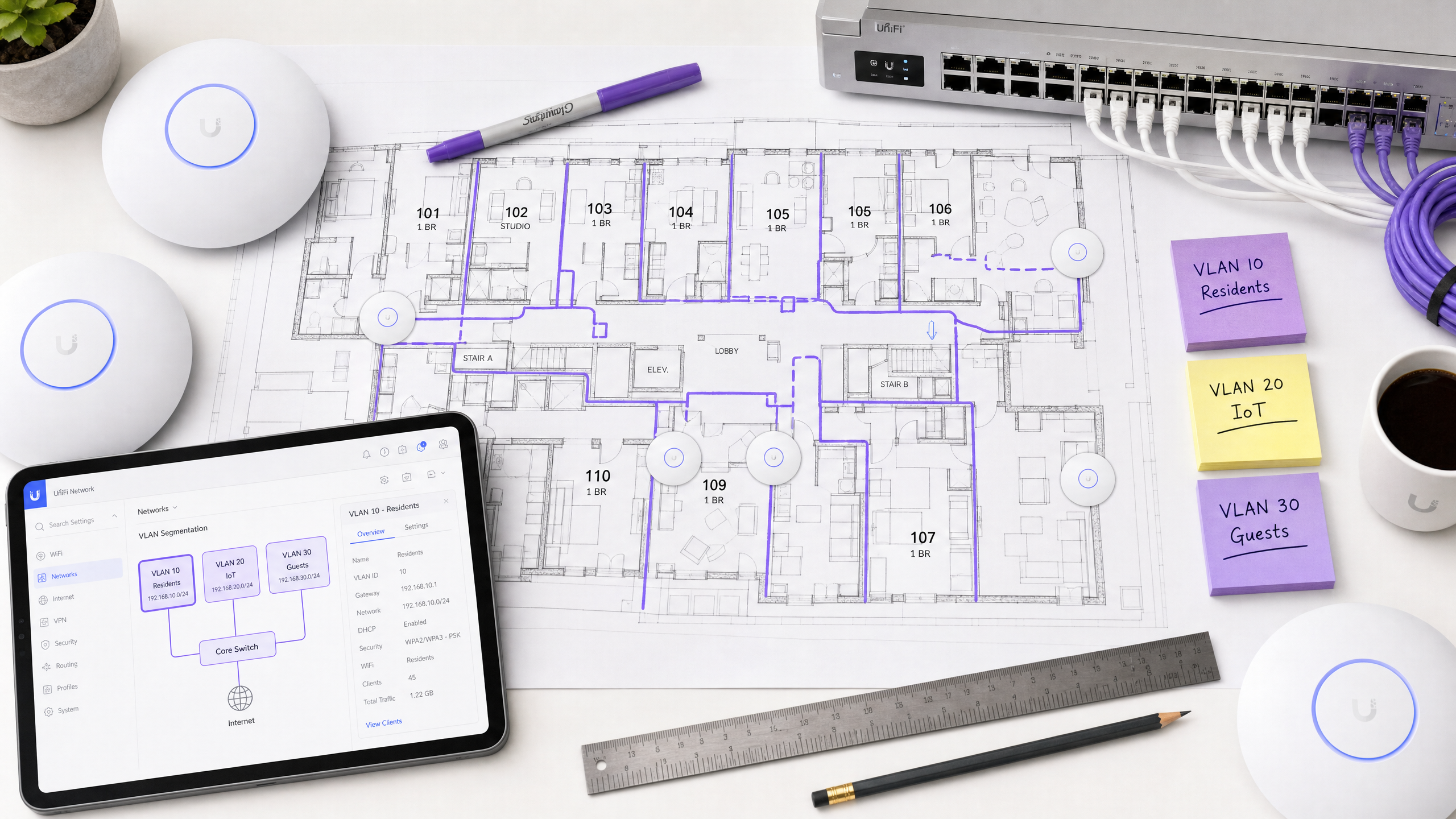
UniFi Private Pre-Shared Key (PPSK) is a native UniFi Network feature that allows multiple unique passwords on a single SSID, mapping each password to a specific VLAN. For property developers, landlords, and Build to Rent (BTR) operators, this solves the fundamental challenge of multi-tenant WiFi: providing isolated, home-like connectivity without the complexity of RADIUS or the insecurity of a shared password.
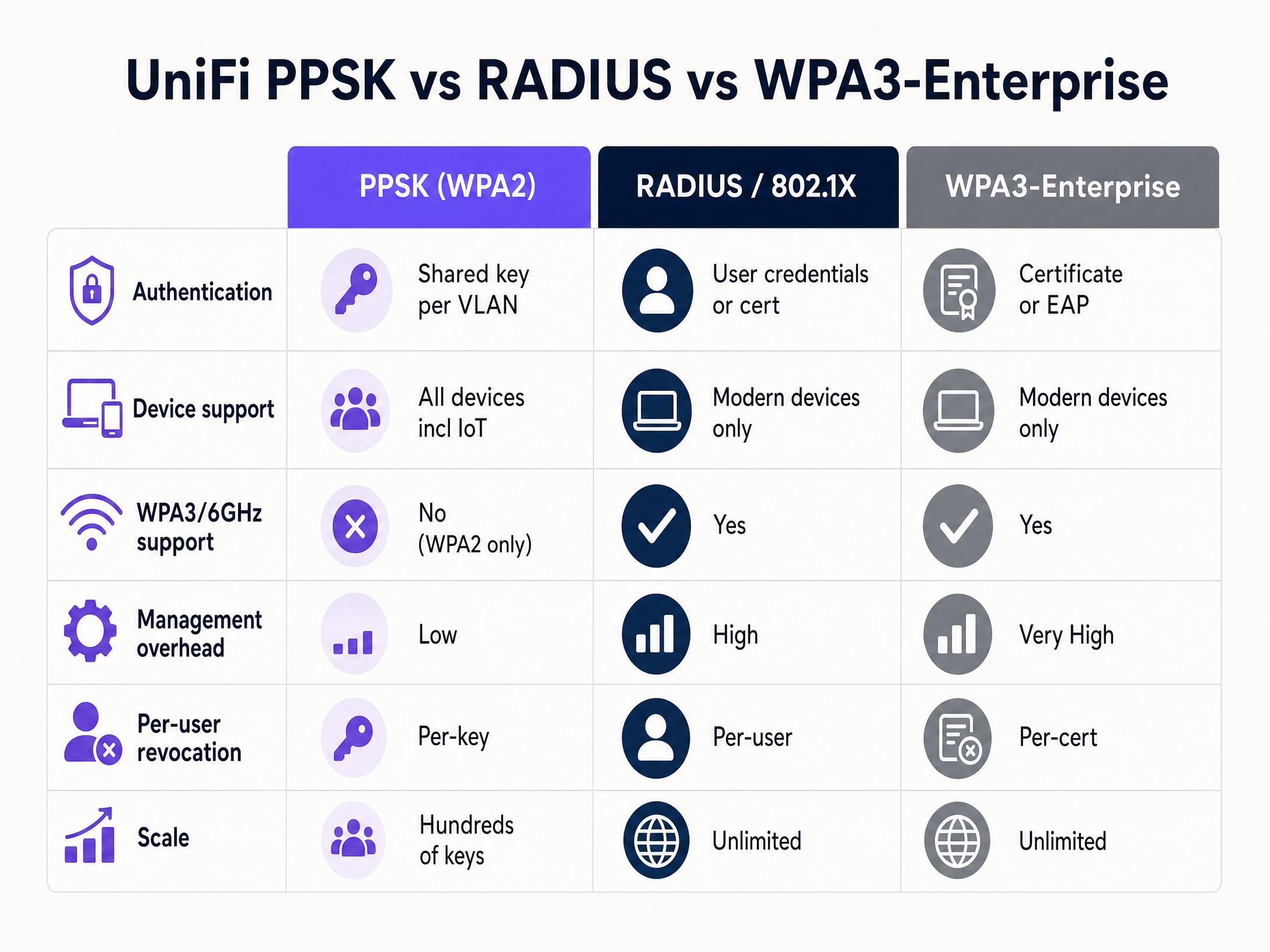
This technical guide compares UniFi PPSK against RADIUS 802.1X and cloud-managed iPSK overlays. It details the architecture required to isolate resident traffic securely, the WPA3 limitations on the 6 GHz band, and the operational model for managing keys at scale. For deployments under 100 units, native PPSK is often sufficient. For larger developments, integrating Purple's hardware-agnostic cloud overlay automates the key lifecycle, integrating directly with property management systems to provision and revoke access dynamically.
Technical Deep-Dive
The core value of UniFi PPSK lies in its simplicity. It bridges the gap between WPA2-Personal and WPA2-Enterprise by allowing a single SSID to accept hundreds of different passwords.
The PPSK Architecture
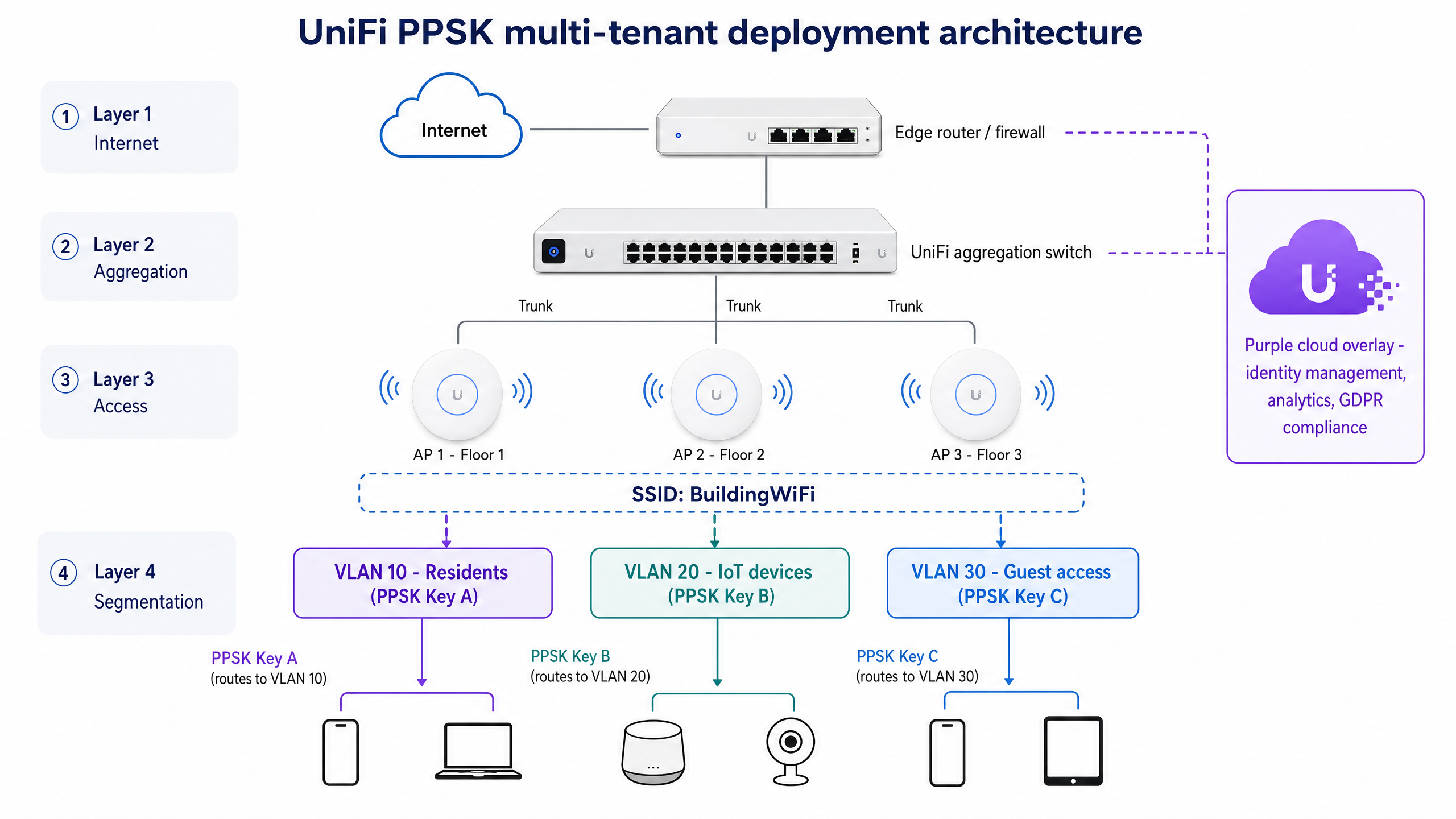
When you enable PPSK on a UniFi SSID, you create a WPA2-Personal network with a multi-key dictionary. Each key in the dictionary is associated with a specific VLAN ID configured in your UniFi switch and controller.
When a client device authenticates using a specific key, the UniFi access point tags the client's traffic with the corresponding VLAN ID before forwarding it upstream. The client behaves exactly as if it were on a dedicated physical network segment. It receives an IP address from that VLAN's DHCP scope, is subject to that VLAN's firewall rules, and is isolated from clients on other VLANs.
WPA3 and the 6 GHz Limitation
A critical constraint of UniFi PPSK is its incompatibility with WPA3. The 802.11 standard for WPA3 currently permits only one pre-shared key per SSID. Because PPSK relies on multiple keys, it is strictly a WPA2 feature.
This has immediate implications for network design. The 6 GHz band, used by WiFi 6E and WiFi 7, mandates the use of WPA3. Therefore, you cannot broadcast a PPSK-enabled SSID on the 6 GHz radio of a modern UniFi access point. The SSID will only broadcast on 2.4 GHz and 5 GHz. For most BTR and multi-tenant deployments today, 5 GHz provides ample capacity, but this limitation must factor into five-year infrastructure plans.
Device Discovery and mDNS
In a residential setting, residents expect their devices to communicate. A phone needs to cast to a smart TV; a smart speaker needs to control a smart plug. Because PPSK places all of a resident's devices on the same VLAN, this Layer 2 discovery works natively.
However, if you need devices to discover services across VLANs - for example, a shared building printer - you must enable mDNS reflection in the UniFi controller and configure precise firewall rules to permit that traffic while maintaining resident isolation.
Implementation Guide
Deploying UniFi PPSK requires a structured approach to VLAN configuration and key management.
Step 1: Configure Network Segmentation
Before enabling PPSK, you must build the underlying network infrastructure. Create the required VLANs in the UniFi Network application (Settings > Networks). Define the subnet, DHCP range, and gateway for each VLAN. For a BTR property, this typically means one VLAN per apartment unit, plus separate VLANs for building management, IoT sensors, and Guest WiFi .
Step 2: Configure Firewall Rules
By default, UniFi allows inter-VLAN routing on corporate networks. You must create firewall rules to block traffic between resident VLANs. Create a rule in the 'LAN In' section to drop traffic where the source and destination are both RFC 1918 private IP ranges, excepting traffic to the gateway.
Step 3: Enable PPSK on the SSID
Create a new wireless network (Settings > WiFi). Set the security protocol to WPA2. Enable the Private Pre-Shared Keys feature. You can then begin adding keys, assigning a password and a VLAN ID to each entry.
Step 4: Scale with a Cloud Overlay
Native UniFi PPSK stores keys locally on the controller. Managing this manually becomes operationally unsustainable beyond 50 to 100 units. For larger BTR deployments, integrate a cloud overlay. Purple's multi-tenant solution acts as the orchestration layer. It uses the same underlying iPSK technology but automates the lifecycle. When a resident lease begins in the property management system, Purple automatically generates a key and provisions it via API. When the lease ends, Purple revokes the key instantly.
Best Practices
To ensure a secure and reliable deployment, adhere to these vendor-neutral best practices:
- Isolate Management Interfaces: Never place management interfaces for switches or access points on a VLAN accessible via a PPSK key. Use a dedicated, wired-only management VLAN.
- Limit Key Sharing: Instruct residents not to share their PPSK key with visitors. Instead, deploy a separate Guest WiFi network with a captive portal for transient visitors.
- Monitor Broadcast Traffic: High numbers of VLANs on a single access point can increase broadcast traffic. Use port isolation where appropriate and monitor airtime utilisation.
- Plan for IoT: Smart home devices often require 2.4 GHz. Ensure your PPSK SSID broadcasts on both 2.4 GHz and 5 GHz to support legacy and IoT hardware. For a deeper dive into IoT network design, read our guide on Three SSIDs to rule them all: guest, Passpoint, and IoT WiFi .
Troubleshooting & Risk Mitigation
When deploying PPSK, operators typically encounter a specific set of failure modes.
Failure Mode 1: Client Fails to Obtain an IP Address
If a client connects to the WiFi but receives an APIPA address (169.254.x.x), the VLAN assignment has failed or the DHCP server is unreachable. Verify that the VLAN ID assigned to the PPSK key exactly matches a configured network in the UniFi controller, and that the switch ports connecting the access points are configured as trunks allowing that VLAN.
Failure Mode 2: Client Connects to the Wrong Network
If a client authenticates but lands on the default untagged network instead of the intended VLAN, the PPSK configuration is likely incorrect. This often happens if the key is entered incorrectly or if the UniFi controller firmware is out of date. Ensure the controller and access points are running the latest stable release.
Failure Mode 3: Smart Devices Cannot Pair
If a resident's phone cannot discover their smart speaker, verify that both devices are connected using the exact same PPSK key. If they are on different keys, they are on different VLANs and will not discover each other.
ROI & Business Impact
Treating WiFi as a managed amenity rather than a tenant responsibility delivers measurable business impact for BTR operators.
Research indicates that high-quality, managed WiFi commands a rent premium of £15 to £30 per unit per month. Furthermore, providing 'instant-on' WiFi at move-in reduces void periods by an average of 5 to 10 days, as units are immediately habitable.
Deploying PPSK via a cloud overlay like Purple reduces the per-door capital expenditure by 30% to 50% compared to installing individual broadband lines and consumer routers in every unit. It also provides the operator with aggregate WiFi Analytics on common area usage, aiding in space planning and resource allocation. By owning the infrastructure, the landlord retains the asset value and controls the resident experience.
Key Definitions
PPSK (Private Pre-Shared Key)
A WiFi security feature that allows a single network name (SSID) to support multiple different passwords, assigning devices to specific VLANs based on the password used.
Used by IT teams to segment traffic without requiring complex 802.1X certificate infrastructure.
iPSK (Identity Pre-Shared Key)
The vendor-neutral term for PPSK. It links a specific user identity or device to a unique WiFi password.
Often used when discussing cloud-managed overlays like Purple that work across multiple hardware vendors.
VLAN (Virtual Local Area Network)
A logical subnetwork that groups a collection of devices, isolating their traffic from other devices on the same physical network hardware.
The foundation of multi-tenant WiFi; each apartment or use-case is assigned its own VLAN for security and privacy.
802.1X
An IEEE standard for port-based network access control, requiring users or devices to authenticate via a RADIUS server using unique credentials or digital certificates.
The enterprise alternative to PPSK. Highly secure but often incompatible with headless IoT devices like smart speakers.
RADIUS
A networking protocol that provides centralised Authentication, Authorisation, and Accounting management for users connecting to a network service.
Required for 802.1X deployments, but bypassed entirely when using native UniFi PPSK.
BTR (Build to Rent)
Purpose-built residential developments designed specifically for renting rather than sale.
The primary market for multi-tenant WiFi, where landlords provide internet as a managed amenity to increase yield.
mDNS (Multicast DNS)
A protocol that resolves hostnames to IP addresses within small networks that do not include a local name server.
Essential for device discovery protocols like Apple AirPlay and Google Cast. Must be configured carefully in VLAN-segmented environments.
WPA3
The latest generation of WiFi security, providing stronger encryption and protection against brute-force attacks.
Mandatory for 6 GHz WiFi 6E and WiFi 7 networks, but fundamentally incompatible with PPSK architectures.
Worked Examples
A 150-unit Build to Rent operator needs to provide 'instant-on' WiFi for residents. They want to avoid installing individual routers in each apartment to reduce RF interference, but require residents' smart home devices to communicate locally while remaining isolated from neighbours. They are deploying UniFi access points.
Deploy a single building-wide SSID using UniFi access points. Configure a dedicated VLAN for each apartment unit (e.g., VLANs 101 through 250). Implement Purple's multi-tenant cloud overlay to manage the iPSK lifecycle. When a lease begins, Purple provisions a unique WPA2 password tied to the specific apartment's VLAN. The resident connects their phone, smart TV, and voice assistant using this single password. All devices land on the assigned VLAN, enabling local discovery (Chromecast, AirPlay) while firewalls block inter-VLAN routing to ensure privacy from other units.
A stadium IT director needs to deploy payment terminals at 40 concession stands. The terminals only support WPA2-Personal. The IT team wants to isolate this payment traffic from the public guest WiFi and the staff operational network to maintain PCI-DSS compliance, but they do not want to broadcast an additional SSID specifically for the terminals.
Configure native UniFi PPSK on the existing staff SSID. Create a dedicated 'Point of Sale' VLAN in the UniFi controller with strict firewall rules denying access to the internet and other corporate subnets, permitting traffic only to the payment gateway IP addresses. Generate a specific PPSK password assigned to this POS VLAN. Connect all 40 payment terminals using this specific key.
Practice Questions
Q1. A BTR operator wants to deploy WiFi 7 access points across a new 200-unit development. They intend to use the 6 GHz band for maximum throughput in the apartments, and they want to use PPSK to isolate each unit. Is this design viable?
Hint: Consider the security protocol requirements for the 6 GHz band.
View model answer
No, this design is not viable. The 6 GHz band mandates the use of WPA3. PPSK relies on multiple pre-shared keys per SSID, which is only supported under WPA2. If the operator requires 6 GHz connectivity, they must use WPA3-Enterprise (802.1X) or standard WPA3-Personal with a single key. They cannot use PPSK on the 6 GHz radio.
Q2. A hotel IT manager has configured a PPSK SSID with a key assigned to VLAN 40 for smart TVs. However, when a TV connects using that key, it receives an IP address from the default native LAN (VLAN 1) instead of VLAN 40. What is the most likely cause?
Hint: Think about the path between the access point and the router.
View model answer
The most likely cause is that the switch port connecting the UniFi access point is not configured as a trunk port that allows VLAN 40. While the AP is correctly tagging the traffic with VLAN 40 based on the PPSK key, the switch is either dropping the tagged frames or stripping the tag, causing the traffic to fall back to the native untagged network.
Q3. You are designing the network for a coworking space with 15 private offices. Members frequently bring legacy devices and smart speakers. Should you deploy native UniFi PPSK or a RADIUS 802.1X solution?
Hint: Evaluate the device types and the scale of the deployment.
View model answer
Native UniFi PPSK is the recommended approach here. The presence of legacy devices and smart speakers makes 802.1X unsuitable, as these devices often lack the supplicants required to authenticate via RADIUS. Because there are only 15 private offices, the total number of required keys is low, meaning the native UniFi PPSK management interface will be sufficient without requiring a cloud overlay.
Continue reading in this series
Spectrum managed WiFi customer service: a comprehensive guide for businesses
This comprehensive guide details how build-to-rent operators and property developers can deploy spectrum managed WiFi to provide secure, isolated network experiences for residents. It covers the technical architecture of cloud RADIUS, VLAN isolation, and iPSK, alongside practical implementation strategies to reduce support overhead.
Spectrum managed WiFi customer service: a comprehensive guide for businesses
This comprehensive guide details how build-to-rent operators and property developers can deploy spectrum managed WiFi to provide secure, isolated network experiences for residents. It covers the technical architecture of cloud RADIUS, VLAN isolation, and iPSK, alongside practical implementation strategies to reduce support overhead.
PPSK lights: comparing features and deployment models
A definitive technical guide comparing PPSK (Private Pre-Shared Key) authentication models for smart buildings and multi-tenant environments. It covers architecture, IoT segmentation, vendor implementations, and the business case for identity-based WiFi in the Build-to-Rent sector.