
Uu PPSK hukumonline: comparing features and deployment models
This authoritative technical reference guide compares Private Pre-Shared Key (PPSK) WiFi architecture against traditional 802.1X and standard PSK deployments. It provides network architects and IT managers with vendor-neutral implementation strategies for multi-tenant residential, IoT, and BTR environments.
Listen to this guide
View podcast transcript
Executive Summary
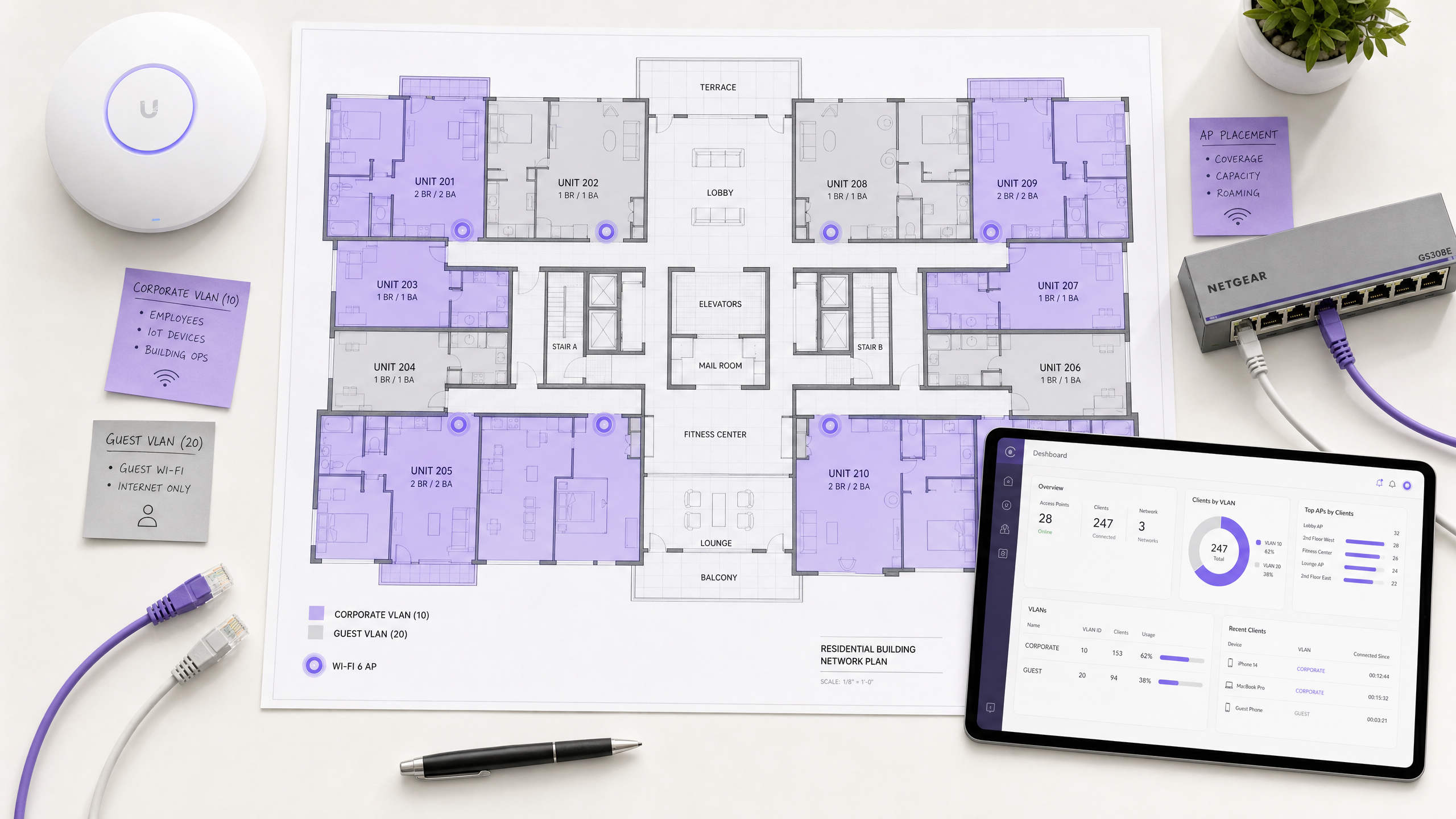
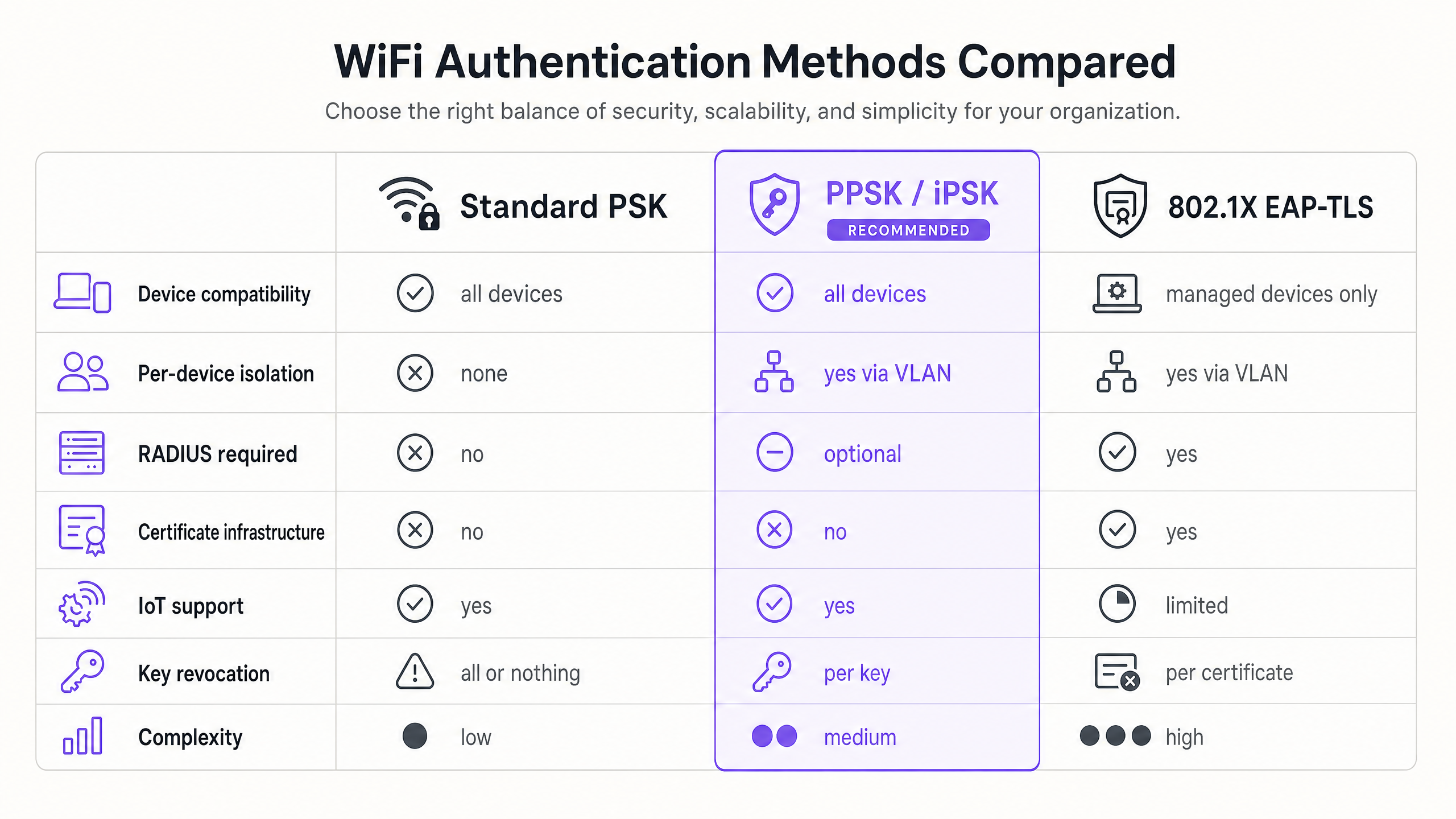
Traditional WPA2 Personal networks share a single password across all devices. In multi-tenant environments like Build to Rent (BTR) developments, student accommodation, and hotels, this architecture creates unacceptable security and operational risks. Private Pre-Shared Key (PPSK) technology solves this by assigning unique credentials to individual users or devices while broadcasting a single SSID. This guide explores PPSK architecture, deployment models, and implementation strategies for enterprise WiFi networks, comparing it against 802.1X and standard PSK approaches.
Purple's Multi-Tenant WiFi platform isolates traffic securely, creating a Private Area Network (PAN) for each resident. This ensures devices remain invisible to neighbours while supporting legacy hardware and smart home ecosystems without the overhead of full 802.1X supplicants.
Technical Deep-Dive: PPSK Architecture
PPSK operates at the WPA Personal layer but introduces enterprise-grade isolation. When a device connects, it presents its unique pre-shared key during the WPA2 four-way handshake. The access point, or its cloud controller, references this key against a central store, identifies the mapped VLAN, and tags the device's traffic accordingly.
From the device's perspective, it is connecting to a standard home network. This is critical for IoT compatibility. Smart TVs, gaming consoles, and thermostats lack the 802.1X supplicant software required for EAP-TLS or PEAP authentication. PPSK bridges this gap, providing device-level isolation without requiring enterprise authentication protocols.
Vendor Terminology
The underlying mechanism is identical across enterprise hardware, though vendor terminology varies:
- Cisco Meraki: iPSK (Identity PSK)
- HPE Aruba: PPSK (Private Pre-Shared Key)
- Juniper Mist: ePSK
- Extreme Networks: Private PSK
- Ubiquiti UniFi: PPSK
Implementation Guide: Deployment Models
Network architects typically deploy PPSK using one of three models, depending on existing infrastructure and security requirements.
1. Cloud-Controller Model
This is the standard approach for new BTR deployments. Access points connect to a cloud management platform where the PPSK key store resides. Administrators provision keys via a portal, assign them to specific VLANs, and the controller pushes the policy to the edge. When a resident moves out, their key is revoked centrally, instantly terminating access for all their devices without affecting the wider network.
2. Local RADIUS Backend
Enterprise environments requiring strict audit trails often integrate PPSK with a local RADIUS server. The RADIUS server stores and validates the credentials, providing centralised logging and integration with identity management platforms like Microsoft Entra ID or Okta. This model suits coworking spaces managing a mix of corporate devices and member-owned IoT equipment.
3. The Hybrid Architecture
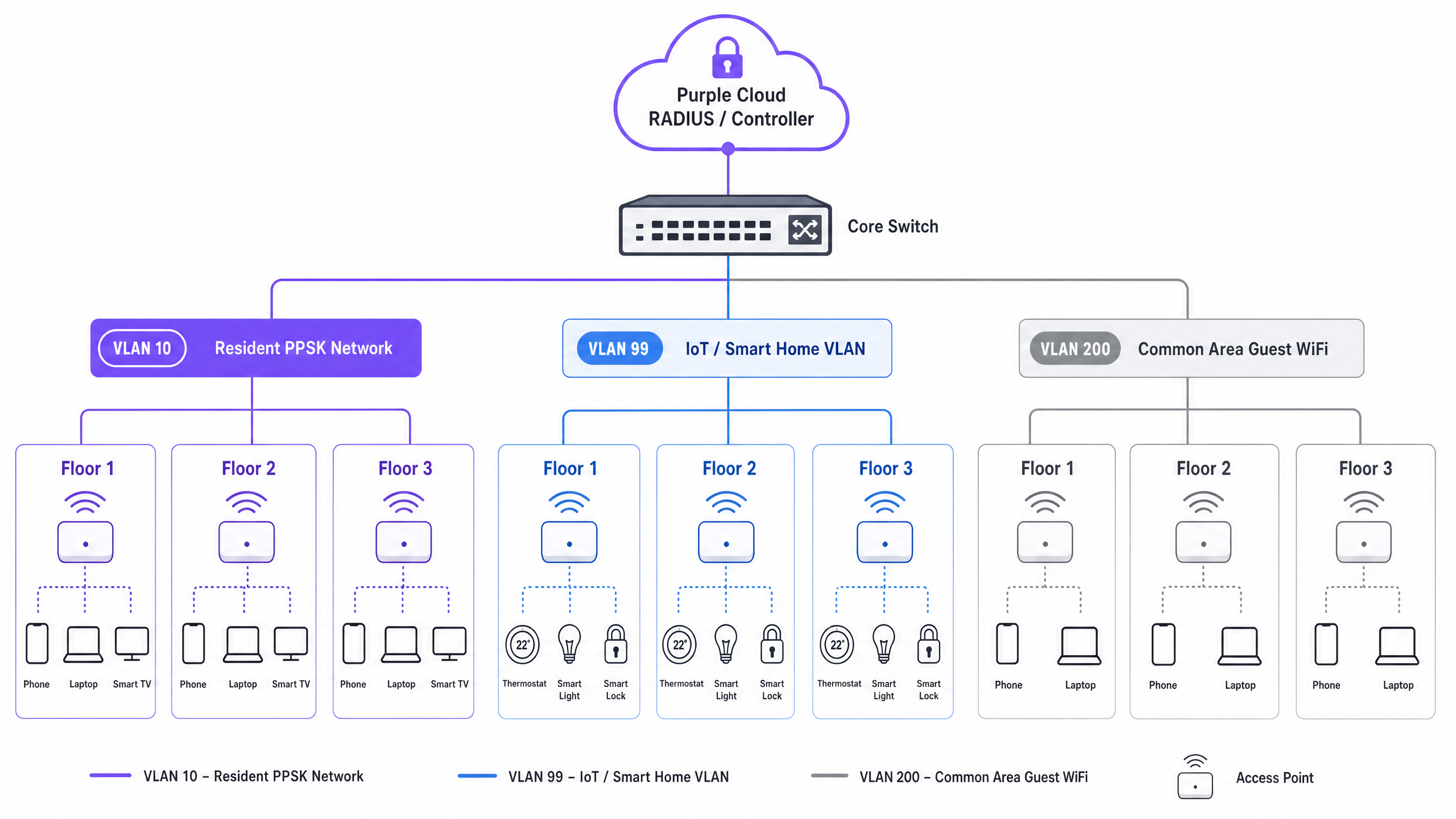
Purple recommends a hybrid approach for multi-dwelling units (MDUs). Residents and their IoT devices use PPSK for seamless onboarding and isolation. Building management systems, CCTV, and access control operate on a dedicated IoT VLAN with PPSK. Meanwhile, the property management team's corporate devices authenticate via 802.1X. This architecture delivers three distinct authentication models across one physical infrastructure.
Best Practices for BTR and MDU Environments
Successful PPSK deployment requires rigorous planning before hardware installation.
VLAN and IP Addressing Design
Map resident counts and IoT categories to specific VLANs. A standard BTR deployment allocates individual VLANs per flat or floor, a dedicated VLAN (e.g., VLAN 99) for building IoT, and a separate VLAN (e.g., VLAN 200) for common area Guest WiFi .
Account for device density. Research indicates 15 to 25 devices per household. In a 200-unit building, the network must support up to 5,000 concurrent connections. Size DHCP scopes accordingly using RFC 1918 private addressing; a /23 subnet provides 510 usable addresses, which is often necessary for high-density floors.
SSID Consolidation
Limit broadcast SSIDs to a maximum of four per radio. Excessive SSIDs consume valuable airtime with beacon frames, degrading overall network performance. Use PPSK to segment users logically behind a single broadcast name rather than creating physical SSIDs per apartment.
Secure Key Distribution
Generate keys automatically and distribute them securely. Providing a QR code in a digital welcome pack streamlines move-in day. For ongoing management, implement a resident portal where users can retrieve their credentials and manage their connected devices.
Troubleshooting & Risk Mitigation
Trunk Port Configuration Failures
The most common implementation failure occurs at the switch layer. If VLANs are not explicitly permitted on trunk links between the distribution switch and the access points, traffic will drop silently. Validate and document every trunk port during commissioning.
WPA3 Compatibility Constraints
While WPA3-SAE provides superior protection against offline dictionary attacks, not all vendor PPSK implementations support it fully. For example, Ubiquiti UniFi's PPSK implementation is currently restricted to WPA2. If deploying WiFi 6E access points requiring the 6 GHz band, verify that your chosen hardware vendor supports WPA3-SAE with PPSK, or restrict PPSK clients to the 2.4 GHz and 5 GHz bands.
IoT Lateral Movement
Placing vulnerable smart home devices on the same VLAN as personal laptops introduces risk. For high-security environments, isolate IoT devices on a dedicated VLAN with strict egress filtering, ensuring compromised sensors cannot pivot to attack resident hardware.
ROI & Business Impact
Implementing PPSK via Purple's Multi-Tenant WiFi platform transforms internet provision from a cost centre into a managed amenity. Property developers can offer tiered bandwidth packages, generating ancillary revenue.
Operationally, PPSK eliminates the support tickets associated with shared password rotation. By isolating traffic and simplifying onboarding for headless devices, operators typically see a 30% reduction in WiFi-related helpdesk requests. Furthermore, integrated WiFi Analytics provide property managers with actionable data on building utilisation and common area footfall, optimising facility management and reducing real estate overheads.
Listen to our technical briefing podcast for a deeper dive into these concepts:
Key Definitions
PPSK (Private Pre-Shared Key)
A WiFi security architecture that assigns unique passwords to individual users or devices on a single SSID, mapping each to a specific VLAN.
Used in MDU and BTR environments to provide secure, isolated networks without requiring complex 802.1X supplicants on consumer devices.
VLAN (Virtual Local Area Network)
A logical subnetwork that groups a collection of devices from different physical LAN segments.
Essential for isolating resident traffic in multi-tenant buildings, ensuring devices in one flat cannot communicate with devices in another.
802.1X
An IEEE standard for port-based network access control that provides an authentication mechanism to devices wishing to attach to a LAN or WLAN.
The enterprise standard for corporate networks, requiring a RADIUS server and identity provider, but often incompatible with consumer IoT devices.
iPSK (Identity PSK)
Cisco Meraki's proprietary term for Private Pre-Shared Key technology.
Functionally identical to PPSK, used when deploying Cisco Meraki hardware in multi-tenant environments.
SSID Proliferation
The negative performance impact caused by broadcasting too many network names from a single access point.
A primary reason to use PPSK instead of deploying individual routers or broadcasting separate SSIDs for every apartment.
RADIUS
A networking protocol that provides centralised Authentication, Authorisation, and Accounting management for users who connect and use a network service.
Used in hybrid PPSK deployments to validate credentials and maintain audit trails.
WPA3-SAE
The latest WiFi security standard using Simultaneous Authentication of Equals to protect against offline dictionary attacks.
Required for 6 GHz band operations, but not yet supported by all vendor PPSK implementations.
PAN (Private Area Network)
A micro-segmented network bubble created for an individual user, allowing their devices to communicate securely while remaining isolated from the wider network.
The core deliverable of Purple's Multi-Tenant WiFi solution for residential and hospitality environments.
Worked Examples
A 180-unit Build to Rent development in a city centre needs to provide WiFi included in rent as an amenity, with move-in-day activation and full smart home support.
The operator deployed HPE Aruba access points managed through Aruba Central. Each flat receives a unique PPSK key generated at tenancy sign-up. The key is emailed to the resident with a QR code. They scan it, and all their devices connect seamlessly, including Chromecasts and smart speakers. When a resident moves out, the property manager revokes the key in the portal. The new resident receives a fresh key at move-in, eliminating password rotation issues.
A 400-bed purpose-built student accommodation block faces network degradation during cohort move-in week, as hundreds of students arrive simultaneously and attempt to connect dozens of devices each.
The operator implemented Ruckus access points with SmartZone, deploying PPSK with one key per room. Keys were pre-generated and included in the digital welcome pack sent before arrival. Students scanned the QR code upon entering their rooms and connected instantly.
Practice Questions
Q1. You are designing the network for a 300-unit luxury apartment building. The client wants to offer smart thermostats and allow residents to connect wireless printers. They propose installing a separate access point broadcasting a unique SSID in every apartment. What is your recommendation?
Hint: Consider the impact of beacon frames on airtime in a high-density environment.
View model answer
Recommend a centralised PPSK deployment. Installing 300 access points broadcasting 300 distinct SSIDs will cause severe SSID proliferation, consuming massive amounts of airtime with beacon frames and degrading performance for everyone. Instead, deploy enterprise access points in the corridors and units as needed for coverage, broadcasting a single property-wide SSID. Use PPSK to assign a unique key to each apartment, mapping them to 300 separate VLANs. This ensures isolation and supports the smart thermostats while maintaining a clean RF environment.
Q2. A coworking space operator wants to implement PPSK to isolate member companies. However, they also require strict audit logging of which specific employee connected to the network at what time for compliance reasons. How should you architect this?
Hint: PPSK operates at the device level, not the identity level. How can you combine it with enterprise logging?
View model answer
Deploy a hybrid architecture or PPSK with a local RADIUS backend. Because standard cloud-managed PPSK identifies devices rather than individual human identities, it lacks the strict non-repudiation required for compliance. The optimal solution is to require 802.1X (EAP-TLS or PEAP) for all corporate laptops and phones, tying authentication directly to the user's Microsoft Entra ID or Okta profile. Use PPSK exclusively on a separate SSID or VLAN for the member companies' headless IoT devices (printers, smart TVs) that cannot support an 802.1X supplicant.
Q3. During the commissioning of a new BTR WiFi network, a resident successfully authenticates using their provided PPSK key, but their device fails to receive an IP address and cannot access the internet. What is the most likely failure point?
Hint: The authentication succeeded, meaning the AP recognised the key and assigned the VLAN. Where does the traffic go next?
View model answer
The most likely failure is an incorrect trunk port configuration on the switch infrastructure. The access point successfully mapped the PPSK key to the correct VLAN and tagged the traffic, but the upstream switch port connecting to the AP is not configured to permit that specific VLAN ID. As a result, the DHCP request is dropped at the switch layer. Validate that all required resident VLANs are allowed on the trunk links between the access layer and the core.
Continue reading in this series
Uu PPSK pdf: comparing features and deployment models
This technical reference guide compares Private Pre-Shared Key (PPSK) WiFi architecture against traditional 802.1X and standard PSK deployments. It provides network architects and IT managers with vendor-neutral implementation strategies for multi-tenant residential, IoT, and BTR environments.
Uu PPSK pdf: comparing features and deployment models
This technical reference guide compares Private Pre-Shared Key (PPSK) WiFi architecture against traditional 802.1X and standard PSK deployments. It provides network architects and IT managers with vendor-neutral implementation strategies for multi-tenant residential, IoT, and BTR environments.
Uu PPSK 2023: comparing features and deployment models
This technical reference guide compares Unique per-User Private Pre-Shared Key (UU PPSK) WiFi architecture against traditional shared PSK and 802.1X deployments, with a specific focus on the 2023 landscape of vendor implementations and platform capabilities. It provides property developers, BTR operators, and MDU landlords with actionable deployment strategies, VLAN architecture guidance, and automated lifecycle management workflows. The guide covers three deployment models, real-world case studies, and the compliance implications of each authentication approach.