
WiFi managed services: a comprehensive guide for businesses
WiFi managed services shift the full lifecycle of enterprise wireless networks - from RF design and hardware procurement through to daily monitoring and firmware management - to a specialist provider. This guide explains the cloud-managed architectures, VLAN segmentation strategies, and authentication standards that underpin reliable, secure deployments across hotels, retail chains, BTR developments, and public-sector venues. Property developers, landlords, and BTR operators will find actionable guidance on isolating resident traffic, onboarding smart devices, and turning connectivity into a measurable business asset.
Listen to this guide
View podcast transcript

Executive summary
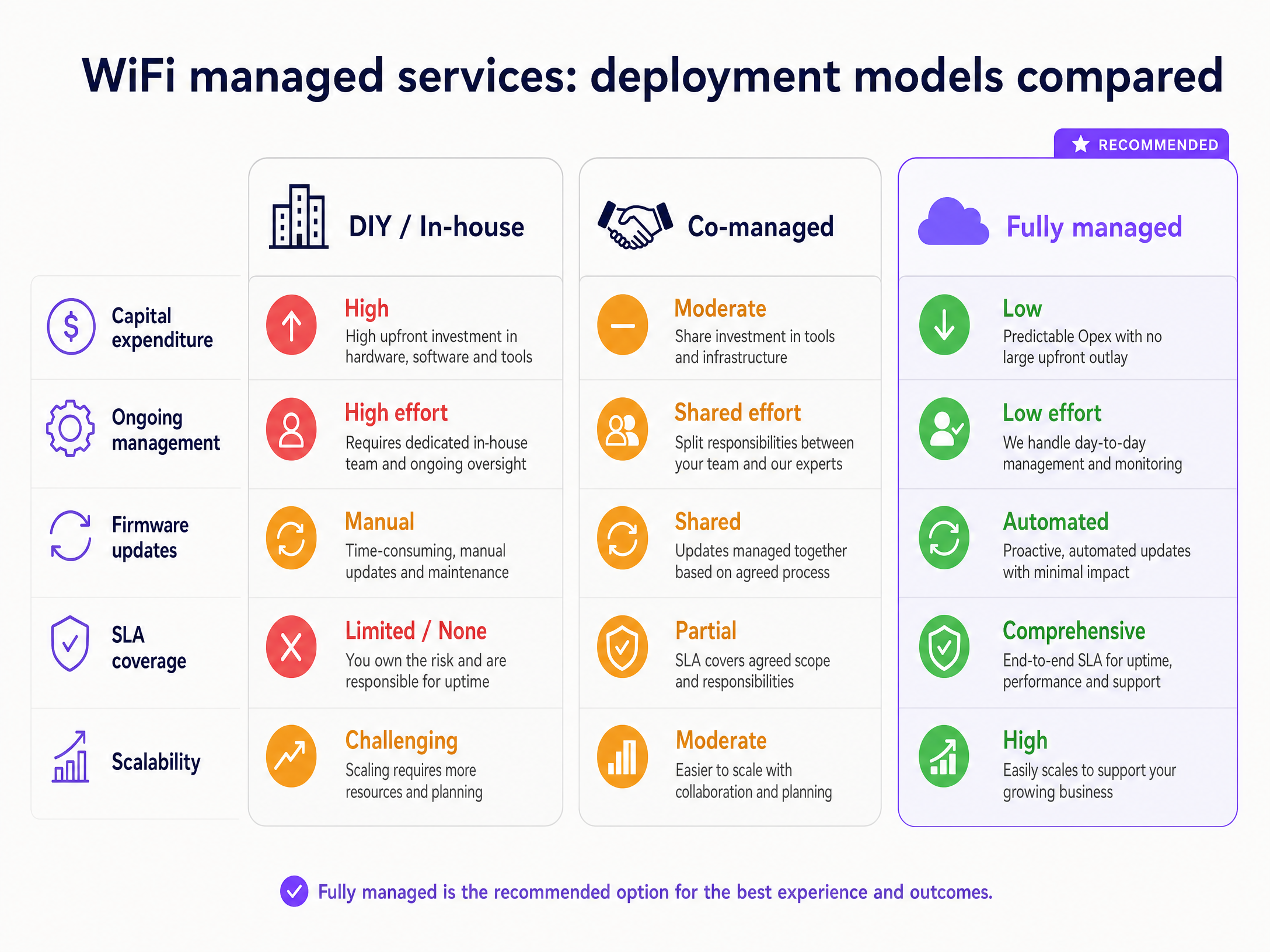
Deploying enterprise wireless networks across multiple locations is an architectural challenge, not a hardware procurement exercise. For IT managers, network architects, and venue operations directors, managing complex environments - from 300-room hotels to retail chains and high-density Build-to-Rent (BTR) developments - requires a shift from capital-intensive, on-premises controllers to cloud-managed overlays. WiFi managed services provide a fully outsourced wireless network model where a provider takes end-to-end responsibility for planning, installing, configuring, and managing the infrastructure.
This guide details the technical architecture and implementation strategies for WiFi managed services, with a specific focus on multi-tenant environments such as BTR and Multi-Dwelling Units (MDU). We examine how cloud-managed platforms separate the control plane from the data plane, enabling centralised visibility across distributed sites. We outline the critical role of VLAN segmentation, where resident isolation is non-negotiable, and explain how IEEE 802.1X authentication, WPA3-Enterprise encryption, and Purple's cloud overlay combine to deliver secure, compliant connectivity. Purple has deployed this architecture across 80,000+ live venues and processed 440 million logins in 2024 (Purple internal data), giving you a proven reference point for what works at scale.
Technical deep-dive: cloud-managed architecture
The foundation of modern WiFi managed services is the separation of the control plane from the data plane. In legacy architectures, wireless LAN controllers sat on-premises at every site, creating single points of failure and complex backhaul requirements. Cloud-managed WiFi moves the management intelligence to the cloud while data flows locally at each site. This is what makes managing 50 locations as operationally practical as managing five.
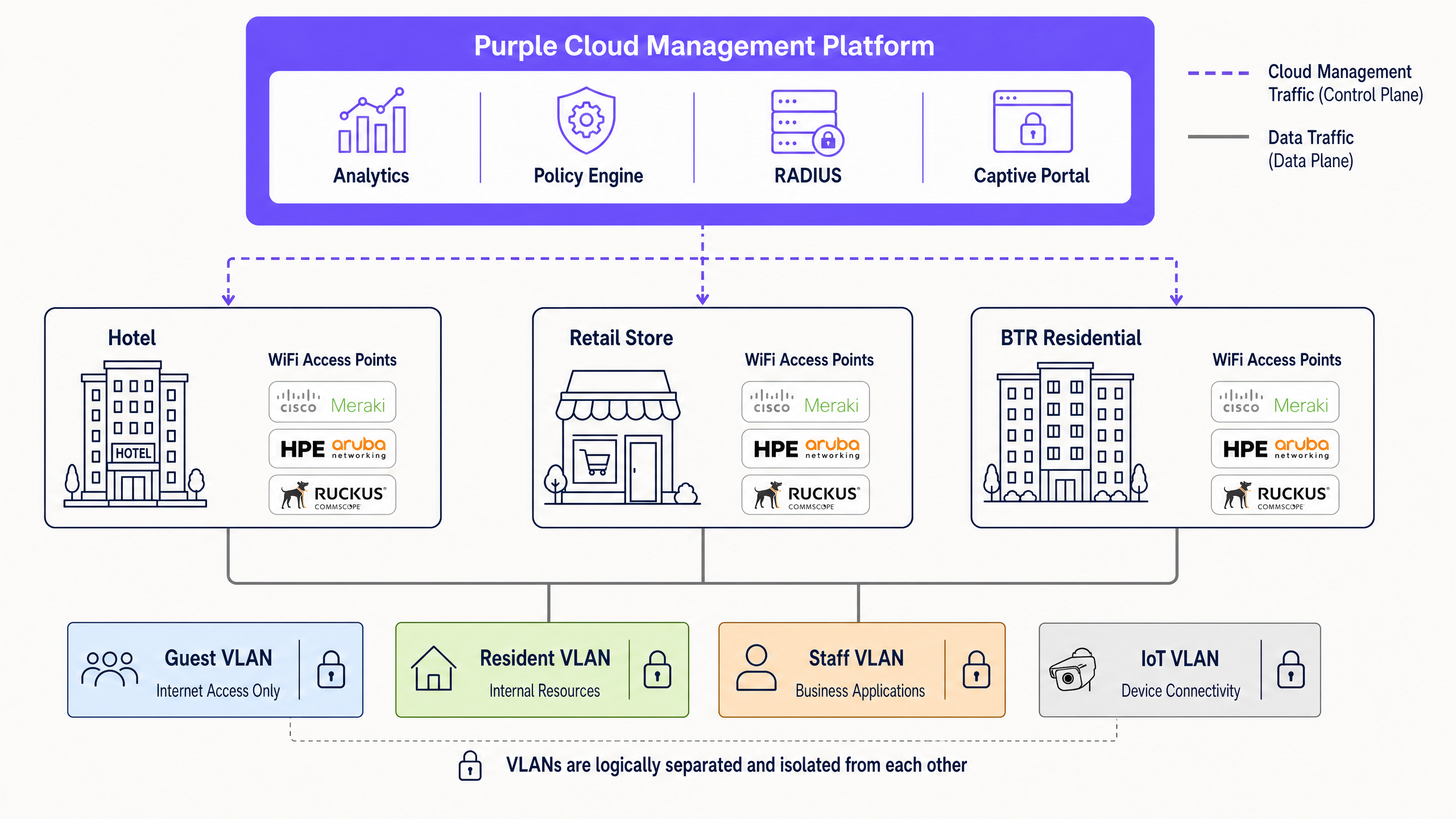
Purple operates as a hardware-agnostic cloud overlay. Your access points - whether Cisco Meraki, HPE Aruba, Ruckus, Juniper Mist, Ubiquiti UniFi, Cambium, Extreme, or Fortinet - connect to the Purple platform via a secure management tunnel. The platform provides centralised policy enforcement, analytics, and identity management without touching the data plane. Zero-touch provisioning means new hardware ships directly to a site, an on-site contact plugs it in, and the device calls home to download its full configuration. No engineer needs to be present.
Network segmentation and VLAN design
VLAN segmentation, defined under IEEE 802.1Q, is the primary mechanism for network isolation in multi-tenant environments. In a BTR development, you assign each resident or traffic class to a distinct virtual LAN. Traffic on VLAN 10 cannot reach traffic on VLAN 20 unless you explicitly permit it through a routing or firewall policy.
| Traffic type | VLAN ID | SSID mapping | Isolation requirement |
|---|---|---|---|
| Resident | 10 | Resident-WiFi | Full access to resident resources, isolated from other tenants |
| Guest | 20 | Guest-WiFi | Internet access only, captive portal authentication |
| Payment / POS | 30 | POS-WiFi | Strict PCI-DSS compliance, zero inter-VLAN routing |
| IoT / BMS | 40 | IoT-WiFi | Isolated, strict egress filtering to designated management platforms |
| Staff | 50 | Staff-WiFi | Access to operational systems, isolated from resident and guest VLANs |
VLANs provide isolation, not security. You must implement strict firewall policies and access control lists (ACLs) between VLANs. A misconfigured trunk port can expose payment terminals to guest traffic - a direct PCI-DSS violation. Document your trunk configurations meticulously and validate them during commissioning.
Authentication and identity
The standard for enterprise multi-tenant deployments is IEEE 802.1X with RADIUS authentication. Each resident or staff member authenticates against an identity provider - Microsoft Entra ID, Okta, or Google Workspace. WPA3-Enterprise encryption is the recommended standard, providing 192-bit security mode for high-sensitivity environments and eliminating the vulnerabilities of WPA2's four-way handshake.
For guest access, the architecture relies on a captive portal (a browser-based authentication page that intercepts the initial HTTP request). Guests connect to an open or WPA2-Personal SSID, redirect to a splash page for terms acceptance or data capture, and are placed on an isolated VLAN with zero routing to any resident or staff VLAN. Purple's SecurePass add-on extends this with identity verification, and Shield provides network-layer threat detection. Purple processes 440 million logins annually (Purple internal data, 2024), ensuring that first-party data is captured securely and in compliance with GDPR and CCPA.
RF planning and spectrum management
In high-density venues - hotel corridors, retail floors, BTR common areas - co-channel interference (CCI) is the primary performance threat. CCI occurs when overlapping access points broadcast on the same channel, halving available airtime for every client on that channel. The 2.4 GHz band provides only three non-overlapping channels (1, 6, and 11). The 5 GHz band provides significantly more, and the 6 GHz band introduced by WiFi 6E (IEEE 802.11ax) is largely free from legacy device interference.
For new BTR and MDU deployments, specifying WiFi 6E-capable access points is the correct call. The additional spectrum headroom pays dividends in dense environments. Conduct an active, on-site RF survey before finalising access point placement. Predictive models using tools like Ekahau or iBwave are a starting point, but furniture, wall materials, and seasonal occupancy changes require on-site measurement to validate.
Implementation guide: the 7-phase deployment lifecycle
A successful WiFi managed service deployment requires rigorous planning. Skipping phases leads to coverage gaps, security vulnerabilities, and support escalations.
Phase 1 - Scoping and requirements gathering: Define user density, application requirements, physical constraints, and compliance obligations. Determine the hardware vendor and confirm PoE budgets and uplink capacity on existing switching infrastructure.
Phase 2 - Predictive RF design: Model RF propagation using floor plans to determine access point quantity, placement, and channel allocation. Use Ekahau or iBwave for professional-grade predictive surveys.
Phase 3 - Documentation: Create the network design document detailing AP placement, VLAN architecture, SSID structure, PoE requirements, and switch port assignments. This document becomes the installation blueprint and the baseline for future changes.
Phase 4 - Procurement and pre-configuration: Order hardware and pre-stage it off-site. Configure SSIDs, VLANs, security policies, and management profiles before access points arrive on site. Pre-staging removes configuration errors from the critical path.
Phase 5 - Physical installation: Mount access points and terminate cabling according to the documented design. Validate PoE power delivery at each port.
Phase 6 - Post-deployment validation: Conduct active, on-site RF surveys to measure real-world coverage, roaming behaviour, and throughput. Predictive models are insufficient on their own. Schedule a physical survey within 30 days of go-live.
Phase 7 - Ongoing management: The managed service provider monitors telemetry continuously, pushes automated firmware updates during low-usage windows, responds to alerts, and adjusts configurations as the environment changes.
Best practices for multi-tenant environments
When deploying WiFi managed services in BTR, student accommodation, or retail complexes, apply these technical standards consistently.
Control co-channel interference: Use 5 GHz and 6 GHz bands extensively. Control transmit power to prevent overlapping access points from halving available airtime. High-density environments need more access points placed closer together at lower power, not fewer access points at maximum power.
Minimise SSID proliferation: Every SSID broadcast consumes airtime for beacon frames. Limit broadcasts to a maximum of four SSIDs per radio. Use dynamic VLAN assignment via RADIUS attributes to serve multiple residents from a single SSID - this is the architecture that scales to hundreds of units.
Isolate IoT devices: Building management systems, smart locks, CCTV cameras, and HVAC controllers represent a significant attack surface. IoT devices are notoriously difficult to patch. Place them on a dedicated VLAN with strict egress filtering so they can only communicate with their designated management platforms.
Audit wired infrastructure first: A WiFi 6 or WiFi 6E access point draws up to 25.5W. If your switch port is budgeted for 15.4W, the access point will fail to power on or operate in a degraded state. Uplink capacity from the access layer to the distribution layer must account for the aggregate throughput of all access points on that switch.
Protect the management plane: Your management VLAN - the one your access points, switches, and controllers communicate on - must be completely isolated from all tenant and guest VLANs. Use out-of-band management where possible and apply strict ACLs to management traffic.
For further reading on SSID architecture in multi-tenant environments, see Three SSIDs to rule them all: guest, Passpoint, and IoT WiFi .
Case study 1: Premier Inn - 800-property estate
Premier Inn, part of Whitbread, operates over 800 properties across the UK and Europe. Deploying consistent Guest WiFi across an estate of this scale requires a hardware-agnostic cloud overlay that can enforce uniform security policies regardless of the underlying access point vendor at each property. Purple's platform integrates with the existing hardware estate, providing centralised captive portal management, first-party data capture, and WiFi Analytics across every venue. The key architectural requirement was isolating guest traffic from the property management system (PMS) network, which handles payment card data and falls within PCI-DSS scope. By mapping guest traffic to a dedicated VLAN with zero routing to the PMS VLAN, Premier Inn eliminated the risk of guest-to-POS lateral movement.
Outcome: Consistent guest WiFi experience across 800+ properties with centralised policy management and GDPR-compliant data capture.
Case study 2: BTR residential development - 350-unit block
A BTR operator managing a 350-unit residential block in Manchester needed to provide each resident with isolated, private connectivity while sharing a single physical infrastructure. The architecture used VLAN-based multi-tenancy with dynamic VLAN assignment via RADIUS. Each resident authenticated using a unique credential mapped to their individual VLAN, ensuring complete layer-2 isolation between units. Smart home devices - including smart locks, thermostats, and voice assistants - were placed on a separate IoT VLAN per unit, preventing cross-unit device discovery. Purple's Multi-Tenant WiFi layer provided the management interface for onboarding new residents, revoking access on move-out, and monitoring per-unit bandwidth consumption.
Outcome: 350 isolated resident networks on shared physical infrastructure, with resident onboarding reduced from two days to under four hours. IoT devices isolated from resident data traffic, meeting GDPR obligations for data separation.
Troubleshooting and risk mitigation
Even with meticulous planning, deployments face operational risks. These are the failure modes we see most frequently.
Trunk port misconfiguration: The most common failure mode in segmented networks is failing to permit the necessary VLANs across trunk links. Traffic drops silently and tenants report connectivity failures that are difficult to diagnose. Document and validate all trunk configurations during commissioning, before residents or guests connect.
Management plane exposure: If a guest or resident can reach the management interface of an access point or switch, the network is compromised. Use out-of-band management and strict ACLs. Never place management interfaces on the same VLAN as user traffic.
Roaming failures in mobile environments: Fragmenting SSIDs across frequency bands breaks fast roaming protocols 802.11r (fast BSS transition), 802.11k (neighbour reports), and 802.11v (BSS transition management). Use a single SSID across bands to ensure seamless mobility for residents moving through common areas, or for warehouse scanners and voice-over-WiFi handsets in retail environments.
SLA definition gaps: A 99.9% uptime SLA allows over eight hours of downtime per year. Understand what the SLA covers, how incidents are measured, and what remedies apply. Ask your provider for a sample monthly performance report before signing.
Firmware drift: Ad-hoc patching creates inconsistent software versions across your estate and introduces security gaps. Require your managed service provider to maintain a firmware lifecycle schedule with rolling updates during low-usage windows and automated health checks after each update.
ROI and business impact
Transitioning to WiFi managed services shifts capital expenditure to predictable operational expenditure. By offloading day-to-day monitoring, firmware management, and support to specialists, internal IT teams can focus on strategic initiatives rather than reactive maintenance.
For BTR operators and property developers, the financial case is straightforward. Connectivity is increasingly a deciding factor in resident acquisition and retention. A well-designed Multi-Tenant WiFi service reduces resident churn, supports smart building integrations, and creates a data asset - resident usage patterns, device counts, peak demand periods - that informs future property investment decisions.
Purple's hardware-agnostic cloud overlay integrates with your existing infrastructure to provide Identity-Based Networks. Venue operators gain actionable analytics from 29 billion data points collected across 80,000+ live venues (Purple internal data). By isolating resident traffic securely and providing seamless guest access, property developers and landlords can monetise connectivity, reduce tenant churn, and deliver a superior digital experience.
For hospitality operators, the same architecture supports revenue-generating guest engagement through conscious-choice opt-ins and first-party data capture. For transport hubs and healthcare facilities, the compliance posture - ISO 27001, GDPR, Cyber Essentials - removes audit risk and simplifies procurement.
Purple has held ISO 27001 certification, GDPR and CCPA compliance, Cyber Essentials certification, and B Corp status since 2012. Our 99.999% uptime record across 80,000+ venues is the reference point for what a managed WiFi service should deliver.
Key Definitions
VLAN (Virtual Local Area Network)
A logical network segment defined under IEEE 802.1Q that isolates traffic at layer 2 of the OSI model. Access points tag outbound traffic with a VLAN ID, and switches enforce isolation by only forwarding tagged frames to the correct network segment.
IT teams encounter VLANs when designing multi-tenant networks. In a BTR development, each resident's traffic is tagged with a unique VLAN ID, preventing cross-tenant visibility even though all residents share the same physical access points and cabling.
IEEE 802.1X
An IEEE standard for port-based network access control. It defines the Extensible Authentication Protocol (EAP) framework used to authenticate devices and users before granting network access. The three components are the supplicant (the device), the authenticator (the access point or switch), and the authentication server (RADIUS).
IT teams use 802.1X to replace shared pre-shared keys (PSK) with individual credentials. In a hotel or BTR deployment, 802.1X with RADIUS enables dynamic VLAN assignment - each authenticated user is placed on the correct network segment automatically.
RADIUS (Remote Authentication Dial-In User Service)
A networking protocol that provides centralised authentication, authorisation, and accounting (AAA) for users connecting to a network. In WiFi deployments, the RADIUS server validates credentials supplied via 802.1X and returns VLAN assignment attributes to the access point.
IT teams deploy RADIUS servers - or use a cloud-hosted RADIUS service - to enforce per-user or per-device network policies. Purple's platform includes a cloud RADIUS service that integrates with Microsoft Entra ID, Okta, and Google Workspace.
WPA3-Enterprise
The current WiFi Alliance security standard for enterprise networks. WPA3-Enterprise uses 802.1X authentication with EAP and provides a 192-bit security mode for high-sensitivity environments. It eliminates the vulnerabilities of WPA2's four-way handshake, including the KRACK attack vector.
IT teams should specify WPA3-Enterprise for all new enterprise deployments. It is mandatory for environments handling sensitive data, including healthcare patient records and financial services. WPA2-Enterprise remains acceptable for legacy device compatibility but should be phased out.
Captive portal
A browser-based authentication mechanism that intercepts a new WiFi client's initial HTTP request and redirects it to a splash page. The splash page collects credentials, terms acceptance, or marketing consent before granting network access. The access point or controller enforces the redirect using DNS interception or HTTP 302 responses.
IT teams deploy captive portals for guest WiFi access in hotels, retail venues, and public spaces. Purple's captive portal supports social login, email capture, and GDPR-compliant consent collection, feeding first-party data directly into the analytics platform.
Co-channel interference (CCI)
Radio frequency interference that occurs when two or more access points within range of each other broadcast on the same channel. CCI forces access points to wait for the channel to be clear before transmitting, effectively halving available airtime for every client on that channel.
IT teams encounter CCI in high-density environments such as hotel corridors, retail floors, and residential blocks. The solution is to reduce transmit power on each access point to limit the coverage cell, then assign non-overlapping channels to adjacent access points.
Zero-touch provisioning (ZTP)
A deployment method where network hardware automatically downloads its configuration from a cloud management platform on first boot, without requiring manual configuration by an engineer. The device authenticates to the cloud platform using a pre-registered serial number or certificate.
IT teams use ZTP to deploy access points across distributed estates without sending engineers to every site. A cloud-managed platform such as Cisco Meraki, HPE Aruba, or Juniper Mist supports ZTP natively. Purple's platform integrates with these vendors to push captive portal and policy configurations automatically.
iPSK / PPSK (Individual or Private Pre-Shared Key)
A WiFi authentication method that assigns a unique pre-shared key to each device or user, rather than a single shared password for all users on an SSID. The access point maps each unique key to a specific VLAN, providing per-device network isolation without requiring 802.1X infrastructure.
IT teams use iPSK or PPSK for IoT device onboarding and for environments where 802.1X is not feasible. In a BTR deployment, each resident's smart home devices can be assigned a unique PPSK that maps to their resident VLAN, providing isolation without requiring the resident to configure 802.1X on each device.
EAP-TLS (Extensible Authentication Protocol - Transport Layer Security)
An 802.1X authentication method that uses mutual certificate-based authentication. Both the client device and the RADIUS server present digital certificates, eliminating the risk of credential theft via phishing. EAP-TLS is the most secure EAP method and is required for high-assurance environments.
IT teams deploy EAP-TLS for staff and corporate device authentication where phishing resistance is required. It requires a public key infrastructure (PKI) to issue and manage device certificates. For guest and resident access, PEAP-MSCHAPv2 or captive portal authentication is more practical.
Multi-Tenant WiFi
A WiFi architecture that delivers isolated, private network segments to multiple independent tenants over a shared physical infrastructure of access points, switches, and cabling. Isolation is enforced using VLAN segmentation, per-tenant RADIUS policies, and firewall rules.
IT teams and property developers use Multi-Tenant WiFi in BTR developments, student accommodation, serviced offices, and retail complexes. Purple's Multi-Tenant WiFi product provides the management layer for tenant onboarding, access revocation, bandwidth management, and per-tenant analytics.
Worked Examples
A BTR operator is developing a 200-unit residential block. Each unit needs isolated internet access, and the building has smart locks, CCTV, and HVAC controllers on the network. How should the WiFi architecture be designed?
Start with a logical VLAN design before selecting hardware. Assign five VLANs: VLAN 10 for resident traffic (one sub-VLAN per unit using dynamic VLAN assignment via RADIUS), VLAN 20 for guest or visitor access in common areas with captive portal authentication, VLAN 30 for building management systems and IoT devices, VLAN 40 for staff and operations, and VLAN 99 for the management plane. Map resident authentication to Microsoft Entra ID or Okta using IEEE 802.1X. Each resident receives a unique credential; on authentication, RADIUS returns the correct VLAN attribute for their unit. Deploy access points from a cloud-managed platform - Cisco Meraki, HPE Aruba, or Ruckus - with a maximum of four SSIDs per radio: one for residents (WPA3-Enterprise), one for guests (captive portal), one for IoT (WPA2-PSK with per-device VLAN assignment), and one for staff. Place IoT devices on VLAN 30 with strict egress ACLs permitting only outbound traffic to designated management endpoints. Apply zero inter-VLAN routing between resident VLANs and the IoT VLAN. Conduct an active RF survey to validate channel allocation across the building before go-live. Integrate Purple's Multi-Tenant WiFi layer for resident onboarding, access revocation on move-out, and per-unit bandwidth monitoring.
A 150-room hotel is experiencing poor WiFi performance in guest rooms despite having recently installed new access points. Guests report slow speeds and frequent disconnections. What is the likely cause and how should it be resolved?
Run a post-deployment RF survey using Ekahau or similar tooling to measure actual signal strength, channel utilisation, and co-channel interference across the property. In a hotel corridor environment with access points on both sides of the corridor, co-channel interference is the most common cause of degraded performance. Check the current channel allocation: if multiple access points within range are broadcasting on the same 2.4 GHz channel (most commonly channel 6), they are competing for airtime and halving throughput for every client. Reduce transmit power on 2.4 GHz radios to limit the coverage cell of each access point, then reassign channels to minimise overlap. Push clients to 5 GHz by enabling band steering and setting the 2.4 GHz minimum data rate to 12 Mbps or higher, which forces legacy devices off the band without disconnecting modern clients. Check SSID count per access point: if the property is broadcasting more than four SSIDs per radio, reduce this by consolidating guest and staff SSIDs and using dynamic VLAN assignment for differentiated access. Validate roaming behaviour by checking that 802.11r, 802.11k, and 802.11v are enabled on all access points and that the SSID is consistent across the estate.
A retail chain with 80 stores needs to deploy WiFi managed services that support guest access, staff devices, and POS terminals. How should the SSID and VLAN architecture be structured to meet PCI-DSS requirements?
PCI-DSS requires that cardholder data environments (CDE) are isolated from all other network segments. Map POS terminals to a dedicated VLAN (VLAN 30) with no routing to any other VLAN. This VLAN must have no path to guest or staff traffic. Deploy a separate SSID for POS devices using WPA2-Enterprise or WPA3-Enterprise with certificate-based authentication (EAP-TLS). Guest WiFi sits on VLAN 20 with a captive portal for terms acceptance and first-party data capture via Purple's platform. Staff WiFi sits on VLAN 10 with 802.1X authentication against Microsoft Entra ID or Okta. IoT devices - digital signage, stock sensors, environmental monitors - sit on VLAN 40 with strict egress ACLs. Deploy the same VLAN and SSID configuration across all 80 stores using zero-touch provisioning via a cloud-managed platform such as Cisco Meraki or Juniper Mist. Centralised policy enforcement ensures that a configuration change to the POS VLAN ACL propagates to all 80 stores simultaneously. Integrate Purple's WiFi Analytics layer on the guest VLAN to capture shopper dwell time, footfall patterns, and repeat visit rates - data that informs merchandising and staffing decisions.
Practice Questions
Q1. You are the IT director for a 500-unit BTR development. The property manager wants every resident to have isolated private WiFi, and the building has 200 smart home devices including smart locks, thermostats, and video doorbells. You have a budget for 80 access points across the building. How do you structure the VLAN and authentication architecture to deliver resident isolation without deploying a separate SSID per resident?
Hint: Consider how RADIUS attributes can return VLAN assignments dynamically on authentication, eliminating the need for per-resident SSIDs. Think about how many SSIDs you can broadcast per radio before beacon frame overhead degrades performance.
View model answer
Deploy four SSIDs per access point: one for residents (WPA3-Enterprise with 802.1X), one for guests and visitors in common areas (captive portal), one for IoT devices (WPA2-PSK with iPSK or PPSK mapped to per-unit IoT VLANs), and one for staff and operations. On the resident SSID, configure 802.1X authentication against a RADIUS server integrated with Microsoft Entra ID or Okta. Each resident's credential maps to a RADIUS policy that returns a VLAN attribute corresponding to their unit. This delivers 500 isolated resident VLANs from a single SSID, with no SSID proliferation. IoT devices receive a unique PPSK per unit, mapped to a per-unit IoT VLAN that has zero routing to the resident VLAN. Apply strict egress ACLs on the IoT VLAN permitting only outbound traffic to designated smart home management platforms. The management VLAN for access points and switches must be on a separate VLAN with no user access.
Q2. A managed WiFi provider is proposing a deployment for your 12-site retail chain. Their proposal includes a 99.9% uptime SLA and monthly reporting. Before signing, what specific questions should you ask to validate that this is a genuinely managed service rather than break-fix support with a monthly fee?
Hint: Focus on what the provider monitors proactively, how they detect issues before users report them, and what the SLA remedies actually are when they miss the target.
View model answer
Ask for a sample monthly report before signing. A genuine managed service report shows per-AP telemetry including signal quality, channel utilisation, and client association counts - not just uptime percentages. Ask how they detect a degrading access point before a user opens a ticket: the answer should reference automated alerting on telemetry thresholds, not reactive ticket management. Ask for their firmware update schedule: updates should be automated, scheduled during low-usage windows, and applied with rolling deployment to avoid simultaneous reboots across a site. Ask what the SLA remedy is when they miss the 99.9% target: a credit of one month's fee for eight hours of downtime is not an acceptable remedy for a retail environment. Ask whether the SLA covers individual access point failures or only total site outages - these are very different things. Finally, ask how they handle internet outages at a site: cloud-managed access points should cache their configuration locally and continue operating normally when the cloud connection drops.
Q3. Your hotel's PCI DSS audit has flagged that guest WiFi traffic has a potential route to the POS network via the default gateway. The current architecture uses a single flat network with all devices on the same subnet. How do you redesign the architecture to eliminate this risk before the next audit?
Hint: PCI DSS requires that cardholder data environments are isolated from all other network segments with no implicit routing paths. Think about what firewall rules need to exist at every VLAN boundary.
View model answer
Segment the network into at minimum four VLANs: VLAN 10 for POS and payment terminals, VLAN 20 for guest WiFi, VLAN 30 for staff and operations, and VLAN 40 for IoT and building systems. Configure the firewall to deny all routing between VLAN 20 (guest) and VLAN 10 (POS) with an explicit deny-all rule. The POS VLAN should permit only the specific outbound traffic required by the payment processor - typically HTTPS to the processor's IP range - and deny everything else. Remove the default gateway route from the POS VLAN that would allow it to reach other segments. Validate the segmentation by attempting to ping from a guest device to a POS terminal IP address: the attempt should time out. Document the VLAN architecture, firewall rules, and validation test results for the auditor. Deploy the guest SSID with a Captive Portal to capture terms acceptance and GDPR consent. Ensure that the POS SSID uses WPA3-Enterprise with certificate-based authentication (EAP-TLS) rather than a shared pre-shared key, which would allow any device with the key to connect to the POS VLAN.
Continue reading in this series
PPSK wpa3: comparing features and deployment models
This technical reference guide compares PPSK and WPA3-SAE, explaining their architectural differences and deployment models for multi-tenant environments. It provides actionable guidance for IT managers and property developers on achieving secure, isolated WiFi networks using Purple's identity-based solutions.
PPSK wpa3: comparing features and deployment models
This technical reference guide compares PPSK and WPA3-SAE, explaining their architectural differences and deployment models for multi-tenant environments. It provides actionable guidance for IT managers and property developers on achieving secure, isolated WiFi networks using Purple's identity-based solutions.
PPSK life: comparing features and deployment models
This guide compares PPSK (Private Pre-Shared Key) against standard PSK and 802.1X, detailing implementation models for multi-tenant environments. It equips IT managers and property operators to deploy secure, resident-isolated WiFi that supports smart home devices and drives measurable business value.