
WPA2 Personal vs Enterprise: what is the difference and which should you use?
This technical reference guide provides a comprehensive comparison of WPA2 Personal and WPA2 Enterprise security protocols within enterprise WiFi environments. It outlines the architectural differences, deployment methodologies, and security implications of each standard to help network architects and IT leaders make informed deployment decisions.
Video overview
Part of our core series: Enterprise WiFi Security Guide →
WPA2 Personal vs Enterprise security & TCO evaluator
Evaluate your wireless authentication posture, measure shared pre-shared key (PSK) credential leakage, audit regulatory compliance gaps, and calculate the operational cost of manual key rotations.
Network parameters
Security posture & credential exposure
- PCI-DSS 4.0 (Req 8.2 / 8.3: Shared passphrases violate unique authentication)
- SOC 2 Type II (Immediate cryptographic revocation on staff exit not achievable)
- ISO/IEC 27001:2022 (Annex A 5.17 Authentication information; A.9 in the 2013 edition)
WPA2/WPA3-Enterprise with EAP-TLS
Deploy certificate-based 802.1X authentication integrated with your identity provider (Azure AD / Google Workspace). Every device receives a unique cryptographic certificate via MDM/SCEP, completely eliminating passwords, shared key leakage, and manual rotations.
Eliminate shared PSK vulnerabilities & automate enterprise 802.1X
Purple integrates with Cisco, Aruba, Ruckus, Meraki, and UniFi access points to deliver automated RADIUS authentication, compliant guest onboarding, and dynamic VLAN segmentation without manual key management.
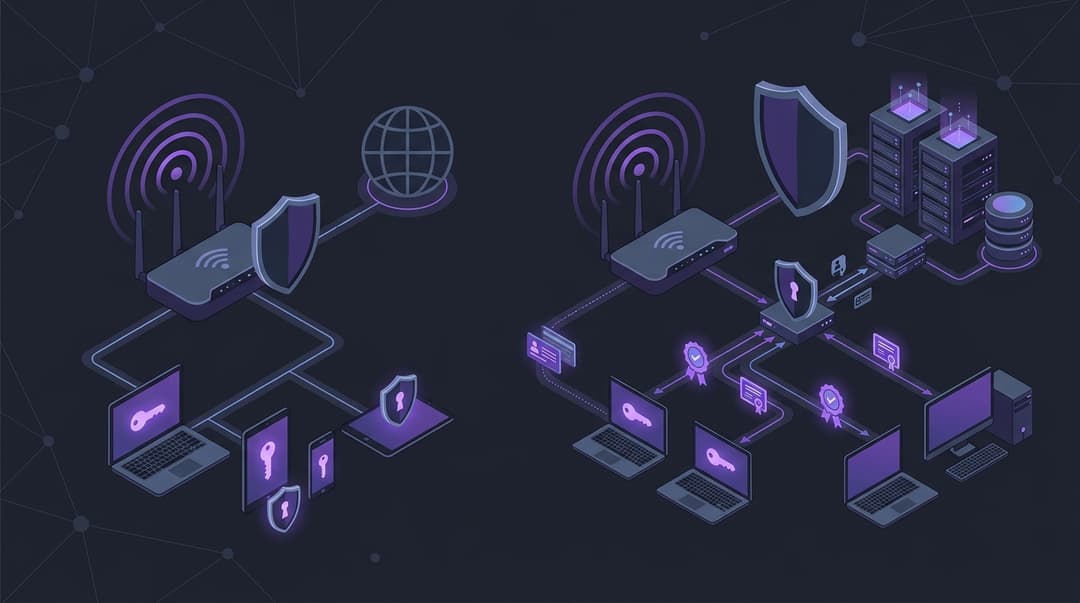
Executive Summary
Wireless security is a foundational pillar of modern enterprise infrastructure. For IT managers, network architects, and CTOs, selecting the appropriate wireless security protocol is not merely a technical choice, but a critical risk management decision. This guide examines the fundamental differences between WPA2 Personal (WPA2-PSK) and WPA2 Enterprise (WPA2-802.1X), detailing why the former introduces unacceptable vulnerabilities in commercial environments.
While WPA2 Personal relies on a single Pre-Shared Key (PSK) shared among all users, WPA2 Enterprise utilises individual credentials authenticated via a central server. This architectural distinction eliminates the risk of shared key compromise, enables granular access control, and provides comprehensive audit trails. For organisations managing hotels, retail chains, stadiums, or corporate offices, transitioning to WPA2 Enterprise is essential to secure sensitive data, maintain regulatory compliance, and protect brand reputation. This document provides the technical depth and practical blueprints required to execute this transition successfully.
Technical Deep-Dive
To understand the security disparity between WPA2 Personal and WPA2 Enterprise, one must analyse their underlying authentication mechanics and cryptographic key derivation processes.
WPA2 Personal (WPA2-PSK) Architecture
WPA2 Personal relies on a Pre-Shared Key (PSK) - a passphrase between 8 and 63 characters. The security of this method hinges on the 4-Way Handshake, which establishes the encryption keys for the session without transmitting the actual PSK over the air.
- PMK Derivation: The Access Point (AP) and the client station (STA) independently derive the Pairwise Master Key (PMK). This is done using the PBKDF2 (Password-Based Key Derivation Function 2) algorithm, hashing the passphrase, the SSID (Service Set Identifier), the SSID length, and repeating the process 4096 times. Because the SSID is factored into the hash, the same passphrase on different SSIDs yields different PMKs.
- The 4-Way Handshake: Once the PMK is established, the AP and STA execute the handshake to generate the Pairwise Transient Key (PTK), which encrypts unicast traffic, and the Group Temporal Key (GTK), which encrypts multicast and broadcast traffic.
- Message 1: The AP sends a random value (ANonce) to the STA.
- Message 2: The STA generates its own random value (SNonce) and calculates the PTK using the PMK, ANonce, SNonce, and the MAC addresses of both devices. The STA sends the SNonce to the AP, accompanied by a Message Integrity Code (MIC) to prove it knows the PMK.
- Message 3: The AP verifies the MIC, derives the PTK, and sends the GTK and a MIC to the STA.
- Message 4: The STA confirms receipt and signals that the keys are ready for use.
The Vulnerability: The fundamental flaw in WPA2 Personal is that the PMK is static and identical for every device on the network. If an attacker captures the 4-Way Handshake (which can be forced by sending de-authentication frames to a connected client), they can perform an offline dictionary attack. Since the SSID and MAC addresses are transmitted in the clear, the attacker can pre-compute hashes or use GPU-accelerated tools to brute-force the passphrase without interacting with the network. Once the passphrase is recovered, the attacker can decrypt all historical and future traffic captured over the air.
WPA2 Enterprise (WPA2-802.1X) Architecture
WPA2 Enterprise eliminates the shared key vulnerability by decoupling authentication from encryption. It implements the IEEE 802.1X standard, which introduces a three-party model: the Supplicant (client device), the Authenticator (Access Point or Wireless LAN Controller), and the Authentication Server (typically a RADIUS server).
Instead of a static PMK, WPA2 Enterprise dynamically generates a unique PMK for every single session. The authentication process is governed by the Extensible Authentication Protocol (EAP). The most common EAP methods deployed in enterprise environments include:
- EAP-TLS (Transport Layer Security): The most secure method. It requires mutual certificate-based authentication. Both the server and the client must present valid digital certificates issued by a trusted Certificate Authority (CA). This eliminates password-based vulnerabilities entirely.
- PEAP-MSCHAPv2 (Protected EAP): A two-stage protocol. In stage one, the RADIUS server presents its certificate to the client, establishing an encrypted TLS tunnel. In stage two, the client authenticates inside this secure tunnel using a username and password via the MSCHAPv2 protocol. While easier to deploy than EAP-TLS, it remains vulnerable to credential harvesting if clients are not configured to validate the server's certificate.
- EAP-TTLS (Tunneled TLS): Similar to PEAP, it establishes a secure TLS tunnel using the server's certificate. However, the inner authentication can support legacy protocols, client certificates, or directory services directly.
Once EAP authentication completes successfully, the RADIUS server generates a Master Session Key (MSK). The server transmits this MSK to the Authenticator (AP) over a secure wired connection (using a shared secret between the AP and RADIUS server). The client and the AP then use the MSK as the PMK to initiate the standard 4-Way Handshake. Because the PMK is unique to that session and never reused, capturing the handshake yields no benefit to an attacker; there is no shared passphrase to crack, and other users' traffic remains completely secure.
Got questions about your specific setup?
Our team works with venue operators, IT managers, and network engineers across 80,000 venues. Book a 20-minute call and we will show you how others like you solved it.
Implementation Guide
Transitioning from WPA2 Personal to WPA2 Enterprise requires systematic planning. Below is the deployment blueprint for a resilient WPA2 Enterprise network using PEAP-MSCHAPv2 (as an initial step) and EAP-TLS (for managed corporate assets).
Step 1: Establish the Identity Source and PKI
Before configuring wireless hardware, you must establish a trusted identity source and a Public Key Infrastructure (PKI).
- Directory Services: Ensure your user directory (Active Directory, LDAP, or cloud identity providers like Okta or Azure AD) is populated and structured with appropriate security groups.
- Certificate Authority (CA): For EAP-TLS, deploy an internal CA (such as Active Directory Certificate Services) to issue machine and user certificates. For PEAP, obtain a public SSL/TLS certificate from a trusted public CA (e.g., DigiCert, Sectigo) for the RADIUS server. Avoid self-signed certificates for production, as they complicate client provisioning and increase the risk of man-in-the-middle attacks.
Step 2: Deploy and Configure the RADIUS Server
The RADIUS server acts as the policy decision point. Common enterprise options include Cisco ISE, FreeRADIUS, and Microsoft Network Policy Server (NPS).
- Define RADIUS Clients: Register your Wireless LAN Controllers (WLCs) or standalone Access Points as RADIUS clients. Assign a strong, randomly generated shared secret (minimum 24 characters) for communication between the AP/WLC and the RADIUS server.
- Configure Authentication Policies: Define which EAP methods are permitted. Disable weak protocols such as PAP, CHAP, and EAP-MD5. Restrict allowed protocols to EAP-TLS and PEAP-MSCHAPv2.
- Configure Authorisation Policies: Map directory groups to network access levels. For example, members of the 'Finance-Dept' group should be assigned to VLAN 10, while 'Marketing-Dept' is assigned to VLAN 20. This is achieved by returning specific RADIUS attributes in the Access-Accept message (e.g.,
Tunnel-Type = VLAN,Tunnel-Medium-Type = 802,Tunnel-Private-Group-ID = [VLAN ID]).
Step 3: Configure the Wireless Infrastructure
Access the management interface of your WLC or AP management platform (such as Purple's integrated dashboard or your hardware controller).
- Create a New SSID: Define a new SSID (e.g., 'Corporate-Secure').
- Set Security Type: Select WPA2 Enterprise (or WPA3 Enterprise if hardware supports it, ensuring backward compatibility).
- Configure RADIUS Servers: Input the IP addresses of your primary and secondary RADIUS servers. Enter the matching shared secrets configured in Step 2. Set the authentication port to UDP 1812 and the accounting port to UDP 1813.
- Enable 802.11r (Fast Transition): To prevent roaming delays as clients move between APs, enable 802.11r. This allows the client and AP to pre-associate, reducing the overhead of full 802.1X re-authentication during roams.
Step 4: Client Provisioning and Onboarding
Unconfigured client devices will reject 802.1X connections if they do not trust the RADIUS server's certificate.
- Managed Devices: Use Mobile Device Management (MDM) or Group Policy Objects (GPO) to push wireless profiles to corporate laptops and smartphones. These profiles must specify the trusted root CA, the exact hostname of the RADIUS server, and the authentication method (e.g., EAP-TLS with machine certificates).
- Unmanaged/BYOD Devices: Implement an onboarding portal (such as Purple's guest and BYOD onboarding workflows) that guides users through installing a temporary profile or certificate, automating the supplicant configuration.
Best Practices
To maintain a secure and performant WPA2 Enterprise environment, adhere to the following industry standards:
- Enforce Strict Certificate Validation: Never allow clients to connect without validating the RADIUS server's certificate. If 'Validate Server Certificate' is disabled on client devices, they will blindly present credentials to any rogue AP broadcasting the same SSID name, exposing them to credential harvesting.
- Implement Dynamic VLAN Assignment: Do not place all authenticated users on a single flat network. Utilise RADIUS attributes to dynamically assign users to isolated VLANs based on their role, minimising the lateral movement capability of any compromised device.
- Isolate Guest Traffic: Guest networks should never use WPA2 Enterprise or WPA2 Personal with a shared key. Instead, deploy an isolated guest SSID utilising a captive portal with client isolation enabled at the AP level. This prevents guest devices from communicating with each other or accessing corporate resources.
- Monitor RADIUS Logs: Centralise RADIUS authentication logs into a SIEM (Security Information and Event Management) system. Monitor for anomalies such as high rates of authentication failures, logins from unusual locations, or credential sharing.
- Decommission Legacy Protocols: Ensure TKIP (Temporal Key Integrity Protocol) is completely disabled. Only AES-CCMP encryption must be permitted.
Troubleshooting & Risk Mitigation
Deploying 802.1X introduces complexity that can lead to specific failure modes. Understanding these issues allows for rapid resolution.
1. Client Connection Failures (Certificate Untrusted)
- Symptom: Client devices fail to connect, showing 'Authentication Failed' or 'Untrusted Certificate' warnings.
- Root Cause: The client does not possess the Root CA certificate that signed the RADIUS server's certificate, or the client's system clock is incorrect (preventing valid certificate validation).
- Mitigation: Ensure the Root CA certificate is distributed to all managed devices via MDM prior to SSID deployment. For BYOD, use an onboarding portal to install the certificate chain.
2. RADIUS Server Timeouts
- Symptom: Clients experience long delays or fail to connect entirely, with AP logs indicating 'RADIUS server unreachable'.
- Root Cause: Network latency between the AP and the RADIUS server exceeds the AP's timeout threshold, or firewalls are blocking UDP ports 1812 and 1813.
- Mitigation: Place RADIUS servers geographically close to the wireless infrastructure. Adjust AP timeout settings from the default (typically 3 seconds) to 5 or 7 seconds to accommodate WAN latency if authenticating to a cloud-hosted RADIUS server.
3. Roaming Drops and Latency
- Symptom: Users experience dropped VoIP calls or session disconnects when walking through a facility.
- Root Cause: The client is performing a full 802.1X authentication exchange (which can take up to 1000ms) at every AP transition.
- Mitigation: Enable 802.11r (Fast Transition) or Opportunistic Key Caching (OKC) on the wireless controller. This reduces roaming handoff times to under 50ms by reusing cached keys.
ROI & Business Impact
Transitioning to WPA2 Enterprise represents an investment in operational security that yields measurable business returns.
Risk Reduction and Financial Protection
The financial impact of a data breach is severe. WPA2 Personal networks present a massive attack surface; a single disgruntled employee leaving the organisation with the shared passphrase necessitates changing the key on every single device - an operational nightmare that is rarely executed. Consequently, former employees often retain access to the corporate network. WPA2 Enterprise mitigates this risk entirely. When an employee departs, disabling their account in the central directory instantly revokes their wireless access across all devices, preventing unauthorised access and potential data exfiltration.
Operational Efficiency
Managing pre-shared keys across hundreds of devices is highly inefficient. IT personnel spend significant hours manually configuring keys on new devices, updating keys when compromises occur, and troubleshooting connectivity issues. WPA2 Enterprise, integrated with an automated onboarding platform, eliminates manual key distribution. Users self-authenticate using existing corporate credentials, reducing wireless-related helpdesk tickets by up to 40%.
Regulatory Compliance
For organisations operating in regulated sectors (such as retail processing credit cards or healthcare managing patient data), WPA2 Enterprise is often a non-negotiable requirement. Standards such as PCI-DSS (Requirement 8) and HIPAA mandate unique user identification and secure access controls. Implementing WPA2 Enterprise ensures compliance, avoiding costly fines and protecting the organisation's brand reputation.
Key Definitions
WPA2 Personal (WPA2-PSK)
A wireless security standard designed for home and small office networks that uses a single Pre-Shared Key (PSK) for authentication and encryption key derivation.
It is highly vulnerable in enterprise environments because the compromise of one device compromises the entire network.
WPA2 Enterprise (WPA2-802.1X)
An enterprise-grade wireless security standard that requires individual authentication of users or devices via an external authentication server (RADIUS) using the 802.1X protocol.
It provides dynamic key generation per session, eliminating shared-key vulnerabilities.
RADIUS (Remote Authentication Dial-In User Service)
A networking protocol that provides centralised Authentication, Authorization, and Accounting (AAA) management for users who connect and use a network service.
It acts as the central decision engine in a WPA2 Enterprise network.
EAP-TLS (Extensible Authentication Protocol - Transport Layer Security)
An extremely secure EAP method that uses digital certificates for mutual authentication between the client and the authentication server, eliminating the need for passwords.
It is the industry standard for securing managed corporate devices.
PEAP-MSCHAPv2 (Protected Extensible Authentication Protocol)
A widely used EAP method that wraps the MSCHAPv2 password-based authentication protocol inside a secure TLS tunnel established by the RADIUS server's certificate.
It is easier to deploy than EAP-TLS but requires strict client-side certificate validation to prevent man-in-the-middle attacks.
Supplicant
The software client running on a user's device (e.g., laptop, smartphone) that negotiates authentication under the 802.1X framework.
Proper configuration of the supplicant is critical for successful 802.1X deployment.
Authenticator
The network device (typically a wireless Access Point or Wireless LAN Controller) that facilitates the authentication process by passing credentials between the supplicant and the authentication server.
The authenticator blocks all non-EAP traffic until the authentication server approves the client.
Dynamic VLAN Assignment
A security technique where a RADIUS server instructs an Access Point to place a connecting client into a specific VLAN based on the user's identity or group membership, rather than static SSID-to-VLAN mapping.
It allows organisations to segment their network dynamically without multiplying SSIDs.
Worked Examples
A national retail chain with 150 stores currently uses WPA2 Personal with a single passphrase for all Point-of-Sale (POS) terminals and back-office computers. They must achieve PCI-DSS compliance, which prohibits shared credentials for network access. How should they design and execute the transition to WPA2 Enterprise?
- Deploy a centralised RADIUS cluster (such as FreeRADIUS or Cisco ISE) in their primary data centre with a secondary node in a backup data centre.
- Integrate the RADIUS cluster with their Active Directory domain.
- Create a dedicated security group in AD for POS terminals ('POS-Devices') and another for administrative laptops ('Admin-Staff').
- Configure the RADIUS server to return VLAN 100 (isolated POS network) for members of 'POS-Devices' and VLAN 200 for 'Admin-Staff' using standard RADIUS attributes (Tunnel-Type, Tunnel-Medium-Type, Tunnel-Private-Group-ID).
- Configure the store APs to point to the central RADIUS cluster, using a unique shared secret per store location to isolate traffic.
- Deploy EAP-TLS for POS terminals using machine certificates enrolled via Active Directory Certificate Services (AD CS) to ensure no user interaction is required and credentials cannot be stolen.
A luxury hotel and conference centre needs to secure its administrative network (used by reception, management, and back-of-house staff) while maintaining a separate, high-capacity guest network. The current setup uses a single WPA2 Personal network for staff, leading to frequent credential leaks. How can they implement a secure, scalable solution?
- Separate the physical/logical networks by creating two distinct SSIDs: 'Hotel-Staff' (WPA2 Enterprise) and 'Hotel-Guest' (Open with Captive Portal).
- For 'Hotel-Staff', configure PEAP-MSCHAPv2 integrated with the hotel's property management system (PMS) or local directory. This allows staff to log in using their individual directory credentials.
- Implement client isolation on the 'Hotel-Guest' network to prevent guest-to-guest communication.
- Integrate Purple's WiFi intelligence platform on the guest network to capture analytics and manage guest onboarding securely via a captive portal, ensuring guest traffic is completely segmented from the administrative VLAN.
- Apply rate limiting on the guest network to prevent bandwidth exhaustion, while prioritising administrative traffic.
Practice Questions
Q1. A large conference venue wants to deploy a secure wireless network for its internal operations staff (ticketing, security, and facilities). The venue operations director suggests using WPA2 Personal with a strong, 63-character passphrase to save on deployment costs. As a network architect, how would you evaluate this proposal and what risks would you highlight?
Hint: Consider the operational lifecycle of a shared key when staff members leave or devices are lost.
View model answer
The proposal should be rejected due to significant operational and security risks. While a 63-character passphrase is highly resistant to brute-force attacks, it remains a Pre-Shared Key (PSK). In a high-turnover environment like a conference venue, the passphrase will inevitably be shared, leaked, or retained by departing staff. To revoke access for a single individual, the IT team would have to change the passphrase on every single operational device (ticketing scanners, security tablets, facilities laptops), causing massive operational disruption. Furthermore, WPA2 Personal does not provide individual accountability; all actions on the network appear under a single shared identity, making forensic analysis impossible in the event of an internal breach. The recommended approach is to deploy WPA2 Enterprise (802.1X) integrated with the venue's central directory, allowing instant revocation of individual accounts without affecting other users.
Q2. During the deployment of PEAP-MSCHAPv2, several Android and iOS devices fail to connect to the corporate SSID. Investigation reveals that the clients are prompting users to 'Trust' an unknown certificate, or failing silently. What is the root cause of this behaviour, and how should the network team resolve it?
Hint: Look at how modern mobile operating systems handle server certificate validation by default.
View model answer
The root cause is that modern mobile operating systems (especially Android 11+ and iOS 14+) enforce strict server certificate validation by default and no longer allow users to easily bypass certificate warnings. If the RADIUS server is using a self-signed certificate, or a certificate issued by an internal CA whose root certificate has not been installed on the mobile devices, the connection will fail. To resolve this, the network team should: 1. Obtain a certificate for the RADIUS server from a publicly trusted Certificate Authority (CA) that is pre-installed in the trust stores of iOS and Android. 2. Ensure that the domain name on the certificate matches the domain configured in the wireless profile. 3. For managed corporate devices, use an MDM to push the wireless profile along with the trusted root CA certificate. For BYOD devices, implement an onboarding solution (like Purple's onboarding portal) to automate the secure installation of the required certificate chain.
Q3. An attacker positions themselves outside a corporate office and captures the 4-way handshake of a client connecting to a WPA2 Personal network. Explain why this capture allows the attacker to decrypt the traffic of other users on the same network, and why this attack is ineffective against WPA2 Enterprise.
Hint: Analyze how the Pairwise Master Key (PMK) is derived in both protocols.
View model answer
In WPA2 Personal, the Pairwise Master Key (PMK) is derived statically from the shared passphrase and the SSID. Because the passphrase and SSID are identical for all users, every device on the network shares the exact same PMK. When an attacker captures the 4-way handshake of any client, they can use the shared PMK along with the publicly transmitted nonces (ANonce, SNonce) and MAC addresses to derive that specific client's Pairwise Transient Key (PTK). This allows the attacker to decrypt that client's traffic. Furthermore, because the PMK is the same for everyone, the attacker can decrypt the traffic of any other user on the network simply by capturing their respective 4-way handshakes. In contrast, WPA2 Enterprise dynamically generates a unique Master Session Key (MSK) for every single authentication session via 802.1X. This MSK acts as a unique PMK for that session only. Even if an attacker captures the 4-way handshake of one client, they cannot decrypt other users' traffic because every user has a completely unique PMK that cannot be derived from a shared secret.
Frequently asked questions
What is the fundamental difference between WPA2 Personal and WPA2 Enterprise?
WPA2 Personal uses a single Pre-Shared Key (PSK) shared across all connecting client devices, creating an inherent single point of failure. WPA2 Enterprise uses the IEEE 802.1X authentication framework and an external RADIUS server to authenticate each user or device individually with unique dynamic session keys.
Why is WPA2 Personal unsafe for business and enterprise networks?
With WPA2 Personal, anyone who knows the shared passphrase can capture the four-way handshake and decrypt other users over-the-air wireless traffic. Furthermore, when an employee or contractor leaves, the network passphrase remains on their personal devices unless IT manually reconfigures every access point and client across the estate.
Does WPA2 Personal comply with regulatory standards like PCI-DSS and HIPAA?
No. PCI-DSS 4.0 Requirement 8 and HIPAA Security Rule § 164.312 strictly mandate unique user authentication and audit logging, prohibiting shared credentials in environments handling cardholder data or electronic protected health information (ePHI). WPA2 Enterprise or certificate-based 802.1X is required for compliance.
What is the difference between PEAP-MSCHAPv2 and EAP-TLS in WPA2 Enterprise?
PEAP-MSCHAPv2 authenticates users using corporate directory username and password credentials encapsulated in a TLS tunnel established by the RADIUS server certificate. EAP-TLS uses mutual cryptographic X.509 digital certificates on both the client and server, completely eliminating passwords and preventing credential theft or rogue access point attacks.
Can an enterprise run both WPA2 Personal and WPA2 Enterprise simultaneously?
Yes. Enterprises routinely broadcast distinct SSIDs on the same physical access points, routing corporate laptops to a WPA2/WPA3 Enterprise 802.1X network while connecting legacy or headless IoT devices to an isolated SSID using Identity Pre-Shared Keys (IPSK) or MPSK mapped to restricted VLANs.
Continue reading in this series
The compliance case for passwordless WiFi: HIPAA, PCI, ISO 27001
You will be able to decide whether moving staff networks from a shared password to 802.1X with EAP-TLS closes your audit gaps under PCI DSS 4.0, HIPAA and ISO 27001:2022. You will know which controls it satisfies, which it does not, and what evidence to assemble before fieldwork.
How to revoke WiFi access when an employee leaves
This guide shows IT and venue operations teams how to remove Staff WiFi access when an employee leaves without disrupting the rest of the workforce. It compares certificate-based 802.1X, identity-specific iPSK and SCIM-driven deprovisioning, then provides a same-day runbook, test method and audit evidence model.
Secure BYOD WiFi: Passpoint certificate onboarding vs xPSK (iPSK)
A comprehensive technical guide for IT teams on securing unmanaged employee and student devices (BYOD) using zero-touch Passpoint EAP-TLS certificates vs vendor-specific xPSK (iPSK/easyPSK, DPSK, PPSK, MPSK).
Got questions about your specific setup?
Our team works with venue operators, IT managers, and network engineers across 80,000 venues. Book a 20-minute call and we will show you how others like you solved it.