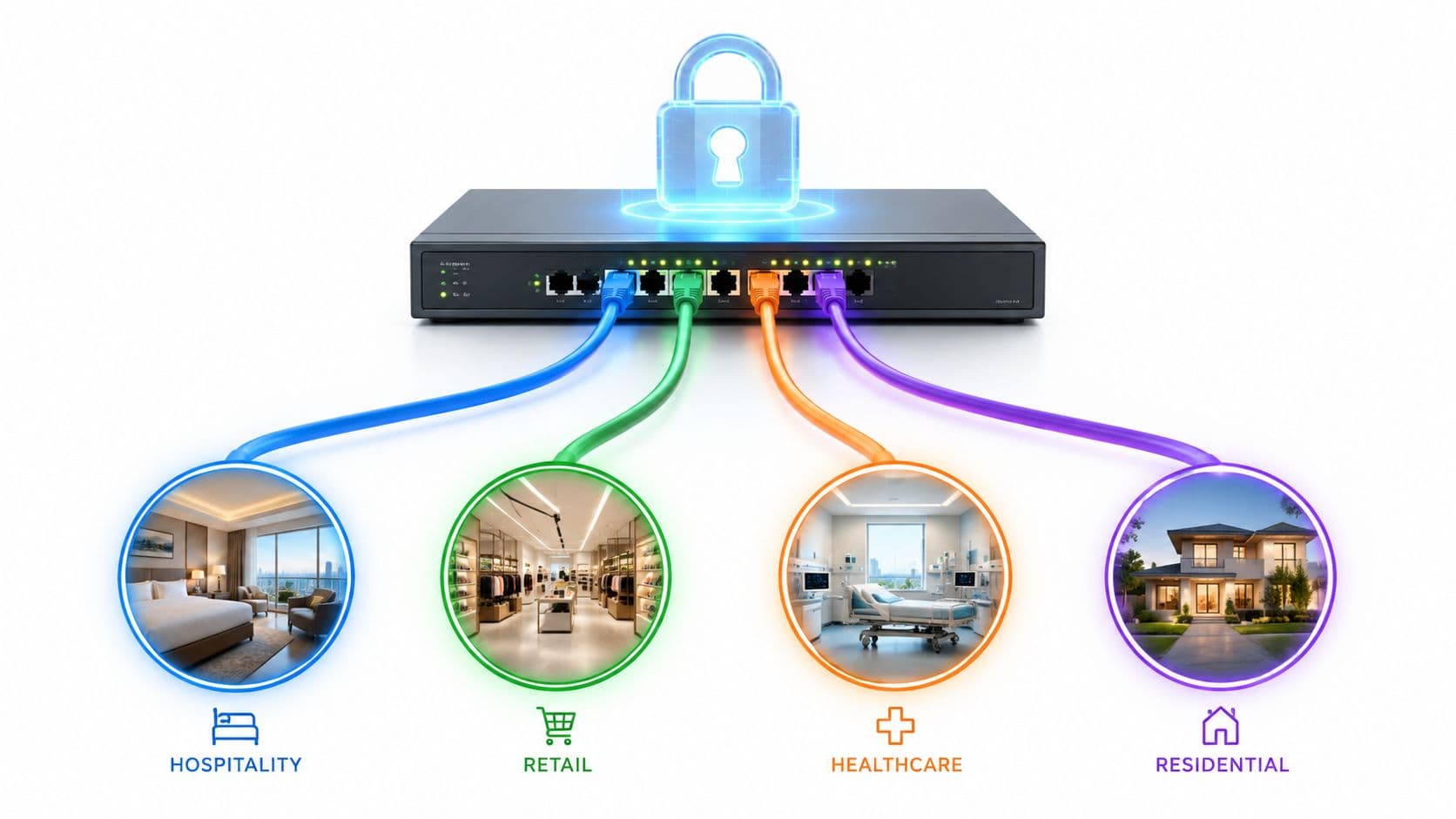
Es probable que su red ya tenga este aspecto. El personal se conecta con ordenadores portátiles gestionados. Los invitados llegan con teléfonos y tabletas que no volverá a ver. Las impresoras están en armarios con firmware antiguo. Televisores, escáneres, dispositivos de pago, sensores y controladores de puertas: todos quieren una dirección IP y una ruta hacia algo útil.
Los equipos de gestión de redes no tienen problemas por falta de señal WiFi. Tienen problemas porque no pueden responder a tres preguntas sencillas lo suficientemente rápido. ¿Quién es este? ¿Qué es este dispositivo? ¿A qué se le debería permitir acceder ahora mismo?
Ahí es donde un sistema moderno de control de acceso a la red demuestra su valor. No como una barrera compleja en el extremo, sino como la capa de control que convierte el acceso a la red en una decisión basada en la identidad. Bien implementado, mejora la seguridad y facilita el acceso al personal, invitados, contratistas y dispositivos que no pueden adaptarse a los flujos de inicio de sesión tradicionales.
Qué es un sistema de control de acceso a la red
Un sistema de control de acceso a la red es el motor de políticas que decide si un usuario o dispositivo debe acceder a su red, qué tipo de acceso debe recibir y si ese acceso debe cambiar mientras la sesión esté activa.
Esa definición es precisa, pero es demasiado estrecha para el funcionamiento de un NAC en entornos reales.
En la práctica, el NAC se convierte en la capa de identidad y experiencia para el acceso. Identifica los dispositivos, los vincula a usuarios o roles cuando es posible, comprueba si cumplen las políticas y, a continuación, los ubica en el nivel de conectividad adecuado. Esto puede significar un acceso corporativo total para un portátil gestionado, un acceso exclusivo a internet para el teléfono de un invitado, una VLAN estrictamente restringida para una impresora o la cuarentena para aquello que no cumpla las políticas.
Por qué el NAC importa ahora
El acceso a la red tradicional asumía que, una vez que un dispositivo estaba dentro, no representaba peligro. Ese modelo no sobrevive al trabajo híbrido, al BYOD, al acceso de invitados, a las sucursales múltiples y a los centros con alta densidad de IoT.
El NAC moderno se basa en una premisa diferente. La confianza debe ganarse en el momento de acceso y reevaluarse a medida que cambian las condiciones. Esto se alinea con la filosofía general de Zero Trust y ayuda a explicar por qué está aumentando su adopción. Las proyecciones de mercado citadas por el informe de mercado sobre NAC de Market Data Forecast indican que se prevé que el mercado de NAC crezca de 1180 millones de USD en 2024 a 10 140 millones de USD para 2033, con una tasa de crecimiento anual compuesto (CAGR) del 26,97%.
Ese crecimiento no se produce porque los equipos deseen otro panel de control más. Se debe a que las redes actuales albergan demasiados usuarios y tipos de dispositivos como para gestionar el acceso manualmente.
Lo que realmente hace una buena plataforma NAC
Un despliegue de NAC capaz suele gestionar bien cuatro tareas:
- Detección e identificación. Visualiza los dispositivos a medida que se conectan y los clasifica con la mayor precisión posible.
- Autenticación y autorización. Comprueba la identidad, el rol y el estado del dispositivo antes de conceder el acceso.
- Segmentación y control. Ubica los dispositivos en la zona de red correcta y limita el movimiento este-oeste.
- Aplicación continua de políticas. Modifica el acceso si cambia el estado, si se revocan las credenciales o si aumenta el riesgo.
Regla práctica: Si su política de acceso no puede distinguir entre personal, invitados, contratistas, impresoras e IoT, no tiene un control de acceso. Tiene una conectividad compartida con intenciones optimistas.
La antigua imagen del NAC como un proyecto complejo de control de admisión ha quedado desfasada. La mejor manera de plantearlo es la siguiente: un sistema moderno de control de acceso a la red permite al departamento de TI sustituir las contraseñas compartidas, los SSID genéricos y las excepciones manuales por un acceso basado en la identidad que los usuarios apenas perciben.
Comprensión de los componentes principales de un sistema NAC
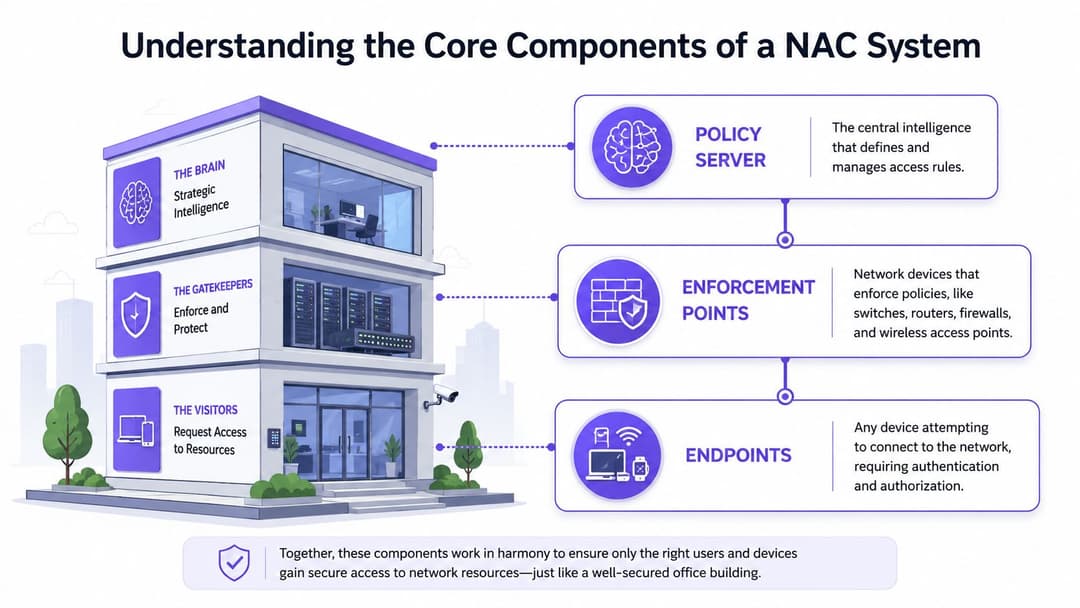
Cada plataforma NAC parece diferente en el catálogo de productos, pero las partes que la componen suelen ser las mismas. Piense en la analogía de un edificio de oficinas seguro. Necesita un mostrador de seguridad central, cámaras y lectores que observen lo que ocurre, y puertas que puedan cerrarse o abrirse.
El servidor de políticas
El servidor de políticas es el cerebro. Contiene las reglas que responden a preguntas como estas:
- ¿Está este usuario en el directorio de personal?
- ¿Este dispositivo está gestionado o no gestionado?
- ¿Se está conectando por cable, WiFi o acceso remoto?
- ¿Debe recibir acceso completo, acceso restringido, Internet para invitados o cuarentena?
Aquí también es donde las integraciones importan. En la mayoría de los entornos empresariales, la capa de políticas trabaja estrechamente con los servicios de directorio y autenticación. Si necesita un recordatorio de cómo funciona la parte de autenticación del backend, esta descripción general de un servidor RADIUS y su función en el control de acceso es un contexto útil.
Los puntos de aplicación
Los puntos de aplicación son los lugares donde se aplica el acceso. En redes reales, esto suele traducirse en switches, puntos de acceso inalámbricos, controladores, firewalls o gateways de segmentación.
Estos dispositivos no crean políticas. Reciben una decisión y la ejecutan. Esto puede implicar asignar una VLAN, aplicar una regla de firewall, limitar la conectividad o mover un dispositivo a un segmento restringido.
Lo que importa desde el punto de vista de la arquitectura es que el NAC no sea meramente consultivo. Necesita un punto de control que pueda cambiar lo que un dispositivo puede hacer.
Los endpoints y sensores
La tercera pieza es el propio endpoint, junto con la telemetría que permite al NAC comprenderlo. Los endpoints incluyen portátiles gestionados, teléfonos personales, escáneres de mano, impresoras, cámaras, dispositivos médicos y todos esos equipos heredados complejos que nadie quiere tocar.
Los sensores y la lógica de perfiles dotan a la plataforma NAC de ojos y oídos. Ayudan a determinar si el dispositivo es conocido, si parece cumplir con las políticas y si su comportamiento se ajusta al rol asignado.
Un despliegue de NAC falla rápidamente cuando autentica a los usuarios pero ignora el contexto del dispositivo. La identidad sin el reconocimiento del dispositivo es solo la mitad de un control.
Por qué estos componentes son compatibles con Zero Trust
Un sistema NAC moderno se adapta a Zero Trust porque el acceso no queda fijo tras una única comprobación correcta. Como señala la descripción general de NAC de Illumio, las políticas se aplican antes de la admisión, la autorización puede basarse en el rol, el estado del dispositivo, la ubicación y la hora del día, y el acceso se puede revocar en tiempo real si cambia el cumplimiento de las normas.
Ese bucle continuo importa más que el inicio de sesión inicial. Es la diferencia entre "has entrado una vez" y "sigues cumpliendo las reglas ahora mismo".
Cómo aplican los sistemas NAC las políticas de acceso
La mayoría de los proyectos de NAC resultan mucho más sencillos cuando los equipos dejan de preguntarse "¿Qué plataforma deberíamos comprar?" y empiezan a plantearse "¿Qué modelo de aplicación se adapta a cada clase de dispositivo?".
No existe un único método para todo. Los portátiles corporativos, los teléfonos de los invitados, las impresoras, los escáneres y los dispositivos IoT no se comportan de la misma manera. Un buen diseño de NAC lo asume y utiliza el mecanismo adecuado para cada categoría en lugar de forzar un único flujo de trabajo universal.
Cuatro modelos comunes de aplicación
802.1X es la opción estándar para los dispositivos corporativos gestionados. Es la solución ideal cuando usted controla el dispositivo final y puede distribuir perfiles, certificados o credenciales corporativas. Le proporciona una identidad fiable en el punto de conexión y admite la asignación dinámica de políticas.
MAC Authentication Bypass (MAB) es la alternativa para los dispositivos que no pueden realizar 802.1X. Piense en impresoras, escáneres antiguos, sistemas de acreditación, algunos dispositivos IoT y equipos especializados. Es útil, pero es más débil porque una dirección MAC no es lo mismo que una identidad sólida.
La evaluación de postura sin agente ayuda cuando se necesita comprobar las características del dispositivo sin instalar un cliente persistente. Esto suele ser útil en escenarios de BYOD y contratistas donde la gestión completa del dispositivo no es realista.
Las claves precompartidas de identidad (iPSK) son una de las mejoras más prácticas en el acceso WiFi moderno. En lugar de una contraseña compartida para todo un SSID, cada usuario, inquilino o dispositivo puede obtener una clave única vinculada a una política. Esto facilita la incorporación y simplifica la revocación, especialmente para entornos mixtos.
Para obtener un contexto de seguridad más amplio, esta guía sobre decisiones de acceso y acceso a la red Zero Trust es un complemento útil a la hora de mapear la aplicación de NAC con la política de identidad.
Comparación de modelos de aplicación de NAC
| Modelo | Ideal para | Nivel de seguridad | Beneficio clave |
|---|---|---|---|
| 802.1X | Portátiles gestionados, móviles corporativos, dispositivos del personal | Alto | Sólida admisión basada en la identidad y control dinámico de políticas |
| MAB | Impresoras, dispositivos heredados, IoT básico | Más bajo | Permite que los dispositivos que no son 802.1X se unan bajo excepciones controladas |
| Postura sin agente | Dispositivos personales, contratistas, usuarios temporales | Medio | Verifica el estado del dispositivo sin necesidad de un despliegue complejo en el endpoint |
| iPSK | Dispositivos WiFi heredados, multiinquilino, comercio minorista, hostelería, IoT | De medio a alto, según el diseño | Credenciales únicas sin la proliferación de contraseñas compartidas |
Qué funciona y qué no
Los equipos suelen sobreestimar hasta dónde pueden llegar solo con 802.1X. Si su entorno incluye hoteles, tiendas, clínicas o edificios de uso mixto, no lo cubrirá todo. Siempre habrá tipos de dispositivos que necesiten un camino diferente.
Un diseño práctico suele tener este aspecto:
- Utilice 802.1X de forma prioritaria para terminales gestionados donde usted controle el sistema operativo y la configuración.
- Reserve MAB exclusivamente para excepciones reales en lugar de permitir que se convierta en la opción por defecto.
- Utilice comprobaciones sin agente de forma selectiva donde la comodidad del usuario sea más importante que un control profundo del terminal.
- Adopte iPSK para grupos complejos de WiFi que necesitan una incorporación sencilla pero que no deben compartir una única clave estática.
El error de diseño común
El error no es utilizar múltiples modelos. El error es utilizarlos sin una disciplina de políticas.
Si cada dispositivo desconocido puede recurrir a MAB, creará un carril de desvío. Si cada invitado recibe la misma clave precompartida, habrá vuelto a crear el problema de la contraseña compartida. Si las comprobaciones de estado son demasiado estrictas, las colas de asistencia se llenarán con dispositivos legítimos que no pueden conectarse.
El objetivo no es la pureza ideológica. Es la flexibilidad controlada. Un sistema de control de acceso a la red bien gestionado elige el método más fuerte que cada dispositivo puede soportar de forma realista, y luego envuelve los métodos más débiles en una segmentación más estricta y una confianza más corta.
Arquitectura e integración de su solución NAC
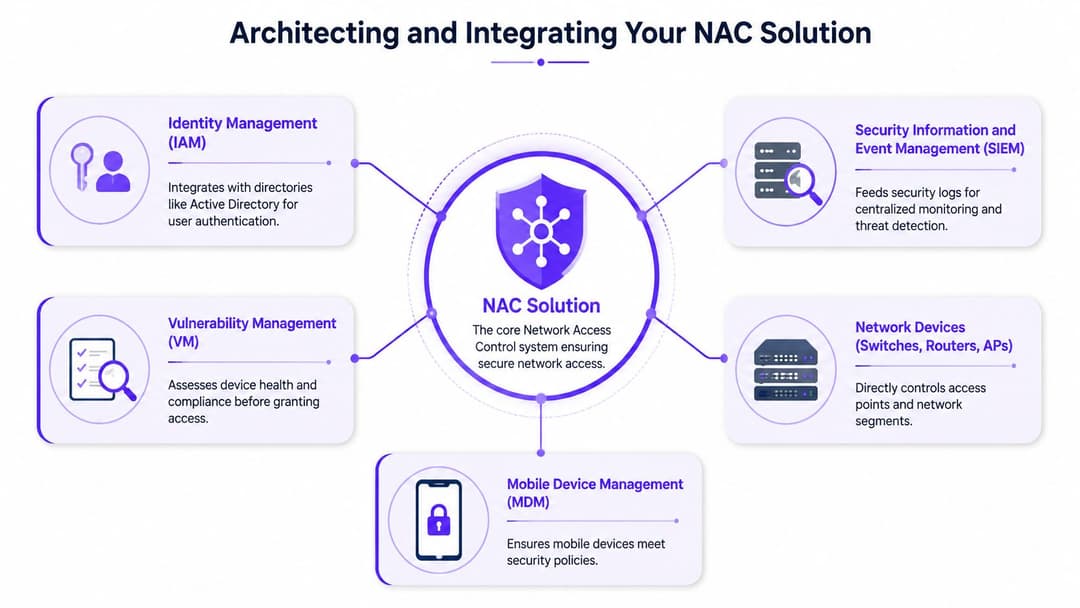
Una plataforma NAC por sí sola puede autenticar y segmentar. Una plataforma NAC integrada con el resto de su pila tecnológica puede automatizar decisiones con un contexto mucho más sólido.
Ese es el cambio de arquitectura que muchos equipos pasan por alto. El NAC no debería situarse junto a la identidad, MDM, SIEM y la política de red como una isla de producto independiente. Debería consumir señales de ellos y devolver los resultados a la red.
Las integraciones que más importan
Las plataformas de directorio e identidad son lo primero. Si Microsoft Entra ID, Okta o su directorio actual ya definen el estado y el rol del usuario, el NAC debería utilizar eso como fuente de verdad en lugar de forzar un modelo de identidad duplicado.
El MDM y la gestión de terminales son el siguiente paso. Indican al NAC si un dispositivo está registrado, cumple con las directivas, está cifrado o se encuentra fuera de la política de seguridad. Las herramientas SIEM y de monitorización completan el ciclo recopilando decisiones de acceso, fallos, cambios de políticas e intentos de conexión sospechosos.
Como se señala en la descripción general de NAC empresarial de Procern, el NAC suele integrarse con los sistemas de directorio mediante API para que las decisiones de acceso puedan utilizar tanto atributos estáticos como un contexto dinámico. Esto es especialmente importante si necesita la misma lógica de mínimo privilegio en el acceso por cable, WiFi y remoto.
Un patrón de integración viable
Para la mayoría de los entornos empresariales, el patrón ideal es el siguiente:
- El sistema de identidad proporciona los datos del usuario. Estado de empleo, pertenencia a grupos y rol.
- El MDM proporciona los datos del dispositivo. Estado gestionado, postura de seguridad, indicadores de cumplimiento.
- El NAC combina ambos. Usuario, dispositivo, ubicación, tipo de red y políticas.
- Los switches y AP aplican el resultado. VLAN, ACL, segmentos restringidos, zonas de invitados.
- El SIEM registra el historial. Útil para operaciones, auditorías y respuesta ante incidentes.
Elección del modelo de despliegue
La arquitectura sobre la que se sustenta su sistema NAC afecta a la resiliencia, la resolución de problemas y la fricción operativa.
Despliegue en línea (inline)
El NAC en línea (inline) se sitúa directamente en la ruta del tráfico. Proporciona un control sólido porque puede inspeccionar y aplicar políticas de forma centralizada, pero introduce dependencias y posibles cuellos de botella. Habitualmente veo el uso en línea donde los equipos desean un control de acceso estricto y pueden asumir la complejidad del diseño.
Despliegue fuera de banda (out-of-band)
El NAC fuera de banda (out-of-band) toma decisiones sin convertirse en la ruta para todo el tráfico. Se apoya en conmutadores, controladores y puntos de acceso para aplicar las políticas. Esta suele ser la opción más limpia en redes corporativas ya consolidadas, ya que reduce el riesgo para el rendimiento y preserva la resiliencia.
Modelos basados en controlador o gestionados en la nube
El NAC basado en controlador y gestionado en la nube suele ser la opción más práctica para entornos distribuidos. Simplifican la coherencia de las políticas entre las sedes y reducen la sobrecarga de gestionar la infraestructura de control local en todas partes.
La arquitectura más sólida suele ser aquella que su equipo de operaciones puede mantener a las 2 de la madrugada, no la que tiene el diagrama de políticas más impresionante.
Qué optimizar
Al elegir la arquitectura, priorice estos compromisos:
- Simplicidad operativa por encima de la elegancia teórica
- Políticas consistentes entre métodos de acceso en lugar de excepciones locales puntuales
- Vías rápidas de reversión cuando una política bloquea los dispositivos incorrectos
- Interoperabilidad de proveedores con su infraestructura de conmutación e inalámbrica
Si su red abarca sucursales, establecimientos hosteleros, tiendas minoristas o ubicaciones mixtas con cable e inalámbricas, un modelo basado en controlador o gestionado en la nube suele reducir la dificultad de mantener las políticas alineadas.
Casos de uso prácticos de NAC por sector
Lo interesante de NAC no es el acrónimo. Es lo que ocurre cuando se aplica en lugares donde los usuarios esperan que el acceso sea inmediato e invisible.
Los entornos más complejos no suelen ser las oficinas corporativas asépticas. Son hoteles, tiendas, hospitales y edificios compartidos donde los dispositivos gestionados y no gestionados conviven en la misma infraestructura.

Hostelería
La red de un hotel debe dar servicio a las tablets del personal, las terminales de recepción, la IPTV, los sistemas de pago, los teléfonos de los huéspedes y los dispositivos de los contratistas sin entorpecer el proceso de registro.
En ese entorno, el NAC deja de ser un complemento de seguridad y pasa a formar parte de la experiencia del invitado. El personal necesita un acceso fluido basado en roles. Los invitados necesitan un registro rápido y con la menor fricción posible. Las contraseñas compartidas y las páginas de bienvenida complejas suelen generar más solicitudes de soporte que valor real, razón por la cual muchos equipos ahora las comparan con alternativas como los Captive Portals y los modelos más recientes de acceso de invitados basados en identidad.
Retail
Los entornos del sector retail tienen un punto de presión diferente. La tienda necesita conectividad pública, pero el punto de venta, los sistemas de back-office, los escáneres de mano, la señalización digital y los dispositivos de soporte de terceros no pueden estar todos en la misma zona de confianza.
El NAC ayuda clasificando cada ruta de conexión y dirigiéndola hacia la política correcta. El resultado empresarial es sencillo. Los clientes obtienen un acceso fácil, el personal puede trabajar y los dispositivos sensibles permanecen aislados del tráfico público abierto.
Sector sanitario
Los hospitales y las clínicas rara vez se permiten el lujo de contar con un entorno de endpoints limpio. Los dispositivos clínicos, las estaciones de trabajo compartidas, los equipos especializados, las impresoras y los dispositivos de contratistas temporales aparecen en la misma red en momentos diferentes.
Ahí es donde la gestión de excepciones se convierte en el principal reto de diseño. El problema no es si el NAC puede autenticar un ordenador portátil. El problema es si la plataforma puede situar de forma segura un dispositivo frágil o heredado en el límite correcto sin que el personal de primera línea tenga que esperar a una aprobación manual.
Edificios residenciales y de oficinas multi-inquilino
Los edificios compartidos necesitan algo que resulte sencillo para el ocupante y controlado para el operador. Los inquilinos quieren una experiencia similar a la de su hogar. Los operadores necesitan separación entre pisos, suites o empresas, además de una forma de gestionar a los instaladores, visitantes, dispositivos de las instalaciones y sistemas comunitarios.
Un diseño de NAC moderno puede ofrecer a cada inquilino una experiencia de acceso con sensación de privacidad, al tiempo que aplica el aislamiento empresarial en segundo plano. Ese es uno de los ejemplos más claros de cómo el NAC actúa como una plataforma de experiencia y no solo como un punto de control de seguridad.
Los operadores del Reino Unido a menudo descubren que el verdadero trabajo no es definir la política. Es gestionar el BYOD no administrado, los límites de los invitados y el flujo constante de dispositivos inusuales sin convertir a los equipos de soporte en administrativos de aprobación.
Esto es importante porque, tal como señala la guía de StateTech sobre prácticas operativas de NAC, el NAC es especialmente útil para delimitar las zonas de invitados, establecer líneas base de dispositivos, realizar despliegues por fases y monitorizar alertas. La misma fuente destaca la realidad práctica de los dispositivos BYOD no gestionados, lo que coincide con la preocupación general de que el compromiso de dispositivos sigue siendo uno de los principales tipos de incidentes para las organizaciones del Reino Unido.
Cómo implementar y elegir un sistema NAC
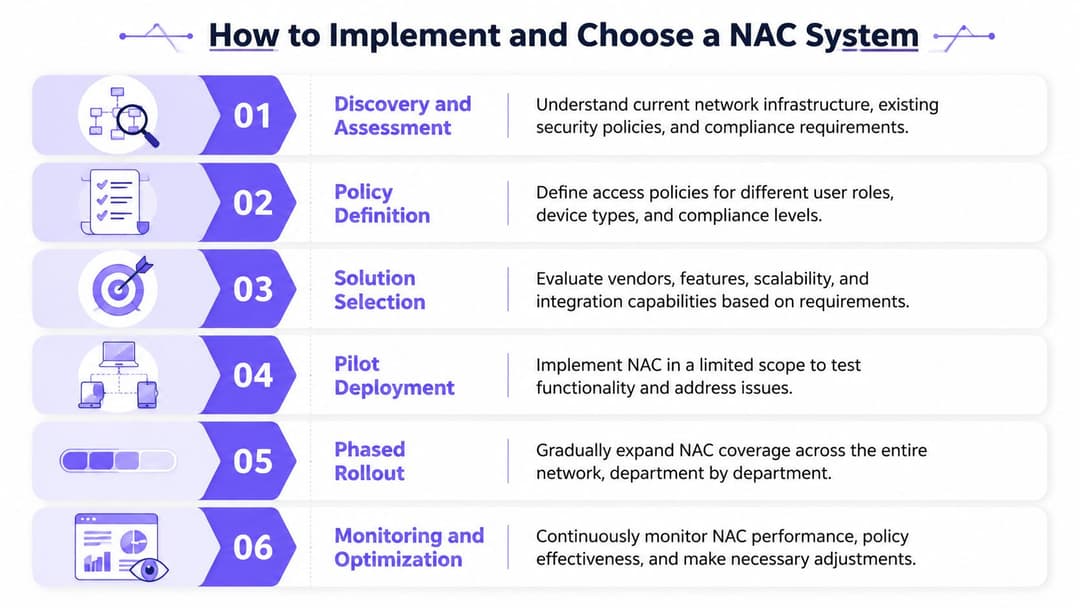
Un despliegue suele salir mal de una manera muy común. Un usuario llega a un hotel, tienda, clínica u oficina, se conecta al WiFi y es bloqueado. Un terminal de pago cae en la VLAN incorrecta. Un contratista necesita acceso ahora, pero el proceso todavía depende de una contraseña compartida y de una cola de tickets. En ese punto, el NAC deja de ser un proyecto de políticas y se convierte en un problema de operaciones.
Una buena implementación empieza por asumir esa realidad. El objetivo no es escribir el conjunto de reglas más detallado. El objetivo es dar al personal, a los invitados y a los dispositivos el acceso adecuado con la menor fricción posible, manteniendo al mismo tiempo contenidos los terminales de riesgo o desconocidos. En las organizaciones del Reino Unido, esto también está relacionado con el cumplimiento normativo. Como explica la explicación de WWT sobre NAC y cumplimiento, la Data Protection Act 2018 integró el marco de trabajo GDPR en la legislación nacional, y el NAC respalda ese modelo al imponer un acceso basado en la identidad y aislar los dispositivos que no cumplen las normas en lugar de confiar en un inicio de sesión único.
Lista de comprobación de implementación que resiste en producción
Comience con el mapeo de servicios, no con la redacción de políticas
Antes de elegir una plataforma o de redactar reglas de acceso, defina quién necesita acceso, mediante qué se conecta y qué ocurre si ese acceso falla.
Eso implica algo más que listar portátiles y teléfonos. Significa identificar los sistemas de los que depende el negocio. El comercio minorista cuenta con dispositivos TPV, escáneres, quioscos, señalización digital y equipos de soporte de terceros. La hostelería dispone de acceso para invitados, dispositivos del personal, sistemas de puertas, televisiones, tabletas y servicios de gestión interna. La sanidad y la educación tienen su propia combinación de terminales compartidos, dispositivos no gestionados y equipos especializados.
Este paso saca a la luz una verdad fundamental. Hoy en día, NAC tiene tanto que ver con la identidad y la experiencia de usuario como con la admisión de dispositivos.
Clasifique por identidad, propiedad y riesgo
Los diseños de NAC sólidos separan a los usuarios y dispositivos en función de cómo deben ser tratados, no solo por su tipo de hardware.
- Los dispositivos gestionados del personal deben utilizar una autenticación sólida y heredar el acceso de la identidad del usuario, el estado del dispositivo y su rol.
- Los invitados y los dispositivos personales deben obtener una incorporación rápida y un acceso estrictamente acotado, normalmente limitado a internet o a aplicaciones específicas.
- Los dispositivos comerciales compartidos, como quioscos, impresoras y terminales de pago, deben tener un acceso predecible y restringido únicamente a los servicios que requieren.
- Los endpoints heredados y de IoT necesitan vías de excepción controladas con una segmentación y monitorización claras.
- Los dispositivos desconocidos deben tener por defecto un acceso restringido hasta que sean identificados.
Los sistemas NAC más antiguos solían volverse complejos porque trataban cualquier cosa que no fuera el modelo de portátil corporativo como una excepción. Las plataformas modernas basadas en la identidad tratan a esos grupos como casos operativos estándar.
Piloto donde la experiencia sea lo más importante
Un proyecto piloto debe evaluar algo más que la aplicación de políticas. Debe probar la velocidad de incorporación, el volumen de solicitudes de soporte, la gestión de excepciones y la facilidad de uso diario para los equipos locales.
Comenzar con la WiFi para invitados en un grupo hotelero, el acceso del personal en una red de tiendas minoristas o una única planta de oficinas suele tener más sentido que empezar por el núcleo de la red. Esos entornos exponen rápidamente los casos extremos más complejos y, además, hacen visible el impacto empresarial. Si los invitados se conectan sin una contraseña compartida, el personal deja de llamar al servicio de soporte para restablecer contraseñas y los dispositivos IoT se ubican en el segmento correcto de forma automática, la plataforma demuestra su valor más allá de la seguridad.
Ejecute en modo de observación antes de la aplicación total
Este paso salva proyectos.
Utilice la creación de perfiles, los registros de autenticación y la simulación de políticas para ver qué haría el sistema antes de que empiece a bloquear el tráfico. Los equipos suelen descubrir suposiciones obsoletas aquí. Los dispositivos aparecen en lugares que nadie documentó. Las impresoras se comunican con servicios que no deberían necesitar. Los contratistas utilizan flujos de trabajo que eluden el aprovisionamiento normal. Corregir eso en modo de monitorización es mucho más barato que solucionarlo durante una interrupción del servicio activo.
Qué buscar en una plataforma moderna
Muchos equipos todavía compran NAC como si estuvieran resolviendo un problema de control de puertos de campus de hace una década. Eso suele traducirse en una infraestructura pesada, flujos de trabajo de invitados incómodos y demasiadas excepciones para BYOD e IoT.
Un mejor modelo de compra comienza con la identidad y la experiencia.
- Integración de identidad limpia y madura. Entra ID, Okta o su directorio existente deben dirigir la política, no estar al margen de ella.
- Acceso sin contraseña o basado en certificados para usuarios y dispositivos gestionados. Las credenciales compartidas generan deuda de soporte y aumentan el riesgo.
- Acceso de invitados que resulte sencillo para el usuario pero que siga ofreciendo control a la empresa. Esto es fundamental en hostelería, comercio minorista, sanidad y espacios compartidos.
- Gestión de primer nivel para IoT, sistemas heredados y dispositivos de terceros. Si estos aspectos se dejan para el final, las operaciones se verán afectadas.
- Administración gestionada en la nube para entornos distribuidos. Las organizaciones con muchas sucursales rara vez quieren mantener más sistemas locales.
- Lógica de políticas clara. Si su equipo no puede explicar por qué un dispositivo ha acabado en un rol o segmento específico, la resolución de problemas se vuelve lenta y compleja.
Para las organizaciones que están comparando opciones, resulta útil leer listas de preselección de proveedores externos. Las perspectivas de seguridad de red en China de Throughwire son útiles porque sitúan el control de acceso dentro de las operaciones de seguridad de red más amplias, que es como se comporta en producción.
Por qué el NAC basado en la identidad es la mejor evolución
Las plataformas más sólidas ahora reemplazan los viejos hábitos en lugar de automatizarlos.
Las arquitecturas NAC más antiguas solían depender de contraseñas, lógica de VLAN estática y rutas de aprobación manuales. Ese modelo no funciona en entornos con invitados, personal itinerante, contratistas y tipos de dispositivos mixtos. También crea una mala experiencia. El personal olvida las credenciales. Los invitados necesitan ayuda. Las claves compartidas se difunden mucho más allá de su público objetivo. Los equipos de soporte se convierten en guardianes del acceso rutinario.
El NAC basado en identidad mejora este aspecto. El personal puede autenticarse con los sistemas de identidad existentes. Los invitados pueden registrarse a través de procesos de acceso controlados y personalizados con la marca. Los dispositivos IoT y heredados pueden utilizar métodos como iPSK u otros modelos de registro restringidos sin heredar una confianza de red amplia. En sectores como la hostelería y el comercio minorista, esto cambia la perspectiva del negocio. El NAC ya no es solo un punto de control, sino que se convierte en parte de la experiencia del cliente y del empleado.
Purple se adapta a ese modelo más nuevo. Se centra en el acceso sin contraseña, la integración de identidad y el soporte para invitados, personal y entornos de dispositivos mixtos, incluidos los flujos de trabajo de iPSK para endpoints antiguos.
Elija el sistema que reduzca las excepciones manuales, acorte el tiempo de incorporación y ofrezca resultados de políticas claros en dispositivos gestionados, acceso de invitados e IoT. Esa suele ser la plataforma que resistirá una vez que el despliegue salga del laboratorio y se enfrente a la realidad empresarial.
Preguntas comunes sobre el control de acceso a la red
¿Reemplaza el NAC a un cortafuegos?
No. Resuelven problemas diferentes.
El NAC decide quién o qué accede a la red y con qué nivel de acceso inicial empieza. Los cortafuegos controlan los flujos de tráfico entre redes, segmentos y servicios después de eso. En un buen diseño, el NAC y los cortafuegos se complementan mutuamente. El NAC gestiona la admisión y la asignación basada en roles. Los cortafuegos y las políticas de segmentación contienen el tráfico entre zonas.
¿Cómo se gestionan los dispositivos heredados o IoT que no pueden usar autenticación moderna?
No fuerce a todos los dispositivos a usar el mismo método. Ahí es donde muchos despliegues se vuelven inestables.
Utilice métodos más sólidos para los terminales gestionados y, a continuación, cree rutas de excepción controladas para los dispositivos que no puedan admitirlos. MAB es común para equipos heredados. iPSK suele ser una opción más limpia en WiFi cuando necesita credenciales únicas sin una contraseña compartida. Lo importante no es la alternativa en sí, sino la segmentación y la política restrictiva que rodea a esa alternativa.
¿Es el NAC solo para grandes empresas?
No. El caso de uso comienza mucho antes de llegar a la "gran empresa".
Un solo restaurante, clínica, hotel o sucursal minorista todavía tiene que separar al personal, a los invitados, los dispositivos de pago, las impresoras y los terminales no gestionados. Lo que cambia con la escala es principalmente la arquitectura y la administración. El NAC gestionado en la nube lo hace mucho más viable para equipos más pequeños porque no necesitan la misma infraestructura local o la carga de aprovisionamiento manual que las plataformas más antiguas solían requerir.
¿Creará el NAC más tickets de soporte?
Puede hacerlo si el despliegue se realiza sin el cuidado suficiente.
La mayoría de los picos en el volumen de incidencias se deben a tres problemas: una detección deficiente de los dispositivos, políticas demasiado estrictas antes de tiempo y un diseño deficiente de las excepciones para los dispositivos no estándar. Los equipos lo evitan realizando pilotos por fases, validando correctamente las clases de dispositivos y ofreciendo al personal y a los invitados procesos de incorporación sencillos.
¿Cuál es la señal más clara de que un proyecto NAC está funcionando?
Puede responder a las preguntas de acceso de forma rápida y coherente.
Su equipo puede identificar quién se ha conectado, qué se ha conectado, qué política se ha aplicado y qué ha cambiado si se ha reducido o revocado el acceso. Cuando eso es visible y aplicable, el NAC deja de ser solo un producto de seguridad para convertirse en una capa de control operativo.
Si está replanteándose cómo se conectan los invitados, el personal, los contratistas y los dispositivos IoT, vale la pena echar un vistazo a Purple. Se centra en el acceso a la red basado en la identidad, la incorporación sin contraseña y el soporte práctico para entornos de hostelería, comercio minorista, sanidad y multiinquilino donde las contraseñas compartidas y los flujos cautivos heredados ya no encajan.