
Guía paso a paso para diagnosticar problemas de roaming de WiFi
Esta guía completa proporciona a los líderes de TI de nivel empresarial y arquitectos de red una metodología autorizada y paso a paso para diagnosticar y resolver problemas de roaming de WiFi. Al combinar análisis técnicos profundos de los estándares IEEE 802.11k/v/r con casos de estudio reales y análisis a nivel de paquetes, esta referencia capacita a los equipos para eliminar el problema del "sticky client" y ofrecer una conectividad móvil fluida. Cubre todo el flujo de trabajo de diagnóstico, desde estudios de cobertura de RF y auditorías de configuración de controladoras hasta análisis de captura de paquetes por el aire (OTA) y validación posterior a la resolución.
Escuchar esta guía
Ver transcripción del podcast
Parte de nuestra serie principal: WiFi RF Engineering Guide →
Resumen Ejecutivo
En las sedes empresariales modernas (el hotel de lujo, la tienda insignia de varias plantas, el estadio abarrotado y el extenso campus corporativo), la conectividad inalámbrica ya no es un servicio estático sino una piedra angular operativa dinámica. A medida que los usuarios, el personal y los dispositivos IoT se mueven por estos espacios físicos, sus dispositivos deben realizar una transición fluida de un punto de acceso (AP) a otro. Cuando esa transición falla o se retrasa, las consecuencias son inmediatas y costosas: caídas de llamadas VoIP, videoconferencias congeladas, transacciones de punto de venta móvil (mPOS) paralizadas y una experiencia de usuario degradada que daña directamente la reputación de la marca y el ROI de la sede.
Esta guía de referencia técnica proporciona a los arquitectos de red, CTOs y directores de IT un marco de diagnóstico riguroso y paso a paso para identificar, aislar y resolver los fallos de roaming WiFi. Vamos más allá de los consejos genéricos de resolución de problemas para ofrecer un análisis arquitectónico en profundidad de las enmiendas IEEE 802.11k, 802.11v y 802.11r. Al comprender la mecánica a nivel de paquete de estos protocolos y desplegar herramientas de diagnóstico avanzadas (incluida la captura de paquetes a través del aire (OTA) multicanal y el registro del lado del cliente), los equipos de IT pueden resolver sistemáticamente el conocido problema del "sticky client" (cliente pegajoso).
Además, esta guía explora la integración crítica entre el roaming rápido y la gestión de sesiones centralizada, aclarando cómo plataformas como Guest WiFi y WiFi Analytics de Purple garantizan que las sesiones de autenticación de invitados persistan a través de miles de AP sin necesidad de repetir los inicios de sesión en el Captive Portal. A través de casos de estudio del mundo real de los sectores de Hospitality y Retail, esta guía ofrece a los equipos de IT empresariales las estrategias prácticas que necesitan para desplegar una infraestructura inalámbrica resistente y de alto rendimiento.
Inmersión Técnica Profunda: La Mecánica del Roaming WiFi
Para diagnosticar los fallos de roaming, primero debe comprender que el roaming es fundamentalmente una decisión del lado del cliente. Aunque la infraestructura puede ayudar, el dispositivo del cliente determina cuándo escanear, qué AP de destino seleccionar y cuándo iniciar la transferencia.
Las Tres Fases del Roaming
Cada evento de roaming consta de tres fases secuenciales. La fase uno es el escaneo (descubrimiento): el dispositivo cliente detecta que su conexión actual se está deteriorando (normalmente basándose en un umbral de RSSI) y realiza un escaneo activo (enviando solicitudes de sondeo a través de los canales) o un escaneo pasivo (escuchando beacons) para descubrir AP candidatos. La fase dos es la selección de AP (decisión): el cliente evalúa los candidatos en función de la intensidad de la señal (RSSI), la relación señal-ruido (SNR), la carga del canal y las capacidades admitidas, y selecciona el mejor destino. La fase tres es el traspaso (ejecución): el cliente se desconecta de su AP actual (BSSID) y se asocia con el nuevo, lo que implica autenticación, reasociación y el protocolo de intercambio de claves criptográficas.
El problema del "Sticky Client" y los umbrales de RSSI
El fallo de roaming más común es el fenómeno del sticky client. Ocurre cuando un dispositivo cliente permanece asociado a un AP lejano y débil (a menudo con un RSSI de -75 dBm a -85 dBm) a pesar de estar situado justo debajo de un AP más fuerte y cercano. Esto sucede porque no se ha superado el umbral de roaming interno del cliente (normalmente alrededor de -70 dBm a -75 dBm, según el sistema operativo) o porque los algoritmos de sus controladores están mal optimizados.
Los sticky clients no solo sufren de un bajo rendimiento y una alta pérdida de paquetes - también degradan el rendimiento de toda la celda. Debido a que transmiten a tasas de datos físicas (tasas PHY) bajas, consumen una cantidad desproporcionada de tiempo de aire, privando de tiempo de aire a todos los demás dispositivos que comparten el mismo canal.
El marco de asistencia al roaming: 802.11k, 802.11v y 802.11r
Para mitigar las ineficiencias de los clientes, el IEEE introdujo tres estándares clave que transforman el roaming de un proceso ciego y exclusivo del cliente en una interacción colaborativa asistida por la infraestructura.
| Estándar | Nombre | Mecanismo principal | Beneficio práctico |
|---|---|---|---|
| IEEE 802.11k | Gestión de recursos de radio | Proporciona un Neighbour Report que contiene una lista seleccionada de AP cercanos y sus canales | Elimina el escaneo activo de banda completa, reduciendo el tiempo de descubrimiento de >100 ms a <10 ms |
| IEEE 802.11v | Gestión de transición de BSS | Permite al AP enviar tramas de BTM Request para dirigir a los clientes | Permite a la red dirigir de forma proactiva a los clientes "sticky" o sobrecargados al AP óptimo |
| IEEE 802.11r | Transición rápida de BSS (FT) | Establece un Mobility Domain para predestribuir material de claves criptográficas entre los AP | Comprime el intercambio 802.1X/EAP, reduciendo el tiempo de traspaso de 200 - 400 ms a <50 ms |
Informes de vecinos (Neighbour Reports) de 802.11k en la práctica
Cuando un cliente compatible con 802.11k detecta que su RSSI ha caído por debajo de un umbral específico, envía una solicitud de informe de vecinos (Neighbour Report Request) 802.11k a su AP actual. El AP responde con una lista de BSSID vecinos y sus canales de funcionamiento. En lugar de escanear los más de 25 canales en la banda de 5 GHz, el cliente escanea únicamente los 3 o 4 canales que figuran en el informe, lo que reduce drásticamente la latencia y el consumo de batería.
Gestión de transición de BSS (BTM) 802.11v
Bajo el estándar 802.11v, la infraestructura puede sugerir activamente a un cliente que realice un roaming. Si un AP está sobrecargado o detecta que la señal de un cliente disminuye, envía una trama de solicitud BTM 802.11v. La trama contiene un BSSID de destino preferido. Aunque técnicamente el cliente puede ignorar la solicitud, los sistemas operativos modernos (iOS, Android, Windows) priorizan enormemente las sugerencias de 802.11v en sus decisiones de roaming.
La jerarquía de claves de transición rápida de BSS (FT) 802.11r
En redes empresariales protegidas por WPA2/WPA3-Enterprise (802.1X), un roaming estándar requiere un intercambio EAP completo con el servidor RADIUS, lo que puede tardar hasta 400 milisegundos. El estándar 802.11r evita esto creando una jerarquía de claves de tres niveles. La MSK (Master Session Key) se genera durante la autenticación 802.1X inicial. La PMK-R0 (Pairwise Master Key Level 0) es retenida por el llavero (normalmente el controlador inalámbrico). La PMK-R1 (Pairwise Master Key Level 1) se deriva de la PMK-R0 y se predistribuye a cada AP dentro del mismo dominio de movilidad (Mobility Domain). Cuando el cliente realiza un roaming a un nuevo AP, presenta su identificador PMK-R1. El AP de destino ya posee la clave correspondiente, lo que permite al cliente completar la asociación y el saludo de 4 vías (4-way handshake) en un solo intercambio, normalmente en menos de 50 milisegundos.
-
Flujo de trabajo de diagnóstico paso a paso
El diagnóstico de problemas de roaming exige un enfoque estructurado y científico. El siguiente marco de seis pasos está diseñado para aislar y resolver sistemáticamente los fallos de roaming.
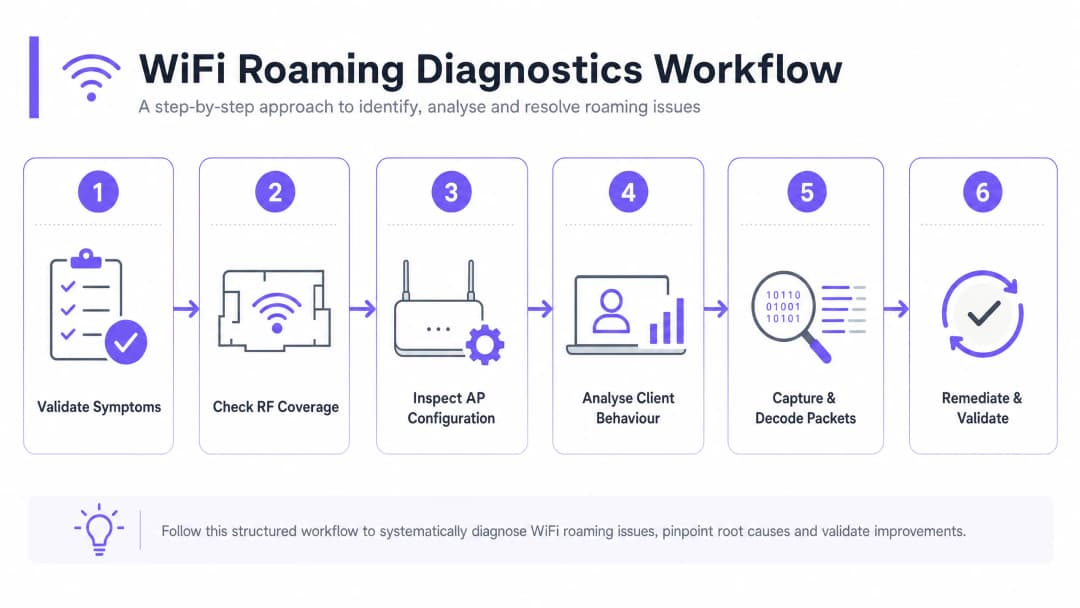
Paso 1: Validar los síntomas y el alcance
Comience por recopilar datos empíricos para definir el alcance del problema. Si los problemas de roaming afectan a todos los dispositivos, esto suele indicar un fallo de arquitectura o de despliegue físico - como una mala ubicación de los AP, un solapamiento excesivo de canales o una configuración incorrecta del controlador. Si el problema es específico de un dispositivo, suele apuntar a un error del controlador del cliente, a la falta de compatibilidad con bandas o canales específicos (como los canales DFS) o a un umbral de roaming interno demasiado agresivo.
Paso 2: Examinar la cobertura de RF y el solapamiento de señales
La principal causa física de los fallos de roaming es una distancia incorrecta entre los AP. Si los AP están demasiado alejados, existirán zonas muertas o áreas de señal débil entre ellos. Si están demasiado cerca, los clientes no realizarán el roaming porque la señal del AP original sigue siendo demasiado fuerte, lo que produce el problema del "cliente pegajoso" (sticky client).
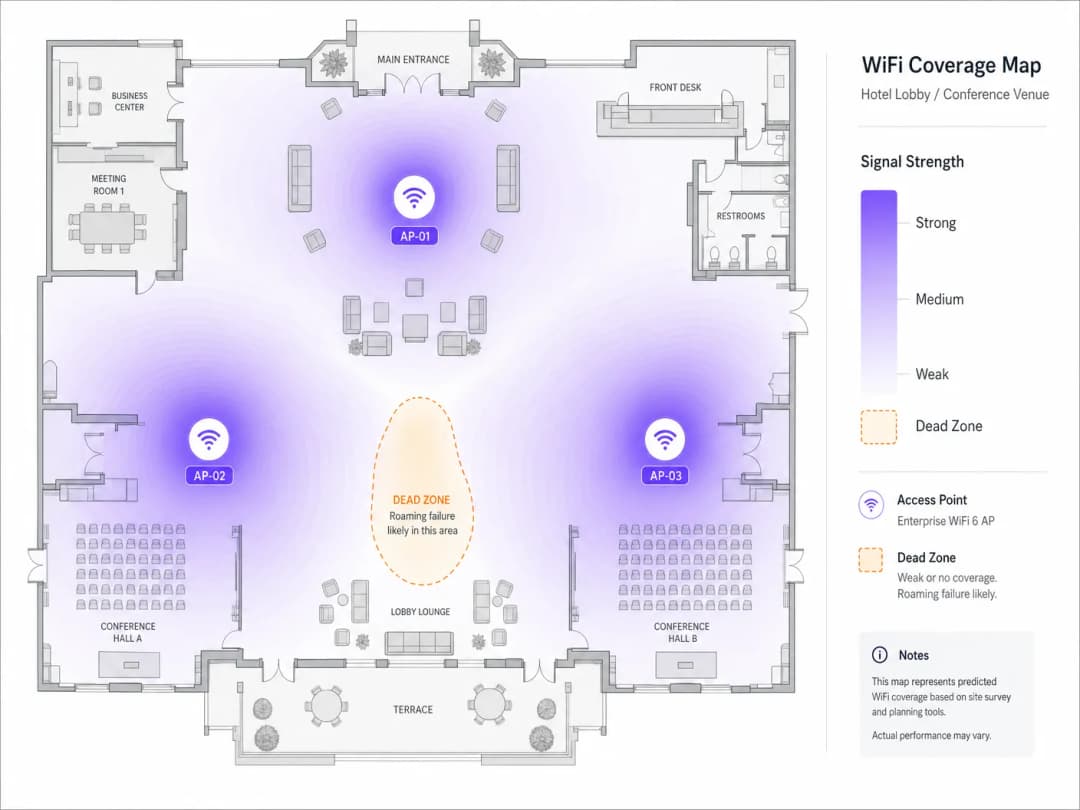
Realice un estudio de cobertura activo con un analizador de WiFi dedicado. La métrica objetivo es una intensidad de señal superpuesta de -67 dBm de los AP vecinos en el límite de la celda. En entornos de alta densidad, busque una superposición de celdas del 20% al 30%. Verifique que los AP superpuestos no funcionen en el mismo canal. En la banda de 5 GHz, utilice canales no superpuestos de 20 MHz o 40 MHz para minimizar la interferencia de cocanal (CCI).
Paso 3: Revisar la configuración del AP y del controlador
Asegúrese de que el controlador inalámbrico esté configurado para admitir y transmitir las funciones de asistencia al roaming. Verifique que el nombre del SSID, el tipo de seguridad (por ejemplo, WPA3-Enterprise) y la asignación de VLAN sean perfectamente consistentes en todos los AP. Habilite 802.11k, 802.11v y 802.11r en el SSID objetivo. Tenga precaución al ejecutar el modo de transición WPA2/WPA3, ya que a algunos dispositivos cliente más antiguos les resulta difícil analizar los elementos de información complejos (IE) en las tramas beacon, lo que provoca fallos de asociación.
Paso 4: Analizar el comportamiento del cliente y la configuración del controlador
Si la infraestructura está configurada correctamente, examine los dispositivos cliente. Asegúrese de que los controladores de la tarjeta de red del cliente - especialmente los chipsets Intel y Realtek en Windows - estén actualizados a las últimas versiones certificadas para empresas. En clientes Windows, vaya a Administrador de dispositivos > Adaptadores de red > Propiedades del adaptador inalámbrico > Opciones avanzadas, y ajuste la "Agresividad de roaming" a "Media-Alta" o "Alta" para obligar al cliente a buscar mejores AP antes. Verifique que los dispositivos cliente admitan canales de selección de frecuencia dinámica (DFS). Si los AP están en canales DFS (52 a 144) y el cliente no los admite, el cliente nunca realizará roaming hacia esos AP, creando puntos ciegos de cobertura.
Paso 5: Capturar y decodificar paquetes en el aire (OTA)
El estándar de oro para la resolución de problemas inalámbricos es la captura de paquetes en el aire (OTA). Para capturar un evento de roaming, debe capturar tramas inalámbricas en los canales de los AP de origen y de destino simultáneamente. Coloque el dispositivo de captura de paquetes en el área física donde se produce el roaming y aplique el siguiente filtro de Wireshark para aislar las tramas de gestión:
wlan.fc.type_subtype == 0x00 || wlan.fc.type_subtype == 0x01 || wlan.fc.type_subtype == 0x0b || wlan.fc.type_subtype == 0x0c
En un roaming 802.11r en el aire correcto, debería observar: el cliente enviando una Solicitud de reasociación que contiene el Elemento de información de transición rápida de BSS (FTIE) y el Elemento de información de dominio de movilidad (MDIE) al AP de destino, seguida de una Respuesta de reasociación con el código de estado 0x0000 (Success), con el saludo de 4 vías integrado dentro de las tramas de reasociación.
If the roam fails, examine the status code in the Reassociation Response. Status code 0x000c (association denied) typically indicates the target AP is overloaded. Status code 0x001e (association denied for security reasons) indicates an FT key negotiation mismatch. If the client sends a standard Association Request instead of a Reassociation Request, it is performing a full authentication - indicating that 802.11r is disabled on the AP, or the client does not support the protocol.
Step 6: Remediate and Validate
Make the necessary physical or logical changes, then validate the results. Adjust AP transmit power - a common best practice is to set 2.4 GHz power to 6-9 dBm and 5 GHz power to 12-15 dBm to maintain a clean 5 GHz preference. Adjust the BSS Minimum Rate (data rate pruning): disable legacy rates (1, 2, 5.5, 11 Mbps) and set the minimum mandatory rate to 12 Mbps or 24 Mbps to force clients to roam earlier and prevent sticky client behaviour. Validate by running continuous ping or VoIP tests while walking the venue, ensuring handoff times remain below 50ms with zero packet loss.
¿Tiene preguntas sobre su configuración específica?
Nuestro equipo trabaja con operadores de recintos, responsables de TI e ingenieros de redes en 80 000 espacios. Reserve una llamada de 20 minutos y le mostraremos cómo lo han solucionado otros profesionales como usted.
Best Practices and Industry Standards
1. Unified Security and Network Access Control (NAC)
Seamless roaming requires consistent authentication across the entire venue. When deploying enterprise-grade security, integrate your wireless infrastructure with a centralised RADIUS or NAC solution. For a detailed guide to this architecture, see our guide: How to Implement 802.1X Authentication with Cloud RADIUS. To evaluate vendor options, consult our review of the 10 Best Network Access Control (NAC) Solutions for 2026.
2. Physical and Logical Separation of SSIDs
In environments with a mix of modern and legacy devices, a single-SSID configuration can create compatibility problems. The recommended approach is to maintain three separate SSIDs: a Corporate/Staff SSID with WPA3-Enterprise and 802.11k/v/r enabled; a Guest SSID powered by Purple's Guest WiFi platform, with MAC caching and an 8-hour session timeout to prevent re-authentication on every roam; and a Legacy/IoT SSID restricted to 2.4 GHz with WPA2-PSK for devices that do not support 802.11r.
3. Compliance and Regulatory Standards
In retail environments, devices within PCI-DSS scope (such as mobile point-of-sale mPOS terminals) must roam securely. Ensure WPA3-Enterprise is enforced and enable rogue AP detection to defend roaming clients against "evil twin" attacks. When using WiFi Analytics to track user roaming patterns and dwell times, ensure MAC addresses are cryptographically salted and hashed at the point of collection to remain GDPR compliant.
Para consultar una referencia sobre la selección de hardware de AP y las mejores prácticas de despliegue, consulte nuestra Guía de AP inalámbricos Cisco: 2026 de productos y despliegue. Para entornos educativos, los principios de esta guía se aplican por igual - consulte WiFi en escuelas: la guía de 2026 para administradores y TI.
Casos de estudio del mundo real
Caso de estudio 1: Resolución de fallos de itinerancia en un hotel de lujo de 500 habitaciones
Un hotel de lujo de varias plantas con 500 habitaciones, espacio para conferencias y un gran salón en el vestíbulo recibía quejas persistentes de los huéspedes por llamadas de VoIP caídas y sesiones de VPN interrumpidas al caminar desde el vestíbulo hacia las habitaciones. El personal también informó de que sus tabletas móviles de limpieza se desconectaban con frecuencia, lo que retrasaba las actualizaciones del estado de las habitaciones.
Una auditoría de RF exhaustiva reveló dos problemas principales. En primer lugar, los AP funcionaban a la máxima potencia de transmisión (más de 20 dBm) tanto en 2.4 GHz como en 5 GHz, lo que creaba una enorme superposición de cobertura y hacía que los dispositivos de los clientes en las habitaciones de los huéspedes permanecieran "atascados" a los AP del vestíbulo. En segundo lugar, se había desactivado 802.11r en el SSID de invitados principal por temor a la compatibilidad con dispositivos heredados.
Las medidas correctoras incluyeron: ajustar la potencia de transmisión de los AP a 8 dBm en 2.4 GHz y a 14 dBm en 5 GHz; activar 802.11k, 802.11v y 802.11r (FT over-the-air); descartar las tasas de datos obligatorias inferiores a 12 Mbps; e integrar el controlador inalámbrico con la plataforma de WiFi para hostelería de Purple con almacenamiento en caché de MAC y tiempos de espera de sesión de 8 horas. Como resultado, la latencia media del traspaso de itinerancia se redujo de 380 milisegundos a 42 milisegundos, se eliminaron por completo las caídas de llamadas de VoIP y las puntuaciones de satisfacción de los huéspedes respecto a la conectividad WiFi aumentaron un 48% en un plazo de 30 días.
Caso de estudio 2: Optimización de la itinerancia de mPOS para un minorista global
Una tienda minorista insignia de alta densidad que abarcaba tres plantas utilizaba terminales de punto de venta móviles (mPOS) para el pago. Durante los periodos de mayor afluencia de compras, los terminales mPOS no lograban completar las transacciones con frecuencia cuando los dependientes se desplazaban con los clientes por la tienda.
La captura de paquetes over-the-air reveló que los terminales mPOS mostraban un comportamiento de cliente pegajoso, permaneciendo conectados a los AP de la tercera planta mientras se encontraban en la planta baja. Cuando finalmente intentaban realizar la itinerancia, la falta de 802.11r obligaba a realizar una reautenticación 802.1X/EAP completa, que expiraba por tiempo límite debido a la extrema utilización de canales (85%) provocada por las interferencias de canal adyacente.
La solución consistió en: rediseñar el plan de canales para utilizar canales no superpuestos de 20 MHz (reduciendo la utilización de canales por debajo del 35%); activar 802.11k y 802.11v; implementar un SSID oculto dedicado con 802.11r activado para las operaciones de la tienda; y consultar la guía de despliegue para el sector minorista para optimizar la ubicación de los AP cerca de las colas de caja. El resultado fue cero transacciones de mPOS fallidas y una reducción de 14 segundos en el tiempo medio de finalización de las transacciones, lo que acortó directamente las colas de caja y aumentó el rendimiento de las ventas en las horas punta.
ROI e impacto empresarial
Optimizar el roaming de WiFi es una inversión empresarial estratégica que ofrece retornos financieros y operativos medibles. En sectores como el transporte y la sanidad, la dependencia del personal de los dispositivos móviles es absoluta. Cuando el personal clínico o los trabajadores de logística experimentan caídas de roaming, los flujos de trabajo críticos se detienen. Al reducir la latencia de traspaso a menos de 50 milisegundos, las organizaciones eliminan los retrasos administrativos y mejoran directamente la utilización del personal y el rendimiento operativo.
En el sector de la hostelería y los eventos, el WiFi para invitados es uno de los principales factores de satisfacción del cliente. Una experiencia inalámbrica fluida anima a los huéspedes a permanecer más tiempo en el establecimiento, lo que aumenta el gasto secundario en servicios de restauración y venta al por menor. Al aprovechar WiFi Analytics de Purple, los operadores de los centros pueden realizar un seguimiento de los trayectos de movimiento y optimizar la rotación del personal y la distribución de las tiendas en función de los datos de permanencia en tiempo real.
A medida que los recintos se preparan para la adopción generalizada de OpenRoaming y la autenticación basada en perfiles, una infraestructura de roaming perfectamente ajustada es un requisito previo. Al desplegar hoy mismo 802.11k/v/r, las organizaciones se posicionan para una integración fluida con las federaciones de roaming global, abriendo nuevos canales de monetización y potenciando los efectos de red que definen al recinto digital moderno.
-
Referencias
- [1] WiFi Roaming and Handoff: 802.11r and 802.11k Explained
- [2] Cisco Wireless APs: 2026 Guide to Products & Deployment
- [3] How to Implement 802.1X Authentication with Cloud RADIUS
- [4] 10 Best Network Access Control (NAC) Solutions for 2026
- [5] WiFi in Schools: The 2026 Administrator & IT Guide
- [6] Understanding and Troubleshooting Client Roaming Issues
- [7] Troubleshooting WiFi Connectivity and Roaming Problems
Definiciones clave
Sticky Client
Un dispositivo inalámbrico que permanece conectado a un punto de acceso lejano y débil a pesar de tener disponible un punto de acceso más cercano y potente.
Los "sticky clients" degradan su propio rendimiento y dejan a otros dispositivos sin tiempo de uso de la red al transmitir a tasas de datos físicas bajas. Son la causa principal más común de quejas relacionadas con el roaming en entornos empresariales.
802.11r (Fast BSS Transition)
Una enmienda IEEE que permite predistribuir el material de claves criptográficas entre los AP dentro de un Mobility Domain, lo que reduce los tiempos de autenticación de traspaso de 200-400 ms a menos de 50 ms.
Crucial para aplicaciones en tiempo real como VoIP, videoconferencias y pagos móviles. El estándar individual de mayor impacto para eliminar las llamadas caídas durante el roaming.
802.11k (Gestión de Recursos de Radio)
Una enmienda IEEE que permite a los dispositivos de cliente solicitar un Neighbour Report (un informe de vecindad) -una lista seleccionada de AP cercanos y sus canales de funcionamiento- a su AP actual.
Elimina la necesidad de que el cliente realice un escaneo activo de banda completa, reduciendo el tiempo de descubrimiento de roaming de más de 100 ms a menos de 10 ms.
802.11v (Gestión de Transición BSS)
Una enmienda IEEE que permite a la infraestructura inalámbrica enviar tramas BTM Request a los dispositivos de cliente, sugiriendo los AP de destino óptimos para el roaming.
Utilizado por los administradores de red para equilibrar la carga de los clientes y resolver proactivamente los problemas de clientes pegajosos (sticky clients). Especialmente eficaz en dispositivos iOS y Android modernos.
Mobility Domain
Una agrupación lógica de puntos de acceso dentro de una red inalámbrica que comparten claves criptográficas 802.11r y admiten un roaming rápido entre sus miembros.
Los clientes solo pueden realizar Fast BSS Transitions (FT) cuando realizan roaming entre AP que pertenecen al mismo Mobility Domain. Los ID de Mobility Domain mal configurados son una causa común de fallos en 802.11r.
Pairwise Master Key (PMK)
La clave criptográfica de nivel superior establecida durante la autenticación inicial de clave precompartida 802.1X o WPA, de la cual se derivan todas las claves de sesión.
En 802.11r, la PMK se divide en PMK-R0 (en poder del controlador) y PMK-R1 (predistribuida a los AP) para facilitar traspasos rápidos sin necesidad de un viaje de ida y vuelta completo de RADIUS.
Tasa Mínima BSS
La tasa de datos más baja que un punto de acceso permitirá utilizar a un cliente mientras permanezca asociado al SSID. Los clientes que no puedan mantener esta tasa se desasociarán.
La eliminación de las tasas más bajas (por ejemplo, estableciendo un mínimo de 12 Mbps) actúa como un activador natural del roaming, obligando a los clientes pegajosos a buscar un nuevo AP cuando su tasa de datos física cae por debajo del umbral.
Interferencia de Co-canal (CCI)
Interferencia de RF causada por múltiples puntos de acceso que funcionan en el mismo canal de frecuencia en la misma área física, lo que obliga a los dispositivos a esperar su turno para transmitir.
La CCI aumenta la contención de tiempo de aire y puede retrasar o interrumpir las tramas de gestión de roaming, lo que provoca traspasos fallidos. Es una de las causas principales de fallos de roaming en redes con despliegues densos.
Captura de Paquetes Over-the-Air (OTA)
Una técnica de diagnóstico inalámbrico en la que un dispositivo en modo monitor captura todas las tramas 802.11 transmitidas en un canal específico, incluidas las tramas de gestión, control y datos.
El método de referencia para diagnosticar fallos de roaming. Permite a los ingenieros inspeccionar la secuencia exacta de tramas de autenticación, asociación y reasociación durante un evento de traspaso.
Ejemplos prácticos
Un gran centro de conferencias con 80 puntos de acceso experimenta graves caídas de audio en los dispositivos VoIP inalámbricos (Vocera) a medida que el personal del evento se desplaza entre los pabellones de exposición. La red utiliza autenticación WPA2-Enterprise (802.1X) con un servidor RADIUS local.
- Realice una captura de paquetes OTA en los canales 36 y 44 (los canales de funcionamiento de los AP adyacentes en el pabellón principal). 2. Identifique que los dispositivos VoIP están realizando autenticaciones EAP-TLS completas en cada roaming, lo que tarda una media de 340 ms, superando el umbral de 50 ms requerido para voz en tiempo real. 3. Active 802.11r (Fast BSS Transition) en la controladora para el SSID del personal. 4. Configure el modo 802.11r como "FT over-the-Air" para garantizar la máxima compatibilidad con el hardware de los dispositivos. 5. Active los informes de vecinos (Neighbour Reports) de 802.11k para eliminar la necesidad de escaneo activo. 6. Establezca la tasa mínima de BSS (BSS Minimum Rate) en 12 Mbps para evitar que los dispositivos se queden conectados a AP lejanos. 7. Verifique el tiempo de roaming en Wireshark: confirme que el intercambio de reasociación tarda 32 ms y que el tráfico de voz no se interrumpe.
Una importante tienda insignia minorista que despliega iPads para punto de venta móvil (mPOS) experimenta fallos en las transacciones. Los iPads se quedan conectados a los AP de la tercera planta incluso cuando se trasladan a la zona de cajas de la planta baja, lo que da como resultado un RSSI de -78 dBm y altas tasas de reintento.
- Realice un estudio de cobertura de RF para medir el solapamiento de señal entre los AP de la tercera planta y los de la planta baja. 2. Descubra que los AP de la tercera planta están transmitiendo a la potencia máxima (20 dBm), traspasando los suelos y creando una señal fuerte pero de baja calidad en la planta baja. 3. Reduzca la potencia de transmisión de las radios de 5 GHz a 14 dBm y de las radios de 2.4 GHz a 8 dBm. 4. Active 802.11v BSS Transition Management (BTM) en la controladora inalámbrica. 5. Configure un umbral mínimo de RSSI de asociación de -72 dBm en la controladora. Cuando el RSSI de un iPad caiga por debajo de -72 dBm, el AP enviará una solicitud BTM de 802.11v sugiriendo el AP de la planta baja. 6. Verifique que los iPads realizan el roaming con éxito al AP de la planta baja en un plazo de 45 ms tras cruzar el umbral físico.
Preguntas de práctica
Q1. El operador de un almacén informa que los escáneres de códigos de barras portátiles se desconectan con frecuencia del sistema ERP al conducir carretillas elevadoras entre los pasillos. La red tiene habilitado 802.11r, pero los escáneres no son compatibles con 802.11r. ¿Cuál es la mejor estrategia de solución inmediata?
Sugerencia: Considere la compatibilidad de los clientes heredados con 802.11r y cómo aislarlos sin degradar la red corporativa principal.
Ver respuesta modelo
Dado que los escáneres de códigos de barras no admiten 802.11r, no podrán conectarse a un SSID con 802.11r habilitado o experimentarán autenticaciones 802.1X estándar lentas. El enfoque recomendado es crear un SSID independiente y dedicado específicamente para los escáneres del almacén utilizando WPA2-PSK y radios solo de 2.4 GHz. Esto aísla el tráfico heredado, evita los problemas de compatibilidad con 802.11r y garantiza un roaming estable utilizando traspasos básicos de clave precompartida, que los escáneres admiten de forma nativa. El SSID corporativo principal con 802.11r puede permanecer intacto para los dispositivos modernos.
Q2. Durante un análisis de captura de paquetes de un fallo de roaming, observa que el dispositivo cliente envía una solicitud de asociación (Association Request - Tipo 0x00) en lugar de una solicitud de reasociación (Reassociation Request - Tipo 0x02) al moverse al AP de destino. ¿Qué le dice esto sobre el estado del roaming y cuáles son las tres causas raíz más probables?
Sugerencia: Analice la diferencia entre una trama de asociación y una de reasociación en el contexto del roaming rápido y la pertenencia a un Mobility Domain.
Ver respuesta modelo
Una solicitud de asociación indica que el cliente está iniciando una conexión completamente nueva desde cero, en lugar de realizar una transición rápida 802.11r. Esto omite el mecanismo FT y fuerza una reautenticación 802.1X/EAP completa. Las tres causas raíz más probables son: 1) El dispositivo cliente no es compatible con 802.11r (verifique la ficha técnica del dispositivo); 2) 802.11r está desactivado en el SSID de destino (verifique la configuración del controlador); o 3) El AP de destino pertenece a un ID de dominio de movilidad diferente al del AP de origen, lo que impide el uso compartido de claves (verifique que todos los AP compartan el mismo ID de dominio de movilidad en el controlador).
Q3. Un administrador de TI nota que después de habilitar la gestión de transición BSS 802.11v, varios clientes de portátiles más antiguos se desconectan con frecuencia de la red por completo en lugar de realizar roaming. ¿Cuál es la causa probable y cómo debe resolverse?
Sugerencia: Piense en cómo los controladores de clientes más antiguos o mal codificados gestionan las tramas de solicitud BTM de 802.11v y cómo interpreta el controlador dicha solicitud.
Ver respuesta modelo
Algunos controladores de clientes antiguos o mal codificados no analizan correctamente las tramas de solicitud BTM de 802.11v. En lugar de evaluar los AP de destino sugeridos, interpretan la solicitud como un comando de desautenticación o desasociación, lo que hace que se desconecten por completo de la red. Los pasos para la resolución son: 1) Identificar las direcciones MAC de los clientes específicos que experimentan el problema; 2) Actualizar los controladores de sus tarjetas de red inalámbricas a la última versión; 3) Si no es posible actualizar los controladores, desactivar 802.11v en un SSID heredado independiente para esos dispositivos, o configurar la agresividad de redireccionamiento del controlador en modo "pasivo", permitiendo que el cliente ignore la solicitud BTM sin ser desconectado a la fuerza.
Continúe leyendo esta serie
Optimización del roaming para VoIP y videollamadas en redes WiFi corporativas
Esta guía proporciona a directores de TI, arquitectos de redes y CTO una hoja de ruta completa e independiente del proveedor para optimizar el roaming WiFi y ofrecer soporte a videollamadas y VoIP fluidas en redes de personal corporativo. Cubre la pila de protocolos IEEE 802.11k/r/v, la configuración de QoS de WMM, el diseño de celdas de RF y el mapeo de QoS cableado de extremo a extremo necesario para lograr una latencia de transferencia inferior a 50 ms. Aplicable a los sectores de hostelería, retail, sanidad y grandes recintos, esta referencia incluye escenarios de implementación reales, marcos de resolución de problemas y un análisis de ROI medible.
Cómo comprender el RSSI y la potencia de señal para una planificación óptima de canales
Esta guía proporciona un análisis técnico profundo y exhaustivo sobre el RSSI, la relación señal/ruido (SNR) y los principios de propagación de RF para una planificación de canales óptima. Ofrece a los responsables de TI, arquitectos de red y directores de operaciones de recintos estrategias prácticas para mitigar la interferencia de canal adyacente y de cocanal, optimizar la ubicación de los AP y aprovechar la analítica para lograr un impacto empresarial cuantificable en entornos de hostelería, retail y sector público.
20MHz vs 40MHz vs 80MHz: ¿Qué ancho de canal debería utilizar?
Esta guía proporciona una referencia técnica definitiva e independiente del fabricante para responsables de TI, arquitectos de redes y directores de operaciones de instalaciones sobre cómo seleccionar el ancho de canal de WiFi correcto (20MHz, 40MHz u 80MHz) en despliegues empresariales de hostelería, comercio minorista, eventos y entornos del sector público. Abarca la mecánica subyacente de IEEE 802.11, las compensaciones de capacidad en el mundo real y una guía de despliegue paso a paso para ayudar a los equipos a tomar la decisión correcta este trimestre. Comprender la selección del ancho de canal es una de las decisiones de mayor repercusión en cualquier diseño de LAN inalámbrica, ya que afecta directamente al rendimiento, las interferencias, la compatibilidad con la densidad de clientes y la fiabilidad de los servicios de cara a los clientes.
¿Tiene preguntas sobre su configuración específica?
Nuestro equipo trabaja con operadores de recintos, responsables de TI e ingenieros de redes en 80 000 espacios. Reserve una llamada de 20 minutos y le mostraremos cómo lo han solucionado otros profesionales como usted.