
Implementación de la autenticación 802.1X en dispositivos móviles
Esta guía exhaustiva proporciona a los responsables de TI un diseño técnico para implementar la autenticación 802.1X en dispositivos iOS y Android. Cubre la arquitectura, la selección del método EAP, el aprovisionamiento mediante MDM y la resolución de problemas para garantizar un acceso seguro y escalable a la red móvil.
Video overview
Escuchar esta guía
Ver transcripción del podcast
Parte de nuestra serie principal: Guía de seguridad para WiFi empresarial →
Resumen Ejecutivo
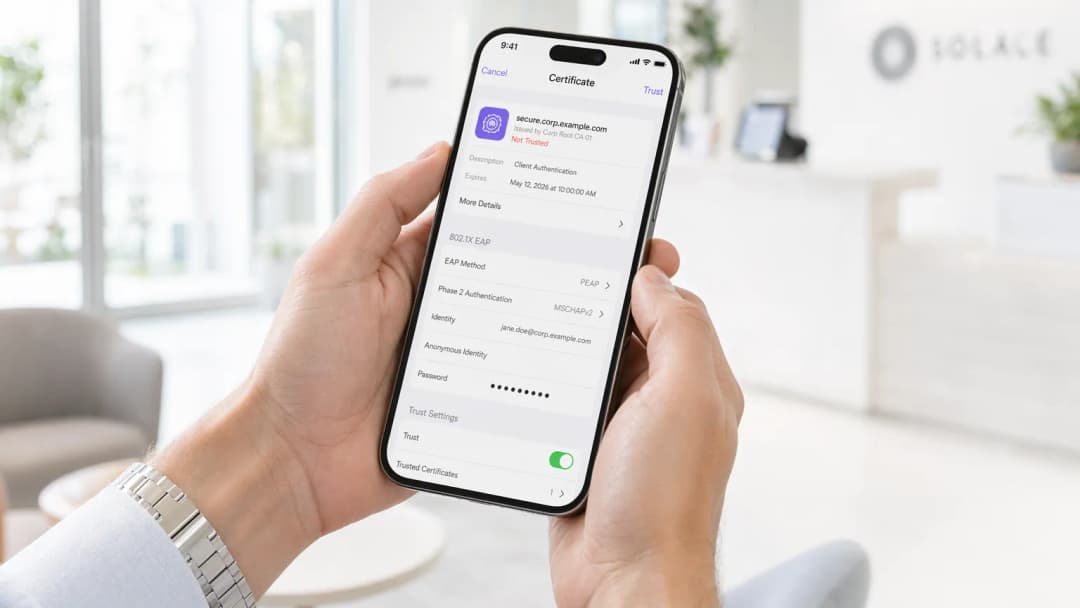
La implementación de la autenticación 802.1X en dispositivos móviles ya no es opcional para los entornos empresariales. Ya sea que se gestione una oficina corporativa, un hotel de 500 habitaciones o un estadio, la dependencia de las claves previamente compartidas (PSKs) presenta un riesgo de seguridad inaceptable. Esta guía proporciona un plan técnico completo para implementar 802.1X en plataformas iOS y Android. Analizaremos los requisitos de arquitectura, la selección del método de Protocolo de Autenticación Extensible (EAP), el aprovisionamiento de Gestión de Dispositivos Móviles (MDM) y los modos de fallo más comunes.
Al realizar la transición a 802.1X, las organizaciones logran un control de acceso a la red granular, una seguridad de Guest WiFi mejorada y el cumplimiento de marcos normativos como PCI-DSS y GDPR. Esta transición requiere una cuidadosa coordinación entre la infraestructura inalámbrica, el servidor RADIUS y los dispositivos móviles de destino.
Análisis Técnico Detallado: Arquitectura y Métodos EAP
El estándar IEEE 802.1X define el control de acceso a la red basado en puertos, que consta de tres componentes principales: el suplicante (dispositivo móvil), el autenticador (punto de acceso inalámbrico o controlador) y el servidor de autenticación (RADIUS).
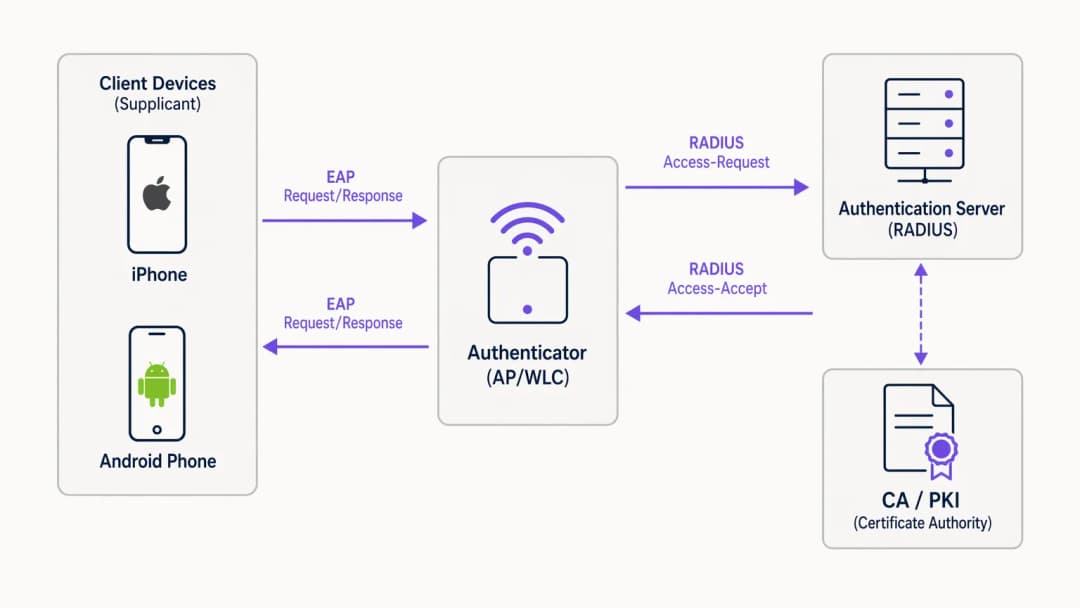
Cuando un dispositivo móvil intenta conectarse, el autenticador bloquea todo el tráfico excepto los paquetes EAP sobre LAN (EAPoL) hasta que el servidor RADIUS valida correctamente las credenciales. La elección del método EAP dicta el nivel de seguridad y la complejidad de la implementación.
Selección del Método EAP para Dispositivos Móviles
Los sistemas operativos móviles tienen diferentes niveles de soporte nativo para los métodos EAP. Los dos estándares dominantes para implementaciones empresariales son EAP-TLS y PEAP.

EAP-TLS es el método más seguro, ya que se basa en la autenticación mutua mediante certificados. Elimina los riesgos de robo de credenciales pero requiere una Infraestructura de Clave Pública (PKI) robusta y un MDM para la distribución de certificados. Tanto iOS como Android son compatibles con EAP-TLS de forma nativa.
PEAP (con MSCHAPv2) encapsula el intercambio de autenticación dentro de un túnel TLS, lo que permite el uso de credenciales de Active Directory. Aunque es más fácil de implementar sin una PKI, es vulnerable a la recopilación de credenciales si el dispositivo cliente no está configurado estrictamente para validar el certificado del servidor.
¿Tiene preguntas sobre su configuración específica?
Nuestro equipo trabaja con operadores de recintos, responsables de TI e ingenieros de redes en 80 000 espacios. Reserve una llamada de 20 minutos y le mostraremos cómo lo han solucionado otros profesionales como usted.
Guía de Implementación
La implementación de 802.1X requiere una configuración coordinada en toda la infraestructura de red y la flota de dispositivos móviles.
1. Configuración del Servidor RADIUS
El servidor RADIUS (por ejemplo, Microsoft NPS, Cisco ISE o alternativas en la nube como JumpCloud) debe estar configurado para admitir el método EAP elegido. Para PEAP, instale un certificado de servidor emitido por una entidad de certificación (CA) de confianza. Para EAP-TLS, configure el servidor para que confíe en la CA que emite los certificados de cliente. Asegúrese de que el servidor RADIUS esté integrado con su servicio de directorio (AD, LDAP) o proveedor de identidad.
2. Configuración de la infraestructura inalámbrica
Configure sus puntos de acceso (AP) o controlador de LAN inalámbrica (WLC) para transmitir un SSID con seguridad WPA2-Enterprise o WPA3-Enterprise. Especifique la dirección IP y el secreto compartido del servidor RADIUS. Habilite el registro (accounting) RADIUS para realizar el seguimiento de las sesiones de usuario, lo cual es crucial para WiFi Analytics y la resolución de problemas.
Para implementaciones avanzadas, considere revisar nuestra guía sobre Implementing WPA3-Enterprise for Enhanced Wireless Security.
3. Aprovisionamiento de dispositivos móviles (MDM)
La configuración manual de 802.1X en dispositivos móviles se desaconseja totalmente debido a errores de usuario y riesgos de seguridad (por ejemplo, que los usuarios acepten certificados de servidor falsos). Utilice una solución MDM (Jamf, Intune, Workspace ONE) para enviar un perfil de configuración WiFi.
- iOS: Utilice Apple Configurator o un MDM para enviar un perfil que contenga el SSID, el método EAP y la cadena de certificados de servidor de confianza. Para EAP-TLS, el perfil también debe implementar el certificado de cliente.
- Android: Android 11+ requiere estrictamente la validación del certificado de servidor. El MDM debe enviar el certificado de la CA al almacén de confianza del dispositivo junto con el perfil WiFi.
Buenas prácticas
- Exija la validación del certificado de servidor: Nunca permita que los dispositivos se conecten sin validar el certificado del servidor RADIUS. Esto evita los ataques de intermediario (man-in-the-middle).
- Utilice un MDM para el aprovisionamiento: Depender de que los usuarios configuren manualmente los ajustes de 802.1X genera costes de soporte y vulnerabilidades de seguridad.
- Segmente el tráfico: Ubique a los usuarios autenticados mediante 802.1X en una VLAN independiente del tráfico de invitados o de los dispositivos IoT.
- Implemente un RADIUS en la nube: Para entornos distribuidos como cadenas de Retail o establecimientos de Hospitality, un RADIUS en la nube reduce las dependencias de la infraestructura local.
Resolución de problemas y mitigación de riesgos
Los fallos más comunes en las implementaciones de 802.1X en dispositivos móviles están relacionados con los certificados y los tiempos de espera.
- Errores de confianza del certificado: Si los dispositivos iOS solicitan a los usuarios que confíen en un certificado, o si los dispositivos Android se niegan a conectarse, es probable que falte la cadena completa de certificados (CA raíz e intermedias) en el perfil de MDM.
- Latencia de RADIUS: Los dispositivos móviles interrumpirán la conexión si el servidor RADIUS tarda más de 2 o 3 segundos en responder. Asegúrese de que su infraestructura RADIUS esté dimensionada correctamente, especialmente en entornos de alta densidad.
- Discordancia de EAP: asegúrese de que el método EAP configurado en el WLC coincida con el de la solución RADIUS y el perfil de cliente.
Retorno de la inversión (ROI) e impacto empresarial
La implementación de 802.1X reduce significativamente el riesgo de acceso no autorizado a la red y el movimiento lateral. Para una empresa de 10 000 empleados, la automatización de la incorporación a la WiFi a través de MDM y 802.1X puede ahorrar cientos de horas de soporte de TI al año en comparación con la gestión de las rotaciones de PSK. Además, la visibilidad granular que proporciona el registro de RADIUS respalda los mandatos de cumplimiento y ayuda en la planificación de la capacidad.
Escuche nuestro podcast informativo completo para obtener más información:
Definiciones clave
802.1X
Un estándar IEEE para el control de acceso a redes basado en puertos que proporciona un mecanismo de autenticación a los dispositivos que desean conectarse a una LAN o WLAN.
El estándar fundamental que sustituye a las contraseñas compartidas inseguras (PSK) en entornos empresariales.
Suplicante
El cliente de software en el dispositivo móvil que solicita acceso a la red y gestiona el intercambio EAP.
Los ajustes nativos de WiFi en iOS o Android actúan como el suplicante.
Autenticador
El dispositivo de red (AP o WLC) que facilita el proceso de autenticación entre el suplicante y el servidor RADIUS.
El AP bloquea el tráfico hasta que la autenticación se realiza correctamente.
Servidor RADIUS
Remote Authentication Dial-In User Service; un protocolo de red que proporciona una gestión centralizada de autenticación, autorización y contabilidad (AAA).
El motor de decisión que valida las credenciales contra un directorio (por ejemplo, Active Directory).
EAP (Protocolo de autenticación extensible)
Un marco de autenticación utilizado con frecuencia en redes inalámbricas y conexiones punto a punto.
El protocolo que transporta los datos de autenticación entre el dispositivo móvil y el servidor RADIUS.
EAP-TLS
Un método EAP que utiliza una infraestructura de clave pública (PKI) para exigir que tanto el cliente como el servidor presenten certificados para una autenticación mutua.
El método más seguro, ideal para dispositivos corporativos totalmente gestionados.
PEAP-MSCHAPv2
EAP protegido; crea un túnel TLS cifrado dentro del cual el cliente se autentica mediante un nombre de usuario y una contraseña.
El método más común, que equilibra la seguridad con la facilidad de despliegue para entornos sin una PKI.
MDM (Gestión de dispositivos móviles)
Software utilizado por los departamentos de TI para supervisar, gestionar y proteger los dispositivos móviles de los empleados.
Esencial para configurar de forma silenciosa los ajustes de 802.1X y distribuir certificados sin la intervención del usuario.
Ejemplos prácticos
Un hotel de 500 habitaciones necesita desplegar WiFi seguro para los dispositivos móviles del personal (una combinación de iOS propiedad de la empresa y Android BYOD). Actualmente utilizan una clave compartida WPA2-PSK.
Desplegar un SSID con 802.1X utilizando PEAP-MSCHAPv2. Integrar un servidor RADIUS en la nube con el Azure AD del hotel. Para los dispositivos iOS corporativos, utilizar un MDM para distribuir el perfil de WiFi y el certificado de la CA de confianza. Para los dispositivos Android BYOD, proporcionar un portal de incorporación (como SecureW2) para configurar automáticamente el suplicante del dispositivo e instalar el certificado de la CA, evitando errores de configuración manual.
Una gran organización del sector público está distribuyendo 5000 tabletas Android propiedad de la empresa para trabajadores de campo y requiere el máximo nivel de seguridad de red.
Implementar EAP-TLS. Desplegar una PKI interna o una CA en la nube. Utilizar el MDM de la organización (por ejemplo, VMware Workspace ONE) para generar y distribuir certificados de cliente únicos a cada tableta Android, junto con el perfil de configuración de WiFi y el certificado de la CA raíz. Configurar el servidor RADIUS para que solo acepte conexiones EAP-TLS.
Preguntas de práctica
Q1. Su organización está desplegando 802.1X para una flota de dispositivos Android BYOD. No dispone de una solución de MDM. Los usuarios se quejan de que no pueden conectarse al nuevo SSID y ven un error que indica "Debe especificar un dominio" o "Se requiere certificado de CA".
Sugerencia: Considere cómo gestionan las versiones modernas de Android la validación del certificado del servidor en comparación con las versiones anteriores.
Ver respuesta modelo
Las versiones modernas de Android (11+) ya no permiten a los usuarios omitir la validación del certificado del servidor ("No validar"). Sin un MDM para distribuir el certificado de la CA, los usuarios deben descargar e instalar manualmente el certificado de la CA en el almacén de confianza de su dispositivo, y luego configurar manualmente el perfil WiFi para usar ese certificado específico. Una mejor solución a largo plazo es implementar un portal de incorporación para automatizar este proceso.
Q2. Ha desplegado EAP-TLS utilizando una PKI interna de Microsoft ADCS. Los portátiles Windows se conectan sin problemas, pero los dispositivos iOS desplegados a través de Jamf MDM están fallando en la autenticación de forma silenciosa.
Sugerencia: Piense en la cadena completa de certificados y en lo que necesita el dispositivo iOS para confiar en el servidor.
Ver respuesta modelo
Es probable que los dispositivos iOS no tengan el certificado de la CA raíz (y de las CA intermedias) de la PKI interna. Los portátiles Windows confían automáticamente en la CA raíz de ADCS mediante directivas de grupo. El perfil de WiFi en Jamf MDM debe actualizarse para incluir explícitamente la carga útil del certificado de la CA raíz, de modo que el dispositivo iOS pueda validar el certificado del servidor RADIUS durante el saludo TLS.
Q3. Durante un evento de mucho tráfico en un estadio, muchos dispositivos móviles no logran conectarse a la red 802.1X, mientras que otros se conectan sin problemas. Las capturas de paquetes muestran que los AP envían solicitudes RADIUS Access-Requests, pero el servidor RADIUS responde con Access-Rejects tras varios segundos, o no responde en absoluto.
Sugerencia: Considere la "regla de los 3 segundos" para dispositivos móviles y el rendimiento de RADIUS.
Ver respuesta modelo
Es probable que el servidor RADIUS esté sobrecargado por el volumen de solicitudes de autenticación simultáneas, lo que provoca una alta latencia. Los dispositivos móviles tienen umbrales de tiempo de espera cortos (a menudo de 3 segundos) y cancelarán la conexión o reintentarán el proceso, lo que empeorará aún más la carga. La solución consiste en escalar la infraestructura RADIUS (por ejemplo, añadiendo más nodos o desplegando proxies regionales) y ajustar la configuración de tiempo de espera y reintentos en el WLC.
Continúe leyendo esta serie
Microsoft Cloud PKI para WiFi: despliegue de certificados EAP-TLS con Intune y Microsoft Entra ID
Podrá decidir si Microsoft Cloud PKI, una entidad de certificación (CA) raíz en la nube o su propia CA (BYOCA) se adapta mejor a su infraestructura. A continuación, podrá desplegar certificados WiFi EAP-TLS en dispositivos gestionados por Intune sin necesidad de NDES. La guía también cubre cómo hacer que RADIUS confíe en la cadena, revocar certificados a través de la CRL y solucionar los ocho fallos más comunes.
Configuración de 802.1X en Juniper Mist con cloud RADIUS
Podrá configurar una WLAN WPA2 o WPA3-Enterprise en Juniper Mist que se autentique contra cloud RADIUS, decidir entre UDP RADIUS, RadSec y un proxy Mist Edge, y mapear atributos RADIUS a VLANs dinámicas. También sabrá exactamente en qué punto falló una autenticación gracias al cronograma de información sobre clientes de Mist y a Marvis.
Resolución de problemas de 802.1X en iOS y macOS: una lista de verificación de despliegue para Intune, Jamf y Microsoft Entra ID
Utilice esta lista de verificación para diagnosticar por qué los iPhones, iPads y Macs fallan al conectar con 802.1X en Intune o Jamf Pro. Cada fallo se asocia a una de estas cuatro causas: confianza en el servidor, certificado de identidad, modo macOS o ámbito de grupo de Microsoft Entra ID. Confirmará la causa mediante los registros de eapolclient y RADIUS, aplicará la solución y organizará las futuras rotaciones de certificados.
¿Tiene preguntas sobre su configuración específica?
Nuestro equipo trabaja con operadores de recintos, responsables de TI e ingenieros de redes en 80 000 espacios. Reserve una llamada de 20 minutos y le mostraremos cómo lo han solucionado otros profesionales como usted.