
SonicWall TZ and SonicWave Integration with Purple WiFi
Esta referencia técnica detalla la integración de los cortafuegos SonicWall TZ y los AP SonicWave con la plataforma Purple WiFi. Proporciona pasos de configuración prácticos para la redirección de Captive Portal, excepciones de walled garden, autenticación 802.1X y direccionamiento dinámico de VLAN mediante claves privadas precompartidas (PPSK).
Escuchar esta guía
Ver transcripción del podcast
Resumen ejecutivo
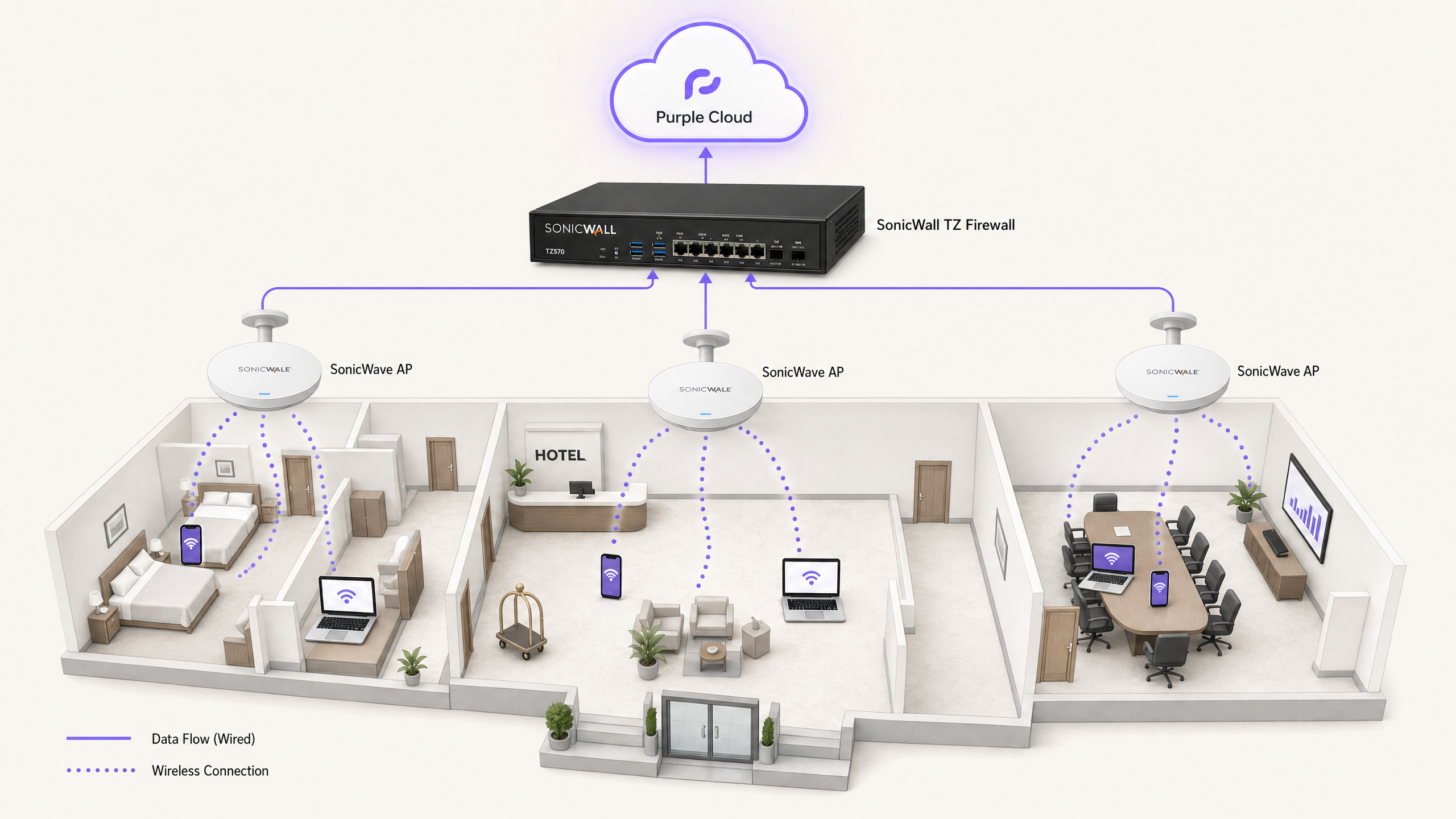
La integración de la infraestructura de red de SonicWall con la capa de nube de Purple proporciona un control de acceso de nivel empresarial junto con una sofisticada captura de datos de origen (first-party). Esta guía cubre la implementación técnica de cuatro casos de uso distintos: WiFi de invitados con redirección de Captive Portal, excepciones de Walled Garden, WiFi seguro para el personal mediante 802.1X y aislamiento multiinquilino (Multi-Tenant) mediante claves privadas precompartidas (PPSK) de SonicWall con direccionamiento dinámico de VLAN.
Procesamos 440 millones de inicios de sesión al año en más de 80 000 establecimientos activos. La arquitectura que se detalla a continuación ha sido probada a gran escala en entornos de hostelería, comercio minorista y sector público. Le permite mantener su hardware SonicWall existente mientras delega la gestión de identidades, el alojamiento de la página de inicio (splash page) y la autenticación RADIUS en la nube de Purple.
Análisis técnico detallado
La integración se basa en dos mecanismos principales: Lightweight Hotspot Messaging (LHM) para la redirección de Captive Portal y RADIUS para la autenticación 802.1X y PPSK.
Redirección de Captive Portal a través de LHM
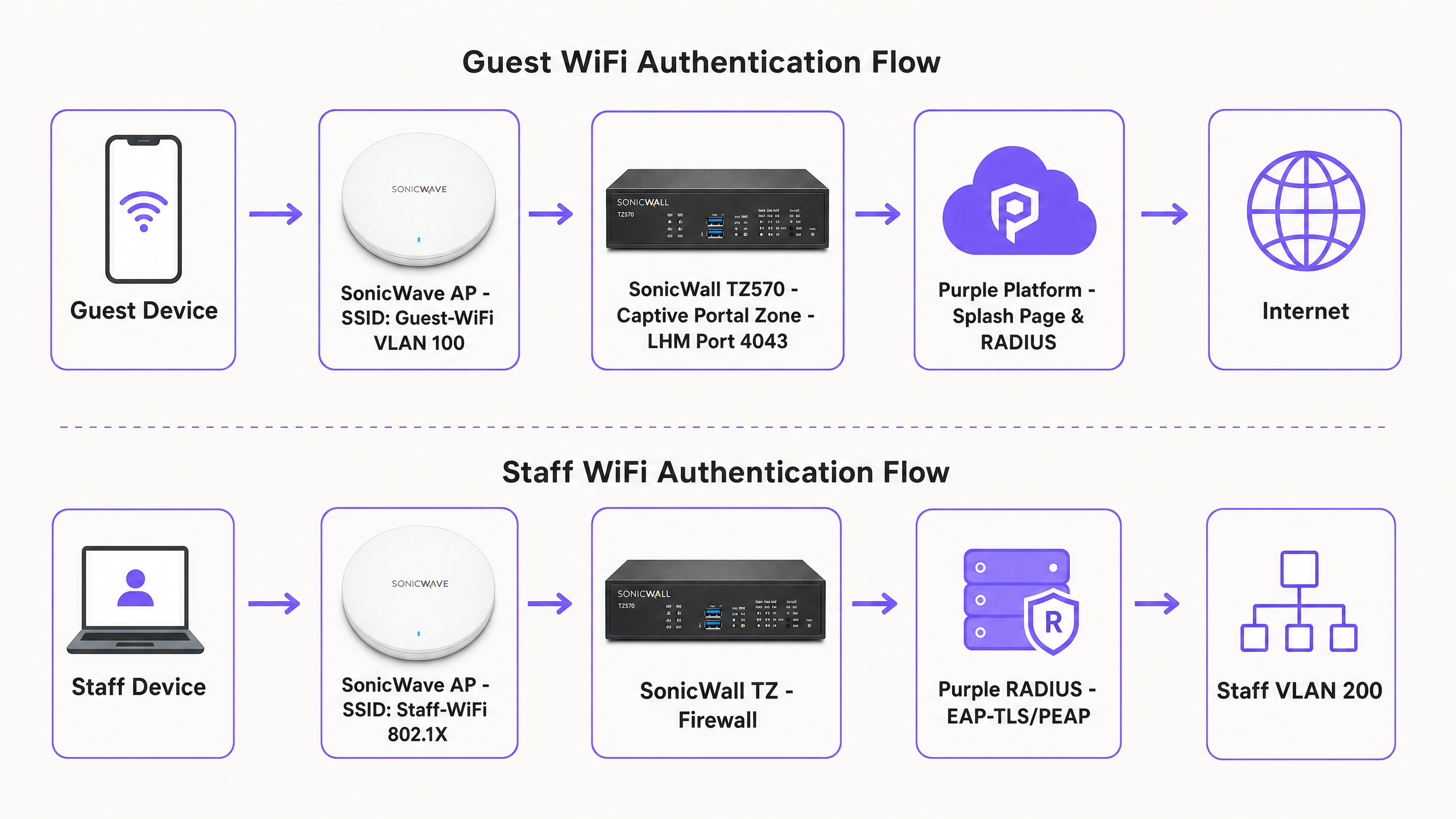
SonicOS utiliza LHM para gestionar las redirecciones externas de Captive Portal. Cuando un dispositivo de invitado no autenticado intenta acceder a Internet, el cortafuegos SonicWall TZ intercepta la solicitud HTTP y redirige al cliente a la página de inicio (splash page) alojada de Purple. El invitado completa el flujo de autenticación (por ejemplo, inicio de sesión social, cumplimentación de un formulario). Purple envía un paquete de autorización LHM de vuelta al SonicWall en el puerto TCP 4043. Al recibir este paquete, SonicWall actualiza su lista de control de acceso interna, permitiendo que la dirección MAC del dispositivo acceda a Internet.
Arquitectura de Walled Garden
Antes de la autenticación, el dispositivo del invitado se mantiene en una zona restringida. El walled garden es el conjunto específico de nombres de dominio completamente cualificados (FQDN) a los que el dispositivo tiene permitido acceder para cargar la página de inicio (splash page) y completar el proceso de inicio de sesión. Esto incluye la CDN de Purple (cdn.purple.ai), la API de autenticación (api.purple.ai) y los dominios requeridos por proveedores de identidad de terceros como Google Workspace, Microsoft Entra ID y Meta.
SonicOS implementa los walled gardens mediante objetos de dirección FQDN. El cortafuegos realiza una resolución DNS dinámica en estos objetos, actualizando los rangos de IP permitidos de forma automática. Esto es fundamental porque los proveedores de identidad y las CDN utilizan una asignación de IP dinámica; las listas blancas de IP estáticas fallarán inevitablemente.
WiFi seguro para el personal y 802.1X
Para las redes del personal, los AP SonicWave actúan como el autenticador 802.1X, realizando el proxy de las solicitudes al servidor RADIUS de Purple. Recomendamos EAP-TLS para dispositivos gestionados que utilizan certificados, o PEAP-MSCHAPv2 para la autenticación por usuario/contraseña contra directorios como Microsoft Entra ID. Tras una autenticación correcta, Purple devuelve los atributos RADIUS estándar (Tunnel-Type, Tunnel-Medium-Type y Tunnel-Private-Group-ID) para asignar dinámicamente el dispositivo a la VLAN de personal correcta.
Aislamiento multiinquilino (Multi-Tenant) con PPSK
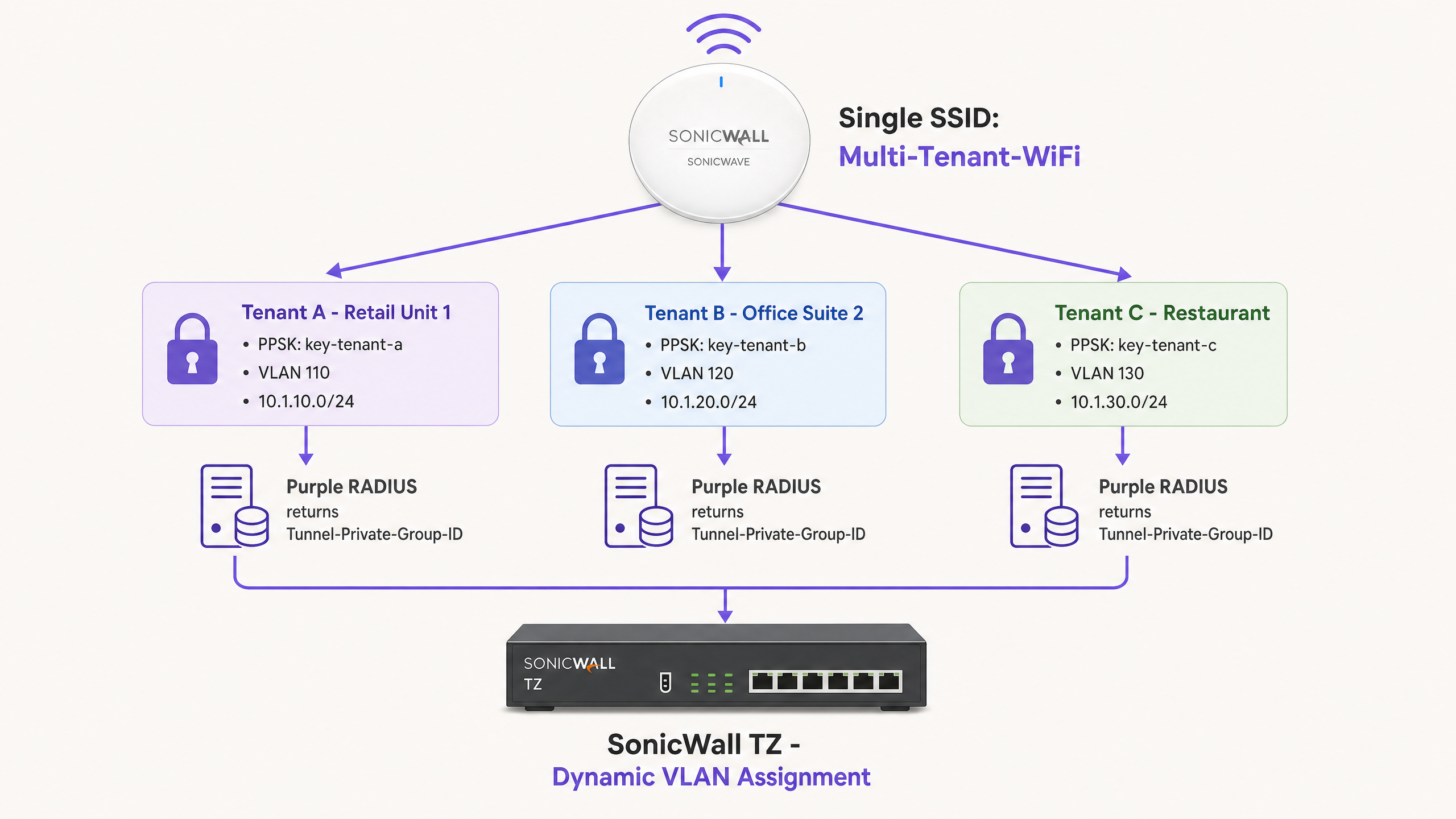
Las redes basadas en la identidad eliminan la necesidad de realizar despliegues complejos de múltiples SSID. Mediante el uso de PPSK de SonicWall, se emite un único SSID (por ejemplo, "Multi-Tenant-WiFi") en todo el establecimiento. Cada inquilino recibe una contraseña única. Cuando un dispositivo se asocia utilizando una PPSK específica, el AP SonicWave valida la clave contra el servidor RADIUS de Purple. Purple identifica al inquilino y devuelve el ID de VLAN asociado. A continuación, SonicWall dirige el tráfico a la VLAN aislada del inquilino.
Guía de implementación
1. Configuración del Captive Portal de SonicWall (LHM)
Para configurar el Captive Portal externo en una serie SonicWall TZ con SonicOS 7.x:
- Vaya a Object > Match Objects > Zones. Edite la zona asignada a su red de invitados (por ejemplo, WLAN).
- En la pestaña Guest Services, active Enable Guest Services y External Guest Authentication.
- Vaya a Configure > Guest Services > General.
- Establezca el Client Redirect Protocol en HTTP.
- Establezca la dirección del Web Server en
portal.purple.ai. - Establezca el Port en
4043. - En la pestaña Auth Pages, establezca la Login URL en la URL específica de la página de inicio (splash page) proporcionada en su panel de control de establecimientos de Purple.
- Guarde la configuración. SonicOS generará automáticamente una política NAT y una regla de acceso WAN a WAN para permitir el puerto TCP 4043. No modifique estas reglas generadas automáticamente.
2. Creación del Walled Garden
Cree objetos de dirección FQDN para los dominios requeridos y agréguelos a un grupo de direcciones. Aplique este grupo a una regla de permitido en su zona de invitados.
Dominios de Purple requeridos:
*.purple.ai*.purpleportal.net
Sondeos de Captive Portal del sistema operativo:
captive.apple.com(iOS/macOS)connectivitycheck.gstatic.com(Android)msftconnecttest.com(Windows)
Dominios comunes de inicio de sesión social (Google):
accounts.google.comoauth2.googleapis.comapis.google.com*.gstatic.com
3. Configuración de RADIUS para los AP SonicWave
Para integrar los AP SonicWave con Purple RADIUS a través del Wireless Network Manager:
- Vaya a Policies > Policy Hierarchy y seleccione su AP Policy.
- Seleccione la pestaña 802.1X.
- Introduzca la dirección IP del servidor RADIUS de Purple (que encontrará en su panel de control de Purple).
- Introduzca el secreto compartido generado por Purple.
- Establezca el Authentication Port en
1812y el Accounting Port en1813. - Seleccione el método EAP adecuado en función de su proveedor de identidad.
4. Configuración del direccionamiento dinámico de VLAN
Asegúrese de que las VLAN de destino existan como subinterfaces en el cortafuegos SonicWall TZ antes de habilitar la asignación dinámica.
En el panel de control de Purple, asocie el grupo de usuarios o PPSK al ID de VLAN de destino. Purple devolverá los siguientes atributos tras una autenticación correcta:
Tunnel-Type = VLAN (13)Tunnel-Medium-Type = 802 (6)Tunnel-Private-Group-ID = [VLAN ID](p. ej., "110")
Buenas prácticas
- Probar la visibilidad del puerto LHM: el puerto TCP 4043 debe ser accesible desde Internet hasta la interfaz WAN de SonicWall. Pruebe esto con un escáner de puertos externo antes de la puesta en marcha. Si el ISP bloquea este puerto, el paquete de autorización se descartará y los invitados se quedarán atrapados en la splash page.
- Preaprovisionar subinterfaces VLAN: el direccionamiento dinámico de VLAN (dynamic VLAN steering) fallará de forma silenciosa si la subinterfaz VLAN de destino no está configurada en el SonicWall antes del evento de autenticación. El dispositivo recurrirá a la VLAN predeterminada sin etiquetar.
- Forzar OAuth basado en web: asegúrese de que la configuración de su splash page fuerce los flujos de OAuth basados en web. Los enlaces profundos (deep-linking) a aplicaciones nativas de redes sociales (como la aplicación de Facebook para iOS) suelen interrumpir la secuencia del Captive Portal porque el tráfico de la aplicación nativa está bloqueado por el walled garden.
- Optimizar los intervalos de actualización de DNS: SonicOS resuelve los objetos FQDN periódicamente. En entornos de alta rotación, como estadios o centros de transporte, establezca el intervalo de actualización de DNS para los objetos del walled garden en 60 segundos para garantizar que los cambios de IP de la CDN se registren con precisión.
Resolución de problemas y mitigación de riesgos
Síntoma: el invitado completa el inicio de sesión en la splash page pero no tiene acceso a Internet. Causa: el paquete de autorización LHM en el puerto TCP 4043 no llega al SonicWall. Resolución: verifique que exista la regla de acceso WAN a WAN generada automáticamente. Compruebe si los routers del ISP ascendente bloquean el puerto. Asegúrese de que la IP WAN de SonicWall esté correctamente registrada en el panel de control de Purple.
Síntoma: la splash page no se carga o los botones de inicio de sesión social devuelven errores de CORS. Causa: configuración incompleta del walled garden. Resolución: conecte un dispositivo de prueba en estado no autenticado. Utilice las herramientas de desarrollo del navegador (pestaña Red) para identificar las solicitudes HTTPS bloqueadas. Añada los dominios que fallan como objetos de dirección FQDN en SonicOS.
Síntoma: los dispositivos del personal se autentican a través de 802.1X pero reciben una dirección IP de la VLAN predeterminada en lugar de la VLAN asignada.
Causa: la subinterfaz VLAN de destino no existe en el SonicWall o los atributos RADIUS no tienen el formato correcto.
Resolución: verifique que la subinterfaz VLAN esté activa. Compruebe los registros de RADIUS de Purple para confirmar que Tunnel-Private-Group-ID se está enviando como un valor de cadena que coincide con el ID de VLAN.
ROI e impacto empresarial
La implementación de la infraestructura de SonicWall con Purple transforma un centro de costes de red estándar en un activo empresarial medible.
Para una cadena minorista con 200 ubicaciones, pasar de claves precompartidas genéricas a un Captive Portal personalizado suele generar un aumento del 40 % en los perfiles de clientes conocidos en un plazo de seis meses. Estos datos de primera mano (first-party data) se integran directamente en los sistemas CRM, lo que impulsa campañas de marketing dirigidas y aumenta las visitas recurrentes.
En entornos multiinquilino, como espacios de coworking o residencias de estudiantes, PPSK con direccionamiento dinámico de VLAN elimina la sobrecarga operativa de gestionar hardware dedicado por inquilino. Se implementa una red física y se segmenta lógicamente mediante la identidad. Esto reduce los gastos de capital en hardware hasta en un 60 % al tiempo que se mantiene un aislamiento de red estricto que cumple con la norma ISO 27001.
Definiciones clave
Lightweight Hotspot Messaging (LHM)
A protocol used by SonicWall to communicate with external captive portals. It handles the redirect and authorisation handshake.
Required for integrating SonicOS with cloud-managed guest WiFi platforms like Purple.
Walled Garden
A specific set of domains or IP addresses that unauthenticated devices are permitted to access.
Critical for allowing guest devices to load the splash page, access CDNs, and complete social login OAuth flows before gaining full internet access.
Private Pre-Shared Key (PPSK)
A security method where multiple unique passphrases are valid on a single SSID, with each passphrase tied to a specific user or policy.
Used in multi-tenant environments to isolate traffic without broadcasting multiple SSIDs.
Captive Network Assistant (CNA)
The built-in OS mechanism (on iOS, Android, Windows) that detects a captive portal and automatically opens a limited browser window for authentication.
If the OS probe domains (e.g., captive.apple.com) are not in the walled garden, the CNA will not trigger, and guests will think the WiFi is broken.
Dynamic VLAN Steering
The process of assigning a device to a specific VLAN based on its identity or credentials, rather than the SSID it connected to.
Managed by Purple RADIUS returning the Tunnel-Private-Group-ID attribute to the SonicWall.
FQDN Address Object
A firewall object based on a Fully Qualified Domain Name rather than a static IP address.
SonicOS resolves these objects dynamically, making them essential for robust walled garden configurations.
Identity-Based Network
A network architecture where access policies and segmentation are applied based on the authenticated user or device, rather than physical ports or SSIDs.
Achieved by combining Purple RADIUS with SonicWall PPSK and 802.1X.
Tunnel-Private-Group-ID
The standard RFC 2868 RADIUS attribute used to specify the VLAN ID for a connecting device.
Must be returned by Purple as a string value (e.g., '100') to instruct the SonicWall to steer the device.
Ejemplos prácticos
A 150-room hotel (Premier Inn) needs to provide free Guest WiFi via a splash page and a secure Staff WiFi network for housekeeping devices. They have a SonicWall TZ570 and 40 SonicWave APs. How should they segment this traffic?
Deploy two SSIDs. SSID 1: 'Guest-WiFi' mapped to VLAN 100. Configure the SonicWall WLAN zone for External Guest Authentication pointing to portal.purple.ai on TCP 4043. Configure the walled garden FQDNs for Purple and social logins. SSID 2: 'Staff-WiFi' mapped to VLAN 200 using 802.1X. Point the SonicWave AP policy to Purple's RADIUS server. Configure Purple to authenticate housekeeping devices via MAC address bypass (MAB) or PEAP-MSCHAPv2, returning Tunnel-Private-Group-ID '200'.
A coworking space manages 15 different companies sharing one open-plan office. They want to provide secure, isolated networks for each company without broadcasting 15 different SSIDs from their SonicWave APs.
Deploy a single SSID named 'Workspace-Secure' using WPA2-Enterprise with PPSK. Create 15 VLAN sub-interfaces on the SonicWall TZ firewall (e.g., VLANs 101-115). In the Purple dashboard, generate a unique PPSK for each company and map it to their specific VLAN ID. When a user connects using their company's PPSK, Purple RADIUS returns the corresponding Tunnel-Private-Group-ID, and the SonicWall steers the device into the isolated VLAN.
Preguntas de práctica
Q1. You have configured the SonicWall guest zone for External Guest Authentication and set the web server to portal.purple.ai. Guests are redirected to the splash page and can log in successfully, but they never gain internet access. What is the most likely cause?
Sugerencia: Think about how Purple tells the SonicWall that the authentication was successful.
Ver respuesta modelo
The LHM authorisation packet is being blocked. TCP port 4043 must be open on the SonicWall WAN interface to receive the success signal from Purple. Check upstream firewalls or ISP configurations for port blocking.
Q2. A venue wants to offer Facebook login on their splash page. You add www.facebook.com to the walled garden FQDN address group. Guests report that the Facebook login page loads, but the styling is broken and the login button does not work.
Sugerencia: Modern web applications load assets from multiple domains.
Ver respuesta modelo
The walled garden is incomplete. You must also whitelist the domains that serve Facebook's CSS, JavaScript, and API calls, specifically graph.facebook.com, connect.facebook.net, and the CDN domain (e.g., *.fbcdn.net).
Q3. You are deploying PPSK for a multi-tenant office. You configure the SSID for WPA2-Enterprise with PPSK and point the RADIUS server to Purple. You create a PPSK in Purple mapped to VLAN 50. When a user connects with that PPSK, they receive an IP address from VLAN 10 instead. Why?
Sugerencia: The SonicWall needs to know where to send the traffic before the RADIUS request completes.
Ver respuesta modelo
VLAN 50 has not been created as a sub-interface on the SonicWall TZ firewall. Dynamic VLAN steering requires the target VLAN to exist on the firewall beforehand; if it does not, the device falls back to the default untagged VLAN (in this case, VLAN 10).
Continúe leyendo esta serie
Integración de CommScope Ruckus con Purple WiFi: Guía de instalación y configuración
Esta guía de referencia técnica proporciona un manual de configuración definitivo para integrar arquitecturas de CommScope Ruckus con Purple WiFi. Detalla implementaciones paso a paso para captive portals de Guest WiFi, WiFi seguro para el personal a través de 802.1X y aislamiento de red multiinquilino mediante Ruckus Dynamic PSK.
Integración de puntos de acceso Allied Telesis con Purple WiFi
Esta guía proporciona un manual de configuración completo para integrar los puntos de acceso de la serie TQ de Allied Telesis con Purple WiFi. Cubre la redirección externa de Captive Portal, la autenticación RADIUS 802.1X y el direccionamiento dinámico de VLAN mediante claves precompartidas privadas (PPSK) para despliegues multiinquilino seguros.
Grandstream GWN Access Points Integration with Purple WiFi
Esta guía de referencia técnica autorizada detalla cómo integrar los puntos de acceso Grandstream GWN con la plataforma de análisis y Guest WiFi de Purple. Cubre la configuración del Captive Portal de Grandstream, los ajustes de RADIUS AAA, la configuración de walled garden, la autenticación segura 802.1X para el personal con direccionamiento dinámico de VLAN y la segmentación PPSK multiinquilino, proporcionando una guía práctica paso a paso para MSP y equipos de TI que implementan WiFi para invitados y personal a gran escala.