
Los mejores puntos de acceso WiFi para empresas y laboratorios domésticos
Esta guía técnica evalúa los mejores puntos de acceso WiFi para empresas para 2025-2026, cubriendo hardware WiFi 6E y WiFi 7 de Cisco, HPE Aruba, Ruckus, Juniper Mist y Ubiquiti en despliegues de alta densidad para hostelería, comercio minorista y recintos públicos. Proporciona estrategias de arquitectura accionables, comparaciones de proveedores, marcos de seguridad y métricas de ROI para líderes de TI que crean redes inalámbricas de próxima generación. La plataforma analítica y de WiFi para invitados independiente del hardware de Purple se integra en todo el documento como la capa de inteligencia que transforma la infraestructura de red en un activo de datos de origen.
Video overview
Escuchar esta guía
Ver transcripción del podcast
Parte de nuestra serie principal: Guía de WiFi para invitados →
Resumen ejecutivo
Para los CTO y directores de TI que gestionan entornos de alta densidad - desde pasillos de estadios hasta extensos campus hospitalarios - la elección del mejor access point ya no es solo una cuestión de rendimiento puro. El paso a WiFi 6E y al emergente estándar WiFi 7 (IEEE 802.11be) ha cambiado radicalmente el panorama de las redes corporativas. Los access points modernos deben gestionar una densidad extrema de dispositivos, admitir roaming continuo, integrarse con sofisticadas plataformas de análisis y mantener estrictos protocolos de seguridad, incluidos WPA3-Enterprise y 802.1X.
Esta guía proporciona una rigurosa evaluación técnica de los access points corporativos de alto nivel de Cisco, HPE Aruba, Ruckus, Juniper Mist y Ubiquiti. Exploramos las consideraciones de arquitectura, las funciones de operación multienlace (MLO), el presupuesto de energía PoE++ y las estrategias prácticas de implementación para la gestión de instalaciones. También examinamos cómo la integración de estas soluciones de hardware con una capa inteligente de Guest WiFi puede transformar la infraestructura de red de un coste fijo a un activo capaz de generar ingresos.
Deep Dive Técnico: Arquitectura WiFi 6E frente a WiFi 7
El mercado de los puntos de acceso WiFi empresariales se encuentra actualmente en la transición entre dos estándares principales: el maduro y ampliamente adoptado WiFi 6E (IEEE 802.11ax que opera en la banda de 6 GHz) y el WiFi 7 (IEEE 802.11be), que avanza a un ritmo acelerado. Comprender las diferencias técnicas es crucial para los arquitectos de redes que planifican ciclos de actualización de hardware con un horizonte temporal de 3 a 5 años.
Multi-Link Operation (MLO) y Rendimiento
El WiFi 7 introduce la Multi-Link Operation (MLO), un cambio de paradigma en la forma en que los dispositivos de cliente interactúan con los puntos de acceso. A diferencia de los estándares anteriores en los que un cliente se conecta a una sola banda - ya sea 2.4 GHz, 5 GHz o 6 GHz - el MLO permite la transmisión y recepción simultáneas en múltiples bandas al mismo tiempo. Esto reduce significativamente la latencia y aumenta el rendimiento agregado, lo que resulta esencial para entornos de alta densidad como centros de conferencias y estadios deportivos.
Además, el WiFi 7 admite anchos de canal de 320 MHz en el espectro de 6 GHz y modulación 4K-QAM (Quadrature Amplitude Modulation), lo que ofrece un incremento de hasta un 20 % en las velocidades de transmisión de datos pico en comparación con la modulación 1024-QAM de WiFi 6. Es importante tener en cuenta que la modulación 4K-QAM requiere una relación señal - ruido (SNR) muy alta para funcionar; en entornos ruidosos y de alta interferencia, la tasa de modulación se reducirá automáticamente. No base la planificación de capacidad en los datos de rendimiento teórico pico.
Perspectiva de Fabricantes y Especificaciones de Hardware
Al comparar el hardware de los mejores puntos de acceso, los arreglos de antenas físicas, la arquitectura de radio y las capacidades de procesamiento determinan el rendimiento en el mundo real mucho más que las cifras de rendimiento nominales.

La serie Cisco Catalyst 9136 es un referente de peso en el sector de WiFi 6E, con una sólida configuración MIMO 8x8 en la banda de 5 GHz, lo que la hace excepcionalmente adecuada para aulas de conferencias o auditorios de alta densidad. Admite funcionamiento tri-banda (2.4/5/6 GHz) y se integra de forma nativa con Cisco Catalyst Center (anteriormente DNA Center) para la gestión local o con Cisco Meraki para implementaciones gestionadas en la nube. Requiere el estándar 802.3bt (PoE++) para operar todas las radios a su máxima capacidad.
HPE Aruba Networking AP-735 es una opción WiFi 7 de última generación que ofrece un sistema tri-radio MIMO 2x2 con puertos duales de enlace ascendente Ethernet de 5 Gbps. El filtrado patentado Ultra Tri-Band (UTB) de Aruba es extremadamente eficaz para minimizar las interferencias entre las bandas de 5 GHz y 6 GHz, un problema común en los despliegues de alta densidad. El AP-735 se gestiona a través de Aruba Central, una plataforma nativa de la nube con AIOps integrada.
Ruckus R760 destaca en entornos con fuertes interferencias de RF. El R760 (WiFi 6E) aprovecha la tecnología patentada de antenas adaptativas BeamFlex+ de Ruckus, que orienta dinámicamente las señales hacia los clientes y atenúa la interferencia de canal compartido. Esto lo convierte a menudo en el mejor punto de acceso para entornos físicos difíciles como almacenes, hoteles antiguos con gruesos muros de hormigón o instalaciones con importantes reflexiones multitrayecto. Admite un enlace ascendente de 10 GbE y se gestiona a través de Ruckus One (nube) o SmartZone (local).
Juniper Mist AP45 es el modelo insignia de Juniper impulsado por inteligencia artificial. El AP45 (WiFi 6E) incluye una cuarta radio dedicada al escaneo de seguridad y una matriz de Bluetooth Low Energy (BLE) para servicios de localización en interiores, integrándolos perfectamente con la plataforma de gestión en la nube Mist AI. El motor AIOps proporciona análisis predictivos, detección proactiva de anomalías y análisis automatizado de la causa raíz, lo que reduce significativamente el tiempo medio de resolución (MTTR).
Ubiquiti UniFi U7 Pro ofrece funciones WiFi 7 a un precio extremadamente competitivo, lo que lo convierte en el mejor punto de acceso para empresas que buscan optimizar costes o para laboratorios domésticos sofisticados. Aunque no ofrece los SLA de soporte empresarial de Cisco o Aruba, su enlace ascendente de 2.5 GbE y su soporte completo de 6 GHz lo hacen muy atractivo para despliegues en el mercado medio gestionados por equipos de TI internos cualificados.
Para un desglose detallado de los paradigmas de gestión, consulte nuestra guía sobre la Comparativa entre puntos de acceso basados en controlador y gestionados en la nube.
¿Tiene preguntas sobre su configuración específica?
Nuestro equipo trabaja con operadores de recintos, responsables de TI e ingenieros de redes en 80 000 espacios. Reserve una llamada de 20 minutos y le mostraremos cómo lo han solucionado otros profesionales como usted.
Guía de despliegue: Despliegue de alta densidad
La instalación de puntos de acceso empresariales requiere una planificación minuciosa. Un error común y costoso es el enfoque de "más es mejor", que genera una interferencia excesiva de canal compartido y una red con peor rendimiento que un despliegue correctamente diseñado con menos puntos de acceso.
1. Planificación de capacidad y cálculos de densidad
No diseñe pensando únicamente en la cobertura; diseñe para la capacidad. En un entorno de Retail de alta densidad, calcule el número previsto de dispositivos simultáneos, asumiendo de 2 a 3 dispositivos por usuario.Como regola pratica: para instalaciones empresariales estándar, apunta a 30-50 clientes activos por radio. En entornos de alta densidad que utilizan AP WiFi 6E/7 con planificación OFDMA avanzada, este valor puede subir a 75-100 clientes por AP, a condición de que los presupuestos de uplink y PoE sean suficientes. Convalida siempre estas cifras con un estudio predictivo del sitio RF utilizando herramientas como Ekahau o Hamina antes de pedir el hardware.
2. Actualizaciones de la infraestructura de red
La instalación de puntos de acceso WiFi 7 en una infraestructura de switching legacy crea graves cuellos de botella que anulan por completo la inversión en hardware.
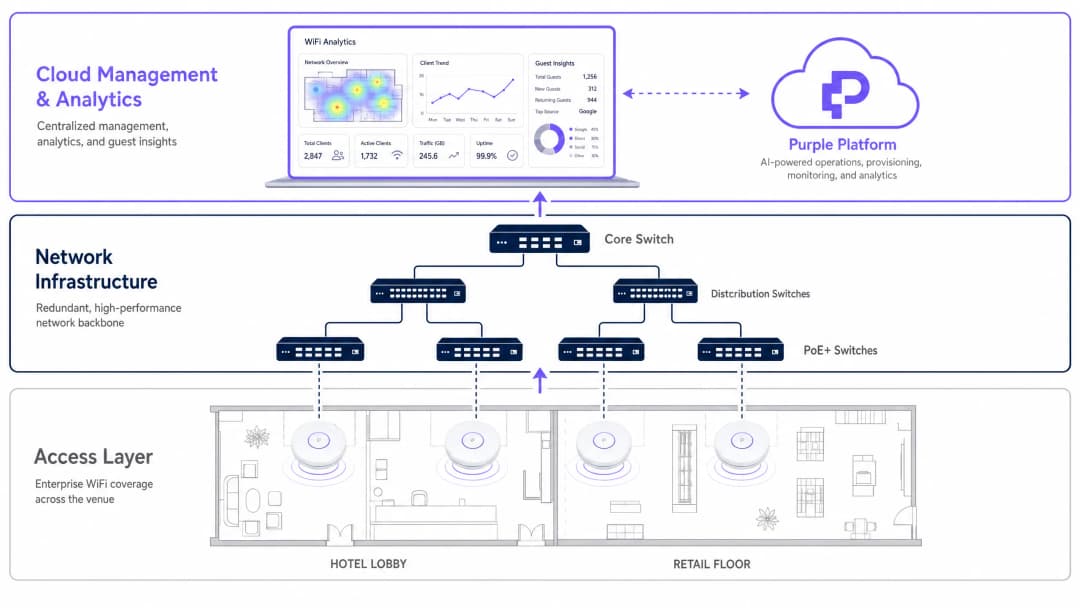
Los puntos de acceso como el Aruba AP-735 o el Cisco 9136 requieren switches Multi-Gigabit (mGig) que admitan 2.5 Gbps, 5 Gbps o 10 Gbps por puerto a nivel de acceso. En cuanto a la alimentación, los modernos AP de triple banda consumen un vatiaje significativo. Asegúrate de que los switches de acceso admitan PoE++ (802.3bt, que proporciona hasta 60W Tipo 3 o 90W Tipo 4 por puerto). El funcionamiento de estos AP con PoE+ estándar (802.3at, máximo 30W) provocará la desactivación de las radios, un rendimiento limitado de la CPU y avisos de modo degradado en el panel de gestión.
3. Gestión de identidades y accesos
La seguridad empresarial impone una autenticación robusta. WPA3 con 802.1X/RADIUS es el estándar para los dispositivos corporativos, ofreciendo claves de cifrado por usuario y la aplicación centralizada de las políticas. El acceso de invitados requiere un enfoque diferente que equilibre la seguridad con la mínima fricción.
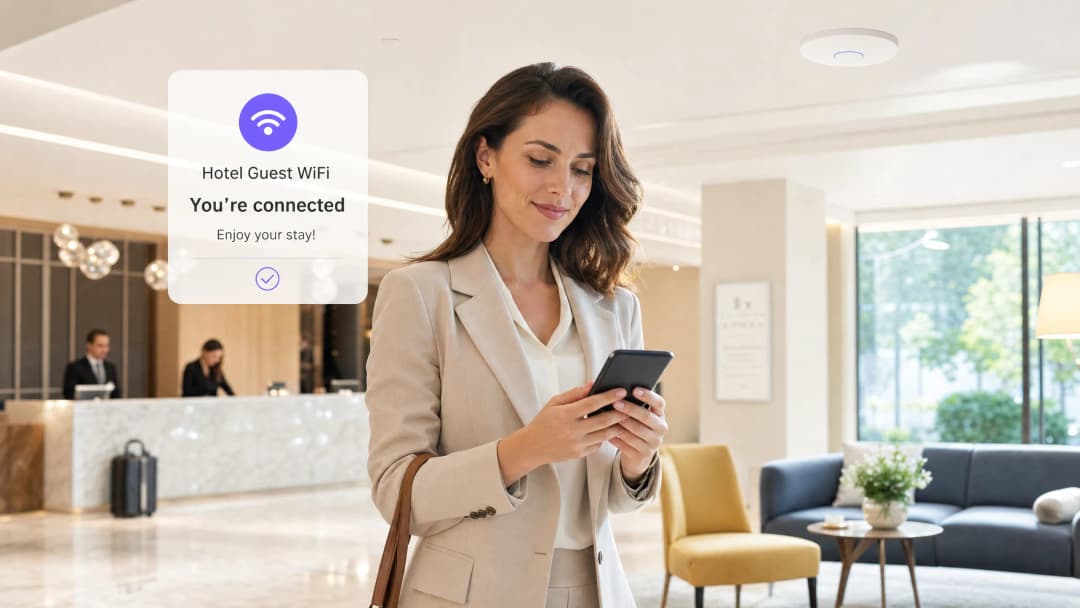
La implementación de un Captive Portal integrado con una plataforma de WiFi Analytics permite a los establecimientos ofrecer un acceso seguro adquiriendo al mismo tiempo valiosos datos de primera mano para el marketing. Para una experiencia aún más fluida, considera la implementación de OpenRoaming. Como se detalla en How a wi fi assistant Enables Passwordless Access in 2026, Purple actúa como identity provider gratuito para OpenRoaming con la licencia Purple Connect, permitiendo que los dispositivos se autentiquen de forma automática y segura sin interacción manual con el portal.
En los sectores del Transport y público, este modelo de autenticación sin fricciones es particularmente valioso para gestionar el elevado tránsito de usuarios temporales.
Best Practice y estándares del sector
RF Site Surveys: realice siempre un estudio predictivo antes de la instalación y un estudio de validación activo después de la instalación. Tenga en cuenta la atenuación provocada por las paredes, el cristal y los cuerpos humanos: una multitud de personas absorbe significativamente la energía de RF, por lo que un estadio con un buen rendimiento durante un estudio de cobertura puede fallar de forma catastrófica durante un evento con el aforo completo.
Planificación de canales: en las bandas de 5 GHz y 6 GHz, utilice anchos de canal de 40 MHz u 80 MHz para despliegues empresariales, con el fin de equilibrar el rendimiento con la disponibilidad de canales. Evite anchos de 160 MHz o 320 MHz a menos que se encuentre en entornos aislados, ya que limitan drásticamente el número de canales no superpuestos y aumentan la probabilidad de interferencias de cocanal.
Conformidad: asegúrese de que la arquitectura de red cumple con las normativas pertinentes. El estándar PCI-DSS 4.0 exige la segmentación de la red para cualquier sistema que procese pagos con tarjeta a través de WiFi. En entornos de Healthcare, la normativa HIPAA exige controles estrictos sobre la transmisión de datos. El GDPR se aplica a todos los datos personales capturados a través de los portales WiFi para invitados en todos los sectores.
Gestión de firmware: establezca una frecuencia estricta para la aplicación de parches de firmware. Los proveedores de AP empresariales lanzan regularmente parches de seguridad para corregir vulnerabilidades. Las plataformas gestionadas en la nube (Aruba Central, Mist AI, Meraki) pueden automatizar este proceso con ventanas de mantenimiento configurables.
Resolución de problemas y mitigación de riesgos
Sticky Clients: un problema común en el que un dispositivo se niega a realizar roaming hacia un punto de acceso más cercano, lo que reduce el rendimiento general de la celda. Mitigue este problema implementando los estándares IEEE 802.11k (Radio Resource Measurement) e IEEE 802.11v (BSS Transition Management) para ayudar a los clientes a tomar mejores decisiones de roaming. Configure tasas mínimas de datos obligatorias en cada SSID para forzar la desconexión de los clientes cuando la señal caiga por debajo de un umbral utilizable, que suele ser de 12 Mbps en 5 GHz.
Enrutamiento asimétrico: el punto de acceso puede transmitir a mayor distancia de la que puede transmitir el cliente móvil, lo que da como resultado que el cliente muestre la máxima potencia de señal pero experimente un rendimiento prácticamente nulo. La mitigación es sencilla: no configure los puntos de acceso a la máxima potencia de transmisión. Ajuste la potencia Tx del AP para que coincida con la capacidad media de los dispositivos móviles, normalmente entre 12 y 15 dBm. Esto también reduce la interferencia de cocanal entre AP adyacentes. Agotamiento del presupuesto PoE: en grandes instalaciones, es fácil superar el presupuesto de alimentación PoE total del chasis de un switch, incluso si los presupuestos de los puertos individuales parecen suficientes. Calcule siempre el consumo de energía general de todos los AP conectados en comparación con el presupuesto de alimentación PoE total del switch, no solo los límites por puerto.
Proliferación de SSID: cada SSID genera una sobrecarga de gestión (tramas de baliza o beacon frames) que consume tiempo de transmisión en el aire. Limite los SSID a un máximo de 3-4 por AP. Consolide los SSID para IoT, corporativo y de invitados en lugar de crear redes por departamento.
ROI e impacto empresarial
El caso de negocio para actualizar a los mejores hardware de puntos de acceso va mucho más allá de las métricas de rendimiento de TI. En el sector de Hospitality, un WiFi fiable se clasifica constantemente entre los factores principales en las puntuaciones de satisfacción de los huéspedes. Un fallo de la red durante un evento de congreso importante puede influir directamente en las tasas de reserva recurrente y en la reputación de la marca.
Al integrar una plataforma de analítica avanzada sobre el hardware, los equipos de TI pueden demostrar un ROI directo al negocio. La red se convierte en una herramienta para comprender los patrones de tráfico peatonal, los tiempos de permanencia, los períodos de pico de uso y los datos demográficos de los clientes. Estos datos informan directamente las decisiones operativas, desde los niveles de personal hasta la colocación del merchandising en los puntos de venta.
Para obtener una guía práctica sobre cómo aprovechar estos datos en un contexto hotelero, consulte How To Improve Guest Satisfaction: The Ultimate Playbook. En el sector público, una infraestructura wireless robusta e inclusiva es cada vez más central para las estrategias de inclusión digital, como se destaca en Purple Appoints Iain Fox as VP Growth – Public Sector to Drive Digital Inclusion and Smart City Innovation.
Los resultados medibles de una implementación WiFi empresarial bien ejecutada con analítica integrada incluyen típicamente: una reducción del 15-25% de las quejas de los huéspedes relacionadas con la conectividad, un aumento del 30-40% en las tasas de conversión del Captive Portal cuando se utiliza el inicio de sesión social en comparación con los formularios de solo correo electrónico, y un activo de datos de primera mano demostrable que reduce la dependencia de proveedores de datos de terceros en un entorno post-cookie.
Definiciones clave
Multi-Link Operation (MLO)
Una función de WiFi 7 (802.11be) que permite a los dispositivos transmitir y recibir datos de forma simultánea a través de múltiples bandas de frecuencia, por ejemplo, 5 GHz y 6 GHz concurrentemente.
Crucial para reducir la latencia y aumentar el rendimiento en entornos empresariales densos. Requiere que tanto el punto de acceso como el dispositivo cliente sean compatibles con WiFi 7 para funcionar.
4K-QAM (Modulación de Amplitud en Cuadratura)
Un esquema de modulación utilizado en WiFi 7 que codifica 12 bits por símbolo, en comparación con el 1024-QAM de WiFi 6 (10 bits por símbolo), lo que ofrece un rendimiento máximo aproximadamente un 20% superior.
Requiere una relación señal-ruido (SNR) muy alta para funcionar con eficacia. En entornos ruidosos, el punto de acceso vuelve automáticamente a tasas de modulación más bajas. No base la planificación de capacidad en las cifras máximas de 4K-QAM.
Flujos espaciales (MIMO)
La tecnología Multiple-Input Multiple-Output utiliza varias antenas para transmitir flujos de datos independientes de forma simultánea. Se denota como 2x2, 4x4 u 8x8 (antenas de transmisión x recepción).
Un mayor número de flujos espaciales permite a un punto de acceso gestionar más conexiones de clientes simultáneas y ofrecer un mayor rendimiento agregado. Un punto de acceso 8x8 como el Cisco 9136 puede dar servicio a un número significativamente mayor de clientes concurrentes que un punto de acceso 2x2.
802.3bt (PoE++)
El estándar Power over Ethernet capaz de suministrar hasta 60W (Tipo 3) o 90W (Tipo 4) de corriente continua a través de cables Ethernet de par trenzado a los dispositivos alimentados.
Obligatorio para alimentar puntos de acceso empresariales tribanda modernos y de alto rendimiento sin comprometer su funcionalidad. Desplegar puntos de acceso tribanda en switches 802.3at (PoE+, 30W) provocará una degradación del rendimiento o la desactivación de las radios.
OpenRoaming
Un estándar de la federación Wi-Fi Alliance que permite a los usuarios conectarse de forma automática y segura a las redes WiFi de invitados participantes sin necesidad de pasar por un Captive Portal ni introducir contraseñas manualmente, utilizando un perfil de credenciales previamente aprovisionado.
Purple actúa como un proveedor de identidad gratuito para OpenRoaming bajo la licencia Connect, lo que permite a los establecimientos ofrecer una autenticación de invitados fluida y segura. Especialmente valioso en centros de transporte y espacios del sector público con un gran volumen de usuarios transitorios.
Gestión de transición BSS (802.11v)
Un estándar de IEEE que permite a la infraestructura de red enviar mensajes de aviso a los dispositivos cliente, recomendando un mejor punto de acceso al que conectarse en función de la intensidad de la señal y la carga.
Utilizado por los administradores de TI para mitigar los "sticky clients" y garantizar el equilibrio de carga en la red inalámbrica. Funciona en conjunto con 802.11k (Medición de Recursos de Radio) para proporcionar a los clientes una lista de AP candidatos.
Interferencia de canal adyacente (CCI)
Interferencia causada cuando dos o más puntos de acceso operan exactamente en el mismo canal de frecuencia y están dentro del alcance del otro, lo que les obliga a turnarse para transmitir mediante el protocolo CSMA/CA.
La CCI es la causa principal de la degradación del rendimiento en redes empresariales sobredesplegadas. Se mitiga mediante una cuidadosa planificación de canales, la reducción de la potencia de transmisión y el uso de la banda más amplia de 6 GHz que ofrece más canales no superpuestos.
OFDMA (Acceso múltiple por división de frecuencias ortogonales)
Una versión multiusuario de OFDM introducida en Wi-Fi 6 que divide un canal en unidades de recursos (subportadoras) más pequeñas, lo que permite a un AP comunicarse con múltiples clientes simultáneamente dentro de una sola ventana de transmisión.
Mejora drásticamente la eficiencia en entornos de alta densidad con muchas transmisiones de paquetes pequeños, como dispositivos IoT o aplicaciones móviles que envían ráfagas cortas de datos frecuentes. Reduce la latencia y mejora la eficiencia del tiempo de transmisión.
BeamFlex+ (Propietario de Ruckus)
Tecnología de antena adaptativa de Ruckus Networks que selecciona dinámicamente el patrón de antena óptimo para cada transmisión de cliente individual, dirigiendo la señal para maximizar la SNR y minimizar las interferencias.
Especialmente eficaz en entornos de RF difíciles, como almacenes con estanterías metálicas o recintos con importantes reflexiones multitrayecto. Proporciona una ventaja de rendimiento medible sobre las antenas omnidireccionales estándar en estos escenarios.
Ejemplos prácticos
Un hotel de lujo de 400 habitaciones está experimentando graves quejas de los huéspedes sobre el rendimiento del WiFi en el vestíbulo y las zonas de conferencias durante las horas punta de la tarde. La infraestructura actual utiliza puntos de acceso WiFi 5 (802.11ac) desplegados en los pasillos. El director de TI necesita un rediseño completo. ¿Cuál es el enfoque recomendado?
Paso 1 - Pasar de un modelo de cobertura a un modelo de capacidad. Retirar los AP de los pasillos, que provocan problemas de "clientes pegajosos" a medida que los huéspedes se desplazan entre las habitaciones y el pasillo. Sustituirlos por AP de placa de pared en la habitación (por ejemplo, Cisco 9105AXW o Aruba AP-303H) para crear microceldas que contengan el dominio de RF dentro de cada habitación.
Paso 2 - En las zonas de alta densidad del vestíbulo y de conferencias, desplegar puntos de acceso WiFi 6E o WiFi 7 (por ejemplo, Aruba AP-735 o Cisco 9136) utilizando antenas direccionales si la altura del techo supera los 8 metros. Establecer como objetivo un AP por cada 75 - 100 metros cuadrados en el vestíbulo, y un AP por cada 50 asistentes en las salas de conferencias.
Paso 3 - Actualizar los conmutadores de extremo para que admitan mGig (2,5/5 Gbps) y PoE++ (802.3bt) para alimentar los nuevos AP tribanda sin modo degradado.
Paso 4 - Implementar el Captive Portal de WiFi para invitados de Purple para gestionar la asignación de ancho de banda por usuario, aplicar la captura de datos de conformidad con el GDPR y recopilar análisis sobre los tiempos de permanencia de los asistentes a las conferencias y las tasas de visitas repetidas.
Paso 5 - Habilitar 802.11k/v/r (Fast BSS Transition) para garantizar un roaming fluido entre los AP del vestíbulo y los AP de las salas de conferencias sin caídas de sesión.
Una gran cadena de tiendas minoristas necesita desplegar WiFi en 50 tiendas nuevas de forma simultánea. Requieren una alta fiabilidad para los escáneres de inventario portátiles y los terminales de punto de venta (el cumplimiento de PCI-DSS es obligatorio), pero también quieren ofrecer WiFi para invitados a los compradores para capturar datos de marketing de origen. El presupuesto es limitado. ¿Cuál es la arquitectura recomendada?
Paso 1 - Desplegar puntos de acceso WiFi 6E de gama media (por ejemplo, Juniper Mist AP45 o Ruckus R560) para equilibrar coste y rendimiento. Las capacidades de AIOps de la plataforma Mist AI reducen la sobrecarga de gestión de TI continua en 50 centros, lo que supone un ahorro significativo de costes operativos.
Paso 2 - Segmentar la red mediante VLANs y SSIDs independientes: un SSID WPA3-Enterprise con autenticación 802.1X para dispositivos corporativos y terminales TPV (aislados en una VLAN dedicada sin enrutamiento inter-VLAN hacia el tráfico de invitados), y un SSID abierto independiente con aislamiento de clientes para invitados.
Paso 3 - Para la red de invitados, implementar el Captive Portal de Purple. Configurar el portal para solicitar un inicio de sesión social o una dirección de correo electrónico a cambio del acceso, lo que permite al equipo de marketing crear una base de datos CRM de origen. Aplicar límites de ancho de banda por cliente (por ejemplo, 10 Mbps de bajada / 5 Mbps de subida) para evitar que un solo usuario sature el enlace ascendente.
Paso 4 - Utilizar las capacidades BLE de los puntos de acceso para rastrear la ubicación de los escáneres de inventario y analizar los patrones de tráfico peatonal de los compradores para optimizar el merchandising.
Paso 5 - Estandarizar la plantilla de configuración en los 50 centros utilizando el flujo de trabajo de aprovisionamiento sin intervención de Mist AI, lo que reduce el tiempo de despliegue por centro de días a horas.
Preguntas de práctica
Q1. ¿Está diseñando la red WiFi para un aula universitaria de alta densidad con capacidad para 300 estudiantes. Planea desplegar tres puntos de acceso Wi-Fi 6E. ¿Cuál es la consideración de diseño de RF más crítica para evitar la degradación del rendimiento y cómo la aborda?
Sugerencia: Considere qué ocurre cuando hay varios AP en el mismo espacio físico y cómo comparten el tiempo de transmisión en el mismo canal de frecuencia.
Ver respuesta modelo
La consideración más crítica es mitigar la interferencia de canal adyacente (CCI). Con tres AP en el mismo espacio físico, debe asegurarse de que estén configurados en canales que no se superpongan, especialmente en las bandas de 5 GHz y 6 GHz. En la banda de 6 GHz, hay hasta 59 canales de 20 MHz no superpuestos, lo que proporciona significativamente más flexibilidad que la de 5 GHz. Además, debe reducir significativamente la potencia de transmisión (Tx) de cada AP para que el tamaño de sus celdas no se superponga excesivamente. Si dos AP se escuchan claramente en el mismo canal, aplazarán las transmisiones mediante CSMA/CA, reduciendo de manera efectiva la capacidad de tres AP a la de un solo AP. Una consideración secundaria es utilizar antenas direccionales apuntadas hacia abajo, hacia la zona de asientos, en lugar de antenas omnidireccionales, para contener el dominio de RF dentro de la sala.
Q2. Un cliente desea actualizar la red WiFi de su almacén para dar soporte a nuevos vehículos de guiado automático (AGV) que requieren una latencia inferior a 50 ms y una itinerancia constante. El almacén tiene estanterías metálicas altas y graves interferencias por multitrayecto. Están considerando Ubiquiti UniFi U7 Pro para ahorrar costes. ¿Cuál es su recomendación y razonamiento?
Sugerencia: Evalúe si la tecnología de antena del hardware es adecuada para el entorno de RF específico y considere los requisitos de itinerancia de los AGV.
Ver respuesta modelo
Aunque el U7 Pro es rentable, no es la opción adecuada para este entorno. Las estanterías metálicas generan graves interferencias por trayectos múltiples que las antenas omnidireccionales estándar tienen dificultades para superar. Recomiendo el Ruckus R760 o equivalente, específicamente por su tecnología de antena adaptativa BeamFlex+, que ajusta dinámicamente los patrones de antena para dirigir las señales alrededor de los obstáculos físicos y mitigar las reflexiones por trayectos múltiples. Para el requisito de roaming de los AGV, implemente 802.11r (Fast BSS Transition) para permitir traspasos de roaming de menos de 50 ms entre AP - esto es fundamental para los AGV que se desplazan a gran velocidad por el almacén. La plataforma Ruckus también es compatible con 802.11k/v para ayudar a los clientes AGV a identificar el AP óptimo antes de iniciar un roaming.
Q3. Su equipo ha desplegado nuevos puntos de acceso WiFi 7 tribanda en un campus corporativo. Durante la fase piloto, las radios de 6 GHz no están transmitiendo y los AP notifican un "modo degradado" en el panel de gestión en la nube. Los AP están conectados a switches PoE+ existentes. ¿Cuál es la causa principal y cuál es la vía de solución?
Sugerencia: Revise los requisitos de la infraestructura física para alimentar puntos de acceso tribanda modernos y de alto rendimiento.
Ver respuesta modelo
La causa principal es un presupuesto insuficiente de alimentación a través de Ethernet (PoE). Los switches PoE+ existentes (802.3at) proporcionan un máximo de 30W por puerto. Los AP WiFi 7 tribanda modernos suelen requerir 802.3bt (PoE++) - hasta 60W o 90W por puerto - para hacer funcionar las tres radios simultáneamente a pleno rendimiento. Cuando el AP detecta una alimentación insuficiente, entra automáticamente en modo degradado, desactivando primero los componentes que más energía consumen, que suelen ser la radio de 6 GHz y el puerto Ethernet secundario. La vía de solución consiste en sustituir los switches de la capa de acceso por modelos compatibles con 802.3bt. Como medida provisional, algunos AP admiten un inyector de alimentación (midspan) para complementar la salida del switch PoE+, pero no es una solución escalable a largo plazo.
Q4. Un palacio de congresos alberga eventos con hasta 2.000 asistentes simultáneos en un solo pabellón. Durante un evento reciente, el rendimiento de la red WiFi fue bueno durante la fase de montaje, pero se degradó gravemente una vez que el pabellón se llenó al máximo de su capacidad. El estudio de cobertura de RF se realizó con el pabellón vacío. ¿Qué falló y cómo se puede prevenir en futuros despliegues?
Sugerencia: Considere cómo cambia el entorno físico entre un pabellón vacío y uno lleno, y qué efecto tiene esto en la propagación de RF.
Ver respuesta modelo
El problema es que el cuerpo humano absorbe significativamente la energía de RF, especialmente en las frecuencias de 5 GHz y 6 GHz. Un pabellón lleno con 2.000 personas genera un entorno de RF drásticamente diferente al de un pabellón vacío. El estudio de cobertura predictivo, realizado con el pabellón vacío, no tuvo en cuenta esta atenuación. El resultado es que los AP que parecían tener cobertura suficiente en el pabellón vacío ahora tienen un rango de alcance efectivo reducido, lo que provoca un mayor número de clientes por AP, un aumento de las tasas de reintento y una degradación del rendimiento de datos. Para prevenirlo es necesario: (1) realizar un estudio de cobertura con el pabellón lleno o cerca de su capacidad, o utilizar herramientas de simulación que modelen la atenuación del cuerpo humano; (2) aumentar la densidad de AP por encima de lo que sugiere el estudio con el pabellón vacío; (3) desplegar los AP a menor altura (por ejemplo, montaje debajo de los asientos o de los balcones) para reducir la distancia entre el AP y el cliente, compensando así la atenuación corporal.
Continúe leyendo esta serie
¿Qué es un WLC (Wireless LAN Controller) y sigue siendo necesario?
Esta guía exhaustiva explora la evolución de los Wireless LAN Controllers (WLCs) y proporciona un marco técnico para determinar la arquitectura adecuada en 2026. Cubre modelos tradicionales de hardware, gestionados en la nube y sin controlador, detallando su impacto en el cumplimiento normativo, la escalabilidad y la experiencia de las visitas.
Power over Ethernet (PoE) para Puntos de Acceso: Guía de Implementación
Esta guía proporciona a los técnicos de infraestructura, arquitectos de red y responsables de la toma de decisiones de TI una referencia técnica definitiva para desplegar puntos de acceso Power over Ethernet (PoE) en entornos corporativos, incluidos hoteles, tiendas minoristas, estadios y centros del sector público. Abarca las normas IEEE desde la 802.3af hasta la 802.3bt, el cálculo del presupuesto de potencia, los requisitos de cableado, la segmentación de VLAN y el cumplimiento de la seguridad, con escenarios de implementación concretos y parámetros de ROI medibles. Comprender la arquitectura PoE es fundamental para cualquier despliegue de [WiFi de invitados](/guest-wifi) o de [WiFi Analytics](/guest-wifi-marketing-analytics-platform), ya que la fiabilidad de la capa física determina directamente la calidad de la captura de datos, la experiencia del usuario y el tiempo de actividad operativa.
Mesh Network vs Access Points: Which is Better for Large Venues?
Esta guía técnica ofrece una comparación definitiva entre redes mesh y puntos de acceso cableados tradicionales para espacios de gran envergadura, cubriendo la arquitectura, las ventajas y desventajas de rendimiento y la estrategia de despliegue. Equipará a directores de TI, arquitectos de redes y directores de tecnología con marcos de trabajo prácticos para diseñar infraestructuras de WiFi de alto rendimiento y conformes a las normativas para entornos de hostelería, comercio minorista, eventos y sector público. La guía también vincula estas decisiones arquitectónicas con la plataforma de análisis y WiFi para invitados independiente del hardware de Purple, demostrando cómo la elección de la infraestructura adecuada impulsa resultados de negocio medibles.
¿Tiene preguntas sobre su configuración específica?
Nuestro equipo trabaja con operadores de recintos, responsables de TI e ingenieros de redes en 80 000 espacios. Reserve una llamada de 20 minutos y le mostraremos cómo lo han solucionado otros profesionales como usted.