

Resolver el error 'Conectado, sin Internet' en Guest WiFi
Esta guía de referencia técnica autorizada explica cómo los tiempos de espera de DNS causados por redes congestionadas provocan el error 'Conectado, sin Internet' en el WiFi de invitados. Proporciona a los arquitectos de red y a los gerentes de TI pasos de implementación prácticos para desplegar filtros DNS empresariales con el fin de resolver estos cuellos de botella y mejorar la incorporación de invitados.
Escuchar esta guía
Ver transcripción del podcast
Resumen Ejecutivo
Para los CTOs y arquitectos de red que supervisan recintos de alta densidad —como los de Comercio Minorista , Hostelería , Sanidad y Transporte —, el error "Conectado, sin Internet" en las redes de Guest WiFi es un persistente dolor de cabeza operativo. Aunque a menudo se diagnostica erróneamente como un fallo de hardware del AP o un ancho de banda ascendente insuficiente, la causa principal en entornos empresariales suele ser el tiempo de espera de DNS causado por la congestión de la red.
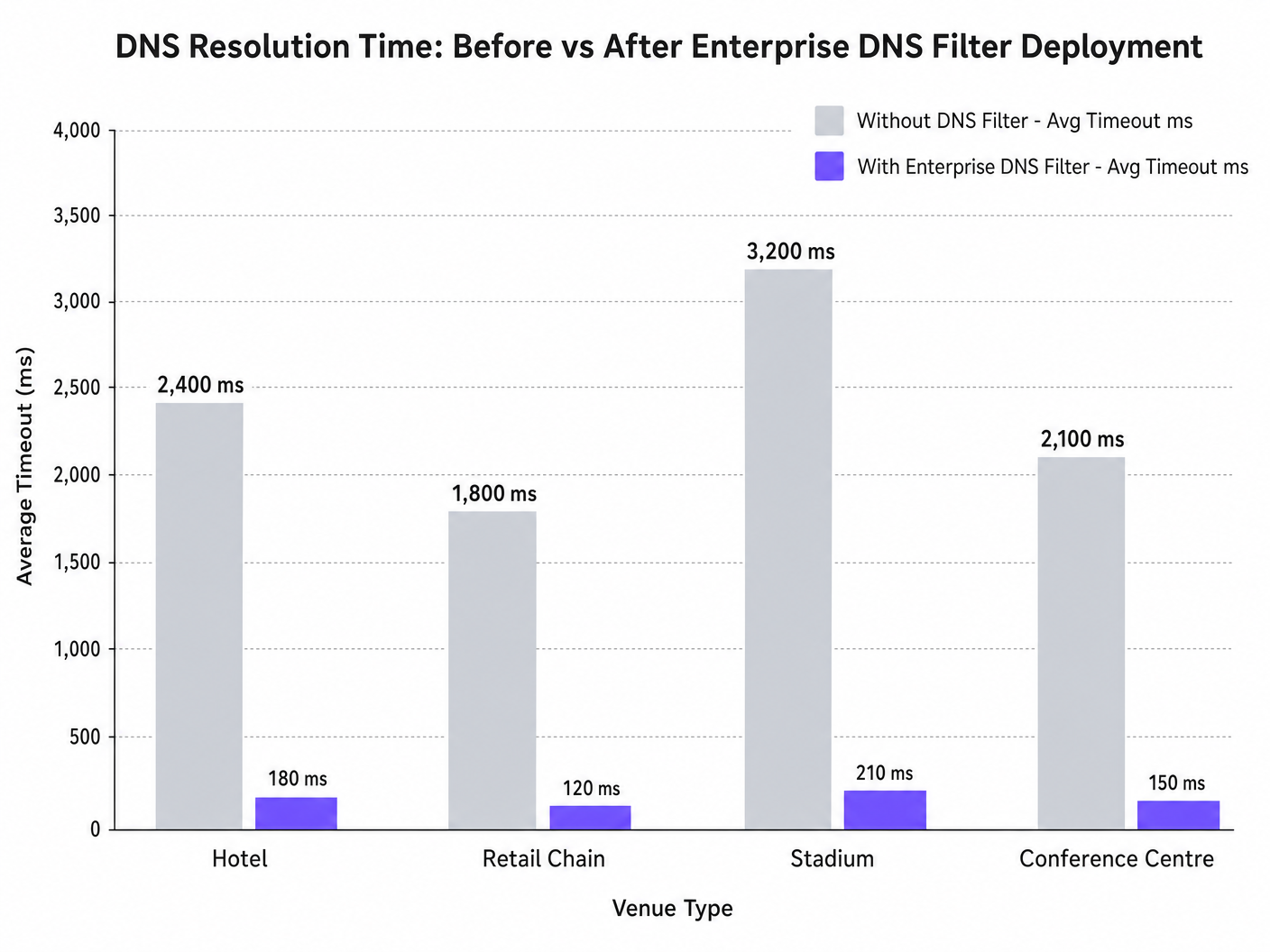
Cuando cientos de dispositivos sondean simultáneamente para la detección del Captive Portal (por ejemplo, captive.apple.com), las consultas predeterminadas del puerto UDP 53 pueden saturar los resolvedores ascendentes estándar. Si la respuesta DNS excede la ventana de tiempo de espera a nivel del sistema operativo (normalmente de 1 a 5 segundos), el dispositivo asume que no existe conectividad a Internet, lo que impide activar el Captive Portal. Esta guía detalla la arquitectura técnica de este modo de fallo y demuestra cómo el despliegue de un filtro DNS empresarial resuelve el cuello de botella, reduciendo la latencia de las consultas de miles de milisegundos a menos de 200 ms, asegurando el cumplimiento de estándares como IEEE 802.1X y GDPR, y mejorando drásticamente la experiencia de incorporación de invitados.
Análisis Técnico Detallado
El Mecanismo de Detección del Captive Portal
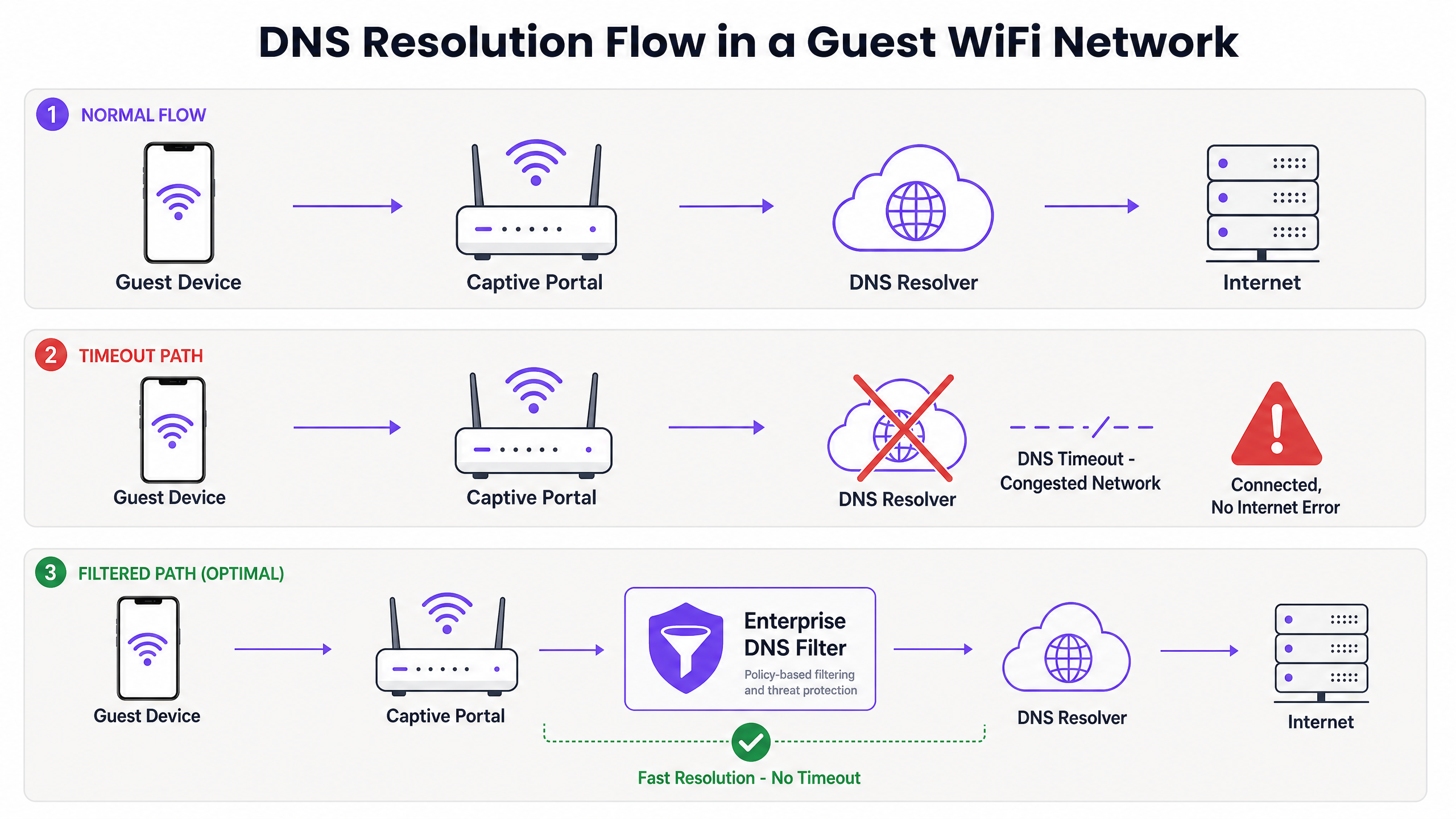
Cuando un dispositivo cliente se asocia con un punto de acceso y recibe una concesión DHCP, debe verificar la accesibilidad a Internet antes de pasar completamente a un estado conectado. Esto se logra mediante sondas de detección del Captive Portal:
- iOS/macOS: HTTP GET a
captive.apple.com - Android: HTTP GET a
connectivitycheck.gstatic.com - Windows: HTTP GET a
msftconnecttest.com
Antes de que se pueda emitir el HTTP GET, el dispositivo debe resolver el nombre de host a través de DNS. Esta consulta DNS inicial es el punto crítico de fallo en entornos de alta densidad.
Por qué la Congestión Provoca Tiempos de Espera de DNS
Las consultas DNS suelen utilizar UDP, un protocolo sin conexión sin retransmisión a nivel de transporte. En una red congestionada —como un estadio durante el descanso o un hotel durante las horas pico de la mañana—, los paquetes UDP se pierden o se retrasan fácilmente.
Si el recinto depende de un resolvedor ISP estándar o de un servicio DNS público (como 8.8.8.8), el tiempo de ida y vuelta (RTT) más el tiempo de procesamiento en el resolvedor puede exceder el límite de tiempo de espera codificado del sistema operativo. Cuando el tiempo de espera expira, el dispositivo marca la conexión como "Conectado, sin Internet" y detiene el proceso de redirección del Captive Portal.
Además, los valores cortos de Time-To-Live (TTL) en estos dominios de sondeo exacerban el problema. A medida que los dispositivos se asocian y desasocian constantemente, las entradas en caché caducan rápidamente, lo que desencadena una avalancha de consultas DNS simultáneas precisamente cuando la red está bajo carga máxima.
El Papel del Filtro DNS Empresarial
Un filtro DNS empresarial, como el integrado en la plataforma WiFi Analytics de Purple, actúa como un resolvedor de alto rendimiento, local o próximo al borde. Al interceptar las consultas DNS antes de que atraviesen el enlace WAN congestionado, el filtro:
- Almacena en caché dominios de alta frecuencia: Sirve dominios de sondeo localmente, reduciendo el RTT a niveles de sub-milisegundos.
- Aplicación de políticas: Descarta inmediatamente las consultas de dominios maliciosos o bloqueados, conservando el ancho de banda de la WAN.
- Registro de auditoría: Proporciona un registro de auditoría para la seguridad de TI , ayudando en el cumplimiento del GDPR y la respuesta a incidentes.
Guía de Implementación
El despliegue de un filtro DNS empresarial requiere una cuidadosa planificación arquitectónica para evitar introducir nuevos puntos de fallo.
1. Ubicación del Resolvedor y Optimización de la Latencia
Despliegue el filtro DNS lo más cerca posible del borde de la red. Para cadenas minoristas distribuidas, un nodo de borde entregado en la nube es apropiado; para grandes recintos de un solo sitio como estadios, se prefiere un dispositivo localizado o una máquina virtual en el switch central. El objetivo es minimizar el número de saltos de enrutamiento entre la VLAN de invitados y el resolvedor.
2. Lista Blanca del Captive Portal (Passthrough)
El paso de configuración más crítico es asegurarse de que su dominio de Captive Portal esté explícitamente en la lista blanca. Si el filtro DNS retrasa o bloquea la resolución del propio portal de autenticación, inducirá el error exacto que está intentando resolver.
3. Ajuste de TTL y Gestión de Caché
Configure el resolvedor local para almacenar agresivamente en caché los dominios de sondeo del Captive Portal. Si bien respetar los TTLs ascendentes es una práctica estándar, anular los TTLs para captive.apple.com y dominios similares a un mínimo de 60 segundos localmente puede reducir drásticamente el volumen de consultas ascendentes durante los eventos de asociación pico.
4. Integración con la Infraestructura Existente
Asegúrese de que el despliegue del filtro DNS se alinee con su segmentación de red existente. El tráfico DNS de invitados debe permanecer aislado de la infraestructura DNS corporativa para mantener el cumplimiento de PCI DSS. Este aislamiento es crucial, ya sea que esté optimizando el WiFi del hotel para viajeros de negocios o asegurando un despliegue en el sector público.
Escuche nuestro podcast de información técnica para obtener más contexto sobre estos pasos de implementación:
Mejores Prácticas
- Evite los Resolvedores Públicos para Redes de Invitados: Confiar en 8.8.8.8 o 1.1.1.1 como el D principalEl DNS asignado por el HCP para redes de invitados de alta densidad introduce una variabilidad de latencia inaceptable.
- Implemente DNS sobre HTTPS (DoH) con Cuidado: Aunque DoH mejora la privacidad, omite el filtrado tradicional del puerto 53. Asegúrese de que su solución DNS empresarial pueda inspeccionar o gestionar el tráfico DoH si lo requiere la política del lugar.
- Supervise las Caídas del Puerto UDP 53: Configure su firewall o switch de núcleo para alertar sobre caídas excesivas de paquetes UDP del puerto 53, lo cual es un indicador principal de inminentes tiempos de espera de DNS.
- Revise Regularmente las Listas Negras: Un filtrado demasiado agresivo puede romper aplicaciones legítimas. Revise los registros de consultas DNS semanalmente para identificar falsos positivos.
Para las implementaciones en el sector público, garantizar una conectividad robusta forma parte de iniciativas más amplias de inclusión digital, como se destacó recientemente cuando Purple nombra a Iain Fox como VP de Crecimiento – Sector Público .
Resolución de Problemas y Mitigación de Riesgos
Cuando ocurre el error "Conectado, sin Internet", los equipos de TI deben seguir una ruta de diagnóstico estructurada en lugar de asumir inmediatamente el agotamiento del ancho de banda.
- Captura de Paquetes (PCAP): Ejecute una captura de paquetes en la VLAN de invitados filtrando por
udp port 53. Busque consultas sin respuestas correspondientes dentro de una ventana de 2 segundos. - Simule la Sonda: Use
curlowgetdesde un dispositivo de prueba en la VLAN de invitados para acceder manualmente ahttp://captive.apple.com/hotspot-detect.html. Mida el tiempo de resolución de DNS frente al tiempo de respuesta HTTP. - Verifique las Reglas del Firewall: Verifique que ninguna política de limitación de velocidad o QoS esté estrangulando inadvertidamente el tráfico UDP del puerto 53 desde la subred de invitados.
- Verifique las Capacidades Offline: En entornos con conectividad WAN intermitente, considere características como el Modo de Mapas Offline de Purple para mantener cierto nivel de interacción del usuario incluso cuando el internet ascendente está degradado.
ROI e Impacto Empresarial
Resolver los tiempos de espera de DNS impacta directamente en los resultados finales para los operadores de recintos.
- Reducción de la Sobrecarga de Soporte: El error "Conectado, sin Internet" es un impulsor principal de los tickets de soporte de Nivel 1 en hostelería y comercio minorista. Eliminarlo reduce el gasto operativo de TI.
- Mayor Captura de Datos: Una carga fallida del Captive Portal significa una oportunidad perdida para la captura de datos y la autenticación de usuarios. Al garantizar una renderización rápida del portal, los recintos maximizan el ROI de sus plataformas de WiFi Analytics .
- Mejora de la Satisfacción del Invitado: La conectividad fluida es una expectativa básica. Minimizar la fricción en la incorporación se correlaciona directamente con la mejora de las Puntuaciones Netas de Promotores (NPS) y las reseñas positivas del recinto.
Al cambiar la perspectiva de "necesitamos más ancho de banda" a "necesitamos una resolución de DNS optimizada", los arquitectos de red pueden ofrecer WiFi para invitados de nivel empresarial que escala con elegancia bajo presión.
Definiciones clave
Captive Portal Detection Probe
An automated HTTP request sent by a mobile OS (e.g., to captive.apple.com) immediately upon network association to determine if a login page is required.
If this probe fails due to DNS timeout, the OS assumes there is no internet access and shows the error.
DNS Timeout
The event where a client device abandons a DNS query because the resolver took too long to respond (typically >2-5 seconds).
The primary technical cause of 'Connected, No Internet' errors in high-density environments.
Enterprise DNS Filter
A dedicated DNS resolver that caches queries locally and applies policy-based blocking to prevent access to malicious or unwanted domains.
Used to offload query volume from congested upstream resolvers and reduce latency.
UDP Port 53
The standard connectionless transport protocol and port used for DNS queries.
Because UDP has no guaranteed delivery, DNS packets are easily dropped during network congestion.
Time-To-Live (TTL)
A value in a DNS record that dictates how long a resolver or client should cache the IP address before querying again.
Short TTLs on probe domains cause frequent re-querying, exacerbating congestion.
IEEE 802.1X
A standard for port-based Network Access Control (PNAC) providing an authentication mechanism to devices wishing to attach to a LAN or WLAN.
While secure, 802.1X environments still rely on robust DNS infrastructure for post-authentication routing.
Local Internet Breakout
Routing internet-bound traffic directly from a branch location to the internet, rather than backhauling it to a central data center.
Crucial for reducing DNS latency in distributed retail or hospitality networks.
WPA3
The latest Wi-Fi security standard that provides enhanced encryption for open and password-protected networks.
WPA3 improves security but does not alter the fundamental DNS resolution path or mitigate timeout issues.
Ejemplos prácticos
A 400-room hotel experiences a surge of 'Connected, No Internet' complaints every morning between 7:30 AM and 8:30 AM when guests wake up and connect to the WiFi. The 1Gbps WAN link shows only 40% utilization during this time.
- Run a packet capture on the guest VLAN filtering for UDP port 53 during the morning peak.
- Identify that DNS queries to captive portal probe domains (e.g., captive.apple.com) are taking >3000ms to resolve via the ISP's default DNS.
- Deploy a local enterprise DNS filter on the guest subnet.
- Configure the DHCP server to assign the local DNS filter IP to guest devices.
- Whitelist the hotel's captive portal domain in the filter.
- Monitor resolution times, which should drop to <50ms.
A large retail chain rolls out a new guest WiFi network across 50 stores, but users in high-footfall flagship stores cannot load the captive portal, while users in smaller stores have no issues.
- Analyze the architecture: all 50 stores are tunneling guest traffic back to a central data center firewall, which then forwards DNS queries to a public resolver.
- In high-footfall stores, the sheer volume of concurrent association events exhausts the NAT/PAT state tables on the central firewall, causing UDP port 53 packets to be dropped.
- Implement a cloud-delivered enterprise DNS filter.
- Reconfigure the local branch routers to forward guest DNS queries directly to the cloud filter via local internet breakout, rather than backhauling them to the data center.
Preguntas de práctica
Q1. A stadium IT director notices that during half-time, thousands of users connect to the WiFi but fail to reach the captive portal. The core switch shows heavy UDP packet drops. Should they increase the WAN bandwidth from 2Gbps to 5Gbps?
Sugerencia: Consider what protocol is being dropped and whether it's related to payload bandwidth or connection state limits.
Ver respuesta modelo
No. Increasing WAN bandwidth will not solve the issue. The UDP packet drops indicate that the firewall or resolver cannot handle the sheer volume of concurrent DNS queries (state table exhaustion or CPU limits). The correct approach is to deploy a high-performance local DNS filter at the edge to cache and respond to these queries locally, bypassing the WAN bottleneck entirely.
Q2. You have just deployed an enterprise DNS filter on a hotel guest network. Guests can now resolve public websites quickly, but when they first connect, they are not redirected to the hotel's login page. What is the most likely configuration error?
Sugerencia: Think about the domain name of the login page itself.
Ver respuesta modelo
The most likely error is that the captive portal's own domain has not been explicitly whitelisted (passthrough) in the DNS filter. The filter is either blocking or delaying the resolution of the portal URL, preventing the redirection from completing.
Q3. A public sector organization requires all guest WiFi traffic to be logged for 90 days to comply with security policies. How does deploying an enterprise DNS filter assist with this requirement?
Sugerencia: Consider what data a DNS filter processes versus a standard firewall.
Ver respuesta modelo
An enterprise DNS filter natively logs all DNS queries made by client devices. This provides a clear, searchable audit trail of which domains were requested and when, satisfying the 90-day logging requirement without needing to perform deep packet inspection on all encrypted HTTPS payload traffic.