
Responsabilidades legales y filtrado de contenidos en redes WiFi públicas para invitados
Esta guía proporciona a directores de TI, arquitectos de redes y CTO un marco técnico y legal definitivo para implementar el filtrado de contenidos en redes WiFi públicas para invitados. Abarca las obligaciones normativas derivadas de GDPR, la UK Online Safety Act 2023 y PCI DSS, junto con una arquitectura multicapa para filtrado DNS, autenticación mediante Captive Portal, cortafuegos de capa de aplicación y segmentación de VLAN. Los operadores de recintos en los sectores de hostelería, retail, sanidad y transporte encontrarán pasos de implementación prácticos, casos de estudio reales y marcos de decisión para construir una red de invitados de alto rendimiento y legalmente defendible.
Escuchar esta guía
Ver transcripción del podcast
Parte de nuestra serie principal: Enterprise WiFi Security Guide →

Resumen Ejecutivo
Para los responsables de TI, arquitectos de red y CTO que gestionan espacios públicos, desplegar Guest WiFi es un requisito operativo básico. Sin embargo, ofrecer una conexión a internet abierta sin un filtrado de contenidos robusto expone al establecimiento a graves riesgos legales, financieros y de reputación. Cuando proporciona acceso público a internet, su organización asume el papel de un Proveedor de Servicios de Internet (ISP). Si el tráfico malicioso o ilegal - como la infracción de derechos de autor, la piratería de igual a igual (P2P) o el acceso a material restringido - se origina desde su dirección IP pública, la responsabilidad recae normalmente en el operador del establecimiento.
Esta guía proporciona el marco técnico definitivo para implementar el filtrado de contenidos obligatorio. Analizamos la arquitectura necesaria para mantener las protecciones de puerto seguro, garantizar el cumplimiento normativo (incluidos el GDPR, la UK Online Safety Act 2023 y PCI-DSS v4.0) y mantener el rendimiento de la red a escala. Al combinar un filtrado robusto con WiFi Analytics, los establecimientos de los sectores de retail, hospitality, healthcare y transport pueden reducir el riesgo mientras mantienen una experiencia de usuario perfecta.
Análisis Técnico Detallado
El Panorama Legal y el Puerto Seguro
El principal motor del filtrado de contenidos es la responsabilidad del WiFi público. En la mayoría de las jurisdicciones, los ISP y los proveedores de WiFi público están protegidos por disposiciones de "puerto seguro" - como la Digital Millennium Copyright Act (DMCA) en los Estados Unidos, o la Directiva de Comercio Electrónico de la UE y sus marcos sucesores. Sin embargo, estas protecciones son explícitamente condicionales. Para cumplir los requisitos, los proveedores deben demostrar que han tomado medidas técnicas razonables para prevenir actividades ilegales y que pueden ayudar a las fuerzas del orden cuando sea necesario.
Sin una pista de auditoría y un filtrado activo, un establecimiento no puede demostrar que ha tomado medidas razonables, lo que anula por completo la protección de puerto seguro. Esto es especialmente crítico para los despliegues del sector público y las instituciones educativas, donde los requisitos de rendición de cuentas son más estrictos. Para obtener más información sobre la gestión de WiFi en entornos sensibles a la protección de menores, consulte WiFi in Schools: The 2026 Administrator & IT Guide.
Los tres principales vectores de riesgo legal de una red no filtrada son los siguientes. En primer lugar, la infracción de derechos de autor mediante piratería P2P: los titulares de los derechos utilizan la monitorización automatizada para identificar las direcciones IP que comparten archivos protegidos por derechos de autor a través del protocolo BitTorrent. En virtud de leyes como la Digital Economy Act 2017 del Reino Unido, las infracciones reiteradas asociadas a la IP pública de un establecimiento pueden dar lugar a la limitación del servicio, sanciones civiles o litigios por parte de los titulares de los derechos. En segundo lugar, el acceso a contenidos nocivos o ilegales: la Online Safety Act 2023 del Reino Unido impone un estricto deber de diligencia a los proveedores de acceso a internet. La Ofcom puede imponer multas de hasta 18 millones de libras o el 10 % de la facturación global por infracciones graves. Si un invitado accede a material ilegal a través de su red y usted no ha implementado el bloqueo estándar del sector (como la lista de bloqueo de la Internet Watch Foundation), su organización se enfrentará a un intenso escrutinio regulatorio. En tercer lugar, el cumplimiento de la privacidad de los datos y el registro: según el GDPR y el UK GDPR, cualquier metadato de red recopilado (concesiones de IP, direcciones MAC, marcas de tiempo) constituye un dato personal. Los establecimientos deben equilibrar la obligación legal de conservar los registros de conexión para las fuerzas del orden (normalmente 12 meses según las normativas de telecomunicaciones del Reino Unido) con el principio de minimización de datos del GDPR.

La arquitectura de seguridad multicapa
Proteger a los invitados y a la empresa requiere un enfoque de defensa en profundidad. Una sola regla de firewall o un filtro DNS básico pueden ser omitidos fácilmente por un usuario con conocimientos técnicos medios. Una arquitectura sólida de red de invitados debe implementar una pila de seguridad por capas a través de cuatro niveles de control diferentes.
Capa 1 - Autenticación e identidad (Captive Portal): antes de que se conceda el acceso a la red, los usuarios deben autenticarse a través de un Captive Portal. Esto vincula la dirección MAC física del dispositivo y su concesión de IP local asignada a una identidad verificada, como un número de teléfono verificado por SMS, una dirección de correo electrónico o un perfil de red social. Este proceso establece la pista de auditoría crítica necesaria para trasladar la responsabilidad legal del establecimiento al usuario individual. Para entornos empresariales que requieren una mayor garantía, la integración de una solución de control de acceso a la red (NAC) o la implementación de la autenticación 802.1X con Cloud RADIUS garantiza que solo puedan conectarse los dispositivos autorizados y que cumplan las normativas.Capa 2 - Filtrado a nivel de DNS: El filtrado de DNS es el método más escalable y de baja latencia para bloquear contenido dañino en el extremo de la red. Cuando un dispositivo invitado solicita la resolución de un nombre de dominio, la solicitud se dirige a un solucionador de DNS seguro en la nube. El solucionador comprueba el dominio con una base de datos de inteligencia de amenazas en tiempo real categorizada por tipo de contenido (adulto, apuestas, P2P, malware, phishing). Si el dominio pertenece a una categoría bloqueada, el solucionador devuelve la dirección de una página de bloqueo local, evitando que se establezca la conexión. Para despliegues de alto rendimiento, como estadios o grandes superficies comerciales, el filtrado de DNS en la nube con almacenamiento en caché local introduce una latencia insignificante, normalmente inferior a 20 milisegundos.
Capa 3 - Pasarela a nivel de aplicación (Next-Generation Firewall): Dado que el filtrado de DNS solo bloquea nombres de dominio, los usuarios pueden eludirlo conectándose directamente a direcciones IP conocidas o utilizando túneles DNS cifrados. Por lo tanto, la pasarela de red debe realizar un filtrado a nivel de aplicación mediante la inspección profunda de paquetes (DPI) para identificar y bloquear protocolos específicos, como BitTorrent, Tor y firmas de VPN comunes, independientemente del puerto o servidor DNS utilizado. La DPI introduce una sobrecarga en el rendimiento, por lo que debe aplicarse de forma selectiva a las categorías de protocolos de alto riesgo en lugar de a todo el tráfico.
Capa 4 - Segmentación de red (VLANs): La red de invitados debe estar totalmente aislada de los recursos corporativos, los sistemas de punto de venta (POS) y la infraestructura de back-of-house mediante VLANs dedicadas y listas de control de acceso (ACLs) estrictas. Según la norma PCI-DSS v4.0, si el tráfico de invitados no está segmentado rigurosamente del entorno de datos de titulares de tarjetas (CDE), toda la red de invitados queda dentro del ámbito de la auditoría de PCI, lo que aumenta drásticamente el coste de cumplimiento y la complejidad de la auditoría.
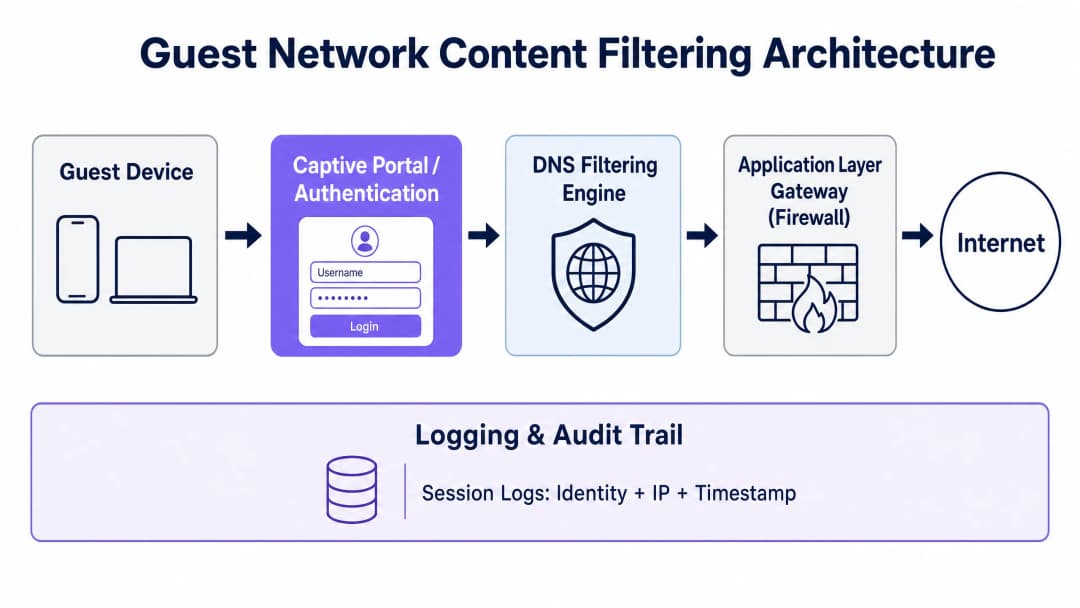
Guía de implementación
Paso 1: Segmentación de red y configuración de VLANs
Configure una VLAN dedicada para el tráfico de invitados en todos los switches principales y controladores inalámbricos. Asegúrese de que el enrutamiento inter-VLAN esté deshabilitado entre la VLAN de invitados y cualquier VLAN corporativa interna. En su firewall, implemente una lista de control de acceso (ACL) que bloquee explícitamente que la subred de invitados acceda a cualquier rango de IP privada RFC 1918, al tiempo que permite todo el demás tráfico saliente a Internet. Este único paso de configuración excluye a la red de invitados del ámbito de PCI-DSS y evita el movimiento lateral en caso de que un dispositivo invitado se vea comprometido.
Paso 2: Despliegue de filtrado de DNS y mitigación de DoH
Para evitar que los invitados eviten el filtro de capa DNS mediante DNS sobre HTTPS (DoH) o DNS sobre TLS (DoT), la puerta de enlace de la red debe forzar todo el tráfico DNS a través del resolvedor seguro designado. Configure reglas de NAT de destino (DNAT) para interceptar todas las solicitudes salientes de los puertos UDP/TCP 53 de la VLAN de invitados y redirigirlas a su IP de filtrado DNS seguro. Para la mitigación de DoH, bloquee el puerto TCP saliente 853 (DoT) y restrinja el acceso a través del puerto 443 a las IP de resolvedores DoH públicos conocidos, utilizando la categoría de bloqueo de aplicaciones DNS sobre HTTPS integrada en su cortafuegos o una lista de bloqueo de IP mantenida por un proveedor de inteligencia de amenazas.
Paso 3: Configuración del Captive Portal y del registro de sesiones
Integre sus puntos de acceso inalámbricos - por ejemplo, Cisco Wireless APs - con una plataforma de Captive Portal centralizada. El portal debe registrar el consentimiento explícito del usuario a las condiciones del servicio y a la política de privacidad antes de permitir el acceso a internet. Conforme al GDPR y al UK GDPR, mantenga un programa de retención dividido: conserve los registros de metadatos de conexión (dirección MAC, IP asignada, marcas de tiempo de la sesión) durante 12 meses en un almacenamiento cifrado y con control de acceso para cumplir con los requisitos legales de retención de datos, mientras que los datos del perfil de marketing deben eliminarse inmediatamente cuando un usuario retire su consentimiento o solicite la supresión.
Paso 4: Configuración de la política de filtrado de contenidos
Implemente una política de filtrado de contenidos adaptada al tipo de establecimiento. Como mínimo, todas las redes de invitados públicas deben bloquear las siguientes categorías: dominios de malware y phishing, protocolos de intercambio de archivos peer-to-peer (P2P), contenido para adultos y obsceno, y servicios conocidos de proxy y anonimizadores. Los establecimientos que atienden a familias o menores - como centros de ocio, bibliotecas o nodos de transporte - deberían aplicar además los modos de búsqueda segura (SafeSearch) en los motores de búsqueda mediante la reescritura de consultas DNS a nivel de resolvedor, e integrarse con la lista de bloqueo de URL de la Internet Watch Foundation (IWF) para cumplir con los estándares de certificación Friendly WiFi.
¿Tiene preguntas sobre su configuración específica?
Nuestro equipo trabaja con operadores de recintos, responsables de TI e ingenieros de redes en 80 000 espacios. Reserve una llamada de 20 minutos y le mostraremos cómo lo han solucionado otros profesionales como usted.
Buenas prácticas
Adoptar el estándar Friendly WiFi
Para los establecimientos públicos que atienden a familias, administraciones locales o espacios educativos, se recomienda encarecidamente obtener la certificación Friendly WiFi. Este estándar, desarrollado en colaboración con el UK Council for Child Internet Safety (UKCCIS), garantiza al público que su red de invitados bloquea activamente el acceso a material ilegal y contenidos obscenos. Mostrar el logotipo aprobado de Friendly WiFi en las entradas de los establecimientos y en la página de bienvenida del Captive Portal mejora directamente la confianza del cliente y diferencia al establecimiento de la competencia.
La matriz de políticas de filtrado de contenidos
Los administradores de TI deben implementar políticas de filtrado de contenidos adaptadas según el tipo de establecimiento y la capacidad de ancho de banda:
| Tipo de establecimiento | Enfoque principal | Categorías bloqueadas obligatorias | Controles opcionales / de ancho de banda |
|---|---|---|---|
| Tiendas y centros comerciales | Seguridad y conformidad | Malware, phishing, contenido para adultos, P2P | Limitar el streaming de vídeo de alto ancho de banda |
| Hospitality & Hotels | Rendimiento y responsabilidad | Malware, piratería P2P, adultos | Límites dinámicos de ancho de banda por sesión |
| Healthcare & Clinics | Privacidad y protección | Malware, adultos, apuestas, P2P | Bloqueo total de túneles VPN |
| Schools & Colleges | Protección infantil | Adultos, violencia, proxy/VPN, P2P | Controles estrictos de aplicaciones, restricciones de redes sociales |
| Stadiums & Arenas | Rendimiento y cumplimiento | Malware, P2P, adultos | Límites estrictos de ancho de banda por dispositivo |
Centralised Multi-Site Policy Management
Para las organizaciones que operan en múltiples recintos - como cadenas hoteleras, comercios minoristas o administraciones locales - la gestión centralizada de políticas es innegociable. Aplicar actualizaciones de políticas a todos los puntos de acceso y pasarelas simultáneamente a través de una única interfaz garantiza una postura de cumplimiento uniforme en todo el patrimonio. Cualquier recinto que opere sin una gestión centralizada está ejecutando de hecho una red no auditada, lo cual es indefendible en una investigación regulatoria.
Troubleshooting and Risk Mitigation
Issue 1: Users Bypassing Filters via VPNs
Los usuarios invitados que utilizan clientes VPN comerciales cifran su tráfico de extremo a extremo, eludiendo los filtros DNS y de capa de aplicación. La estrategia de mitigación consiste en bloquear los protocolos de VPN comunes en la pasarela habilitando las categorías de proxy y VPN en su cortafuegos de última generación. Vale la pena señalar, sin embargo, que el hecho de que un invitado utilice con éxito una VPN significa que su tráfico sale de la dirección IP del proveedor de VPN, no de la suya. En muchos casos, esto reduce su exposición al riesgo en lugar de aumentarla, ya que la responsabilidad legal se traslada al proveedor de VPN.
Issue 2: Over-Blocking Legitimate Business Applications
Las políticas de filtrado excesivamente agresivas bloquean con frecuencia plataformas SaaS empresariales legítimas, lo que provoca informes de fallos de conexión por parte de los invitados corporativos. La mitigación consiste en mantener una lista blanca depurada de dominios empresariales esenciales (como Microsoft 365, Google Workspace, Zoom, Salesforce y plataformas similares) que eludan las categorías de filtrado restrictivas. Considere la posibilidad de implementar un SSID de "Invitado Corporativo" independiente con un filtrado menos restrictivo para los usuarios de negocios verificados que necesiten acceder a puntos finales de VPN corporativos.
Issue 3: MAC Address Randomisation Breaking the Audit Trail
Los sistemas operativos móviles modernos (iOS 14+, Android 10+) aleatorizan la dirección MAC del dispositivo para cada nueva conexión de red, lo que impide el seguimiento continuo del dispositivo. La mitigación consiste en basar la pista de auditoría en los tokens de sesión del Captive Portal en lugar de en las direcciones MAC de hardware. Cuando un usuario se autentica a través del portal, su identidad verificada se asocia con su concesión DHCP activa y su ID de sesión. Si la dirección MAC cambia, el usuario debe volver a autenticarse a través del Captive Portal, generando una entrada de registro nueva y válida.
Issue 4: "Set and Forget" Policy Decay
Las bases de datos de inteligencia de amenazas se actualizan continuamente. Una política de filtrado de contenido que era exhaustiva al momento de su implementación puede pasar por alto miles de dominios maliciosos recién registrados en cuestión de semanas. Asegúrese de que su proveedor de filtrado de DNS ofrezca actualizaciones de fuentes de inteligencia de amenazas automáticas y en tiempo real, y programe una revisión trimestral de políticas para evaluar si las categorías bloqueadas y permitidas siguen coincidiendo con las necesidades operativas del establecimiento y el panorama actual de amenazas.
ROI e impacto empresarial
La implementación de una arquitectura sólida de filtrado de contenido y cumplimiento legal en la red de invitados ofrece rendimientos operativos y financieros tangibles más allá de la mera mitigación de riesgos.
Optimización del ancho de banda y ahorro de costes: Las redes de invitados no filtradas suelen ser objeto de abusos por parte de usuarios que ejecutan protocolos P2P o transmiten vídeo de alta definición de forma continua. Al bloquear activamente las redes P2P y limitar los servicios de streaming no esenciales, los establecimientos pueden recuperar hasta un 40% del ancho de banda total de la red. Esta optimización retrasa o elimina directamente la necesidad de adquirir costosas actualizaciones de líneas alquiladas, lo que ahorra miles de libras en costes recurrentes de telecomunicaciones al año.
Defensa jurídica y protección frente a responsabilidades: Las consecuencias financieras de una sola reclamación por infracción de derechos de autor o de una investigación reguladora en virtud de la Ley de Seguridad Online (Online Safety Act) pueden ser graves. Una red totalmente auditada y filtrada proporciona una protección de puerto seguro justificable. Si se detecta una actividad ilegal, el establecimiento puede presentar inmediatamente registros de conexión seguros y desidentificados para demostrar su cooperación con las fuerzas del orden, desviando la responsabilidad fuera de la empresa y evitando multas de la GDPR de hasta el 4% de la facturación anual global.
Mejora de la reputación de la marca y la confianza de los invitados: Para el consumidor moderno, la seguridad digital es un factor clave de diferenciación. Mostrar la certificación Friendly WiFi en la entrada de su establecimiento o en la página de inicio de sesión del Captive Portal garantiza a las familias, clientes corporativos y socios del sector público que su entorno digital es seguro y está gestionado de manera profesional. Esa confianza se traduce directamente en tiempos de permanencia más prolongados, mayores puntuaciones de satisfacción de los invitados y una mayor fidelidad a la marca en todo su patrimonio comercial o de hostelería.
Referencias
[1] Parlamento del Reino Unido. Digital Economy Act 2017. Legislation.gov.uk.
[2] Oficina de Derechos de Autor de EE. UU. Digital Millennium Copyright Act (DMCA). Copyright.gov.
[3] Purple.ai. WiFi in Schools: The 2026 Administrator & IT Guide. /blog/wifi-in-schools.
[4] Friendly WiFi. Is Your Public WiFi Safe? Understanding the Online Safety Act. FriendlyWiFi.com.
[5] Spotipo. Are Your Captive Portals Legal? GDPR, Data Retention, and Privacy Rules by Region. Spotipo.com.
[6] Purple.ai. How to Implement 802.1X Authentication with Cloud RADIUS. /guides/implementing-8021x-with-cloud-radius.
[7] TitanHQ. Web Filtering For Guest WiFi. TitanHQ.com.
[8] Purple.ai. Cisco Wireless APs: 2026 Guide to Products & Deployment. /blog/cisco-wireless-ap.
Definiciones clave
Puerto Seguro (Safe Harbour)
Una protección legal que exime a los proveedores de acceso a internet de la responsabilidad por los contenidos o actividades ilegales transmitidos a través de sus redes, siempre que puedan demostrar que adoptaron las medidas técnicas razonables para evitar el abuso y que colaboran con las fuerzas del orden. El puerto seguro es condicional, no automático.
Los equipos de TI se encuentran con este concepto al evaluar el riesgo legal de desplegar una red de invitados sin filtrar. La implicación operativa clave es que el puerto seguro requiere tanto un filtrado activo como un registro de auditoría verificable - ninguno de los dos por separado es suficiente.
Filtrado DNS
Una técnica de seguridad de red que intercepta las solicitudes de resolución DNS y bloquea o redirige las consultas de dominios clasificados como maliciosos, ilegales o que infringen las políticas antes de que se establezca una conexión. Funciona en la capa DNS (puerto UDP/TCP 53) y se ofrece normalmente como un servicio basado en la nube.
El mecanismo principal de filtrado de contenidos para despliegues de WiFi de invitados. Los equipos de TI deben tener en cuenta que el filtrado DNS por sí solo es insuficiente sin controles complementarios para bloquear los intentos de elusión mediante DNS sobre HTTPS (DoH).
DNS over HTTPS (DoH)
Un protocolo que cifra las consultas de resolución DNS dentro del tráfico HTTPS estándar (puerto TCP 443), haciendo que no se puedan distinguir del tráfico web normal. DoH permite a los dispositivos eludir el filtrado DNS a nivel de red enviando consultas directamente a un servidor de resolución DoH público en lugar de al servidor DNS gestionado de la red.
El vector de elusión técnica más importante para el filtrado de contenidos basado en DNS. Los arquitectos de red deben bloquear explícitamente las IP de resolución de DoH conocidas y el puerto TCP 853 (DoT) en la pasarela para evitar que los invitados eludan las políticas de filtrado de contenidos.
Captive Portal
Una pasarela de autenticación basada en web que intercepta todo el tráfico HTTP/HTTPS de un dispositivo de invitado recién conectado y lo redirige a una página de inicio de sesión o de aceptación de condiciones de servicio antes de conceder acceso total a internet. El Captive Portal es el mecanismo principal para crear un registro de auditoría legalmente defendible.
Esencial para cualquier red WiFi de invitados pública. El Captive Portal asocia una identidad de usuario verificada a una sesión de red, una dirección MAC y una concesión de IP, los tres elementos necesarios para responder a una solicitud de datos de las fuerzas del orden o defenderse contra una reclamación por infracción de derechos de autor.
VLAN Segmentation
La práctica de separar lógicamente el tráfico de red en diferentes redes locales virtuales (VLANs) a nivel de conmutador y router, evitando que el tráfico de una VLAN llegue a los dispositivos de otra sin reglas de enrutamiento explícitas. El tráfico de invitados debe aislarse en una VLAN dedicada, separada de las redes corporativas, de TPV y de gestión.
Un requisito obligatorio de PCI DSS v4.0 para cualquier establecimiento que procese datos de tarjetas de pago. Sin VLAN Segmentation, la red de invitados queda dentro del alcance del entorno de datos de titulares de tarjetas (CDE) de PCI, lo que aumenta drásticamente la complejidad de la auditoría y los costes de cumplimiento.
Deep Packet Inspection (DPI)
Una técnica de cortafuegos que analiza el contenido completo de los paquetes de red, incluidos los datos de carga útil, en lugar de limitarse a las cabeceras de los paquetes. DPI puede identificar y bloquear protocolos de aplicación específicos (como BitTorrent o Tor) independientemente del número de puerto utilizado, lo que la hace eficaz contra los intentos de elusión a nivel de protocolo.
Se utiliza en la pasarela de la capa de aplicación para bloquear los protocolos P2P y los túneles VPN que eluden el filtrado de la capa DNS. DPI introduce una sobrecarga de rendimiento medible y debe aplicarse de forma selectiva a categorías de protocolos de alto riesgo en lugar de a todo el tráfico de invitados.
UK GDPR / GDPR
El Reglamento General de Protección de Datos tal como se incorporó a la legislación del Reino Unido tras el Brexit (UK GDPR) y tal como se aplica en los estados miembros de la UE (GDPR). Ambos marcos exigen una base legal para el tratamiento de datos personales, minimización de datos, avisos de privacidad transparentes y la capacidad de responder a las solicitudes de acceso de los interesados. Las multas pueden llegar a los 17,5 millones de libras o al 4% de la facturación anual global bajo el UK GDPR.
Se aplica directamente a cualquier establecimiento que recopile metadatos de conexión WiFi de invitados (direcciones IP, direcciones MAC, marcas de tiempo de sesión) o datos proporcionados por el usuario (correo electrónico, número de teléfono) a través de un Captive Portal. El establecimiento es el responsable del tratamiento; el proveedor del Captive Portal es el encargado del tratamiento.
PCI DSS v4.0
El estándar de seguridad de datos de la industria de tarjetas de pago (PCI DSS) versión 4.0, que define los requisitos de seguridad para cualquier organización que almacene, procese o transmita datos de tarjetas de pago. El requisito 1.3 exige una segmentación estricta de la red entre el entorno de datos de titulares de tarjetas (CDE) y todas las demás redes, incluida la red WiFi de invitados.
Relevante para cualquier establecimiento de hostelería o comercio minorista donde los invitados puedan utilizar las mismas instalaciones físicas que los sistemas de procesamiento de tarjetas de pago. Si no se segmenta la red de invitados del CDE, toda la red de invitados entra en el alcance de la auditoría PCI, lo que exige una evaluación completa de conformidad de toda la infraestructura WiFi de invitados.
Lista de bloqueo de la Internet Watch Foundation (IWF)
Una lista de bloqueo de URL mantenida dinámicamente y producida por la Internet Watch Foundation, con sede en el Reino Unido, que contiene URL confirmadas que albergan material de abuso sexual infantil (CSAM) y otras imágenes ilegales. La integración con la lista de bloqueo de la IWF es un requisito obligatorio para la certificación Friendly WiFi y se considera el estándar mínimo de la industria para cualquier despliegue de WiFi público en el Reino Unido.
Los equipos de TI deben verificar que su proveedor de filtrado DNS mantenga una integración activa con la lista de URL de la IWF y que las actualizaciones se apliquen en tiempo real. Este es un punto de partida no negociable para cualquier espacio público del Reino Unido y se exige cada vez más en los marcos de contratación del sector público.
Certificación Friendly WiFi
Un programa de certificación respaldado por el gobierno del Reino Unido y desarrollado en colaboración con el UK Council for Child Internet Safety (UKCCIS) que verifica que una red WiFi pública filtra activamente el contenido ilegal y nocivo, incluida la integración con la lista de bloqueo de la IWF y la aplicación de restricciones de contenido para adultos. Los establecimientos certificados pueden mostrar el símbolo de Friendly WiFi Approved.
Relevante para los sectores de hostelería, comercio minorista, transporte y espacios del sector público. La certificación proporciona una señal de cumplimiento visible y de confianza para los clientes y se menciona cada vez más en los requisitos de contratación del sector público. También proporciona un registro defendible de diligencia debida en caso de una investigación reguladora.
Ejemplos prácticos
Una cadena hotelera de servicio completo con 350 habitaciones y 12 establecimientos en el Reino Unido necesita implantar una solución de WiFi para invitados que cumpla con la normativa. Cada establecimiento cuenta con una combinación de clientes de ocio, viajeros de negocios y delegados de congresos. El director de TI ha recibido una carta de requerimiento por infracción de derechos de autor de un titular de derechos en relación con actividad P2P rastreada hasta una de sus IP públicas. La cadena no dispone actualmente de filtrado de contenidos, ni de Captive Portal, ni de registro de sesiones. ¿Cuál es la arquitectura de remediación recomendada?
La remediación debe ejecutarse en tres fases. Fase 1 (Semanas 1 y 2): Segmentación de VLAN de emergencia. En los 12 establecimientos, configure inmediatamente una VLAN dedicada para invitados (por ejemplo, VLAN 200) en todos los switches principales y controladores inalámbricos. Aplique una ACL en la puerta de enlace para bloquear todo el enrutamiento inter-VLAN entre las redes de invitados y corporativas. Esto excluye inmediatamente la red de invitados del alcance de PCI DSS y evita cualquier riesgo de movimiento lateral adicional. Fase 2 (Semanas 2 a 4): Implementar filtrado DNS basado en la nube. Aprovisione un servicio de filtrado DNS en la nube en los 12 centros mediante una gestión centralizada. Configure el ámbito DHCP de la VLAN de invitados para asignar las IP del resolvedor DNS seguro como servidores DNS primarios y secundarios. Active como mínimo las siguientes categorías de bloqueo: P2P/Torrenting, Malware, Phishing, Adult Content (contenido para adultos) y Proxy/Anonymisers. Configure una regla DNAT en la puerta de enlace de cada centro para interceptar todo el tráfico del puerto 53 de la VLAN de invitados y redirigirlo a los resolvedores DNS gestionados. Bloquee el puerto TCP de salida 853 y las IP de resolvedores DoH conocidos para evitar la elusión de DNS. Fase 3 (Semanas 4 a 6): Desplegar Captive Portal y registro de sesiones. Integre los controladores inalámbricos con una plataforma de Captive Portal centralizada. Configure el portal para que requiera autenticación por correo electrónico o SMS antes de conceder acceso a internet. Asegúrese de que los registros de sesión capturen: identidad autenticada, dirección MAC, IP local asignada, IP pública NAT y marcas de tiempo de inicio y fin de sesión. Configure la retención automatizada de registros durante 12 meses en un sistema de almacenamiento cifrado y con control de acceso. Redacte un acuerdo de procesamiento de datos (DPA) con el proveedor del portal para cumplir los requisitos del Artículo 28 de GDPR.
Una cadena minorista nacional que opera 85 tiendas desea ofrecer WiFi para invitados gratuito como motor de afluencia y herramienta de captura de datos de marketing. Al CTO le preocupan tres riesgos específicos: (1) que la red se utilice para acceder a contenidos ilegales en tiendas cercanas a colegios, (2) el cumplimiento del GDPR para los datos recopilados en el Captive Portal y (3) el abuso de ancho de banda por parte de clientes que transmiten vídeo durante periodos prolongados. ¿Cómo debe diseñarse la arquitectura de red para abordar las tres preocupaciones simultáneamente?
La arquitectura debe integrar tres planos de control distintos. Para la preocupación 1 (contenido dañino): Despliegue un servicio de filtrado DNS en la nube con el conjunto de categorías que cumple la certificación Friendly WiFi habilitado en las 85 tiendas. Esto incluye la integración obligatoria con la lista de bloqueo de URL de la Internet Watch Foundation (IWF), la aplicación de SafeSearch en los principales motores de búsqueda y plataformas de vídeo mediante la reescritura de consultas DNS, y el bloqueo de categorías de contenido para adultos, violencia y proxy/anonimizadores. Aplique esta política de manera uniforme en todas las tiendas, independientemente de su proximidad a los colegios - una política coherente es más fácil de auditar y defender que una política basada en la ubicación. Para la preocupación 2 (cumplimiento del GDPR): Configure el Captive Portal con un flujo de consentimiento que cumpla con el GDPR: un aviso de privacidad claro que se muestre antes de la autenticación, una casilla de consentimiento de marketing desmarcada que sea independiente de la aceptación de las condiciones del servicio y un programa de retención de datos dividido - los metadatos de conexión se conservan durante 12 meses en un almacén de registros cifrado, mientras que los perfiles de marketing se conservan solo mientras se mantenga el consentimiento activo. Asegúrese de que existe un Acuerdo de Procesamiento de Datos (DPA) firmado con el proveedor del Captive Portal. Para la preocupación 3 (gestión del ancho de banda): Implemente límites de ancho de banda por dispositivo a nivel de controlador inalámbrico (por ejemplo, 5 Mbps de bajada / 2 Mbps de subida por dispositivo). Configure políticas de QoS para restar prioridad a los protocolos de streaming de gran ancho de banda durante las horas punta de actividad comercial. Utilice el servicio de filtrado DNS para limitar o bloquear el acceso a las plataformas de streaming de gran ancho de banda durante las horas punta definidas (por ejemplo, de 12:00 a 14:00 y de 17:00 a 19:00), permitiendo al mismo tiempo el acceso durante las horas de menor actividad como beneficio para los invitados.
Preguntas de práctica
Q1. Un centro de conferencias que acoge a 5000 delegados al día ha desplegado una red WiFi para invitados sin Captive Portal ni filtrado de contenidos. Durante un evento importante del sector, el equipo de TI del centro recibe una notificación de su ISP en la que se le indica que la dirección IP pública del establecimiento ha sido señalada por reiteradas actividades de infracción de derechos de autor. El equipo legal del centro pregunta si este es responsable. ¿Cuál es su valoración y qué medidas técnicas inmediatas deben adoptarse?
Sugerencia: Considere qué significan las "medidas técnicas razonables" en el contexto de las protecciones de puerto seguro y qué capas de la pila de filtrado están ausentes en este escenario.
Ver respuesta modelo
El establecimiento se encuentra en una posición jurídica muy expuesta. Sin un Captive Portal, no existe un registro de auditoría que vincule a una persona concreta con la actividad infractora: el establecimiento no puede identificar al usuario responsable ante las fuerzas del orden ni ante el titular de los derechos. Sin filtrado de contenidos, el establecimiento no puede demostrar que tomó las medidas técnicas razonables para evitar la infracción, que es la condición principal para la protección de puerto seguro según la Digital Economy Act. Las medidas técnicas inmediatas son: (1) Desplegar una política de filtrado DNS de emergencia que bloquee los dominios de seguimiento P2P y las firmas del protocolo BitTorrent en la pasarela de la capa de aplicación; esto detiene la infracción activa en cuestión de horas. (2) Habilitar un Captive Portal que requiera autenticación por correo electrónico o SMS antes de conceder acceso a internet; esto crea un registro de auditoría para todas las sesiones futuras. (3) Configurar el registro de sesiones para capturar la identidad, la dirección MAC, la IP asignada y las marcas de tiempo, conservándolas durante 12 meses. (4) Enviar una respuesta por escrito al ISP confirmando las medidas adoptadas y la fecha de implementación. Estas medidas no resolverán con carácter retroactivo la reclamación existente, pero establecen una postura de cumplimiento defendible para toda la actividad futura y demuestran buena fe ante el titular de los derechos y cualquier organismo regulador.
Q2. Un grupo hotelero regional está desplegando una nueva plataforma de WiFi para invitados en 20 establecimientos. El arquitecto de TI propone utilizar un servicio de filtrado DNS basado en la nube como único control de filtrado de contenidos, argumentando que es suficiente para el cumplimiento normativo. Un consultor de seguridad no está de acuerdo. ¿Quién tiene razón y qué lagunas técnicas específicas deja sin resolver el filtrado DNS por sí solo?
Sugerencia: Piense en cómo un invitado podría eludir por completo el filtrado DNS sin utilizar ninguna herramienta especializada y qué protocolos funcionan de forma independiente de la resolución de DNS.
Ver respuesta modelo
El consultor de seguridad tiene razón. El filtrado DNS por sí solo es insuficiente por tres razones específicas. En primer lugar, la elusión de DNS sobre HTTPS (DoH): cualquier invitado que utilice un navegador moderno con DoH habilitado (Chrome, Firefox y Edge lo admiten de forma predeterminada) puede enviar consultas DNS cifradas directamente a un resolutor DoH público a través del puerto 443, eludiendo por completo el filtro DNS gestionado. Sin una regla de firewall complementaria que bloquee las IP de resolutores DoH conocidos y el puerto TCP 853 (DoT), el filtro DNS se elude fácilmente. En segundo lugar, las conexiones IP directas: el filtrado DNS solo bloquea la resolución de nombres de dominio. Un usuario que conozca la dirección IP directa de un recurso bloqueado (por ejemplo, un rastreador de torrents) puede conectarse directamente sin realizar una consulta DNS, eludiendo el filtro por completo. En tercer lugar, el funcionamiento del protocolo P2P: BitTorrent y protocolos P2P similares no dependen únicamente de DNS para la detección de pares; utilizan tablas de hash distribuidas (DHT) y mecanismos de intercambio de pares (PEX) que funcionan de forma independiente de DNS. Solo la inspección profunda de paquetes en la capa de aplicación en la puerta de enlace puede identificar y bloquear de manera confiable el tráfico de BitTorrent. La arquitectura correcta combina el filtrado DNS en la nube con un Next-Generation Firewall configurado para bloquear resolutores DoH, protocolos P2P conocidos y nodos de salida de Tor.
Q3. Una gran cadena minorista está ampliando su programa de WiFi para invitados para incluir la captura de datos de marketing a través de un Captive Portal. El equipo de marketing desea recopilar direcciones de correo electrónico y números de teléfono de todos los invitados que se conecten y conservarlos de forma indefinida para campañas de remarketing. El equipo de TI señala problemas relacionados con el GDPR. ¿Qué requisitos específicos del GDPR se aplican y cómo debe configurarse la arquitectura de datos para lograr el objetivo de marketing sin dejar de cumplir con la normativa?
Sugerencia: Considere la distinción entre los metadatos de conexión (requeridos para las fuerzas del orden) y los datos de perfil de marketing (sujetos al consentimiento y a la minimización de datos), así como los requisitos específicos para un consentimiento de marketing válido bajo el GDPR.
Ver respuesta modelo
Se aplican varios requisitos específicos del GDPR. En primer lugar, la base legal: la recopilación de direcciones de correo electrónico y números de teléfono para fines de marketing requiere un consentimiento explícito y otorgado libremente de acuerdo con el Artículo 6(1)(a) del GDPR. El Captive Portal debe presentar una casilla de verificación de consentimiento de marketing desmarcada que sea totalmente independiente de la aceptación de las condiciones de servicio - agrupar el consentimiento de marketing con las condiciones de acceso a la WiFi está explícitamente prohibido según el Considerando 43 del GDPR. En segundo lugar, la minimización de datos: la cadena solo debe recopilar los datos que vaya a utilizar activamente. Si no se planea realizar marketing por SMS, la recopilación de números de teléfono carece de base legal. En tercer lugar, la conservación: los datos del perfil de marketing no deben conservarse indefinidamente. La cadena debe implementar un proceso de purga automatizado para los contactos inactivos (por ejemplo, aquellos que no han interactuado con las comunicaciones de marketing en 12 meses) y debe eliminar cualquier perfil de inmediato tras una solicitud de eliminación del interesado (Artículo 17). En cuarto lugar, la arquitectura de conservación dividida: los metadatos de conexión (IP, MAC, marcas de tiempo de la sesión) deben conservarse durante 12 meses en un almacén de registros independiente con control de acceso para el cumplimiento de la ley. Estos datos no deben fusionarse con la base de datos de marketing. La arquitectura compatible es: un Captive Portal con una pantalla de consentimiento GDPR que muestre qué datos se recopilan y por qué, una casilla de consentimiento de marketing desmarcada independiente, metadatos de conexión almacenados en una base de datos de registros cifrada con purga automática a los 12 meses y perfiles de marketing almacenados en un CRM independiente con capacidad de purga automática de contactos inactivos y eliminación inmediata. Debe existir un Acuerdo de Procesamiento de Datos (DPA) firmado tanto con el proveedor del Captive Portal como con el proveedor de CRM.
Continúe leyendo esta serie
Cyber Essentials y WiFi para el personal: Cómo superar los cinco controles en su red inalámbrica
Podrá mapear cada uno de los cinco controles de Cyber Essentials en el WiFi de su personal y cerrar las brechas que encuentren los evaluadores. Después, podrá elegir entre 802.1X, iPSK y una red WPA2-PSK segregada para cada clase de dispositivo. Por último, sabrá cómo preparar los puntos de acceso, las controladoras y los dispositivos BYOD para una auditoría de Cyber Essentials Plus.
Analíticas de presencia de HPE Aruba Central: configuración, exportaciones y límites
Podrá habilitar las analíticas de presencia de Aruba Central por sitio, calibrar el umbral de RSSI y los límites de permanencia frente a un recuento real sobre el terreno, y exportar agregados a nivel de sitio a través de la API REST de Central. También conocerá dónde terminan las analíticas de presencia nativas y cuándo una capa de plataforma independiente del hardware como Purple se gana su lugar en sus puntos de acceso Aruba existentes.
Cumplimiento con CIPA: lista de verificación para operadores de establecimientos
Podrá decidir si CIPA vincula su WiFi, segmentar redes, enrutar DNS a través de Purple Shield y cerrar rutas de derivación. También sabrá qué pruebas conservar para la certificación del Formulario 486 o del Formulario 479. La lista de verificación asigna un responsable a cada requisito, para que no falte nada en la certificación de su próximo año de financiación.
¿Tiene preguntas sobre su configuración específica?
Nuestro equipo trabaja con operadores de recintos, responsables de TI e ingenieros de redes en 80 000 espacios. Reserve una llamada de 20 minutos y le mostraremos cómo lo han solucionado otros profesionales como usted.