
¿Qué es Cloud RADIUS? Una guía completa sobre RADIUS-as-a-Service
Esta guía completa analiza Cloud RADIUS (RADIUS-as-a-Service), detallando su arquitectura, métodos de EAP y estrategias de implementación. Proporciona a los líderes de TI información práctica sobre la migración de servidores locales a un modelo de autenticación en la nube escalable, seguro y compatible.
Escuchar esta guía
Ver transcripción del podcast
Parte de nuestra serie principal: Enterprise WiFi Security Guide →

Resumen Ejecutivo
Para las redes empresariales modernas, la arquitectura RADIUS (Remote Authentication Dial-In User Service) local tradicional constituye un cuello de botella operativo importante. Gestionar servidores físicos, parchear sistemas operativos, administrar autoridades de certificación y diseñar la redundancia multisitio consume valiosos recursos de TI. Cloud RADIUS (o RADIUS-as-a-Service) resuelve este problema al migrar la capa de autenticación IEEE 802.1X a una infraestructura en la nube gestionada y de alta disponibilidad. Esta guía proporciona una descripción técnica completa de Cloud RADIUS para directores de TI, arquitectos de red y CTO que evalúan estrategias de implementación. Al pasar de sistemas que requieren mucho gasto de capital y un mantenimiento manual a un modelo elástico y distribuido globalmente, las organizaciones de los sectores de retail, hospitality y transport pueden aplicar políticas de acceso sólidas, lograr el cumplimiento normativo (como PCI-DSS y GDPR) e integrarse perfectamente con proveedores de identidad modernos como Microsoft Entra ID y Google Workspace.
Análisis Técnico Detallado
La Evolución de la Arquitectura RADIUS
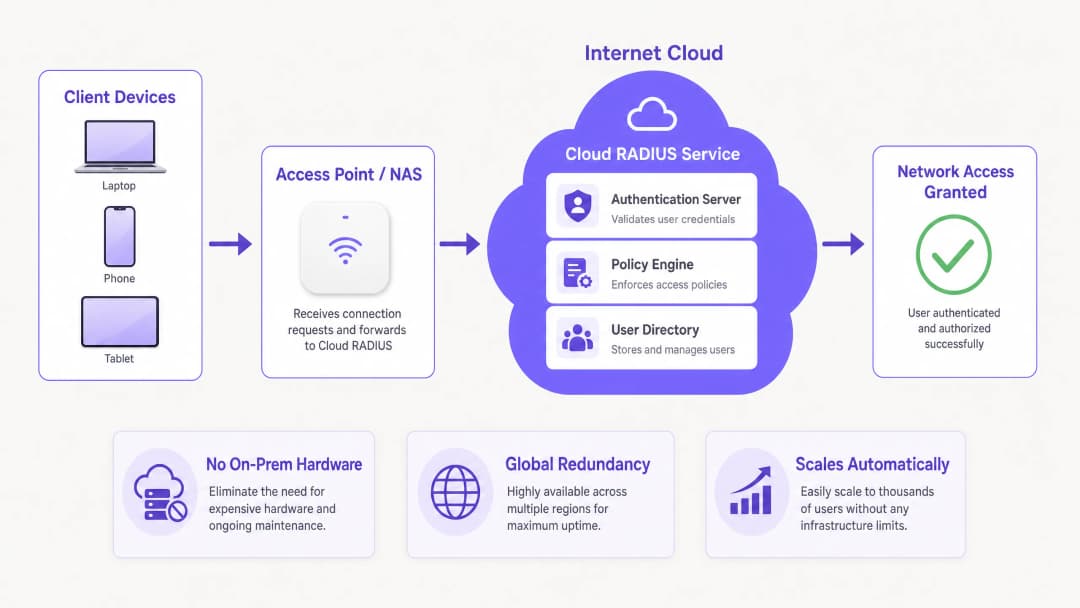
RADIUS, definido originalmente en RFC 2865, funciona en un modelo cliente-servidor en el que un servidor de acceso a la red (NAS) - como un punto de acceso WiFi o un concentrador VPN - reenvía las solicitudes de autenticación a un servidor central. Históricamente, esto significaba implementar FreeRADIUS o Microsoft Network Policy Server (NPS) en hardware dedicado. Aunque esto es viable para implementaciones en un solo sitio, escalar esta arquitectura en entornos distribuidos introduce importantes desafíos de latencia y redundancia.
Cloud RADIUS abstrae la infraestructura subyacente. Las solicitudes de autenticación se enrutan a endpoints en la nube distribuidos globalmente, lo que garantiza tiempos de respuesta inferiores a 100 milisegundos incluso bajo cargas pico. Esta elasticidad es fundamental para entornos de alta densidad como estadios o centros de conferencias.
Métodos EAP y Postura de Seguridad
La elección del método de Protocolo de Autenticación Extensible (EAP) determina fundamentalmente su postura de seguridad:
- PEAP (Protected EAP): Establece un túnel MSCHAPv2 dentro de una sesión TLS. Aunque PEAP cuenta con un amplio soporte y es fácil de integrar con Active Directory, es vulnerable al robo de credenciales a través de puntos de acceso no autorizados si los dispositivos cliente no están configurados estrictamente para validar el certificado del servidor.
- EAP-TLS: El estándar de oro empresarial. Requiere autenticación mutua por certificado - tanto el servidor como el cliente deben presentar certificados válidos. Esto elimina por completo los ataques basados en contraseñas, pero exige una infraestructura de clave pública (PKI) robusta y la integración de gestión de dispositivos móviles (MDM) para la distribución de certificados.
- EAP-TTLS y EAP-FAST: Ofrecen alternativas adecuadas para escenarios que requieren una amplia compatibilidad con clientes (incluidos sistemas heredados o Linux), o donde se necesitan credenciales de acceso protegido (PAC) para omitir las dependencias de validación de certificados.
Integración de WPA3 y OpenRoaming
Las implementaciones modernas deben tener en cuenta WPA3-Enterprise, que exige un modo de seguridad de 192 bits para obtener el máximo nivel de seguridad, lo que requiere conjuntos de cifrado específicos. Además, Cloud RADIUS facilita la participación en marcos de federación como OpenRoaming. Por ejemplo, Purple actúa como proveedor de identidad gratuito para OpenRoaming bajo su licencia de Connect, lo que permite una autenticación segura y fluida en las redes participantes de todo el mundo.
¿Tiene preguntas sobre su configuración específica?
Nuestro equipo trabaja con operadores de recintos, responsables de TI e ingenieros de redes en 80 000 espacios. Reserve una llamada de 20 minutos y le mostraremos cómo lo han solucionado otros profesionales como usted.
Guía de implementación
La implementación de Cloud RADIUS requiere un enfoque sistemático para garantizar que no haya tiempo de inactividad durante la transición.
Paso 1: Integración del proveedor de identidad (IdP)
Su instancia de Cloud RADIUS debe sincronizarse con su directorio de usuarios autoritativo. El aprovisionamiento nativo de SAML o SCIM con Microsoft Entra ID, Google Workspace o Okta es preferible a los proxies LDAP manuales o las importaciones CSV. Esto garantiza que cuando se da de baja a un empleado en el sistema de recursos humanos, su acceso a la red se revoca de inmediato.
Paso 2: Estrategia de gestión de certificados
Si va a implementar EAP-TLS, defina el ciclo de vida de sus certificados. Elija un proveedor de Cloud RADIUS que incluya una PKI integrada o que se integre perfectamente con su entidad de certificación (CA) existente. Automatice la emisión y revocación de certificados a través de su plataforma MDM (como Intune o Jamf) para evitar fallos de autenticación causados por certificados caducados.
Paso 3: Configuración de los dispositivos de red
Configure sus dispositivos NAS (puntos de acceso, switches) para que apunten a las direcciones IP primaria y secundaria de Cloud RADIUS. Asegúrese de que los secretos compartidos sean criptográficamente complejos (un mínimo de 32 caracteres aleatorios). Ajuste la configuración del tiempo de espera de conmutación por error; un tiempo de espera de 3 a 5 segundos es óptimo para evitar retrasos prolongados en la autenticación si el nodo primario deja de estar accesible.
Paso 4: Definición de políticas
Establezca políticas por cada SSID. Por ejemplo, aplique EAP-TLS para la red corporativa, PEAP para los dispositivos IoT heredados y aísle el acceso de invitados. Tenga en cuenta que RADIUS gestiona a los usuarios conocidos; para los visitantes, implemente una solución dedicada de Guest WiFi con un Captive Portal para capturar datos de origen, integrada con una plataforma de WiFi Analytics. Para obtener más información sobre la captación de visitantes, consulte Cómo mejorar la satisfacción de los huéspedes: la guía definitiva.
Buenas prácticas
- Aplicar una validación estricta de certificados de servidor: Para implementaciones PEAP, aplique directivas de grupo o perfiles de MDM que obliguen a los clientes a validar el certificado del servidor RADIUS y restrinjan la confianza a una CA raíz específica.
- Segmentar el tráfico de contabilidad y autenticación: Asegúrese de que los datos de contabilidad de RADIUS se supervisen y conserven de forma activa. Este registro de auditoría es esencial para los informes de cumplimiento (como PCI-DSS y HIPAA).
- Supervisar la latencia de autenticación: Una latencia alta suele indicar un enrutamiento subóptimo o problemas de sincronización de IdP. Utilice herramientas de supervisión para realizar un seguimiento del tiempo transcurrido desde el paquete Access-Request hasta el Access-Accept.
- Optimizar la planificación de señales y canales: Una autenticación fiable depende de una capa física estable. Consulte guías como Comprensión del RSSI y la intensidad de la señal para una planificación óptima de los canales para asegurarse de que su entorno de RF sea compatible con un roaming 802.1X sin interrupciones.
Resolución de problemas y mitigación de riesgos
Incluso con un servicio gestionado, una configuración incorrecta puede provocar fallos de acceso. Los modos de fallo más habituales son:
- Caducidad del certificado: La principal causa de fallos en EAP-TLS. Mitigación: Implemente alertas automatizadas 30 días antes de que caduquen los certificados de la CA o del servidor.
- Discrepancia en el secreto compartido: Suele ocurrir al añadir nuevos puntos de acceso. Mitigación: Estandarice las plantillas de configuración en su sistema de gestión de red.
- Problemas de NAT y de listas de IP permitidas: Los proveedores de Cloud RADIUS suelen exigir una lista de IP permitidas de NAS. Si sus sucursales utilizan IP dinámicas o configuraciones de NAT complejas, es posible que se descarten las solicitudes de autenticación. Mitigación: Utilice IP de salida estáticas o despliegue un proxy RADIUS local cuando sea necesario.
- Fallos de sincronización de IdP: Si el directorio en la nube no se sincroniza con el AD local, los nuevos usuarios no podrán autenticarse. Mitigación: Supervise de forma proactiva el estado del conector SCIM/LDAP.
ROI e impacto empresarial
La transición a Cloud RADIUS ofrece un valor empresarial medible:
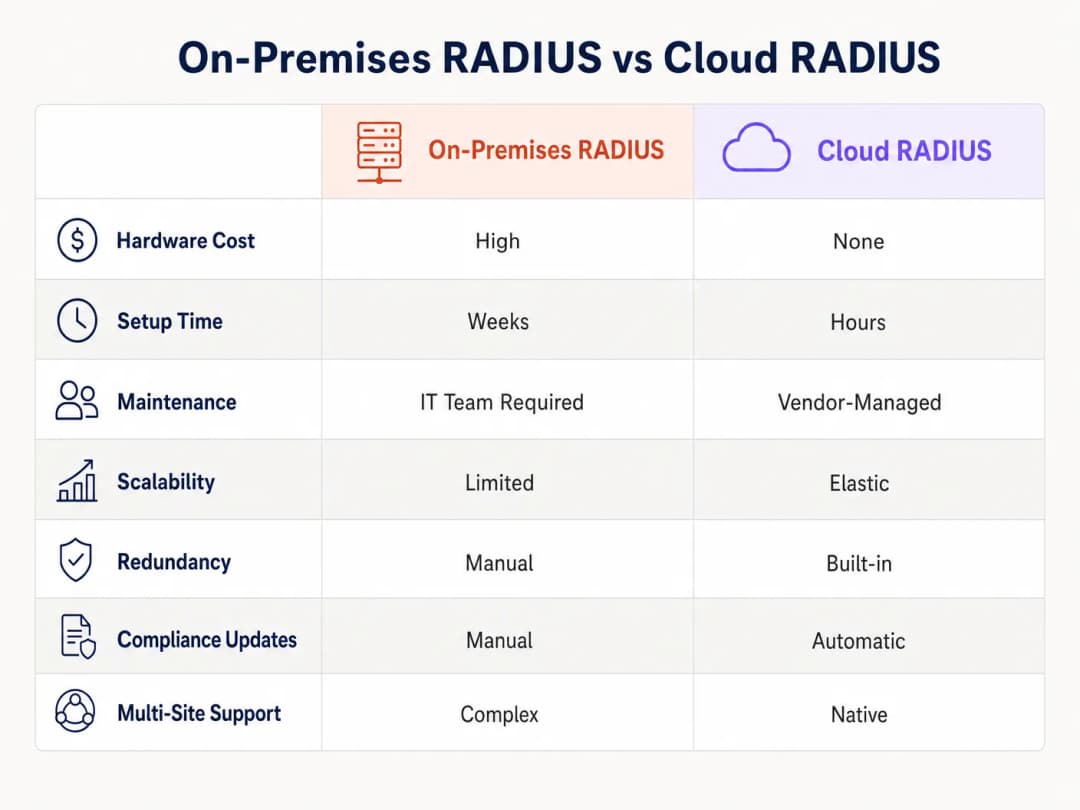
- Reducción de los gastos de capital en infraestructura (Capex): No es necesario adquirir, instalar en bastidores y alimentar servidores RADIUS físicos en cada ubicación principal.
- Menores costes operativos: Los equipos de TI ya no pasan horas parcheando vulnerabilidades del sistema operativo o gestionando manualmente la conmutación por error del servidor. Las actualizaciones gestionadas por el proveedor garantizan un cumplimiento continuo.
- Mejora de la seguridad: La transición a EAP-TLS a través de una PKI en la nube reduce el riesgo de robo de credenciales, lo que reduce directamente el coste potencial de una brecha de datos.
- Agilidad y escalabilidad: Al abrir una nueva sucursal comercial u hotel, la autenticación de red se puede aprovisionar en minutos en lugar de semanas. Para conocer estrategias de implementación prácticas, consulte Configuración de WiFi para empresas: guía práctica para 2026.
Con un control de acceso centralizado, las organizaciones no solo aseguran su perímetro, sino que también liberan al talento de ingeniería sénior para que se concentre en proyectos estratégicos de alto impacto en lugar de mantener una infraestructura heredada obsoleta.
Definiciones clave
Cloud RADIUS
Un servicio gestionado que aloja el protocolo Remote Authentication Dial-In User Service en un entorno de nube de alta disponibilidad, eliminando la necesidad de servidores de autenticación locales.
Evaluado por equipos de TI que buscan reducir el capex de hardware y los gastos operativos, manteniendo al mismo tiempo un acceso seguro a la red 802.1X.
EAP-TLS (Extensible Authentication Protocol-Transport Layer Security)
Un método de autenticación altamente seguro que requiere que tanto el cliente como el servidor presenten certificados digitales para demostrar su identidad.
El estándar recomendado para redes corporativas para evitar ataques basados en contraseñas, que requiere PKI y MDM para su implementación.
NAS (Network Access Server)
El dispositivo -como un punto de acceso WiFi, un conmutador o un concentrador VPN- que actúa como cliente RADIUS, reenviando las credenciales de usuario al servidor RADIUS.
Los ingenieros de red deben configurar el NAS con las IP del servidor RADIUS y los secretos compartidos correctos para habilitar la autenticación 802.1X.
Secret Shared
Una cadena de texto criptográfica conocida únicamente por el NAS y el servidor RADIUS, utilizada para cifrar paquetes RADIUS y verificar la autenticidad del remitente.
Un secreto compartido débil es una vulnerabilidad de seguridad importante; las implementaciones empresariales deben usar cadenas largas generadas aleatoriamente.
SCIM (System for Cross-domain Identity Management)
Un estándar abierto que automatiza el intercambio de información de identidad de usuario entre sistemas de TI o aplicaciones en la nube.
Se utiliza para aprovisionar y desaprovisionar automáticamente a los usuarios en el directorio de Cloud RADIUS cuando se realizan cambios en el sistema de identidad principal de TI o RR. HH.
OpenRoaming
Un marco de federación desarrollado por la Wireless Broadband Alliance que permite a los usuarios conectarse de forma automática y segura a las redes WiFi participantes a nivel mundial.
Los proveedores de Cloud RADIUS compatibles con OpenRoaming (como Purple) permiten a los establecimientos ofrecer una conectividad segura y fluida a los visitantes sin necesidad de Captive Portals.
Registros de contabilidad (Accounting Logs)
Registros generados por el servidor RADIUS que detallan los eventos de conexión de los usuarios, incluyendo la hora de inicio, la hora de finalización, los datos transferidos y la dirección IP asignada.
Fundamentales para las auditorías de seguridad, la resolución de problemas y para demostrar el cumplimiento de marcos regulatorios como PCI-DSS y GDPR.
Cambio de autorización (CoA)
Una función de RADIUS que permite al servidor modificar dinámicamente la sesión activa de un usuario, como cambiar su VLAN o desconectarlo, sin necesidad de realizar una reconexión.
Utilizado por los administradores de red para poner en cuarentena de forma instantánea un dispositivo comprometido o aplicar nuevas restricciones de política a mitad de la sesión.
Ejemplos prácticos
Un hotel de 200 habitaciones utiliza actualmente Microsoft NPS local para la autenticación de la WiFi del personal a través de PEAP. Experimentan tiempos de espera de autenticación durante las horas pico de entrada y desean migrar a Cloud RADIUS con EAP-TLS para mejorar la seguridad y la fiabilidad. ¿Cómo debería el director de TI estructurar esta migración?
- Implementar un inquilino de Cloud RADIUS e integrarlo con el Microsoft Entra ID del hotel a través de SCIM para la gestión automatizada del ciclo de vida de los usuarios. 2. Configurar la PKI integrada de Cloud RADIUS para emitir certificados de cliente. 3. Utilizar el MDM existente (por ejemplo, Intune) para enviar la CA raíz, los certificados de cliente y un nuevo perfil de WiFi configurado para EAP-TLS a todos los dispositivos del personal. 4. Configurar los puntos de acceso del hotel para que apunten a las IP primarias y secundarias de Cloud RADIUS, utilizando un nuevo secreto compartido complejo de 32 caracteres. 5. Ejecutar tanto el NPS antiguo como el nuevo Cloud RADIUS en paralelo en diferentes SSID durante un período de transición de dos semanas antes de retirar los servidores locales.
Una cadena minorista nacional con 500 ubicaciones necesita garantizar el cumplimiento de PCI-DSS para sus terminales de punto de venta (POS), que se conectan a través de WiFi. Se están trasladando a Cloud RADIUS. ¿Qué configuraciones específicas se requieren para cumplir con la normativa?
- Implementar una segmentación de red estricta: los terminales POS deben autenticarse en un SSID dedicado y oculto asignado a una VLAN aislada. 2. Forzar la autenticación EAP-TLS para todos los dispositivos POS para garantizar la autenticación mutua y evitar que dispositivos no autorizados se unan a la red POS. 3. Configurar el servicio Cloud RADIUS para conservar todos los registros de contabilidad (Access-Accept, Access-Reject, duración de la conexión) durante un mínimo de un año, tal como exige PCI-DSS. 4. Asegurarse de que los secretos compartidos de RADIUS entre los puntos de acceso de las sucursales y el servicio Cloud RADIUS se roten cada 90 días mediante un script automatizado.
Preguntas de práctica
Q1. Su organización está migrando de un Active Directory local a Google Workspace. Actualmente utiliza PEAP-MSCHAPv2 para la autenticación WiFi. ¿Por qué es esto un problema y cuál es la solución recomendada?
Sugerencia: Considere cómo PEAP valida las credenciales frente al protocolo de directorio.
Ver respuesta modelo
PEAP-MSCHAPv2 depende del hash NT de la contraseña de un usuario, el cual Google Workspace no almacena ni expone de forma nativa. La solución recomendada es migrar a EAP-TLS utilizando un proveedor de Cloud RADIUS que cuente con una PKI integrada. El servicio Cloud RADIUS puede sincronizar las identidades de los usuarios desde Google Workspace a través de SAML/SCIM y autenticar los dispositivos mediante certificados de cliente en lugar de contraseñas.
Q2. Una sucursal informa de que los usuarios experimentan retrasos de 30 segundos al conectarse a la red WiFi, seguidos de una conexión correcta. La IP principal de Cloud RADIUS en esa región se encuentra actualmente en mantenimiento. ¿Qué error de configuración está causando este retraso?
Sugerencia: Examine la comunicación entre el NAS y los servidores RADIUS.
Ver respuesta modelo
El NAS (punto de acceso o switch) tiene configurado un tiempo de espera de respuesta (timeout) del servidor RADIUS demasiado alto (por ejemplo, 30 segundos). Está esperando a que el servidor principal responda antes de realizar la conmutación por error (failover) al servidor secundario. El tiempo de espera debería reducirse a 3 - 5 segundos para garantizar una conmutación por error rápida sin afectar a la experiencia del usuario.
Q3. Está implementando Cloud RADIUS para un hospital. El equipo de seguridad exige que solo los dispositivos propiedad de la empresa puedan conectarse a la red interna, incluso si un empleado conoce un nombre de usuario y una contraseña válidos. ¿Cómo se aplica esta norma?
Sugerencia: ¿Qué método EAP verifica la identidad del dispositivo y no solo el conocimiento del usuario?
Ver respuesta modelo
Implemente EAP-TLS. Configure la solución MDM del hospital para distribuir un certificado de cliente único únicamente a los dispositivos corporativos registrados. Configure la política de Cloud RADIUS para rechazar cualquier solicitud de autenticación que no presente un certificado válido firmado por la PKI interna de confianza, bloqueando de manera efectiva los dispositivos BYOD o no autorizados, independientemente de si conocen la contraseña.
Continúe leyendo esta serie
Los beneficios de seguridad de RADIUS-as-a-Service para plantillas híbridas
Esta guía de referencia técnica explica cómo RADIUS-as-a-Service protege el acceso a la red para plantillas híbridas en centros distribuidos. Cubre la arquitectura, los beneficios de seguridad y los pasos de implementación para reemplazar la infraestructura RADIUS local por un servicio de autenticación gestionado en la nube. Para responsables de TI y arquitectos de red en hoteles, cadenas minoristas, estadios y organizaciones del sector público, esta guía proporciona las pruebas necesarias para evaluar y ejecutar una migración a RADIUS en la nube este trimestre.
Integración de RADIUS-as-a-Service con directorios en la nube (Azure AD y Google Workspace)
Esta guía de referencia técnica detalla cómo integrar RADIUS-as-a-Service con directorios en la nube - Microsoft Entra ID y Google Workspace - para la autenticación WiFi empresarial. Cubre la transición arquitectónica de NPS local a RADIUS nativo de la nube, el despliegue de autenticación EAP-TLS basada en certificados y las mejores prácticas operativas para proteger el acceso inalámbrico en entornos de hostelería, comercio minorista y sector público. Para los responsables de TI y arquitectos de redes que ya han invertido en identidad en la nube, esta guía cierra la brecha entre la gestión de directorios y la seguridad física de la red.
Cómo implementar la autenticación 802.1X con Cloud RADIUS
Esta guía de referencia técnica proporciona un marco integral para implementar la autenticación 802.1X con Cloud RADIUS en entornos empresariales distribuidos. Detalla la arquitectura, la selección del método EAP, la secuencia de implementación y las estrategias de mitigación de riesgos necesarias para proteger el acceso a la red y, al mismo tiempo, eliminar los costes operativos de la infraestructura local.
¿Tiene preguntas sobre su configuración específica?
Nuestro equipo trabaja con operadores de recintos, responsables de TI e ingenieros de redes en 80 000 espacios. Reserve una llamada de 20 minutos y le mostraremos cómo lo han solucionado otros profesionales como usted.