
Cómo implementar restricciones de tiempo y ancho de banda en WiFi para invitados
Una guía de referencia técnica autorizada sobre la implementación de restricciones de tiempo y ancho de banda en redes WiFi empresariales para invitados. Esta guía proporciona planos de arquitectura prácticos, configuraciones independientes del proveedor y casos de estudio reales para ayudar a los líderes de TI a equilibrar el rendimiento de la red, el cumplimiento de la seguridad y la experiencia del visitante.
Escucha esta guía
Ver transcripción del podcast
Resumen ejecutivo
Para las empresas modernas, ofrecer acceso inalámbrico para invitados ya no es un lujo; es una necesidad operativa. Sin embargo, una red de invitados no gestionada representa un vector de amenaza significativo, capaz de degradar el rendimiento de la red corporativa, exponer datos confidenciales e introducir responsabilidades regulatorias. Los gerentes de TI, arquitectos de redes y CTO deben realizar la transición de un modelo de conectividad abierta a una capa de acceso para invitados altamente estructurada y basada en políticas.
Esta guía de referencia detalla las estrategias técnicas para implementar restricciones precisas de tiempo y ancho de banda en redes inalámbricas para invitados. Al implementar una segmentación de red lógica a través de redes de área local virtuales (VLAN), utilizar marcos de calidad de servicio (QoS) de nivel empresarial y aprovechar los puntos de decisión de políticas (PDP) gestionados en la nube, las organizaciones pueden proteger las operaciones comerciales críticas al tiempo que ofrecen una experiencia de visitante de alta calidad.
A través de la limitación proactiva del ancho de banda, los límites de duración de las sesiones y la programación de SSID basada en el tiempo, los administradores de red pueden mitigar el riesgo de que los "acaparadores de ancho de banda" saturen los enlaces ascendentes, mantener el cumplimiento de estándares como PCI DSS v4.0 y GDPR, y abrir nuevas vías para la interacción con el cliente. Ya sea que se gestione un hotel de 200 habitaciones, un estadio deportivo de alta densidad o una presencia minorista multisitio, la implementación de políticas estructuradas de acceso a la red de invitados es una piedra angular del diseño de infraestructura de red moderno.
Análisis técnico profundo
La implementación de restricciones de tiempo y ancho de banda en redes inalámbricas para invitados requiere una comprensión profunda tanto de los protocolos inalámbricos como de las arquitecturas de seguridad de red. Para construir una red de invitados resiliente, los administradores deben operar en múltiples capas del modelo OSI, coordinando puntos de acceso, controladores inalámbricos, firewalls y servidores de autenticación.
1. Gestión de ancho de banda y calidad de servicio (QoS)
Las restricciones de ancho de banda se aplican para evitar que los clientes individuales o toda la red de invitados saturen el enlace ascendente WAN del establecimiento. Esto se logra mediante dos mecanismos principales: la limitación de velocidad (throttling) y la priorización del tráfico.
En la capa inalámbrica, la calidad de servicio se rige por el estándar IEEE 802.11e, que introduce Wi-Fi Multimedia (WMM) [1]. WMM prioriza el tráfico en cuatro categorías de acceso (AC):
- Voz (AC_VO): Máxima prioridad, mínima latencia (por ejemplo, VoIP).
- Video (AC_VI): Alta prioridad, baja latencia (por ejemplo, transmisión de medios).
- Mejor esfuerzo (AC_BE): Prioridad media, tráfico estándar (por ejemplo, navegación web).
- Segundo plano (AC_BK): Menor prioridad, datos de alto rendimiento (por ejemplo, descargas de archivos).
Para las redes de invitados, todo el tráfico debe asignarse a las categorías de Mejor esfuerzo (AC_BE) o Segundo plano (AC_BK). Esto garantiza que el tráfico corporativo crítico, como las transacciones de punto de venta (POS) o las llamadas VoIP corporativas, tenga prioridad sobre la navegación web de los invitados.
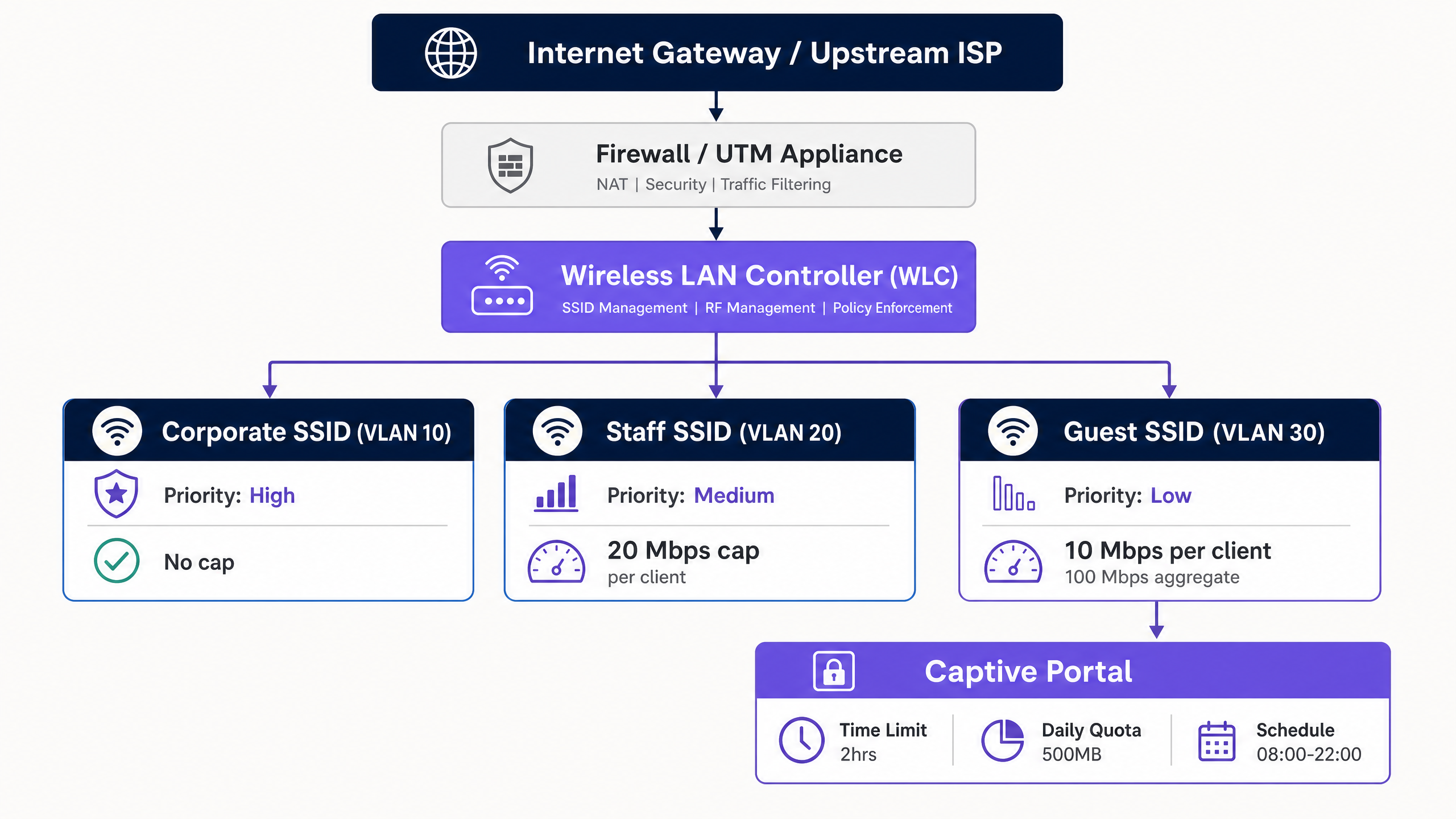
Para aplicar límites estrictos de rendimiento, los administradores implementan la limitación de velocidad por cliente y la limitación de velocidad por SSID. Los límites por cliente restringen las velocidades máximas de descarga y subida para un dispositivo individual (por ejemplo, 10 Mbps de bajada / 2 Mbps de subida), mientras que los límites por SSID restringen el ancho de banda agregado asignado a toda la red de invitados (por ejemplo, 100 Mbps en total).
2. Acceso basado en tiempo y gestión de sesiones
Las restricciones basadas en el tiempo gestionan la concurrencia de la red y evitan el acceso no autorizado a largo plazo. Esto implica dos conceptos distintos: los tiempos de espera de sesión y la programación de SSID.
- Tiempo de espera de sesión (Session Timeout): Se aplica a través de los atributos RADIUS devueltos durante la autenticación del Captive Portal. El servidor RADIUS envía el atributo
Session-Timeout(Atributo RADIUS 27) al punto de acceso (AP) o al controlador de LAN inalámbrica (WLC) [2]. Este valor, especificado en segundos, dicta cuánto tiempo permanece activa la sesión del cliente antes de requerir una nueva autenticación. - Tiempo de espera por inactividad (Idle Timeout): El atributo
Idle-Timeout(Atributo RADIUS 28) finaliza una sesión si no se detecta tráfico del cliente durante un período específico (por ejemplo, 15 minutos). Esto es fundamental en establecimientos de alta densidad para recuperar direcciones IP de dispositivos inactivos. - Cambio de autorización de RADIUS (CoA): Definido en RFC 5176, CoA permite que el servidor RADIUS envíe dinámicamente cambios de política al WLC o AP sin desconectar el enlace inalámbrico físico [3]. Por ejemplo, si un invitado consume su cuota diaria de datos, el servidor RADIUS puede emitir un mensaje CoA para limitar dinámicamente el ancho de banda del cliente de 20 Mbps a 1 Mbps.
3. Segmentación de red y cumplimiento
Una regla fundamental de la arquitectura inalámbrica para invitados es el aislamiento completo de los sistemas corporativos. Esto se logra a través de la segmentación de VLAN. El tráfico de invitados debe residir en una VLAN dedicada (por ejemplo, VLAN 30), completamente separada de la LAN corporativa (VLAN 10) y de la red de voz/gestión (VLAN 20).
El enrutamiento inter-VLAN debe restringirse en la capa del firewall. Las políticas restrictivas del firewall deben bloquear todo el tráfico de invitados a corporativo. Además, se debe habilitar el aislamiento de clientes (también conocido como bloqueo de igual a igual) en el SSID de invitados. Esto evita que los clientes inalámbricos en la misma red de invitados se comuniquen entre sí, mitigando el riesgo de propagación lateral de malware o ataques de intermediario (MITM).
La segmentación de red no es solo una buena práctica; es un requisito estricto de cumplimiento. Bajo el Requisito 1.3 de PCI DSS v4.0, las organizaciones deben implementar la segmentación de red para aislar el entorno de datos de titulares de tarjetas (CDE) de las redes no confiables, incluido el WiFi para invitados [4]. No segmentar la red de invitados hace que toda la infraestructuentran en el alcance de las auditorías PCI, lo que aumenta drásticamente los costos de cumplimiento y los riesgos de seguridad.
Además, las organizaciones que recopilan datos personales a través de captive portals deben cumplir con el GDPR. Esto requiere implementar una base legal para la recopilación de datos, presentar avisos de privacidad claros y aplicar límites estrictos de retención de datos en los registros de sesión.
Guía de implementación
Implementar restricciones de tiempo y ancho de banda en una red empresarial requiere un flujo de trabajo sistemático e independiente del proveedor. A continuación, se presenta el plan de implementación paso a paso recomendado para ingenieros de redes senior.
Paso 1: Segmentación lógica de la red (VLAN y DHCP)
Antes de configurar cualquier ajuste inalámbrico, establezca los límites lógicos de la red en su switch principal y firewall.
- Crear la VLAN de invitados: Configure una VLAN dedicada (por ejemplo, VLAN 30) en sus switches principales y conéctela en modo troncal (trunk) a todos los Access Points.
- Configurar el alcance de DHCP: Establezca un alcance de DHCP dedicado para la VLAN de invitados. Utilice un tiempo de concesión (lease time) corto (por ejemplo, de 2 a 4 horas) para evitar el agotamiento de direcciones IP en entornos de alta rotación.
- Habilitar DHCP Snooping e inspección ARP: En los switches, habilite DHCP snooping y la inspección dinámica de ARP (DAI) para protegerse contra servidores DHCP no autorizados y ataques de suplantación de MAC (MAC spoofing).
Paso 2: Política de firewall y modelado de tráfico (Traffic Shaping)
Configure la puerta de enlace de seguridad (security gateway) para controlar el tráfico de la VLAN de invitados.
- Bloquear el enrutamiento inter-VLAN: Cree una regla de firewall que descarte explícitamente todo el tráfico originado en la VLAN de invitados (VLAN 30) con destino a cualquier subred interna (por ejemplo, VLAN 10, VLAN 20).
- Aplicar modelado de tráfico (Traffic Shaping): Cree una política de modelado de tráfico compartida en el firewall para limitar el rendimiento agregado de la interfaz de la VLAN de invitados para proteger el enlace WAN principal. Por ejemplo, en un circuito de fibra de 1 Gbps, limite la VLAN de invitados a 150 Mbps.
Paso 3: Configuración del SSID inalámbrico
Configure la red inalámbrica de invitados en su controlador de LAN inalámbrica (WLC) o en el panel de administración en la nube.
- Crear el SSID de invitados: Transmita un SSID dedicado (por ejemplo, "Venue Guest WiFi").
- Habilitar el aislamiento de clientes: Active "Aislamiento de clientes" (Client Isolation) o "Bloqueo de igual a igual" (Peer-to-Peer Blocking) para evitar que los dispositivos de los invitados se comuniquen entre sí.
- Habilitar el cifrado inalámbrico oportunista (OWE) de WPA3: Para proporcionar confidencialidad de datos sin la fricción de una clave precompartida (PSK), configure WPA3-OWE. Esto cifra el tráfico aéreo de cada sesión de invitado de forma de manera individual.
Paso 4: Integración de RADIUS y Captive Portal
Integre su infraestructura inalámbrica con un Punto de Decisión de Políticas (PDP) centralizado como Guest WiFi para gestionar la autenticación y la aplicación de políticas.
- Configurar servidores RADIUS: Apunte sus WLC/APs a las direcciones IP del servidor RADIUS en la nube. Configure secretos compartidos (Shared Secrets) seguros.
- Asociar atributos RADIUS: Configure el perfil RADIUS para devolver atributos de límite de sesión tras una autenticación exitosa:
Session-Timeout=7200(Aplica un límite de sesión de 2 horas).Idle-Timeout=900(Aplica un tiempo de espera por inactividad de 15 minutos).
- Configurar la redirección al Captive Portal: Establezca las ACL de preautenticación en los WLC/APs para permitir DNS, DHCP y el tráfico a los nombres de host del captive portal, mientras redirige todo el demás tráfico HTTP/HTTPS a la página de inicio (splash page) del portal.
Paso 5: Programación de SSID y ventanas de tiempo
Para proteger aún más la red y reducir la superficie de ataque, configure la programación de SSID para desactivar el acceso de invitados fuera de las horas operativas.
- Definir el horario: En el WLC o panel en la nube, asocie el SSID de invitados a un perfil de tiempo (por ejemplo, de lunes a domingo, de 08:00 a 22:00).
- Forzar el apagado: Asegúrese de que los AP dejen de transmitir por completo el SSID de invitados fuera de estas horas, en lugar de solo bloquear la asociación.
Mejores prácticas
Para garantizar una implementación equilibrada que mantenga un alto rendimiento de la red sin causar fricciones a los invitados, los arquitectos de red deben seguir las siguientes mejores prácticas estándar de la industria.
1. Asignación dinámica de ancho de banda y "Bursting"
Un límite estático de ancho de banda a veces puede provocar una experiencia de usuario subóptima durante los períodos de baja ocupación. Se recomienda encarecidamente implementar una política de asignación dinámica de ancho de banda o bursting.
- Bursting (o Boost): Permite que el dispositivo de un invitado supere temporalmente su límite de ancho de banda (por ejemplo, aumentando de 10 Mbps a 30 Mbps durante los primeros 15 segundos de una descarga) para permitir cargas rápidas de páginas o el almacenamiento en búfer de videos, antes de reducirlo suavemente a su límite de velocidad base. Esto es compatible de forma nativa con controladores avanzados y plataformas como Tanaza [5].
- Modelado dinámico (Dynamic Shaping): Ajusta el límite de ancho de banda agregado del SSID de invitados en función de la utilización general de la WAN. Si las redes corporativas están inactivas, la red de invitados puede expandir dinámicamente su límite, contrayéndolo inmediatamente cuando el tráfico corporativo aumente.
2. Adaptar las políticas según el sector comercial
Los límites de tiempo y ancho de banda no deben ser uniformes en los diferentes entornos. Deben adaptarse a los tiempos de permanencia específicos y a las expectativas de los usuarios de cada sector.
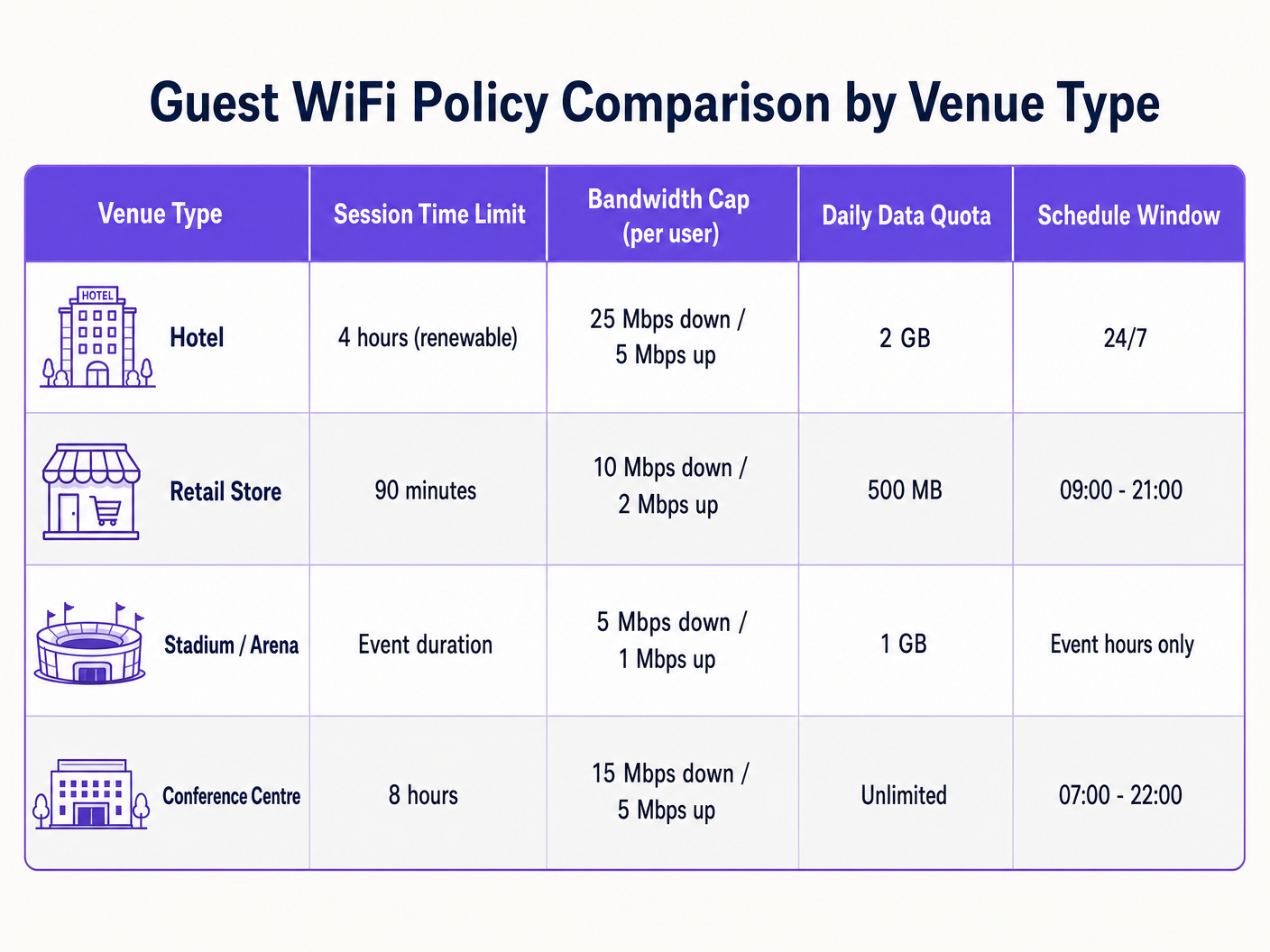
- Hotelería: Los huéspedes de los hoteles esperan conexiones de alto rendimiento para streaming y trabajo remoto. Adapte las políticas para admitir al menos 25 Mbps de bajada por habitación, con tiempos de sesión más largos (por ejemplo, 24 horas) para evitar la fricción de la reautenticación constante [6]. Para obtener más información, consulte nuestra guía sobre Planificación de velocidad y ancho de banda de Hotel WiFi .
- Comercio minorista (Retail): Los tiempos de permanencia son más cortos, normalmente de 30 a 90 minutos. Implemente un límite de tiempo de sesión estricto de 90 minutos para fomentar la rotación y capturar datos de marketing a través de WiFi Analytics durante la reautenticación [7].
- Estadios y arenas: Entornos de alta densidad con decenas de miles de usuarios concurrentes. El ancho de blos límites deben ser muy conservadores (p. ej., 5 Mbps de bajada) para evitar la saturación total del backhaul, con tiempos de sesión adaptados a la duración del evento [8].
3. Aproveche el acceso por niveles basado en perfiles
Evite una red de invitados de "talla única". Implemente perfiles de acceso por niveles para recompensar la lealtad y monetizar la conectividad premium:
- Nivel gratuito: Velocidad estándar (p. ej., 5 Mbps de bajada), límite de sesión de 1 hora, inicio de sesión básico en el Captive Portal.
- Nivel Premium: Alta velocidad (p. ej., 50 Mbps de bajada), límite de sesión de 24 horas, autenticado mediante credenciales de lealtad, número de habitación o pago directo. Esto se implementa a menudo utilizando las 10 mejores soluciones de control de acceso a la red (NAC) para 2026 o integrado con Cómo implementar la autenticación 802.1X con Cloud RADIUS .
Resolución de problemas y mitigación de riesgos
Operar una red inalámbrica de invitados con restricciones activas introduce modos de falla específicos que los equipos de TI deben monitorear y mitigar de manera proactiva.
1. Aleatorización de direcciones MAC y seguimiento de sesiones
Los sistemas operativos móviles modernos (iOS 14+, Android 10+) emplean la aleatorización de direcciones MAC de forma predeterminada, rotando el identificador de hardware del dispositivo para proteger la privacidad del usuario.
- El riesgo: Si su red de invitados realiza el seguimiento de los límites de tiempo de sesión o las cuotas de datos únicamente por dirección MAC, un dispositivo que aleatorice su dirección MAC aparecerá como un dispositivo completamente nuevo, evadiendo sus límites de tiempo y de datos.
- Mitigación: No dependa de las direcciones MAC para el estado de la sesión. Utilice un modelo de autenticación basado en la identidad en la capa del Captive Portal. Asocie el estado de la sesión, los límites de tiempo y las cuotas de datos con la identidad autenticada del usuario (p. ej., dirección de correo electrónico, número de teléfono verificado o ID de lealtad) en su base de datos RADIUS.
2. Agotamiento de direcciones IP en espacios de alta rotación
En espacios de gran afluencia como centros de transporte o centros comerciales, un tiempo de concesión DHCP prolongado puede agotar rápidamente el grupo de direcciones IP disponibles, impidiendo que se conecten nuevos invitados.
- El riesgo: Si las concesiones DHCP se configuran en las 24 horas estándar, pero el tiempo promedio de permanencia de los invitados es de 20 minutos, miles de direcciones IP seguirán asignadas a dispositivos que ya se retiraron, dejando sin servicio a los usuarios activos.
- Mitigación: Reduzca el tiempo de concesión DHCP en el alcance de invitados a 30 o 60 minutos. Implemente una máscara de subred más grande (p. ej.,
/20o/19en lugar de/24) para expandir el grupo de direcciones IP disponibles. Habilite DHCP Release on Disconnect si su controlador inalámbrico lo admite.
3. Fallas de redirección del Captive Portal (DNS y SSL)
La queja más común de los invitados es "la página de inicio de sesión no carga". Esto casi siempre se debe a una configuración incorrecta de DNS o a problemas con el certificado SSL.
- El riesgo: Si el dispositivo del invitado no puede resolver las consultas DNS antes de la autenticación, no podrá cargar el Captive Portal. Además, si la redirección del Captive Portal utiliza un certificado SSL no confiable o caducado, los navegadores modernos bloquearán la redirección con una advertencia de seguridad.
- Mitigación: Asegúrese de que la ACL de preautenticación (walled garden) permita explícitamente el tráfico DNS a resolutores públicos (p. ej.,
1.1.1.1o8.8.8.8) o al DNS de la puerta de enlace local. Utilice siempre un certificado SSL/TLS válido y de confianza pública para el nombre de host de redirección de su Captive Portal. Evite los certificados autofirmados.
ROI e impacto empresarial
Implementar restricciones estructuradas de WiFi para invitados no es un simple ejercicio técnico; ofrece retornos financieros y operativos medibles para la empresa.
1. Contención de costos de WAN y ahorro de ancho de banda
Las redes de invitados no controladas obligan a las organizaciones a actualizar continuamente sus circuitos WAN para hacer frente a la demanda máxima. Al aplicar límites de velocidad por cliente y topes agregados, las empresas pueden prolongar significativamente la vida útil de sus conexiones de internet existentes.
- Escenario: Un hotel de tamaño mediano con un circuito de 500 Mbps experimenta una latencia severa durante las horas pico de la noche debido a que algunos invitados transmiten video en 4K.
- Solución: Implementar un límite de 15 Mbps por cliente reduce la utilización máxima en un 40%, eliminando la necesidad de actualizar a un costoso circuito de 1 Gbps, lo que ahorra miles de dólares anuales en costos recurrentes del ISP.
2. Mayor confiabilidad de la red operativa
En el sector minorista y la hospitalidad, la misma conexión física a internet a menudo admite tanto los servicios para invitados como las operaciones críticas para el negocio (como los sistemas POS, el ERP de back-office y la comunicación del personal).
- Impacto empresarial: Implementar una segmentación estricta de VLAN y priorizar el tráfico corporativo a través de WMM garantiza que la actividad de los invitados nunca interfiera con una transacción. El procesamiento de tarjetas de crédito de una tienda minorista seguirá siendo instantáneo incluso si la red de invitados está saturada de compradores, protegiendo directamente los ingresos en el punto de venta.
3. Monetización de marketing y captura de datos de primera mano
Aplicar límites de tiempo de sesión (p. ej., 90 minutos) requiere que los invitados interactúen con el Captive Portal periódicamente. Esto crea puntos de contacto repetibles para capturar valiosos datos de primera mano, impulsar los registros de lealtad y mostrar anuncios dirigidos.
- Captura de datos: Al requerir un correo electrónico o inicio de sesión social para renovar una sesión, los establecimientos crean bases de datos de clientes ricas y conformes con las normativas que alimentan las plataformas de CRM y marketing.
- Ingresos publicitarios: Los establecimientos pueden monetizar el espacio de pantalla del Captive Portal mostrando páginas de inicio patrocinadas o anuncios de comercios locales durante el flujo de reautenticación, transformando el WiFi de invitados de un centro de costos operativos a un generador directo de ingresos.
Referencias
[1] IEEE Standard for Information Technology - Telecommunications and Information Exchange Between Systems - Wireless LAN Medium Access Control (MAC) and Physical Layer (PHY) Specifications. Amendment 8: Medium Access Control (MAC) Quality of Service Enhancements. IEEE Std 802.11e-2005. [2] Rigney, C., et al. Remote Authentication Dial In User Service (RADIUS). RFC 2865, June 2000. [3] Chiba, M., et al. Dynamic Authorization Extensions to Remote Authentication Dial In User Service (RADIUS). RFC 5176, January 2008. [4] Estándar de Seguridad de Datos de la Industria de Tarjetas de Pago (PCI), Requisitos y procedimientos de evaluación de seguridad, Versión 4.0. Consejo de Estándares de Seguridad de PCI, marzo de 2022. [5] Tanaza S.p.A. Control de ancho de banda por cliente en la plataforma en la nube de Tanaza. Documentación de Tanaza, 2018. [6] Purple.ai. Planificación de velocidad y ancho de banda de WiFi para hoteles: Una guía definitiva para gerentes de TI. Guías de referencia de Purple, 2024. [7] Purple.ai. Plataforma de marketing y analítica de WiFi para invitados: Aprovechando la afluencia física. Whitepapers de Purple, 2025. [8] Cox Business. Soluciones de conectividad para estadios: Implementación inalámbrica de alta densidad. Whitepaper de Cox Communications, 2025.
Definiciones clave
IEEE 802.11e / WMM
An amendment to the IEEE 802.11 standard that introduces Quality of Service (QoS) enhancements, prioritizing wireless traffic into voice, video, best effort, and background categories.
IT teams use WMM to map guest wireless traffic to low-priority categories, ensuring critical corporate applications are never starved of bandwidth.
RADIUS Attribute 27 (Session-Timeout)
A standard RADIUS attribute returned by the authentication server that defines the maximum number of seconds a user session can remain active before requiring re-authentication.
Encountered when integrating captive portals with RADIUS. It is used to enforce strict time limits on guest sessions (e.g., 7200 seconds for 2 hours).
RADIUS Attribute 28 (Idle-Timeout)
A RADIUS attribute that specifies the maximum period of inactivity (in seconds) allowed for a client session before the network access point automatically terminates the connection.
Critical in high-density venues to reclaim IP addresses from devices that have left the area without logging out.
RADIUS Change of Authorization (CoA)
A protocol extension (RFC 5176) that enables a RADIUS server to dynamically modify an active session's policies (such as bandwidth caps or VLAN assignment) without disconnecting the client.
Used to dynamically throttle a guest's bandwidth in real-time once they exceed their daily data quota.
Client Isolation
A security feature on wireless access points that prevents wireless clients associated with the same SSID from communicating with each other.
Essential on guest networks to prevent lateral malware propagation, device snooping, and local man-in-the-middle attacks.
WPA3 Opportunistic Wireless Encryption (OWE)
A Wi-Fi Alliance certified standard that provides individualized data encryption for open wireless networks, preventing passive eavesdropping without requiring a shared password.
The modern replacement for completely open guest networks, delivering security and data privacy to visitors with zero connection friction.
DHCP Lease Time
The duration for which a network device is allocated a specific IP address by the DHCP server before the address is returned to the pool or renewed.
In guest networks with high turnover, DHCP lease times must be kept short (e.g., 1 hour) to prevent IP pool exhaustion.
Network Segmentation
The architectural practice of splitting a physical network into multiple logical subnets (VLANs), each isolated by firewall rules and security policies.
A mandatory requirement under PCI DSS v4.0 to isolate the untrusted guest wireless network from the Cardholder Data Environment (CDE).
Ejemplos resueltos
A 200-room luxury hotel wants to implement a tiered guest WiFi model. Standard guests should receive a free, basic connection sufficient for web browsing, while loyalty members and paying guests should receive premium high-speed access capable of streaming 4K video. The hotel uses Cisco Catalyst 9800 WLCs and Cisco DNA Center.
Deploy a single Guest SSID configured with 802.1X and MAC Authentication Bypass (MAB) pointing to a centralized RADIUS server (e.g., Cloud RADIUS). Configure the captive portal to authenticate users. Upon successful login, the RADIUS server evaluates the user's profile:
- For Standard Guests: The RADIUS server returns access-accept with Cisco Vendor-Specific Attributes (VSAs) for rate limiting:
cisco-avpair = "subscriber:traffic-class=in direction=input action=shape rate=5000000"andcisco-avpair = "subscriber:traffic-class=out direction=output action=shape rate=1000000"(5 Mbps down / 1 Mbps up), along withSession-Timeout = 86400(24 hours). - For Premium/Loyalty Guests: The RADIUS server returns Cisco VSAs for high-speed rate limiting:
cisco-avpair = "subscriber:traffic-class=in direction=input action=shape rate=50000000"andcisco-avpair = "subscriber:traffic-class=out direction=output action=shape rate=10000000"(50 Mbps down / 10 Mbps up), along withSession-Timeout = 604800(7 days). This tiered model is enforced dynamically on a single SSID, minimizing RF overhead by avoiding multiple guest SSIDs.
A high-density sports stadium with a capacity of 50,000 concurrent spectators needs to prevent guest WiFi from saturating their 10 Gbps WAN uplink during live events, while ensuring spectators can still upload social media posts and access the stadium's mobile ordering app.
Configure a highly structured, high-density wireless policy on the Wireless LAN Controller (e.g., HPE Aruba Mobility Conductor):
- SSID Rate Limiting: Set a strict per-client bandwidth cap of 3 Mbps downstream and 1 Mbps upstream. This is sufficient for mobile apps and text/image uploads but discourages high-bandwidth video streaming.
- Aggregate Bandwidth Shaping: Apply an aggregate traffic shaping contract on the guest VLAN at the firewall (e.g., Fortinet FortiGate) to cap the entire guest network at 2 Gbps (20% of the total WAN capacity), leaving 8 Gbps for broadcast media, POS transactions, and operational staff.
- Time-Based Access: Set the captive portal session timeout to 14,400 seconds (4 hours), matching the typical duration of a sports event. Enable an aggressive
Idle-Timeoutof 600 seconds (15 minutes) to quickly reclaim IP addresses from spectators who leave the stadium early.
A national retail chain with 150 stores wants to implement a guest WiFi network that automatically shuts down outside of store hours to prevent security risks and unauthorized use of store internet by loiterers in the parking lot overnight.
Deploy a cloud-managed wireless architecture (e.g., Cisco Meraki or Juniper Mist) integrated with a centralized policy dashboard:
- Configure SSID Scheduling: In the cloud-managed dashboard, configure a time schedule profile for the 'Store Guest' SSID. Set the active hours to match store trading hours plus a 30-minute buffer (e.g., Monday-Saturday, 08:30 to 21:30; Sunday, 10:30 to 18:30).
- Enforce Complete SSID Suppression: Ensure the cloud profile is set to completely disable the radio broadcasting the Guest SSID outside these hours. This prevents the SSID from appearing in scan lists, eliminating the risk of overnight brute-force or probing attacks.
- Session Expiry: Set a strict 90-minute session timeout (
Session-Timeout = 5400) at the captive portal layer. This matches average retail dwell times and prompts users to re-authenticate if they stay longer, driving repeat marketing engagement.
Preguntas de práctica
Q1. A major retail shopping mall experiences frequent DHCP IP address exhaustion on its guest WiFi network during peak weekend hours. The current configuration uses a `/24` subnet (254 available IPs) with a 24-hour DHCP lease time. How should the network architect resolve this issue without expanding the hardware infrastructure?
Sugerencia: Consider the relationship between average dwell time, DHCP lease duration, and the size of the logical subnet.
Ver respuesta modelo
The network architect should implement two immediate changes:
- Reduce the DHCP lease time from 24 hours to 30 or 60 minutes. Since the average dwell time in a shopping mall is 1 to 2 hours, a short lease time ensures that IP addresses are rapidly reclaimed from departed devices and returned to the pool.
- Expand the DHCP scope by changing the subnet mask from a
/24to a/21(providing 2,046 available IPs) or/20(providing 4,094 available IPs). This increases the logical size of the IP pool on Guest VLAN 30 without requiring any new physical switches or access points.
Q2. An IT manager notices that several users on the guest WiFi network are consistently bypassing the 500 MB daily data quota. The network uses MAC-based tracking to enforce quotas. How are the users likely bypassing this restriction, and what is the recommended enterprise-grade solution?
Sugerencia: Modern mobile operating systems rotate their physical identifiers automatically.
Ver respuesta modelo
The users are bypassing the quota by utilizing MAC Address Randomization, a native privacy feature on modern iOS and Android devices. By toggling their WiFi connection off and on, or modifying their device settings, they generate a new randomized MAC address, which the network access point treats as a brand-new device with a fresh 500 MB quota. The recommended solution is to transition from MAC-based session tracking to Identity-Based Session Tracking. Configure the captive portal to require user authentication (e.g., email verification, SMS OTP, or social login). Associate the data consumption quota with the user's authenticated identity in the centralized RADIUS/policy database. When a user connects, regardless of what randomized MAC address their device presents, they must log in, and their session will be mapped to their unique identity, enforcing the 500 MB daily limit across all MAC addresses they use.
Q3. A hotel chain wants to ensure its guest wireless network complies with PCI DSS v4.0. During an audit, the QSA (Qualified Security Assessor) discovers that the hotel's property management system (PMS) and guest WiFi are on different subnets but connected to the same physical switches without firewall rules blocking inter-subnet traffic. What is the compliance risk, and how should it be remediated?
Sugerencia: PCI DSS requires logical segmentation to be actively enforced, not just defined by subnets.
Ver respuesta modelo
The compliance risk is that the guest WiFi network is not segmented from the Cardholder Data Environment (CDE) where the PMS resides. In a flat physical network with inter-subnet routing enabled and no firewall restrictions, any guest device on the WiFi can route traffic directly to the PMS server. This brings the entire guest WiFi network into the scope of the PCI audit, representing a critical non-compliance finding. To remediate this:
- Enforce strict VLAN segmentation on the switches. Assign the guest WiFi to a dedicated VLAN (VLAN 30) and the PMS/CDE to a separate secure VLAN (VLAN 100).
- Implement firewall policies at the gateway/router level. Configure explicit Access Control Lists (ACLs) or firewall rules that drop all traffic originating from VLAN 30 destined for VLAN 100.
- Enable stateful packet inspection and perform regular penetration testing to verify that no guest device can establish a connection to any device within the CDE, thereby officially segmenting the guest network out of the PCI audit scope.
Continúe leyendo esta serie
Responsabilidades legales y filtrado de contenido en redes públicas de invitados
Esta guía proporciona a los gerentes de TI, arquitectos de red y CTO un marco técnico y legal definitivo para implementar el filtrado de contenido en redes WiFi públicas de invitados. Cubre las obligaciones regulatorias bajo el GDPR, la Ley de Seguridad en Línea del Reino Unido de 2023 (UK Online Safety Act 2023) y PCI DSS, junto con una arquitectura multicapa para filtrado DNS, autenticación de Captive Portal, firewall de capa de aplicación y segmentación de VLAN. Los operadores de establecimientos en los sectores de hotelería, retail, salud y transporte encontrarán pasos de implementación prácticos, casos de estudio reales y marcos de decisión para construir una red de invitados de alto rendimiento y legalmente defendible.
La guía definitiva para la arquitectura de WiFi de invitados segura
Esta guía proporciona a los gerentes de TI, arquitectos de red y CTO de hoteles, cadenas de retail, estadios y organizaciones del sector público un plan técnico completo para implementar un WiFi de invitados empresarial seguro. Cubre los tres pilares arquitectónicos principales (segmentación de red, cifrado WPA3-OWE y control de acceso basado en la identidad), junto con los requisitos de cumplimiento de PCI DSS y GDPR, casos de estudio del mundo real y una guía de implementación paso a paso.
Minimizar las distracciones de los estudiantes con el bloqueo de anuncios a nivel de red
Esta guía de referencia técnica autorizada detalla la arquitectura, implementación y el impacto comercial del bloqueo de anuncios a nivel de red en entornos educativos. Proporciona a los gerentes de TI y arquitectos de red estrategias accionables para recuperar ancho de banda, fortalecer el cumplimiento y eliminar los riesgos de publicidad maliciosa.