
How to Implement Time and Bandwidth Restrictions on Guest WiFi
An authoritative technical reference guide on implementing time and bandwidth restrictions on enterprise guest WiFi networks. This guide provides actionable architectural blueprints, vendor-neutral configurations, and real-world case studies to help IT leaders balance network performance, security compliance, and visitor experience.
Listen to this guide
View podcast transcript
Executive Summary
For modern enterprises, offering guest wireless access is no longer a luxury; it is an operational necessity. However, an unmanaged guest network represents a significant threat vector, capable of degrading corporate network performance, exposing sensitive data, and introducing regulatory liabilities. IT managers, network architects, and CTOs must transition from a model of open-ended connectivity to a highly structured, policy-driven guest access layer.
This reference guide details the technical strategies for implementing precise time and bandwidth restrictions on guest wireless networks. By deploying logical network segmentation via Virtual Local Area Networks (VLANs), utilizing enterprise-grade Quality of Service (QoS) frameworks, and leveraging cloud-managed Policy Decision Points (PDPs), organizations can protect critical business operations while delivering a high-quality visitor experience.
Through proactive bandwidth throttling, session duration limits, and time-based SSID scheduling, network administrators can mitigate the risk of "bandwidth hogs" saturating upstream links, maintain compliance with standards such as PCI DSS v4.0 and GDPR, and unlock new avenues for customer engagement. Whether managing a 200-room hotel, a high-density sports stadium, or a multi-site retail footprint, the deployment of structured guest network access policies is a cornerstone of modern network infrastructure design.
Technical Deep-Dive
Implementing time and bandwidth restrictions on guest wireless networks requires a deep understanding of both wireless protocols and network security architectures. To build a resilient guest network, administrators must operate at multiple layers of the OSI model, coordinating access points, wireless controllers, firewalls, and authentication servers.
1. Bandwidth Management and Quality of Service (QoS)
Bandwidth restrictions are enforced to prevent individual clients or the entire guest network from saturating the venue's WAN uplink. This is accomplished using two primary mechanisms: rate limiting (throttling) and traffic prioritization.
At the wireless layer, Quality of Service is governed by the IEEE 802.11e standard, which introduces Wi-Fi Multimedia (WMM) [1]. WMM prioritizes traffic into four Access Categories (AC):
- Voice (AC_VO): Highest priority, lowest latency (e.g., VoIP).
- Video (AC_VI): High priority, low latency (e.g., streaming media).
- Best Effort (AC_BE): Medium priority, standard traffic (e.g., web browsing).
- Background (AC_BK): Lowest priority, high-throughput data (e.g., file downloads).
For guest networks, all traffic should be mapped to the Best Effort (AC_BE) or Background (AC_BK) categories. This ensures that critical corporate traffic, such as Point of Sale (POS) transactions or corporate VoIP calls, takes precedence over guest web browsing.
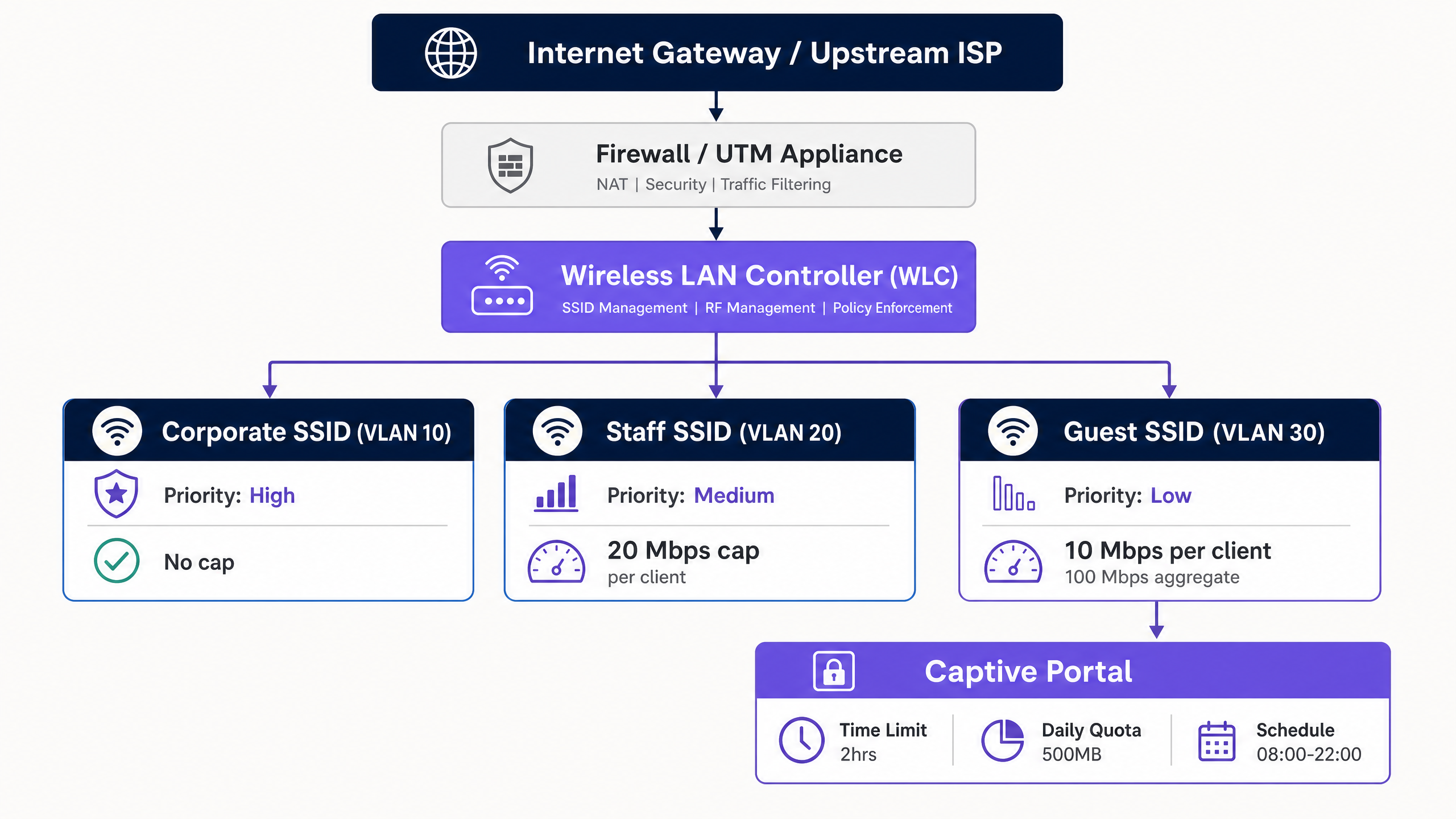
To enforce hard throughput limits, administrators deploy Per-Client Rate Limiting and Per-SSID Rate Limiting. Per-client limits cap the maximum downstream and upstream speeds for an individual device (e.g., 10 Mbps down / 2 Mbps up), while per-SSID limits restrict the aggregate bandwidth allocated to the entire guest network (e.g., 100 Mbps total).
2. Time-Based Access and Session Management
Time-based restrictions manage network concurrency and prevent unauthorized long-term access. This involves two distinct concepts: session timeouts and SSID scheduling.
- Session Timeout: Enforced via RADIUS attributes returned during captive portal authentication. The RADIUS server sends the
Session-Timeoutattribute (RADIUS Attribute 27) to the Access Point (AP) or Wireless LAN Controller (WLC) [2]. This value, specified in seconds, dictates how long the client's session remains active before requiring re-authentication. - Idle Timeout: The
Idle-Timeoutattribute (RADIUS Attribute 28) terminates a session if no traffic is detected from the client for a specified period (e.g., 15 minutes). This is critical in high-density venues to reclaim IP addresses from inactive devices. - RADIUS Change of Authorization (CoA): Defined in RFC 5176, CoA allows the RADIUS server to dynamically push policy changes to the WLC or AP without disconnecting the physical wireless link [3]. For example, if a guest consumes their daily data quota, the RADIUS server can issue a CoA message to dynamically throttle the client's bandwidth from 20 Mbps to 1 Mbps.
3. Network Segmentation and Compliance
A fundamental rule of guest wireless architecture is complete isolation from corporate systems. This is achieved through VLAN Segmentation. Guest traffic must live on a dedicated VLAN (e.g., VLAN 30), completely separated from the corporate LAN (VLAN 10) and the voice/management network (VLAN 20).
Inter-VLAN routing must be restricted at the firewall layer. Restrictive firewall policies should block all guest-to-corporate traffic. Furthermore, Client Isolation (also known as peer-to-peer blocking) must be enabled on the guest SSID. This prevents wireless clients on the same guest network from communicating with each other, mitigating the risk of lateral malware propagation or Man-in-the-Middle (MITM) attacks.
Network segmentation is not just a best practice; it is a strict compliance requirement. Under PCI DSS v4.0 Requirement 1.3, organizations must implement network segmentation to isolate the Cardholder Data Environment (CDE) from untrusted networks, including guest WiFi [4]. Failure to segment the guest network brings the entire guest infrastructure into the scope of PCI audits, drastically increasing compliance costs and security risks.
Additionally, organizations collecting personal data via captive portals must comply with GDPR. This requires implementing a lawful basis for data collection, presenting clear privacy notices, and enforcing strict data retention limits on session logs.
Implementation Guide
Deploying time and bandwidth restrictions across an enterprise estate requires a systematic, vendor-neutral workflow. Below is the step-by-step implementation blueprint recommended for senior network engineers.
Step 1: Logical Network Segmentation (VLAN & DHCP)
Before configuring any wireless settings, establish the logical network boundaries on your core switch and firewall.
- Create the Guest VLAN: Configure a dedicated VLAN (e.g., VLAN 30) on your core switches and trunk it to all Access Points.
- Configure DHCP Scope: Set up a dedicated DHCP scope for the Guest VLAN. Use a short lease time (e.g., 2 to 4 hours) to prevent IP address exhaustion in high-turnover environments.
- Enable DHCP Snooping and ARP Inspection: On the switches, enable DHCP snooping and Dynamic ARP Inspection (DAI) to protect against rogue DHCP servers and MAC spoofing attacks.
Step 2: Firewall Policy and Traffic Shaping
Configure the security gateway to police the guest VLAN traffic.
- Block Inter-VLAN Routing: Create a firewall rule that explicitly drops all traffic originating from the Guest VLAN (VLAN 30) destined for any internal subnet (e.g., VLAN 10, VLAN 20).
- Apply Traffic Shaping: Create a shared traffic shaping policy on the firewall to limit the aggregate throughput of the Guest VLAN interface to protect the primary WAN link. For example, on a 1 Gbps fiber circuit, cap the guest VLAN at 150 Mbps.
Step 3: Wireless SSID Configuration
Configure the guest wireless network on your Wireless LAN Controller (WLC) or cloud-managed dashboard.
- Create Guest SSID: Broadcast a dedicated SSID (e.g., "Venue Guest WiFi").
- Enable Client Isolation: Toggle on "Client Isolation" or "Peer-to-Peer Blocking" to prevent guest devices from communicating with one another.
- Enable WPA3 Opportunistic Wireless Encryption (OWE): To provide data confidentiality without the friction of a shared pre-shared key (PSK), configure WPA3-OWE. This encrypts the over-the-air traffic for each guest session individually.
Step 4: RADIUS and Captive Portal Integration
Integrate your wireless infrastructure with a centralized Policy Decision Point (PDP) like Guest WiFi to manage authentication and policy enforcement.
- Configure RADIUS Servers: Point your WLC/APs to the cloud RADIUS server IP addresses. Set up secure Shared Secrets.
- Map RADIUS Attributes: Configure the RADIUS profile to return session-limiting attributes upon successful authentication:
Session-Timeout=7200(Enforces a 2-hour session limit).Idle-Timeout=900(Enforces a 15-minute idle timeout).
- Configure Captive Portal Redirect: Set the pre-authentication ACLs on the WLC/APs to allow DNS, DHCP, and traffic to the captive portal hostnames, while redirecting all other HTTP/HTTPS traffic to the portal splash page.
Step 5: SSID Scheduling and Time Windows
To further secure the network and reduce the attack surface, configure SSID scheduling to disable guest access outside of operational hours.
- Define Schedule: In the WLC or cloud dashboard, map the Guest SSID to a time profile (e.g., Monday-Sunday, 08:00 to 22:00).
- Enforce Shutdown: Ensure that the APs completely stop broadcasting the Guest SSID outside these hours, rather than just blocking association.
Best Practices
To ensure a balanced deployment that maintains high network performance without causing guest friction, network architects should adhere to the following industry-standard best practices.
1. Dynamic Bandwidth Allocation and "Bursting"
A static bandwidth cap can sometimes lead to a sub-optimal guest experience during low-occupancy periods. Implementing a dynamic bandwidth allocation or bursting policy is highly recommended.
- Bursting (or Boost): Allows a guest device to temporarily exceed their bandwidth limit (e.g., boosting from 10 Mbps to 30 Mbps for the first 15 seconds of a download) to allow fast page loads or video buffering, before smoothly throttling them back to their baseline rate limit. This is supported natively by advanced controllers and platforms like Tanaza [5].
- Dynamic Shaping: Adjusts the aggregate guest SSID bandwidth cap based on overall WAN utilization. If corporate networks are idle, the guest network can dynamically expand its cap, contracting it immediately when corporate traffic spikes.
2. Right-Sizing Policies by Industry Vertical
Bandwidth and time limits should not be uniform across different environments. They must be tailored to the specific dwell times and user expectations of each industry.
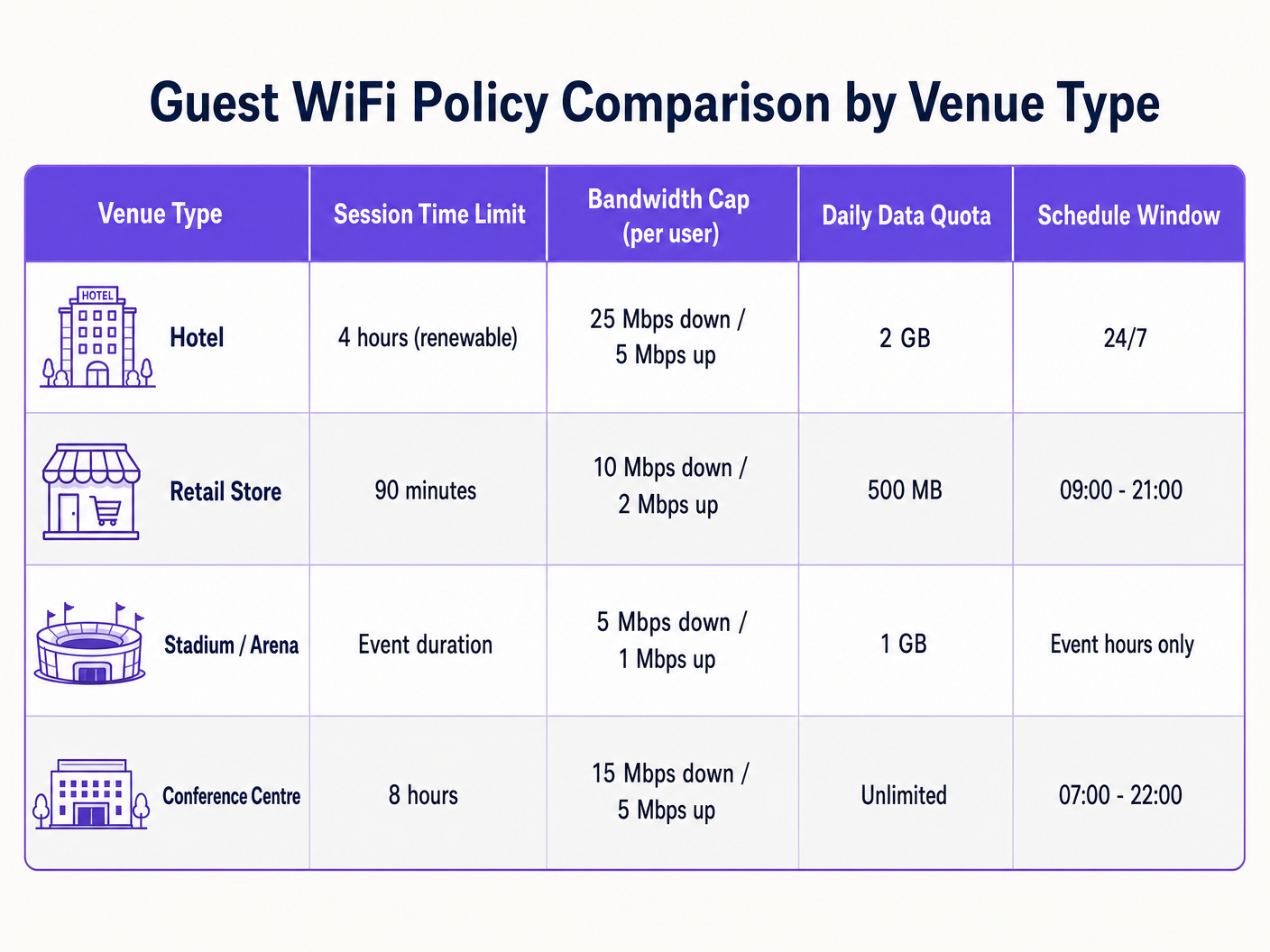
- Hospitality: Guests in hotels expect high-throughput connections for streaming and remote work. Tailor policies to support at least 25 Mbps down per room, with longer session times (e.g., 24 hours) to prevent constant re-authentication friction [6]. For deeper insights, consult our guide on Hotel WiFi Speed & Bandwidth Planning .
- Retail: Dwell times are shorter, typically 30 to 90 minutes. Implement a strict 90-minute session timeout to encourage turnover and capture marketing data via WiFi Analytics during re-authentication [7].
- Stadiums and Arenas: High-density environments with tens of thousands of concurrent users. Bandwidth caps must be highly conservative (e.g., 5 Mbps down) to prevent total backhaul saturation, with session times matched to the event duration [8].
3. Leverage Profile-Based Tiered Access
Avoid a "one-size-fits-all" guest network. Implement tiered access profiles to reward loyalty and monetize premium connectivity:
- Free Tier: Standard speed (e.g., 5 Mbps down), 1-hour session limit, basic captive portal login.
- Premium Tier: High speed (e.g., 50 Mbps down), 24-hour session limit, authenticated via loyalty credentials, room number, or direct payment. This is often implemented using 10 Best Network Access Control (NAC) Solutions for 2026 or integrated with How to Implement 802.1X Authentication with Cloud RADIUS .
Troubleshooting & Risk Mitigation
Operating a guest wireless network with active restrictions introduces specific failure modes that IT teams must proactively monitor and mitigate.
1. MAC Address Randomization and Session Tracking
Modern mobile operating systems (iOS 14+, Android 10+) employ MAC address randomization by default, rotating the device's hardware identifier to protect user privacy.
- The Risk: If your guest network tracks session timeouts or data quotas solely by MAC address, a device that randomizes its MAC address will appear as a brand-new device, bypassing your time limits and data caps.
- Mitigation: Do not rely on MAC addresses for session state. Utilize an identity-based authentication model at the captive portal layer. Associate the session state, time limits, and data quotas with the user's authenticated identity (e.g., email address, verified phone number, or loyalty ID) in your RADIUS database.
2. IP Address Exhaustion in High-Turnover Venues
In high-footfall venues like transit hubs or retail malls, a long DHCP lease time can quickly exhaust the available IP pool, preventing new guests from connecting.
- The Risk: If DHCP leases are set to the standard 24 hours, but average guest dwell time is 20 minutes, thousands of IP addresses will remain leased to departed devices, starving active users.
- Mitigation: Reduce the DHCP lease time on the guest scope to 30 or 60 minutes. Implement a larger subnet mask (e.g.,
/20or/19instead of/24) to expand the available IP pool. Enable DHCP Release on Disconnect if supported by your wireless controller.
3. Captive Portal Redirect Failures (DNS and SSL)
The most common guest complaint is "the login page won't load." This is almost always caused by misconfigured DNS or SSL certificate issues.
- The Risk: If the guest device cannot resolve DNS queries before authentication, it cannot load the captive portal. Furthermore, if the captive portal redirect uses an untrusted or expired SSL certificate, modern browsers will block the redirect with a security warning.
- Mitigation: Ensure the pre-authentication ACL (walled garden) explicitly allows DNS traffic to public resolvers (e.g.,
1.1.1.1or8.8.8.8) or local gateway DNS. Always use a valid, publicly trusted SSL/TLS certificate for your captive portal redirect hostname. Avoid self-signed certificates.
ROI & Business Impact
Implementing structured guest WiFi restrictions is not merely a technical exercise; it delivers measurable financial and operational returns for the enterprise.
1. WAN Cost Containment and Bandwidth Savings
Uncontrolled guest networks force organizations to continuously upgrade their WAN circuits to cope with peak demand. By enforcing per-client rate limits and aggregate caps, enterprises can significantly extend the lifespan of their existing internet connections.
- Scenario: A mid-sized hotel with a 500 Mbps circuit experiences severe latency during peak evening hours due to a few guests streaming 4K video.
- Solution: Implementing a 15 Mbps per-client cap reduces peak utilization by 40%, eliminating the need to upgrade to a costly 1 Gbps circuit, saving thousands of dollars annually in ISP recurring costs.
2. Enhanced Operational Network Reliability
In retail and hospitality, the same physical internet connection often supports both guest services and business-critical operations (such as POS systems, back-office ERP, and staff communication).
- Business Impact: Implementing strict VLAN segmentation and prioritizing corporate traffic via WMM ensures that guest activity never interferes with a transaction. A retail store's credit card processing will remain instantaneous even if the guest network is packed with shoppers, directly protecting revenue at the point of sale.
3. Marketing Monetization and First-Party Data Capture
Enforcing session time limits (e.g., 90 minutes) requires guests to interact with the captive portal periodically. This creates repeatable touchpoints to capture valuable first-party data, drive loyalty registrations, and display targeted advertisements.
- Data Capture: By requiring an email or social login to renew a session, venues build rich, compliant customer databases that feed CRM and marketing platforms.
- Ad Revenue: Venues can monetize the captive portal screen real estate by displaying sponsored splash pages or local merchant ads during the re-authentication flow, transforming the guest WiFi from an operational cost center into a direct revenue generator.
References
[1] IEEE Standard for Information Technology - Telecommunications and Information Exchange Between Systems - Wireless LAN Medium Access Control (MAC) and Physical Layer (PHY) Specifications. Amendment 8: Medium Access Control (MAC) Quality of Service Enhancements. IEEE Std 802.11e-2005. [2] Rigney, C., et al. Remote Authentication Dial In User Service (RADIUS). RFC 2865, June 2000. [3] Chiba, M., et al. Dynamic Authorization Extensions to Remote Authentication Dial In User Service (RADIUS). RFC 5176, January 2008. [4] Payment Card Industry (PCI) Data Security Standard, Requirements and Security Assessment Procedures, Version 4.0. PCI Security Standards Council, March 2022. [5] Tanaza S.p.A. Bandwidth Control per Client on Tanaza Cloud Platform. Tanaza Documentation, 2018. [6] Purple.ai. Hotel WiFi Speed & Bandwidth Planning: An Authoritative Guide for IT Managers. Purple Reference Guides, 2024. [7] Purple.ai. Guest WiFi Marketing & Analytics Platform: Capitalizing on Physical Footfall. Purple Whitepapers, 2025. [8] Cox Business. Stadium Connectivity Solutions: High-Density Wireless Deployment. Cox Communications Whitepaper, 2025.
Key Definitions
IEEE 802.11e / WMM
An amendment to the IEEE 802.11 standard that introduces Quality of Service (QoS) enhancements, prioritizing wireless traffic into voice, video, best effort, and background categories.
IT teams use WMM to map guest wireless traffic to low-priority categories, ensuring critical corporate applications are never starved of bandwidth.
RADIUS Attribute 27 (Session-Timeout)
A standard RADIUS attribute returned by the authentication server that defines the maximum number of seconds a user session can remain active before requiring re-authentication.
Encountered when integrating captive portals with RADIUS. It is used to enforce strict time limits on guest sessions (e.g., 7200 seconds for 2 hours).
RADIUS Attribute 28 (Idle-Timeout)
A RADIUS attribute that specifies the maximum period of inactivity (in seconds) allowed for a client session before the network access point automatically terminates the connection.
Critical in high-density venues to reclaim IP addresses from devices that have left the area without logging out.
RADIUS Change of Authorization (CoA)
A protocol extension (RFC 5176) that enables a RADIUS server to dynamically modify an active session's policies (such as bandwidth caps or VLAN assignment) without disconnecting the client.
Used to dynamically throttle a guest's bandwidth in real-time once they exceed their daily data quota.
Client Isolation
A security feature on wireless access points that prevents wireless clients associated with the same SSID from communicating with each other.
Essential on guest networks to prevent lateral malware propagation, device snooping, and local man-in-the-middle attacks.
WPA3 Opportunistic Wireless Encryption (OWE)
A Wi-Fi Alliance certified standard that provides individualized data encryption for open wireless networks, preventing passive eavesdropping without requiring a shared password.
The modern replacement for completely open guest networks, delivering security and data privacy to visitors with zero connection friction.
DHCP Lease Time
The duration for which a network device is allocated a specific IP address by the DHCP server before the address is returned to the pool or renewed.
In guest networks with high turnover, DHCP lease times must be kept short (e.g., 1 hour) to prevent IP pool exhaustion.
Network Segmentation
The architectural practice of splitting a physical network into multiple logical subnets (VLANs), each isolated by firewall rules and security policies.
A mandatory requirement under PCI DSS v4.0 to isolate the untrusted guest wireless network from the Cardholder Data Environment (CDE).
Worked Examples
A 200-room luxury hotel wants to implement a tiered guest WiFi model. Standard guests should receive a free, basic connection sufficient for web browsing, while loyalty members and paying guests should receive premium high-speed access capable of streaming 4K video. The hotel uses Cisco Catalyst 9800 WLCs and Cisco DNA Center.
Deploy a single Guest SSID configured with 802.1X and MAC Authentication Bypass (MAB) pointing to a centralized RADIUS server (e.g., Cloud RADIUS). Configure the captive portal to authenticate users. Upon successful login, the RADIUS server evaluates the user's profile:
- For Standard Guests: The RADIUS server returns access-accept with Cisco Vendor-Specific Attributes (VSAs) for rate limiting:
cisco-avpair = "subscriber:traffic-class=in direction=input action=shape rate=5000000"andcisco-avpair = "subscriber:traffic-class=out direction=output action=shape rate=1000000"(5 Mbps down / 1 Mbps up), along withSession-Timeout = 86400(24 hours). - For Premium/Loyalty Guests: The RADIUS server returns Cisco VSAs for high-speed rate limiting:
cisco-avpair = "subscriber:traffic-class=in direction=input action=shape rate=50000000"andcisco-avpair = "subscriber:traffic-class=out direction=output action=shape rate=10000000"(50 Mbps down / 10 Mbps up), along withSession-Timeout = 604800(7 days). This tiered model is enforced dynamically on a single SSID, minimizing RF overhead by avoiding multiple guest SSIDs.
A high-density sports stadium with a capacity of 50,000 concurrent spectators needs to prevent guest WiFi from saturating their 10 Gbps WAN uplink during live events, while ensuring spectators can still upload social media posts and access the stadium's mobile ordering app.
Configure a highly structured, high-density wireless policy on the Wireless LAN Controller (e.g., HPE Aruba Mobility Conductor):
- SSID Rate Limiting: Set a strict per-client bandwidth cap of 3 Mbps downstream and 1 Mbps upstream. This is sufficient for mobile apps and text/image uploads but discourages high-bandwidth video streaming.
- Aggregate Bandwidth Shaping: Apply an aggregate traffic shaping contract on the guest VLAN at the firewall (e.g., Fortinet FortiGate) to cap the entire guest network at 2 Gbps (20% of the total WAN capacity), leaving 8 Gbps for broadcast media, POS transactions, and operational staff.
- Time-Based Access: Set the captive portal session timeout to 14,400 seconds (4 hours), matching the typical duration of a sports event. Enable an aggressive
Idle-Timeoutof 600 seconds (15 minutes) to quickly reclaim IP addresses from spectators who leave the stadium early.
A national retail chain with 150 stores wants to implement a guest WiFi network that automatically shuts down outside of store hours to prevent security risks and unauthorized use of store internet by loiterers in the parking lot overnight.
Deploy a cloud-managed wireless architecture (e.g., Cisco Meraki or Juniper Mist) integrated with a centralized policy dashboard:
- Configure SSID Scheduling: In the cloud-managed dashboard, configure a time schedule profile for the 'Store Guest' SSID. Set the active hours to match store trading hours plus a 30-minute buffer (e.g., Monday-Saturday, 08:30 to 21:30; Sunday, 10:30 to 18:30).
- Enforce Complete SSID Suppression: Ensure the cloud profile is set to completely disable the radio broadcasting the Guest SSID outside these hours. This prevents the SSID from appearing in scan lists, eliminating the risk of overnight brute-force or probing attacks.
- Session Expiry: Set a strict 90-minute session timeout (
Session-Timeout = 5400) at the captive portal layer. This matches average retail dwell times and prompts users to re-authenticate if they stay longer, driving repeat marketing engagement.
Practice Questions
Q1. A major retail shopping mall experiences frequent DHCP IP address exhaustion on its guest WiFi network during peak weekend hours. The current configuration uses a `/24` subnet (254 available IPs) with a 24-hour DHCP lease time. How should the network architect resolve this issue without expanding the hardware infrastructure?
Hint: Consider the relationship between average dwell time, DHCP lease duration, and the size of the logical subnet.
View model answer
The network architect should implement two immediate changes:
- Reduce the DHCP lease time from 24 hours to 30 or 60 minutes. Since the average dwell time in a shopping mall is 1 to 2 hours, a short lease time ensures that IP addresses are rapidly reclaimed from departed devices and returned to the pool.
- Expand the DHCP scope by changing the subnet mask from a
/24to a/21(providing 2,046 available IPs) or/20(providing 4,094 available IPs). This increases the logical size of the IP pool on Guest VLAN 30 without requiring any new physical switches or access points.
Q2. An IT manager notices that several users on the guest WiFi network are consistently bypassing the 500 MB daily data quota. The network uses MAC-based tracking to enforce quotas. How are the users likely bypassing this restriction, and what is the recommended enterprise-grade solution?
Hint: Modern mobile operating systems rotate their physical identifiers automatically.
View model answer
The users are bypassing the quota by utilizing MAC Address Randomization, a native privacy feature on modern iOS and Android devices. By toggling their WiFi connection off and on, or modifying their device settings, they generate a new randomized MAC address, which the network access point treats as a brand-new device with a fresh 500 MB quota. The recommended solution is to transition from MAC-based session tracking to Identity-Based Session Tracking. Configure the captive portal to require user authentication (e.g., email verification, SMS OTP, or social login). Associate the data consumption quota with the user's authenticated identity in the centralized RADIUS/policy database. When a user connects, regardless of what randomized MAC address their device presents, they must log in, and their session will be mapped to their unique identity, enforcing the 500 MB daily limit across all MAC addresses they use.
Q3. A hotel chain wants to ensure its guest wireless network complies with PCI DSS v4.0. During an audit, the QSA (Qualified Security Assessor) discovers that the hotel's property management system (PMS) and guest WiFi are on different subnets but connected to the same physical switches without firewall rules blocking inter-subnet traffic. What is the compliance risk, and how should it be remediated?
Hint: PCI DSS requires logical segmentation to be actively enforced, not just defined by subnets.
View model answer
The compliance risk is that the guest WiFi network is not segmented from the Cardholder Data Environment (CDE) where the PMS resides. In a flat physical network with inter-subnet routing enabled and no firewall restrictions, any guest device on the WiFi can route traffic directly to the PMS server. This brings the entire guest WiFi network into the scope of the PCI audit, representing a critical non-compliance finding. To remediate this:
- Enforce strict VLAN segmentation on the switches. Assign the guest WiFi to a dedicated VLAN (VLAN 30) and the PMS/CDE to a separate secure VLAN (VLAN 100).
- Implement firewall policies at the gateway/router level. Configure explicit Access Control Lists (ACLs) or firewall rules that drop all traffic originating from VLAN 30 destined for VLAN 100.
- Enable stateful packet inspection and perform regular penetration testing to verify that no guest device can establish a connection to any device within the CDE, thereby officially segmenting the guest network out of the PCI audit scope.
Continue reading in this series
Monetising Guest WiFi Through Data Analytics and Splash Pages
This authoritative guide provides IT managers, network architects, and CTOs with a comprehensive technical framework for transforming guest WiFi from a cost centre into a high-yield first-party data asset. It outlines network architecture, data analytics integration, captive portal optimisation, and global compliance strategies to drive measurable venue revenue.
Monetizing Guest WiFi Through Data Analytics and Splash Pages
This authoritative guide provides IT managers, network architects, and CTOs with a comprehensive technical framework for transforming guest WiFi from a cost centre into a high-yield first-party data asset. It outlines network architecture, data analytics integration, captive portal optimization, and global compliance strategies to drive measurable venue revenue.
Legal Liabilities and Content Filtering on Public Guest Networks
This guide provides IT managers, network architects, and CTOs with a definitive technical and legal framework for deploying content filtering on public guest WiFi networks. It covers the regulatory obligations under GDPR, the UK Online Safety Act 2023, and PCI DSS, alongside a multi-layered architecture for DNS filtering, captive portal authentication, application-layer firewalling, and VLAN segmentation. Venue operators in hospitality, retail, healthcare, and transport will find actionable implementation steps, real-world case studies, and decision frameworks to build a legally defensible, high-performance guest network.