
Velocidad de WiFi en hoteles: Qué esperan los huéspedes y cómo ofrecerla
Esta guía de referencia técnica autorizada capacita a gerentes de TI, arquitectos de red y CTO con estrategias prácticas para la planificación del ancho de banda de WiFi en hoteles, la implementación de QoS y modelos de precios escalonados. Detalla cómo dimensionar correctamente la capacidad de la red para satisfacer las expectativas de los huéspedes modernos, desde 15 Mbps por habitación en propiedades de gama media hasta más de 50 Mbps en hoteles de lujo y centros de conferencias, garantizando al mismo mismo tiempo implementaciones empresariales seguras, conformes y escalables. Al integrar la plataforma de analítica y Guest WiFi de Purple, los operadores de los establecimientos pueden transformar su red de un centro de costos en un activo basado en datos que genera ingresos.
Video overview
Escucha esta guía
Ver transcripción del podcast
Parte de nuestra serie principal: Guía de Guest WiFi →
Resumen Ejecutivo
Para los directores de TI y CTOs que gestionan portafolios hoteleros, el WiFi para invitados ha evolucionado de un servicio básico a una infraestructura de servicios críticos. Una mala conexión afecta directamente las puntuaciones de satisfacción de los huéspedes, la reputación de la marca y los ingresos. Esta guía detalla los requisitos técnicos para dimensionar correctamente el ancho de banda, implementar la Calidad de Servicio (QoS) y desplegar arquitecturas de WiFi por niveles en propiedades que van desde hoteles de negocios de escala media hasta marcas de lujo. Al alejarse de los modelos heredados de ancho de banda con tarifa plana, los establecimientos pueden optimizar el rendimiento de la red, gestionar la demanda máxima y monetizar los servicios premium. La integración de una plataforma robusta de Guest WiFi como Purple permite una autenticación segura, el modelado de tráfico y la captura de valiosos datos de origen - transformando un centro de costos tradicional en un activo estratégico. Esta guía es igualmente relevante para los operadores de los sectores de Hospitality, Retail, Healthcare y Transport, donde la tecnología inalámbrica de alta densidad y alta confiabilidad es un requisito básico.
Análisis Técnico Detallado
Planificación de Ancho de Banda y Capacidad
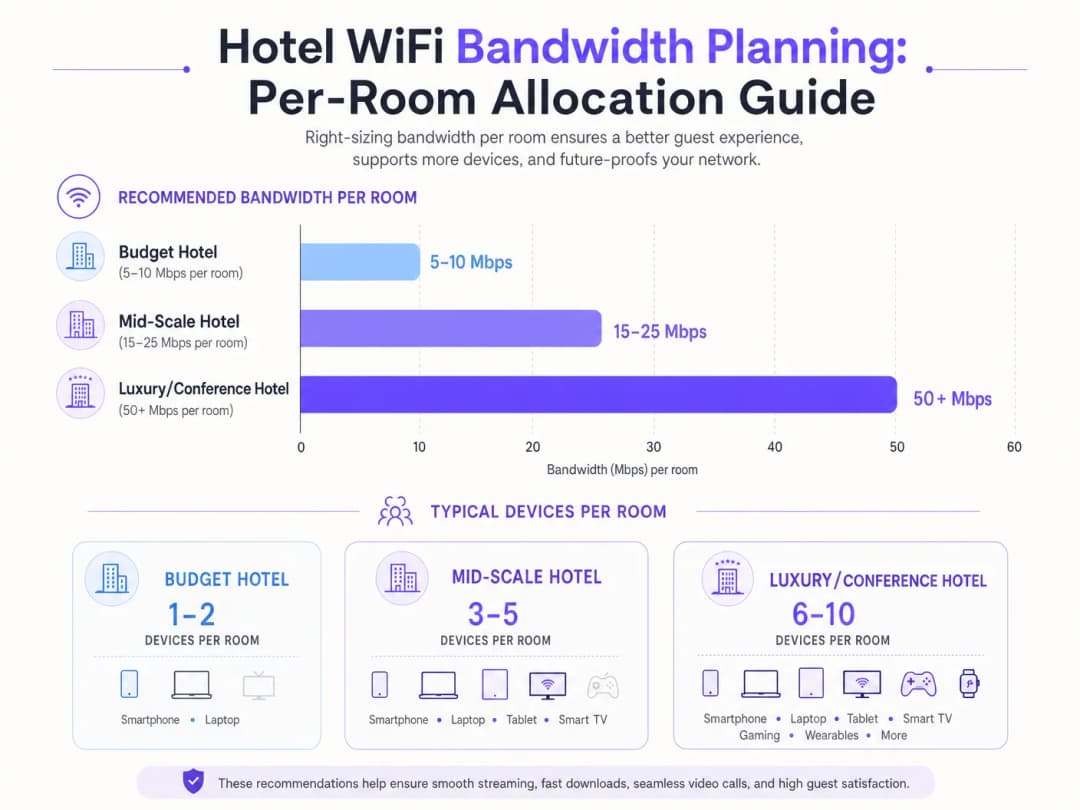
El desafío fundamental en el diseño de redes hoteleras es la planificación de la capacidad. El enfoque tradicional de asignar un valor fijo de 5 a 10 Mbps por habitación es insuficiente para los requisitos de los huéspedes modernos. Hoy en día, una sola habitación de hotel suele albergar de 3 a 5 dispositivos conectados - teléfonos inteligentes, laptops, tabletas, dispositivos portátiles y pantallas inteligentes que transmiten contenido en 4K. Según la Wi-Fi Alliance, el número promedio de dispositivos conectados por persona superó los 9 a nivel mundial para 2025, siendo los entornos hoteleros los que registran la mayor densidad de dispositivos por habitación de cualquier sector.
Para un hotel de escala media, los arquitectos de TI deben prever entre 15 y 25 Mbps por habitación. En establecimientos de lujo o enfocados en conferencias, este requisito aumenta a más de 50 Mbps por habitación. Esto requiere despliegues de puntos de acceso (AP) de alta densidad - a menudo un AP por habitación o cada dos habitaciones, según los materiales de construcción - para garantizar una intensidad de señal y capacidad adecuadas. Los espacios para conferencias requieren APs de alta densidad especializados que sean capaces de manejar cientos de conexiones concurrentes, aislados del tráfico de las habitaciones de los huéspedes mediante grupos de ancho de banda dedicados y VLANs.
La red de retorno cableada es igualmente crítica. Cada punto de acceso requiere un enlace ascendente Gigabit Ethernet, idealmente a través de switches PoE+. La capa de conmutación central debe manejar el rendimiento agregado de todos los AP de forma simultánea. Un hotel de 200 habitaciones con AP por habitación podría generar 10 Gbps o más de tráfico agregado durante las horas pico. El enlace ascendente de Internet - típicamente una línea arrendada dedicada - debe dimensionarse en consecuencia, con una recomendación mínima de 1 Gbps para propiedades de escala media y 10 Gbps para grandes centros de conferencias.
Estándares y Tecnología de WiFi
Las implementaciones modernas deberían ejecutar WiFi 6 (802.11ax) como mínimo. WiFi 6 introdujo OFDMA (Acceso múltiple por división de frecuencias ortogonales), que permite que un solo AP atienda a múltiples clientes simultáneamente, mejorando drásticamente la eficiencia en entornos densos. Para implementaciones más nuevas, WiFi 6E extiende esta capacidad a la banda de 6 GHz, reduciendo la interferencia de canal adyacente (CCI) y proporcionando espectro adicional para aplicaciones de gran ancho de banda. La seguridad debe aplicarse a través de WPA3 Enterprise con autenticación 802.1X para dispositivos corporativos, y WPA3 Personal para redes de invitados.
Calidad de Servicio (QoS) y Gestión de Tráfico
Simplemente aumentar el ancho de banda bruto rara vez es la solución más rentable. La gestión inteligente del tráfico utilizando los estándares 802.11e QoS es esencial. Al priorizar las aplicaciones sensibles a la latencia - videoconferencias, VoIP - sobre las transferencias de datos masivas, los administradores de red pueden garantizar una experiencia fluida para los viajeros de negocios incluso durante las horas de mayor uso (típicamente de 7 PM - 10 PM). La inspección profunda de paquetes (DPI) permite a la red clasificar el tráfico por tipo de aplicación y aplicar políticas de QoS adecuadas de forma dinámica.
¿Tiene preguntas sobre su configuración específica?
Nuestro equipo trabaja con gestores de espacios, responsables de TI e ingenieros de redes en 80 000 establecimientos. Reserve una llamada de 20 minutos y le mostraremos cómo lo resolvieron otros profesionales como usted.
Guía de Implementación
Arquitectura de Servicio por Niveles
Un modelo de WiFi por niveles es el estándar de la industria para equilibrar la satisfacción de los huéspedes con los costos de infraestructura. Esta arquitectura generalmente involucra tres niveles de servicio distintos:
| Nivel | Velocidad | Caso de Uso | Modelo de Precios |
|---|---|---|---|
| Básico de Cortesía | 5 Mbps | Mensajería, navegación ligera | Gratis |
| Huésped Estándar | 15 Mbps | Redes sociales, streaming SD | £4.99/día o incluido para miembros del programa de lealtad |
| Negocios Premium | 50+ Mbps garantizados | VPN, streaming 4K, videoconferencia | £9.99/día |

Implementar esta arquitectura requiere un captive portal robusto, un servidor RADIUS para la autenticación y un motor de aplicación de políticas. Plataformas como Purple actúan como un proveedor de identidad gratuito para servicios como OpenRoaming bajo la licencia Connect, optimizando el proceso de incorporación mientras aplican límites de ancho de banda y capturan análisis de usuarios a través de su panel de WiFi Analytics. El captive portal en sí es el punto de contacto principal para la captura de datos de primera mano (direcciones de correo electrónico, perfiles de redes sociales e información demográfica) que se integra directamente en los flujos de trabajo de CRM y automatización de marketing.
Lista de verificación de implementación
Antes de entrar en producción, valide lo siguiente:
- Estudio de sitio: Realice un estudio de RF predictivo para identificar brechas de cobertura, fuentes de interferencia y la colocación óptima de los AP. Tome en cuenta los materiales de construcción (concreto, acero, vidrio) que atenúan la señal.
- Densidad de AP: Implemente un AP por habitación o cada dos habitaciones. Para espacios de conferencias, implemente AP de alta densidad con antenas direccionales para crear microceldas.
- Segmentación de VLAN: Aísle las redes de invitados, corporativas, IoT y de pago en VLANs separadas con ACL estrictas aplicadas en el firewall.
- Política de QoS: Configure perfiles 802.11e WMM (WiFi Multimedia) para priorizar el tráfico de voz y video. Aplique limitación de ancho de banda por SSID o por usuario.
- Captive Portal: Implemente un portal que cumpla con GDPR con una opción de inclusión voluntaria explícita para comunicaciones de marketing. Intégrelo con Purple para análisis y gestión de identidad.
- Monitoreo: Configure SNMP o una plataforma de gestión de red basada en la nube para alertar sobre fallas de AP, alta utilización y picos de latencia.
Mejores prácticas
Seguridad y segmentación no son negociables. El tráfico de invitados debe estar estrictamente aislado de las redes corporativas y de procesamiento de pagos mediante el uso de VLANs para mantener el cumplimiento de PCI-DSS. La implementación del cifrado WPA3 y una autenticación 802.1X robusta es obligatoria para las implementaciones empresariales. El aislamiento de clientes debe habilitarse en los SSIDs de invitados para evitar el movimiento lateral entre dispositivos de invitados.
Privacidad de datos y cumplimiento requieren que el captive portal y las prácticas de recopilación de datos cumplan con GDPR y otras regulaciones de privacidad regionales. Los términos de servicio claros y los mecanismos de inclusión voluntaria desmarcados para las comunicaciones de marketing son legalmente obligatorios en el Reino Unido y la UE. La plataforma de Purple proporciona herramientas integradas de cumplimiento con GDPR, que incluyen la gestión del consentimiento y controles de retención de datos.
Monitoreo continuo es esencial. Confiar únicamente en las métricas de tiempo de actividad es insuficiente. Los equipos de TI deben monitorear la latencia, la pérdida de paquetes y la utilización de los AP durante las horas pico para identificar y resolver proactivamente los problemas de congestión. Una conexión puede estar técnicamente "activa" pero ser completamente inutilizable para una videollamada si la latencia supera los 150 ms o la pérdida de paquetes supera el 1%.Para obtener más información sobre la estrategia integral de redes hoteleras, consulte Hotel WiFi: The Complete Guide for Hoteliers y el equivalente en español WiFi para Hoteles: La Guía Completa para Hoteleros.
Solución de problemas y mitigación de riesgos
Interferencia de canal adyacente (CCI): En implementaciones densas, la superposición de canales degrada gravemente el rendimiento. Implemente la gestión automatizada de recursos de radio (RRM) para ajustar de forma dinámica la asignación de canales y la potencia de transmisión. Evite implementar múltiples puntos de acceso en el mismo canal dentro del rango de cobertura mutuo.
Fricción en el Captive Portal: Los procesos de inicio de sesión complejos o mal diseñados frustran a los huéspedes y reducen las tasas de captura de datos. Utilice métodos de autenticación fluidos - como el inicio de sesión con redes sociales, OpenRoaming o acceso mediante códigos QR - para reducir la fricción mientras mantiene el cumplimiento normativo.
Red de transporte (Backhaul) inadecuada: La red inalámbrica es tan rápida como su infraestructura cableada de backhaul. Asegúrese de que los switches centrales y la conexión a Internet puedan soportar el rendimiento agregado de todos los puntos de acceso. Un solo puerto de enlace ascendente saturado puede degradar el rendimiento de un piso entero.
Puntos de acceso no autorizados: En propiedades grandes, los huéspedes a veces conectan routers de viaje personales o puntos de acceso móviles, lo que genera interferencias y riesgos de seguridad. Implemente capacidades de Sistema de Prevención de Intrusiones Inalámbricas (WIPS) para detectar y alertar sobre dispositivos no autorizados.
ROI e impacto empresarial
Invertir en una infraestructura de WiFi de nivel empresarial ofrece retornos medibles en múltiples dimensiones. Un modelo de precios escalonado genera ingresos directos a partir de los niveles premium - un hotel de 200 habitaciones con una adopción del nivel premium del 30% a £9.99/día puede generar más de £200,000 anuales únicamente en ingresos de WiFi, lo que suele ser suficiente para financiar la actualización de la red en un plazo de 12 a 18 meses.
Más allá de los ingresos directos, la integración de una plataforma como Purple permite a los establecimientos capturar valiosos datos de primera mano, lo que facilita las campañas de marketing dirigidas, aumenta las suscripciones a programas de fidelización e impulsa las reservas repetidas. La plataforma WiFi Analytics de Purple proporciona análisis del tiempo de permanencia, mapas de calor de afluencia y seguimiento de visitantes recurrentes; información que fundamenta las decisiones de dotación de personal, la ubicación de alimentos y bebidas, y la optimización del diseño de las tiendas. Este enfoque es igualmente aplicable en los sectores de Retail y Transport.
El riesgo de no invertir es igualmente cuantificable. Un estudio de satisfacción de huéspedes de hotel de J.D. Power de 2024 reveló que el rendimiento del WiFi es el factor más citado en las reseñas negativas en línea para hoteles de negocios. Una caída de una estrella en la calificación de TripAdvisor se correlaciona con una reducción del 5 al 9% en los ingresos por habitación disponible (RevPAR).
Escuche el podcast completo de la sesión informativa técnica arriba - aproximadamente 10 minutos, que cubre la planificación del ancho de banda, la arquitectura de QoS, los errores de implementación y una sesión de preguntas y respuestas rápidas.
Definiciones clave
Quality of Service (QoS)
Mecanismos de red utilizados para priorizar ciertos tipos de tráfico, como voz y video, sobre datos menos críticos, garantizando un rendimiento constante durante los períodos de congestión.
Esencial para garantizar que los viajeros de negocios tengan una experiencia de videoconferencia fluida, incluso cuando la red tiene una alta carga de otros huéspedes.
VLAN (Virtual Local Area Network)
Una agrupación lógica de dispositivos de red que permite a los administradores segmentar una red física en múltiples dominios de transmisión distintos, cada uno con sus propias políticas de seguridad y tráfico.
Crucial para separar el tráfico de los huéspedes de las redes corporativas seguras y de los entornos de procesamiento de pagos para mantener el cumplimiento de PCI DSS.
Captive Portal
Una página web con la que los usuarios deben interactuar antes de acceder a una red WiFi pública, utilizada normalmente para autenticación, aceptación de términos de servicio o procesamiento de pagos.
El punto de contacto principal para la incorporación de invitados y la captura de datos de primera mano; su diseño afecta directamente la fricción del usuario, las tasas de conversión y el cumplimiento de la GDPR.
802.11e / WMM
Un estándar IEEE que define las mejoras de calidad de servicio para LAN inalámbricas mediante modificaciones en la capa MAC. WiFi Multimedia (WMM) es la certificación de consumo basada en este estándar.
El protocolo subyacente que habilita la priorización del tráfico para voz y video sobre WiFi. Debe estar habilitado tanto en el AP como en el dispositivo del cliente para ser efectivo.
OpenRoaming
Una federación de redes WiFi que permite a los usuarios conectarse de forma automática y segura sin ingresar credenciales repetidamente ni interactuar con portales cautivos, utilizando un marco Passpoint/Hotspot 2.0.
Reduce la fricción de incorporación para los invitados; Purple actúa como un proveedor de identidad gratuito para este servicio bajo la licencia Connect.
Rendimiento
La tasa real de entrega exitosa de datos a través de un canal de comunicación, medida en bits por segundo (bps). A diferencia del ancho de banda máximo teórico.
La velocidad práctica que experimenta un invitado, que suele ser del 40 al 70% del máximo teórico debido a la sobrecarga del protocolo, la interferencia y los usuarios concurrentes.
Interferencia de cocanal (CCI)
Degradación del rendimiento que ocurre cuando múltiples puntos de acceso que operan en el mismo canal se detectan entre sí, lo que provoca que retrasen la transmisión y reduzcan el rendimiento general.
Un problema importante en implementaciones de alta densidad. Requiere una planificación cuidadosa de canales, gestión automatizada de recursos de radio (RRM) y, de preferencia, una migración a las bandas de 5 GHz o 6 GHz, que están menos congestionadas.
PCI-DSS
Payment Card Industry Data Security Standard - un conjunto obligatorio de estándares de seguridad para organizaciones que procesan, almacenan o transmiten datos de tarjetas de pago.
Si el hotel procesa pagos a través de la misma infraestructura de red física que el WiFi de invitados, se requieren legalmente controles estrictos de segmentación y cumplimiento.
OFDMA (Orthogonal Frequency Division Multiple Access)
Una versión multiusuario de OFDM que permite a un solo punto de acceso atender simultáneamente a múltiples clientes al dividir el canal en subcanales más pequeños llamados Unidades de Recursos (RU).
Introducido en WiFi 6 (802.11ax), OFDMA es la razón principal por la que WiFi 6 supera a WiFi 5 en entornos densos como vestíbulos de hoteles y espacios de conferencias.
Ejemplos resueltos
¿Un hotel de lujo de 400 habitaciones está experimentando una congestión de red severa entre las 7 PM y las 10 PM, lo que satura su línea arrendada de 1 Gbps. El director de TI necesita resolver esto sin comprometerse de inmediato a una actualización de circuito a 10 Gbps. ¿Cuál es el enfoque recomendado?
El director de TI debe implementar una estrategia de QoS escalonada en tres fases. Fase uno: aplicar un límite estricto de 5 Mbps en el nivel de cortesía para huéspedes mediante la limitación de ancho de banda por usuario en el controlador inalámbrico. Esto evita que un pequeño número de usuarios monopolice el ancho de banda con descargas masivas o torrents. Fase dos: priorizar el tráfico para el nivel premium (50 Mbps garantizados) utilizando etiquetas QoS de WMM 802.11e, asegurando que las videoconferencias y el tráfico de VPN reciban cola de prioridad sobre el tráfico de mejor esfuerzo. Fase tres: implementar WiFi Analytics de Purple para analizar los patrones de tráfico, identificar los tipos de aplicaciones en horas pico e implementar políticas de QoS con reconocimiento de aplicaciones mediante Deep Packet Inspection. Monitorear la utilización máxima durante un período de 30 días para determinar si aún se requiere una actualización de circuito.
Un gran hotel de conferencias que alberga un evento tecnológico de 500 personas descubre que el WiFi del salón de baile es completamente inutilizable durante las sesiones plenarias. El establecimiento cuenta con una línea arrendada de 10 Gbps y tres puntos de acceso en el salón de baile. ¿Cuál es la falla de arquitectura y cómo se resuelve?
La falla es un error de diseño de cobertura versus capacidad. Tres AP brindan una cobertura adecuada (fuerza de señal) para el espacio, pero no pueden manejar las solicitudes de asociación simultáneas y el rendimiento de datos de más de 500 asistentes con más de 1,500 dispositivos. La resolución consiste en implementar 12 AP de alta densidad con antenas direccionales, creando microceldas más pequeñas que no se traslapen. Cada AP debe configurarse en canales que no se traslapen (1, 6, 11 en 2.4 GHz; múltiples canales en 5 GHz utilizando anchos de canal de 20 MHz para maximizar el número de canales disponibles). Se debe aprovisionar un SSID exclusivo para conferencias en una VLAN independiente con un grupo de ancho de banda dedicado, aislado de la red de las habitaciones de huéspedes. Se debe habilitar el band steering para dirigir los dispositivos compatibles a las bandas de 5 GHz o 6 GHz.
Preguntas de práctica
Q1. ¿Un hotel alberga una importante conferencia de tecnología. El equipo de TI asignó 50 Mbps por habitación en las torres de huéspedes, pero 500 asistentes en el salón de eventos principal informan velocidades lentas y desconexiones frecuentes. El lugar cuenta con una línea dedicada de 10 Gbps y tres puntos de acceso en el salón. ¿Cuál es el fallo arquitectónico más probable y cuál es el plan de remediación?
Sugerencia: Considere la diferencia entre el diseño basado en cobertura y el basado en capacidad. La intensidad de la señal no es lo mismo que la capacidad.
Ver respuesta modelo
La red en el salón de eventos se diseñó para cobertura en lugar de capacidad. Tres AP proporcionan una señal adecuada pero no pueden manejar las solicitudes de asociación concurrentes y el rendimiento de más de 500 asistentes con más de 1,500 dispositivos. El plan de remediación es implementar 12 AP de alta densidad con antenas direccionales para crear microceldas más pequeñas que no se superpongan. Configure canales que no se superpongan, habilite el direccionamiento de banda para empujar a los dispositivos compatibles a 5 GHz o 6 GHz, y configure un SSID de conferencia dedicado en una VLAN separada con un grupo de ancho de banda dedicado y aislado de la red de las habitaciones de huéspedes.
Q2. El director de marketing quiere capturar direcciones de correo electrónico de todos los huéspedes que utilizan el WiFi, pero al director de TI le preocupa el cumplimiento de GDPR y la fricción en el registro. ¿Cuál es la arquitectura recomendada?
Sugerencia: ¿Cómo se puede equilibrar la recopilación de datos con la experiencia del usuario y los requisitos legales? Considere qué constituye un consentimiento válido bajo la GDPR.
Ver respuesta modelo
Implementar un captive portal integrado con Purple. Ofrecer inicio de sesión social (Google, Facebook, Apple) para una experiencia sin fricciones. El portal debe incluir casillas de verificación de consentimiento explícitas y desmarcadas para comunicaciones de marketing; las casillas marcadas previamente no son un consentimiento válido bajo GDPR. Incluir un enlace claro a la política de privacidad. Almacenar los registros de consentimiento con marcas de tiempo en la plataforma Purple para fines de auditoría. Este enfoque maximiza la captura de datos mientras mantiene el cumplimiento legal total.
Q3. Un hotel de gama media quiere introducir un plan de WiFi premium a £9.99/día pero le preocupa que los huéspedes eviten el cargo al compartir una sola conexión a través de un router de viaje. ¿Cómo se puede mitigar esto técnicamente?
Sugerencia: ¿Qué controles a nivel de red pueden identificar o restringir tipos de dispositivos específicos? Considere tanto la identificación de huellas de dispositivos (fingerprinting) como la gestión de sesiones.
Ver respuesta modelo
La red puede utilizar el filtrado de direcciones MAC combinado con la identificación de dispositivos (a través de fingerprinting de DHCP o análisis de User-Agent HTTP) para detectar routers de viaje y dispositivos NAT. Además, el captive portal puede aplicar un límite estricto de dispositivos (normalmente 3 dispositivos) por credencial de acceso premium, lo que hace que compartir no sea práctico. La implementación del análisis de IP TTL también puede detectar el tráfico NAT, ya que los paquetes enrutados a través de un router de viaje suelen llegar con un TTL reducido. Para los infractores recurrentes, el servidor RADIUS puede marcar la dirección MAC y requerir una nueva autenticación.
Q4. Un hotel de negocios de 300 habitaciones está planeando una actualización completa de la red. El director de TI debe elegir entre implementar un AP por habitación o un AP por pasillo (cada 3 o 4 habitaciones). ¿Qué factores deberían guiar esta decisión y cuál es el enfoque recomendado?
Sugerencia: Considere los materiales de construcción del edificio, la densidad de dispositivos de los huéspedes y la relación costo-beneficio de la implementación por habitación en comparación con el pasillo.
Ver respuesta modelo
La decisión depende de los materiales de construcción y de la densidad de dispositivos prevista. En las construcciones modernas de concreto y acero, las puertas cortafuegos y las paredes gruesas atenúan significativamente las señales de 5 GHz, por lo que los AP por habitación son el enfoque recomendado para un hotel de negocios donde los huéspedes utilizan habitualmente VPNs y videoconferencias. En construcciones más ligeras (por ejemplo, tabiques de yeso), los AP de pasillo pueden ser suficientes para propiedades de bajo presupuesto. Para un hotel de negocios de 300 habitaciones, el costo incremental de los AP por habitación (aproximadamente entre £150 y £250 por AP) se justifica por la mejora en la satisfacción de los huéspedes y la capacidad de soportar de 6 a 10 dispositivos por habitación de manera confiable.
Continúe leyendo esta serie
Cómo configurar el WiFi de invitados: una guía definitiva de configuración empresarial segura
Esta guía definitiva proporciona a los líderes de TI y arquitectos de redes un diseño estructural definitivo para implementar un WiFi de invitados empresarial seguro. Cubre la arquitectura esencial, la migración a WPA3, la segmentación de VLAN y la integración de Captive Portal para proteger los sistemas internos mientras se recopilan datos de primera mano en conformidad con la ley.
Cómo solucionar los problemas de WiFi lento sin mejorar tu plan de Internet
Una guía de referencia técnica completa para gerentes de TI y arquitectos de red sobre cómo optimizar el rendimiento de la WiFi empresarial sin aumentar el ancho de banda del ISP. Cubre la sintonización de RF, la gestión de la densidad de clientes, la implementación de QoS y cómo aprovechar la analítica de WiFi para diagnosticar y resolver cuellos de botella.
Cómo construir una red WiFi para campus: Una guía de TI para universidades
Esta guía técnica proporciona un modelo integral para diseñar e implementar redes WiFi de alta densidad en campus, abarcando desde estudios de cobertura activos en sitio y la ubicación de puntos de acceso, hasta la arquitectura del controlador, el roaming fluido y el onboarding seguro de invitados. Está escrita para gerentes de TI, arquitectos de red y directores de tecnología (CTOs) en universidades y grandes recintos que necesitan orientación práctica para planificar y ejecutar una implementación inalámbrica este trimestre. La guía también vincula la plataforma de analíticas y Guest WiFi de Purple con puntos de integración reales dentro del ciclo de vida de la implementación.
¿Tiene preguntas sobre su configuración específica?
Nuestro equipo trabaja con gestores de espacios, responsables de TI e ingenieros de redes en 80 000 establecimientos. Reserve una llamada de 20 minutos y le mostraremos cómo lo resolvieron otros profesionales como usted.