
Vitesse du WiFi d'hôtel : ce que les clients attendent et comment y répondre
Ce guide de référence technique aide les responsables informatiques, les architectes réseau et les CTO à élaborer des stratégies concrètes de planification de bande passante WiFi d'hôtel, d'implémentation de QoS et de modèles de tarification par paliers. Il explique comment dimensionner la capacité du réseau pour répondre aux attentes modernes des clients - de 15 Mbps par chambre dans les établissements de catégorie moyenne à plus de 50 Mbps dans les hôtels de luxe et centres de conférence - tout en garantissant des déploiements d'entreprise sécurisés, conformes et évolutifs. En intégrant la plateforme de Guest WiFi et d'analyses de Purple, les exploitants d'établissements peuvent transformer leur réseau d'un centre de coûts en un actif générateur de revenus et piloté par les données.
Video overview
Écouter ce guide
Voir la transcription du podcast
Fait partie de notre série principale : Guide du Guest WiFi →
Résumé opérationnel
Pour les directeurs informatiques et les CTO qui gèrent des portefeuilles hôteliers, le WiFi invité est passé d'un simple service de courtoisie à une infrastructure réseau critique pour l'activité. Une mauvaise connexion affecte directement les scores de satisfaction des clients, la réputation de la marque et le chiffre d'affaires. Ce guide détaille les exigences techniques pour dimensionner correctement la bande passante, implémenter la qualité de service (QoS) et déployer des architectures WiFi à plusieurs niveaux sur des établissements allant des hôtels d'affaires de milieu de gamme aux enseignes de luxe. En abandonnant les anciens modèles de bande passante à tarif fixe, les établissements peuvent optimiser les performances du réseau, gérer les pics de demande et monétiser les services premium. L'intégration d'une plateforme de WiFi invité robuste comme Purple permet une authentification sécurisée, le lissage du trafic et la capture de précieuses données de première partie - transformant ainsi un centre de coûts traditionnel en un actif stratégique. Ce guide est tout aussi pertinent pour les opérateurs des secteurs de l'Hôtellerie, du Commerce de détail, de la Santé et du Transport où un réseau sans fil haute densité et haute fiabilité est une exigence de base.
Analyse technique approfondie
Planification de la bande passante et de la capacité
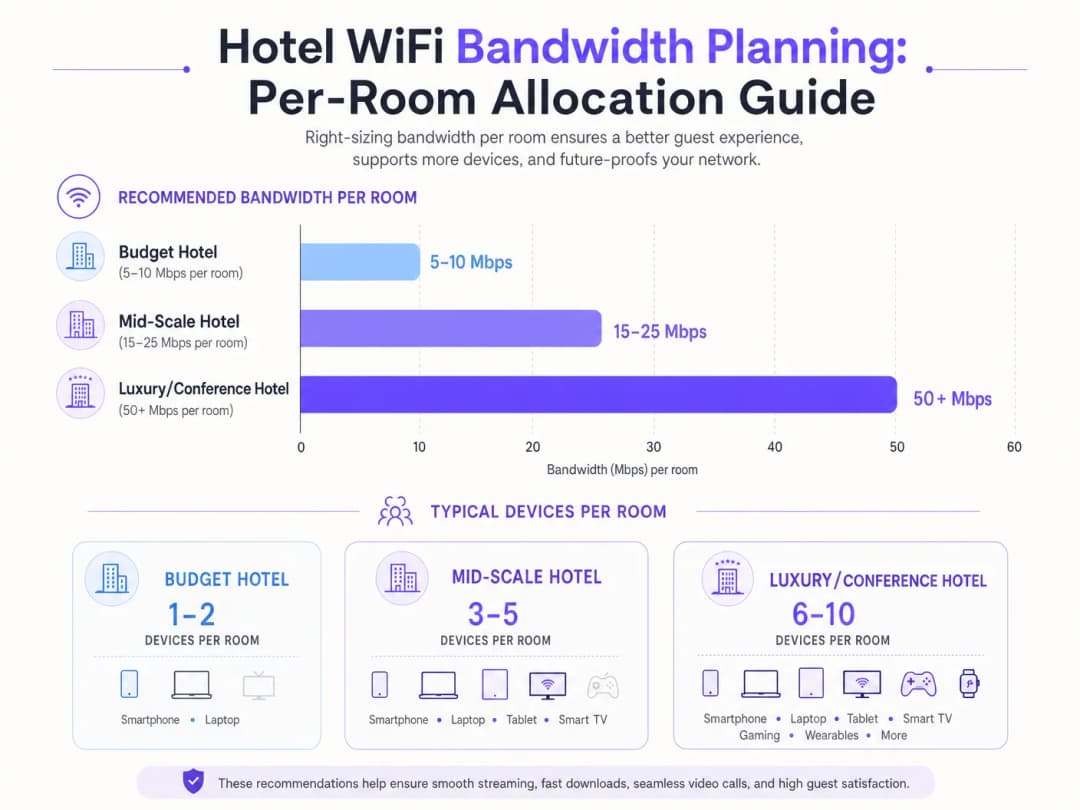
Le défi fondamental dans la conception de réseaux hôteliers réside dans la planification de la capacité. L'approche historique consistant à allouer un débit fixe de 5 à 10 Mbps par chambre est insuffisante face aux exigences des clients modernes. Aujourd'hui, une seule chambre d'hôtel abrite généralement 3 à 5 appareils connectés - smartphones, ordinateurs portables, tablettes, objets connectés et Smart TV diffusant du contenu 4K. Selon la Wi-Fi Alliance, le nombre moyen d'appareils connectés par personne a dépassé 9 dans le monde en 2025, les environnements hôteliers affichant la densité d'appareils par chambre la plus élevée de tous les secteurs.
Pour un hôtel de milieu de gamme, les architectes informatiques doivent prévoir 15 à 25 Mbps par chambre. Dans les établissements de luxe ou orientés vers les séminaires, cette exigence grimpe à plus de 50 Mbps par chambre. Cela nécessite des déploiements de points d'accès (AP) haute densité - souvent un point d'accès par chambre ou une chambre sur deux, selon les matériaux de construction - pour garantir une force de signal et une capacité adéquates. Les espaces de conférence exigent des points d'accès haute densité spécialisés, capables de gérer des centaines de connexions simultanées, isolés du trafic des chambres d'hôtes via des pools de bande passante dédiés et des VLANs.
Le backhaul câblé est tout aussi critique. Chaque point d'accès nécessite une liaison montante Gigabit Ethernet, idéalement via des commutateurs PoE+. La couche de commutation centrale doit gérer le débit global de tous les points d'accès simultanément. Un hôtel de 200 chambres équipé de points d'accès par chambre peut générer un trafic global de 10 Gbps ou plus pendant les heures de pointe. La liaison montante internet - généralement une ligne louée dédiée - doit être dimensionnée en conséquence, avec une recommandation minimale de 1 Gbps pour les établissements de taille moyenne et de 10 Gbps pour les grands espaces de conférence.
Normes et technologies WiFi
Les déploiements modernes doivent au minimum utiliser le WiFi 6 (802.11ax). Le WiFi 6 a introduit l'OFDMA (Orthogonal Frequency Division Multiple Access), qui permet à un seul point d'accès de desservir plusieurs clients simultanément, améliorant ainsi considérablement l'efficacité dans les environnements denses. Pour les déploiements plus récents, le WiFi 6E étend cette capacité à la bande 6 GHz, réduisant les interférences co-canal et fournissant un spectre supplémentaire pour les applications à large bande passante. La sécurité doit être appliquée via WPA3 Enterprise avec authentification 802.1X pour les appareils d'entreprise, et WPA3 Personal pour les réseaux invités.
Qualité de Service (QoS) et gestion du trafic
Augmenter simplement la bande passante brute est rarement la solution la plus rentable. Une gestion intelligente du trafic utilisant les normes de QoS 802.11e est essentielle. En donnant la priorité aux applications sensibles à la latence - visioconférence, VoIP - par rapport aux transferts de données volumineux, les administrateurs réseau peuvent garantir une expérience fluide aux voyageurs d'affaires, même pendant les heures de pointe (généralement de 19h à 22h). L'inspection approfondie des paquets (DPI) permet au réseau de classer le trafic par type d'application et d'appliquer dynamiquement les politiques de QoS appropriées.
Vous avez des questions sur votre configuration spécifique ?
Notre équipe collabore avec des exploitants de sites, des responsables informatiques et des ingénieurs réseau au sein de 80 000 sites. Réservez un appel de 20 minutes et nous vous montrerons comment d'autres professionnels comme vous ont résolu ce problème.
Guide de mise en œuvre
Architecture de service à plusieurs niveaux
Un modèle WiFi à plusieurs niveaux est la norme de l'industrie pour équilibrer la satisfaction des clients et les coûts d'infrastructure. Cette architecture comprend généralement trois niveaux de service distincts :
| Niveau | Vitesse | Cas d'utilisation | Modèle de tarification |
|---|---|---|---|
| Gratuit de base | 5 Mbps | Messagerie, navigation légère | Gratuit |
| Invité standard | 15 Mbps | Réseaux sociaux, streaming SD | 4,99 £/jour ou inclus pour les membres du programme de fidélité |
| Affaires Premium | 50+ Mbps garantis | VPN, streaming 4K, visioconférence | 9,99 £/jour |

L'implémentation de cette architecture nécessite un Captive Portal robuste, un serveur RADIUS pour l'authentification et un moteur d'application des politiques. Les plateformes comme Purple agissent en tant que fournisseur d'identité gratuit pour des services tels que OpenRoaming sous la licence Connect, simplifiant le processus d'intégration tout en appliquant des limites de bande passante et en collectant des données analytiques sur les utilisateurs via leur tableau de bord WiFi Analytics. Le Captive Portal lui-même est le principal point de contact pour la capture de données de première partie - adresses e-mail, profils sociaux et informations démographiques - qui alimentent directement les flux de travail du CRM et de l'automatisation du marketing.
Liste de contrôle pour le déploiement
Avant la mise en service, validez les points suivants :
- Étude de site : Réalisez une étude RF prédictive pour identifier les zones d'ombre, les sources d'interférences et l'emplacement optimal des AP. Prenez en compte les matériaux de construction (béton, acier, verre) qui atténuent le signal.
- Densité des AP : Déployez un AP par pièce ou toutes les deux pièces. Pour les espaces de conférence, déployez des AP haute densité avec des antennes directives pour créer des micro-cellules.
- Segmentation VLAN : Isolez les réseaux invités, d'entreprise, IoT et de paiement sur des VLAN séparés avec des ACL strictes appliquées au niveau du pare-feu.
- Politique QoS : Configurez les profils WMM (WiFi Multimedia) 802.11e pour donner la priorité au trafic voix et vidéo. Appliquez une limitation de débit par SSID ou par utilisateur.
- Captive Portal : Déployez un portail conforme au GDPR avec un consentement explicite (opt-in) pour les communications marketing. Intégrez-le avec Purple pour l'analytique et la gestion des identités.
- Supervision : Configurez SNMP ou une plateforme de gestion de réseau basée sur le cloud pour générer des alertes en cas de panne d'AP, d'utilisation élevée et de pics de latence.
Bonnes pratiques
La sécurité et la segmentation ne sont pas négociables. Le trafic invité doit être strictement isolé des réseaux d'entreprise et de traitement des paiements à l'aide de VLAN afin de maintenir la conformité PCI-DSS. L'implémentation du chiffrement WPA3 et d'une authentification 802.1X robuste est obligatoire pour les déploiements d'entreprise. L'isolation des clients doit être activée sur les SSID invités pour empêcher tout mouvement latéral entre les appareils des invités.
La confidentialité des données et la conformité exigent que le Captive Portal et les pratiques de collecte de données soient conformes au GDPR et aux autres réglementations régionales sur la confidentialité. Des conditions d'utilisation claires et des mécanismes d'opt-in non pré-cochés pour les communications marketing sont légalement obligatoires au Royaume-Uni et dans l'UE. La plateforme de Purple fournit des outils de conformité GDPR intégrés, y compris la gestion du consentement et le contrôle de la rétention des données.
Une supervision continue est essentielle. Se fier uniquement aux mesures de temps de fonctionnement est insuffisant. Les équipes informatiques doivent surveiller la latence, la perte de paquets et l'utilisation des AP pendant les heures de pointe afin d'identifier et de résoudre proactivement les problèmes de congestion. Une connexion peut être techniquement active mais totalement inutilisable pour un appel vidéo si la latence dépasse 150 ms ou si la perte de paquets dépasse 1 %.Pour approfondir votre stratégie globale de réseau hôtelier, consultez Hotel WiFi: The Complete Guide for Hoteliers et son équivalent en espagnol WiFi para Hoteles: La Guía Completa para Hoteleros.
Dépannage et atténuation des risques
Interférences cocanal (CCI) : Dans les déploiements denses, le chevauchement des canaux dégrade considérablement les performances. Mettez en œuvre la gestion automatisée des ressources radio (RRM) pour ajuster dynamiquement l'attribution des canaux et la puissance d'émission. Évitez de déployer plusieurs AP sur le même canal à portée les uns des autres.
Friction du Captive Portal : Des processus de connexion complexes ou mal conçus frustrent les clients et réduisent les taux de capture de données. Utilisez des méthodes d'authentification fluides - connexion via les réseaux sociaux, OpenRoaming ou accès par QR code - pour réduire la friction tout en maintenant la conformité.
Liaison de raccordement (Backhaul) inadéquate : Le réseau sans fil n'est performant qu'à la mesure de sa liaison filaire. Assurez-vous que les commutateurs de cœur de réseau et la connexion Internet peuvent supporter le débit cumulé de tous les AP. Un seul port de liaison montante saturé peut dégrader les performances de tout un étage.
Points d'accès non autorisés (Rogue APs) : Dans les grands établissements, les clients connectent parfois des routeurs de voyage ou des points d'accès personnels, ce qui crée des interférences et des risques de sécurité. Activez les fonctionnalités du système de prévention des intrusions sans fil (WIPS) pour détecter et signaler les appareils non autorisés.
ROI et impact commercial
Investir dans une infrastructure WiFi de niveau entreprise offre des rendements mesurables sur plusieurs aspects. Un modèle de tarification par paliers génère des revenus directs via les offres premium - un hôtel de 200 chambres avec un taux d'adoption de l'offre premium de 30 % à 9,99 £/jour peut générer plus de 200 000 £ par an de revenus issus du seul WiFi, ce qui suffit souvent à financer la mise à niveau du réseau en 12 à 18 mois.
Au-delà des revenus directs, l'intégration d'une plateforme comme Purple vous permet de capturer de précieuses données de première partie, facilitant ainsi les campagnes marketing ciblées, augmentant les inscriptions aux programmes de fidélité et stimulant les réservations récurrentes. La plateforme WiFi Analytics de Purple fournit des analyses de temps de séjour, des cartes de chaleur de fréquentation et le suivi des visiteurs récurrents - des informations précieuses pour orienter les décisions de personnel, l'emplacement de la restauration et l'optimisation de l'agencement des espaces commerciaux. Cette approche s'applique également aux secteurs du Retail et du Transport.
Le risque de ne pas investir est tout aussi quantifiable. Une étude de J.D. Power de 2024 sur la satisfaction des clients d'hôtels a révélé que les performances du WiFi sont le facteur le plus souvent cité dans les avis en ligne négatifs des hôtels d'affaires. Une baisse d'une étoile sur TripAdvisor est corrélée à une réduction de 5 à 9 % du revenu par chambre disponible (RevPAR).
Écoutez le podcast complet du briefing technique ci-dessus - environ 10 minutes, couvrant la planification de la bande passante, l'architecture QoS, les pièges de mise en œuvre et une session de questions-réponses rapide.
Définitions clés
Qualité de Service (QoS)
Mécanismes réseau utilisés pour prioriser certains types de trafic - comme la voix et la vidéo - par rapport à des données moins critiques, garantissant ainsi des performances constantes pendant les périodes de congestion.
Essentiel pour garantir aux voyageurs d'affaires une expérience de visioconférence fluide, même lorsque le réseau est fortement sollicité par d'autres clients.
VLAN (Virtual Local Area Network)
Un regroupement logique de périphériques réseau qui permet aux administrateurs de segmenter un réseau physique en plusieurs domaines de diffusion distincts, chacun ayant ses propres politiques de sécurité et de trafic.
Crucial pour séparer le trafic des invités des réseaux d'entreprise sécurisés et des environnements de traitement des paiements afin de maintenir la conformité PCI DSS.
Captive Portal
Une page web avec laquelle les utilisateurs doivent interagir avant d'accéder à un réseau WiFi public, généralement utilisée pour l'authentification, l'acceptation des conditions d'utilisation ou le traitement des paiements.
Le principal point de contact pour l'intégration des invités et la capture de données de première main ; sa conception a un impact direct sur la friction des utilisateurs, les taux de conversion et la conformité au GDPR.
802.11e / WMM
Une norme IEEE qui définit les améliorations de la qualité de service pour les réseaux locaux sans fil grâce à des modifications de la couche MAC. WiFi Multimedia (WMM) est la certification grand public basée sur cette norme.
Le protocole sous-jacent permettant de prioriser le trafic pour la voix et la vidéo sur WiFi. Doit être activé à la fois sur le point d'accès et sur le périphérique client pour être efficace.
OpenRoaming
Une fédération de réseaux WiFi qui permet aux utilisateurs de se connecter automatiquement et en toute sécurité sans avoir à saisir à plusieurs reprises des identifiants ou à interagir avec des portails captifs, en utilisant un cadre Passpoint/Hotspot 2.0.
Réduit la friction lors de l'authentification des invités ; Purple agit comme un fournisseur d'identité gratuit pour ce service sous la licence Purple Connect.
Débit
Le taux réel de transmission réussie des données sur un canal de communication, mesuré en bits par seconde (bps). Distinct de la bande passante maximale théorique.
La vitesse pratique ressentie par un invité, qui représente généralement 40 à 70 % du maximum théorique en raison de la surcharge de protocole, des interférences et des utilisateurs simultanés.
Interférence cocanal (CCI)
Dégradation des performances qui se produit lorsque plusieurs points d'accès fonctionnant sur le même canal s'interfèrent mutuellement, les incitant à différer la transmission et réduisant le débit global.
Un problème majeur dans les déploiements à haute densité. Nécessite une planification minutieuse des canaux, une gestion automatisée des ressources radio (RRM), et idéalement une migration vers les bandes moins encombrées de 5 GHz ou 6 GHz.
PCI-DSS
Norme de sécurité des données de l'industrie des cartes de paiement - un ensemble de normes de sécurité obligatoires pour les organisations qui traitent, stockent ou transmettent des données de cartes de paiement.
Si l'hôtel traite les paiements sur la même infrastructure réseau physique que le WiFi des invités, une segmentation stricte et des contrôles de conformité sont légalement requis.
OFDMA (Orthogonal Frequency Division Multiple Access)
Une version multi-utilisateur de l'OFDM qui permet à un seul point d'accès de servir simultanément plusieurs clients en divisant le canal en sous-canaux plus petits appelés unités de ressources (RU).
Introduit avec le WiFi 6 (802.11ax), l'OFDMA est la principale raison pour laquelle le WiFi 6 surpasse le WiFi 5 dans les environnements denses tels que les halls d'hôtels et les espaces de conférence.
Exemples concrets
Un hôtel de luxe de 400 chambres subit une forte congestion du réseau entre 19 h et 22 h, saturant sa ligne louée de 1 Gbps. Le directeur informatique doit résoudre ce problème sans s'engager immédiatement dans une mise à niveau coûteuse vers un circuit de 10 Gbps. Quelle est l'approche recommandée ?
Le directeur informatique doit mettre en œuvre une stratégie QoS hiérarchisée en trois phases. Première phase : appliquer une limite stricte de 5 Mbps sur le palier gratuit des invités en limitant le débit par utilisateur sur le contrôleur sans fil. Cela empêche un petit nombre d'utilisateurs de monopoliser la bande passante avec des téléchargements volumineux ou du torrenting. Deuxième phase : prioriser le trafic pour le palier premium (50 Mbps garantis) à l'aide de balises QoS 802.11e WMM, garantissant ainsi que la visioconférence et le trafic VPN reçoivent une file d'attente prioritaire par rapport au trafic standard. Troisième phase : déployer Purple WiFi Analytics pour analyser les modèles de trafic, identifier les types d'applications pendant les heures de pointe et mettre en œuvre des politiques QoS applicatives via l'inspection approfondie des paquets (DPI). Surveiller l'utilisation maximale sur une période de 30 jours pour déterminer si une mise à niveau du circuit est toujours requise.
Un grand hôtel de conférence accueillant un événement technologique de 500 personnes constate que le WiFi de la salle de bal est complètement inutilisable pendant les sessions plénières. L'établissement dispose d'une ligne louée de 10 Gbps et de trois points d'accès dans la salle de bal. Quelle est la défaillance architecturale et comment la résoudre ?
La défaillance est une erreur de conception entre couverture et capacité. Trois points d'accès offrent une couverture (force du signal) adéquate pour l'espace, mais ne peuvent pas gérer les demandes d'association simultanées et le débit de données de plus de 500 participants avec plus de 1 500 appareils. La solution consiste à déployer 12 points d'accès haute densité avec des antennes directives, créant ainsi des micro-cellules plus petites qui ne se chevauchent pas. Chaque point d'accès doit être configuré sur des canaux sans chevauchement (1, 6, 11 sur 2,4 GHz ; plusieurs canaux sur 5 GHz en utilisant des largeurs de canal de 20 MHz pour maximiser le nombre de canaux disponibles). Un SSID dédié aux conférences doit être configuré sur un VLAN distinct avec un pool de bande passante dédié, isolé du réseau des chambres d'hôtes. Le band steering doit être activé pour orienter les appareils compatibles vers les bandes 5 GHz ou 6 GHz.
Questions d'entraînement
Q1. Un hôtel accueille une grande conférence technologique. L'équipe informatique a alloué 50 Mbps par chambre dans les bâtiments d'hébergement, mais 500 participants dans la grande salle de bal signalent des lenteurs et des déconnexions fréquentes. Le site dispose d'une ligne louée de 10 Gbps et de trois points d'accès dans la salle de bal. Quel est le défaut d'architecture le plus probable, et quel est le plan de remédiation ?
Conseil : Considérez la différence entre une conception basée sur la couverture et une conception basée sur la capacité. La force du signal n'est pas la même chose que la capacité.
Voir la réponse type
Le réseau de la salle de bal a été conçu pour la couverture plutôt que pour la capacité. Trois points d'accès fournissent un signal adéquat mais ne peuvent pas gérer les demandes d'association simultanées et le débit de plus de 500 participants avec plus de 1 500 appareils. Le plan de remédiation consiste à déployer 12 points d'accès haute densité avec des antennes directives pour créer des micro-cellules plus petites et sans chevauchement. Configurez des canaux non chevauchants, activez le band steering pour orienter les appareils compatibles vers le 5 GHz ou le 6 GHz, et configurez un SSID de conférence dédié sur un VLAN séparé avec un pool de bande passante dédié, isolé du réseau des chambres d'hôtes.
Q2. Le directeur marketing souhaite collecter les adresses e-mail de tous les clients utilisant le WiFi, mais le directeur informatique s'inquiète de la conformité au GDPR et de la friction lors de la connexion. Quelle est l'architecture recommandée ?
Conseil : Comment équilibrer la collecte de données avec l'expérience utilisateur et les exigences légales ? Considérez ce qui constitue un consentement valide en vertu du GDPR.
Voir la réponse type
Implémentez un Captive Portal intégré avec Purple. Proposez la connexion via les réseaux sociaux (Google, Facebook, Apple) pour une expérience sans friction. Le portail doit inclure des cases d'option explicites et non cochées par défaut pour les communications marketing - les cases pré-cochées ne constituant pas un consentement valide selon le GDPR. Incluez un lien clair vers la politique de confidentialité. Enregistrez les données de consentement avec horodatage dans la plateforme Purple à des fins d'audit. Cette approche maximise la collecte de données tout en garantissant une conformité légale totale.
Q3. Un hôtel de moyenne gamme souhaite lancer une offre WiFi premium à 9,99 £/jour mais craint que les clients ne contournent le paiement en partageant une seule connexion via un routeur de voyage. Comment limiter cela techniquement ?
Conseil : Quels contrôles au niveau du réseau permettent d'identifier ou de restreindre des types d'appareils spécifiques ? Pensez à l'empreinte numérique des appareils ainsi qu'à la gestion des sessions.
Voir la réponse type
Le réseau peut utiliser le filtrage par adresse MAC combiné à l'empreinte numérique des appareils (via l'empreinte DHCP ou l'analyse de l'User-Agent HTTP) pour détecter les routeurs de voyage et les appareils NAT. De plus, le Captive Portal peut imposer une limite stricte d'appareils - généralement 3 appareils - par identifiant d'accès premium, rendant le partage fastidieux. L'analyse du TTL IP permet également de détecter la traversée de NAT, car les paquets acheminés via un routeur de voyage arrivent généralement avec un TTL réduit. Pour les utilisateurs qui persistent, le serveur RADIUS peut signaler l'adresse MAC et exiger une réauthentification.
Q4. Un hôtel d'affaires de 300 chambres prévoit un renouvellement complet de son réseau. Le directeur informatique doit choisir entre déployer un AP par chambre ou un AP par couloir (toutes les 3 ou 4 chambres). Quels facteurs doivent orienter cette décision et quelle est l'approche recommandée ?
Conseil : Prenez en compte les matériaux de construction du bâtiment, la densité des appareils des clients et le rapport coût-bénéfice d'un déploiement par chambre par rapport à un déploiement dans les couloirs.
Voir la réponse type
La décision dépend des matériaux de construction et de la densité d'appareils attendue. Dans les constructions modernes en béton et en acier, les portes coupe-feu et les murs épais atténuent considérablement les signaux 5 GHz, ce qui fait des AP par chambre l'approche recommandée pour un hôtel d'affaires où les clients utilisent régulièrement des VPN et la visioconférence. Dans les constructions plus légères (cloisons sèches, par exemple), des AP de couloir peuvent suffire pour des établissements économiques. Pour un hôtel d'affaires de 300 chambres, le coût supplémentaire des AP par chambre (environ 150 £ - 250 £ par AP) est justifié par l'amélioration de la satisfaction des clients et la capacité à prendre en charge de 6 à 10 appareils par chambre de manière fiable.
Continuer la lecture de cette série
Comment configurer un WiFi invité : un guide de configuration d'entreprise sécurisé
Ce guide de référence offre aux responsables informatiques et architectes réseau un modèle définitif pour déployer un WiFi invité d'entreprise sécurisé. Il couvre l'architecture essentielle, la migration WPA3, la segmentation VLAN et l'intégration de captive portal pour protéger les systèmes internes tout en collectant des données de premier niveau conformes.
Comment résoudre les lenteurs de votre WiFi sans augmenter le débit de votre forfait Internet
Un guide de référence technique complet pour les responsables informatiques et les architectes réseau sur l'optimisation des performances WiFi d'entreprise sans augmenter la bande passante du FAI. Couvre le réglage RF, la gestion de la densité des clients, la mise en œuvre de la QoS et l'utilisation de l'analyse WiFi pour diagnostiquer et résoudre les goulots d'étranglement.
Comment concevoir un réseau WiFi de campus : Un guide informatique pour les universités
Ce guide technique fournit un plan complet pour concevoir et déployer des réseaux WiFi de campus à haute densité, couvrant tous les aspects, des études de site actives et de l'emplacement des points d'accès à l'architecture des contrôleurs, au roaming transparent et à l'authentification sécurisée des invités. Il est rédigé pour les responsables informatiques, les architectes réseau et les directeurs de la technologie des universités et des grands sites qui ont besoin de conseils pratiques pour planifier et exécuter un déploiement sans fil ce trimestre. Ce guide intègre également la plateforme de Guest WiFi et d'analyses de Purple aux points d'intégration réels du cycle de vie du déploiement.
Vous avez des questions sur votre configuration spécifique ?
Notre équipe collabore avec des exploitants de sites, des responsables informatiques et des ingénieurs réseau au sein de 80 000 sites. Réservez un appel de 20 minutes et nous vous montrerons comment d'autres professionnels comme vous ont résolu ce problème.