

L'OFDMA expliqué : Comment le WiFi 6 gère les environnements à haute densité
This guide provides an advanced technical deep-dive into OFDMA (Orthogonal Frequency Division Multiple Access), the foundational multi-user technology of the IEEE 802.11ax (WiFi 6) standard. It explains how OFDMA differs from legacy OFDM, why it is critical for high-density venue deployments, and delivers actionable implementation guidance for network architects and IT directors. Venue operators in hospitality, retail, healthcare, and events will find concrete deployment strategies, client-side requirements, and ROI frameworks to justify and execute a WiFi 6 infrastructure refresh.
🎧 Écouter ce guide
Voir la transcription
Résumé exécutif
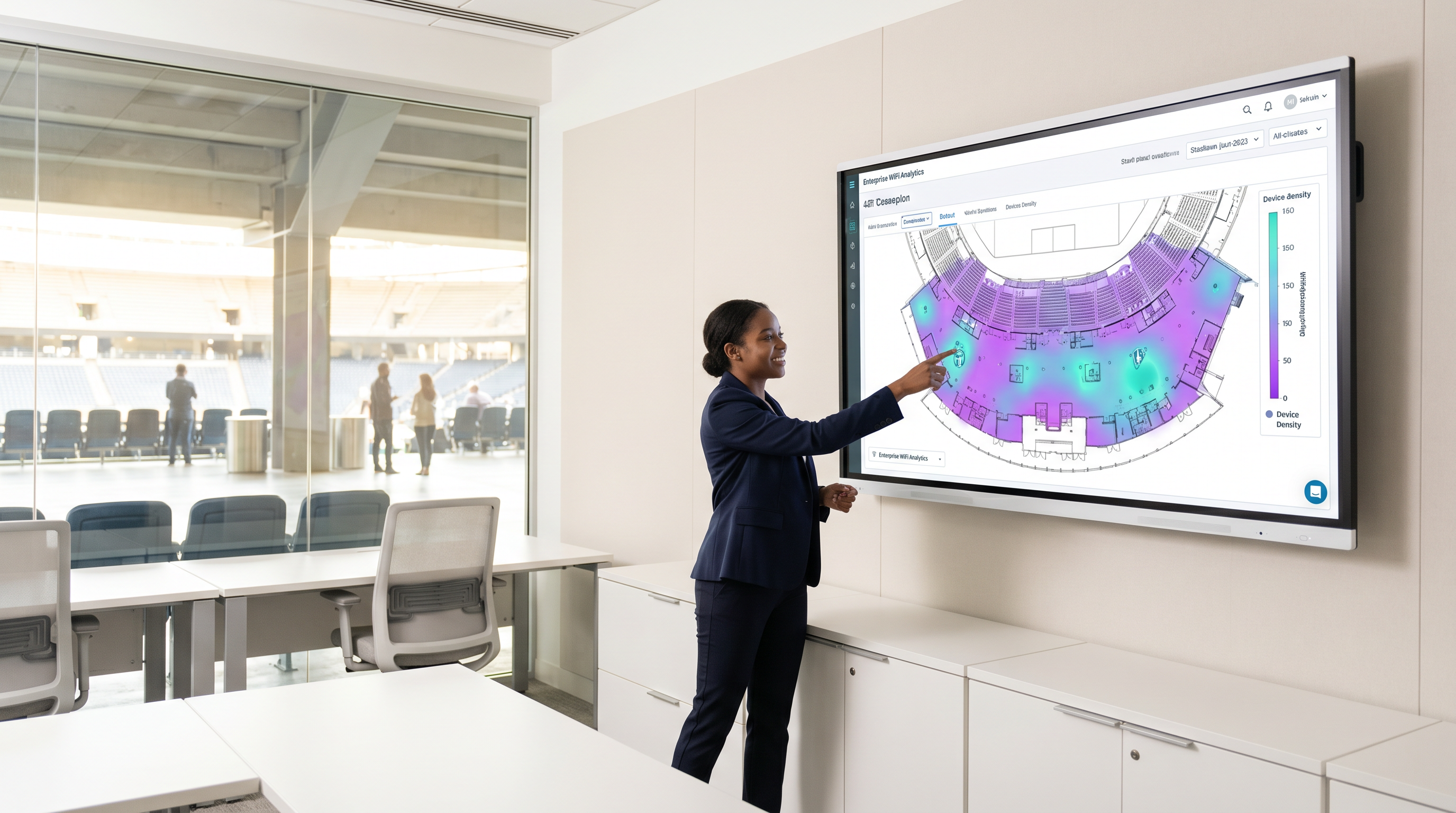
Pour les sites d'entreprise — qu'il s'agisse d'un stade de 50 000 places, d'un vaste campus hospitalier ou d'un environnement de vente au détail à forte densité — le principal défi des réseaux sans fil n'est plus la vitesse pure, mais l'efficacité spectrale. L'accès multiple par répartition orthogonale de la fréquence (OFDMA) est la technologie fondamentale de la norme IEEE 802.11ax (WiFi 6) qui répond précisément à ce problème. En permettant à une seule transmission de communiquer avec plusieurs clients simultanément, l'OFDMA réduit considérablement la latence, minimise la surcharge de contention et augmente la capacité globale du réseau dans les déploiements à haute densité.
Ce guide explore les mécanismes techniques de l'OFDMA, en quoi il diffère de l'ancien OFDM, et fournit des conseils pratiques aux directeurs informatiques et aux architectes réseau qui planifient leur infrastructure WiFi Invité de nouvelle génération. Que vous gériez un centre de conférence, un parc de magasins ou un campus du secteur public, la compréhension de l'OFDMA est la condition préalable à toute stratégie de déploiement WiFi 6 crédible.
Analyse technique approfondie : De l'OFDM à l'OFDMA
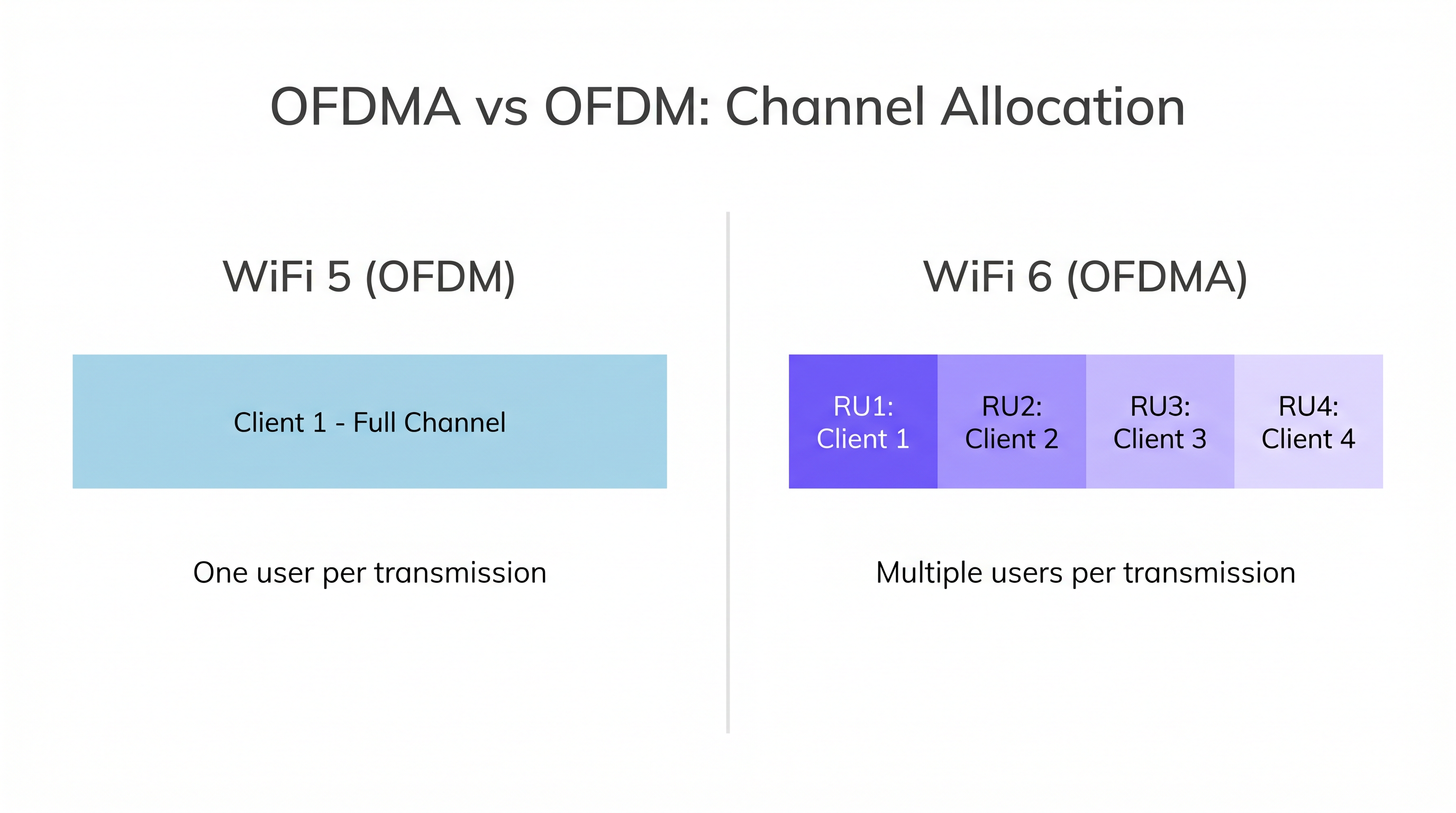
Pour comprendre l'OFDMA, nous devons d'abord examiner les limites de son prédécesseur. Dans le WiFi 5 (802.11ac) et les normes antérieures, les réseaux utilisaient le multiplexage par répartition orthogonale de la fréquence (OFDM). L'OFDM alloue la totalité de la bande passante du canal — qu'elle soit de 20 MHz, 40 MHz ou 80 MHz — à un seul client pour une transmission spécifique. Même si le client n'a besoin de transmettre qu'une infime charge utile, comme une requête DNS, un accusé de réception TCP ou un ping de capteur IoT, il monopolise l'ensemble du canal pendant cette durée.
Dans des environnements denses comme le Commerce de détail ou l' Hôtellerie , cela crée un goulot d'étranglement massif. Des centaines d'appareils faisant la queue pour transmettre de petits paquets entraînent une surcharge de contention importante et des pics de latence. Le problème n'est pas une bande passante insuffisante — c'est que le protocole est fondamentalement mono-utilisateur.
La solution OFDMA : Les unités de ressources (RU)
L'OFDMA modifie fondamentalement ce paradigme en divisant le canal en sous-canaux plus petits appelés Unités de ressources (RU). Au lieu de dédier un canal de 20 MHz à un seul utilisateur, un point d'accès (AP) WiFi 6 peut subdiviser ce canal de 20 MHz en un maximum de neuf RU distinctes (en utilisant des RU à 26 tonalités). Cela permet à l'AP de communiquer avec jusqu'à neuf clients simultanément lors d'une seule opportunité de transmission (TXOP).
| Largeur du canal | RU max (26 tonalités) | Clients simultanés max |
|---|---|---|
| 20 MHz | 9 | 9 |
| 40 MHz | 18 | 18 |
| 80 MHz | 37 | 37 |
| 160 MHz | 74 | 74 |
L'AP agit comme un contrôleur de trafic, utilisant des trames de déclenchement (Trigger Frames) — un nouveau type de trame de gestion introduit dans la norme 802.11ax — pour orchestrer toutes les transmissions OFDMA en liaison montante. La trame de déclenchement alloue des RU spécifiques à des clients spécifiques, dicte la puissance de transmission et synchronise la liaison montante afin que tous les signaux des clients arrivent à l'AP simultanément. Ce passage d'un modèle basé sur la contention (CSMA/CA) à un modèle planifié et orchestré est la raison principale pour laquelle l'OFDMA offre des améliorations de latence aussi spectaculaires en charge.
Architecture des sous-porteuses
Le WiFi 6 réduit l'espacement des sous-porteuses de 312,5 kHz (WiFi 5) à 78,125 kHz — une réduction d'un facteur quatre. Cet espacement plus étroit permet des durées de symbole plus longues (12,8 μs contre 3,2 μs), ce qui améliore la robustesse contre l'évanouissement par trajets multiples. Dans des environnements tels que les entrepôts, les hubs de Transport ou les grandes surfaces de vente au détail ouvertes où les signaux se reflètent sur les rayonnages métalliques et les structures en béton, il s'agit d'une amélioration significative de la fiabilité de la liaison.
Coloration BSS (BSS Coloring)
Bien qu'elle ne fasse pas strictement partie de l'OFDMA, la coloration BSS fonctionne en tandem avec lui. Elle ajoute un identifiant de 6 bits aux en-têtes PHY, permettant aux radios de distinguer les transmissions de leur propre réseau (intra-BSS) de celles des réseaux voisins (inter-BSS). Ce mécanisme de réutilisation spatiale atténue considérablement les interférences co-canal dans les déploiements denses où plusieurs AP fonctionnent sur le même canal dans des zones adjacentes.
Guide de mise en œuvre
Le déploiement de réseaux compatibles OFDMA nécessite un changement de philosophie de conception. Les réseaux existants ont été conçus pour la couverture ; les réseaux modernes à haute densité doivent être conçus pour la capacité.
1. Préparation de l'écosystème client
Le piège le plus courant dans les déploiements WiFi 6 est de supposer des gains de performances immédiats sans tenir compte de la mixité des clients. L'OFDMA nécessite du matériel 802.11ax aux deux extrémités. Si un site possède une base de 70 % de clients d'ancienne génération (WiFi 4/5), l'AP doit fréquemment revenir à l'OFDM standard pour les servir, annulant ainsi les avantages de l'OFDMA.
Utilisez WiFi Analytics pour profiler l'écosystème client avant de vous engager dans une refonte de l'architecture. Pour les environnements s'appuyant sur des Capteurs ou des appareils IoT, assurez-vous que les nouveaux achats exigent la conformité WiFi 6. Mettez en œuvre un band steering agressif et une isolation des clients pour pousser les appareils compatibles vers les bandes 5 GHz ou 6 GHz.
2. Stratégie de largeur de canal
Dans les environnements denses, les canaux plus larges (80 MHz ou 160 MHz) sont généralement préjudiciables. Ils réduisent le nombre de canaux non chevauchants disponibles, augmentant ainsi les interférences co-canal.
Recommandation : Standardisez sur des canaux de 20 MHz pour les déploiements ultra-denses (stades, auditoriums, salles de conférence). Cela maximise la réutilisation des canaux et permet à la coloration BSS de fonctionner de manière optimale. Un canal de 20 MHz utilisant l'OFDMA offrira souvent un meilleur débit global et une latence plus faible pour 50 utilisateurs simultanés qu'un canal de 80 MHz luttant contre la contention.
3. Considérations relatives à l'alimentation et au PoE
Les AP WiFi 6 disposent de radios sophistiquées qui exigent plus d'énergie. De nombreux AP d'entreprise nécessitent la norme 802.3at (PoE+) ou même 802.3bt (PoE++) pour exploiter pleinement tous les flux spatiaux et toutes les fonctionnalités.
Recommandation : Auditez votre infrastructure de commutation avant le déploiement. La connexion d'AP WiFi 6 haut de gamme à des commutateurs 802.3af d'ancienne génération obligera les AP à réduire leurs capacités — généralement en désactivant les flux spatiaux ou en réduisant la puissance de transmission — limitant sévèrement le retour sur votre investissement matériel.
Bonnes pratiques
1. Privilégiez le 6 GHz (WiFi 6E) pour les applications critiques. Le WiFi 6E apporte tous les avantages de l'OFDMA dans le spectre vierge des 6 GHz, totalement exempt de clients WiFi 4/5 d'ancienne génération. Cela est particulièrement précieux pour les applications critiques dans le secteur de la Santé , où les anciens appareils médicaux sur 2,4 GHz et 5 GHz ne doivent pas interférer avec les communications cliniques.
2. Imposez le WPA3 pour tous les nouveaux déploiements. Le WPA3 est obligatoire pour la certification WiFi 6 et offre des améliorations significatives de la force cryptographique via l'authentification simultanée des égaux (SAE). Cela s'aligne sur les exigences PCI DSS et GDPR et devrait être une norme non négociable dans tout nouveau déploiement. Pour obtenir des conseils sur l'intégration au réseau dans le contexte de l'authentification sécurisée, consultez UX d'intégration réseau : Concevoir une expérience de configuration WiFi sans friction .
3. Intégrez la stratégie sans fil et WAN. Une périphérie sans fil haute performance nécessite une périphérie WAN robuste. Assurez-vous que votre réseau de raccordement (backhaul) peut gérer l'augmentation du débit global qu'un réseau OFDMA fonctionnant correctement générera. Consultez Les principaux avantages du SD WAN pour les entreprises modernes pour des stratégies d'intégration qui alignent vos investissements sans fil et WAN.
4. Déployez le Wayfinding sur la même infrastructure. Les caractéristiques de faible latence de l'OFDMA font du WiFi 6 un excellent substrat pour les services de localisation en temps réel et le wayfinding. Le même investissement d'infrastructure qui améliore la connectivité des invités peut simultanément alimenter la navigation en intérieur, réduisant ainsi le coût total de possession.
Dépannage et atténuation des risques
Symptôme : Latence élevée malgré le déploiement d'AP WiFi 6.
La cause fondamentale la plus probable est un pourcentage élevé de clients d'ancienne génération forçant l'AP à passer en mode OFDM hérité, ou un chevauchement excessif des canaux entre les AP adjacents. Commencez par auditer la mixité des clients à l'aide de votre plateforme de gestion de réseau. Si les anciens clients sont le problème, mettez en œuvre le band steering et envisagez d'accélérer le cycle de renouvellement des terminaux. Si le chevauchement des canaux est le problème, réduisez la largeur des canaux à 20 MHz et activez la coloration BSS.
Symptôme : Redémarrage des AP, désactivation des radios ou performances bien inférieures aux spécifications.
Il s'agit presque toujours d'un problème de manque d'alimentation PoE. Vérifiez l'allocation d'alimentation des ports du commutateur via les journaux de négociation LLDP. Vérifiez si l'AP fonctionne dans un mode à puissance réduite. La solution nécessite une mise à niveau vers des commutateurs PoE+ ou PoE++, ou le déploiement d'injecteurs PoE mid-span comme mesure provisoire.
Symptôme : Les métriques d'utilisation de l'OFDMA affichent une utilisation proche de zéro dans le tableau de bord de gestion.
Cela indique que l'AP ne trouve pas suffisamment de clients WiFi 6 pour planifier les transmissions OFDMA. Consultez la table d'association des clients. Si la majorité des clients associés sont des appareils d'ancienne génération, l'OFDMA restera inactif. Il s'agit d'un problème d'écosystème client, et non d'un problème de configuration de l'AP.
ROI et impact commercial
Pour les directeurs techniques (CTO) et les exploitants de sites, le ROI de l'OFDMA se mesure en termes d'expérience utilisateur, d'efficacité opérationnelle et d'allongement du cycle de vie de l'infrastructure.
Dans un environnement de Commerce de détail , une latence plus faible signifie des transactions aux points de vente plus rapides, une numérisation fiable des stocks et des applications de Wayfinding réactives qui améliorent le parcours client. Dans le secteur de l' Hôtellerie , l'OFDMA garantit que les clients diffusant des vidéos 4K n'impactent pas la latence des appels VoIP passés par le personnel de l'hôtel — une plainte fréquente dans les anciens déploiements WiFi 5. Pour des conseils détaillés sur les stratégies de déploiement spécifiques à l'hôtellerie, consultez Les solutions WiFi modernes pour l'hôtellerie que vos clients méritent .
En augmentant la capacité du spectre RF, l'OFDMA prolonge le cycle de vie de l'infrastructure sans fil, retardant ainsi le besoin de futures mises à niveau massives tout en fournissant une base solide pour l'expansion de l'IoT. Un réseau capable de desservir efficacement 200 clients simultanés aujourd'hui pourra en accueillir 400 demain — non pas en ajoutant plus d'AP, mais en utilisant le spectre de manière plus intelligente.
Pour obtenir des conseils sur la sélection du matériel, consultez notre Définition des points d'accès sans fil : Votre guide ultime 2026 . Pour une compréhension plus large de la façon dont le WiFi 6 s'intègre à votre stratégie d'intégration et d'expérience utilisateur, le guide UX d'intégration réseau : Concevoir une expérience de configuration WiFi sans friction fournit un contexte de déploiement multilingue.
Termes clés et définitions
OFDMA (Orthogonal Frequency Division Multiple Access)
A multi-user technology introduced in IEEE 802.11ax (WiFi 6) that subdivides a WiFi channel into smaller frequency allocations called Resource Units (RUs), allowing an AP to communicate with multiple clients simultaneously within a single transmission opportunity.
The core feature of WiFi 6 that reduces latency and increases spectral efficiency in dense deployments. IT teams should understand OFDMA as the primary justification for WiFi 6 upgrades in high-density venues.
Resource Unit (RU)
A specific subset of subcarriers within an OFDMA channel allocated to a single client for a given transmission. RU sizes range from 26 tones (smallest, for IoT/small packets) to 996 tones (full channel, for high-throughput clients).
IT teams must understand RUs to grasp how bandwidth is dynamically allocated to clients based on their traffic needs. A client sending a DNS query gets a small RU; a client streaming 4K video gets a larger RU.
Trigger Frame
A management frame sent by the AP to orchestrate uplink OFDMA transmissions. It allocates specific RUs to specific clients, specifies transmission power levels, and synchronises client timing so all uplink signals arrive at the AP simultaneously.
Crucial for understanding how the AP acts as the traffic controller in a WiFi 6 network. Without Trigger Frames, uplink OFDMA cannot function — the AP must actively schedule clients rather than waiting for them to contend for airtime.
BSS Coloring
A spatial reuse technique in IEEE 802.11ax that adds a 6-bit colour identifier to PHY headers, allowing radios to distinguish between transmissions from their own network (intra-BSS) and neighbouring networks on the same channel (inter-BSS).
Essential for mitigating co-channel interference in ultra-dense environments like stadiums, retail malls, or multi-floor office buildings. Works in concert with OFDMA to improve overall spectral efficiency.
Subcarrier
A narrow frequency band within a larger WiFi channel used to carry data. WiFi 6 uses subcarrier spacing of 78.125 kHz, compared to 312.5 kHz in WiFi 5, quadrupling the number of subcarriers and enabling finer-grained frequency allocation.
The tighter subcarrier spacing in WiFi 6 is what makes OFDMA's fine-grained RU allocation possible, and also improves multipath resilience in complex RF environments.
TXOP (Transmission Opportunity)
A bounded time interval during which a device has the right to initiate frame exchanges on the wireless medium. In WiFi 6, OFDMA maximises the efficiency of each TXOP by packing data for multiple users into a single transmission.
Understanding TXOPs helps IT teams appreciate why OFDMA reduces overhead: instead of each client requiring its own TXOP (with associated contention and backoff delays), multiple clients share a single TXOP.
Spatial Streams (MIMO)
Independent data signals transmitted simultaneously using Multiple-Input Multiple-Output (MIMO) antenna technology. WiFi 6 APs support up to 8 spatial streams (8x8 MIMO), which work in conjunction with OFDMA to increase overall capacity.
High-density deployments require APs with sufficient spatial stream support. However, spatial streams require adequate PoE power — a key infrastructure consideration when specifying hardware.
WPA3
The latest WiFi security certification, featuring Simultaneous Authentication of Equals (SAE) to protect against offline dictionary attacks, and Forward Secrecy to protect past sessions if a key is later compromised. Mandatory for all WiFi 6 certified devices.
Mandatory for WiFi 6 certification. For organisations subject to PCI DSS (payment card environments) or GDPR (personal data processing), WPA3 is a compliance requirement, not merely a best practice.
PoE+ (802.3at) and PoE++ (802.3bt)
IEEE standards for Power over Ethernet that define the maximum power delivered per port. 802.3at delivers up to 30W; 802.3bt delivers up to 90W. Both exceed the legacy 802.3af standard (15.4W) required by modern WiFi 6 APs.
A critical infrastructure consideration for any WiFi 6 deployment. Failing to provision adequate PoE power is the most common cause of underperforming WiFi 6 installations.
Études de cas
A 500-room resort hotel is experiencing severe guest complaints regarding WiFi performance during the evening 'Netflix hour' (8 PM to 11 PM). They currently use 802.11ac (WiFi 5) APs configured with 80MHz channels on the 5GHz band. The network team has already deployed a high AP density — one AP per floor section — but performance remains poor. How should the network architect redesign the RF environment using WiFi 6 and OFDMA?
Step 1 — Client Ecosystem Audit: Before any hardware change, use WiFi Analytics to profile the client mix. Identify what percentage of connected devices are WiFi 6 capable. In a typical hotel, this will range from 40% to 70% depending on guest demographics. Step 2 — Channel Width Reduction: Immediately reduce 5GHz channel widths from 80MHz to 20MHz on the existing APs. This alone will reduce co-channel interference and improve aggregate performance, even before the WiFi 6 upgrade. Step 3 — WiFi 6 AP Deployment: Replace existing APs with WiFi 6 (802.11ax) models. Ensure the switching infrastructure supports PoE+ (802.3at). Configure OFDMA and BSS Coloring on all APs. Step 4 — Band Steering and QoS: Implement aggressive band steering to push 5GHz-capable clients off the 2.4GHz band. Configure QoS policies to prioritise latency-sensitive traffic (VoIP, interactive applications) over bulk streaming traffic. Step 5 — Monitoring: Deploy real-time monitoring to track OFDMA utilisation, client distribution per AP, and per-client throughput. Adjust AP placement if any single AP is serving more than 40 concurrent active clients.
A stadium IT director needs to deploy connectivity for a dense concourse area where up to 8,000 fans congregate during halftime. They plan to deploy high-density WiFi 6 APs rated for 8x8 MIMO but are constrained by legacy PoE (802.3af) switches in the intermediate distribution frames (IDFs). The project budget does not currently include switch replacement. What is the critical risk, and how should it be mitigated within the existing budget constraint?
The critical risk is power starvation. High-density WiFi 6 APs with 8x8 MIMO typically require 802.3at (PoE+, up to 30W) or 802.3bt (PoE++, up to 90W) to fully power their radios, dedicated scanning radios, and onboard processors. If connected to 802.3af switches (maximum 15.4W), the APs will enter a power-saving mode. Typical degradation includes: dropping from 8x8 to 4x4 or 2x2 MIMO, disabling the dedicated scanning radio (which handles security monitoring and analytics), and reducing transmit power. Mitigation within budget: Deploy mid-span PoE injectors between the 802.3af switch and each AP. A mid-span injector takes the existing PoE feed and supplements it to deliver PoE+ or PoE++ levels. This is significantly cheaper than replacing the switches and can be deployed without any changes to the IDF. Budget the injector cost into the AP deployment line item. Document this as a temporary measure and include switch replacement in the next capital expenditure cycle.
Analyse de scénario
Q1. You are designing a high-density WiFi network for a university lecture hall seating 300 students. The primary use case is concurrent online examination, where all students must maintain a stable, low-latency connection simultaneously. The hall has a dropped ceiling with regular grid tiles. Which channel width configuration is most appropriate for the 5GHz band, and why?
💡 Astuce :Consider the impact of co-channel interference and the number of non-overlapping 5GHz channels available in a confined space. Also consider what happens to OFDMA efficiency as channel width increases.
Afficher l'approche recommandée
20MHz channels are the most appropriate configuration. While 80MHz channels offer higher peak speeds for individual users, they reduce the number of non-overlapping 5GHz channels from approximately 24 (at 20MHz) to just 6 (at 80MHz) in the UNII-1 through UNII-3 bands. In a lecture hall requiring multiple APs, this leads to severe co-channel interference. 20MHz channels maximise channel reuse, allowing more APs to operate cleanly in adjacent areas. Within those 20MHz channels, OFDMA efficiently handles the concurrent client load by allocating Resource Units to each student's device simultaneously, delivering low latency and high aggregate throughput — exactly what an online examination environment requires.
Q2. A retail chain is upgrading 50 stores to WiFi 6 to support new IoT shelf sensors, mobile POS terminals, and a customer-facing Guest WiFi service. The project budget covers new WiFi 6 APs but does not include switch replacement. The existing switches are all 802.3af (PoE). The IT director insists the project can proceed without switch upgrades. What is the likely outcome, and what is your recommendation?
💡 Astuce :Review the power requirements for modern 802.11ax radios compared to legacy 802.3af limits. Consider what features are typically disabled when an AP enters power-saving mode.
Afficher l'approche recommandée
The likely outcome is that the new WiFi 6 APs will operate in a degraded power-saving mode. To remain within the 15.4W limit of 802.3af, the APs will typically disable spatial streams (dropping from 4x4 to 2x2), reduce transmit power, and disable auxiliary radios such as dedicated BLE scanning radios. This severely limits the expected performance gains and may render the IoT sensor integration unreliable if it depends on the BLE radio. The recommendation is to either include mid-span PoE injectors in the project budget (a cost-effective interim solution) or to phase the switch upgrade alongside the AP deployment, prioritising the highest-density stores first.
Q3. During a post-deployment review of a newly installed WiFi 6 network in a 1,200-bed hospital, the network team observes that OFDMA utilisation metrics in the management dashboard are consistently below 10%, and average client latency has not improved significantly compared to the previous WiFi 5 deployment. The APs are correctly configured and receiving full PoE+ power. What is the most likely root cause, and what remediation steps would you recommend?
💡 Astuce :Consider the requirements for OFDMA to activate, the typical composition of device types in a hospital environment, and what the management dashboard's client association table would reveal.
Afficher l'approche recommandée
The most likely root cause is a high percentage of legacy (WiFi 4/WiFi 5) clients on the network. Hospitals typically have a large installed base of legacy medical devices — infusion pumps, patient monitoring systems, nurse call systems, and older clinical workstations — many of which are on long replacement cycles and are not WiFi 6 capable. OFDMA requires 802.11ax hardware on both the AP and the client. If the majority of associated clients are legacy, the AP operates predominantly in OFDM mode, and OFDMA remains dormant. Remediation steps: (1) Use WiFi Analytics to generate a full client device report, segmented by WiFi generation. (2) Identify which device categories represent the largest legacy population. (3) Work with clinical engineering to accelerate the refresh cycle for high-volume legacy devices. (4) In the interim, implement band steering to segregate legacy devices onto dedicated 2.4GHz SSIDs, freeing the 5GHz band for WiFi 6 clients where OFDMA can operate effectively. (5) For new clinical device procurement, mandate WiFi 6 compliance as a purchasing requirement.
Points clés à retenir
- ✓OFDMA is the core technology of WiFi 6 that shifts the focus from peak single-user throughput to multi-user spectral efficiency, allowing an AP to serve multiple clients simultaneously within a single channel.
- ✓Unlike legacy OFDM, OFDMA divides channels into Resource Units (RUs), enabling up to nine concurrent transmissions within a single 20MHz channel — dramatically reducing latency and contention overhead.
- ✓Maximum OFDMA benefits require a high percentage of WiFi 6-capable clients; legacy devices force the network back into less efficient OFDM mode, making a client ecosystem audit essential before deployment.
- ✓High-density designs should standardise on 20MHz channels to maximise frequency reuse and minimise co-channel interference — wider channels reduce available non-overlapping channels and increase contention.
- ✓Upgrading to WiFi 6 APs almost always necessitates upgrading switching infrastructure to support PoE+ (802.3at) or PoE++ (802.3bt); power starvation is the most common cause of underperforming WiFi 6 deployments.
- ✓BSS Coloring works in concert with OFDMA to mitigate co-channel interference in dense venues by allowing radios to distinguish and deprioritise transmissions from neighbouring networks.
- ✓The ROI of OFDMA is measured in user experience, operational efficiency, and infrastructure lifecycle extension — not just headline throughput figures.




