
गेस्ट WiFi के लिए DNS फ़िल्टरिंग: मैलवेयर और अनुचित सामग्री को ब्लॉक करना
यह मार्गदर्शिका IT प्रबंधकों, नेटवर्क आर्किटेक्ट्स और वेन्यू संचालन निदेशकों को गेस्ट WiFi नेटवर्क पर DNS फ़िल्टरिंग तैनात करने के लिए एक निश्चित तकनीकी संदर्भ प्रदान करती है। यह DNS-स्तर के थ्रेट ब्लॉकिंग के आर्किटेक्चर, अग्रणी क्लाउड DNS सेवाओं की वेंडर तुलना, चरण-दर-चरण कार्यान्वयन मार्गदर्शन, और हॉस्पिटैलिटी और रिटेल वातावरण से वास्तविक दुनिया के केस स्टडीज़ को कवर करती है। DNS फ़िल्टरिंग सार्वजनिक-फ़ेसिंग नेटवर्क पर मैलवेयर, फ़िशिंग और अनुचित सामग्री के खिलाफ़ रक्षा की सबसे अधिक लागत-प्रभावी पहली पंक्ति है, और यह मार्गदर्शिका टीमों को इसे आत्मविश्वास से और PCI DSS, GDPR और HIPAA आवश्यकताओं के अनुपालन में तैनात करने के लिए सुसज्जित करती है।
इस गाइड को सुनें
पॉडकास्ट ट्रांसक्रिप्ट देखें

कार्यकारी सारांश
गेस्ट WiFi के लिए DNS फ़िल्टरिंग अब कोई वैकल्पिक सुरक्षा वृद्धि नहीं है — यह सार्वजनिक-फ़ेसिंग नेटवर्क संचालित करने वाले किसी भी स्थान के लिए एक आधारभूत नियंत्रण है। जब कोई होटल, स्टेडियम, रिटेल चेन, या कॉन्फ़्रेंस सेंटर गेस्ट WiFi प्रदान करता है, तो वह अपने बुनियादी ढांचे से गुज़रने वाले ट्रैफ़िक की ज़िम्मेदारी लेता है। DNS-स्तर की फ़िल्टरिंग के बिना, वह नेटवर्क मैलवेयर कॉलबैक, फ़िशिंग सत्रों और अनुचित सामग्री के लिए एक खुला माध्यम बन जाता है, जो संगठन को विनियामक देयता, प्रतिष्ठा संबंधी जोखिम और संभावित नेटवर्क समझौते के प्रति उजागर करता है。
यह मार्गदर्शिका बताती है कि तकनीकी स्तर पर DNS फ़िल्टरिंग कैसे काम करती है, वेन्यू ऑपरेटरों के लिए उपलब्ध अग्रणी क्लाउड DNS सेवाओं की तुलना करती है, और एक संरचित कार्यान्वयन रोडमैप प्रदान करती है। यह महत्वपूर्ण प्रवर्तन आवश्यकता — हार्डकोडेड DNS क्वेरीज़ को इंटरसेप्ट करना — को संबोधित करती है जिसे अधिकांश डिप्लॉयमेंट अनदेखा कर देते हैं, और यह फ़ॉल्स पॉज़िटिव प्रबंधन, अनुपालन संरेखण, और एन्क्रिप्टेड DNS प्रोटोकॉल की उभरती चुनौती को कवर करती है। Purple ग्राहक DNS फ़िल्टरिंग को सीधे अपने Guest WiFi बुनियादी ढांचे के ऊपर लेयर कर सकते हैं, जिससे सुरक्षा और WiFi Analytics डेटा के साथ खतरे की घटनाओं को सहसंबंधित करने की दृश्यता दोनों प्राप्त होती हैं।
तकनीकी डीप-डाइव
DNS फ़िल्टरिंग कैसे काम करती है
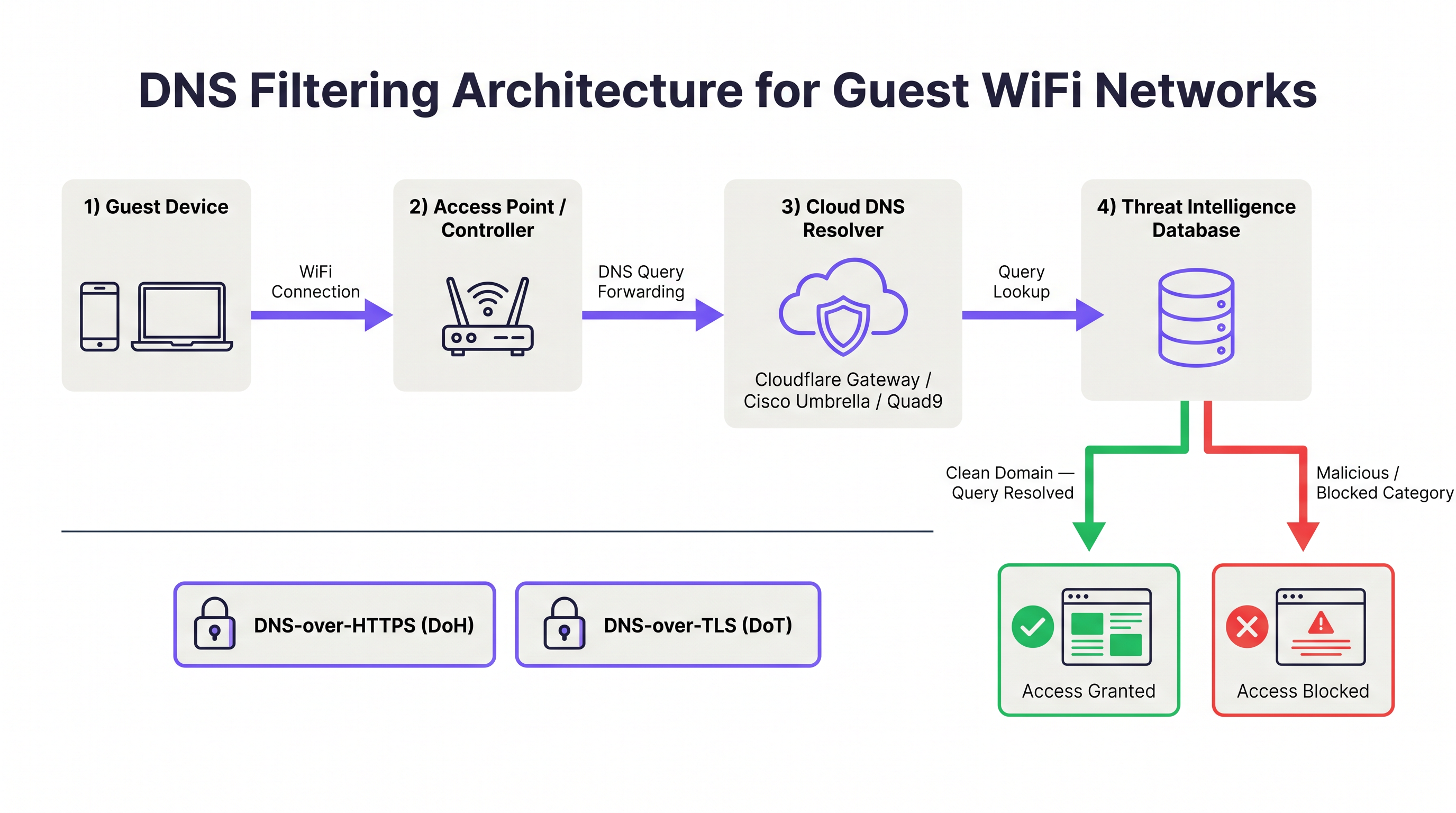
डोमेन नेम सिस्टम (DNS) इंटरनेट की आधारभूत रिज़ॉल्यूशन लेयर है। हर बार जब कोई डिवाइस किसी वेब संसाधन से कनेक्ट होने का प्रयास करता है, तो वह डोमेन नाम को IP पते में रिज़ॉल्व करने के लिए सबसे पहले एक DNS क्वेरी जारी करता है। DNS फ़िल्टरिंग इस रिज़ॉल्यूशन प्रक्रिया को इंटरसेप्ट करती है और प्रतिक्रिया देने से पहले थ्रेट इंटेलिजेंस डेटाबेस के विरुद्ध अनुरोधित डोमेन का मूल्यांकन करती है। यदि डोमेन को दुर्भावनापूर्ण के रूप में वर्गीकृत किया गया है — मैलवेयर होस्ट करना, फ़िशिंग साइट के रूप में काम करना, या बॉटनेट कमांड-एंड-कंट्रोल (C2) एंडपॉइंट के रूप में काम करना — तो रिज़ॉल्वर एक नॉन-राउटेबल पता लौटाता है या क्लाइंट को ब्लॉक पेज पर रीडायरेक्ट करता है। दुर्भावनापूर्ण होस्ट के साथ TCP/IP कनेक्शन कभी स्थापित नहीं होता है।
यह आर्किटेक्चर पैकेट-इंस्पेक्शन फ़ायरवॉल पर एक बुनियादी दक्षता लाभ प्रदान करता है। कनेक्शन शुरू होने के बाद फ़ायरवॉल को डेटा का निरीक्षण करना चाहिए; DNS फ़िल्टरिंग कनेक्शन को शुरू होने से ही रोकती है। गेस्ट WiFi वातावरण के लिए जहां सैकड़ों अविश्वसनीय डिवाइस एक साथ सक्रिय हो सकते हैं, यह अपस्ट्रीम इंटरसेप्शन नेटवर्क परिधि तक पहुंचने वाले दुर्भावनापूर्ण ट्रैफ़िक की मात्रा को नाटकीय रूप से कम कर देता है।
DNS फ़िल्टरिंग क्या ब्लॉक कर सकती है और क्या नहीं
हितधारकों के साथ सटीक अपेक्षाएं निर्धारित करने के लिए DNS फ़िल्टरिंग के दायरे को समझना आवश्यक है।
| खतरे की श्रेणी | DNS फ़िल्टरिंग प्रभावशीलता | नोट्स |
|---|---|---|
| मैलवेयर वितरण डोमेन | उच्च | दुर्भावनापूर्ण पेलोड के डाउनलोड को रोकता है |
| फ़िशिंग साइटें | उच्च | क्रेडेंशियल हार्वेस्टिंग पेजों को रोकता है |
| बॉटनेट C2 संचार | उच्च | डिवाइस पर पहले से मौजूद मैलवेयर को बाधित करता है |
| रैंसमवेयर स्टेजिंग सर्वर | उच्च | पेलोड पुनर्प्राप्ति और कुंजी विनिमय को रोकता है |
| वयस्क / अनुचित सामग्री | उच्च | श्रेणी-आधारित फ़िल्टरिंग |
| क्रिप्टोमाइनिंग पूल | उच्च | डोमेन-आधारित पूल कनेक्शन को रोकता है |
| IP-आधारित खतरे (कोई डोमेन नहीं) | कोई नहीं | फ़ायरवॉल या IPS की आवश्यकता है |
| HTTPS में एन्क्रिप्टेड पेलोड | कोई नहीं | TLS निरीक्षण की आवश्यकता है |
| VPN-टनल ट्रैफ़िक | कोई नहीं | फ़ायरवॉल पर VPN ब्लॉकिंग की आवश्यकता है |
| लेटरल मूवमेंट (LAN) | कोई नहीं | नेटवर्क सेगमेंटेशन की आवश्यकता है |
DNS फ़िल्टरिंग कोई संपूर्ण सुरक्षा समाधान नहीं है। यह डिफ़ेंस-इन-डेप्थ आर्किटेक्चर में एक लेयर है। व्यापक गेस्ट WiFi सुरक्षा के लिए, इसे VLAN सेगमेंटेशन, Captive Portal प्रमाणीकरण, सत्र टाइमआउट नियंत्रण (देखें Guest WiFi Session Timeouts: Balancing UX and Security ), और जहां आवश्यक हो, TLS निरीक्षण के साथ होना चाहिए।
क्लाउड DNS फ़िल्टरिंग: आर्किटेक्चर और सेवा तुलना
क्लाउड DNS फ़िल्टरिंग सेवाएं ग्लोबल एनीकास्ट नेटवर्क संचालित करती हैं, जिसका अर्थ है कि DNS क्वेरीज़ को निकटतम डेटा सेंटर में रूट किया जाता है, जिससे लेटेंसी कम होती है। वेन्यू ऑपरेटरों के लिए प्रासंगिक चार प्राथमिक सेवाएं Cloudflare Gateway, Cisco Umbrella, Quad9 और NextDNS हैं।
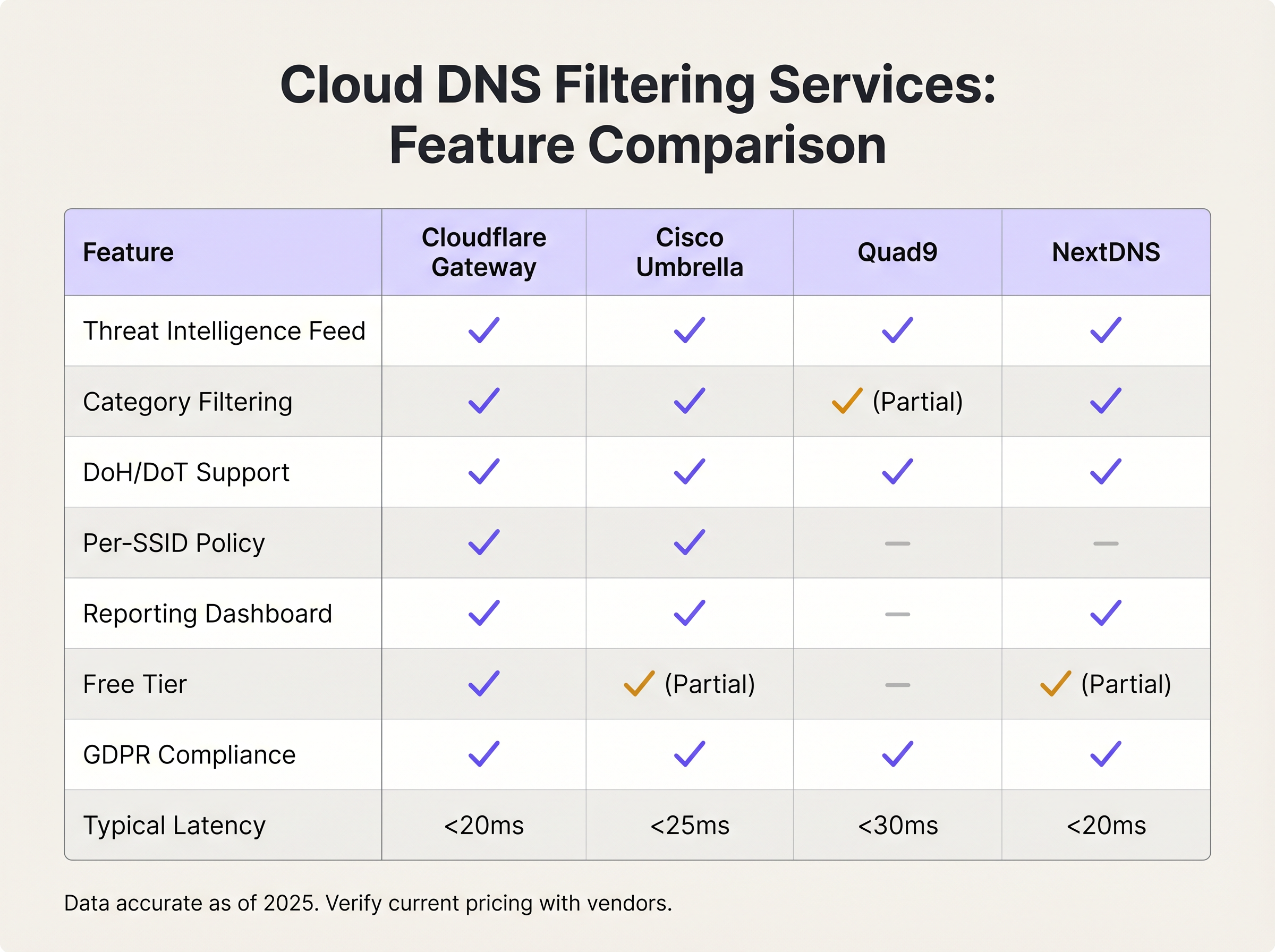
Cloudflare Gateway (Cloudflare Zero Trust प्लेटफ़ॉर्म का हिस्सा) विश्व स्तर पर सब-20ms रिज़ॉल्यूशन लेटेंसी, ग्रैन्युलर श्रेणी फ़िल्टरिंग, प्रति-स्थान नीति प्रवर्तन, और एक GDPR-अनुपालक डेटा प्रोसेसिंग समझौता प्रदान करता है। इसका मुफ़्त टियर बुनियादी थ्रेट ब्लॉकिंग का समर्थन करता है; सशुल्क टियर उन्नत श्रेणी फ़िल्टरिंग, लॉगिंग और नीति स्वचालन के लिए API एक्सेस जोड़ते हैं।
Cisco Umbrella मौजूदा Cisco बुनियादी ढांचे वाले संगठनों के लिए एंटरप्राइज़ मानक है। यह सबसे व्यापक थ्रेट इंटेलिजेंस फ़ीड प्रदान करता है — जिसे Cisco Talos द्वारा सूचित किया जाता है, जो सबसे बड़े वाणिज्यिक थ्रेट रिसर्च संगठनों में से एक है — और प्रति-SSID नीति प्रवर्तन का समर्थन करता है, जो कई SSID (स्टाफ़, गेस्ट, IoT) संचालित करने वाले स्थानों के लिए महत्वपूर्ण है। Umbrella Cisco के व्यापक सुरक्षा पोर्टफ़ोलियो के साथ एकीकृत होता है, जिसमें Meraki एक्सेस पॉइंट शामिल हैं, जो Meraki-आधारित नेटवर्क के लिए डिप्लॉयमेंट को सरल बनाता है。
Quad9 (Quad9 Foundation, एक स्विस गैर-लाभकारी संस्था द्वारा संचालित) सामग्री वर्गीकरण के बजाय विशेष रूप से सुरक्षा फ़िल्टरिंग पर केंद्रित है। यह 20 से अधिक भागीदारों से थ्रेट इंटेलिजेंस का उपयोग करके दुर्भावनापूर्ण डोमेन को ब्लॉक करता है, व्यक्तिगत रूप से पहचान योग्य जानकारी को लॉग नहीं करता है, और उपयोग करने के लिए मुफ़्त है। यह सख्त डेटा संप्रभुता आवश्यकताओं या सीमित बजट वाले संगठनों के लिए एक उत्कृष्ट विकल्प है, हालांकि इसमें वाणिज्यिक विकल्पों की श्रेणी फ़िल्टरिंग और रिपोर्टिंग क्षमताओं का अभाव है।
NextDNS एक व्यापक श्रेणी फ़िल्टरिंग लाइब्रेरी, प्रति-डिवाइस प्रोफ़ाइल और विस्तृत क्वेरी लॉगिंग के साथ एक अत्यधिक कॉन्फ़िगर करने योग्य क्लाउड DNS सेवा प्रदान करता है। इसका मूल्य निर्धारण मॉडल — मासिक क्वेरी वॉल्यूम पर आधारित — इसे छोटे से मध्यम डिप्लॉयमेंट के लिए लागत-प्रभावी बनाता है। यह मूल रूप से DNS-over-HTTPS और DNS-over-TLS का समर्थन करता है।
सेल्फ़-होस्टेड DNS फ़िल्टरिंग: यह कब समझ में आता है
सेल्फ़-होस्टेड समाधान — सबसे आम तौर पर वाणिज्यिक ब्लॉकलिस्ट के साथ Pi-hole, या रिस्पॉन्स पॉलिसी ज़ोन (RPZ) के साथ BIND कार्यान्वयन — पूर्ण डेटा संप्रभुता और नीति नियंत्रण प्रदान करते हैं। वे DNS क्वेरी डेटा के आसपास सख्त विनियामक आवश्यकताओं वाले संगठनों के लिए उपयुक्त हैं, या उन लोगों के लिए जिनके पास परिचालन ओवरहेड को प्रबंधित करने में सक्षम मौजूदा बुनियादी ढांचा टीमें हैं। ट्रेड-ऑफ़ महत्वपूर्ण है: सेल्फ़-होस्टेड समाधानों के लिए उच्च-उपलब्धता डिप्लॉयमेंट (सक्रिय-निष्क्रिय या सक्रिय-सक्रिय कॉन्फ़िगरेशन — HA पैटर्न की समानांतर चर्चा के लिए RADIUS सर्वर हाई अवेलेबिलिटी: Active-Active बनाम Active-Passive देखें), मैन्युअल थ्रेट फ़ीड अपडेट और आंतरिक निगरानी की आवश्यकता होती है। अधिकांश वेन्यू ऑपरेटरों के लिए, परिचालन लागत लाभ से अधिक है।
एन्क्रिप्टेड DNS: DoH और DoT विचार
DNS-over-HTTPS (DoH) और DNS-over-TLS (DoT) DNS क्वेरीज़ को एन्क्रिप्ट करते हैं, जिससे अविश्वसनीय नेटवर्क पर उपयोगकर्ता की गोपनीयता की रक्षा होती है। हालाँकि, वे DNS फ़िल्टरिंग के लिए एक बायपास वेक्टर भी बनाते हैं। सार्वजनिक DoH रिज़ॉल्वर (जैसे https://cloudflare-dns.com/dns-query) का उपयोग करने के लिए कॉन्फ़िगर किया गया डिवाइस पोर्ट 443 पर HTTPS ट्रैफ़िक के भीतर अपनी DNS क्वेरीज़ को एन्क्रिप्ट करेगा, जिससे पारंपरिक पोर्ट 53 इंटरसेप्शन अप्रभावी हो जाएगा।
शमन रणनीति के दो घटक हैं। सबसे पहले, ज्ञात सार्वजनिक DoH रिज़ॉल्वर एंडपॉइंट्स के आउटबाउंड कनेक्शन को ब्लॉक करने के लिए अपने फ़ायरवॉल या वायरलेस कंट्रोलर को कॉन्फ़िगर करें। Cloudflare, Google और अन्य प्रदाता अपनी DoH एंडपॉइंट IP रेंज प्रकाशित करते हैं। दूसरा, सुनिश्चित करें कि आपकी चुनी हुई DNS फ़िल्टरिंग सेवा मूल रूप से DoH और DoT का समर्थन करती है, ताकि एन्क्रिप्टेड DNS का उपयोग करने के लिए कॉन्फ़िगर किए गए उपकरणों को सार्वजनिक रिज़ॉल्वर के बजाय आपके सुरक्षित रिज़ॉल्वर पर निर्देशित किया जा सके। Cisco Umbrella और Cloudflare Gateway दोनों इस कॉन्फ़िगरेशन का समर्थन करते हैं।
कार्यान्वयन मार्गदर्शिका
चरण 1: अपनी DNS फ़िल्टरिंग सेवा चुनें
चयन मानदंड तीन कारकों द्वारा संचालित होने चाहिए: पैमाना, नीति ग्रैन्युलैरिटी, और अनुपालन आवश्यकताएं। निम्नलिखित ढांचा अधिकांश वेन्यू डिप्लॉयमेंट पर लागू होता है।
| डिप्लॉयमेंट पैमाना | अनुशंसित सेवा | औचित्य |
|---|---|---|
| < 100 समवर्ती उपयोगकर्ता | Cloudflare Gateway (मुफ़्त) या Quad9 | शून्य लागत, पर्याप्त थ्रेट ब्लॉकिंग |
| 100–500 समवर्ती उपयोगकर्ता | NextDNS (सशुल्क) या Cloudflare Gateway | श्रेणी फ़िल्टरिंग, रिपोर्टिंग डैशबोर्ड |
| 500+ समवर्ती उपयोगकर्ता, सिंगल साइट | Cisco Umbrella Essentials | प्रति-SSID नीति, एंटरप्राइज़ SLA |
| मल्टी-साइट एंटरप्राइज़ | Cisco Umbrella Advantage या Cloudflare Gateway Enterprise | केंद्रीकृत नीति प्रबंधन, API स्वचालन |
| हेल्थकेयर / विनियमित वातावरण | Cisco Umbrella या सेल्फ़-होस्टेड RPZ | डेटा संप्रभुता, HIPAA ऑडिट लॉगिंग |
चरण 2: गेस्ट SSID पर DHCP कॉन्फ़िगर करें
अपने वायरलेस कंट्रोलर या एक्सेस पॉइंट प्रबंधन इंटरफ़ेस पर नेविगेट करें और DNS फ़िल्टरिंग सेवा के रिज़ॉल्वर IP पते असाइन करने के लिए गेस्ट SSID के लिए DHCP स्कोप कॉन्फ़िगर करें। डिफ़ॉल्ट अपस्ट्रीम ISP DNS सर्वर का उपयोग न करें। Cloudflare Gateway के लिए, अपने Zero Trust डैशबोर्ड में दिए गए रिज़ॉल्वर IP का उपयोग करें। Cisco Umbrella के लिए, Umbrella रिज़ॉल्वर IP (विरासत डिप्लॉयमेंट के लिए 208.67.222.222 और 208.67.220.220; आधुनिक डिप्लॉयमेंट के लिए वर्चुअल एप्लायंस IP) का उपयोग करें।
Purple-प्रबंधित नेटवर्क के लिए, यह कॉन्फ़िगरेशन कंट्रोलर स्तर पर लागू किया जाता है, जो गेस्ट SSID पर सभी एक्सेस पॉइंट पर लगातार नीति प्रवर्तन सुनिश्चित करता है।
चरण 3: नेटवर्क एज पर DNS इंटरसेप्शन लागू करें
यह सबसे अधिक बार अनदेखा किया जाने वाला चरण है। UDP पोर्ट 53 और TCP पोर्ट 53 पर सभी आउटबाउंड ट्रैफ़िक को इंटरसेप्ट करने और इसे अपने DNS फ़िल्टरिंग रिज़ॉल्वर पर रीडायरेक्ट करने के लिए अपने फ़ायरवॉल या वायरलेस कंट्रोलर को कॉन्फ़िगर करें। यह हार्डकोडेड DNS सेटिंग्स वाले उपकरणों को फ़िल्टर को बायपास करने से रोकता है। Cisco Meraki पर, इसे ट्रैफ़िक शेपिंग नियम के माध्यम से लागू किया जाता है। Fortinet FortiGate पर, DNS प्रॉक्सी नीति का उपयोग करें। pfSense या OPNsense पर, NAT रीडायरेक्ट नियम कॉन्फ़िगर करें।
इसके अतिरिक्त, एन्क्रिप्टेड DNS बायपास को रोकने के लिए पोर्ट 443 पर ज्ञात सार्वजनिक DoH रिज़ॉल्वर एंडपॉइंट्स के आउटबाउंड कनेक्शन को ब्लॉक करें। DoH रिज़ॉल्वर IP रेंज की नियमित रूप से अपडेट की गई सूची बनाए रखें।
चरण 4: अपनी फ़िल्टरिंग नीति परिभाषित करें
सुरक्षा बेसलाइन से शुरू करें — वे श्रेणियां जिन्हें वेन्यू के प्रकार की परवाह किए बिना सार्वभौमिक रूप से ब्लॉक किया जाना चाहिए:
- मैलवेयर वितरण
- फ़िशिंग और क्रेडेंशियल हार्वेस्टिंग
- बॉटनेट कमांड-एंड-कंट्रोल
- रैंसमवेयर स्टेजिंग
- क्रिप्टोमाइनिंग
फिर अपनी स्वीकार्य उपयोग नीति के आधार पर वेन्यू-विशिष्ट सामग्री श्रेणियां लागू करें:
| वेन्यू का प्रकार | ब्लॉक करने के लिए अनुशंसित अतिरिक्त श्रेणियां |
|---|---|
| फ़ैमिली रिटेल / शॉपिंग सेंटर | वयस्क सामग्री, जुआ, चरमपंथी सामग्री |
| होटल (गेस्ट नेटवर्क) | बाल यौन शोषण सामग्री (अनिवार्य), चरमपंथी सामग्री |
| स्टेडियम / इवेंट वेन्यू | वयस्क सामग्री, चरमपंथी सामग्री, अवैध स्ट्रीमिंग |
| कॉन्फ़्रेंस सेंटर | पीयर-टू-पीयर फ़ाइल शेयरिंग, अनामीकरण प्रॉक्सी |
| हेल्थकेयर सुविधा | वयस्क सामग्री, जुआ, सोशल मीडिया (वैकल्पिक) |
| सार्वजनिक क्षेत्र / पुस्तकालय | वयस्क सामग्री, चरमपंथी सामग्री, जुआ |
चरण 5: परीक्षण और सत्यापन करें
लाइव होने से पहले, गेस्ट SSID पर एक परीक्षण डिवाइस का उपयोग करके कॉन्फ़िगरेशन को मान्य करें। एक ज्ञात परीक्षण मैलवेयर डोमेन तक पहुंचने का प्रयास करें (अधिकांश DNS फ़िल्टरिंग सेवाएं इस उद्देश्य के लिए परीक्षण डोमेन प्रदान करती हैं)। पुष्टि करें कि ब्लॉक पेज प्रदर्शित होता है। हार्डकोडेड DNS सर्वर (उदा., nslookup google.com 8.8.8.8) का उपयोग करने का प्रयास करें और पुष्टि करें कि क्वेरी इंटरसेप्ट और रीडायरेक्ट की गई है। सार्वजनिक DoH रिज़ॉल्वर का उपयोग करने के लिए ब्राउज़र को कॉन्फ़िगर करके DoH बायपास का परीक्षण करें और पुष्टि करें कि कनेक्शन अवरुद्ध है।
चरण 6: मॉनिटर, ट्यून और रिपोर्ट करें
पहले चार हफ्तों के लिए प्रतिदिन DNS फ़िल्टरिंग डैशबोर्ड की समीक्षा करें। ट्रैक करने के लिए प्रमुख मेट्रिक्स में कुल क्वेरीज़, श्रेणी के अनुसार अवरुद्ध क्वेरीज़, शीर्ष अवरुद्ध डोमेन और उपयोगकर्ताओं से फ़ॉल्स पॉज़िटिव रिपोर्ट शामिल हैं। एक व्हाइटलिस्ट समीक्षा प्रक्रिया स्थापित करें — व्हाइटलिस्ट में जोड़े गए किसी भी डोमेन को व्यावसायिक औचित्य के साथ प्रलेखित किया जाना चाहिए और त्रैमासिक रूप से समीक्षा की जानी चाहिए। CISO या IT निदेशक के लिए मासिक रिपोर्ट शेड्यूल करें जो खतरे की मात्रा और श्रेणी ब्रेकडाउन दिखाती हो।
सर्वोत्तम प्रथाएं
गेस्ट और कॉर्पोरेट DNS नीतियों को विभाजित करें। गेस्ट और स्टाफ़ SSID पर कभी भी समान DNS फ़िल्टरिंग नीति लागू न करें। गेस्ट नेटवर्क को सख्त सामग्री फ़िल्टरिंग की आवश्यकता होती है; स्टाफ़ नेटवर्क को उन श्रेणियों तक पहुंच की आवश्यकता हो सकती है जो सार्वजनिक उपयोगकर्ताओं के लिए अनुचित होंगी। Cisco Umbrella और Cloudflare Gateway दोनों प्रति-स्थान या प्रति-नेटवर्क नीतियों का समर्थन करते हैं।
अपनी स्वीकार्य उपयोग नीति को अपने DNS फ़िल्टरिंग कॉन्फ़िगरेशन के साथ संरेखित करें। आपके Captive Portal की सेवा की शर्तों में प्रदर्शित फ़िल्टरिंग नीति को सटीक रूप से प्रतिबिंबित करना चाहिए कि क्या अवरुद्ध है। गलत संरेखण कानूनी जोखिम पैदा करता है। यह सुनिश्चित करने के लिए अपनी कानूनी टीम के साथ काम करें कि AUP स्पष्ट रूप से DNS-स्तर की सामग्री फ़िल्टरिंग को संदर्भित करता है। Purple का Guest WiFi Captive Portal इस उद्देश्य के लिए अनुकूलन योग्य AUP टेक्स्ट का समर्थन करता है।
रिडंडेंट DNS रिज़ॉल्वर लागू करें। अपने DHCP स्कोप में दो रिज़ॉल्वर IP पते कॉन्फ़िगर करें — एक प्राथमिक और एक द्वितीयक। क्लाउड DNS सेवाएं रिडंडेंसी के लिए कई रिज़ॉल्वर एंडपॉइंट प्रदान करती हैं। DNS रिज़ॉल्यूशन में विफलता का एक भी बिंदु पूरे गेस्ट नेटवर्क को गैर-कार्यात्मक बना देगा।
अपनी डेटा प्रतिधारण नीति के अनुपालन में DNS क्वेरीज़ को लॉग करें। DNS क्वेरी लॉग सुरक्षा जांच के लिए मूल्यवान हैं, लेकिन यदि उन्हें किसी व्यक्ति से जोड़ा जा सकता है तो वे GDPR के तहत व्यक्तिगत डेटा का गठन कर सकते हैं। सुनिश्चित करें कि आपकी DNS फ़िल्टरिंग सेवा का डेटा प्रोसेसिंग समझौता आपके GDPR दायित्वों के अनुकूल है, और तदनुसार लॉग प्रतिधारण अवधि कॉन्फ़िगर करें।
DNS नीति स्थिरता के लिए अपने SD-WAN आर्किटेक्चर की समीक्षा करें। मल्टी-साइट डिप्लॉयमेंट के लिए, DNS फ़िल्टरिंग नीति को सभी साइटों पर लगातार लागू किया जाना चाहिए। SD-WAN प्लेटफ़ॉर्म DNS नीति प्रबंधन को केंद्रीकृत कर सकते हैं — एंटरप्राइज़ नेटवर्क प्रबंधन में SD-WAN की भूमिका की व्यापक चर्चा के लिए The Core SD WAN Benefits for Modern Businesses देखें।
रिटेल एनालिटिक्स के साथ परस्पर क्रिया पर विचार करें। Retail वातावरण में, DNS फ़िल्टरिंग लॉग असामान्य डिवाइस व्यवहार पैटर्न की पहचान करने के लिए WiFi Analytics डेटा के पूरक हो सकते हैं। अवरुद्ध DNS क्वेरीज़ की असामान्य रूप से उच्च मात्रा उत्पन्न करने वाला डिवाइस एक समझौता किए गए डिवाइस का संकेत दे सकता है जिसकी जांच की आवश्यकता है।
समस्या निवारण और जोखिम शमन
सामान्य विफलता मोड
हार्डकोडेड रिज़ॉल्वर के माध्यम से DNS बायपास। लक्षण: DNS फ़िल्टरिंग लॉग कनेक्टेड डिवाइस काउंट के सापेक्ष कम क्वेरी वॉल्यूम दिखाते हैं। मूल कारण: डिवाइस हार्डकोडेड DNS सर्वर का उपयोग कर रहे हैं जो DHCP-असाइन किए गए रिज़ॉल्वर को बायपास करते हैं। समाधान: पोर्ट 53 इंटरसेप्शन लागू करें और फ़ायरवॉल पर रीडायरेक्ट करें।
वैध सेवाओं को अवरुद्ध करने वाले फ़ॉल्स पॉज़िटिव। लक्षण: विशिष्ट वेबसाइटों के दुर्गम होने के बारे में उपयोगकर्ता की शिकायतें। मूल कारण: DNS फ़िल्टरिंग सेवा ने एक वैध डोमेन को गलत तरीके से वर्गीकृत किया है। समाधान: सेवा के लुकअप टूल में डोमेन के वर्गीकरण की जांच करें, पुनर्वर्गीकरण अनुरोध सबमिट करें, और सुधार लंबित होने तक डोमेन को व्हाइटलिस्ट में जोड़ें।
DoH बायपास। लक्षण: पोर्ट 53 इंटरसेप्शन के बावजूद कुछ डिवाइस फ़िल्टरिंग को बायपास करते हुए प्रतीत होते हैं। मूल कारण: डिवाइस सार्वजनिक रिज़ॉल्वर के लिए DNS-over-HTTPS का उपयोग कर रहा है। समाधान: फ़ायरवॉल पर ज्ञात DoH रिज़ॉल्वर IP रेंज के आउटबाउंड कनेक्शन को ब्लॉक करें।
DNSSEC सत्यापन विफलताएं। लक्षण: कुछ डोमेन SERVFAIL प्रतिक्रियाएं लौटाते हैं। मूल कारण: DNS फ़िल्टरिंग सेवा DNSSEC सत्यापन कर रही है और डोमेन के DNSSEC रिकॉर्ड गलत तरीके से कॉन्फ़िगर किए गए हैं। समाधान: ऑनलाइन DNSSEC विश्लेषक का उपयोग करके डोमेन के DNSSEC कॉन्फ़िगरेशन को सत्यापित करें; यदि डोमेन वैध है, तो इसे व्हाइटलिस्ट में जोड़ें।
उच्च DNS लेटेंसी के कारण धीमे पेज लोड। लक्षण: पर्याप्त बैंडविड्थ के बावजूद उपयोगकर्ता धीमी ब्राउज़िंग की रिपोर्ट करते हैं। मूल कारण: DNS फ़िल्टरिंग रिज़ॉल्वर भौगोलिक रूप से दूर है या लोड का अनुभव कर रहा है। समाधान: सत्यापित करें कि एनीकास्ट रूटिंग सही ढंग से काम कर रही है; अपने वेन्यू के करीब डेटा सेंटर वाले रिज़ॉल्वर पर स्विच करने पर विचार करें।
जोखिम शमन ढांचा
निम्नलिखित जोखिम रजिस्टर DNS फ़िल्टरिंग डिप्लॉयमेंट और उनके शमन से जुड़े प्राथमिक जोखिमों को सारांशित करता है।
| जोखिम | संभावना | प्रभाव | शमन |
|---|---|---|---|
| हार्डकोडेड रिज़ॉल्वर के माध्यम से DNS बायपास | उच्च | उच्च | पोर्ट 53 इंटरसेप्शन और रीडायरेक्ट |
| व्यवसाय-महत्वपूर्ण सेवाओं को अवरुद्ध करने वाले फ़ॉल्स पॉज़िटिव | मध्यम | उच्च | व्हाइटलिस्ट प्रक्रिया, डिप्लॉयमेंट-पूर्व परीक्षण |
| नेटवर्क आउटेज का कारण बनने वाली एकल रिज़ॉल्वर विफलता | मध्यम | उच्च | रिडंडेंट रिज़ॉल्वर कॉन्फ़िगरेशन |
| फ़िल्टर को दरकिनार करने वाला DoH बायपास | मध्यम | मध्यम | फ़ायरवॉल पर ज्ञात DoH एंडपॉइंट्स को ब्लॉक करें |
| अत्यधिक DNS लॉगिंग के माध्यम से GDPR गैर-अनुपालन | निम्न | उच्च | डेटा प्रतिधारण नीति, DPA समीक्षा |
| थ्रेट इंटेलिजेंस फ़ीड का पुराना होना (सेल्फ़-होस्टेड) | निम्न | उच्च | स्वचालित फ़ीड अपडेट, क्लाउड सेवा को प्राथमिकता |
ROI और व्यावसायिक प्रभाव
DNS फ़िल्टरिंग के मूल्य की मात्रा निर्धारित करना
गेस्ट WiFi पर DNS फ़िल्टरिंग के लिए निवेश पर प्रतिफल तीन कारकों द्वारा संचालित होता है: घटना लागत से बचाव, अनुपालन लागत में कमी, और परिचालन दक्षता।
घटना लागत से बचाव सबसे महत्वपूर्ण चालक है। गेस्ट नेटवर्क से उत्पन्न होने वाली एक भी मैलवेयर घटना — जिसके परिणामस्वरूप ISP दुरुपयोग नोटिस, विनियामक जांच, या प्रतिष्ठा को नुकसान होता है — उपचारात्मक कार्रवाई, कानूनी शुल्क और खोए हुए व्यवसाय में दसियों हज़ार पाउंड का खर्च आ सकता है। अधिकांश वेन्यू डिप्लॉयमेंट के लिए क्लाउड DNS फ़िल्टरिंग सेवाओं की लागत शून्य से कुछ सौ पाउंड प्रति माह के बीच होती है। लागत-लाभ अनुपात सम्मोहक है।
अनुपालन लागत में कमी तेजी से प्रासंगिक हो रही है क्योंकि विनियामक ढांचे कड़े हो रहे हैं। PCI DSS v4.0, GDPR, और UK का ऑनलाइन सुरक्षा अधिनियम सभी नेटवर्क निगरानी और सामग्री नियंत्रण के आसपास दायित्व बनाते हैं। DNS फ़िल्टरिंग सक्रिय सुरक्षा नियंत्रणों का प्रलेखित साक्ष्य प्रदान करती है, जो अनुपालन ऑडिट के दायरे और लागत को कम करती है।
परिचालन दक्षता एक कम स्पष्ट लेकिन वास्तविक लाभ है। DNS फ़िल्टरिंग आपके फ़ायरवॉल और सुरक्षा निगरानी बुनियादी ढांचे तक पहुंचने वाले दुर्भावनापूर्ण ट्रैफ़िक की मात्रा को कम करती है, जिससे अलर्ट थकान और झूठे अलार्म की जांच के परिचालन ओवरहेड को कम किया जा सकता है।
अपेक्षित परिणाम
Hospitality , Retail , Healthcare , और Transport वातावरण में डिप्लॉयमेंट के आधार पर, गेस्ट WiFi पर DNS फ़िल्टरिंग तैनात करने वाले संगठन 90 दिनों के भीतर निम्नलिखित परिणामों की अपेक्षा कर सकते हैं:
| मीट्रिक | विशिष्ट परिणाम |
|---|---|
| प्रतिदिन अवरुद्ध दुर्भावनापूर्ण डोमेन अनुरोध (प्रति 100 डिवाइस) | 50–200 |
| ISP दुरुपयोग नोटिस में कमी | 80–100% |
| गेस्ट नेटवर्क सुरक्षा घटनाओं में कमी | 60–80% |
| समझौता किए गए डिवाइस का पता लगाने का समय (DNS विसंगति के माध्यम से) | < 24 घंटे |
| अनुपालन ऑडिट निष्कर्ष में कमी | 20–40% |
Purple के Guest WiFi प्लेटफ़ॉर्म को पहले से ही संचालित करने वाले स्थानों के लिए, DNS फ़िल्टरिंग एकीकरण के लिए किसी अतिरिक्त हार्डवेयर और न्यूनतम कॉन्फ़िगरेशन समय की आवश्यकता नहीं होती है — आमतौर पर सिंगल-साइट डिप्लॉयमेंट के लिए दो से चार घंटे, प्रति-साइट नीति अनुकूलन के साथ मल्टी-साइट एंटरप्राइज़ रोलआउट के लिए एक से दो दिन तक स्केलिंग।
मुख्य परिभाषाएं
DNS Filtering
एक सुरक्षा नियंत्रण जो DNS क्वेरीज़ को इंटरसेप्ट करता है और दुर्भावनापूर्ण या नीति-उल्लंघन के रूप में वर्गीकृत डोमेन के रिज़ॉल्यूशन को रोकता है, जिससे क्लाइंट डिवाइस को लक्ष्य होस्ट से कनेक्शन स्थापित करने से रोका जा सकता है।
गेस्ट WiFi सुरक्षा नियंत्रणों का मूल्यांकन करते समय IT टीमों का इससे सामना होता है। यह सार्वजनिक-फ़ेसिंग नेटवर्क पर मैलवेयर, फ़िशिंग और अनुचित सामग्री के खिलाफ़ रक्षा की सबसे अधिक लागत-प्रभावी पहली परत है।
Anycast Network
एक रूटिंग कार्यप्रणाली जिसमें कई सर्वर समान IP पता साझा करते हैं, और क्लाइंट क्वेरीज़ स्वचालित रूप से नेटवर्क टोपोलॉजी के आधार पर निकटतम सर्वर पर रूट की जाती हैं। विश्व स्तर पर क्वेरी लेटेंसी को कम करने के लिए क्लाउड DNS प्रदाताओं द्वारा उपयोग किया जाता है।
क्लाउड DNS फ़िल्टरिंग सेवाओं का मूल्यांकन करते समय प्रासंगिक। एनीकास्ट यह सुनिश्चित करता है कि मैनचेस्टर में किसी वेन्यू से DNS क्वेरीज़ को US के बजाय UK डेटा सेंटर द्वारा रिज़ॉल्व किया जाता है, जिससे लेटेंसी 20ms से कम रहती है।
Response Policy Zone (RPZ)
एक DNS एक्सटेंशन जो रिज़ॉल्वर को स्थानीय रूप से परिभाषित नीति ज़ोन के आधार पर मानक DNS प्रतिक्रियाओं को ओवरराइड करने की अनुमति देता है। विशिष्ट डोमेन के लिए क्वेरीज़ को ब्लॉक या रीडायरेक्ट करने के लिए सेल्फ़-होस्टेड DNS फ़िल्टरिंग कार्यान्वयन में उपयोग किया जाता है।
BIND या Unbound का उपयोग करके सेल्फ़-होस्टेड DNS फ़िल्टरिंग डिप्लॉयमेंट में सामना किया गया। RPZ वाणिज्यिक क्लाउड सेवा की आवश्यकता के बिना DNS प्रतिक्रियाओं पर सूक्ष्म नियंत्रण प्रदान करता है।
DNS-over-HTTPS (DoH)
एक प्रोटोकॉल जो पोर्ट 443 पर HTTPS ट्रैफ़िक के भीतर DNS क्वेरीज़ को एन्क्रिप्ट करता है, क्वेरी गोपनीयता की रक्षा करता है लेकिन DNS फ़िल्टरिंग सिस्टम के लिए एक संभावित बायपास वेक्टर भी बनाता है जो पोर्ट 53 इंटरसेप्शन पर निर्भर करते हैं।
तेजी से प्रासंगिक क्योंकि ब्राउज़र और ऑपरेटिंग सिस्टम डिफ़ॉल्ट रूप से DoH अपनाते हैं। गेस्ट नेटवर्क पर DNS फ़िल्टरिंग तैनात करते समय IT टीमों को DoH बायपास का ध्यान रखना चाहिए।
DNS-over-TLS (DoT)
एक प्रोटोकॉल जो पोर्ट 853 पर TLS का उपयोग करके DNS क्वेरीज़ को एन्क्रिप्ट करता है, DoH के समान गोपनीयता लाभ प्रदान करता है लेकिन एक समर्पित पोर्ट का उपयोग करता है जिसे नेटवर्क एज पर पहचानना और प्रबंधित करना आसान है।
उपभोक्ता उपकरणों में DoH की तुलना में कम उपयोग किया जाता है लेकिन एंटरप्राइज़ वातावरण में प्रासंगिक है। पोर्ट 853 पर DoT ट्रैफ़िक को DoH की तुलना में फ़ायरवॉल पर अधिक सीधे ब्लॉक या रीडायरेक्ट किया जा सकता है।
Threat Intelligence Feed
ज्ञात दुर्भावनापूर्ण डोमेन, IP पते और URL का लगातार अपडेट किया जाने वाला डेटाबेस, जिसे सुरक्षा शोधकर्ताओं द्वारा बनाए रखा जाता है और वास्तविक समय में खतरों को वर्गीकृत करने और ब्लॉक करने के लिए DNS फ़िल्टरिंग सेवाओं द्वारा उपयोग किया जाता है।
थ्रेट इंटेलिजेंस फ़ीड की गुणवत्ता और ताज़गी DNS फ़िल्टरिंग सेवाओं के बीच प्राथमिक अंतर है। Cisco Talos जैसे क्लाउड प्रदाता फ़ीड सटीकता बनाए रखने के लिए प्रतिदिन अरबों क्वेरीज़ संसाधित करते हैं।
Botnet Command-and-Control (C2)
मैलवेयर ऑपरेटरों द्वारा समझौता किए गए उपकरणों (बॉट्स) को निर्देश जारी करने और एक्सफ़िल्ट्रेटेड डेटा प्राप्त करने के लिए उपयोग किया जाने वाला सर्वर या डोमेन। DNS फ़िल्टरिंग C2 डोमेन रिज़ॉल्यूशन को रोकती है, जिससे गेस्ट डिवाइस पर पहले से स्थापित मैलवेयर बाधित होता है।
गेस्ट WiFi सुरक्षा के लिए महत्वपूर्ण क्योंकि नेटवर्क से कनेक्ट होने से पहले गेस्ट डिवाइस पहले से ही संक्रमित हो सकता है। DNS फ़िल्टरिंग मैलवेयर को उसके ऑपरेटरों के साथ संचार करने से रोकती है, जिससे नुकसान सीमित होता है।
DNSSEC (DNS Security Extensions)
IETF विनिर्देशों का एक सूट जो DNS प्रतिक्रियाओं में क्रिप्टोग्राफ़िक हस्ताक्षर जोड़ता है, जिससे रिज़ॉल्वर यह सत्यापित कर सकते हैं कि पारगमन में प्रतिक्रियाओं के साथ छेड़छाड़ नहीं की गई है। DNS फ़िल्टरिंग से अलग लेकिन पूरक।
DNS फ़िल्टरिंग तैनात करते समय IT टीमों को DNSSEC सत्यापन विफलताओं का सामना करना पड़ सकता है यदि फ़िल्टरिंग सेवा DNSSEC सत्यापन करती है और डोमेन के रिकॉर्ड गलत तरीके से कॉन्फ़िगर किए गए हैं। DNSSEC और DNS फ़िल्टरिंग के बीच अंतर को समझने से नैदानिक भ्रम से बचा जा सकता है।
Acceptable Use Policy (AUP)
एक औपचारिक नीति दस्तावेज़ जो नेटवर्क या कंप्यूटिंग संसाधन के अनुमत और निषिद्ध उपयोगों को परिभाषित करता है। गेस्ट WiFi के लिए, AUP आमतौर पर Captive Portal पर प्रस्तुत किया जाता है और इसे प्रभाव में DNS फ़िल्टरिंग श्रेणियों को सटीक रूप से प्रतिबिंबित करना चाहिए।
कानूनी टीमों को GDPR और UK ऑनलाइन सुरक्षा अधिनियम के तहत एक बचाव योग्य स्थिति स्थापित करने के लिए स्पष्ट रूप से DNS-स्तर की सामग्री फ़िल्टरिंग को संदर्भित करने के लिए AUP की आवश्यकता होती है। AUP और वास्तविक फ़िल्टरिंग नीति के बीच गलत संरेखण कानूनी जोखिम पैदा करता है।
Per-SSID Policy
एक DNS फ़िल्टरिंग कॉन्फ़िगरेशन क्षमता जो विभिन्न वायरलेस नेटवर्क नामों (SSID) पर विभिन्न फ़िल्टरिंग नीतियों को लागू करने की अनुमति देती है — उदाहरण के लिए, गेस्ट SSID पर एक सख्त सामग्री नीति और स्टाफ़ SSID पर केवल-सुरक्षा नीति।
कई SSID संचालित करने वाले स्थानों के लिए आवश्यक। प्रति-SSID नीति समर्थन के बिना, समान फ़िल्टरिंग नियम सभी नेटवर्क पर लागू होते हैं, जो या तो स्टाफ़ की पहुंच को अधिक प्रतिबंधित करता है या गेस्ट की पहुंच को कम सुरक्षित करता है।
हल किए गए उदाहरण
UK भर में 12 संपत्तियों का संचालन करने वाला 350 कमरों का एक होटल समूह गेस्ट उपकरणों से उत्पन्न होने वाले मैलवेयर ट्रैफ़िक के बारे में ISP दुरुपयोग नोटिस प्राप्त कर रहा है। उनका गेस्ट WiFi Purple के माध्यम से प्रबंधित किया जाता है। उन्हें 30 दिनों के भीतर सभी संपत्तियों में DNS फ़िल्टरिंग तैनात करने की आवश्यकता है, जिसमें मेहमानों को न्यूनतम व्यवधान हो और कोई अतिरिक्त ऑन-साइट हार्डवेयर न हो।
अनुशंसित दृष्टिकोण क्लाउड DNS फ़िल्टरिंग सेवा के रूप में Cloudflare Gateway (Zero Trust) को तैनात करना है, जिसे सभी 12 संपत्तियों में गेस्ट SSID के लिए वायरलेस कंट्रोलर स्तर पर कॉन्फ़िगर किया गया है।
सप्ताह 1 — सेवा कॉन्फ़िगरेशन: एक Cloudflare Zero Trust खाता बनाएं और सुरक्षा बेसलाइन (मैलवेयर, फ़िशिंग, बॉटनेट C2, रैंसमवेयर) सक्षम के साथ एक DNS फ़िल्टरिंग नीति कॉन्फ़िगर करें। होटल की स्वीकार्य उपयोग श्रेणियां जोड़ें: वयस्क सामग्री और चरमपंथी सामग्री। उन मेहमानों के लिए होटल के लोगो और संपर्क नंबर के साथ एक ब्रांडेड ब्लॉक पेज प्रदर्शित करने के लिए नीति को कॉन्फ़िगर करें जो मानते हैं कि किसी साइट को गलत तरीके से ब्लॉक किया गया है।
सप्ताह 2 — नेटवर्क कॉन्फ़िगरेशन: प्रत्येक संपत्ति के लिए, वायरलेस कंट्रोलर प्रबंधन इंटरफ़ेस तक पहुंचें और Cloudflare Gateway के रिज़ॉल्वर IP असाइन करने के लिए गेस्ट SSID के लिए DHCP स्कोप अपडेट करें। आउटबाउंड पोर्ट 53 ट्रैफ़िक को इंटरसेप्ट करने और Cloudflare रिज़ॉल्वर पर रीडायरेक्ट करने के लिए प्रत्येक संपत्ति पर फ़ायरवॉल कॉन्फ़िगर करें। सही स्थान नीति के साथ क्वेरीज़ को जोड़ने के लिए Cloudflare Zero Trust डैशबोर्ड में प्रत्येक संपत्ति के इग्रेस IP को पंजीकृत करें।
सप्ताह 3 — परीक्षण और सत्यापन: दो पायलट संपत्तियों पर, गेस्ट SSID से एक परीक्षण डिवाइस कनेक्ट करें और मान्य करें: (a) दुर्भावनापूर्ण परीक्षण डोमेन अवरुद्ध है, (b) हार्डकोडेड DNS क्वेरी इंटरसेप्ट की गई है, (c) वैध होटल सेवाएं (बुकिंग इंजन, स्ट्रीमिंग सेवाएं) सुलभ हैं। फ़ॉल्स पॉज़िटिव के लिए Cloudflare डैशबोर्ड की समीक्षा करें और आवश्यकतानुसार व्हाइटलिस्ट करें।
सप्ताह 4 — पूर्ण रोलआउट और निगरानी: शेष 10 संपत्तियों में रोल आउट करें। Cloudflare डैशबोर्ड से समूह IT निदेशक को साप्ताहिक ईमेल रिपोर्ट कॉन्फ़िगर करें। प्रत्येक संपत्ति पर एक नामित संपर्क के साथ एक व्हाइटलिस्ट समीक्षा प्रक्रिया स्थापित करें।
अपेक्षित परिणाम: ISP दुरुपयोग नोटिस 30 दिनों के भीतर बंद हो जाते हैं। डैशबोर्ड एस्टेट भर में प्रतिदिन औसतन 340 अवरुद्ध दुर्भावनापूर्ण अनुरोधों का खुलासा करता है। एक संपत्ति असामान्य रूप से उच्च अवरुद्ध अनुरोध मात्रा दिखाती है, जिसका पता कॉन्फ़्रेंस रूम में एक समझौता किए गए IoT डिवाइस से लगाया जाता है, जिसे अलग कर दिया जाता है और सुधारा जाता है।
यूरोप भर में 200 स्टोर वाली एक रिटेल चेन अपने इन-स्टोर गेस्ट WiFi पर दो समस्याओं का सामना कर रही है: मेहमान वयस्क सामग्री और वीडियो स्ट्रीमिंग सेवाओं तक पहुंच रहे हैं, जिससे प्रतिष्ठा संबंधी जोखिम और नेटवर्क कंजेशन हो रहा है। IT निदेशक को एक ऐसे समाधान की आवश्यकता है जो सभी स्टोरों में लगातार सामग्री फ़िल्टरिंग लागू करे, मौजूदा Cisco Meraki बुनियादी ढांचे के साथ एकीकृत हो, और GDPR और UK ऑनलाइन सुरक्षा अधिनियम के अनुपालन का प्रलेखित साक्ष्य प्रदान करे।
Meraki-Umbrella एकीकरण के माध्यम से मौजूदा Meraki बुनियादी ढांचे के साथ एकीकृत Cisco Umbrella Advantage तैनात करें।
चरण 1 — नीति डिज़ाइन: दो DNS फ़िल्टरिंग नीतियां परिभाषित करें: (a) गेस्ट SSID नीति — सुरक्षा बेसलाइन के साथ वयस्क सामग्री, वीडियो स्ट्रीमिंग, पीयर-टू-पीयर फ़ाइल शेयरिंग, और अनामीकरण प्रॉक्सी अवरुद्ध; (b) स्टाफ़ SSID नीति — केवल सुरक्षा बेसलाइन। Captive Portal AUP को अपडेट करने के लिए कानूनी टीम के साथ काम करें ताकि स्पष्ट रूप से DNS-स्तर की सामग्री फ़िल्टरिंग को संदर्भित किया जा सके।
चरण 2 — Meraki एकीकरण: Cisco Umbrella डैशबोर्ड में, Meraki एकीकरण सक्षम करें और Umbrella संगठन को Meraki डैशबोर्ड से लिंक करें। 200-स्टोर एस्टेट में सभी गेस्ट नेटवर्क SSID को गेस्ट SSID नीति असाइन करें। Meraki एकीकरण स्वचालित रूप से Umbrella रिज़ॉल्वर को DNS फ़ॉरवर्डिंग कॉन्फ़िगर करता है — प्रति स्टोर कोई मैन्युअल DHCP कॉन्फ़िगरेशन आवश्यक नहीं है।
चरण 3 — प्रवर्तन: ट्रैफ़िक शेपिंग नियम का उपयोग करके गैर-Umbrella रिज़ॉल्वर के लिए आउटबाउंड पोर्ट 53 ट्रैफ़िक को ब्लॉक करने के लिए Meraki को कॉन्फ़िगर करें। ज्ञात सार्वजनिक रिज़ॉल्वर के लिए DoH ट्रैफ़िक का निरीक्षण और ब्लॉक करने के लिए Umbrella की इंटेलिजेंट प्रॉक्सी सक्षम करें।
चरण 4 — अनुपालन दस्तावेज़ीकरण: Umbrella के नीति कॉन्फ़िगरेशन और ऑडिट लॉग को मासिक रूप से निर्यात करें। सामग्री फ़िल्टरिंग नियंत्रणों के साक्ष्य के रूप में इन्हें संगठन के ISMS (सूचना सुरक्षा प्रबंधन प्रणाली) में संग्रहीत करें। सुनिश्चित करें कि Umbrella के डेटा प्रोसेसिंग समझौते पर हस्ताक्षर किए गए हैं और DPO के पास दायर किए गए हैं।
अपेक्षित परिणाम: वीडियो स्ट्रीमिंग अवरुद्ध होने से गेस्ट नेटवर्क उपयोग में 35% की गिरावट आती है। डिप्लॉयमेंट के बाद 12 महीनों में शून्य वयस्क सामग्री घटनाओं की सूचना मिली। अनुपालन ऑडिट पुष्टि करता है कि प्रलेखित फ़िल्टरिंग नियंत्रण ऑनलाइन सुरक्षा अधिनियम दायित्वों को पूरा करते हैं।
अभ्यास प्रश्न
Q1. एक कॉन्फ़्रेंस सेंटर ऑपरेटर तीन SSID चलाता है: 'Guest-Public' (सभी उपस्थित लोगों के लिए खुला), 'Exhibitor-WiFi' (कार्ड भुगतान संसाधित करने वाले ट्रेड शो प्रदर्शकों के लिए), और 'Staff-Internal' (वेन्यू कर्मचारियों के लिए)। वे DNS फ़िल्टरिंग तैनात करना चाहते हैं। उन्हें अपनी फ़िल्टरिंग नीतियों की संरचना कैसे करनी चाहिए, और Exhibitor SSID पर कौन से अनुपालन विचार लागू होते हैं?
संकेत: प्रत्येक SSID के लिए विभिन्न जोखिम प्रोफ़ाइल और विनियामक आवश्यकताओं पर विचार करें। PCI DSS किसी भी नेटवर्क पर लागू होता है जहां कार्ड डेटा मौजूद या आसन्न हो सकता है।
मॉडल उत्तर देखें
तीन अलग-अलग नीतियों की आवश्यकता है। Guest-Public: पूर्ण सुरक्षा बेसलाइन (मैलवेयर, फ़िशिंग, C2, रैंसमवेयर) के साथ पेशेवर वातावरण के लिए उपयुक्त सामग्री श्रेणियां (वयस्क सामग्री, चरमपंथी सामग्री, अनामीकरण प्रॉक्सी)। Exhibitor-WiFi: केवल सुरक्षा बेसलाइन — ऐसी सामग्री फ़िल्टरिंग लागू न करें जो वैध व्यावसायिक टूल को ब्लॉक कर सके। गंभीर रूप से, क्योंकि इस SSID का उपयोग कार्ड भुगतान संसाधित करने वाले प्रदर्शकों द्वारा किया जाता है, PCI DSS v4.0 लागू होता है। SSID कार्डधारक डेटा वातावरण के लिए बिना किसी पथ के एक अलग VLAN पर होना चाहिए, और ऑडिट ट्रेल के हिस्से के रूप में DNS फ़िल्टरिंग लॉग कम से कम 12 महीनों के लिए बनाए रखा जाना चाहिए। इसकी PCI DSS अनुपालन रिपोर्टिंग सुविधा के साथ Cisco Umbrella को तैनात करने पर विचार करें। Staff-Internal: केवल सुरक्षा बेसलाइन, उन कर्मचारियों के लिए एक प्रलेखित अपवाद प्रक्रिया के साथ जिन्हें उन श्रेणियों तक पहुंच की आवश्यकता है जिन्हें अन्यथा अवरुद्ध किया जा सकता है। Exhibitor SSID के लिए मुख्य अनुपालन विचार यह है कि PCI DSS आवश्यकता 6.4 सार्वजनिक-फ़ेसिंग वेब अनुप्रयोगों की सुरक्षा को अनिवार्य करती है, और आवश्यकता 10.2 ऑडिट लॉग प्रतिधारण को अनिवार्य करती है — DNS फ़िल्टरिंग लॉग इस आवश्यकता के हिस्से को पूरा करते हैं।
Q2. एक होटल IT प्रबंधक गेस्ट SSID पर Cloudflare Gateway तैनात करता है। दो सप्ताह के बाद, डैशबोर्ड दिखाता है कि कनेक्टेड उपकरणों की संख्या के आधार पर DNS क्वेरी वॉल्यूम अपेक्षा से 40% कम है। सबसे संभावित कारण क्या है, और IT प्रबंधक को इसकी जांच और समाधान कैसे करना चाहिए?
संकेत: इस बारे में सोचें कि क्लाउड रिज़ॉल्वर को पूरी तरह से बायपास करने के लिए DNS क्वेरीज़ का क्या कारण हो सकता है। डिवाइस-स्तर और नेटवर्क-स्तर दोनों बायपास वैक्टर पर विचार करें।
मॉडल उत्तर देखें
सबसे संभावित कारण यह है कि गेस्ट उपकरणों का एक महत्वपूर्ण अनुपात DHCP-असाइन किए गए Cloudflare Gateway रिज़ॉल्वर के बजाय हार्डकोडेड DNS रिज़ॉल्वर (जैसे 8.8.8.8 या 1.1.1.1) का उपयोग कर रहा है। यह इंगित करता है कि फ़ायरवॉल पर पोर्ट 53 इंटरसेप्शन नियम कॉन्फ़िगर नहीं किया गया है, या सही ढंग से काम नहीं कर रहा है। जांच के चरण: (1) फ़ायरवॉल पर, जांचें कि क्या गेस्ट VLAN से आउटबाउंड UDP/TCP पोर्ट 53 ट्रैफ़िक के लिए NAT रीडायरेक्ट नियम मौजूद है। (2) गेस्ट SSID पर एक परीक्षण डिवाइस से, 'nslookup google.com 8.8.8.8' चलाएं — यदि यह इंटरसेप्ट होने के बजाय कोई परिणाम देता है, तो फ़ायरवॉल नियम गायब है या गलत तरीके से कॉन्फ़िगर किया गया है। (3) गैर-Cloudflare IP पतों पर आउटबाउंड पोर्ट 53 ट्रैफ़िक के लिए फ़ायरवॉल लॉग की जांच करें। समाधान: गेस्ट VLAN से सभी आउटबाउंड पोर्ट 53 ट्रैफ़िक को इंटरसेप्ट करने और इसे Cloudflare Gateway रिज़ॉल्वर IP पर रीडायरेक्ट करने के लिए फ़ायरवॉल को कॉन्फ़िगर करें। इसे लागू करने के बाद, क्वेरी वॉल्यूम सामान्य होना चाहिए। इसके अतिरिक्त, जांचें कि क्या कोई डिवाइस DoH का उपयोग कर रहा है — यदि पोर्ट 53 इंटरसेप्शन के बाद भी क्वेरी वॉल्यूम कम रहता है, तो DoH बायपास एक द्वितीयक कारक हो सकता है।
Q3. एक रिटेल चेन का IT निदेशक 200 स्टोरों के लिए DNS फ़िल्टरिंग का मूल्यांकन कर रहा है। सुरक्षा टीम अपने Talos थ्रेट इंटेलिजेंस के लिए Cisco Umbrella चाहती है; वित्त टीम लागत को कम करने के लिए मुफ़्त समाधान पर ज़ोर दे रही है। स्टोर Cisco Meraki एक्सेस पॉइंट का उपयोग करते हैं। IT निदेशक को ROI तर्क कैसे तैयार करना चाहिए, और अनुशंसित समाधान क्या है?
संकेत: केवल लाइसेंसिंग लागत ही नहीं, बल्कि स्वामित्व की कुल लागत पर विचार करें। बड़े पैमाने पर मुफ़्त समाधान के परिचालन ओवरहेड और मूल बुनियादी ढांचे के एकीकरण के मूल्य को ध्यान में रखें।
मॉडल उत्तर देखें
IT निदेशक को तीन लागत श्रेणियों के आसपास ROI तर्क तैयार करना चाहिए: (1) घटना लागत से बचाव — एक स्टोर पर एक भी मैलवेयर घटना, जिसके परिणामस्वरूप ISP दुरुपयोग नोटिस, विनियामक जांच, या POS सिस्टम समझौता होता है, उपचारात्मक कार्रवाई और कानूनी शुल्क में £20,000–£100,000 का खर्च आ सकता है। 200 स्टोरों पर, DNS फ़िल्टरिंग के बिना 1% वार्षिक घटना दर भी एक महत्वपूर्ण अपेक्षित लागत का प्रतिनिधित्व करती है। (2) परिचालन लागत — Pi-hole जैसे मुफ़्त समाधान के लिए बिना किसी केंद्रीकृत प्रबंधन के 200 स्टोरों पर डिप्लॉयमेंट और रखरखाव की आवश्यकता होगी। प्रति स्टोर प्रति तिमाही 1 घंटे के IT समय पर, यह सालाना 800 घंटे है — जो संभवतः Cisco Umbrella की लाइसेंसिंग लागत से अधिक है। (3) एकीकरण मूल्य — Cisco Umbrella का मूल Meraki एकीकरण प्रति-स्टोर DHCP कॉन्फ़िगरेशन को समाप्त करता है, डिप्लॉयमेंट समय को हफ्तों से घटाकर दिनों तक करता है, और केंद्रीकृत नीति प्रबंधन प्रदान करता है। अनुशंसित समाधान Cisco Umbrella Essentials या Advantage है, जो Meraki के साथ एकीकृत है। लागत के बारे में वित्त टीम की चिंता वैध है, लेकिन तुलना स्वामित्व की कुल लागत होनी चाहिए, न कि केवल लाइसेंसिंग लागत। Meraki-Umbrella एकीकरण निर्णायक कारक है: यह 200-स्टोर डिप्लॉयमेंट को इस तरह से परिचालन रूप से व्यवहार्य बनाता है कि कोई भी मुफ़्त समाधान इस पैमाने पर मेल नहीं खा सकता है।
इस श्रृंखला में आगे पढ़ें
Wi-Fi सुरक्षा का भविष्य: AI-संचालित NAC और थ्रेट डिटेक्शन
यह आधिकारिक गाइड पुरानी WPA2 से AI-संचालित नेटवर्क एक्सेस कंट्रोल (NAC) और थ्रेट डिटेक्शन तक एंटरप्राइज़ Wi-Fi सुरक्षा के विकास की पड़ताल करती है। IT लीडर्स के लिए डिज़ाइन की गई, यह Purple के पहचान-आधारित नेटवर्क का उपयोग करके रिटेल, हॉस्पिटैलिटी और स्टेडियम जैसे उच्च-घनत्व वाले वातावरण को सुरक्षित करने के लिए कार्रवाई योग्य परिनियोजन (deployment) रणनीतियां प्रदान करती है।
NAC और MPSK के साथ IoT डिवाइस सुरक्षा का प्रबंधन
यह तकनीकी मार्गदर्शिका विस्तार से बताती है कि एंटरप्राइज़ स्थान मल्टीपल प्री-शेयर्ड की (MPSK) आर्किटेक्चर और नेटवर्क एक्सेस कंट्रोल (NAC) का उपयोग करके हेडलेस IoT डिवाइसों को कैसे सुरक्षित कर सकते हैं। यह स्केलेबिलिटी से समझौता किए बिना माइक्रो-सेगमेंटेशन प्राप्त करने, सुरक्षा ब्लास्ट रेडियस को सीमित करने और अनुपालन बनाए रखने के लिए कार्रवाई योग्य कार्यान्वयन चरण प्रदान करता है।
RadSec: RADIUS over TLS कैसे WiFi ऑथेंटिकेशन सिक्योरिटी को बेहतर बनाता है
यह आधिकारिक तकनीकी संदर्भ बताता है कि कैसे RadSec (RFC 6614) पारंपरिक RADIUS ट्रैफ़िक को TLS एन्क्रिप्शन में रैप करके एंटरप्राइज़ WiFi ऑथेंटिकेशन को सुरक्षित करता है। IT प्रबंधकों और नेटवर्क आर्किटेक्ट्स के लिए डिज़ाइन किया गया, यह कॉर्पोरेट और गेस्ट नेटवर्क पर अनएन्क्रिप्टेड UDP RADIUS ट्रैफ़िक के जोखिमों को कम करने के लिए आर्किटेक्चर, डिप्लॉयमेंट रणनीतियों और व्यावहारिक कदमों को कवर करता है।